- Preface
- New and Changed Information
- Overview
- Configuring Basic Interface Parameters
- Configuring Layer 2 Interfaces
- Configuring Layer 3 Interfaces
- Configuring Bidirectional Forwarding Detection
- Configuring Port Channels
- Configuring vPCs
- Configuring IP Tunnels
- IETF RFCs supported by Cisco NX-OS Interfaces
- Configuration Limits for Cisco NX-OS Interfaces
- About BFD
- Licensing Requirements for BFD
- Prerequisites for BFD
- Guidelines and Limitations
- Default Settings
- Configuring BFD
- Configuring BFD Support for Routing Protocols
- Configuring BFD Interoperability
- Configuring BFD Interoperability in Cisco NX-OS Devices in a Point-to-Point Link
- Configuring BFD Interoperability in Cisco NX-OS Devices in a Switch Virtual Interface
- Configuring BFD Interoperability in Cisco NX-OS Devices in Logical Mode
- Verifying BFD Interoperability in a Cisco Nexus 9000 Series Device
- Verifying the BFD Configuration
- Monitoring BFD
- Configuration Examples for BFD
- Related Documents
- RFCs
Configuring Bidirectional Forwarding Detection
- About BFD
- Licensing Requirements for BFD
- Prerequisites for BFD
- Guidelines and Limitations
- Default Settings
- Configuring BFD
- Configuring BFD Support for Routing Protocols
- Configuring BFD Interoperability
- Verifying the BFD Configuration
- Monitoring BFD
- Configuration Examples for BFD
- Related Documents
- RFCs
About BFD
BFD is a detection protocol designed to provide fast forwarding-path failure detection times for media types, encapsulations, topologies, and routing protocols. You can use BFD to detect forwarding path failures at a uniform rate, rather than the variable rates for different protocol hello mechanisms. BFD makes network profiling and planning easier and reconvergence time consistent and predictable.
BFD provides subsecond failure detection between two adjacent devices and can be less CPU-intensive than protocol hello messages because some of the BFD load can be distributed onto the data plane on supported modules.
- Asynchronous Mode
- BFD Detection of Failures
- Distributed Operation
- BFD Echo Function
- Security
- High Availability
- Virtualization Support
Asynchronous Mode
Cisco NX-OS supports the BFD asynchronous mode, which sends BFD control packets between two adjacent devices to activate and maintain BFD neighbor sessions between the devices. You configure BFD on both devices (or BFD neighbors). Once BFD has been enabled on the interfaces and on the appropriate protocols, Cisco NX-OS creates a BFD session, negotiates BFD session parameters, and begins to send BFD control packets to each BFD neighbor at the negotiated interval. The BFD session parameters include the following:
Desired minimum transmit interval—The interval at which this device wants to send BFD hello messages.
Required minimum receive interval—The minimum interval at which this device can accept BFD hello messages from another BFD device.
Detect multiplier—The number of missing BFD hello messages from another BFD device before this local device detects a fault in the forwarding path.
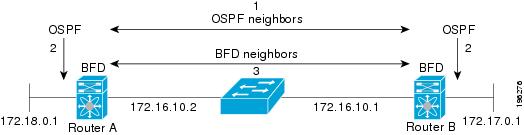
The following figure shows how a BFD session is established. The figure shows a simple network with two routers running Open Shortest Path First (OSPF) and BFD. When OSPF discovers a neighbor (1), it sends a request to the local BFD process to initiate a BFD neighbor session with the OSPF neighbor router (2). The BFD neighbor session with the OSPF neighbor router is now established (3).
BFD Detection of Failures
Once a BFD session has been established and timer negotiations are complete, BFD neighbors send BFD control packets that act in the same manner as an IGP hello protocol to detect liveliness, except at a more accelerated rate. BFD detects a failure, but the protocol must take action to bypass a failed peer.
BFD sends a failure detection notice to the BFD-enabled protocols when it detects a failure in the forwarding path. The local device can then initiate the protocol recalculation process and reduce the overall network convergence time.
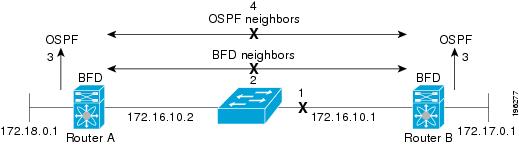
The following figure shows what happens when a failure occurs in the network (1). The BFD neighbor session with the OSPF neighbor router is torn down (2). BFD notifies the local OSPF process that the BFD neighbor is no longer reachable (3). The local OSPF process tears down the OSPF neighbor relationship (4). If an alternative path is available, the routers immediately start converging on it.
 Note | Note The BFD failure detection occurs in less than a second, which is much faster than OSPF Hello messages could detect the same failure. |
Distributed Operation
Cisco NX-OS can distribute the BFD operation to compatible modules that support BFD. This process offloads the CPU load for BFD packet processing to the individual modules that connect to the BFD neighbors. All BFD session traffic occurs on the module CPU. The module informs the supervisor when a BFD failure is detected.
BFD Echo Function
The BFD echo function sends echo packets from the forwarding engine to the remote BFD neighbor. The BFD neighbor forwards the echo packet back along the same path in order to perform detection; the BFD neighbor does not participate in the actual forwarding of the echo packets. The echo function and the forwarding engine are responsible for the detection process. BFD can use the slow timer to slow down the asynchronous session when the echo function is enabled and reduce the number of BFD control packets that are sent between two BFD neighbors. Also, the forwarding engine tests the forwarding path on the remote (neighbor) system without involving the remote system, so there is less interpacket delay variability and faster failure detection times.
The echo function is without asymmetry when both BFD neighbors are running echo function.
Security
Cisco NX-OS uses the packet Time to Live (TTL) value to verify that the BFD packets came from an adjacent BFD peer. For all asynchronous and echo request packets, the BFD neighbor sets the TTL value to 255 and the local BFD process verifies the TTL value as 255 before processing the incoming packet. For the echo response packet, BFD sets the TTL value to 254.
You can configure SHA-1 authentication of BFD packets.
High Availability
BFD supports stateless restarts. After a reboot or supervisor switchover, Cisco NX-OS applies the running configuration and BFD immediately sends control packets to the BFD peers.
Virtualization Support
BFD supports virtual routing and forwarding instances (VRFs). VRFs exist within virtual device contexts (VDCs). By default, Cisco NX-OS places you in the default VDC and default VRF.
Licensing Requirements for BFD
The following table shows the licensing requirements for this feature:
|
Product |
License Requirement |
|---|---|
|
Cisco NX-OS |
BFD requires no license. Any feature not included in a license package is bundled with the NX-OS image and is provided at no extra charge to you. |
Prerequisites for BFD
BFD has the following prerequisites:
Guidelines and Limitations
BFD has the following configuration guidelines and limitations:
-
BFD supports BFD version 1.
-
BFD supports IPv4 and IPv6.
-
BFD supports OSPFv3.
-
BFD supports IS-ISv6.
-
BFD supports BGPv6.
-
BFD supports EIGRPv6.
-
BFD supports only one session per address family, per interface.
-
BFD supports single-hop BFD.
-
BFD for BGP supports single-hop EBGP and iBGP peers.
-
BFD supports keyed SHA-1 authentication beginning with Cisco NX-OS Release 5.2.
-
BFD supports the following Layer 3 interfaces—physical interfaces, port channels, subinterfaces, and VLAN interfaces.
-
BFD depends on a Layer 3 adjacency information to discover topology changes, including Layer 2 topology changes. A BFD session on a VLAN interface (SVI) may not be up after the convergence of the Layer 2 topology if there is no Layer 3 adjacency information available.
-
For BFD on a static route between two devices, both devices must support BFD. If one or both of the devices do not support BFD, the static routes are not programmed in the Routing Information Base (RIB).
- Port channel configuration limitations:
-
SVI limitations:
-
An ASIC reset will cause traffic disruption for other ports. This event could possibly cause SVI sessions on other ports to flap. Some triggers for an ASIC reset are port moves between VDCs, reloading a VDC, or if the carrier interface is a virtual port channel (vPC), BFD is not supported over the SVI interface.
-
When you change the topology (for example, add or delete a link into a VLAN, delete a member from a Layer 2 port channel, and so on), the SVI session could be affected. It may go down first and then come up after the topology discovery is finished.
-
When a BFD session is over SVI using virtual port channel (vPC) peer-link, the BFD echo function is not supported. You must disable the BFD echo function for all sessions over SVI between vPC peer nodes.

Tip
If you do not want the SVI sessions to flap and you need to change the topology, you can disable the BFD feature before making the changes and reenable BFD after the changes have been made. You can also configure the BFD timer to be a large value (for example, 5 seconds), and change it back to a fast timer after the above events complete.
-
-
When you configure the BFD Echo function on the distributed Layer 3 port channels, reloading a member module flaps the BFD session hosted on that module, which results in a packet loss.
If you connect the BFD peers directly without a Layer 2 switch in between, you can use the BFD per-link mode as an alternative solution.
Note
Using BFD per-link mode and subinterface optimization simultaneously on a Layer 3 port channel is not supported.
-
When you specify a BFD neighbor prefix in the clear {ip | ipv6} route prefix command, the BFD echo session will flap.
-
The clear {ip | ipv6} route * command causes BFD echo sessions to flap.
-
HSRP for IPv4 is supported with BFD.
-
BFD packets generated by the Cisco NX-OS device linecards are sent with COS 6/DSCP CS6. The DSCP/COS values for BFD packets are not user configurable.
-
When configuring BFDv6 in no-bfd-echo mode, it is recommended to run with timers of 150 ms with a multiplier of 3.
-
BFDv6 is not supported for VRRPv3 and HSRP for v6.
Default Settings
The following table lists the default settings for BFD parameters.
Parameters |
Default |
|---|---|
BFD feature |
Disabled |
Required minimum receive interval |
50 milliseconds |
Desired minimum transmit interval |
50 milliseconds |
Detect multiplier |
3 |
Echo function |
Enabled |
Mode |
Asynchronous |
Port-channel |
Logical mode (one session per source-destination pair address) |
Slow timer |
2000 milliseconds |
Configuring BFD
- Configuration Hierarchy
- Task Flow for Configuring BFD
- Enabling the BFD Feature
- Configuring Global BFD Parameters
- Configuring BFD on an Interface
- Configuring BFD on a Port Channel
- Configuring the BFD Echo Function
Configuration Hierarchy
You can configure BFD at the global level and at the interface level. The interface configuration overrides the global configuration.
For physical ports that are members of a port channel, the member port inherits the master port channel BFD configuration.
Task Flow for Configuring BFD
Follow these steps in the following sections to configure BFD:
Enabling the BFD Feature
You must enable the BFD feature before you can configure BFD on an interface and protocol.
1.
configure
terminal
2.
feature bfd
3.
show feature |
include
bfd
4.
copy running-config startup-config
DETAILED STEPS
| Command or Action | Purpose | |
|---|---|---|
| Step 1 |
configure
terminal
Example: switch# configure terminal switch(config)# |
Enters configuration mode. |
| Step 2 |
feature bfd
Example: switch(config)# feature bfd |
Enables the BFD feature. |
| Step 3 | show feature |
include
bfd
Example: switch(config)# show feature | include bfd |
(Optional) Displays enabled and disabled features. |
| Step 4 | copy running-config startup-config
Example: switch(config)# copy running-config startup-config |
(Optional) Saves the configuration change. |
Configuring Global BFD Parameters
You can configure the BFD session parameters for all BFD sessions on the device. The BFD session parameters are negotiated between the BFD peers in a three-way handshake.
See the Configuring BFD on an Interface section to override these global session parameters on an interface.
Enable the BFD feature.
1.
configure
terminal
2.
bfd interval
mintx
min_rx
msec
multiplier
value
3.
bfd
slow-timer [interval]
4.
bfd echo-interface
loopback
interface
number
5.
show running-config bfd
6.
copy running-config startup-config
DETAILED STEPS
| Command or Action | Purpose | |
|---|---|---|
| Step 1 |
configure
terminal
Example: switch# configure terminal switch(config)# |
Enters configuration mode. |
| Step 2 |
bfd interval
mintx
min_rx
msec
multiplier
value
Example: switch(config)# bfd interval 50 min_rx 50 multiplier 3 |
Configures the BFD session parameters for all BFD sessions on the device. This command overrides these values by configuring the BFD session parameters on an interface. The mintx and msec range is from 50 to 999 milliseconds and the default is 50. The multiplier range is from 1 to 50. The multiplier default is 3. |
| Step 3 |
bfd
slow-timer [interval]
Example: switch(config)# bfd slow-timer 2000 |
Configures the slow timer used in the echo function. This value determines how fast BFD starts up a new session and at what speed the asynchronous sessions use for BFD control packets when the echo function is enabled. The slow-timer value is used as the new control packet interval, while the echo packets use the configured BFD intervals. The echo packets are used for link failure detection, while the control packets at the slower rate maintain the BFD session. The range is from 1000 to 30000 milliseconds. The default is 2000. |
| Step 4 |
bfd echo-interface
loopback
interface
number
Example: switch(config-if)# bfd echo-interface loopback 1 3 |
Configures the interface used for Bidirectional Forwarding Detection (BFD) echo frames. This command changes the source address for the echo packets to the one configured on the specified loopback interface. The interface number range is from 0 to 1023. |
| Step 5 | show running-config bfd
Example: switch(config)# show running-config bfd |
(Optional) Displays the BFD running configuration. |
| Step 6 | copy running-config startup-config
Example: switch(config)# copy running-config startup-config |
(Optional) Saves the configuration change. |
Configuring BFD on an Interface
You can configure the BFD session parameters for all BFD sessions on an interface. The BFD session parameters are negotiated between the BFD peers in a three-way handshake.
This configuration overrides the global session parameters for the configured interface.
Ensure that Internet Control Message Protocol (ICMP) redirect messages are disabled on BFD-enabled interfaces. Use the no ip redirects command on the interface.
Enable the BFD feature. See the Enabling the BFD Feature section.
1.
configure
terminal
2.
interface
int-if
3.
bfd interval
mintx
min_rx
msec
multiplier
value
4.
bfd authentication keyed-sha1
keyid
id
key
ascii_key
5.
show running-config bfd
6.
copy running-config startup-config
DETAILED STEPS
| Command or Action | Purpose | |
|---|---|---|
| Step 1 |
configure
terminal
Example: switch# configure terminal switch(config)# |
Enters configuration mode. |
| Step 2 |
interface
int-if
Example: switch(config)# interface ethernet 2/1 switch(config-if)# |
Enters interface configuration mode. Use the ? keyword to display the supported interfaces. |
| Step 3 |
bfd interval
mintx
min_rx
msec
multiplier
value
Example: switch(config-if)# bfd interval 50 min_rx 50 multiplier 3 |
Configures the BFD session parameters for all BFD sessions on the device. This command overrides these values by configuring the BFD session parameters on an interface. The mintx and msec range is from 50 to 999 milliseconds and the default is 50. The multiplier range is from 1 to 50. The multiplier default is 3. |
| Step 4 |
bfd authentication keyed-sha1
keyid
id
key
ascii_key
Example: switch(config-if)# bfd authentication keyed-sha1 keyid 1 ascii_key cisco123 |
(Optional) Configures SHA-1 authentication for all BFD sessions on the interface. The ascii_key string is a secret key shared among BFD peers. The id value, a number between 0 and 255, is assigned to this particular ascii_key. BFD packets specify the key by id, allowing the use of multiple active keys. To disable SHA-1 authentication on the interface, use the no form of the command. |
| Step 5 | show running-config bfd
Example: switch(config-if)# show running-config bfd |
(Optional) Displays the BFD running configuration. |
| Step 6 | copy running-config startup-config
Example: switch(config-if)# copy running-config startup-config |
(Optional) Saves the configuration change. |
Configuring BFD on a Port Channel
You can configure the BFD session parameters for all BFD sessions on a port channel. If per-link mode is used for Layer 3 port channels, BFD creates a session for each link in the port channel and provides an aggregate result to client protocols. For example, if the BFD session for one link on a port channel is up, BFD informs client protocols, such as OSPF, that the port channel is up. The BFD session parameters are negotiated between the BFD peers in a three-way handshake.
This configuration overrides the global session parameters for the configured port channel. The member ports of the port channel inherit the port channel BFD session parameters.
Ensure that you enable LACP on the port channel before you enable BFD.
Ensure that Internet Control Message Protocol (ICMP) redirect messages are disabled on BFD-enabled interfaces. Use the no ip redirects command on the interface.
Enable the BFD feature. See the Enabling the BFD Feature section.
1.
configure
terminal
2.
interface port-channel
number
3.
bfd per-link
4.
bfd interval
mintx
min_rx
msec
multiplier
value
5.
bfd authentication keyed-sha1
keyid
id
key
ascii_key
6.
show running-config bfd
7.
copy running-config startup-config
DETAILED STEPS
| Command or Action | Purpose | |
|---|---|---|
| Step 1 |
configure
terminal
Example: switch# configure terminal switch(config)# |
Enters global configuration mode. |
| Step 2 |
interface port-channel
number
Example: switch(config)# interface port-channel 2 switch(config-if)# |
Enters port-channel configuration mode. Use the ? keyword to display the supported number range. |
| Step 3 |
bfd per-link
Example: switch(config-if)# bfd per-link |
Configures the BFD sessions for each link in the port channel. |
| Step 4 |
bfd interval
mintx
min_rx
msec
multiplier
value
Example: switch(config-if)# bfd interval 50 min_rx 50 multiplier 3 |
(Optional) Configures the BFD session parameters for all BFD sessions on the port channel. This command overrides these values by configuring the BFD session parameters. The mintx and msec range is from 50 to 999 milliseconds and the default is 50. The multiplier range is from 1 to 50. The multiplier default is 3. |
| Step 5 |
bfd authentication keyed-sha1
keyid
id
key
ascii_key
Example: switch(config-if)# bfd authentication keyed-sha1 keyid 1 ascii_key cisco123 |
(Optional) Configures SHA-1 authentication for all BFD sessions on the interface. The ascii_key string is a secret key shared among BFD peers. The id value, a number between 0 and 255, is assigned to this particular ascii_key. BFD packets specify the key by id, allowing the use of multiple active keys. To disable SHA-1 authentication on the interface, use the no form of the command. |
| Step 6 | show running-config bfd
Example: switch(config-if)# show running-config bfd |
(Optional) Displays the BFD running configuration. |
| Step 7 | copy running-config startup-config
Example: switch(config-if)# copy running-config startup-config |
(Optional) Saves the configuration change. |
Configuring the BFD Echo Function
You can configure the BFD echo function on one or both ends of a BFD-monitored link. The echo function slows down the required minimum receive interval, based on the configured slow timer. The RequiredMinEchoRx BFD session parameter is set to zero if the echo function is disabled. The slow timer becomes the required minimum receive interval if the echo function is enabled.
Enable the BFD feature. See the Enabling the BFD Feature section.
Configure the BFD session parameters. See the Configuring Global BFD Parameters section on or the Configuring BFD on an Interface section.
Ensure that Internet Control Message Protocol (ICMP) redirect messages are disabled on BFD-enabled interfaces. Use the no ip redirects command on the interface.
Ensure that the IP packet verification check for identical IP source and destination addresses is disabled. Use the no hardware ip verify address identical command. See the Cisco Nexus 9000 Series NX-OS Unicast Routing Configuration Guide for more information about this command.
1.
configure
terminal
2.
bfd slow-timer
echo-interval
3.
interface
int-if
4.
bfd echo
5.
show running-config bfd
6.
copy running-config startup-config
DETAILED STEPS
| Command or Action | Purpose | |
|---|---|---|
| Step 1 |
configure
terminal
Example: switch# configure terminal switch(config)# |
Enters configuration mode. |
| Step 2 |
bfd slow-timer
echo-interval
Example: switch(config)# bfd slow-timer 2000 |
Configures the slow timer used in the echo function. This value determines how fast BFD starts up a new session and is used to slow down the asynchronous sessions when the BFD echo function is enabled. This value overwrites the required minimum receive interval when the echo function is enabled. The range is from 1000 to 30000 milliseconds. The default is 2000. |
| Step 3 |
interface
int-if
Example: switch(config)# interface ethernet 2/1 switch(config-if)# |
Enters interface configuration mode. Use the ? keyword to display the supported interfaces. |
| Step 4 |
bfd echo
Example: switch(config-if)# bfd echo |
Enables the echo function. The default is enabled. |
| Step 5 | show running-config bfd
Example: switch(config-if)# show running-config bfd |
(Optional) Displays the BFD running configuration. |
| Step 6 | copy running-config startup-config
Example: switch(config-if)# copy running-config startup-config |
(Optional) Saves the configuration change. |
Configuring BFD Support for Routing Protocols
- Configuring BFD on BGP
- Configuring BFD on EIGRP
- Configuring BFD on OSPF
- Configuring BFD on IS-IS
- Configuring BFD on HSRP
- Configuring BFD on VRRP
- Configuring BFD on PIM
- Configuring BFD on Static Routes
- Disabling BFD on an Interface
Configuring BFD on BGP
You can configure BFD for the Border Gateway Protocol (BGP).
Enable the BFD feature. See the Enabling the BFD Feature section.
Configure the BFD session parameters. See the Configuring Global BFD Parameters section or the Configuring BFD on an Interface section.
Enable the BGP feature. See the Cisco Nexus 9000 Series NX-OS Unicast Routing Configuration Guide for more information.
1.
configure
terminal
2.
router bgp
as-number
3.
neighbor (ip-address |
ipv6-address)
remote-as
as-number
4.
bfd
5.
show running-config bgp
6.
copy running-config startup-config
DETAILED STEPS
| Command or Action | Purpose | |
|---|---|---|
| Step 1 |
configure
terminal
Example: switch# configure terminal switch(config)# |
Enters configuration mode. |
| Step 2 |
router bgp
as-number
Example: switch(config)# router bgp 64496 switch(config-router)# |
Enables BGP and assigns the AS number to the local BGP speaker. The AS number can be a 16-bit integer or a 32-bit integer in the form of a higher 16-bit decimal number and a lower 16-bit decimal number in xx.xx format. |
| Step 3 |
neighbor (ip-address |
ipv6-address)
remote-as
as-number
Example: switch(config-router)# neighbor 209.165.201.1 remote-as 64497 switch(config-router-neighbor)# |
Configures the IPv4 or IPv6 address and AS number for a remote BGP peer. The ip-address format is x.x.x.x. The ipv6-address format is A:B::C:D. |
| Step 4 |
bfd
Example: switch(config-router-neighbor)# bfd |
Enables BFD for this BGP peer. |
| Step 5 | show running-config bgp
Example: switch(config-router-neighbor)# show running-config bgp |
(Optional) Displays the BGP running configuration. |
| Step 6 | copy running-config startup-config
Example: switch(config-router-neighbor)# copy running-config startup-config |
(Optional) Saves the configuration change. |
Configuring BFD on EIGRP
You can configure BFD for the Enhanced Interior Gateway Routing Protocol (EIGRP).
Enable the BFD feature. See the Enabling the BFD Feature section.
Configure the BFD session parameters. See the Configuring Global BFD Parameters section or the Configuring BFD on an Interface section.
Enable the EIGRP feature. See the Cisco Nexus 9000 Series NX-OS Unicast Routing Configuration Guide for more information.
1.
configure
terminal
2.
router eigrp
instance-tag
3.
bfd
4.
interface
int-if
5.
ip eigrp
instance-tag
bfd
6.
show ip eigrp [vrf
vrf-name] [
interfaces
if]
7.
copy running-config startup-config
DETAILED STEPS
| Command or Action | Purpose | |
|---|---|---|
| Step 1 |
configure
terminal
Example: switch# configure terminal switch(config)# |
Enters configuration mode. |
| Step 2 |
router eigrp
instance-tag
Example: switch(config)# router eigrp Test1 switch(config-router)# |
Creates a new EIGRP process with the configured instance tag. The instance tag can be any case-sensitive, alphanumeric string up to 20 characters. If you configure an instance-tag that does not qualify as an AS number, you must use the autonomous-system command to configure the AS number explicitly or this EIGRP instance will remain in the shutdown state. |
| Step 3 |
bfd
Example: switch(config-router-neighbor)# bfd |
(Optional) Enables BFD for all EIGRP interfaces. |
| Step 4 |
interface
int-if
Example: switch(config-router-neighbor)# interface ethernet 2/1 switch(config-if)# |
Enters interface configuration mode. Use the ? keyword to display the supported interfaces. |
| Step 5 | ip eigrp
instance-tag
bfd
Example: switch(config-if)# ip eigrp Test1 bfd |
(Optional) Enables or disables BFD on an EIGRP interface. The instance tag can be any case-sensitive, alphanumeric string up to 20 characters. The default is disabled. |
| Step 6 | show ip eigrp [vrf
vrf-name] [
interfaces
if]
Example: switch(config-if)# show ip eigrp |
(Optional) Displays information about EIGRP. The vrf-name can be any case-sensitive, alphanumeric string up to 32 characters. |
| Step 7 | copy running-config startup-config
Example: switch(config-if)# copy running-config startup-config |
(Optional) Saves the configuration change. |
Configuring BFD on OSPF
You can configure BFD for the Open Shortest Path First version 2 (OSPFv2).
Enable the BFD feature. See the Enabling the BFD Feature section.
Configure the BFD session parameters. See the Configuring Global BFD Parameters section or the Configuring BFD on an Interface section.
Enable the OSPF feature. See the Cisco Nexus 9000 Series NX-OS Unicast Routing Configuration Guide for more information.
1.
configure
terminal
2.
router ospf
instance-tag
3.
bfd
4.
interface
int-if
5.
ip ospf bfd
6.
show ip ospf [vrf
vrf-name] [
interfaces
if]
7.
copy running-config startup-config
DETAILED STEPS
| Command or Action | Purpose | |
|---|---|---|
| Step 1 |
configure
terminal
Example: switch# configure terminal switch(config)# |
Enters global configuration mode. |
| Step 2 |
router ospf
instance-tag
Example: switch(config)# router ospf 201 switch(config-router)# |
Creates a new OSPFv2 instance with the configured instance tag. The instance tag can be any case-sensitive, alphanumeric string up to 20 characters. |
| Step 3 |
bfd
Example: switch(config-router)# bfd |
(Optional) Enables BFD for all OSPFv2 interfaces. |
| Step 4 |
interface
int-if
Example: switch(config-router)# interface ethernet 2/1 switch(config-if)# |
Enters interface configuration mode. Use the ? keyword to display the supported interfaces. |
| Step 5 | ip ospf bfd
Example: switch(config-if)# ip ospf bfd |
(Optional) Enables or disables BFD on an OSPFv2 interface. The default is disabled. |
| Step 6 | show ip ospf [vrf
vrf-name] [
interfaces
if]
Example: switch(config-if)# show ip ospf |
(Optional) Displays information about OSPF. The vrf-name can be any case-sensitive, alphanumeric string up to 32 characters. |
| Step 7 | copy running-config startup-config
Example: switch(config-if)# copy running-config startup-config |
(Optional) Saves the configuration change. |
Configuring BFD on IS-IS
You can configure BFD for the Intermediate System-to-Intermediate System (IS-IS) protocol.
Enable the BFD feature. See the Enabling the BFD Feature section.
Configure the BFD session parameters. See the Configuring Global BFD Parameters section or the Configuring BFD on an Interface section.
Enable the IS-IS feature. See the Cisco Nexus 9000 Series NX-OS Unicast Routing Configuration Guide for more information.
1.
configure
terminal
2.
router isis
instance-tag
3.
bfd
4.
interface
int-if
5.
isis bfd
6.
show isis [vrf
vrf-name] [
interface
if]
7.
copy running-config startup-config
DETAILED STEPS
| Command or Action | Purpose | |
|---|---|---|
| Step 1 |
configure
terminal
Example: switch# configure terminal switch(config)# |
Enters global configuration mode. |
| Step 2 |
router isis
instance-tag
Example: switch(config)# router isis Enterprise switch(config-router)# |
Creates a new IS-IS instance with the configured instance tag. |
| Step 3 |
bfd
Example: switch(config-router)# bfd |
(Optional) Enables BFD for all OSPFv2 interfaces. |
| Step 4 |
interface
int-if
Example: switch(config-router)# interface ethernet 2/1 switch(config-if)# |
Enters interface configuration mode. Use the ? keyword to display the supported interfaces. |
| Step 5 | isis bfd
Example: switch(config-if)# isis bfd |
(Optional) Enables or disables BFD on an IS-IS interface. The default is disabled. |
| Step 6 | show isis [vrf
vrf-name] [
interface
if]
Example: switch(config-if)# show isis |
(Optional) Displays information about IS-IS. The vrf-name can be any case-sensitive, alphanumeric string up to 32 characters. |
| Step 7 | copy running-config startup-config
Example: switch(config-if)# copy running-config startup-config |
(Optional) Saves the configuration change. |
Configuring BFD on HSRP
You can configure BFD for the Hot Standby Router Protocol (HSRP). The active and standby HSRP routers track each other through BFD. If BFD on the standby HSRP router detects that the active HSRP router is down, the standby HSRP router treats this event as an active time rexpiry and takes over as the active HSRP router.
The show hsrp detail command shows this event as BFD@Act-down or BFD@Sby-down.
Enable the BFD feature. See the Enabling the BFD Feature section.
Configure the BFD session parameters. See the Configuring Global BFD Parameters section or the Configuring BFD on an Interface section.
Enable the HSRP feature. See the Cisco Nexus 9000 Series NX-OS Unicast Routing Configuration Guide for more information.
1.
configure
terminal
2.
hsrp bfd
all-interfaces
3.
interface
int-if
4.
hsrp bfd
5.
show running-config hsrp
6.
copy running-config startup-config
DETAILED STEPS
| Command or Action | Purpose | |
|---|---|---|
| Step 1 |
configure
terminal
Example: switch# configure terminal switch(config)# |
Enters global configuration mode. |
| Step 2 |
hsrp bfd
all-interfaces
Example: switch# hsrp bfd all-interfaces |
(Optional) Enables or disables BFD on all HSRP interfaces. The default is disabled. |
| Step 3 |
interface
int-if
Example: switch(config-router)# interface ethernet 2/1 switch(config-if)# |
Enters interface configuration mode. Use the ? keyword to display the supported interfaces. |
| Step 4 | hsrp bfd
Example: switch(config-if)# hsrp bfd |
(Optional) Enables or disables BFD on an HSRP interface. The default is disabled. |
| Step 5 | show running-config hsrp
Example: switch(config-if)# show running-config hsrp |
(Optional) Displays the HSRP running configuration. |
| Step 6 | copy running-config startup-config
Example: switch(config-if)# copy running-config startup-config |
(Optional) Saves the configuration change. |
Configuring BFD on VRRP
You can configure BFD for the Virtual Router Redundancy Protocol (VRRP). The active and standby VRRP routers track each other through BFD. If BFD on the standby VRRP router detects that the active VRRP router is down, the standby VRRP router treats this event as an active time rexpiry and takes over as the active VRRP router.
The show vrrp detail command shows this event as BFD@Act-down or BFD@Sby-down.
Enable the BFD feature. See the Enabling the BFD Feature section.
Configure the BFD session parameters. See the Configuring Global BFD Parameters section or the Configuring BFD on an Interface section.
Enable the VRRP feature. See the Cisco Nexus 9000 Series NX-OS Unicast Routing Configuration Guide for more information.
1.
configure
terminal
2.
interface
int-if
3.
vrrp
group-no
4.
vrrp bfd
address
5.
show running-config vrrp
6.
copy running-config startup-config
DETAILED STEPS
| Command or Action | Purpose | |
|---|---|---|
| Step 1 |
configure
terminal
Example: switch# configure terminal switch(config)# |
Enters global configuration mode. |
| Step 2 |
interface
int-if
Example: switch(config)# interface ethernet 2/1 switch(config-if)# |
Enters interface configuration mode. Use the ? keyword to display the supported interfaces. |
| Step 3 |
vrrp
group-no
Example: switch(config-if)# vrrp 2 |
Specifies the VRRP group number. |
| Step 4 | vrrp bfd
address
Example: switch(config-if)# vrrp bfd |
Enables or disables BFD on a VRRP interface. The default is disabled. |
| Step 5 | show running-config vrrp
Example: switch(config-if)# show running-config vrrp |
(Optional) Displays the VRRP running configuration. |
| Step 6 | copy running-config startup-config
Example: switch(config-if)# copy running-config startup-config |
(Optional) Saves the configuration change. |
Configuring BFD on PIM
You can configure BFD for the Protocol Independent Multicast (PIM) protocol.
Enable the BFD feature. See the Enabling the BFD Feature section.
Enable the PIM feature. See the Cisco Nexus 9000 Series NX-OS Unicast Routing Configuration Guide for more information.
1.
configure
terminal
2.
ip pim bfd
3.
interface
int-if
4.
ip pim bfd-instance
[disable]
5.
show running-config pim
6.
copy running-config startup-config
DETAILED STEPS
| Command or Action | Purpose | |
|---|---|---|
| Step 1 |
configure
terminal
Example: switch# configure terminal switch(config)# |
Enters global configuration mode. |
| Step 2 | ip pim bfd
Example: switch(config)# ip pim bfd |
Enables BFD for PIM. |
| Step 3 |
interface
int-if
Example: switch(config)# interface ethernet 2/1 switch(config-if)# |
Enters interface configuration mode. Use the ? keyword to display the supported interfaces. |
| Step 4 |
ip pim bfd-instance
[disable]
Example: switch(config-if)# ip pim bfd-instance |
(Optional) Enables or disables BFD on a PIM interface. The default is disabled. |
| Step 5 | show running-config pim
Example: switch(config)# show running-config pim |
(Optional) Displays the PIM running configuration. |
| Step 6 | copy running-config startup-config
Example: switch(config)# copy running-config startup-config |
(Optional) Saves the configuration change. |
Configuring BFD on Static Routes
You can configure BFD for static routes on an interface. You can optionally configure BFD on a static route within a virtual routing and forwarding (VRF) instance.
Enable the BFD feature. See the Enabling the BFD Feature section.
1.
configure
terminal
2.
vrf context
vrf-name
3.
ip route
route
interface {nh-address |
nh-prefix}
4.
ip route static bfd
interface {nh-address |
nh-prefix}
5.
show ip route static [vrf
vrf-name]
6.
copy running-config startup-config
DETAILED STEPS
| Command or Action | Purpose | |
|---|---|---|
| Step 1 |
configure
terminal
Example: switch# configure terminal switch(config)# |
Enters global configuration mode. |
| Step 2 |
vrf context
vrf-name
Example: switch(config)# vrf context Red switch(config-vrf)# |
(Optional) Enters VRF configuration mode. |
| Step 3 | ip route
route
interface {nh-address |
nh-prefix}
Example: switch(config-vrf)# ip route 192.0.2.1 ethernet 2/1 192.0.2.4 |
Creates a static route Use the ? keyword to display the supported interfaces. |
| Step 4 | ip route static bfd
interface {nh-address |
nh-prefix}
Example: switch(config-vrf)# ip route static bfd ethernet 2/1 192.0.2.4 |
Enables BFD for all static routes on an interface. Use the? keyword to display the supported interfaces. |
| Step 5 | show ip route static [vrf
vrf-name]
Example: switch(config-vrf)# show ip route static vrf Red |
(Optional) Displays the static routes. |
| Step 6 | copy running-config startup-config
Example: switch(config-vrf)# copy running-config startup-config |
(Optional) Saves the configuration change. |
Disabling BFD on an Interface
You can selectively disable BFD on an interface for a routing protocol that has BFD enabled at the global or VRF level.
To disable BFD on an interface, use one of the following commands in interface configuration mode:
|
Command |
Purpose |
|---|---|
|
ip eigrp instance-tag bfd disable switch(config-if)# ip eigrp Test1 bfd disable |
Disables BFD on an EIGRP interface. The instance tag can be any case-sensitive, alphanumeric string up to 20 characters. |
|
ip ospf bfd disable switch(config-if)# ip ospf bfd disable |
Disables BFD on an OSPFv2 interface. |
|
isis bfd disable switch(config-if)# isis bfd disable |
Disables BFD on an IS-IS interface. |
Configuring BFD Interoperability
- Configuring BFD Interoperability in Cisco NX-OS Devices in a Point-to-Point Link
- Configuring BFD Interoperability in Cisco NX-OS Devices in a Switch Virtual Interface
- Configuring BFD Interoperability in Cisco NX-OS Devices in Logical Mode
- Verifying BFD Interoperability in a Cisco Nexus 9000 Series Device
Configuring BFD Interoperability in Cisco NX-OS Devices in a Point-to-Point Link
1.
configure terminal
2.
interface port-channel
int-if
3.
ip ospf bfd
4.
no ip redirects
5.
bfd interval
mintx
min_rx
msec
multiplier
value
6.
exit
DETAILED STEPS
| Command or Action | Purpose | |
|---|---|---|
| Step 1 |
configure terminal
Example: switch# configure terminal switch(config)# |
Enters global configuration mode. |
| Step 2 |
interface port-channel
int-if
Example: switch(config-if)# interface ethernet 2/1 |
Enters interface configuration mode. Use the ? keyword to display the supported interfaces. |
| Step 3 |
ip ospf bfd
Example: switch(config-if)# ip ospf bfd |
Enables BFD on an OSPFv2 interface. The default is disabled. OSPF is used as an example. You can enable BFD of any of the supported protocols. |
| Step 4 |
no ip redirects
Example: switch(config-if)# no ip redirects |
Prevents the device from sending redirects. |
| Step 5 |
bfd interval
mintx
min_rx
msec
multiplier
value
Example: switch(config-if)# bfd interval 50 min_rx 50 multiplier 3 |
Configures the BFD session parameters for all BFD sessions on the port channel. This command overrides these values by configuring the BFD session parameters. The mintx and msec range is from 50 to 999 milliseconds and the default is 50. The multiplier range is from 1 to 50. The multiplier default is 3. |
| Step 6 |
exit
Example: switch(config-if)# exit |
Exits interface configuration mode and returns to EXEC mode. |
Configuring BFD Interoperability in Cisco NX-OS Devices in a Switch Virtual Interface
1.
configure terminal
2.
interface port-channel
vlan
vlan-id
3.
bfd interval
mintx
min_rx
msec
multiplier
value
4.
no ip redirects
5.
ip address
ip-address/length
6.
ip ospf bfd
7.
exit
DETAILED STEPS
| Command or Action | Purpose | |
|---|---|---|
| Step 1 |
configure terminal
Example: switch# configure terminal switch(config)# |
Enters global configuration mode. |
| Step 2 |
interface port-channel
vlan
vlan-id
Example: switch(config)# interface vlan 998 switch(config-if)# |
Creates a dynamic Switch Virtual Interface (SVI). |
| Step 3 |
bfd interval
mintx
min_rx
msec
multiplier
value
Example: switch(config-if)# bfd interval 50 min_rx 50 multiplier 3 |
Configures the BFD session parameters for all BFD sessions on the device. The mintx and msec range is from 50 to 999 milliseconds and the default is 50. The multiplier range is from 1 to 50. The multiplier default is 3. |
| Step 4 |
no ip redirects
Example: switch(config-if)# no ip redirects |
Prevents the device from sending redirects. |
| Step 5 |
ip address
ip-address/length
Example: switch(config-if)# ip address 10.1.0.253/24 |
Configures an IP address for this interface. |
| Step 6 |
ip ospf bfd
Example: switch(config-if)# ip ospf bfd |
Enables BFD on an OSPFv2 interface. The default is disabled. |
| Step 7 |
exit
Example: switch(config-if)# exit |
Exits interface configuration mode and returns to EXEC mode. |
Configuring BFD Interoperability in Cisco NX-OS Devices in Logical Mode
1.
configure terminal
2.
interface port-channel
type
number.subinterface-id
3.
bfd interval
mintx
min_rx
msec
multiplier
value
4.
no ip redirects
5.
ip ospf bfd
6.
exit
DETAILED STEPS
| Command or Action | Purpose | |
|---|---|---|
| Step 1 |
configure terminal
Example: switch# configure terminal switch(config)# |
Enters global configuration mode. |
| Step 2 |
interface port-channel
type
number.subinterface-id
Example: switch(config-if)# interface port-channel 50.2 |
Enters port channel configuration mode. Use the ? keyword to display the supported number range. |
| Step 3 |
bfd interval
mintx
min_rx
msec
multiplier
value
Example: switch(config-if)# bfd interval 50 min_rx 50 multiplier 3 |
Configures the BFD session parameters for all BFD sessions on the port channel. The mintx and msec range is from 50 to 999 milliseconds and the default is 50. The multiplier range is from 1 to 50. The multiplier default is 3. |
| Step 4 |
no ip redirects
Example: switch(config-if)# no ip redirects |
Prevents the device from sending redirects. |
| Step 5 |
ip ospf bfd
Example: switch(config-if)# ip ospf bfd |
Enables BFD on an OSPFv2 interface. The default is disabled. OSPF is used as an example. You can enable BFD of any of the supported protocols. |
| Step 6 |
exit
Example: switch(config-if)# exit |
Exits interface configuration mode and returns to EXEC mode. |
Verifying BFD Interoperability in a Cisco Nexus 9000 Series Device
The following example shows how to verify BFD interoperability in a Cisco Nexus 9000 Series device.
switch# show bfd neighbors details
OurAddr NeighAddr LD/RD RH/RS Holdown(mult) State Int
Vrf
10.1.1.1 10.1.1.2 1140850707/2147418093 Up 6393(4) Up Vlan2121
default
Session state is Up and using echo function with 50 ms interval
Local Diag: 0, Demand mode: 0, Poll bit: 0, Authentication: None
MinTxInt: 50000 us, MinRxInt: 2000000 us, Multiplier: 3
Received MinRxInt: 2000000 us, Received Multiplier: 4
Holdown (hits): 8000 ms (0), Hello (hits): 2000 ms (108)
Rx Count: 92, Rx Interval (ms) min/max/avg: 347/1996/1776 last: 1606 ms ago
Tx Count: 108, Tx Interval (ms) min/max/avg: 1515/1515/1515 last: 1233 ms ago
Registered protocols: ospf
Uptime: 0 days 0 hrs 2 mins 44 secs
Last packet: Version: 1 - Diagnostic: 0
State bit: Up - Demand bit: 0
Poll bit: 0 - Final bit: 0
Multiplier: 4 - Length: 24
My Discr.: 2147418093 - Your Discr.: 1140850707
Min tx interval: 2000000 - Min rx interval: 2000000
Min Echo interval: 1000 - Authentication bit: 0
Hosting LC: 10, Down reason: None, Reason not-hosted: None
switch# show bfd neighbors details
OurAddr NeighAddr LD/RD RH/RS Holdown(mult) State Int
Vrf
10.0.2.1 10.0.2.2 1140850695/131083 Up 270(3) Up Po14.121
default
Session state is Up and not using echo function
Local Diag: 0, Demand mode: 0, Poll bit: 0, Authentication: None
MinTxInt: 50000 us, MinRxInt: 50000 us, Multiplier: 3
Received MinRxInt: 100000 us, Received Multiplier: 3
Holdown (hits): 300 ms (0), Hello (hits): 100 ms (3136283)
Rx Count: 2669290, Rx Interval (ms) min/max/avg: 12/1999/93 last: 29 ms ago
Tx Count: 3136283, Tx Interval (ms) min/max/avg: 77/77/77 last: 76 ms ago
Registered protocols: ospf
Uptime: 2 days 21 hrs 41 mins 45 secs
Last packet: Version: 1 - Diagnostic: 0
State bit: Up - Demand bit: 0
Poll bit: 0 - Final bit: 0
Multiplier: 3 - Length: 24
My Discr.: 131083 - Your Discr.: 1140850695
Min tx interval: 100000 - Min rx interval: 100000
Min Echo interval: 0 - Authentication bit: 0
Hosting LC: 8, Down reason: None, Reason not-hosted: None
Verifying the BFD Configuration
To display BFD configuration information, perform one of the following:
|
Command |
Purpose |
|---|---|
|
show running-config bfd |
Displays the running BFD configuration. |
|
show startup-config bfd |
Displays the BFD configuration that will be applied on the next system startup. |
Monitoring BFD
Use the following commands to display BFD:
|
Command |
Purpose |
|---|---|
|
show bfd neighbors [application name] [details] |
Displays information about BFD for a supported application, such as BGP or OSPFv2. |
|
show bfd neighbors [interface int-if] [details] |
Displays information about BGP sessions on an interface. |
|
show bfd neighbors [dest-ip ip-address] [src-ip ip-address][details] |
Displays information about the specified BGP session on an interface. |
|
show bfd neighbors [vrf vrf-name] [details] |
Displays information about BFD for a VRF. |
Configuration Examples for BFD
This example shows how to configure BFD for OSPFv2 on Ethernet 2/1, using the default BFD session parameters:
feature bfd
feature ospf
router ospf Test1
interface ethernet 2/1
ip ospf bfd
no shutdown
This example shows how to configure BFD for all EIGRP interfaces, using the default BFD session parameters:
feature bfd
feature eigrp
bfd interval 100 min_rx 100 multiplier 4
router eigrp Test2
bfd
Related Documents
|
Related Topic |
Document Title |
|---|---|
|
BFD commands |
Cisco Nexus 9000 Series NX-OS Unicast Routing Configuration Guide |
RFCs
|
RFC |
Title |
|---|---|
|
RFC 5880 |
Bidirectional Forwarding Detection (BFD) |
|
RFC 5881 |
BFD for IPv4 and IPv6 (Single Hop) |
 Feedback