LISP Instance-ID Support

This chapter includes the following sections:

Information about LISP Instance-ID Support

Overview of LISP Instance ID

The LISP Instance ID provides a means of maintaining unique address spaces (or "address space segmentation") in the control and data plane. Instance IDs are numerical tags defined in the LISP canonical address format (LCAF). The Instance ID has been added to LISP to support virtualization.

When multiple organizations inside of a LISP site are using private addresses as Endpoint ID (EID) prefixes, their address spaces must remain segregated due to possible address duplication. An Instance ID in the address encoding can be used to create multiple segmented VPNs inside of a LISP site where you want to keep using EID-prefix-based subnets. The LISP Instance ID is currently supported in LISP ingress tunnel routers and egress tunnel routers (ITRs and ETRs, collectively known as xTRs), map server (MS) and map resolver (MR).

This chapter explains how to configure LISP xTRs with LISP MS and MR to implement virtualization. The content considers different site topologies and includes guidance to both shared and parallel LISP model configurations. It includes conceptual background and practical guidance, and provides multiple configuration examples.

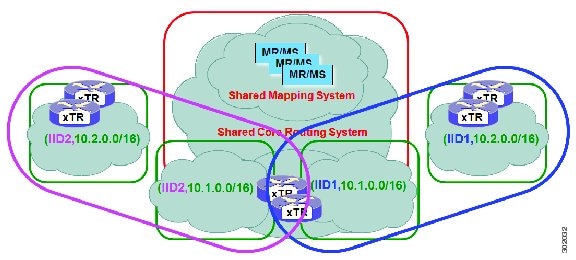
The purpose of network virtualization, as illustrated the following figure, is to create multiple, logically separated topologies across one common physical infrastructure.
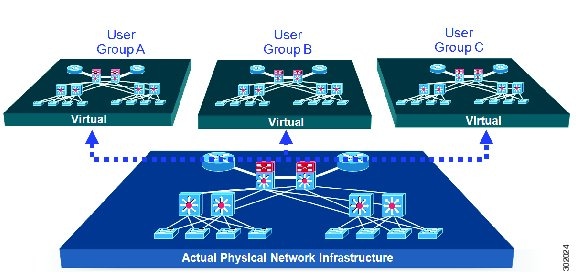
Figure 1. LISP Deployment Environment

When you plan the deployment of a LISP virtualized network environment, you must plan for virtualization at both the device level and the path level.

For path level virtualization: LISP binds virtual routing and forwarding (VRFs) to instance IDs (IIDs). These IIDs are included in the LISP header to provide data plane (traffic flow) separation.

For device level virtualization: Both the EID and the RLOC namespaces can be virtualized. The EID can be virtualized by binding a LISP instance ID to an EID VRF; the RLOC by tying locator addresses and associated mapping services to the specific VRF within which they are reachable.

Prerequisites for LISP Instance-ID Support

  • Allow the use of instance-id 0's within a virtual routing and forwarding (VRF) instance.

Guidelines and Limitations for LISP Instance-ID Support

The LISP Instance-ID Support feature has the following configuration guidelines and restrictions:

  • If you enable LISP, nondisruptive upgrade (ISSU) and nondisruptive downgrade (ISSD) paths are not supported. Disable LISP prior to any upgrade. This restriction applies only to releases before 6.2(2), not to 6.2(2) or subsequent LISP releases.

Device Level Virtualization

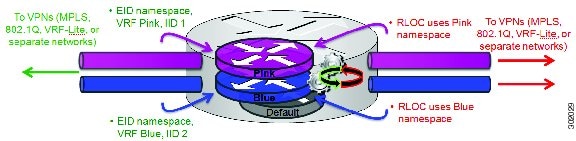
Virtualization at the device level uses virtual routing and forwarding (VRF) to create multiple instances of Layer 3 routing tables, as shown in the figure below. VRFs provide segmentation across IP addresses, allowing for overlapped address space and traffic separation. Separate routing, quality of service (QoS), security, and management policies can be applied to each VRF instance. An interior gateway protocol (IGP) or exterior gateway protocol (EGP) routing process is typically enabled within a VRF, just as it would be in the global (default) routing table. LISP binds VRFs to instance IDs for similar purposes.
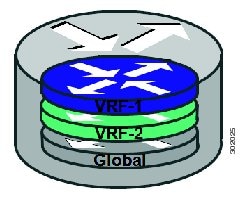
Figure 2. Device Level Virtualization

Path Level Virtualization

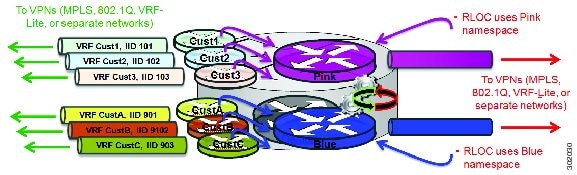
VRF table separation is maintained across network paths, as shown in the following figure. Single-hop path segmentation (hop by hop) is typically accomplished by using 802.1q VLANs, virtual path identifier/virtual circuit identifier password (VPI/VCI PW), or easy virtual network (EVN). You can also use the Locator ID Separation Protocol (LISP) in multihop mechanisms that include Multiprotocol Label Switching (MPLS) and generic routing encapsulation (GRE) tunnels. LISP binds VRF instances to instance IDs (IIDs), and then these IIDs are included in the LISP header to provide data plane (traffic flow) separation for single or multihop needs.
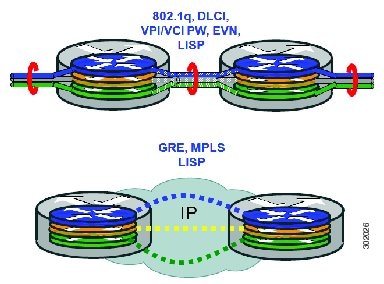
Figure 3. Path Level Virtualization

LISP Virtualization at the Device Level

LISP implements Locator ID separation and thereby creates two namespaces; endpoint ID (EID) and routing locator (RLOC). Either or both of these can be virtualized.

  • EID virtualization—Enabled by binding a LISP instance ID to an EID virtual routing and forwarding (VRF). Instance IDs are numerical tags defined in the LISP canonical address format (LCAF) draft, and are used to maintain address space segmentation in both the control plane and data plane.

  • Routing locator (RLOC) virtualization—Tying locator addresses and associated mapping services to the specific VRF within which they are reachable enables RLOC virtualization.

Because LISP can virtualize either or both of these namespaces, two models of operation are defined: the shared model and the parallel model. To understand how these models differ from the non-virtualized model of LISP, review information about the default (non-virtualized) model of LISP before reading about the shared model and the parallel model.

Default (Non-Virtualized) LISP Model

By default, LISP is not virtualized in the EID space or the RLOC space. That is, unless otherwise configured, both EID and RLOC addresses are resolved in the default (global) routing table. See the following figure.
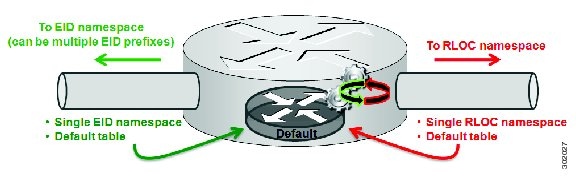
Figure 4. Default (Nonvirtualized) LISP Model

The mapping system must also be reachable through the default table. This default model can be thought of as a single instantiation of the parallel model of LISP virtualization where EID and RLOC addresses are within the same namespace.
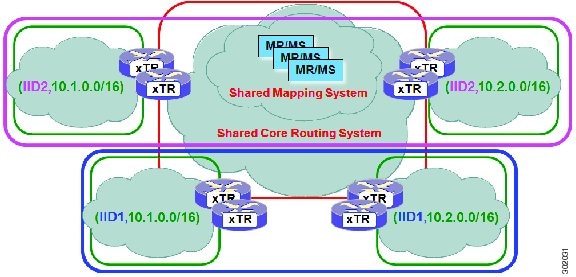
LISP Shared Model Virtualization

A LISP shared model virtualized EID space is created when you bind VRFs associated with an EID space to Instance IDs. A common, shared locator space is used by all virtualized EIDs.

Figure 5. LISP Shared Model Virtualization resolves EIDs within VRFs tied to Instance IDs. The default (global) routing table is the shared space.

As shown in the figure, EID space is virtualized through its association with VRFs, and these VRFs are tied to LISP Instance IDs to segment the control plane and data plane in LISP. A common, shared locator space, the default (global) table, is used to resolve RLOC addresses for all virtualized EIDs. The mapping system must also be reachable through the common locator space.

LISP Shared Model Virtualization Architecture

You can deploy the LISP shared model virtualization in single or multitenancy configurations. In the shared model single tenancy case, ingress and egress tunnel routers (xTRs) are dedicated to a customer but share infrastructure with other customers. Each customer and all sites associated with an xTR use the same instance ID and are part of a VPN using their own EID namespace. LISP instance IDs segment the LISP data plane and control plane. See the following figure.

Figure 6. LISP shared model single tenancy use case. A customers uses its own xTR and shares a common core network and mapping system.

In the shared model multitenancy case, a set of xTRs is shared (virtualized) among multiple customers. These customers also share a common infrastructure with other single and multitenant customers. Each customer and all sites associated with it use the same instance ID and are part of a VPN using their own EID namespace. LISP instance IDs segment the LISP data plane and control plane. See the following figure.

Figure 7. LISP shared model multitenancy use case. Customer's use shared xTRs and share a common core network and mapping system.

LISP Shared Model Virtualization Implementation Considerations and Caveats

When you use the LISP Shared Model, instance IDs must be unique to an EID VRF.

 
xTR-1# configure terminal
xTR-1(config)# vrf context alpha 
xTR-1(config-vrf)# lisp instance-id 101
xTR-1(config-vrf)# exit
xTR-1(config)# vrf context beta
xTR-1(config-vrf)# lisp instance-id 101
Instance-ID 101 is already assigned to VRF context alpha

In the example, two EID VRFs are created: alpha and beta. In global configuration mode, a VRF named alpha is specified and associated with the instance ID 101. Next, a VRF named beta is specified and also associated with the instance ID 101. This configuration is not permissible because instance ID 101 is already associated with the VRF context named alpha. That is, you cannot connect the same instance ID to more than one EID VRF.

LISP Parallel Model Virtualization

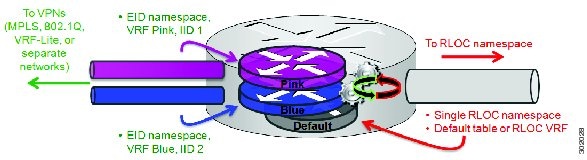
The LISP parallel model virtualization ties the virtualized EID space associated with VRFs to RLOCs that are associated with the same or different VRFs (see the following figure).

Figure 8. LISP parallel model virtualization resolves an EID and associated RLOCs within the same or a different VRF. In this example, both EID and RLOC addresses are resolved in the same VRF, but multiple (parallel) segmentation is configured on the same device (BLUE and PINK).

EID space is virtualized through its association with VRFs, and these VRFs are tied to LISP Instance IDs to segment the control plane and data plane in LISP. A common, “shared” locator space, the default (global) table is used to resolve RLOC addresses for all virtualized EIDs. The mapping system must also be reachable through the common locator space as well.

In the figure, virtualized EID space is associated with a VRF (and bound to an Instance ID) that is tied to locator space associated with the same VRF, in this case - Pink/Pink and Blue/Blue. However, this is not required; the EID VRF does not need to match the RLOC VRF. In any case, a mapping system must be reachable through the associated locator space. Multiple parallel instantiations can be defined.

A shared model and parallel model can be combined such that multiple EID VRFs share a common RLOC VRF, and multiple instantiations of this architecture are implemented on the same platform, as shown in the following figure.

Figure 9. LISP shared and parallel models may be combined for maximum flexibility.

LISP Parallel Model Virtualization Architecture

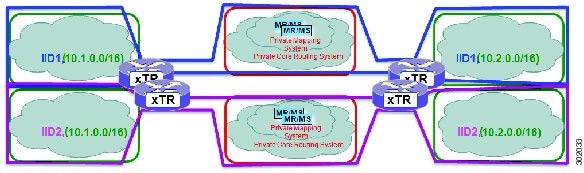
You can deploy LISP parallel model virtualization in single or multitenancy configurations. In the parallel model multitenancy case, a set of xTRs is shared (virtualized) among multiple customers, and each customer uses their own private (segmented) core infrastructure and mapping system. All sites associated with the customer use the same instance ID and are part of a VPN using their own EID namespace, as shown in the following figure.

Figure 10. LISP parallel model multitenancy case. Shared xTRs use virtualized core networks and mapping systems. LISP instance IDs segment the LISP data plane and control plane.

LISP Parallel Model Virtualization Implementation Considerations and Caveats

When you use LISP parallel model virtualization, each vrfvrf vrf-name instantiation is considered by a separate process. Instance IDs must be unique only within a vrf instantiation.

xTR-1# configure terminal
xTR-1(config)# vrf context alpha
xTR-1(config-vrf)# address-family ipv4 unicast
xTR-1(config-vrf-af-ipv4)# exit
xTR-1(config)# vrf context beta
xTR-1(config-vrf)# address-family ipv4 unicast
xTR-1(config-vrf-af-ipv4)# exit
xTR-1(config-vrf)# exit
xTR-1(config)# vrf context gamma
xTR-1(config-vrf)# address-family ipv4 unicast
xTR-1(config-vrf-af-ipv4)# exit
xTR-1(config-vrf)# exit
xTR-1(config)# vrf context delta
xTR-1(config-vrf)# address-family ipv4 unicast
xTR-1(config-vrf-af-ipv4)# exit
xTR-1(config-vrf)# exit
xTR-1(config)# vrf context alpha
xTR-1(config-vrf)# lisp instance-id 101
xTR-1(config-vrf)# exit
xTR-1(config)# vrf context gamma
xTR-1(config-vrf)# lisp instance-id 101
xTR-1(config-vrf)# exit
xTR-1(config)# vrf context beta
xTR-1(config-vrf)# lisp instance-id 201
The vrf beta table is not available for use as an EID table (in use by switch lisp 1 EID instance 101 VRF)

In the above example, four VRFs are created: alpha, beta, gamma, and delta, as follows:

  • The vrf instantiation device lisp 1 is created and associated with the VRF named alpha.

  • The EID VRF named beta is specified and associated with instance ID 101.

  • A new vrf instantiation, device lisp 3, is created and associated with the locator-table VRF named gamma.

  • The EID table VRF named delta is specified and also associated with instance ID 101.

These two instance IDs are unrelated to each other; one is relevant only within device lisp 1, and the other is relevant only within device lisp 2.

In the example, note that under device lisp 2, the code requests a VRF instance named beta. Note that the device is unable to use this VRF instance because it (beta) is already associated with a vrf command within the device lisp 1 instantiation.

You can reuse an instance ID. The EID VRF into which it is decapsulated depends on the vrf instantiation with which it is associated. However, you cannot connect the same EID VRF to more than one VRF.

How to Configure LISP Instance-ID Support

Configuring Simple LISP Shared Model Virtualization

You can perform this task to enable and configure LISP ingress tunnel router/egress tunnel router (ITR/ETR) functionality (also known as xTR) with the LISP map server and map resolver, and thereby implement LISP shared model virtualization. This LISP shared model reference configuration is for a very simple two-site LISP topology, including xTRs and an map server/map resolver (MS/MR).

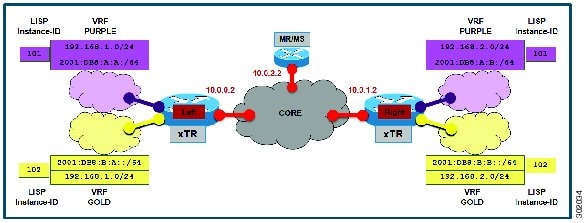
The following figure shows a basic LISP shared model virtualization solution. Two LISP sites are deployed, each containing two VRFs: PURPLE and GOLD. LISP is used to provide virtualized connectivity between these two sites across a common IPv4 core, while maintaining address separation between the two VRF instances.

Figure 11. Simple LISP Site with Virtualized IPv4 and IPv6 EIDs and a Shared IPv4 core

In this figure, each LISP site uses a single edge switch that is configured as both an ITR and ETR (xTR), with a single connection to its upstream provider. The RLOC is IPv4, and IPv4 and IPv6 EID prefixes are configured. Each LISP site registers to a map server/map resolver (MS/MR) switch that is located in the network core within the shared RLOC address space.


Note


All IPv4 or IPv6 EID-sourced packets destined for both LISP and non-LISP sites are forwarded in one of two ways:
  • LISP-encapsulated to a LISP site when traffic is LISP-to-LISP
  • Natively forwarded when traffic is LISP-to-non-LISP
Packets are deemed to be a candidate for LISP encapsulation when they are sourced from a LISP EID and the destination matches one of the following entries:
  • a current map-cache entry
  • a default route with a legitimate next-hop
  • a static route to Null0
  • no route at all

In this configuration example, because the xTR has IPv4 RLOC connectivity, a default route to the upstream SP is used for all IPv4 packets to support LISP processing. Adding an IPv6 default route to Null0 ensures that all IPv6 packets are handled by LISP processing. (The use of the static route to Null0 is not strictly required, but is a LISP best practice.)


The components in the figure above are as follows:

LISP site
  • The CPE functions as a LISP ITR and ETR (xTR).

  • Both LISP xTRs have two VRFs: GOLD and PURPLE. Each VRF contains both IPv4 and IPv6 EID-prefixes. A LISP instance ID is used to maintain separation between two VRFs. In this example, the share key is configured "per-site" and not "per-VRF." (Another configuration could configure the shared key per-VPN.)

  • Each LISP xTR has a single RLOC connection to a shared IPv4 core network.

Mapping system

  • One map server/map resolver system is shown and is assumed available for the LISP xTR to register to. The MS/MR has an IPv4 RLOC address of 10.0.2.2 within the shared IPv4 core.

  • The map server site configurations are virtualized using LISP instance IDs to maintain separation between the two VRFs.

Perform the following procedure (once through for each xTR in the LISP site) to enable and configure LISP ITR and ETR (xTR) functionality when using a LISP map server and map resolver for mapping services. The example configurations at the end of this task show the full configuration for two xTRs (xTR1 and xTR2).

Summary Steps

Before you begin, create the VRF instances by using the vrf definition command.

Before you begin

Create the VRFs using the vrf definition command.

Procedure

  Command or Action Purpose

Step 1

configure terminal

Example:


switch# configure terminal

Enters global configuration mode.

Step 2

vrf context vrf-name

Example:


switch(config)# vrf context vrf1

Enters VRF configuration submode.

Step 3

ip lisp database-mapping EID-prefix/prefix-length locator priority priority weight weight

Example:


switch(config-vrf)# ip lisp database-mapping 192.168.1.0/24 10.0.0.2 priority 1 weight 100

Configures an IPv4 EID-to-RLOC mapping relationship and its associated traffic policy for this LISP site.

Note


In this example, a single IPv4 EID prefix, 192.168.1.0/24, is being associated with the single IPv4 RLOC 10.0.0.2.

Step 4

Repeat Step 3 until all EID-to-RLOC mappings for the LISP site are configured.

Example:


switch(config-vrf)# ipv6 lisp database-mapping 2001:db8:b:a::/64 10.0.0.2 priority 1 weight 100

Configures an IPv6 EID-to-RLOC mapping relationship and its associated traffic policy for this LISP site.

Step 5

ip lisp itr

Example:


switch(config-vrf)# ip lisp itr

Enables LISP ITR functionality for the IPv4 address family.

Step 6

ip lisp etr

Example:


switch(config-vrf)# ip lisp etr

Enables LISP ETR functionality for the IPv4 address family.

Step 7

ip lisp itr map-resolver map-resolver-address

Example:


switch(config-vrf)# ip lisp itr map-resolver 10.0.2.2

Configures a locator address for the LISP map resolver to which this switch will send map request messages for IPv4 EID-to-RLOC mapping resolutions.

The locator address of the map resolver may be an IPv4 or IPv6 address. In this example, because each xTR has only IPv4 RLOC connectivity, the map resolver is reachable using its IPv4 locator address.

Note


You can configure up to two map resolvers if multiple map resolvers are available.

Step 8

ip lisp etr map-server map-server-address key key-type authentication-key

Example:


switch(config-vrf)# ip lisp etr map-server 10.0.2.2 key 0 Left-key

Configures a locator address for the LISP map server and an authentication key for which this switch, acting as an IPv4 LISP ETR, will use to register with the LISP mapping system.

You must configure the map serve with EID prefixes and instance IDs matching those configured on this ETR and with an identical authentication key.

Note


The locator address of the map server may be an IPv4 or IPv6 address. In this example, because each xTR has only IPv4 RLOC connectivity, the map-server is reachable using its IPv4 locator addresses.

Step 9

ipv6 lisp itr

Example:


switch(config-vrf)# ipv6 lisp itr

Enables LISP ITR functionality for the IPv6 address family.

Step 10

ipv6 lisp etr

Example:


switch(config-vrf)# ipv6 lisp etr

Enables LISP ETR functionality for the IPv6 address family.

Step 11

ipv6 lisp itr map-resolver map-resolver-address

Example:


switch(config-vrf)# ipv6 lisp itr map-resolver 10.0.2.2

Configures a locator address for the LISP map resolver to which this switch will send map request messages for IPv6 EID-to-RLOC mapping resolutions.

The locator address of the map resolver may be an IPv4 or IPv6 address. In this example, because each xTR has only IPv4 RLOC connectivity, the map resolver is reachable using its IPv4 locator addresses.

Note


You can configure up to two map resolvers if multiple map resolvers are available.

Step 12

ipv6 lisp etr map-server map-server-address key key-type authentication-key

Example:


switch(config-vrf)# ipv6 lisp etr map-server 10.0.2.2 key 0 Left-key

Configures a locator address for the LISP map-server and an authentication key that this switch, acting as an IPv6 LISP ETR, will use to register to the LISP mapping system.

The map server must be configured with EID prefixes and instance IDs matching those configured on this ETR and with an identical authentication key.

Note


The locator address of the map-server may be an IPv4 or IPv6 address. In this example, because each xTR has only IPv4 RLOC connectivity, the map-server is reachable using its IPv4 locator addresses.

Step 13

ip lisp locator-vrf default

Example:


switch(config-vrf)# ip lisp locator-vrf BLUE

Configures a nondefault VRF table to be referenced by any IPv4 locators addresses.

Step 14

ipv6 lisp locator-vrf default

Example:


switch(config-vrf)# ipv6 lisp locator-vrf default

Configures a nondefault VRF table to be referenced by any IPv6 locator addresses.

Step 15

exit

Example:


switch(config-vrf)# exit

Exits VRF configuration mode and returns to global configuration mode.

Step 16

ip lisp itr

Example:


switch(config)# ip lisp itr

Enables LISP ITR functionality for the IPv4 address family.

Step 17

ip lisp etr

Example:


switch(config)# ip lisp etr

Enables LISP ETR functionality for the IPv4 address family.

Step 18

ipv6 lisp itr

Example:


switch(config)# ipv6 lisp itr

Enables LISP ITR functionality for the IPv6 address family.

Step 19

ipv6 lisp etr

Example:


switch(config)# ipv6 lisp etr

Enables LISP ETR functionality for the IPv6 address family.

Step 20

ip route ipv4-prefix next-hop

Example:


switch(config)# ip route 0.0.0.0 0.0.0.0 10.0.0.1

Configures a default route to the upstream next hop for all IPv4 destinations.

In this configuration example, because the xTR has IPv4 RLOC connectivity, a default route to the upstream SP is used for all IPv4 packets to support LISP processing.

Step 21

ipv6 route ipv6-prefix next-hop

Example:


switch(config)# ipv6 route ::/0 Null0

Configures a default route to the upstream next hop for all IPv6 destinations.

In this configuration example, because the xTR has only IPv4 RLOC connectivity, adding an IPv6 default route to Null0 ensures that all IPv6 packets are handled by LISP processing. (Use of the static route to Null0 is not strictly required, but is recommended as a LISP best practice.) If the destination is another LISP site, packets are LISP-encapsulated (using IPv4 RLOCs) to the remote site. If the destination is non-LISP, all IPv6 EIDs are LISP-encapsulated to a PETR (assuming one is configured).

Step 22

(Optional) show running-config lisp

Example:


switch(config)# show running-config lisp

Displays the LISP configuration on the switch.

Step 23

(Optional) show [ip | ipv6] lisp

Example:


switch(config)# show ip lisp vrf TRANS 

The show ip lisp and show ipv6 lisp commands quickly verify the operational status of LISP as configured on the switch, as applicable to the IPv4 and IPv6 address families, respectively.

Step 24

(Optional) show [ip | ipv6] lisp map-cache [vrf vrf-name ]

Example:


switch(config)# show ip lisp map-cache

The show ip lisp map-cache and show ipv6 lisp map-cache commands quickly verify the operational status of the map cache on a switch configured as an ITR or PITR, as applicable to the IPv4 and IPv6 address families, respectively.

Step 25

(Optional) show [ip | ipv6] lisp database [ vrf vrf-name]

Example:

The following example shows IPv6 mapping database information for the VRF named GOLD.


switch(config)# show ipv6 lisp database vrf GOLD

The show ip lisp database and show ipv6 lisp database commands quickly verify the operational status of the database mapping on a switch configured as an ETR, as applicable to the IPv4 and IPv6 address families, respectively.

Step 26

(Optional) show lisp site [name site-name]

Example:


switch(config)# show lisp site

Displays the operational status of LISP sites as configured on a map server. This command applies only to a switch configured as a map server.

Step 27

clear [ip | ipv6] lisp map-cache [vrf vrf-name ]

Example:

The first command displays IPv4 mapping cache information for vrf1. The second clears the mapping cache for vrf1 and shows the information after clearing the cache.


switch(config)# show ip lisp map-cache vrf vrf1
switch(config)# clear ip lisp map-cache vrf vrf1

This command removes all IPv4 or IPv6 dynamic LISP map-cache entries stored by the switch, and displays the operational status of the LISP control plane. This command applies to a LISP switch that maintains a map cache (for example, if configured as an ITR or PITR).

Configuring a Private LISP Mapping System for LISP Shared Model Virtualization

You can perform this task to configure and enable standalone LISP map server/map resolver functionality for LISP shared model virtualization. In this procedure, you configure a switch as a standalone map server/map resolver (MR/MS) for a private LISP mapping system. Because the MR/MS is configured as a standalone switch, it has no need for LISP Alternate Logical Topology (ALT) connectivity. All relevant LISP sites must be configured to register with this map server so that this map server has full knowledge of all registered EID prefixes within the (assumed) private LISP system.

Procedure

  Command or Action Purpose

Step 1

configure terminal

Example:


switch# configure terminal

Enters global configuration mode.

Step 2

lisp site site-name

Example:


switch(config)# lisp site LEFT

Specifies a LISP site named LEFT and enters LISP site configuration mode.

Note


A LISP site name is locally significant to the map server on which it is configured. It has no relevance anywhere else. This name is used solely as an administrative means of associating EID-prefix or prefixes with an authentication key and other site-related mechanisms.

Step 3

authentication-key [key-type] authentication-key

Example:


switch(config-lisp-site)# authentication-key 0 Left-key

Configures the password used to create the SHA-2 HMAC hash for authenticating the map register messages sent by an ETR when registering to the map server.

Note


The LISP ETR must be configured with an identical authentication key as well as matching EID prefixes and instance IDs.

Step 4

eid-prefix EID-prefix instance-id instance-id

Example:


switch(config-lisp-site)# eid-prefix 192.168.1.0/24 instance-id 102 

Configures an EID prefix and instance ID that are allowed in a map register message sent by an ETR when registering to this map server. Repeat this step as necessary to configure additional EID prefixes under this LISP site.

Note


In this example, the IPv4 EID prefix 192.168.1.0/24 and instance ID 102 are associated together. To complete this task, an IPv6 EID prefix is required.

Step 5

(optional) eid-prefix EID-prefix instance-id instance-id

Example:


switch(config-lisp-site)# eid-prefix 2001:db8:a:b::/64 instance-id 102 

(optional) Configures an EID prefix and instance ID that are allowed in a map register message sent by an ETR when registering to this map server. This step is repeated here to configure an additional EID prefix under this LISP site.

Note


In this example, the IPv6 EID prefix 2001:db8:a:b::/64 and instance ID 102 are associated together.

Step 6

exit

Example:


switch(config-lisp-site)# exit

Exits LISP site configuration mode and returns to global configuration mode.

Step 7

ip lisp map-resolver ipv6 lisp map-resolver

Example:


switch(config)# ip lisp map-resolver
switch(config)# ipv6 lisp map-resolver

Enables LISP map resolver functionality for EIDs in the IPv4 address family and in the IPv6 family..

Step 8

ip lisp map-server ipv6 lisp map-server

Example:


switch(config)# ip lisp map-server
switch(config)# ipv6 lisp map-server

Enables LISP map server functionality for EIDs in the IPv4 address family and in the IPv6 address family..

Step 9

(optional) show running-config lisp

Example:


switch(config)# show running-config lisp

Displays the LISP configuration on the switch.

Step 10

(optional) show [ip | ipv6] lisp

Example:


switch(config)# show ip lisp vrf TRANS 

The show ip lisp and show ipv6 lisp commands display the operational status of LISP as configured on the switch, as applicable to the IPv4 and IPv6 address families respectively.

Step 11

(optional) show [ip | ipv6] lisp map-cache [vrf vrf-name ]

Example:


switch(config)# show ip lisp map-cache

The show ip lisp map-cache and show ipv6 lisp map-cache commands display the operational status of the map cache on a switch configured as an ITR or PITR, as applicable to the IPv4 and IPv6 address families respectively.

Step 12

(optional) show [ip | ipv6] lisp database [ vrf vrf-name]

Example:

The following example shows IPv6 mapping database information for the VRF named GOLD.


switch(config)# show ipv6 lisp database vrf GOLD

The show ip lisp database and show ipv6 lisp database commands display the operational status of the database mapping on a switch configured as an ETR, as applicable to the IPv4 and IPv6 address families respectively.

Step 13

(optional) show lisp site [name site-name]

Example:


switch(config)# show lisp site

The show lisp site command displays the operational status of LISP sites, as configured on a map server. This command only applies to a switch configured as a map server.

Step 14

clear [ip | ipv6] lisp map-cache [vrf vrf-name ]

Example:

The first command displays IPv4 mapping cache information for vrf1. The second command clears the mapping cache for vrf1 and displays the updated status.


switch(config)# show ip lisp map-cache vrf vrf1
switch(config)# clear ip lisp map-cache vrf vrf1

The clear ip lisp map-cache and clear ipv6 lisp map-cache commands remove all IPv4 or IPv6 dynamic LISP map-cache entries stored by the switch, respectively. They also show the operational status of the LISP control plane. This command applies to a LISP switch that maintains a map cache (for example, a switch configured as an ITR or PITR).

Configuring Large-Scale LISP Shared Model Virtualization

To implement LISP shared model virtualization, you can configure LISP ITR/ETR (xTR) functionality with LISP map server and map resolver. This LISP shared model reference configuration is for a large-scale, multiple-site LISP topology, including xTRs and multiple MS/MRs.

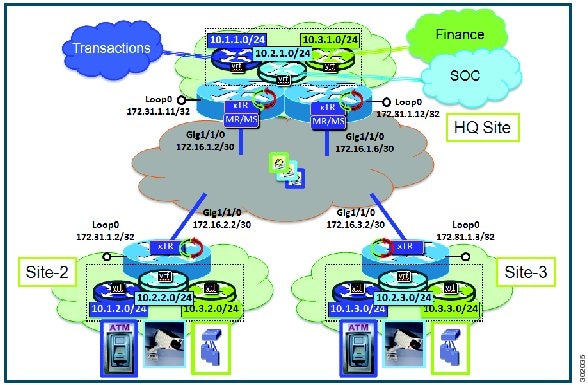
This procedure is for an enterprise that is deploying the LISP Shared Model where EID space is virtualized over a shared, common core network. A subset of the entire network is shown in the following figure. Three sites are shown: a multihomed "Headquarters" (HQ) site, and two remote office sites. The HQ site switches are deployed as xTRs and also as map resolver/map servers. The remote sites switches act as xTRs, and use the MS/MRs at the HQ site for LISP control plane support.

Figure 12. Large Scale LISP Site with Virtualized IPv4 EIDs and a Shared IPv4 Core

The components in the figure are as follows:

  • LISP site:
    • Each customer premises equipment (CPE) switch functions as a LISP ITR and ETR (xTR), as well as a Map-Server/Map-Resolver (MS/MR).

    • Both LISP xTRs have three VRFs: TRANS (for transactions), SOC (for security operations), and FIN (for financials). Each VRF contains only IPv4 EID-prefixes. No overlapping prefixes are used; segmentation between each VRF by LISP instance-ids makes this possible. Note that in this example, the separate authentication key is configured “per-vrf" and not “per-site", which affects both the xTR and MS configurations.

    • The HQ LISP Site is multihomed to the shared IPv4 core, but each xTR at the HQ site has a single RLOC.

    • Each CPE also functions as an MS/MR to which the HQ and Remote LISP sites can register.

    • The map server site configurations are virtualized using LISP instance IDs to maintain separation between the three VRFs.

  • LISP remote sites
    • Each remote site CPE switch functions as a LISP ITR and ETR (xTR).

    • Each LISP xTRs has the same three VRFs as the HQ Site: TRANS, SOC, and FIN. Each VRF contains only IPv4 EID-prefixes.

    • Each remote site LISP xTR has a single RLOC connection to a shared IPv4 core network.

Before you begin

Create the VRFs using the vrf definition command.

Procedure

  Command or Action Purpose

Step 1

configure terminal

Example:


switch# configure terminal

Enters global configuration mode.

Step 2

lisp site site-name

Example:


switch(config)# lisp site TRANS

Specifies a LISP site named TRANS and enters LISP site configuration mode.

Note


A LISP site name is significant to the local map server on which it is configured and has no relevance anywhere else. This site name serves solely as an administrative means of associating an EID-prefix or prefixes with an authentication key and other site-related mechanisms.

Step 3

authentication-key [key-type] authentication-key

Example:


switch(config-lisp-site)# authentication-key 0 Left-key

Configures the password used to create the SHA-2 HMAC hash for authenticating the map register messages sent by an ETR when registering to the map server.

Note


The LISP ETR must be configured with an identical authentication key as well as matching EID prefixes and instance IDs.

Step 4

eid-prefix EID-prefix / prefix-length instance-id instance-id accept-more-specifics

Example:


switch(config-lisp-site)#  eid-prefix 10.1.0.0/16 instance-id 1 accept-more-specifics
Configures an EID prefix and instance ID that are allowed in a map register message sent by an ETR when registering to this map server. Repeat this step as necessary to configure additional EID prefixes under this LISP site.
  • In the example, EID-prefix 10.1.0.0/16 and instance ID 1 are associated. The EID-prefix 10.1.0.0/16 is assumed to be an aggregate that covers all TRANS EID-prefixes at all LISP Sites. Use accept-more-specifics to allow each site to register its more-specific EID-prefix contained within that aggregate. If aggregation is not possible, simply enter all EID prefixes integrated within instance ID 1.

Step 5

exit

Example:


switch(config-lisp-site)# exit

Exits LISP site configuration mode and returns to LISP configuration mode.

Step 6

Repeat Steps 3 through 5 for each LISP site to be configured.

Repeat steps 3 through 5 for the site SOC and FIN as shown in the configuration example at the end of this procedure.

Step 7

ip lisp map-resolver

Example:


switch(config)# ip lisp map-resolver

Enables LISP map resolver functionality for EIDs in the IPv4 address family.

Step 8

ip lisp map-server

Example:


switch(config)# ip lisp map-server

Enables LISP map server functionality for EIDs in the IPv4 address family.

Step 9

vrf context vrf-name

Example:


switch(config)# vrf context vrf1

Enters VRF configuration submode.

Step 10

database-mapping EID-prefix/prefix-length locator priority priority weight weight

Example:


switch(config-vrf)# database-mapping 10.1.1.0/24 172.16.1.2 priority 1 weight 100

Configures an EID-to-RLOC mapping relationship and its associated traffic policy for this LISP site.

  • The EID prefix 10.1.1.0/24 within instance ID 1 at this site is associated with the local IPv4 RLOC 172.16.1.2, as well as with the neighbor xTR RLOC 172.6.1.6.

  • Repeat Step 10 until all EID-to-RLOC mappings within this eid-table vrf and instance ID for the LISP site are configured.

Step 11

Repeat Step 10 until all EID-to-RLOC mappings within this EID table VRF and instance ID for the LISP site are configured.

Step 12

ip lisp etr map-server map-server-address key key-type authentication-key

Example:


switch(config-vrf)# ip lisp etr map-server 172.16.1.2 key 0 TRANS-key

Configures a locator address for the LISP map server and an authentication key, which this switch, acting as an IPv4 LISP ETR, will use to register with the LISP mapping system.

  • In this example, the map server and authentication-key are specified in the EID-table subcommand mode, so that the authentication key is associated only with this instance ID, within this VPN.

Note


The map server must be configured with EID prefixes and instance-ids matching the one(s) configured on this ETR, as well as an identical authentication key.

Note


The locator address of the map server can be an IPv4 or IPv6 address. Because each xTR has only IPv4 RLOC connectivity, the map server is reachable using its IPv4 locator addresses.

Step 13

ip lisp itr map-resolver map-resolver-address

Example:


switch(config-vrf)# ip lisp itr map-resolver 172.16.1.2

Configures a locator address for the LISP map resolver to which this switch will send map request messages for IPv4 EID-to-RLOC mapping resolutions.

Note


In this example, the map resolver is specified in switch lisp configuration mode and is inherited into all EID-table instances, since nothing is related to any single instance ID. In addition, redundant map resolvers are configured. Because the MR is co-located with the xTRs in this case, this xTR is pointing to itself for mapping resolution (and to its neighbor xTR/MS/MR at the same site).

Note


The locator address of the map resolver may be an IPv4 or IPv6 address. In this example, because each xTR has only IPv4 RLOC connectivity, the map resolver is reachable using its IPv4 locator address.

Note


You can configure up to two map resolvers if multiple map resolvers are available.

Step 14

Repeat Step 13 to configure another locator address for the LISP map resolver

Example:


switch(config-vrf)# ip lisp itr map-resolver 172.16.1.6

Configures a locator address for the LISP map resolver to which this switch will send map request messages for IPv4 EID-to-RLOC mapping resolutions.

Note


In this example, a redundant map resolver is configured. (Because the MR is co-located with the xTRs in this case, this command indicates that this xTR is pointing to itself for mapping resolution (and its neighbor xTR/MS/MR at the same site).

Note


The locator address of the map resolver may be an IPv4 or IPv6 address. In this example, because each xTR has only IPv4 RLOC connectivity, the map resolver is reachable using its IPv4 locator address.

Note


You can configure up to two map resolvers if multiple map resolvers are available.

Step 15

ip lisp itr

Example:


switch(config-vrf)# ip lisp itr

Enables LISP ITR functionality for the IPv4 address family.

Step 16

ip lisp etr

Example:


switch(config-vrf)# ip lisp etr

Enables LISP ETR functionality for the IPv4 address family.

Step 17

ip lisp locator-vrf default

Example:


switch(config-vrf)# ip lisp locator-vrf BLUE

Configures a nondefault VRF table to be referenced by any IPv4 locators addresses.

Step 18

ipv6 lisp locator-vrf default

Example:


switch(config-vrf)# ipv6 lisp locator-vrf default

Configures a nondefault VRF table to be referenced by any IPv6 locator addresses.

Step 19

exit

Example:


switch(config-vrf)# exit

Exits VRF configuration mode and returns to global configuration mode.

Step 20

Repeat step 9 to 19 for all VRFs.

Step 21

ip route ipv4-prefix next-hop

Example:


switch(config)# ip route 0.0.0.0 0.0.0.0 172.16.1.1

Configures a default route to the upstream next hop for all IPv4 destinations.

Note

 
All IPv4 EID-sourced packets destined to both LISP and non-LISP sites are forwarded in one of two ways:
  • LISP-encapsulated to a LISP site when traffic is LISP-to-LISP
  • natively forwarded when traffic is LISP-to-non-LISP

Note

 
Packets are deemed to be a candidate for LISP encapsulation when they are sourced from a LISP EID and the destination is one of the following:
  • a current map-cache entry
  • a default route with a legitimate next-hop
  • a static route to Null0
  • no route at all

In this configuration example, because the xTR has IPv4 RLOC connectivity, a default route to the upstream SP is used for all IPv4 packets to support LISP processing.

Step 22

(Optional) show running-config lisp

Example:


switch(config)# show running-config lisp

Displays the LISP configuration on the switch.

Step 23

(Optional) show [ip | ipv6] lisp

Example:


switch(config)# show ip lisp vrf TRANS 

The show ip lisp and show ipv6 lisp commands are useful for quickly verifying the operational status of LISP as configured on the switch, as applicable to the IPv4 and IPv6 address families respectively.

Step 24

(Optional) show [ip | ipv6] lisp map-cache [vrf vrf-name ]

Example:


switch(config)# show ip lisp map-cache

Displays the operational status of the map cache on a switch configured as an ITR or PITR, as applicable to the IPv4 and IPv6 address families.

Step 25

(Optional) show [ip | ipv6] lisp database [ vrf vrf-name]

Example:


switch(config)# show ipv6 lisp database vrf GOLD

The show ip lisp database and show ipv6 lisp database commands are useful for quickly verifying the operational status of the database mapping on a switch configured as an ETR, as applicable to the IPv4 and IPv6 address families.

This example shows IPv6 mapping database information for a VRF named GOLD.

Step 26

(Optional) show lisp site [name site-name]

Example:


switch(config)# show lisp site

The show lisp site command verifies the operational status of LISP sites, as configured on a map server. This command only applies to a switch configured as a map server.

Step 27

(Optional) clear [ip | ipv6] lisp map-cache [vrf vrf-name ]

Example:


switch(config)# show ip lisp map-cache vrf vrf1
switch(config)# clear ip lisp map-cache vrf vrf1

The clear ip lisp map-cache and clear ipv6 lisp map-cache commands remove all IPv4 or IPv6 dynamic LISP map-cache entries stored by the switch. They verify the operational status of the LISP control plane. The command applies to a LISP switch that maintains a map cache (for example, a switch configured as an ITR or PITR).

The first command in the example displays IPv4 mapping cache information for vrf1. The second command clears the mapping cache for vrf1 and displays the status information after clearing the cache.

Configuring a Remote Site for Large-Scale LISP Shared Model Virtualization

You can perform this task to enable and configure LISP ITR/ETR (xTR) functionality at a remote site to implement LISP shared model virtualization as part of a large-scale, multiple-site LISP topology.

This configuration task is part of a more complex, larger scale LISP virtualization solution. The configuration applies to one of the remote sites shown in the figure below. The remote site switches only act as xTRs, and use the MS/MRs at the HQ site for LISP control plane support.

Figure 13. Large Scale LISP Site with Virtualized IPv4 EIDs and a Shared IPv4 Core

The components illustrated in the topology shown in the figure above are described below:

  • LISP remote sites:
    • Each customer premises equipment (CPE) switch at a remote site functions as a LISP ITR and ETR (xTR).

    • Each LISP xTR has the same three VRFs as the HQ Site: the TRANS (for transactions), the SOC (for security operations), and the FIN (for financials). Each VRF contains only IPv4 EID-prefixes.

    • Each remote site LISP xTR has a single RLOC connection to a shared IPv4 core network.

Before you begin

Create the VRFs using the vrf definition command and verify that the Configure a Large-Scale LISP Shared Model Virtualization task has been performed at one or more central (headquarters) sites.

Procedure

  Command or Action Purpose

Step 1

configure terminal

Example:


Switch# configure terminal

Enters global configuration mode.

Step 2

vrf contextvrf-name

Example:


Switch(config)# vrf context vrf1

Enters VRF configuration submode.

Step 3

database-mapping EID-prefix/prefix-length locator priority priority weight weight

Example:


Switch(config-vrf)# database-mapping 10.1.1.0/24 172.16.1.2 priority 1 weight 100

Configures an EID-to-RLOC mapping relationship and its associated traffic policy for this LISP site.

  • In this example, the EID prefix 10.1.1.0/24 within instance-id 1 at this site is associated with the local IPv4 RLOC 172.16.1.2, as well as with the neighbor xTR RLOC 172.6.1.6.

Step 4

ip lisp etr map-server map-server-address key key-type authentication-key

Example:


Switch(config-vrf)# ip lisp etr map-server 172.16.1.2 key 0 TRANS-key

Configures a locator address for the LISP map server and an authentication key for which this switch, acting as an IPv4 LISP ETR, will use to register with the LISP mapping system.

  • In this example, the map server and authentication-key are specified here, within the eid-table subcommand mode, so that the authentication key is associated only with this instance ID, within this VPN.

Note


The map server must be configured with EID prefixes and instance-ids matching the one(s) configured on this ETR, as well as an identical authentication key.

Note


The locator address of the map server may be an IPv4 or IPv6 address. In this example, because each xTR has only IPv4 RLOC connectivity, the map server is reachable using its IPv4 locator addresses.

Step 5

Repeat Step 4 to configure another locator address for the same LISP map server.

Example:


Switch(config-vrf)# ip lisp etr map-server 172.16.1.6 key 0 TRANS-key

Configures a locator address for the LISP map server and an authentication key for which this switch, acting as an IPv4 LISP ETR, will use to register with the LISP mapping system.

  • In this example, a redundant map server is configured. (Because the MS is co-located with the xTRs in this case, this command indicates that this xTR is pointing to itself for registration (and its neighbor xTR/MS/MR at the same site).

Step 6

ip lisp itr map-resolver map-resolver-address

Example:


Switch(config-vrf)# ip lisp itr map-resolver 172.16.1.2

Configures a locator address for the LISP map resolver to which this switch will send map request messages for IPv4 EID-to-RLOC mapping resolutions.

  • In this example, the map resolver is specified within switch lisp configuration mode and inherited into all eid-table instances since nothing is related to any single instance ID. In addition, redundant map resolvers are configured. (Because the MR is co-located with the xTRs in this case, this command indicates that this xTR is pointing to itself for mapping resolution (and its neighbor xTR/MS/MR at the same site).

  • The locator address of the map resolver may be an IPv4 or IPv6 address. In this example, because each xTR has only IPv4 RLOC connectivity, the map resolver is reachable using its IPv4 locator address.

Note


Up to two map resolvers may be configured if multiple map resolvers are available.

Step 7

Repeat Step 6 to configure another locator address for the LISP map resolver

Example:


Switch(config-vrf)# ip lisp itr map-resolver 172.16.1.6

Configures a locator address for the LISP map resolver to which this switch will send map request messages for IPv4 EID-to-RLOC mapping resolutions.

Note


In this example, a redundant map resolver is configured. (Because the MR is co-located with the xTRs in this case, this command indicates that this xTR is pointing to itself for mapping resolution (and its neighbor xTR/MS/MR at the same site).

The locator address of the map resolver may be an IPv4 or IPv6 address. In this example, because each xTR has only IPv4 RLOC connectivity, the map resolver is reachable using its IPv4 locator address.

Note


Up to two map resolvers may be configured if multiple map resolvers are available.

Step 8

ip lisp itr

Example:


Switch(config-vrf)# ip lisp itr

Enables LISP ITR functionality for the IPv4 address family.

Step 9

ip lisp etr

Example:


Switch(config-vrf)# ip lisp etr

Enables LISP ETR functionality for the IPv4 address family.

Step 10

ip lisp locator-vrf default

Example:


Switch(config-vrf)# ip lisp locator-vrf BLUE

Configures a non-default VRF table to be referenced by any IPv4 locators addresses.

Step 11

ipv6 lisp locator-vrf default

Example:


Switch(config-vrf)# ipv6 lisp locator-vrf default

Configures a non-default VRF table to be referenced by any IPv6 locator addresses.

Step 12

exit

Example:


Switch(config-vrf)# exit

Exits VRF configuration mode and returns to global configuration mode.

Step 13

Repeat Steps 2 to 12 for all VRFs.

Step 14

ip route ipv4-prefix next-hop

Example:


Switch(config)# ip route 0.0.0.0 0.0.0.0 172.16.2.1

Configures a default route to the upstream next hop for all IPv4 destinations.

  • All IPv4 EID-sourced packets destined to both LISP and non-LISP sites are forwarded in one of two ways:
    • LISP-encapsulated to a LISP site when traffic is LISP-to-LISP
    • natively forwarded when traffic is LISP-to-non-LISP
  • Packets are deemed to be a candidate for LISP encapsulation when they are sourced from a LISP EID and the destination matches one of the following entries:
    • a current map-cache entry
    • a default route with a legitimate next-hop
    • a static route to Null0
    • no route at all
In this configuration example, because the xTR has IPv4 RLOC connectivity, a default route to the upstream SP is used for all IPv4 packets to support LISP processing.

Step 15

(Optional) show running-config lisp

Example:


Switch(config)# show running-config lisp

Verifies the LISP configuration on the switch.

Step 16

(Optional) show [ip | ipv6] lisp

Example:


Switch(config)# show ip lisp vrf TRANS 

The show ip lisp and show ipv6 lisp commands verify the operational status of LISP as configured on the switch, as applicable to the IPv4 and IPv6 address families, respectively.

Step 17

(Optional) show [ip | ipv6] lisp map-cache [vrf vrf-name ]

Example:


Switch(config)# show ip lisp map-cache

The show ip lisp map-cache and show ipv6 lisp map-cache commands verify the operational status of the map cache on a switch configured as an ITR or PITR, as applicable to the IPv4 and IPv6 address families, respectively.

Step 18

(Optional) show [ip | ipv6] lisp database [ vrf vrf-name]

Example:

The following example shows IPv6 mapping database information for the VRF named GOLD.


Switch(config)# show ipv6 lisp database vrf GOLD

The show ip lisp database and show ipv6 lisp database commands display the operational status of the database mapping on a switch configured as an ETR, as applicable to the IPv4 and IPv6 address families, respectively.

Step 19

(Optional) show lisp site [name site-name]

Example:


Switch(config)# show lisp site

The show lisp site command is useful for quickly verifying the operational status of LISP sites, as configured on a map server. This command only applies to a switch configured as a map server.

Step 20

clear [ip | ipv6] lisp map-cache [vrf vrf-name ]

Example:

The following commands display IPv4 mapping cache information for vrf1, and clear the mapping cache for vrf1. Clearing also displays the show information after it clears the cache.


Switch(config)# show ip lisp map-cache vrf vrf1
Switch(config)# clear ip lisp map-cache vrf vrf1

The clear ip lisp map-cache and clear ipv6 lisp map-cache commands remove all IPv4 or IPv6 dynamic LISP map-cache entries stored by the switch. These verify the operational status of the LISP control plane. The command applies to a LISP switch that maintains a map cache (for example, if configured as an ITR or PITR).

Configuring Simple LISP Parallel Model Virtualization

You can perform these tasks to enable and configure LISP ITR/ETR (xTR) functionality and LISP map resolver and map server for LISP parallel model virtualization.

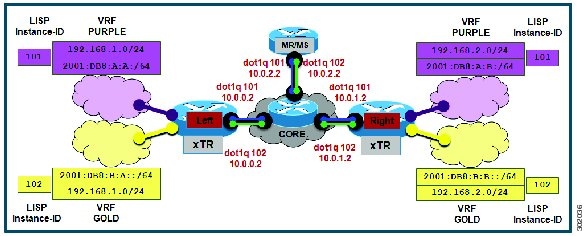
The configuration in the following figure below is for two LISP sites that are connected in parallel mode. Each LISP site uses a single edge switch configured as both an ITR and ETR (xTR), with a single connection to its upstream provider. Note that the upstream connection is VLAN-segmented to maintain RLOC space separation within the core. Two VRFs are defined here: BLUE and GREEN. The IPv4 RLOC space is used in each of these parallel networks. Both IPv4 and IPv6 EID address space is used. The LISP site registers to one map server/map resolver (MS/MR), which is segmented to maintain the parallel model architecture of the core network.

Figure 14. Simple LISP Site with One IPv4 RLOC and One IPv4 EID

The components illustrated in the topology shown in the figure above are described below.

LISP site
  • The customer premises equipment (CPE) functions as a LISP ITR and ETR (xTR).

  • Both LISP xTRs have two VRFs: GOLD and PURPLE, with each VRF containing both IPv4 and IPv6 EID-prefixes, as shown in the figure above. Note the overlapping prefixes, used for illustration purposes. A LISP instance ID is used to maintain separation between two VRFs. The share key is configured “per-VPN."

  • Each LISP xTR has a single RLOC connection to a parallel IPv4 core network.

Perform the steps in this task (once through for each xTR in the LISP site) to enable and configure LISP ITR and ETR (xTR) functionality when using a LISP map-server and map-resolver for mapping services. The example configurations at the end of this task show the full configuration for two xTRs (Left-xTR and Right-xTR).

Before you begin

Create the VRFs using the vrf context command.

Procedure

  Command or Action Purpose

Step 1

configure terminal

Example:


switch# configure terminal

Enters global configuration mode.

Step 2

vrf context vrf-name

Example:


switch(config)# vrf context vrf1

Enters VRF configuration submode.

  • In this example, the RLOC VRF named vrf1 is configured.

Step 3

lisp instance-id instance-id

Example:


switch(config-vrf)# lisp instance-id 101

Configures an association between a VRF and a LISP instance ID.

Step 4

ip lisp database-mapping EID-prefix/prefix-length locator priority priority weight weight

Example:


switch(config-vrf)# ip lisp database-mapping 192.168.1.0/24 10.0.0.2 priority 1 weight 1

Configures an EID-to-RLOC mapping relationship and its associated traffic policy for this LISP site.

Note


In this example, a single IPv4 EID prefix, 192.168.1.0/24, within instance ID 1 at this site is associated with the local IPv4 RLOC 10.0.0.2.

Step 5

exit

Example:


switch(config-vrf)# exit

Exits VRF configuration submode and returns to global mode.

Step 6

ipv4 itr map-resolver map-resolver-address

Example:


switch(config)# ip lisp itr map-resolver 10.0.2.2

Configures a locator address for the LISP map resolver to which this switch will send map request messages for IPv4 EID-to-RLOC mapping resolutions.

Note


The locator address of the map resolver may be an IPv4 or IPv6 address. In this example, because each xTR has only IPv4 RLOC connectivity, the map resolver is reachable using its IPv4 locator address.

Note


Up to two map resolvers may be configured if multiple map resolvers are available.

Step 7

ip lisp etr map-server map-server-address key key-type authentication-key

Example:


switch(config)# ip lisp etr map-server 10.0.2.2 key 0 PURPLE-key

Configures a locator address for the LISP map server and an authentication key for which this switch, acting as an IPv4 LISP ETR, will use to register with the LISP mapping system.

Note


The map server must be configured with EID prefixes and instance IDs matching those configured on this ETR and with an identical authentication key.

Note


The locator address of the map server may be an IPv4 or IPv6 address. In this example, because each xTR has only IPv4 RLOC connectivity, the map-server is reachable using its IPv4 locator addresses.

Step 8

ip lisp itr

Example:


switch(config)# ip lisp itr

Enables LISP ITR functionality for the IPv4 address family.

Step 9

ip lisp etr

Example:


switch(config)# ip lisp etr

Enables LISP ETR functionality for the IPv4 address family.

Step 10

ipv6 lisp itr map-resolver map-resolver-address

Example:


switch(config)# ipv6 lisp itr map-resolver 10.0.2.2

Configures a locator address for the LISP map resolver to which this switch will send map request messages for IPv6 EID-to-RLOC mapping resolutions.

Note


The locator address of the map resolver may be an IPv4 or IPv6 address. In this example, because each xTR has only IPv4 RLOC connectivity, the map-resolver is reachable using its IPv4 locator addresses.

Note


Up to two map resolvers may be configured if multiple map resolvers are available.

Step 11

ipv6 lisp etr map-server map-server-address key key-type authentication-key

Example:


switch(config)# ipv6 lisp etr map-server 10.0.2.2 key 0 PURPLE-key

Configures a locator address for the LISP map-server and an authentication key that this switch, acting as an IPv6 LISP ETR, will use to register to the LISP mapping system.

Note


The map-server must be configured with EID prefixes and instance IDs matching those configured on this ETR and with an identical authentication key.

Note


The locator address of the map-server may be an IPv4 or IPv6 address. In this example, because each xTR has only IPv4 RLOC connectivity, the map-server is reachable using its IPv4 locator addresses.

Step 12

ipv6 itr

Example:


switch(config)# ipv6 itr

Enables LISP ITR functionality for the IPv6 address family.

Step 13

ipv6 etr

Example:


switch(config)# ipv6 etr

Enables LISP ETR functionality for the IPv6 address family.

Step 14

ip route vrf rloc-vrf-name ipv4-prefix next-hop

Example:


switch(config)# ip route vrf BLUE 0.0.0.0 0.0.0.0 10.0.0.1

Configures a default route to the upstream next hop for all IPv4 destinations.

All IPv4 EID-sourced packets destined to both LISP and non-LISP sites are forwarded in one of two ways:

  • LISP-encapsulated to a LISP site when traffic is LISP-to-LISP
  • natively forwarded when traffic is LISP-to-non-LISP

Packets are deemed to be a candidate for LISP encapsulation when they are sourced from a LISP EID and the destination matches one of the following entries:

  • a current map-cache entry
  • a default route with a legitimate next-hop
  • a static route to Null0
  • no route at all

In this configuration example, because the xTR has IPv4 RLOC connectivity, a default route to the upstream SP is used for all IPv4 packets to support LISP processing.

Step 15

ipv6 route vrf rloc-vrf-name ipv6-prefix next-hop

Example:


switch(config)# ipv6 route vrf BLUE ::/0 Null0

Configures a default route to the upstream next hop for all IPv6 destinations, reachable within the specified RLOC VRF.

All IPv6 EID-sourced packets destined for both LISP and non-LISP sites require LISP support for forwarding in the following two ways:

  • LISP-encapsulated to a LISP site when traffic is LISP-to-LISP
  • natively forwarded when traffic is LISP-to-non-LISP

Packets are deemed to be a candidate for LISP encapsulation when they are sourced from a LISP EID and the destination matches one of the following entries:

  • a current map-cache entry
  • a default route with a legitimate next-hop
  • a static route to Null0
  • no route at all

In this configuration example, because the xTR has only IPv4 RLOC connectivity, adding an IPv6 default route to Null0 ensures that all IPv6 packets are handled by LISP processing. If the destination is another LISP site, packets are LISP-encapsulated (using IPv4 RLOCs) to the remote site. If the destination is non-LISP, all IPv6 EIDs are LISP-encapsulated to a Proxy ETR (PETR) –assuming one is configured.

Note


The use of the static route to Null0 is not required, but is considered a LISP best practice.

Step 16

(Optional) show running-config lisp

Example:


switch(config)# show running-config lisp

Shows the LISP configuration on the switch.

Step 17

(Optional) show [ip | ipv6] lisp

Example:


switch(config)# show ip lisp vrf TRANS 

The show ip lisp and show ipv6 lisp commands verify the operational status of LISP as configured on the switch, as applicable to the IPv4 and IPv6 address families, respectively.

Step 18

(Optional) show [ip | ipv6] lisp map-cache [vrf vrf-name ]

Example:


switch(config)# show ip lisp map-cache

The show ip lisp map-cache and show ipv6 lisp map-cache commands verify the operational status of the map cache on a switch configured as an ITR or Proxy ETR (PETR), as applicable to the IPv4 and IPv6 address families, respectively.

Step 19

(Optional) show [ip | ipv6] lisp database [ vrf vrf-name]

Example:

The following example shows IPv6 mapping database information for the VRF named GOLD.


switch(config)# show ipv6 lisp database vrf GOLD

The show ip lisp database and show ipv6 lisp database commands verify the operational status of the database mapping on a switch configured as an ETR, as applicable to the IPv4 and IPv6 address families, respectively.

Step 20

(Optional) show lisp site [name site-name]

Example:


switch(config)# show lisp site

The show lisp site command verifies the operational status of LISP sites, as configured on a map server. This command only applies to a switch configured as a map server.

Step 21

clear [ip | ipv6] lisp map-cache [vrf vrf-name ]

Example:


switch(config)# show ip lisp map-cache vrf vrf1
switch(config)# clear ip lisp map-cache vrf vrf1

The clear ip lisp map-cache and clear ipv6 lisp map-cache commands remove all IPv4 or IPv6 dynamic LISP map-cache entries stored by the switch. This verifies the operational status of the LISP control plane. This command applies to a LISP switch that maintains a map cache (for example, if configured as an ITR or PITR).

The commands in the example display IPv4 mapping cache information for vrf1, and clear the mapping cache for vrf1 and show information after clearing the cache.

Configuring a Private LISP Mapping System for LISP Parallel Model Virtualization

Perform this task to configure and enable standalone LISP map server/map resolver functionality for LISP parallel model virtualization. In this task, a Cisco switch is configured as a standalone map resolver/map server (MR/MS) for a private LISP mapping system. Because the MR/MS is configured as a stand-alone switch, it has no need for LISP alternate logical topology (ALT) connectivity. All relevant LISP sites must be configured to register with this map server so that this map server has full knowledge of all registered EID prefixes within the (assumed) private LISP system.

  • Mapping system:
    Figure 15. Simple LISP Site with One IPv4 RLOC and One IPv4 EID
    • One map resolver/map server (MS/MR) system is shown in the figure above and assumed available for the LISP xTR to register to within the proper parallel RLOC space. The MS/MR has an IPv4 RLOC address of 10.0.2.2, within each VLAN/VRF (Green and Blue) providing parallel model RLOX separation in the IPv4 core.

    • The map server site configurations are virtualized using LISP instance IDs to maintain separation between the two VRFs, PURPLE and GOLD.

Repeat this task for all lisp instantiations and RLOC VRFs.

Procedure

  Command or Action Purpose

Step 1

configure terminal

Example:


Switch# configure terminal

Enters global configuration mode.

Step 2

lisp site site-name

Example:


Switch(config)# lisp site PURPLE

Specifies a LISP site named Purple and enters LISP site configuration mode.

  • In this example, the LISP site named Purple is configured.

Step 3

authentication-key [key-type] authentication-key

Example:


Switch(config-lisp-site)# authentication-key 0 Purple-key

Configures the password used to create the SHA-2 HMAC hash for authenticating the map register messages sent by an ETR when registering to the map server.

Note


The ETR must be configured with EID prefixes and instance IDs matching the one(s) configured on this map server, as well as an identical authentication key.

Step 4

eid-prefix EID-prefix instance-id instance-id

Example:


Switch(config-lisp-site)# eid-prefix 192.168.1.0/24 instance-id 101
Configures an EID prefix and instance ID that are allowed in a map register message sent by an ETR when registering to this map server. Repeat this step as necessary to configure additional IPv4 EID prefixes under this LISP site.
  • In this example, the IPv4 EID prefix 192.168.1.0/24 and instance ID 101 are associated together.

Step 5

eid-prefix EID-prefix instance-id instance-id

Example:


Switch(config-lisp-site)# eid-prefix 2001:db8:a:b::/64 instance-id 101
Configures an EID prefix and instance ID that are allowed in a map register message sent by an ETR when registering to this map server. Repeat this step as necessary to configure additional IPv6 EID prefixes under this LISP site.
  • In this example, the IPv6 EID prefix 2001:db8:a:a::/64 and instance ID 101 are associated together.

Step 6

exit

Example:


Switch(config-lisp-site)# exit

Exits LISP site configuration mode and returns to global configuration mode.

Step 7

ip lisp map-resolver

Example:


Switch(config)# ip lisp map-resolver

Enables LISP map resolver functionality for EIDs in the IPv4 address family.

Step 8

ip lisp map-server

Example:


Switch(config)# ip lisp map-server

Enables LISP map server functionality for EIDs in the IPv4 address family.

Step 9

ipv6 lisp map-resolver

Example:


Switch(config)# ipv6 lisp map-resolver

Enables LISP map resolver functionality for EIDs in the IPv6 address family.

Step 10

ipv6 lisp map-server

Example:


Switch(config)# ipv6 lisp map-server

Enables LISP map server functionality for EIDs in the IPv6 address family.

Step 11

ip route vrf rloc-vrf-name ipv4-prefix next-hop

Example:


Switch(config)# ip route vrf BLUE 0.0.0.0 0.0.0.0 10.0.2.1

Configures a default route to the upstream next hop for all IPv4 destinations, reachable within the specified RLOC VRF.

Step 12

show running-config lisp

Example:


Switch(config)# show running-config lisp

Verifies the LISP configuration on the switch.

Step 13

show [ip | ipv6] lisp

Example:


Switch(config)# show ip lisp vrf TRANS 

The show ip lisp and show ipv6 lisp commands are useful for quickly verifying the operational status of LISP as configured on the switch, as applicable to the IPv4 and IPv6 address families respectively.

Step 14

show [ip | ipv6] lisp map-cache [vrf vrf-name ]

Example:


Switch(config)# show ip lisp map-cache

The show ip lisp map-cache and show ipv6 lisp map-cache commands are useful for quickly verifying the operational status of the map cache on a switch configured as an ITR or PITR, as applicable to the IPv4 and IPv6 address families respectively.

Step 15

show [ip | ipv6] lisp database [ vrf vrf-name]

Example:

The following example shows IPv6 mapping database information for the VRF named GOLD.


Switch(config)# show ipv6 lisp database vrf GOLD

The show ip lisp database and show ipv6 lisp database commands are useful for quickly verifying the operational status of the database mapping on a switch configured as an ETR, as applicable to the IPv4 and IPv6 address families respectively.

Step 16

show lisp site [name site-name]

Example:


Switch(config)# show lisp site

The show lisp site command is useful for quickly verifying the operational status of LISP sites, as configured on a map server. This command only applies to a switch configured as a map server.

Step 17

clear [ip | ipv6] lisp map-cache [vrf vrf-name ]

Example:

The following example displays IPv4 mapping cache information for vrf1, shows the command used to clear the mapping cache for vrf1, and displays the show information after clearing the cache.


Switch(config)# show ip lisp map-cache vrf vrf1
Switch(config)# clear ip lisp map-cache vrf vrf1

The clear ip lisp map-cache and clear ipv6 lisp map-cache commands remove all IPv4 or IPv6 dynamic LISP map-cache entries stored by the switch. This can be useful for trying to quickly verify the operational status of the LISP control plane. This command applies to a LISP switch that maintains a map cache (for example, if configured as an ITR or PITR).

Configuration Examples for LISP Instance-ID Support

Example: Configuring Simple LISP Shared Model Virtualization

These examples show the complete configuration for the LISP topology. On the xTRs, the VRFs and EID prefixes are assumed to be attached to VLANs configured on the switches.

This example shows how to configure the left xTR:


vrf context GOLD
  ipv6 lisp itr
  ip lisp itr
  ipv6 lisp etr
  ip lisp etr
  ipv6 lisp database-mapping 2001:db8:b:a::/64 10.0.0.2 priority 1 weight 100
  ip lisp database-mapping 192.168.1.0/24 10.0.0.2 priority 1 weight 100
  lisp instance-id 102
  ipv6 lisp locator-vrf default
  ip lisp locator-vrf default
  ipv6 lisp itr map-resolver 10.0.2.2
  ip lisp itr map-resolver 10.0.2.2
  ipv6 lisp etr map-server 10.0.2.2 key Left-key
  ip lisp etr map-server 10.0.2.2 key Left-key

interface Ethernet0/0
 ip address 10.0.0.2 255.255.255.0

interface Ethernet1/0.1
 encapsulation dot1q 101
 vrf forwarding PURPLE
 ip address 192.168.1.1 255.255.255.0
 ipv6 address 2001:DB8:A:A::1/64

interface Ethernet1/0.2
 encapsulation dot1q 102
 vrf forwarding GOLD
 ip address 192.168.1.1 255.255.255.0
 ipv6 address 2001:DB8:B:A::1/64

vrf context PURPLE
  ipv6 lisp itr
  ip lisp itr
  ipv6 lisp etr
  ip lisp etr
  ipv6 lisp database-mapping 2001:db8:a:a::/64 10.0.0.2 priority 1 weight 100
  ip lisp database-mapping 192.168.1.0/24 10.0.0.2 priority 1 weight 100
  lisp instance-id 101
  ipv6 lisp locator-vrf default
  ip lisp locator-vrf default
  ipv6 lisp itr map-resolver 10.0.2.2
  ip lisp itr map-resolver 10.0.2.2
  ipv6 lisp etr map-server 10.0.2.2 key Left-key
  ip lisp etr map-server 10.0.2.2 key Left-key


This example shows how to configure the right xTR:


vrf context GOLD
  ipv6 lisp itr
  ip lisp itr
  ipv6 lisp etr
  ip lisp etr
  ipv6 lisp database-mapping 2001:db8:b:b::/64 10.0.1.2 priority 1 weight 100
  ip lisp database-mapping 192.168.2.0/24 10.0.1.2 priority 1 weight 100
  lisp instance-id 102
  ipv6 lisp locator-vrf default
  ip lisp locator-vrf default
  ipv6 lisp itr map-resolver 10.0.2.2
  ip lisp itr map-resolver 10.0.2.2
  ipv6 lisp etr map-server 10.0.2.2 key Right-key
  ip lisp etr map-server 10.0.2.2 key Right-key

interface Ethernet0/0
 ip address 10.0.1.2 255.255.255.0

interface Ethernet1/0.1
 encapsulation dot1q 101
 vrf forwarding PURPLE
 ip address 192.168.2.1 255.255.255.0
 ipv6 address 2001:DB8:A:B::1/64

interface Ethernet1/0.2
 encapsulation dot1q 102
 vrf forwarding GOLD
 ip address 192.168.2.1 255.255.255.0
 ipv6 address 2001:DB8:B:B::1/64

vrf context PURPLE
  ipv6 lisp itr
  ip lisp itr
  ipv6 lisp etr
  ip lisp etr
  ipv6 lisp database-mapping 2001:db8:a:b::/64 10.0.1.2 priority 1 weight 100
  ip lisp database-mapping 192.168.2.0/24 10.0.1.2 priority 1 weight 100
  lisp instance-id 101
  ipv6 lisp locator-vrf default
  ip lisp locator-vrf default
  ipv6 lisp itr map-resolver 10.0.2.2
  ip lisp itr map-resolver 10.0.2.2
  ipv6 lisp etr map-server 10.0.2.2 key Right-key
  ip lisp etr map-server 10.0.2.2 key Right-key

Example: Configuring a Private LISP Mapping System for LISP Shared Model Virtualization

This example shows how to configure the LISP map server/map resolver.


hostname MSMR
!
interface Ethernet0/0
 ip address 10.0.2.2 255.255.255.0
!
router lisp
  !
  site Left
    authentication-key Left-key
    eid-prefix instance-id 101 192.168.1.0/24
    eid-prefix instance-id 101 2001:DB8:A:A::/64
    eid-prefix instance-id 102 192.168.1.0/24
    eid-prefix instance-id 102 2001:DB8:B:A::/64
    exit

  !
  site Right
    authentication-key Right-key
    eid-prefix instance-id 101 192.168.2.0/24
    eid-prefix instance-id 101 2001:DB8:A:B::/64
    eid-prefix instance-id 102 192.168.2.0/24
    eid-prefix instance-id 102 2001:DB8:B:B::/64
    exit
  !
  	 ipv4 map-server
			 ipv4 map-resolver
			 ipv6 map-server
			 ipv6 map-resolver
			 exit
!
    ip route 0.0.0.0 0.0.0.0 10.0.2.1

Example: Configuring Large-Scale LISP Shared Model Virtualization

Example:

The examples show the complete configuration for the HQ-RTR-1 and HQ-RTR-2 (xTR/MS/MR located at the HQ site), and Site2-xTR LISP switches. Both HQ-RTR-1 and HQ-RTR-2 are provided to illustrate the proper method for configuring a LISP multihomed site.

This example shows how to configure HQ-RTR-1 with an xTR, a map server, and a map resolver.


feature lisp
interface loopback 0
   ip address 172.31.1.11/32
interface ethernet2/1
   ip address 172.16.1.6/30
interface Ethernet 2/2
   vrf member TRANS
   ip address 10.1.1.1/24 
interface Ethernet 2/3
    vrf member SOC
    ip address 10.2.1.1/24
interface Ethernet 2/4
    vrf member FIN
    ip address 10.3.1.1/24
ip lisp itr
ip lisp etr
ip lisp map-resolver
ip lisp map-server
ip lisp database-mapping 172.31.1.11/32 172.16.1.2 priority 1 weight 50
ip lisp database-mapping 172.31.1.11/32 172.16.1.6 priority 1 weight 50
ip lisp itr map-resolver 172.16.1.2
ip lisp itr map-resolver 172.16.1.6
ip lisp etr map-server 172.16.1.2 key DEFAULT-key
ip lisp etr map-server 172.16.1.6 key DEFAULT-key
vrf context FIN
  ip lisp itr
  ip lisp etr
  ip lisp database-mapping 10.3.1.0/24 172.16.1.2 priority 1 weight 50
  ip lisp database-mapping 10.3.1.0/24 172.16.1.6 priority 1 weight 50
  lisp instance-id 3
  ip lisp itr map-resolver 172.16.1.2
  ip lisp itr map-resolver 172.16.1.6
  ip lisp etr map-server 172.16.1.2 key FIN-key
  ip lisp etr map-server 172.16.1.6 key FIN-key
  ip lisp locator-vrf default
vrf context SOC
  ip lisp itr
  ip lisp etr
  ip lisp database-mapping 10.2.1.0/24 172.16.1.2 priority 1 weight 50
  ip lisp database-mapping 10.2.1.0/24 172.16.1.6 priority 1 weight 50
  lisp instance-id 2
  ip lisp itr map-resolver 172.16.1.2
  ip lisp itr map-resolver 172.16.1.6
  ip lisp etr map-server 172.16.1.2 key SOC-key
  ip lisp etr map-server 172.16.1.6 key SOC-key
  ip lisp locator-vrf default
vrf context TRANS
  ip lisp itr
  ip lisp etr
  ip lisp database-mapping 10.1.1.0/24 172.16.1.2 priority 1 weight 50
  ip lisp database-mapping 10.1.1.0/24 172.16.1.6 priority 1 weight 50
  lisp instance-id 1
  ip lisp itr map-resolver 172.16.1.2
  ip lisp itr map-resolver 172.16.1.6
  ip lisp etr map-server 172.16.1.2 key TRANS-key
  ip lisp etr map-server 172.16.1.6 key TRANS-key
  ip lisp locator-vrf default
lisp site DEFAULT
  eid-prefix 172.31.1.0/24 accept-more-specifics
  authentication-key DEFAULT-key
lisp site FIN
  eid-prefix 10.3.0.0/16 accept-more-specifics
  authentication-key FIN-key
lisp site SOC
  eid-prefix 10.2.0.0/16 instance-id 2 accept-more-specifics
  authentication-key SOC-key
lisp site TRANS
  eid-prefix 10.1.0.0/16 instance-id 1 accept-more-specifics
  authentication-key TRANS-key

This example shows how to configure HQ-RTR-2 with an xTR, a map server, and a map resolver.


feature lisp
interface loopback 0
   ip address 172.31.1.12/32
interface ethernet2/1
   ip address 172.16.1.6/30
interface Ethernet 2/2
   vrf member TRANS
   ip address 10.1.1.2/24 
interface Ethernet 2/3
    vrf member SOC
    ip address 10.2.1.2/24
interface Ethernet 2/4
    vrf member FIN
    ip address 10.3.1.2/24

ip lisp itr
ip lisp etr
ip lisp map-resolver
ip lisp map-server
ip lisp database-mapping 172.31.1.12/32 172.16.1.2 priority 1 weight 50
ip lisp database-mapping 172.31.1.12/32 172.16.1.6 priority 1 weight 50
ip lisp itr map-resolver 172.16.1.2
ip lisp itr map-resolver 172.16.1.6
ip lisp etr map-server 172.16.1.2 key DEFAULT-key
ip lisp etr map-server 172.16.1.6 key DEFAULT-key
vrf context FIN
  ip lisp itr
  ip lisp etr
  ip lisp database-mapping 10.3.1.0/24 172.16.1.2 priority 1 weight 50
  ip lisp database-mapping 10.3.1.0/24 172.16.1.6 priority 1 weight 50
  lisp instance-id 3
  ip lisp itr map-resolver 172.16.1.2
  ip lisp itr map-resolver 172.16.1.6
  ip lisp etr map-server 172.16.1.2 key FIN-key
  ip lisp etr map-server 172.16.1.6 key FIN-key
  ip lisp locator-vrf default
vrf context SOC
  ip lisp itr
  ip lisp etr
  ip lisp database-mapping 10.2.1.0/24 172.16.1.2 priority 1 weight 50
  ip lisp database-mapping 10.2.1.0/24 172.16.1.6 priority 1 weight 50
  lisp instance-id 2
  ip lisp itr map-resolver 172.16.1.2
  ip lisp itr map-resolver 172.16.1.6
  ip lisp etr map-server 172.16.1.2 key SOC-key
  ip lisp etr map-server 172.16.1.6 key SOC-key
  ip lisp locator-vrf default
vrf context TRANS
  ip lisp itr
  ip lisp etr
  ip lisp database-mapping 10.1.1.0/24 172.16.1.2 priority 1 weight 50
  ip lisp database-mapping 10.1.1.0/24 172.16.1.6 priority 1 weight 50
  lisp instance-id 1
  ip lisp itr map-resolver 172.16.1.2
  ip lisp itr map-resolver 172.16.1.6
  ip lisp etr map-server 172.16.1.2 key TRANS-key
  ip lisp etr map-server 172.16.1.6 key TRANS-key
  ip lisp locator-vrf default
lisp site DEFAULT
  eid-prefix 172.31.1.0/24 accept-more-specifics
  authentication-key DEFAULT-key
lisp site FIN
  eid-prefix 10.3.0.0/16 accept-more-specifics
  authentication-key FIN-key
lisp site SOC
  eid-prefix 10.2.0.0/16 instance-id 2 accept-more-specifics
  authentication-key SOC-key
lisp site TRANS
  eid-prefix 10.1.0.0/16 instance-id 1 accept-more-specifics
  authentication-key TRANS-key

Example: Configuring a Remote Site for Large-Scale LISP Shared Model Virtualization

This example shows the complete configuration for the remote site switch. Only one remote site configuration is shown.

This example shows how to configure Site 2 with an xTR, using the map server and a map resolver from the HQ site.


feature lisp
interface loopback 0
   ip address 172.31.1.2/32
interface ethernet2/1
   ip address 172.16.2.2/30
interface Ethernet 2/2
   vrf member TRANS
   ip address 10.1.2.1/24 
interface Ethernet 2/3
    vrf member SOC
    ip address 10.2.2.1/24
interface Ethernet 2/4
    vrf member FIN
    ip address 10.3.2.1/24

ip lisp itr
ip lisp etr
ip lisp map-resolver
ip lisp map-server
ip lisp database-mapping 172.31.1.2/32 172.16.2.2 priority 1 weight 100
ip lisp itr map-resolver 172.16.1.2
ip lisp itr map-resolver 172.16.1.6
ip lisp etr map-server 172.16.1.2 key DEFAULT-key
ip lisp etr map-server 172.16.1.6 key DEFAULT-key
vrf context FIN
  ip lisp itr
  ip lisp etr
  ip lisp database-mapping 10.3.2.0/24 172.16.2.2 priority 1 weight 100
lisp instance-id 3
  ip lisp itr map-resolver 172.16.1.2
  ip lisp itr map-resolver 172.16.1.6
  ip lisp etr map-server 172.16.1.2 key FIN-key
  ip lisp etr map-server 172.16.1.6 key FIN-key
  ip lisp locator-vrf default
vrf context SOC
  ip lisp itr
  ip lisp etr
  ip lisp database-mapping 10.2.2.0/24 172.16.2.2 priority 1 weight 100
  lisp instance-id 2
  ip lisp itr map-resolver 172.16.1.2
  ip lisp itr map-resolver 172.16.1.6
  ip lisp etr map-server 172.16.1.2 key SOC-key
  ip lisp etr map-server 172.16.1.6 key SOC-key
  ip lisp locator-vrf default
vrf context TRANS
  ip lisp itr
  ip lisp etr
  ip lisp database-mapping 10.1.2.0/24 172.16.2.2 priority 1 weight 100
  lisp instance-id 1
  ip lisp itr map-resolver 172.16.1.2
  ip lisp itr map-resolver 172.16.1.6
  ip lisp etr map-server 172.16.1.2 key TRANS-key
  ip lisp etr map-server 172.16.1.6 key TRANS-key
  ip lisp locator-vrf default

Example: Configuring Simple LISP Parallel Model Virtualization

Example:

These examples show the complete configuration for the LISP topology. On the xTRs, the VRFs and EID prefixes are assumed to be attached to VLANs configured on the switches.

This example shows how to configure the left xTR:


hostname Left-xTR
!
ipv6 unicast-routing
!
vrf definition PURPLE
address-family ipv4
exit
address-family ipv6
exit
!
vrf definition GOLD
address-family ipv4
exit
address-family ipv6
exit
!
interface Ethernet0/0
ip address 10.0.0.2 255.255.255.0
!
interface Ethernet1/0.1
encapsulation dot1q 101
vrf forwarding PURPLE
ip address 192.168.1.1 255.255.255.0
ipv6 address 2001:DB8:A:A::1/64
!
interface Ethernet1/0.2
encapsulation dot1q 102
vrf forwarding GOLD
ip address 192.168.1.1 255.255.255.0
ipv6 address 2001:DB8:B:A::1/64
!
router lisp
eid-table vrf PURPLE instance-id 101
database-mapping 192.168.1.0/24 10.0.0.2 priority 1 weight 1
database-mapping 2001:DB8:A:A::/64 10.0.0.2 priority 1 weight 1
eid-table vrf GOLD instance-id 102
database-mapping 192.168.1.0/24 10.0.0.2 priority 1 weight 1
database-mapping 2001:DB8:B:A::/64 10.0.0.2 priority 1 weight 1
exit
!
ipv4 itr map-resolver 10.0.2.2
ipv4 itr
ipv4 etr map-server 10.0.2.2 key Left-key
ipv4 etr
ipv6 itr map-resolver 10.0.2.2
ipv6 itr
ipv6 etr map-server 10.0.2.2 key Left-key
ipv6 etr
exit
!
ip route 0.0.0.0 0.0.0.0 10.0.0.1
ipv6 route ::/0 Null0

This example shows how to configure the right xTR:


hostname Right-xTR
!
ipv6 unicast-routing
!
vrf definition PURPLE
address-family ipv4
exit
address-family ipv6
exit
!
vrf definition GOLD
address-family ipv4
exit
address-family ipv6
exit
!
interface Ethernet0/0
ip address 10.0.1.2 255.255.255.0
!
interface Ethernet1/0.1
encapsulation dot1q 101
vrf forwarding PURPLE
ip address 192.168.2.1 255.255.255.0
ipv6 address 2001:DB8:A:B::1/64
!
interface Ethernet1/0.2
encapsulation dot1q 102
vrf forwarding GOLD
ip address 192.168.2.1 255.255.255.0
ipv6 address 2001:DB8:B:B::1/64
!
router lisp
eid-table vrf PURPLE instance-id 101
database-mapping 192.168.2.0/24 10.0.1.2 priority 1 weight 1
database-mapping 2001:DB8:A:B::/64 10.0.1.2 priority 1 weight 1
eid-table vrf GOLD instance-id 102
database-mapping 192.168.2.0/24 10.0.1.2 priority 1 weight 1
database-mapping 2001:DB8:B:B::/64 10.0.1.2 priority 1 weight 1
exit
 !
ipv4 itr map-resolver 10.0.2.2
ipv4 itr
ipv4 etr map-server 10.0.2.2 key Right-key
ipv4 etr
ipv6 itr map-resolver 10.0.2.2
ipv6 itr
ipv6 etr map-server 10.0.2.2 key Right-key
ipv6 etr
exit
!
ip route 0.0.0.0 0.0.0.0 10.0.1.1
ipv6 route ::/0 Null0


Example: Configuring a Private LISP Mapping System for LISP Parallel Model Virtualization

This example shows how to configure the map server/map resolver:


hostname MSMR
!
vrf definition BLUE
address-family ipv4
exit
!
vrf definition GREEN
address-family ipv4
exit
!
ipv6 unicast-routing
!
interface Ethernet0/0.101
encapsulation dot1Q 101
vrf forwarding BLUE
ip address 10.0.0.2 255.255.255.0
!
interface Ethernet0/0.102
encapsulation dot1Q 102
vrf forwarding GREEN
ip address 10.0.0.2 255.255.255.0
!
router lisp 1
locator-table vrf BLUE
site Purple
authentication-key PURPLE-key
eid-prefix instance-id 101 192.168.1.0/24
eid-prefix instance-id 101 192.168.2.0/24
eid-prefix instance-id 101 2001:DB8:A:A::/64
eid-prefix instance-id 101 2001:DB8:A:B::/64
!
ipv4 map-server
ipv4 map-resolver
ipv6 map-server
ipv6 map-resolver
!
router lisp 2
locator-table vrf GREEN
site Gold
authentication-key GOLD-key
eid-prefix instance-id 102 192.168.1.0/24
eid-prefix instance-id 102 192.168.2.0/24
eid-prefix instance-id 102 2001:DB8:B:A::/64
eid-prefix instance-id 102 2001:DB8:B:B::/64
!
ipv4 map-server
ipv4 map-resolver
ipv6 map-server
ipv6 map-resolver
!
ip route vrf GREEN 0.0.0.0 0.0.0.0 10.0.2.1
ip route vrf BLUE 0.0.0.0 0.0.0.0 10.0.2.1

Feature History for Configuring LISP Instance ID

This table lists the release history for this feature.

Table 1. Feature History for Configuring LISP Instance ID

Feature Name

Releases

Feature Information

Locator/ID Separation Protocol (LISP) Instance ID

6.2(2)

This feature is introduced.