- Preface
- New and Changed Information for this Release
- Overview
- Configuring Authentication, Authorization, and Accounting
- Configuring RADIUS
- Configuring TACACS+
- Configuring SSH and Telnet
- Configuring Access Control Lists
- Configuring DHCP Snooping
- Configuring Dynamic ARP Inspection
- Configuring Unicast RPF
- Configuring Control Plane Policing
- Index
- Information About AAA
- Prerequisites for Remote AAA
- Guidelines and Limitations for AAA
- Configuring AAA
Configuring Authentication, Authorization, and Accounting
This chapter describes how to configure authentication, authorization, and accounting (AAA) on Cisco Nexus 3000 Series switches. It contains the following sections:
- Information About AAA
- Prerequisites for Remote AAA
- Guidelines and Limitations for AAA
- Configuring AAA
- Monitoring and Clearing the Local AAA Accounting Log
- Verifying the AAA Configuration
- Configuration Examples for AAA
- Default AAA Settings
Information About AAA
AAA Security Services
The authentication, authorization, and accounting (AAA) features allows you to verify the identity of, grant access to, and track the actions of users who manage Cisco Nexus 3000 Series switches. The Cisco Nexus 3000 Series switches support Remote Access Dial-In User Service (RADIUS) or Terminal Access Controller Access Control device Plus (TACACS+) protocols.
Based on the user ID and password that you provide, the switches perform local authentication or authorization using the local database or remote authentication or authorization using one or more AAA servers. A preshared secret key provides security for communication between the switch and AAA servers. You can configure a common secret key for all AAA servers or for only a specific AAA server.
AAA security provides the following services:
- Authentication—Identifies users, including login and password dialog, challenge and response, messaging support, and, encryption depending on the security protocol that you select.
- Authorization—Provides access control. Authorization in Cisco Nexus 3000 Series switches is provided by attributes that are downloaded from AAA servers. Remote security servers, such as RADIUS and TACACS+, authorize users for specific rights by associating attribute-value (AV) pairs, which define those rights with the appropriate user.
- Accounting—Provides the method for collecting information, logging the information locally, and sending the information to the AAA server for billing, auditing, and reporting.
 Note |
The Cisco NX-OS software supports authentication, authorization, and accounting independently. For example, you can configure authentication and authorization without configuring accounting. |
Benefits of Using AAA
AAA provides the following benefits:
Remote AAA Services
Remote AAA services provided through RADIUS and TACACS+ protocols have the following advantages over local AAA services:
- User password lists for each switch in the fabric are easier to manage.
- AAA servers are already deployed widely across enterprises and can be easily used for AAA services.
- The accounting log for all switches in the fabric can be centrally managed.
- User attributes for each switch in the fabric are easier to manage than using the local databases on the switches.
AAA Server Groups
You can specify remote AAA servers for authentication, authorization, and accounting using server groups. A server group is a set of remote AAA servers that implement the same AAA protocol. A server group provides for failover servers if a remote AAA server fails to respond. If the first remote server in the group fails to respond, the next remote server in the group is tried until one of the servers sends a response. If all the AAA servers in the server group fail to respond, that server group option is considered a failure. If required, you can specify multiple server groups. If a switch encounters errors from the servers in the first group, it tries the servers in the next server group.
AAA Service Configuration Options
On Cisco Nexus 3000 Series switches, you can have separate AAA configurations for the following services:
- User Telnet or Secure Shell (SSH) login authentication
- Console login authentication
- User management session accounting
The following table lists the CLI commands for each AAA service configuration option.
| AAA Service Configuration Option |
Related Command |
|---|---|
| Telnet or SSH login |
aaa authentication login default |
| Console login |
aaa authentication login console |
| User session accounting |
aaa accounting default |
You can specify the following authentication methods for the AAA services:
- RADIUS server groups—Uses the global pool of RADIUS servers for authentication.
- Specified server groups—Uses specified RADIUS or TACACS+ server groups for authentication.
- Local—Uses the local username or password database for authentication.
- None—Uses only the username.
Note |
If the method is for all RADIUS servers, instead of a specific server group, the Cisco Nexus 3000 Series switches choose the RADIUS server from the global pool of configured RADIUS servers in the order of configuration. Servers from this global pool are the servers that can be selectively configured in a RADIUS server group on the Nexus 5000 Series switches. |
The following table describes the AAA authentication methods that you can configure for the AAA services.
| AAA Service |
AAA Methods |
|---|---|
| Console login authentication |
Server groups, local, and none |
| User login authentication |
Server groups, local, and none |
| User management session accounting |
Server groups and local |
Note |
For console login authentication, user login authentication, and user management session accounting, the Cisco Nexus 3000 Series switches try each option in the order specified. The local option is the default method when other configured options fail. |
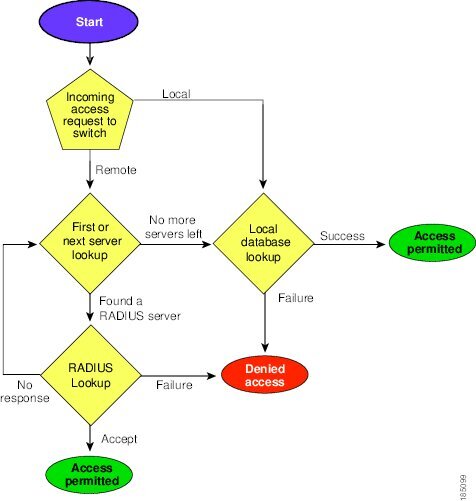
Authentication and Authorization Process for User Logins
The authentication and authorization process for user login is as occurs:
- When you log in to the required Cisco Nexus 3000 Series switch, you can use the Telnet, SSH, Fabric Manager or Device Manager, or console login options.
- When you have configured the AAA server groups using the server group authentication method, the Cisco Nexus 3000 Series switch sends an authentication request to the first AAA server in the group as follows: If the AAA server fails to respond, then the next AAA server is tried and so on until the remote server responds to the authentication request. If all AAA servers in the server group fail to respond, the servers in the next server group are tried. If all configured methods fail, the local database is used for authentication.
- If the Cisco Nexus 3000 Series switches successfully authenticate you through a remote AAA server, the following conditions apply: If the AAA server protocol is RADIUS, user roles specified in the cisco-av-pair attribute are downloaded with an authentication response. If the AAA server protocol is TACACS+, another request is sent to the same server to get the user roles specified as custom attributes for the shell.
- If your username and password are successfully authenticated locally, the Cisco Nexus 3000 Series switch logs you in and assigns you the roles configured in the local database.
The following figure shows a flowchart of the authentication and authorization process.
Note |
"No more server groups left" means that there is no response from any server in all server groups. "No more servers left" means that there is no response from any server within this server group. |
Prerequisites for Remote AAA
Remote AAA servers have the following prerequisites:
- At least one RADIUS or TACACS+ server must be IP reachable.
- The Cisco Nexus 3000 Series switch is configured as a client of the AAA servers.
- The preshared secret key is configured on the Cisco Nexus 3000 Series switch and on the remote AAA servers.
- The remote server responds to AAA requests from the Cisco Nexus 3000 Series switch.
Guidelines and Limitations for AAA
The Cisco Nexus 3000 Series switches do not support all numeric usernames, whether created with TACACS+ or RADIUS, or created locally. If an all numeric username exists on an AAA server and is entered during a login, the Cisco Nexus 3000 Series switch still logs in the user.
 Caution |
You should not create user accounts with usernames that are all numeric. |
Configuring AAA
Configuring Console Login Authentication Methods
The authentication methods include the following:
- Global pool of RADIUS servers
- Named subset of RADIUS or TACACS+ servers
- Local database on the Cisco Nexus 3000 Series switch
- Username only ( none )
The default method is local.
Note |
The group radius and group server-name forms of the aaa authentication command are used for a set of previously defined RADIUS servers. Use the radius server-host command to configure the host servers. Use the aaa group server radius command to create a named group of servers. |
Before you configure console login authentication methods, configure RADIUS or TACACS+ server groups as needed.
The following example shows how to configure authentication methods for the console login:
switch# configure terminal
switch(config)# aaa authentication login console group radius
switch(config)# exit
switch# show aaa authentication
switch# copy running-config startup-config
Configuring Default Login Authentication Methods
The default method is local.
Before you configure default login authentication methods, configure RADIUS or TACACS+ server groups as needed. To configure default login authentication methods, perform this task:
Enabling Login Authentication Failure Messages
When you log in, the login is processed by the local user database if the remote AAA servers do not respond. If you have enabled the displaying of login failure messages, the following message is displayed:
Remote AAA servers unreachable; local authentication done.
Remote AAA servers unreachable; local authentication failed.
Configuring AAA Command Authorization
When a TACACS+ server authorization method is configured, you can authorize every command that a user executes with the TACACS+ server which includes all EXEC mode commands and all configuration mode commands.
The authorization methods include the following:
The default method is Local.
Note |
There is no authorization on the console session. |
You must enable TACACS+ before configuring AAA command authorization.
The following example shows how to authorize EXEC mode commands with TACACS+ server group tac1:
switch# aaa authorization commands default group tac1
The following example shows how to authorize configuration mode commands with TACACS+ server group tac1:
switch(config)# aaa authorization config-commands default group tac1
The following example shows how to authorize configuration mode commands with TACACS+ server group tac1:
- If the server is reachable, the command is allowed or not allowed based on the server response.
- If there is an error reaching the server, the command is authorized based on the user's local role.
switch(config)# aaa authorization config-commands default group tac1 local
The followng example shows how to authorize configuration mode commands with TACACS+ server group tac1:
- If the server is reachable, the command is allowed or not allowed based on the server response.
- If there is an error reaching the server, allow the command regardless of the local role.
switch# aaa authorization commands default group tac1 none
The following example shows how to authorize EXEC mode commands regardless of the local role:
switch# aaa authorization commands default none
The following example shows how to authorize EXEC mode commands using the local role for authorization:
switch# aaa authorization commands default local
Enabling MSCHAP Authentication
Microsoft Challenge Handshake Authentication Protocol (MSCHAP) is the Microsoft version of CHAP. You can use MSCHAP for user logins to a Cisco Nexus 3000 Series switch through a remote authentication server (RADIUS or TACACS+).
By default, the Cisco Nexus 3000 Series switch uses Password Authentication Protocol (PAP) authentication between the switch and the remote server. If you enable MSCHAP, you must configure your RADIUS server to recognize the MSCHAP vendor-specific attributes (VSAs).
The following table describes the RADIUS VSAs required for MSCHAP.
| Vendor-ID Number |
Vendor-Type Number |
VSA |
Description |
|---|---|---|---|
| 311 |
11 |
MSCHAP-Challenge |
Contains the challenge sent by an AAA server to an MSCHAP user. It can be used in both Access-Request and Access-Challenge packets. |
| 211 |
11 |
MSCHAP-Response |
Contains the response value provided by an MSCHAP user in response to the challenge. It is only used in Access-Request packets. |
Configuring AAA Accounting Default Methods
The Cisco Nexus 3000 Series switch supports TACACS+ and RADIUS methods for accounting. The switches report user activity to TACACS+ or RADIUS security servers in the form of accounting records. Each accounting record contains accounting attribute-value (AV) pairs and is stored on the AAA server.
When you activate AAA accounting, the Cisco Nexus 3000 Series switch reports these attributes as accounting records, which are then stored in an accounting log on the security server.
You can create default method lists defining specific accounting methods, which include the following:.
- RADIUS server group—Uses the global pool of RADIUS servers for accounting.
- Specified server group—Uses a specified RADIUS or TACACS+ server group for accounting.
- Local—Uses the local username or password database for accounting.
Note |
If you have configured server groups and the server groups do not respond, by default, the local database is used for authentication. |
Before you configure AAA accounting default methods, configure RADIUS or TACACS+ server groups as needed.
Using AAA Server VSAs
VSAs
You can use vendor-specific attributes (VSAs) to specify the Cisco Nexus 3000 Series user roles and SNMPv3 parameters on AAA servers.
The Internet Engineering Task Force (IETF) draft standard specifies a method for communicating VSAs between the network access server and the RADIUS server. The IETF uses attribute 26. VSAs allow vendors to support their own extended attributes that are not suitable for general use. The Cisco RADIUS implementation supports one vendor-specific option using the format recommended in the specification. The Cisco vendor ID is 9, and the supported option is vendor type 1, which is named cisco-av-pair. The value is a string with the following format:
protocol : attribute seperator value *
The protocol is a Cisco attribute for a particular type of authorization, separator is an equal sign (=) for mandatory attributes, and an asterisk (* ) indicates optional attributes.
When you use RADIUS servers for authentication on a Cisco Nexus 3000 Series switch, the RADIUS protocol directs the RADIUS server to return user attributes, such as authorization information, with authentication results. This authorization information is specified through VSAs.
VSA Format
The following VSA protocol options are supported by the Cisco Nexus 3000 Series switches:
- Shell— Used in access-accept packets to provide user profile information.
- Accounting—Used in accounting-request packets. If a value contains any white spaces, put it within double quotation marks.
The following attributes are supported by the Cisco Nexus 3000 Series switches:
- roles—Lists all the roles assigned to the user. The value field is a string that stores the list of group names delimited by white space.
- accountinginfo—Stores additional accounting information in addition to the attributes covered by a standard RADIUS accounting protocol. This attribute is sent only in the VSA portion of the Account-Request frames from the RADIUS client on the switch, and it can only be used with the accounting protocol-related PDUs.
Specifying Switch User Roles and SNMPv3 Parameters on AAA Servers
You can use the VSA cisco-av-pair on AAA servers to specify user role mapping for the Cisco Nexus 3000 Series switch using this format:
shell:roles="roleA roleB …"
If you do not specify the role option in the cisco-av-pair attribute, the default user role is network-operator.
Note |
For information on Cisco Unified Wireless Network TACACS+ configurations and to change the user roles, see Cisco Unified Wireless Network TACACS+ Configuration. |
You can also specify your SNMPv3 authentication and privacy protocol attributes as follows:
shell:roles="roleA roleB..." snmpv3:auth=SHA priv=AES-128
The SNMPv3 authentication protocol options are SHA and MD5. The privacy protocol options are AES-128 and DES. If you do not specify these options in the cisco-av-pair attribute, MD5 and DES are the default authentication protocols.
For additional information, see the Configuring User Accounts and RBAC chapter in the Cisco Nexus 3000 Series NX-OS System Management Configuration Guide.
Monitoring and Clearing the Local AAA Accounting Log
The Cisco Nexus 3000 Series switch maintains a local log for the AAA accounting activity.
Verifying the AAA Configuration
To display AAA configuration information, perform one of the following tasks:
Configuration Examples for AAA
The following example shows how to configure AAA:
switch(config)# aaa authentication login default group radius
switch(config)# aaa authentication login console group radius
switch(config)# aaa accounting default group radius
Default AAA Settings
The following table lists the default settings for AAA parameters.
| Parameters |
Default |
|---|---|
| Console authentication method |
local |
| Default authentication method |
local |
| Login authentication failure messages |
Disabled |
| MSCHAP authentication |
Disabled |
| Default accounting method |
local |
| Accounting log display length |
250 KB |
 Feedback