- Preface
- New and Changed Information for this Release
- Overview
- Configuring Authentication, Authorization, and Accounting
- Configuring RADIUS
- Configuring TACACS+
- Configuring SSH and Telnet
- Configuring Access Control Lists
- Configuring DHCP Snooping
- Configuring Dynamic ARP Inspection
- Configuring Unicast RPF
- Configuring Control Plane Policing
- Index
- Configuring RADIUS
- Information About RADIUS
- Prerequisites for RADIUS
- Guidelines and Limitations for RADIUS
- Configuring RADIUS Servers
- Configuring RADIUS Server Hosts
- Configuring RADIUS Global Preshared Keys
- Configuring RADIUS Server Preshared Keys
- Configuring RADIUS Server Groups
- Configuring the Global Source Interface for RADIUS Server Groups
- Allowing Users to Specify a RADIUS Server at Login
- Configuring the Global RADIUS Transmission Retry Count and Timeout Interval
- Configuring the RADIUS Transmission Retry Count and Timeout Interval for a Server
- Configuring Accounting and Authentication Attributes for RADIUS Servers
- Configuring Periodic RADIUS Server Monitoring
- Configuring the Dead-Time Interval
- Manually Monitoring RADIUS Servers or Groups
- Verifying the RADIUS Configuration
- Monitoring RADIUS Server Statistics
- Clearing RADIUS Server Statistics
- Configuration Examples for RADIUS
- Default Settings for RADIUS
- Feature History for RADIUS
Configuring RADIUS
This chapter contains the following sections:
Configuring RADIUS
Information About RADIUS
The Remote Access Dial-In User Service (RADIUS) distributed client/server system allows you to secure networks against unauthorized access. In the Cisco implementation, RADIUS clients run on Cisco Nexus 3000 Series switches and send authentication and accounting requests to a central RADIUS server that contains all user authentication and network service access information.
- RADIUS Network Environments
- Information About RADIUS Operations
- RADIUS Server Monitoring
- Vendor-Specific Attributes
RADIUS Network Environments
RADIUS can be implemented in a variety of network environments that require high levels of security while maintaining network access for remote users.
You can use RADIUS in the following network environments that require access security:
- Networks with multiple-vendor network devices, each supporting RADIUS. For example, network devices from several vendors can use a single RADIUS server-based security database.
- Networks already using RADIUS. You can add a Cisco Nexus 3000 Series switch with RADIUS to the network. This action might be the first step when you make a transition to an AAA server.
- Networks that require resource accounting. You can use RADIUS accounting independent of RADIUS authentication or authorization. The RADIUS accounting functions allow data to be sent at the start and end of services, indicating the amount of resources (such as time, packets, bytes, and so on) used during the session. An Internet service provider (ISP) might use a freeware-based version of the RADIUS access control and accounting software to meet special security and billing needs.
- Networks that support authentication profiles. Using the RADIUS server in your network, you can configure AAA authentication and set up per-user profiles. Per-user profiles enable the Nexus 5000 Series switch to manage ports using their existing RADIUS solutions and to efficiently manage shared resources to offer different service-level agreements.
Information About RADIUS Operations
When a user attempts to log in and authenticate to a Cisco Nexus 3000 Series switch using RADIUS, the following process occurs:
- The user is prompted for and enters a username and password.
- The username and encrypted password are sent over the network to the RADIUS server.
-
The user receives one of the following responses from the RADIUS server:
- ACCEPT—The user is authenticated.
- REJECT—The user is not authenticated and is prompted to reenter the username and password, or access is denied.
- CHALLENGE—A challenge is issued by the RADIUS server. The challenge collects additional data from the user.
- CHANGE PASSWORD—A request is issued by the RADIUS server, asking the user to select a new password.
The ACCEPT or REJECT response is bundled with additional data that is used for EXEC or network authorization. You must first complete RADIUS authentication before using RADIUS authorization. The additional data included with the ACCEPT or REJECT packets consists of the following:
- Services that the user can access, including Telnet, rlogin, or local-area transport (LAT) connections, and Point-to-Point Protocol (PPP), Serial Line Internet Protocol (SLIP), or EXEC services.
- Connection parameters, including the host or client IPv4 or IPv6 address, access list, and user timeouts.
RADIUS Server Monitoring
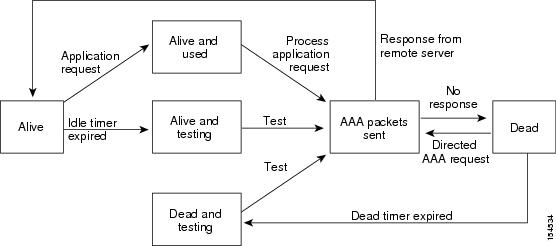
An unresponsive RADIUS server can cause delay in processing of AAA requests. You can configure the switch to periodically monitor a RADIUS server to check whether it is responding (or alive) to save time in processing AAA requests. The switch marks unresponsive RADIUS servers as dead and does not send AAA requests to any dead RADIUS servers. The switch periodically monitors the dead RADIUS servers and brings them to the alive state once they respond. This process verifies that a RADIUS server is in a working state before real AAA requests are sent to the server. Whenever a RADIUS server changes to the dead or alive state, a Simple Network Management Protocol (SNMP) trap is generated and the switch displays an error message that a failure is taking place.
The following figure shows the different RADIUS server states:
 Note |
The monitoring interval for alive servers and dead servers are different and can be configured by the user. The RADIUS server monitoring is performed by sending a test authentication request to the RADIUS server. |
Vendor-Specific Attributes
The Internet Engineering Task Force (IETF) draft standard specifies a method for communicating vendor-specific attributes (VSAs) between the network access server and the RADIUS server. The IETF uses attribute 26. VSAs allow vendors to support their own extended attributes that are not suitable for general use. The Cisco RADIUS implementation supports one vendor-specific option using the format recommended in the specification. The Cisco vendor ID is 9, and the supported option is vendor type 1, which is named cisco-av-pair. The value is a string with the following format:
protocol : attribute separator value *
The protocol is a Cisco attribute for a particular type of authorization, the separator is an equal sign (=) for mandatory attributes, and an asterisk (*) indicates optional attributes.
When you use RADIUS servers for authentication on a Cisco Nexus 3000 Series switch, the RADIUS protocol directs the RADIUS server to return user attributes, such as authorization information, with authentication results. This authorization information is specified through VSAs.
The following VSA protocol options are supported by the Cisco Nexus 3000 Series switch:
- Shell— Used in access-accept packets to provide user profile information.
- Accounting— Used in accounting-request packets. If a value contains any white spaces, you should enclose the value within double quotation marks.
Cisco Nexus 3000 Series switches support the following attributes:
- roles—Lists all the roles to which the user belongs. The value field is a string that lists the role names delimited by white spaces.
- accountinginfo—Stores accounting information in addition to the attributes covered by a standard RADIUS accounting protocol. This attribute is sent only in the VSA portion of the Account-Request frames from the RADIUS client on the switch. It can be used only with the accounting protocol data units (PDUs).
Prerequisites for RADIUS
RADIUS has the following prerequisites:
Guidelines and Limitations for RADIUS
RADIUS has the following configuration guidelines and limitations:
Configuring RADIUS Servers
This section describes how to configure RADIUS servers.
Configuring RADIUS Server Hosts
You must configure the IPv4 or IPv6 address or the hostname for each RADIUS server that you want to use for authentication. All RADIUS server hosts are added to the default RADIUS server group. You can configure up to 64 RADIUS servers.
switch# configure terminal
switch(config)# radius-server host 10.10.1.1
switch(config)# exit
switch# copy running-config startup-config
Configuring RADIUS Global Preshared Keys
You can configure preshared keys at the global level for all servers used by the Cisco Nexus 3000 Series device. A preshared key is a shared secret text string between the switch and the RADIUS server hosts.
Obtain the preshared key values for the remote RADIUS servers
This example shows how to configure preshared keys at the global level for all servers used by the device:
switch# configure terminal
switch(config)# radius-server key 0 QsEfThUkO
switch(config)# exit
switch# copy running-config startup-config
Configuring RADIUS Server Preshared Keys
A preshared key is a shared secret text string between the Cisco Nexus 3000 Series device and the RADIUS server host.
Obtain the preshared key values for the remote RADIUS servers.
| Command or Action | Purpose | |||
|---|---|---|---|---|
| Step 1 | switch# configure terminal | Enters global configuration mode. |
||
| Step 2 | switch(config)# radius-server host {ipv4-address | ipv6-address | host-name} key [0 | 7] key-value | Specifies a preshared key for a specific RADIUS server. You can specify a clear text ( 0 ) or encrypted ( 7 ) preshared key. The default format is clear text. The maximum length is 63 characters. This preshared key is used instead of the global preshared key. |
||
| Step 3 | switch(config)# exit | Exits configuration mode. |
||
| Step 4 | switch# show radius-server | (Optional) Displays the RADIUS server configuration.
|
||
| Step 5 | switch# copy running-config startup-config | (Optional) Saves the change persistently through reboots and restarts by copying the running configuration to the startup configuration. |
switch# configure terminal
switch(config)# radius-server host 10.10.1.1 key 0 PlIjUhYg
switch(config)# exit
switch# show radius-server
switch# copy running-config startup-config
Configuring RADIUS Server Groups
You can specify one or more remote AAA servers for authentication using server groups. All members of a group must belong to the RADIUS protocol. The servers are tried in the same order in which you configure them.
| Command or Action | Purpose | |||
|---|---|---|---|---|
| Step 1 | switch# configure terminal | Enters global configuration mode. |
||
| Step 2 | switch (config)# aaa group server radius group-name | Creates a RADIUS server group and enters the RADIUS server group configuration submode for that group. The group-name argument is a case-sensitive, alphanumeric string with a maximum of 127 characters. |
||
| Step 3 | switch (config-radius)# server {ipv4-address | ipv6-address | server-name} |
Configures the RADIUS server as a member of the RADIUS server group. If the specified RADIUS server is not found, configure it using the radius-server host command and retry this command. |
||
| Step 4 | switch (config-radius)# deadtime minutes | (Optional) Configures the monitoring dead time. The default is 0 minutes. The range is from 1 through 1440.
|
||
| Step 5 | switch(config-radius)# source-interface interface |
(Optional) Assigns a source interface for a specific RADIUS server group. The supported interface types are management and VLAN.
|
||
| Step 6 | switch(config-radius)# exit | Exits configuration mode. |
||
| Step 7 | switch(config)# show radius-server group [group-name] |
(Optional) Displays the RADIUS server group configuration. |
||
| Step 8 | switch(config)# copy running-config startup-config | (Optional) Saves the change persistently through reboots and restarts by copying the running configuration to the startup configuration. |
The following example shows how to configure a RADIUS server group:
switch# configure terminal
switch (config)# aaa group server radius RadServer
switch (config-radius)# server 10.10.1.1
switch (config-radius)# deadtime 30
switch (config-radius)# use-vrf management
switch (config-radius)# exit
switch (config)# show radius-server group
switch (config)# copy running-config startup-config
Apply the RADIUS server groups to an AAA service.
Configuring the Global Source Interface for RADIUS Server Groups
You can configure a global source interface for RADIUS server groups to use when accessing RADIUS servers. You can also configure a different source interface for a specific RADIUS server group.
| Command or Action | Purpose | |
|---|---|---|
| Step 1 | switch# configure terminal | Enters global configuration mode. |
| Step 2 | switch(config)# ip radius source-interface interface | Configures the global source interface for all RADIUS server groups configured on the device. The source interface can be the management or the VLAN interface. |
| Step 3 | switch(config)# exit | Exits configuration mode. |
| Step 4 | switch# show radius-server | (Optional) Displays the RADIUS server configuration information. |
| Step 5 | switch# copy running-config startup config | (Optional) Copies the running configuration to the startup configuration. |
This example shows how to configure the mgmt 0 interface as the global source interface for RADIUS server groups:
switch# configure terminal
switch(config)# ip radius source-interface mgmt 0
switch(config)# exit
switch# copy running-config startup-config
Allowing Users to Specify a RADIUS Server at Login
You can allow users to specify a RADIUS server at login.
| Command or Action | Purpose | |
|---|---|---|
| Step 1 | switch# configure terminal |
Enters configuration mode. |
| Step 2 | switch(config)# radius-server directed-request |
Allows users to specify a RADIUS server to send the authentication request when logging in. The default is disabled. |
| Step 3 | switch(config)# exit |
Exits configuration mode. |
| Step 4 | switch# show radius-server directed-request |
(Optional) Displays the directed request configuration. |
| Step 5 | switch# copy running-config startup-config |
(Optional) Copies the running configuration to the startup configuration. |
This example shows how to allow users to select a RADIUS server when logging in to a network:
switch# configure terminal
switch(config)# radius-server directed-request
switch# exit
switch# copy running-config startup-config
Configuring the Global RADIUS Transmission Retry Count and Timeout Interval
You can configure a global retransmission retry count and timeout interval for all RADIUS servers. By default, a switch retries transmission to a RADIUS server only once before reverting to local authentication. You can increase this number up to a maximum of five retries per server. The timeout interval determines how long the Cisco Nexus 3000 Series switch waits for responses from RADIUS servers before declaring a timeout failure.
| Command or Action | Purpose | |
|---|---|---|
| Step 1 | switch# configure terminal |
Enters configuration mode. |
| Step 2 | switch(config)# radius-server retransmit count |
Specifies the retransmission count for all RADIUS servers. The default retransmission count is 1 and the range is from 0 to 5. |
| Step 3 | switch(config)# radius-server timeout seconds |
Specifies the transmission timeout interval for RADIUS servers. The default timeout interval is 5 seconds and the range is from 1 to 60 seconds. |
| Step 4 | switch(config)# exit |
Exits configuration mode. |
| Step 5 | switch# show radius-server |
(Optional) Displays the RADIUS server configuration. |
| Step 6 | switch# copy running-config startup-config |
(Optional) Copies the running configuration to the startup configuration. |
This example shows how to set the retry count to 3 and the transmission timeout interval to 5 seconds for RADIUS servers:
switch# configure terminal
switch(config)# radius-server retransmit 3
switch(config)# radius-server timeout 5
switch(config)# exit
switch# copy running-config startup-config
Configuring the RADIUS Transmission Retry Count and Timeout Interval for a Server
By default, a Cisco Nexus 3000 Series switch retries transmission to a RADIUS server only once before reverting to local authentication. You can increase this number up to a maximum of five retries per server. You can also set a timeout interval that the switch waits for responses from RADIUS servers before declaring a timeout failure.
| Command or Action | Purpose | |||
|---|---|---|---|---|
| Step 1 | switch# configure terminal | Enters global configuration mode. |
||
| Step 2 | switch(config)# radius-server host {ipv4-address | ipv6-address | host-name} retransmit count | Specifies the retransmission count for a specific server. The default is the global value.
|
||
| Step 3 | switch(config)#radius-server host {ipv4-address | ipv6-address | host-name} timeout seconds | Specifies the transmission timeout interval for a specific server. The default is the global value.
|
||
| Step 4 | switch(config)# exit | Exits configuration mode. |
||
| Step 5 | switch# show radius-server |
(Optional) Displays the RADIUS server configuration. |
||
| Step 6 | switch# copy running-config startup-config | (Optional) Saves the change persistently through reboots and restarts by copying the running configuration to the startup configuration. |
This example shows how to set the RADIUS transmission retry count to 3 and the timeout interval to 10 seconds on RADIUS host server server1:
switch# configure terminal
switch(config)# radius-server host server1 retransmit 3
switch(config)# radius-server host server1 timeout 10
switch(config)# exit
switch# copy running-config startup-config
Configuring Accounting and Authentication Attributes for RADIUS Servers
You can specify that a RADIUS server is to be used only for accounting purposes or only for authentication purposes. By default, RADIUS servers are used for both accounting and authentication. You can also specify the destination UDP port numbers where RADIUS accounting and authentication messages should be sent.
| Command or Action | Purpose | |
|---|---|---|
| Step 1 | switch# configure terminal | Enters global configuration mode. |
| Step 2 | switch(config)# radius-server host {ipv4-address | ipv6-address | host-name} acct-port udp-port | (Optional) Specifies a UDP port to use for RADIUS accounting messages. The default UDP port is 1812. The range is from 0 to 65535. |
| Step 3 | switch(config)# radius-server host {ipv4-address | ipv6-address | host-name} accounting | (Optional) Specifies that the specified RADIUS server is to be used only for accounting purposes. The default is both accounting and authentication. |
| Step 4 | switch(config)# radius-server host {ipv4-address | ipv6-address | host-name} auth-port udp-port | (Optional) Specifies a UDP port to use for RADIUS authentication messages. The default UDP port is 1812. The range is from 0 to 65535. |
| Step 5 | switch(config)# radius-server host {ipv4-address | ipv6-address | host-name} authentication | (Optional) Specifies that the specified RADIUS server only be used for authentication purposes. The default is both accounting and authentication. |
| Step 6 | switch(config)# exit | Exits configuration mode. |
| Step 7 | switch(config)# show radius-server | (Optional) Displays the RADIUS server configuration. |
| Step 8 | switch(config)# copy running-config startup-config | Saves the change persistently through reboots and restarts by copying the running configuration to the startup configuration. |
This example shows how to configure accounting and authentication attributes for a RADIUS server:
switch# configure terminal
switch(config)# radius-server host 10.10.1.1 acct-port 2004
switch(config)# radius-server host 10.10.1.1 accounting
switch(config)# radius-server host 10.10.2.2 auth-port 2005
switch(config)# radius-server host 10.10.2.2 authentication
switch # exit
switch # copy running-config startup-config
switch #
Configuring Periodic RADIUS Server Monitoring
You can monitor the availability of RADIUS servers. These parameters include the username and password to use for the server and an idle timer. The idle timer specifies the interval during which a RADIUS server receives no requests before the switch sends out a test packet. You can configure this option to test servers periodically.
Note |
For security reasons, we recommend that you do not configure a test username that is the same as an existing user in the RADIUS database. |
The test idle timer specifies the interval during which a RADIUS server receives no requests before the switch sends out a test packet.
The default idle timer value is 0 minutes. When the idle time interval is 0 minutes, the switch does not perform periodic RADIUS server monitoring.
| Command or Action | Purpose | |||
|---|---|---|---|---|
| Step 1 | switch# configure terminal | Enters global configuration mode. |
||
| Step 2 | switch(config)# radius-server host {ipv4-address | ipv6-address | host-name} test {idle-time minutes | password password [idle-time minutes] | username name [password password [idle-time minutes]]} | Specifies parameters for server monitoring. The default username is test and the default password is test. The default value for the idle timer is 0 minutes. The valid range is from 0 to 1440 minutes.
|
||
| Step 3 | switch(config)# radius-server deadtime minutes | Specifies the number of minutes before the switch checks a RADIUS server that was previously unresponsive. The default value is 0 minutes. The valid range is 1 to 1440 minutes. |
||
| Step 4 | switch(config)# exit | Exits configuration mode. |
||
| Step 5 | switch# show radius-server | (Optional) Displays the RADIUS server configuration. |
||
| Step 6 | switch# copy running-config startup-config | (Optional) Saves the change persistently through reboots and restarts by copying the running configuration to the startup configuration. |
This example shows how to configure RADIUS server host 10.10.1.1 with a username (user1) and password (Ur2Gd2BH) and with an idle timer of 3 minutes and a deadtime of 5 minutes:
switch# configure terminal
switch(config)# radius-server host 10.10.1.1 test username user1 password Ur2Gd2BH idle-time 3
switch(config)# radius-server deadtime 5
switch(config)# exit
switch# copy running-config startup-config
Configuring the Dead-Time Interval
You can configure the dead-time interval for all RADIUS servers. The dead-time interval specifies the time that the Cisco Nexus 3000 Series switch waits after declaring a RADIUS server is dead, before sending out a test packet to determine if the server is now alive. The default value is 0 minutes.
Note |
When the dead-time interval is 0 minutes, RADIUS servers are not marked as dead even if they are not responding. You can configure the dead-time interval for a RADIUS server group. |
| Command or Action | Purpose | |
|---|---|---|
| Step 1 | switch# configure terminal |
Enters configuration mode. |
| Step 2 | switch(config)# radius-server deadtime |
Configures the dead-time interval. The default value is 0 minutes. The range is from 1 to 1440 minutes. |
| Step 3 | switch(config)# exit |
Exits configuration mode. |
| Step 4 | switch# show radius-server |
(Optional) Displays the RADIUS server configuration. |
| Step 5 | switch# copy running-config startup-config |
(Optional) Copies the running configuration to the startup configuration. |
This example shows how to configure a deadtime of 5 minutes for a radius server:
switch# configure terminal
switch(config)# radius-server deadtime 5
switch(config# exit
switch# copy running-config startup-config
Manually Monitoring RADIUS Servers or Groups
| Command or Action | Purpose | |
|---|---|---|
| Step 1 | switch# test aaa server radius {ipv4-address | ipv6-address | server-name} [vrf vrf-name] username password | Sends a test message to a RADIUS server to confirm availability. |
| Step 2 | switch# test aaa group group-name username password | Sends a test message to a RADIUS server group to confirm availability. |
This example shows how to send a test message to the RADIUS server and server group to confirm availability:
switch# test aaa server radius 10.10.1.1 user 1 Ur2Gd2BH
switch# test aaa group RadGroup user2 As3He3CI
Verifying the RADIUS Configuration
| Command or Action | Purpose | |
|---|---|---|
| Step 1 | switch# show running-config radius [all] | Displays the RADIUS configuration in the running configuration. |
| Step 2 | switch# show startup-config radius | Displays the RADIUS configuration in the startup configuration. |
| Step 3 | switch# show radius-server [server-name | ipv4-address] [directed-request | groups | sorted | statistics] | Displays all configured RADIUS server parameters. |
Monitoring RADIUS Server Statistics
| Command or Action | Purpose | |
|---|---|---|
| Step 1 | switch# show radius-server statistics {hostname | ipv4-address | ipv6-address} | Displays the RADIUS statistics. |
Clearing RADIUS Server Statistics
You can display the statistics that the Cisco NX-OS device maintains for RADIUS server activity.
Configure RADIUS servers on the Cisco NX-OS device.
| Command or Action | Purpose | |
|---|---|---|
| Step 1 | switch# show radius-server statistics {hostname | ipv4-address | ipv6-address} | (Optional) Displays the RADIUS server statistics on the Cisco NX-OS device. |
| Step 2 | switch# clear radius-server statistics {hostname | ipv4-address | ipv6-address} | Clears the RADIUS server statistics. |
Configuration Examples for RADIUS
The following example shows how to configure RADIUS:
switch# configure terminal
switch(config)# radius-server key 7 "ToIkLhPpG"
switch(config)# radius-server host 10.10.1.1 key 7 "ShMoMhTl" authentication accounting
switch(config)# aaa group server radius RadServer
switch(config-radius)# server 10.10.1.1
switch(config-radius)# exit
switch(config-radius)# use-vrf management
Default Settings for RADIUS
The following table lists the default settings for RADIUS parameters.
| Parameters |
Default |
|---|---|
| Server roles |
Authentication and accounting |
| Dead timer interval |
0 minutes |
| Retransmission count |
1 |
| Retransmission timer interval |
5 seconds |
| Idle timer interval |
0 minutes |
| Periodic server monitoring username |
test |
| Periodic server monitoring password |
test |
Feature History for RADIUS
Feature Name |
Releases |
Feature Information |
|---|---|---|
| RADIUS | 5.0(3)U1(1) | This feature was introduced. |
| IPv6 | 5.0(3)U3(1) | IPv6 support was introduced. |
 Feedback