Overview of the Cisco OpenFlow Agent

About Cisco OpenFlow Agent

OpenFlow is an open standardized interface that allows a software-defined networking (SDN) controller to manage the forwarding plane of a network.

Cisco OpenFlow Agent provides better control over networks making them more open, programmable, and application-aware and supports the following specifications defined by the Open Networking Foundation (ONF) standards organization:

  • OpenFlow Switch Specification Version 1.0.1 (Wire Protocol 0x01) (referred to as OpenFlow 1.0)

  • OpenFlow Switch Specification Version 1.3.0 (Wire Protocol 0x04), referred to as OpenFlow 1.3

These specifications are based on the concept of an Ethernet switch, with an internal flow table and standardized interface to allow traffic flows on a device to be added or removed. OpenFlow 1.3 defines the communication channel between Cisco OpenFlow Agent and controllers.

A controller can be Cisco Open SDN Controller, or any controller compliant with OpenFlow 1.3.

In an OpenFlow network, Cisco OpenFlow Agent exists on the device and controllers exist on a server that is external to the device. Flow management and any network management are either part of a controller or accomplished through a controller. Flow management includes the addition, modification, or removal of flows, and the handling of OpenFlow error messages.

The following figure gives an overview of the OpenFlow network.
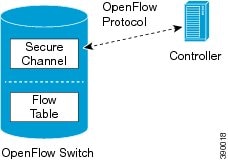
Figure 1. OpenFlow Overview


Cisco OpenFlow Agent Operation

Cisco OpenFlow Agent creates OpenFlow–based TCP/IP connections to controllers for a Cisco OpenFlow Agent logical switch. Cisco OpenFlow Agent creates databases for a configured logical switch, OpenFlow-enabled interfaces, and flows. The logical switch database contains all the information needed to connect to a controller. The interface database contains the list of OpenFlow-enabled interfaces associated with a logical switch, and the flow database contains the list of flows on a logical switch as well as for interface that is programmed into forwarded traffic.

OpenFlow Controller Operation

OpenFlow controller (referred to as controller) controls the switch and inserts flows with a subset of OpenFlow 1.3 and 1.0 match and action criteria through Cisco OpenFlow Agent logical switch. Cisco OpenFlow Agent rejects all OpenFlow messages with any other action.

OpenFlow Multiple Sub-Switch Operation

For more granular and distributed flow control, you can define multiple virtual subswitches, each with its own controller, its own unique VLAN range, and its own flow control configuration. The controller of a subswitch has configuration access only to the flows of that subswitch. VLANs associated with a subswitch cannot also be associated to another subswitch, and VLAN ranges cannot overlap between subswitches.

When you define one or more subswitches, a lower priority primary switch is implicitly created. A flow is evaluated for a match first on the subswitches and lastly on the primary switch if no previous match was found. There are no default flows (miss-action) for the subswitches.

Information About Cisco OpenFlow Agent

Prerequisites for Cisco OpenFlow Agent

Cisco OpenFlow Agent requires the following conditions:

  • A Cisco device that supports Cisco OpenFlow Agent.

    The Supported Platforms for Cisco OpenFlow Agent provides a table of OpenFlow support on Cisco Nexus 9000 and Nexus 3000 Series switches.

  • Cisco NX-OS software supports the Cisco OpenFlow Agent.

    The Cisco OpenFlow Agent was introduced in Cisco NX-OS Release 7.0(3)I5(1), replacing the Cisco Plug-in for OpenFlow used in previous releases. The Cisco Plug-in for OpenFlow, which runs as an application in a virtual services container, is no longer supported as of this release. When upgrading from a release earlier than Cisco NX-OS Release 7.0(3)I5(1) to Cisco NX-OS Release 7.0(3)I5(1) or a later release, you must deactivate and uninstall the Cisco Plug-in for OpenFlow application from the virtual services container using the procedure that is described in Uninstalling Cisco Plug-in for OpenFlow.

  • A Cisco Nexus 3000 platform switch must run in Cisco NX-OS 9000 software mode. On the Cisco Nexus 3000 Series switch, the Cisco NX-OS 9000 mode is activated using the CLI command system switch-mode n9k .

  • The OpenFlow feature is enabled on the Cisco Nexus switch using the CLI command feature openflow .

  • A controller is installed on a connected server.

    Table 1. Controller Support

    OpenFlow Version

    Supported Controllers

    OpenFlow 1.0

    Cisco Open SDN Controller or POX controller.

    OpenFlow 1.3

    Cisco Open SDN Controller, Ixia, OpenDaylight, or Ryu

Restrictions for Cisco OpenFlow Agent

  • Cisco OpenFlow Agent supports only a subset of OpenFlow 1.3 and OpenFlow 1.0 functions. For more information, see Feature Support.

  • You cannot configure more than one Cisco OpenFlow Agent logical switch. The logical switch ID has a value of 1. However, you can configure up to nine logical subswitches in addition to the primary switch.

  • OpenFlow hybrid model (ships-in-the-night) is supported. VLANs configured for Cisco OpenFlow Agent logical switch ports should not overlap with regular device interfaces.

  • You cannot configure a bridge domain, Virtual LANs, and virtual routing and forwarding (VRF) interfaces on an Cisco OpenFlow Agent logical switch. You can configure only Layer 2 physical interfaces or port-channel interfaces.

  • For Cisco Nexus 3000 Series switches, the total number of VLANs across all ports cannot exceed 32000. For example, if you have configured 512 VLANs per port, you cannot configure more than 62 ports (32000/512). If you have configured 4000 VLANs per port, you cannot configure more than 8 ports (32000/4000).

  • You cannot configure more than 512 VLANs in Per-VLAN Spanning Tree+ (PVST+) mode.

  • The Cisco OpenFlow Agent supports IPv4 and IPv6 flow matching, but not both simultaneously. The choice is configured in the TCAM configuration commands. IPv4 and IPv6 dual stack is not supported.

  • For IPv6 OpenFlow, you must explicitly carve the OpenFlow–IPv6 TCAM region.

  • ISSU from the previously supported Cisco Plug-in for OpenFlow to the Cisco OpenFlow Agent is not supported.

  • MIBs and XMLs are not supported

  • Reachability to controller via Switched Virtual Interface (SVI) is not supported.

  • The minimum idle timeout for flows must be (2 * statistics collection interval) + 1 second.

  • LACP port-channels are not supported for OpenFlow. Remove all OpenFlow related configurations before downgrading to an earlier release.

Feature Support

The following is a subset of OpenFlow 1.3 and OpenFlow 1.0 functions that are supported by Cisco OpenFlow Agent.

Supported Feature

Additional Notes

The OpenFlow hybrid (ships-in-night) model is supported using the OpenFlow packet format

OpenFlow-hybrid models where traffic can flow between Cisco OpenFlow Agent ports and regular interfaces (integrated) are not supported. Both types of ports can transmit and receive packets.

Note


VLANs must be configured such that the VLANs on the Cisco OpenFlow Agent do not overlap with those on the regular device interfaces.

Configuration of port-channel and physical interfaces as Cisco OpenFlow Agent logical switch ports

  • Bridge domain, Virtual LANs and Virtual Routing and Forwarding (VRF) interfaces are not supported.

  • Only L2 interfaces can be Cisco OpenFlow Agent Logical switch ports.

Configuration of VLANs for each port of the Cisco OpenFlow Agent logical switch

Total number of VLANs across all ports cannot exceed 512.

Maximum VLAN range supported is 4000. You can configure 8 such ports on the Cisco OpenFlow Agent device.

Recommended VLAN range supported is 512. You can configure 62 such ports on the Cisco OpenFlow Agent device.

VLAN range greater than 512 is not supported in Per-VLAN Spanning Tree+ (PVST+) mode.

Pipelines for Cisco OpenFlow Agent Logical Switch

  • Pipelines are mandatory for the logical switch.

  • The logical switch supports the following pipelines:

    • Pipeline 201 supports the L3 ACL forwarding table.

    • Pipeline 202 supports an L3 ACL forwarding table and an L2 MAC forwarding table. Mandatory matches and actions in both tables must be specified in all configured flows.

    • Pipeline 205 supports MAC and MAC-IP route tables.

L3 ACL Forwarding Table (Match Criteria)

The following match criteria are supported:
  • Ethertype

  • Ethernet MAC destination (Double-wide TCAM required)

  • Ethernet MAC source (Double-wide TCAM required)

  • VLAN ID (for IPv4 packets only)

  • VLAN priority (Supported for the Ethertype value 0x0800 (IP) only)

  • IPv4 source address (Supported for the Ethertype value 0x0800 (IP) only)

  • IPv4 destination address (Supported for the Ethertype value 0x0800 (IP) only)

  • IPv6 source address (Supported for the Ethertype value 0x86DD (IP) only)

  • IPv6 destination address (Supported for the Ethertype value 0x86DD (IP) only)

  • IP DSCP (Supported for the Ethertype values 0x0800 or 0x86DD (IP) only)

  • IP protocol (Supported for the Ethertype values 0x0800 or 0x86DD (IP) only)

  • Layer 4 source port (Supported for the Ethertype values 0x0800 or 0x86DD (IP) only)

  • Layer 4 destination port (Supported for the Ethertype values 0x0800 or 0x86DD (IP) only)

L3 ACL Forwarding Table (Action Criteria)

The following action criteria are supported:

  • Output to multiple ports

  • Output to a specified interface

  • Output to controller (OpenFlow Packet-In message)

  • Rewrite source MAC address (SMAC)

    • Supported for the Ethertype values 0x0800 or 0x86DD (IP) only

  • Rewrite destination MAC address (DMAC)

    • Supported for the Ethertype values 0x0800 or 0x86DD (IP) only

  • Rewrite VLAN ID

    • Supported for the Ethertype values 0x0800 or 0x86DD (IP) only

  • Strip VLAN (Supported for the Ethertype values 0x0800 or 0x86DD (IP) only)

  • Drop

Note

 
Rewrite DMAC and Rewrite SMAC actions must be specified together.

L2 MAC Forwarding Table

Match Criteria:

  • Destination MAC address (mandatory)

  • VLAN ID (mandatory)

Action Criteria:

  • Output to multiple ports

  • Drop

Default Forwarding Rule

All packets that cannot be matched to flows are dropped by default. You can configure sending unmatched packets to the controller.

OpenFlow 1.3 message types

The “modify state” and “queue config” message types are not supported. All other message types are supported.

Connection to up to eight controllers

Transport Layer Security (TLS) is supported for the connection to the controller.

Multiple actions

If multiple actions are associated with a flow, they are processed in the order specified. The output action should be the last action in the action list. Any action after the output action is not supported, and can cause the flow to fail and return an error to the controller.

Flows defined on the controller must follow the following guidelines :

  • The flow can have only up to 16 output actions.

  • The flow should have the output action at the end of all actions.

  • The flow should not have multiple rewrite actions that override one another. For example, strip VLAN after set VLAN or multiple set VLANs.

  • The flow should not have an output–to–controller action in combination with other output–to–port actions or with VLAN–rewrite actions.

  • Flows with unsupported actions will be rejected.

Supported counters

Per Table—Active Entries, Packet Lookups, Packet Matches.

Per Flow—Received Packets.

Per Port—Received or Transmitted packets, bytes, drops and errors.