- Preface
- New and Changed Information
- Overview
- Importing a Device Package
- Defining a Logical Device
- Configuring Connectivity to Devices
- Selecting a Layer 4 to Layer 7 Device to Render a Graph
- Configuring a Service Graph
- Configuring Route Peering
- Configuring Direct Server Return
- Configuring the Device and Chassis Manager
- Configuring Unmanaged Mode
- Configuration Parameters
- Using a Service Graph Template
- Monitoring a Service Graph
- Configuring Administrator Roles for Managing a Service Configuration
- Developing Automation
- Using the GUI
Configuring
Connectivity to Devices
- About In-Band Management for Devices
- Configuring In-Band Management for Devices Using the GUI
- Troubleshooting In-Band Management for Devices Using the GUI
About In-Band Management for Devices
The Cisco Application Policy Infrastructure Controller (Cisco APIC) provides a mechanism for managing devices within each tenant in-band through the Cisco Application Centric Infrastructure (ACI) fabric. This configuration option provides device management connectivity without requiring the management IP addresses used on devices to be routable within the infra tenant and mgmt tenant.
 Note | This feature is separate from in-band management for the Cisco APICs and fabric nodes. In-band management for the fabric is not required for you to manage devices in-band. |
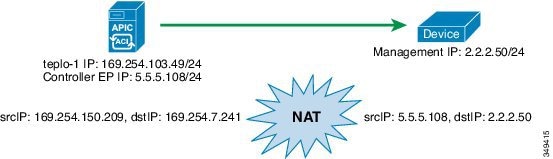
In-band management communication between the Cisco APICs and devices is enabled by configuring unique IP addresses on the Cisco APICs. The IP addresses are known as controller endpoints. These IP addresses are not actually configured on the Cisco APIC interfaces, but instead are used in conjunction with Network Address Translation (NAT) to establish management communication with the devices. The NAT addresses that are used by the Cisco APICs are automatically selected by the Cisco APIC and fall within the 169.254.0.0/16 address range.
In addition, each device management IP address is presented to the Cisco APICs as a translated IP address. This translated address is referred to as the mapped host address.
The following figure depicts the address translation between the Cisco APIC and the devices:
Configuring In-Band Management for Devices Using the GUI
You can configure in-band management for devices using the GUI.
Troubleshooting In-Band Management for Devices Using the GUI
If you chose an existing endpoint group (EPG) as the management EPG for the devices, you must manually add the management IP address pools and controller management policies. You can add these using the GUI.
 Feedback