- Preface
- Overview
- Prerequisites
- Importing a Device Package
- Configuring a Device (Logical Device)
- Configuring Connectivity to Devices
- Using a Device
- Configuring a Service Graph
- Configuration Parameters
- Using a Service Graph Template
- Monitoring a Service Graph
- Configuring Administrator Roles for Managing a Service Configuration
- Developing Automation
- Using the GUI Wizards
- Configuration Parameters Inside the Device Package Specification
- Configuration Parameters Inside An Abstract Function Profile
- Configuration Parameters Inside an Abstract Function Node in a Service Graph
- Configuration Parameters Inside Various Configuration MOs
- Parameter Resolution
- Looking Up an MO During Parameter Resolution
- About Role-Based Access Control Rule Enhancements
Configuration
Parameters
- Configuration Parameters Inside the Device Package Specification
- Configuration Parameters Inside An Abstract Function Profile
- Configuration Parameters Inside an Abstract Function Node in a Service Graph
- Configuration Parameters Inside Various Configuration MOs
- Parameter Resolution
- Looking Up an MO During Parameter Resolution
- About Role-Based Access Control Rule Enhancements
Configuration Parameters Inside the Device Package Specification
A device package contains an XML file that describes the specification for the service device. This specification includes device information as well as various functions provided by the service device.
As part of the device specification, this file must contain the declaration for the configuration needed by the service device. This configuration is needed to configure various functions that are provided by the service device during graph instantiation.
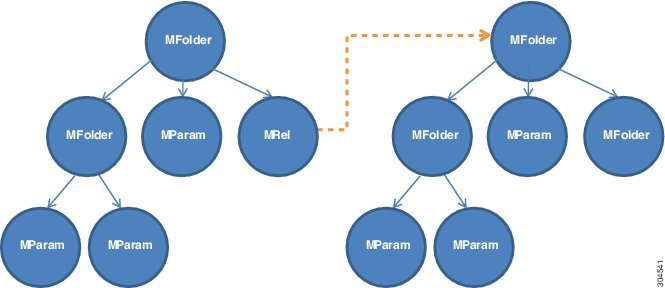
The following figure shows the configuration parameters hierarchy inside the device package.
MFolder
MFolder is a group of configuration items that can contain MParams and other nested MFolders. An MFolder has following attributes:
| Attribute | Description |
|---|---|
| Key | Defines the type of the configuration item. The key is defined in the device package and can never be overwritten. The key is used as a matching criterion as well as for validation. |
| Description | Describes the configuration item. |
| Cardinality | Specifies the cardinality of the configuration item. The default value of cardinality is 1. If cardinality is N, The Application Policy Infrastructure Controller (APIC) allows N instances of the configuration parameter to be configured. |
| ScopedBy |
Specifies the scope for the parameter resolution. ScopedBy determines where to look for parameter values when APIC resolves the parameter from configuration MOs. Default value is Epg. Supported values are Tenant, Ap, Bd, and Epg. |
| RsConnector | A relation that associates a configuration item to an MConn. |
| DevCtx | Allows a configuration item to be associated with a specific physical device (CDev) in a device (LDev). |
| Locked | Allows a configuration item value to be locked. Once locked, the value cannot be changed. |
MParam
MParam is the basic unit of configuration parameters that declares a single configuration parameter. MParam has following attributes:
| Attribute | Description |
|---|---|
| Key | Defines the type of the configuration item. The key is defined in the device package and can never be overwritten. The key is used as a matching criterion as well as for validation. |
| Description | Describes the configuration item. |
| Cardinality | Specifies the cardinality of the configuration item. The default value of cardinality is 1. If cardinality is N, The APIC allows N instances of the configuration parameter to be configured. |
| RsConnector | A relation that associates a configuration item to an MConn. |
| Mandatory | Allows a configuration item to be marked as mandatory. |
| Locked | Allows a configuration item value to be locked. Once locked, the value cannot be changed. |
| Validation | Specifies the validation method for the value. |
MRel
MRel allows one MFolder to refer to another MFolder. Using MRel inside an MFolder, an administrator can associate the containing MFolder to the MFolder that is pointed by the MRel using the RsTarget relation contained inside MRel. MRel has following attributes:
| Attribute | Description |
|---|---|
| Key | Defines the type of the configuration item. The key is defined in the device package and can never be overwritten. The key is used as a matching criterion as well as for validation. |
| Description | Describes the configuration item. |
| Cardinality | Specifies the cardinality of the configuration item. The default value of cardinality is 1. |
| RsTarget | A relation that associates a configuration folder to another MFolder. The value of TDn for this relation is the DN of the target folder. |
| RsConnector | A relation that associates a configuration item to an MConn. |
| Mandatory | Allows a configuration item to be marked as mandatory. |
- Configuration Scope of a Device Package Specification
- Example XML of Configuration Parameters Inside the Device Package
Configuration Scope of a Device Package Specification
In a device specification file, configuration items are arranged in different sections.
MDevCfg
The MDevCfg section describes the device level configuration, which is shared by all service graphs using the device. The Application Policy Infrastructure Controller (APIC) does a reference counting of the configuration objects created by using the configuration items described in this section. Objects are only deleted from a service device after all the graph instances that use the device are deleted.
MFuncCfg
The MFuncCfg describes the configuration that is local to a service function and is specific to a service function. The APIC does a reference counting of the configuration objects created by the configuration items described in this section. Objects are created and deleted whenever a service function is instantiated and deleted.
MGrpCfg
The MGrpCfg describes the configuration that is shared by all functions of a service graph using the device. The APIC does a reference counting of the configuration objects created by using the configuration items described in this section. Objects are only deleted from a service device after all functions from the service graph are deleted.
Example XML of Configuration Parameters Inside the Device Package
The following XML example shows configuration parameters inside of the device package:
<vnsMFolder key="VServer" scopedBy="epg">
    <vnsRsConnector tDn="uni/infra/mDev-Acme-ADC-1.0/mFunc-SLB/mConn-external"/>
    <vnsMParam key="vservername" description="Name of VServer" mandatory="true"/>
    <vnsMParam key="vip" description="Virtual IP"/>
    <vnsMParam key="subnet" description="Subnet IP"/>
    <vnsMParam key="port" description="Port for Virtual server"/>
    <vnsMParam key="persistencetype" description="persistencetype"/>
    <vnsMParam key="servicename" description="Service bound to this vServer"/>
    <vnsMParam key="servicetype" description="Service bound to this vServer"/>
    <vnsMParam key="clttimeout" description="Client timeout"/>
    <vnsMFolder key="VServerGlobalConfig"
      description="This references the global configuration">
        <vnsMRel key="ServiceConfig">
            <vnsRsTarget tDn="uni/infra/mDev-Acme-ADC-1.0/mDevCfg/mFolder-Service"/>
        </vnsMRel>
        <vnsMRel key="ServerConfig">
            <vnsRsTarget tDn="uni/infra/mDev-Acme-ADC-1.0/mDevCfg/mFolder-Server"/>
        </vnsMRel>
        <vnsMRel key="VipConfig">
            <vnsRsTarget
              tDn="uni/infra/mDev-Acme-ADC-1.0/mDevCfg/mFolder-Network/mFolder-vip"/>
            <vnsRsConnector tDn="uni/infra/mDev-Acme-ADC-1.0/mFunc-SLB/mConn-external"/>
        </vnsMRel>
    </vnsMFolder>
</vnsMFolder>
Configuration Parameters Inside An Abstract Function Profile
An abstract profile allows an administrator to configure the default values for the configuration parameters. An abstract function profile contains configuration parameters with values. These values are used as default values during graph instantiation.
An abstract function profile is attached to a function node in a service graph. The default values specified in an abstract function profile is then used when rendering the function onto the service device at the graph instantiation time.
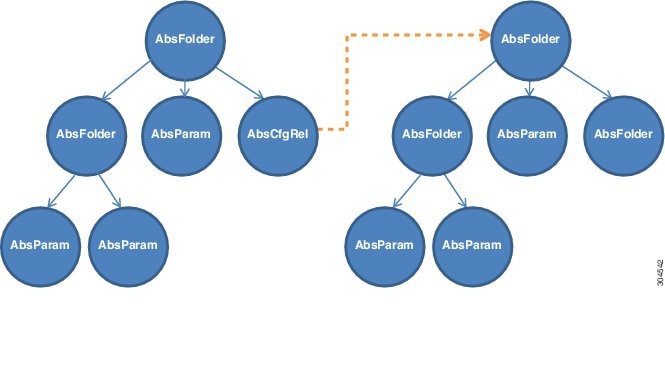
The following figure shows the configuration parameters hierarchy within an abstract function profile.
AbsFolder
AbsFolder is a group of configuration items that can contain AbsParams and other nested AbsFolders. For each AbsFolder, there must be an MFolder inside the device package. The Application Policy Infrastructure Controller (APIC) validates each AbsFolder to ensure that the AbsFolder has a corresponding MFolder in the package. An AbsFolder has the following attributes:
| Attribute | Description |
|---|---|
| Key | Defines the type of the configuration item. The key is defined in the device package and can never be overwritten. The key is used as a matching criterion as well as for validation. |
| Description | Describes the configuration item. |
| Cardinality | Specifies the cardinality of the configuration item. The default value is 1. |
| ScopedBy |
Specifies the scope for the parameter resolution. ScopedBy determines where to look for parameter values when the APIC resolves the parameter from configuration MOs. Default value is Epg. Supported values are Tenant, Ap, Bd, and Epg. |
| DevCtx | Allows a configuration item to be associated with a specific physical device (CDev) in a device cluster (LDev). |
| Locked | Allows a configuration item value to be locked. Once locked, the value cannot be changed. |
AbsParam
AbsParam is the basic unit of configuration parameters. AbsParam defines a single configuration parameter. As with an AbsFolder, each AbsParam must have an equivalent MFolder in the device specification. The APIC validates the specification to ensure that AbsParam has a corresponding MFolder in the package. The value of an AbsParam is validated using the validation method specified in MParam. An AbsParam has following attributes:
| Attribute | Description |
|---|---|
| Key | Defines the type of the configuration item. The key is defined in the device package and can never be overwritten. The key is used as a matching criterion as well as for validation. |
| Value | Holds the value for a given configuration item. Values are not supported for MParam. |
| Description | Describes the configuration item. |
| Cardinality | Specifies the cardinality of the configuration item. The default value is 1. |
| Mandatory |
Allows a configuration item to be marked as mandatory. |
| Locked | Allows a configuration item value to be locked. Once locked, the value cannot be changed. |
| Validation | Specifies the validation mechanism to be used to validate the configuration parameter. |
AbsRel
AbsRel allows one AbsFolder to refer to another AbsFolder. An AbsRel has following attributes:
| Attribute | Description |
|---|---|
| Key | Defines the type of the configuration item. The key is defined in the device package and can never be overwritten. The key is used as a matching criterion as well as for validation. |
| Value | Holds the value for a given configuration item. Values are not supported for MParam. |
| Description | Describes the configuration item. |
| Cardinality | Specifies the cardinality of the configuration item. The default value is 1. |
| Mandatory |
Allows a configuration item to be marked as mandatory. |
- Configuration Scope of an Abstract Function Profile
- Example XML POST for an Abstract Function Profile With Configuration Parameters
Configuration Scope of an Abstract Function Profile
Within an abstract function profile, the configuration parameters are structured in a similar manner as to how they are structured inside a device package. There are three different scopes.
AbsDevCfg
This section provides the default value for the configuration items that are declared to be the device level configuration inside of a device package. The configuration items are specified under MDevCfg.
For each configuration item, there must be an equivalent configuration item under the device package.
The configuration that is described in this section is shared by all service graphs that use the device. The Application Policy Infrastructure Controller (APIC) does a reference counting of the configuration objects that are created by using the configuration items that are described in this section. Objects are only deleted from a service device after all graph instances that are using the device are deleted.
AbsGrpCfg
This section provides the default value for the configuration items that are declared to be the device level configuration inside of a device package. The configuration items are specified under MGrpCfg.
For each configuration item, there must be an equivalent configuration item under the device package.
The configuration described in this section is shared by all functions of a service graph that use the device. The APIC does a reference counting of the configuration objects that are created by using the configuration items that are described in this section. Objects are only deleted from a service device after all graph instances that are using the device are deleted.
AbsFuncCfg
This section provides the default value for the configuration items that are declared to be the function level configuration inside of a device package. The configuration items are specified under MFuncCfg.
For each configuration item, there must be an equivalent configuration item under the device package.
This section is used to describe the configuration that is local to a service function. The configuration described in this section is specific to a service function. The APIC does a reference counting of the configuration objects that are created by the configuration items that are described in this section. Objects are created and deleted whenever a service function is instantiated and deleted.
Example XML POST for an Abstract Function Profile With Configuration Parameters
The following XML POST example shows an abstract function profile with configuration parameters:
<vnsAbsFuncProfContr name = "NP">
    <vnsAbsFuncProfGrp name = "Grp1">
        <vnsAbsFuncProf name = "P1">
            <vnsRsProfToMFunc tDn="uni/infra/mDev-Acme-ADC-1.0/mFunc-SLB"/>
            <vnsAbsDevCfg name="D1">
                <vnsAbsFolder key="Service" name="Service-Default" cardinality="n">
                    <vnsAbsParam name="servicetype" key="servicetype" value="TCP"/>
                    <vnsAbsParam name="serviceport" key="serviceport" value="80"/>
                    <vnsAbsParam name="maxclient" key="maxclient" value="1000"/>
                    <vnsAbsParam name="maxreq" key="maxreq" value="100"/>
                    <vnsAbsParam name="cip" key="cip" value="enable"/>
                    <vnsAbsParam name="usip" key="usip" value="enable"/>
                    <vnsAbsParam name="sp" key="sp" value=""/>
                    <vnsAbsParam name="svrtimeout" key="svrtimeout" value="60"/>
                    <vnsAbsParam name="clttimeout" key="clttimeout" value="60"/>
                    <vnsAbsParam name="cka" key="cka" value="NO"/>
                    <vnsAbsParam name="tcpb" key="tcpb" value="NO"/>
                    <vnsAbsParam name="cmp" key="cmp" value="NO"/>
                </vnsAbsFolder>
            </vnsAbsDevCfg>
            <vnsAbsFuncCfg name="SLB">
                <vnsAbsFolder key="VServer" name="VServer-Default">
                    <vnsAbsParam name="port" key="port" value="80"/>
                    <vnsAbsParam name="persistencetype" key="persistencetype"
                      value="cookie"/>
                    <vnsAbsParam name="clttimeout" key="clttimeout" value="100"/>
                    <vnsAbsParam name="servicetype" key="servicetype" value="TCP"/>
                    <vnsAbsParam name="servicename" key="servicename"/>
                </vnsAbsFolder>
            </vnsAbsFuncCfg>
        </vnsAbsFuncProf>
    </vnsAbsFuncProfGrp>
</vnsAbsFuncProfContr>
Configuration Parameters Inside an Abstract Function Node in a Service Graph
A function node inside a service graph allows an administrator to configure values for the configuration parameters. These values are used during graph instantiation.
Within an abstract function node, the configuration parameters are structured in a similar manner as to how they are structured inside an abstract function profile.
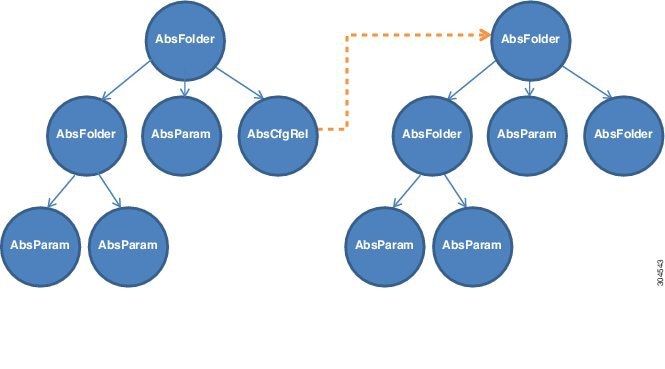
The following figure shows the configuration parameters hierarchy inside an abstract function node.
AbsDevCfg
This section is used to provide the default value for the configuration items that are declared to be the device level configuration inside of the device package. The configuration items are specified under MDevCfg.
For each of these configuration items, there must be an equivalent configuration item under the device package.
AbsGrpCfg
This section is used to provide the default value for the configuration items that are declared to be the device level configuration inside of the device package. The configuration items are specified under MGrpCfg.
For each of these configuration items, there must be an equivalent configuration item under the device package.
The configuration that is described in this section is shared by all functions of a service graph that use the device. The Application Policy Infrastructure Controller (APIC) does a reference counting of the configuration objects that are created by using the configuration items that are described in this section. Objects are only deleted from a service device after all functions from the service graph are deleted.
AbsFuncCfg
This section is used to provide the default value for the configuration items that are declared to be the function level configuration inside of the device package. The configuration items are specified under MFuncCfg.
For each of these configuration items, there must be an equivalent configuration item under the device package.
This section is used to describe the configuration that is local to a service function. The configuration that is described in this section is specific to a service function. The APIC does a reference counting of the configuration objects that are created by the configuration items that are described in this section. Objects are created and deleted whenever a service function is instantiated and deleted.
AbsFolder
AbsFolder is a group of configuration items that can contain AbsParamss and other nested AbsFolders. For each AbsFolder, there must be an MFolder inside the device package. The APIC validates each AbsFolder to ensure that the AbsFolder has a corresponding MFolder in the package. AbsFolder has the following attributes:
| Attribute | Description |
|---|---|
| Key | Defines the type of the configuration item. The key is defined in the device package and can never be overwritten. The key is used as a matching criterion as well as for validation. |
| Description | Describes the configuration item. |
| Cardinality | Specifies the cardinality of the configuration item. The default value is 1. |
| ScopedBy |
Specifies the scope for the parameter resolution. ScopedBy determines where to look for parameter values when the APIC resolves the parameter from configuration MOs. Default value is Epg. Supported values are Tenant, Ap, Bd, and Epg. |
| RsCfgToConn | A relation that associates a configuration item to an AbsConn. |
| DevCtx | Allows a configuration item to be associated with a specific physical device (CDev) in a device (LDev). |
| Locked | Allows a configuration item value to be locked. Once locked, the value cannot be changed. |
AbsParam
AbsParam is the basic unit of configuration parameters. AbsParam defines a single configuration parameter. As with an AbsFolder, each AbsParam must have an equivalent MFolder in the device specification. The APIC validates the specification to ensure that AbsParam has a corresponding MFolder in the package. The value of an AbsParam is validated using the validation method specified in MParam. AbsParam has following attributes:
| Attribute | Description |
|---|---|
| Key | Defines the type of the configuration item. The key is defined in the device package and can never be overwritten. The key is used as a matching criterion as well as for validation. |
| Value | Holds the value for a given configuration item. Values are not supported for MParam. |
| Description | Describes the configuration item. |
| Cardinality | Specifies the cardinality of the configuration item. The default value is 1. |
| RsCfgToConn | A relation that associates a configuration item to an MConn. |
| Mandatory |
Allows a configuration item to be marked as mandatory. |
| Locked | Allows a configuration item value to be locked. Once locked, the value cannot be changed. |
| Validation | Specifies the validation mechanism to be used to validate the configuration parameter. |
AbsRel
AbsRel allows one AbsFolder to refer to another AbsFolder. AbsRel has following attributes:
| Attribute | Description |
|---|---|
| Key | Defines the type of the configuration item. The key is defined in the device package and can never be overwritten. The key is used as a matching criterion as well as for validation. |
| Value | Holds the value for a given configuration item. Values are not supported for MParam. |
| Description | Describes the configuration item. |
| Cardinality | Specifies the cardinality of the configuration item. The default value is 1. |
| RsCfgToConn | A relation that associates a configuration item to an MConn. |
| Mandatory |
Allows a configuration item to be marked as mandatory. |
| Locked | Allows a configuration item value to be locked. Once locked, the value cannot be changed. |
Example XML POST for an Abstract Function Node With Configuration Parameters
The following XML POST example shows an abstract function node with configuration parameters:
<vnsAbsNode name = "SLB" funcType="GoTo" >
    <vnsRsDefaultScopeToTerm tDn="uni/tn-tenant1/AbsGraph-G3/AbsTermNode-Output1/outtmnl"/>
    <vnsAbsFuncConn name = "C4" direction = "input">
        <vnsRsMConnAtt tDn="uni/infra/mDev-Acme-ADC-1.0/mFunc-SLB/mConn-external" />
    </vnsAbsFuncConn>
    <vnsAbsFuncConn name = "C5" direction = "output">
        <vnsRsMConnAtt tDn="uni/infra/mDev-Acme-ADC-1.0/mFunc-SLB/mConn-internal" />
    </vnsAbsFuncConn>

    <vnsAbsDevCfg>
        <vnsAbsFolder key="Network" name="Network" scopedBy="epg">
            <!-- Following scopes this folder to input terminal or Src Epg -->
            <vnsRsScopeToTerm tDn="uni/tn-tenant1/AbsGraph-G3/AbsTermNode-Output1/outtmnl"/>

            <!-- VIP address -->
            <vnsAbsFolder key="vip" name="vip" scopedBy="epg">
                <vnsAbsParam name="vipaddress" key="vipaddress" value=""/>
            </vnsAbsFolder>

            <!-- SNIP address -->
            <vnsAbsFolder key="snip" name="snip" scopedBy="epg">
                <vnsAbsParam name="snipaddress" key="snipaddress" value=""/>
            </vnsAbsFolder>

        </vnsAbsFolder>

        <vnsAbsFolder key="Service" name="Service" scopedBy="epg" cardinality="n">
            <vnsRsScopeToTerm tDn="uni/tn-tenant1/AbsGraph-G3/AbsTermNode-Output1/outtmnl"/>
            <vnsAbsParam name="servicename" key="servicename" value=""/>
            <vnsAbsParam name="servername" key="servername" value=""/>
            <vnsAbsParam name="serveripaddress" key="serveripaddress" value=""/>
        </vnsAbsFolder>
    </vnsAbsDevCfg>

    <vnsAbsFuncCfg>
        <vnsAbsFolder key="VServer" name="VServer" scopedBy="epg">
            <vnsRsScopeToTerm tDn="uni/tn-tenant1/AbsGraph-G3/AbsTermNode-Output1/outtmnl"/>
            <!-- Virtual Server Configuration -->
            <vnsAbsParam name="vip" key="vip" value=""/>
            <vnsAbsParam name="vservername" key="vservername" value=""/>
            <vnsAbsParam name="servicename" key="servicename"/>
            <vnsRsCfgToConn tDn="uni/tn-tenant1/AbsGraph-G3/AbsNode-Node2/AbsFConn-C4" />
        </vnsAbsFolder>
    </vnsAbsFuncCfg>
    <vnsRsNodeToMFunc tDn="uni/infra/mDev-Acme-ADC-1.0/mFunc-SLB"/>
</vnsAbsNode>
Configuration Parameters Inside Various Configuration MOs
An administrator can specify configuration parameters for a service function as part of various Application Policy Infrastructure Controller (APIC) MOs, such as EPG, tenant, BD, or AP. When a graph is instantiated, the APIC resolves the needed configuration for a graph by looking up the parameters from various places. At instantiation, parameter values are resolved and passed to the device script.
The flexibility of being able to keep configuration parameters inside various MOs allows an administrator to configure a single service graph and then use the graph for different tenants or end point groups (EPGs) with a different configuration for different tenants or EPGs.
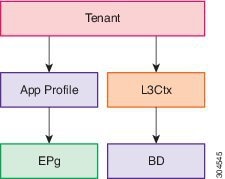
The following figure shows the hierarchy of an APIC MO.
The following figure shows configuration parameters inside various configuration MOs.
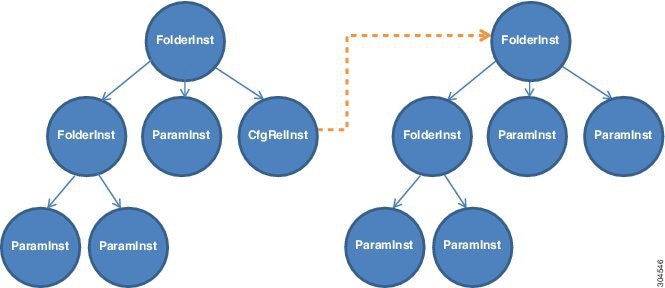
FolderInst
FolderInst is a group of configuration items that can contain ParamInsts and other nested FolderInsts. A FolderInst has the following attributes:
| Attribute | Description |
|---|---|
| Key | Defines the type of the configuration item. The key is defined in the device package and can never be overwritten. The key is used as a matching criterion as well as for validation. |
| ctrctNameOrLbl |
Finds a matching FolderInst during parameter resolution. For a FolderInst to be used for parameter resolution, this property must match with the name of the contract that is associated with the service graph. Otherwise, this FolderInst is skipped and values are not used from this FolderInst. The value of this field can be "any" to allow this FolderInst to be used for all contracts. |
| graphNameOrLbl |
Finds a matching FolderInst during parameter resolution. For a FolderInst to be used for parameter resolution, this property must match with the service graph name. Otherwise, this FolderInst is skipped and values are not used from this FolderInst. The value of this field can be “any” to allow this FolderInst to be used for all service graphs. |
| nodeNameOrLbl |
Finds a matching FolderInst during parameter resolution. For a FolderInst to be used for parameter resolution, this property must match with the node name. Otherwise, this FolderInst is skipped and values are not used from this FolderInst. The value of this field can be “any” to allow this FolderInst to be used for all nodes in a service graph. |
ParamInst
ParamInst is the basic unit of configuration parameters. ParamInst defines a single configuration parameter. As with a FolderInst, each ParamInst must have an equivalent MParam in the device specification. The APIC validates the specification to ensure that ParamInst has a corresponding MParam in the package. The value of an ParamInst is validated using the validation method specified in the corresponding MParam. ParamInst has following attributes:
| Attribute | Description |
|---|---|
| Key | Defines the type of the configuration item. The key is defined in the device package and can never be overwritten. The key is used as a matching criterion as well as for validation. |
| Value | Holds the value for a given configuration item. Values are not supported for MParam. |
CfgRelInst
CfgRelInst has following attributes:
| Attribute | Description |
|---|---|
| Key | Defines the type of the configuration item. The key is defined in the device package and can never be overwritten. The key is used as a matching criterion as well as for validation. |
| Value | Holds the path for the target FolderInst. |
Example XML POST for an Application EPG With Configuration Parameters
The following XML example shows configuration parameters inside of the device package:
<fvAEPg dn="uni/tn-acme/ap-myApp/epg-app"  name="app">

    <vnsFolderInst ctrctNameOrLbl="any" graphNameOrLbl="any" nodeNameOrLbl="any" key="Monitor"
      name="monitor1">
        <vnsRsFolderInstToMFolder tDn="uni/infra/mDev-Acme-ADC-1.0/mDevCfg/mFolder-Monitor"/>
        <vnsParamInst name="weight" key="weight" value="10"/>
    </vnsFolderInst>

    <vnsFolderInst ctrctNameOrLbl="any" graphNameOrLbl="any" nodeNameOrLbl="any" key="Service"
      name="Service1">
        <vnsParamInst name="servicename" key="servicename" value="crpvgrtst02-8010"/>
        <vnsParamInst name="servicetype" key="servicetype" value="TCP"/>
        <vnsParamInst name="servername" key="servername" value="s192.168.100.100"/>
        <vnsParamInst name="serveripaddress" key="serveripaddress" value="192.168.100.100"/>
        <vnsParamInst name="serviceport" key="serviceport" value="8080"/>
        <vnsParamInst name="svrtimeout" key="svrtimeout" value="9000" />
        <vnsParamInst name="clttimeout" key="clttimeout" value="9000" />
        <vnsParamInst name="usip" key="usip" value="NO" />
        <vnsParamInst name="useproxyport" key="useproxyport" value="" />
        <vnsParamInst name="cip" key="cip" value="ENABLED" />
        <vnsParamInst name="cka" key="cka" value="NO" />
        <vnsParamInst name="sp" key="sp" value="OFF" />
        <vnsParamInst name="cmp" key="cmp" value="NO" />
        <vnsParamInst name="maxclient" key="maxclient" value="0" />
        <vnsParamInst name="maxreq" key="maxreq" value="0" />
        <vnsParamInst name="tcpb" key="tcpb" value="NO" />
        <vnsCfgRelInst name="MonitorConfig" key="MonitorConfig" targetName="monitor1"/>
    </vnsFolderInst>

    <vnsFolderInst ctrctNameOrLbl="any" graphNameOrLbl="G2" nodeNameOrLbl="any" key="Network"
      name="Network">
        <vnsFolderInst ctrctNameOrLbl="any" graphNameOrLbl="G2" nodeNameOrLbl="any" key="vip"
          name="vip">
            <vnsParamInst name="vipaddress1" key="vipaddress" value="10.10.10.200"/>
        </vnsFolderInst>
        <vnsFolderInst ctrctNameOrLbl="any" graphNameOrLbl="G2" nodeNameOrLbl="any"
          devCtxLbl="C1" key="snip" name="snip1">
            <vnsParamInst name="snipaddress" key="snipaddress" value="192.168.1.200"/>
        </vnsFolderInst>
        <vnsFolderInst ctrctNameOrLbl="any" graphNameOrLbl="G2" nodeNameOrLbl="any"
          devCtxLbl="C2" key="snip" name="snip2">
    <vnsFolderInst ctrctNameOrLbl="any" graphNameOrLbl="G1" nodeNameOrLbl="any" key="Network"
      name="Network">
        <vnsFolderInst ctrctNameOrLbl="any" graphNameOrLbl="G1" nodeNameOrLbl="any" key="vip"
          name="vip">
            <vnsParamInst name="vipaddress1" key="vipaddress" value="10.10.10.100"/>
        </vnsFolderInst>
        <vnsFolderInst ctrctNameOrLbl="any" graphNameOrLbl="G1" nodeNameOrLbl="any"
          devCtxLbl="C1" key="snip" name="snip1">
            <vnsParamInst name="snipaddress" key="snipaddress" value="192.168.1.100"/>
        </vnsFolderInst>
        <vnsFolderInst ctrctNameOrLbl="any" graphNameOrLbl="G1" nodeNameOrLbl="any"
          devCtxLbl="C2" key="snip" name="snip2">
            <vnsParamInst name="snipaddress" key="snipaddress" value="192.168.1.101"/>
        </vnsFolderInst>
        <vnsFolderInst ctrctNameOrLbl="any" graphNameOrLbl="G1" nodeNameOrLbl="any"
          devCtxLbl="C3" key="snip" name="snip3">
            <vnsParamInst name="snipaddress" key="snipaddress" value="192.168.1.102"/>
        </vnsFolderInst>
    </vnsFolderInst>

    <!-- SLB Configuration -->
    <vnsFolderInst ctrctNameOrLbl="any" graphNameOrLbl="any" nodeNameOrLbl="any" key="VServer"
      name="VServer">
        <!-- Virtual Server Configuration -->
        <vnsParamInst name="port" key="port" value="8010"/>
        <vnsParamInst name="vip" key="vip" value="10.10.10.100"/>
        <vnsParamInst name="vservername" key="vservername" value="crpvgrtst02-vip-8010"/>
        <vnsParamInst name="servicename" key="servicename" value="crpvgrtst02-8010"/>
        <vnsFolderInst ctrctNameOrLbl="any" graphNameOrLbl="any" nodeNameOrLbl="any"
          key="VServerGlobalConfig" name="VServerGlobalConfig">
            <vnsCfgRelInst name="ServiceConfig" key="ServiceConfig" targetName="Service1"/>
            <vnsCfgRelInst name="VipConfig" key="VipConfig" targetName="Network/vip"/>
        </vnsFolderInst>
    </vnsFolderInst>
</fvAEPg>
Parameter Resolution
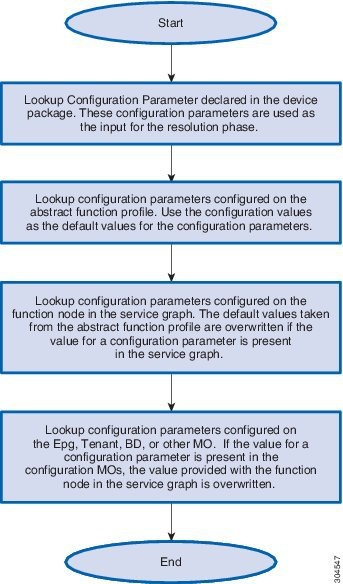
During graph instantiation, the Application Policy Infrastructure Controller (APIC) resolves the configuration parameters for each function in the service graph. After resolution completes, the parameter values are passed to the device script. The device script uses these parameter values to configure the service on the service appliance.
The following flow chart describes the parameter resolution steps.
Looking Up an MO During Parameter Resolution
The Application Policy Infrastructure Controller (APIC) uses two main constructs while finding the suitable configuration MO to take the configuration parameters from.
RsScopeToTerm
The RsScopeToTerm relation for a function node or for an AbsFolder indicates the terminal node of the service graph that is connected with the configuration MOs that has parameters for the graph. The APIC uses the configuration MOs that are connected to the specified terminal node in RsScopeToTerm to find the graph configuration parameters.
If there is no RsScopeToTerm configuration specified, APIC uses the terminal connected to the provider EPG by default.
ScopedBy Attribute
The ScopedBy attribute is used to find the starting MO from which to resolve the parameter. For example, if scopedBy has a value of "Epg", the APIC starts the parameter resolution from the endpoint group. The APIC then walks up in the hierarchy to resolve the parameters, walking to the application profile and then to the tenant to resolve the configuration parameters.
The following figure shows the hierarchy of an APIC MO.
About Role-Based Access Control Rule Enhancements
Layer 4 to Layer 7 policy configurations in a multi-tenant environment required administrator intervention to create certain objects that cannot be created by tenant administrators using the classic role-based access control (RBAC) domains and roles model definition. An Application Policy Infrastructure Controller (APIC) provides more granular RBAC privileges in the management information tree (MIT) such that you can grant tenant administrators the privileges that are required to create the objects. Tenant administrators can also create RBAC rules through self-service without administrator intervention to grant permissions for resources under their tenant subtree to other tenants and users in the system.
Role-Based Access Control Rule Architecture
The role-based access control (RBAC) rule has a boolean field allowWrites that enhances the role-based access control (RBAC) model to allow writeability rules. Without the allowWrites field, you can only define read RBAC rules.
The RbacRule class is defined as follows:
Class aaa:RbacRule (CONCRETE)
Encrypted: false
Exportable: true
Persistent: true
Configurable: true
Write Access: [aaa, admin]
Read Access: [aaa, admin]
An RBAC rule allows users from a security domain to read the subtree starting at a specific object.
DN FORMAT: [1] uni/rbacdb/rule-{[objectDn]}-dom-{domain}
|
Property |
Type |
Class |
Description |
|---|---|---|---|
|
aaa:Boolean |
scalar:Enum8 |
allowWrites (aaa:RbacRule:allowWrites) |
Read-write or read rule. |
|
naming:Name |
string:Basic |
domain (aaa:RbacRule:domain) |
The domain of the counts object. Overrides aaa:ARbacRule:domain. |
|
reference:BinRef |
|
objectDn (aaa:RbacRule:objectDn) |
Overrides aaa:ARbacRule:objectDn. |
The PartialRbacRule class is defined under the fvTenant class to allow tenants to create RBAC Rules (self-service). The PartialRbacRule class is defined as follows:
Class aaa:PartialRbacRule (CONCRETE)
Encrypted: false
Exportable: true
Persistent: true
Configurable: true
Write Access: [aaa, admin]
Read Access: [aaa, admin]
|
Property |
Type |
Class |
Description |
|---|---|---|---|
|
aaa:Boolean |
scalar:Enum8 |
allowWrites (aaa:PartialRbacRule:allowWrites) |
Read-write or read rule. |
|
naming:Name |
string:Basic |
domain (aaa:PartialRbacRule:domain) |
The domain of the counts object. |
|
reference:BinRef |
|
monPolDn (aaa:PartialRbacRule:monPolDn) |
The monitoring policy attached to this observable object. |
|
reference:BinRef |
|
partialObjectDn (aaa:PartialRbacRule:partialObjectDn) |
|
The creation of the PartialRbacRule class by the tenant must be checked for a legal partialObjectDn. If the partialObjectDn lies under the tenant subtree, it is legal. Any distinguished names outside of the parent tenant subtree are not permitted.
The administrator can create RbacRules that point to any distinguished name in the system. The tenant administrator can only create PartialRbacRules that point to distinguished names that lie in that tenant administrator's tenant subtree.
Role-Based Access Control Rule System Flow
Either before, during, or after configuring the Layer 4 to Layer 7 policy, the tenant administrator can choose to create PartialRbacRules that grant access to specific firewall and load balancer devices to their own tenant users. The access is implemented by creating aaaDomains that represent each resource group that must be individually assigned. The following information provides an example setup:
|
Tenant |
Acme |
|
Users |
acme-admin acme-firewall-1-admin acme-firewall-2-admin acme-loadbalancer-1-admin acme-loadbalancer-2-admin |
|
Firewall Devices |
Firewall1 Firewall2 |
|
Load Balancer Devices |
LB1 LB2 |
The tenant administrator user acme-admin wishes to create the devices Firewall1, Firewall2, LB1, and LB2. Full write permissions for each device need to be assigned on an individual user basis. For example, user acme-firewall-1-admin must only have write privileges to device Firewall1 policies, while user acme-loadbalancer-1-admin must only have write privileges to device LB1 policies. To accomplish this, the acme-admin user creates 4 PartialRbacRules that grant the following access:
-
Firewall1 distinguished name—writeable by domain acme-firewall1
-
Firewall2 distinguished name—writeable by domain acme-firewall2
-
LB1 distinguished name—writeable by domain acme-lb1
-
LB2 distinguished name—writeable by domain acme-lb2
Users are then assigned the following privileges:
For any of the above 4 users, the domain acme's permissions allow them to read the acme tenant subtree, but not write any nodes. The domain acme-lb2's permissions of tenant-admin/write allow the user to write to the LB2 policy subtree only.
 Feedback