- Preface
- Overview
- Prerequisites
- Importing a Device Package
- Configuring a Device (Logical Device)
- Configuring Connectivity to Devices
- Using a Device
- Configuring a Service Graph
- Configuration Parameters
- Using a Service Graph Template
- Monitoring a Service Graph
- Configuring Administrator Roles for Managing a Service Configuration
- Developing Automation
- Using the GUI Wizards
Importing a Device
Package
- About Device Packages
- Installing a Device Package Using the REST API
- Importing a Device Package Using the GUI
About Device Packages
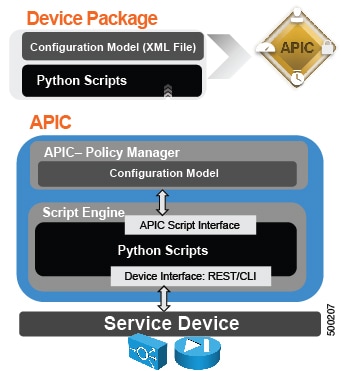
The Application Policy Infrastructure Controller (APIC) requires a device package to configure and monitor service devices. You add service functions to the APIC through the device package. A device package manages a single class of service devices and provides the APIC with information about the device and its capabilities. A device package is a zip file that contains the following parts:
You can create a device package or it can be provided by a device vendor or Cisco.
The following figure illustrates the interaction of a device package and the APIC:
The functions in a device script are classified into the following categories:
-
Device/Infrastructure—For device level configuration and monitoring
-
Service Events—For configuring functions, such as a server load balancer or Secure Sockets Layer, on the device
-
Endpoint/Network Events—For handling endpoint and network attach/detach events
The APIC uses the device configuration model that is provided in the device package to pass the appropriate configuration to the device scripts. The device script handlers interface with the device using its REST or CLI interface.
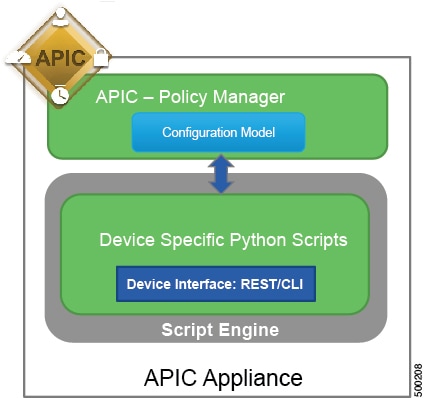
The device package enables an administrator to automate the management of the following services:
-
Device attachment and detachment
-
Endpoint attachment and detachment
-
Service graph rendering
-
Health monitoring
-
Alarms, notifications, and logging
-
Counters
For more information about device packages and how to develop a device package, see Cisco APIC Layer 4 to Layer 7 Device Package Development Guide
Installing a Device Package Using the REST API
Importing a Device Package Using the GUI
You can import a device package using the GUI.
See Using the GUI for the procedure for importing a device package.
 Feedback