Getting Started
This chapter provides an overview of the CMX Engage, process flow, license packages, and the system requirements for the CMX Engage with CUWN.
Overview
The Cisco CMX Engage is a location intelligence, digital customer acquisition and multi-channel engagement platform that enables companies to connect, know, and engage with visitors at their physical business locations.
This innovative cloud-based software platform delivers rich customer experiences and provides actionable location insights by unifying location engagement across all location technologies with unmatched reliability, while leveraging your existing infrastructure investments in the best possible way.
The major functionalities of the CMX Engage includes:
Enable to Display Captive Portals Based on Rules
The captive portal refers to the portal that appears for a user who accesses your Wi-Fi from a particular location with a specific Wi-Fi network ID (SSID).
The end users of this captive portal are internet users who connect to the Internet through Wi-Fi or mobile devices from a public Wi-Fi network at airports, malls, hotels, and so on.
The CMX Engage enables you to create Captive Portal Rules that define the captive portals for various customers, locations, and period for an SSID. You can configure to display a captive portal based on the location, number of visits by the customer, type of customer, app status of the customer, and so on. The portal also serves as a gateway for visitors to gain internet access over Wi-Fi.
Function as a WiFi Beacon to Send Notifications
The CMX Engage also functions as a Wi-Fi based beacon that facilitates you send appropriate information to your customers, who has a Wi-Fi enabled device, when the customer is in and around your premises. The beacon functionality enables you to reach out to your customers individually with different promotions and offers. You can remind the customers about the offers available for them and their membership details. You can also set to provide offers only in certain outlets.
You can configure to send the notifications using the Engagement Rules. The CMX Engage enables you to send the notification when a customer connects to a Wi-Fi or when a customer is with in a beacon premises.
The CMX Engage enables you to send the notifications in the following ways:
- SMS
- Push notifications using apps
- BLE notifications
- API notifications using the external applications
This document describes how to use the CMX Engage with the CUWN.
Process Flow
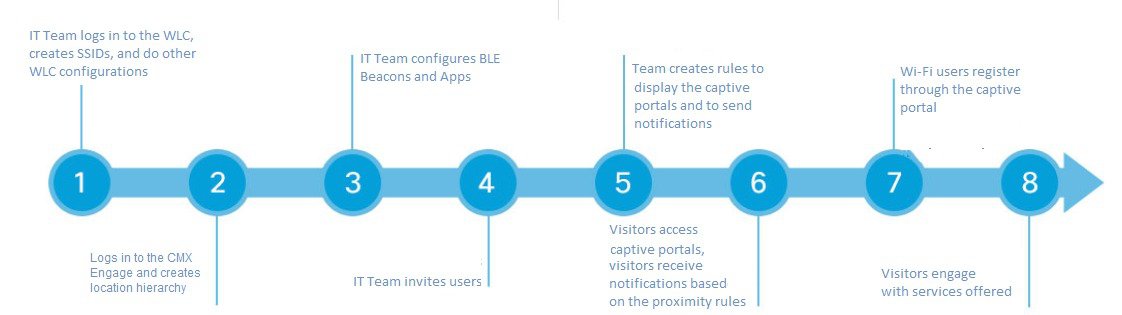
The process flow for the CMX Engage is as shown in Figure 1-1.
Figure 1-1 Process Flow for the CMX Engage
CMX Engage License Packages
The CMX Engage is available in three different license packages namely Base, Advance, and Enterprise. The features available for your account depends on the type of CMX Engage license package you own.
System Requirements
|
|
|
|---|---|
 Feedback