Configuring TPoP Smart SFP

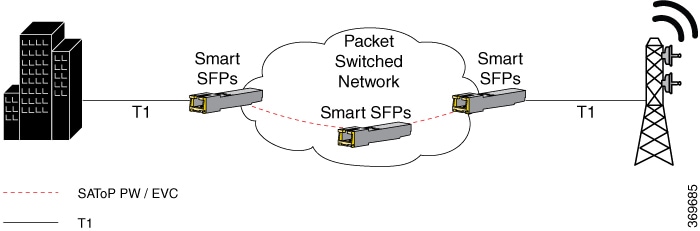
Transparent PDH over Packet (TPoP) Smart SFP is a special type of transceiver, which provides solution to encapsulate a T1 stream into a SAToP packet, suitable for pseudowire (PW) transport over a packet switched network (PSN).

Figure 1. Network View with TPoP SSFPs

This image is not available in preview/cisco.com

The key component of TPoP is the interworking function that provides packetization, de-packetization, and clock recovery that translate the TDM bit stream to a packet stream, and conversely. TPoP approach is similar to the SAToP method, where the entire T1 is encapsulated in a single circuit emulating pseudowire and transport it to a single destination over the PSN.

Features of TPoP Smart SFP

The TPoP smart SFP supports the following Cisco ASR 920 series routers:

  • NCS4201-SA

  • NCS4202-SA

The TPoP smart SFP supports the following features:

  • Supports unframed SAToP

  • Supports local and network loopback.

  • Supports Interworking Functionality (IWF) Performance Monitoring (PM) counters.

  • Supports Loss of Signal (LoS) alarm only.

  • Supports the clock recovery modes such as Adaptive Clock Recovery (ACR), Differential Clock Recovery (DCR), or re-timing mode.


    Note

    Re-timing mode is the default mode (Using common clock source through SYNCE or same external source for PE nodes)


  • Supports cable length and jitter-buffer.

  • Peer end side of the TPoP smart SFP could be TPoP smart SFP or IM that supports the SAToP protocol.

TPoP Prerequisites

  • The Multiprotocol Label Switching (MPLS) and Interior Gateway Protocol (IGP) endpoints are up and running fine between the PE nodes.

  • Use either one of the following modes for synchronization:

    • Ensure that SyncE is configured.

    • Use the PTP Telecom profile, G.8265.1 for frequency synchronization, for CEM.

  • Port interface should be set as default using the default int Gig 0/0/8 command before inserting TPoP smart SFP on GE or 10GE port.

  • The GE or 10GE port interface is brought up using the no shutdown command.

  • In cases where a non-TPoP SFP is to be inserted on any port from which any TPoP smart SFP is removed, then before inserting non-TPoP SFP, the TPoP smart SFP configuration is removed using the following commands:

    • For T1

      no platform smart-sfp interface Gig x/y/z type t1

      no platform smart-sfp interface TenGig x/y/z type t1


    Note

    Recovered clock configuration needs to be removed before applying the no platform command.


Restrictions for TPoP Smart SFP

  • The payload for T1 is limited to 192 bytes.

  • Framed SAToP and CESoP are not supported.

  • BERT and BERT statistics are not supported.

  • Error insertion in BERT is not supported.

  • PMON counters are not supported on the T1 mode.

  • The Cisco ASR-920-24SZ-IM, ASR-920-24SZ-M routers support a maximum of 12 TPoP smart SFPs and only on GE ports of the top row, which has odd-numbered ports.

  • The Cisco ASR-920-12SZ-IM router supports a maximum of 8 TPoP smart SFPs and on all GE and 10GE ports.

  • The chassis supports up to 12 TPoP smart SFPs.

Configuring TPoP Smart SFP

Enabling TPoP Smart SFP on T1

To enable TPoP smart SFP on the T1 mode, enter the following commands:


Router# configure terminal
Router(config)# platform smart-sfp interface gig slot/bay/port type T1
Router(config)# exit

Configuring CEM Circuits on T1 TPoP Smart SFP

To configure CEM circuits on T1 TPoP, enter the following commands:


enable
configure terminal 
controller t1  0/0/10
cem-group 0 unframed
end

Configuring Cable Length on T1 TPoP Smart SFP

You can configure a cable length (in feet) on the T1 mode.

  • You can configure the cable length in one of the following five ranges:

    Table 1. Cable Length Values

    Cable Length

    Range

    133

    0–133

    266

    134–266

    399

    267–399

    533

    400-533

    655

    534–655

To configure the cable length on the T1 mode for TPoP smart SFP, enter the following commands:


enable
configure terminal 
controller t1 x/y/z
cablelength short <value> 
end

To configure a cable length of 266 feet on the t1 0/0/0 interface, enter the following commands:


enable
configure terminal 
controller t1 0/0/10
cablelength short <value> 
end

Configuring Dejitter Buffer and Payload on T1 TPoP Smart SFP

You can configure jitter buffer for TPoP Smart SFP. You can configure a maximum jitter buffer value from 3 through 32 ms.

To configure jitter buffer, enter the following commands:


router#interface cem0/0/11
router(config-if)#cem 0
router#dejitter-buffer 5

You can configure a payload with size of 192 bytes only for TPoP Smart SFP.

To configure the payload, enter the following commands:


router#interface cem0/0/11
router#cem 0
router#payload-size 192

Loopback on TPoP Smart SFP

TPoP smart SFP supports two types of loopback configurations:

  • Local loopback—In a local loopback, the transmitting signal loops back to the receiver signal.

  • Network loopback—In a network loopback, the receiving signal loops back to the transmitting signal.

Configuring Loopback on TpoP

Configuring Network Loopback

Follow these steps to configure a network loopback on T1 for TPoP:


enable
configure terminal
controller t1 x/y/z
loopback network line
exit

Configuring Local Loopback

Follow these steps to configure a local loopback on T1 for TPoP:


enable
configure terminal
controller t1 x/y/z
loopback local
exit

The following example explains on how to configure the network loopback on T1 for TPoP:


Router(config)#controller t1 0/0/4
Router(config-controller)#loopback network line 

The following example explains on how to configure the local loopback on T1 for TPoP:


Router(config)#controller T1 0/0/4
Router(config-controller)#loopback local 

Verifying Loopback at Controller Level

Use the show controller t1 x/y/z command to verify the local loopback configuration on T1 controller for TPoP smart SFP.


Router#show controllers T1 0/0/4
T1 0/0/4 is up (Local Loopback)
  Applique type is 2xGE-4x10GE-FIXED
  Cablelength is short 133
  No alarms detected.
  alarm-trigger is not set
  Soaking time: 3, Clearance time: 10
  AIS State:Clear  LOS State:Clear  LOF State:Clear 
  Framing is unframed, Line Code is B8ZS, Clock Source is Internal.
  BER thresholds:  SF = 10e-3  SD = 10e-6
  Data in current interval (0 seconds elapsed):
   Near End
     0 Line Code Violations, 0 Path Code Violations
     0 Slip Secs, 0 Fr Loss Secs, 0 Line Err Secs, 0 Degraded Mins
     0 Errored Secs, 0 Bursty Err Secs, 0 Severely Err Secs, 0 Unavail Secs
     0 Path Failures, 0 SEF/AIS Secs
   Far End
     0 Line Code Violations, 0 Path Code Violations
     0 Slip Secs, 0 Fr Loss Secs, 0 Line Err Secs, 0 Degraded Mins
     0 Errored Secs, 0 Bursty Err Secs, 0 Severely Err Secs, 0 Unavail Secs
     0 Path Failures

Use the show controller t1 x/y/z command to verify the network loopback configuration on TPoP smart SFP.


router#show controller T1 0/0/4
T1 0/0/4 is up (Network Line Loopback)
  Applique type is 2xGE-4x10GE-FIXED
  Cablelength is short 133
  No alarms detected.
  alarm-trigger is not set
  Soaking time: 3, Clearance time: 10
  AIS State:Clear  LOS State:Clear  LOF State:Clear 
  Framing is unframed, Line Code is B8ZS, Clock Source is Internal.
  BER thresholds:  SF = 10e-3  SD = 10e-6
  Data in current interval (0 seconds elapsed):
   Near End
     0 Line Code Violations, 0 Path Code Violations
     0 Slip Secs, 0 Fr Loss Secs, 0 Line Err Secs, 0 Degraded Mins
     0 Errored Secs, 0 Bursty Err Secs, 0 Severely Err Secs, 0 Unavail Secs
     0 Path Failures, 0 SEF/AIS Secs
   Far End
     0 Line Code Violations, 0 Path Code Violations
     0 Slip Secs, 0 Fr Loss Secs, 0 Line Err Secs, 0 Degraded Mins
     0 Errored Secs, 0 Bursty Err Secs, 0 Severely Err Secs, 0 Unavail Secs
     0 Path Failures

Configuring Clocking Recovery System for TPoP

Adaptive Clock Recovery

Adaptive Clock Recovery (ACR) is an averaging process that negates the effect of random packet delay variation and captures the average rate of transmission of the original bit stream. ACR recovers the original clock for a synchronous data stream from the actual payload of the data stream.

For more information, see Adaptive Clock Recovery.

Differential Clock Recovery

Differential Clock Recovery (DCR) is another technique that is used for Circuit Emulation (CEM) to recover clocks based on the difference between PE clocks.

For more information, see Differential Clock Recovery.

Prerequisites for Clock Recovery

  • You must configure CEM before configuring the global clock recovery.

  • RTP is enabled by default for DCR in CEM. If DCR configuration is removed, then you must remove the RTP configuration manually under CEM.

Configuring ACR on T1 for TPoP

To configure the clock on T1 interfaces for TPoP in the T1 controller mode, use the following commands:
 
enable
configure terminal
controller t1 0/0/1
clock source recovered 1
cem-group 0 unframed
exit
To configure the clock recovery on T1 interfaces in global configuration mode, use the following commands:
 
recovered-clock 0 0
clock recovered 1 adaptive cem 1 0
exit
Verifying ACR Configuration for TPoP
Use the show recovered-clock command to verify the adaptive clock recovery of T1 interfaces for TPoP:

Router# show recovered-clock

Recovered clock status for subslot 0/4
--------------------------------------
Clock    Type     Mode        CEM    Status       Frequency Offset(ppb)  Circuit-No

0        DS1      ADAPTIVE     0    	   		n/a                    0 (Port)


Note

There is a hardware limitation to display the status of the clock. The show recovered-clock command is just an indication for the configured recovered clock.


Use the show running-config command to verify the configuration of adaptive clock of T1 interfaces:

Router# show running-config | section x/y/z
controller T1 x/y/z
threshold sd-ber 6
threshold sf-ber 3
framing esf
clock source recovered 1
linecode b8zs
cablelength short 110
cem-group 0 framed
interface CEM x/y/z
no ip address
cem 0
!
 
Use the show running-config | section recovered-clock command to verify the recovery of adaptive clock of T1 interfaces:

Router# show running-config | section recovered-clock
recovered-clock 0 0
 clock recovered 1 adaptive cem 1 0

Configuring DCR on T1 for TPoP

To configure the clock on T1 interfaces for TPoP in the T1 controller mode, use the following commands:
 
enable
configure terminal
controller t1 0/0/1
clock source recovered 1
cem-group 0 unframed
exit

The rtp-present is added by default, when DCR is configured.

To configure RTP header on T1 interfaces in global configuration mode, use the following commands:
 
interface cem 0/0/1
cem 0
rtp-present
To configure Differential clock recovery of T1 interfaces, use the following commands in global configuration mode:
 
recovered-clock 0 0
clock recovered 1 differential cem 1 0
exit
Verifying DCR Configuration for TPoP
Use the show recovered-clock command to verify the differential clock recovery of T1 interfaces for TPoP:

Router# show recovered-clock

Recovered clock status for subslot 0/4
---------------------------------------
Clock    Type     Mode        				CEM    Status       Frequency Offset(ppb)  Circuit-No

0        DS1      DIFFERENTIAL     0    	   		n/a                    0 (Port)


Note

There is a hardware limitation to display the status of the clock. The show recovered-clock command is just an indication for the configured recovered clock.


Use the show running-config | section command to verify the configuration of differential clock of T1 interfaces for TPoP:

Router# show running-config | section 0/0/1
controller T1 x/y/z
 framing unframed
 clock source recovered 1
 linecode b8zs
 cablelength long 0db
  cem-group 0 unframed
interface CEM x/y/z
 no ip address
 cem 0
rtp-present
Use the show running-config | section recovered-clock command to verify the recovery of differential clock of T1 interfaces:

Router# show running-config | section recovered-clock
recovered-clock 0 0
 clock recovered 1 differential cem 1 0

Verifying TPoP Smart SFP Configuration

Use the following show commands to verify the TPoP smart SFP configuration:

show controller {t1} slot/subslot/port—Displays the TPoP Smart SFP information available in the slot/subslot/port, if any, along with the other controllers information. T1 specifies the TPoP T1 specific controller.

show cem cir id—Displays the CEM circuit statistics or configuration.


router#show controller T1 0/0/4
T1 0/0/4 is up (Network Line Loopback)
  Applique type is 2xGE-4x10GE-FIXED
  Cablelength is short 133
  No alarms detected.
  alarm-trigger is not set
  Soaking time: 3, Clearance time: 10
  AIS State:Clear  LOS State:Clear  LOF State:Clear 
  Framing is unframed, Line Code is B8ZS, Clock Source is Internal.
  BER thresholds:  SF = 10e-3  SD = 10e-6
  Data in current interval (0 seconds elapsed):
   Near End
     0 Line Code Violations, 0 Path Code Violations
     0 Slip Secs, 0 Fr Loss Secs, 0 Line Err Secs, 0 Degraded Mins
     0 Errored Secs, 0 Bursty Err Secs, 0 Severely Err Secs, 0 Unavail Secs
     0 Path Failures, 0 SEF/AIS Secs
   Far End
     0 Line Code Violations, 0 Path Code Violations
     0 Slip Secs, 0 Fr Loss Secs, 0 Line Err Secs, 0 Degraded Mins
     0 Errored Secs, 0 Bursty Err Secs, 0 Severely Err Secs, 0 Unavail Secs
     0 Path Failures


Router#show cem cir int CEM 0/0/4 

CEM0/0/4, ID: 0, Line: UP, Admin: UP, Ckt: ACTIVE
Mode :T1, CEM Mode: T1-SAToP
Controller state: up, T1/E1 state: up
Idle Pattern: 0xFF, Idle CAS: 0x8
Dejitter: 5 (In use: 0)
Payload Size: 192
Framing: Unframed
CEM Defects Set
None

Signalling: No CAS
RTP: No RTP

Ingress Pkts:    8273275              Dropped:             0                   
Egress Pkts:     8273275              Dropped:             0                   

CEM Counter Details
Input Errors:    0                    Output Errors:       0                   
Pkts Missing:    0                    Pkts Reordered:      0                   
Misorder Drops:  0                    JitterBuf Underrun:  0             
Error Sec:       0                    Severly Errored Sec: 0                   
Unavailable Sec: 0                    Failure Counts:      0                   
Pkts Malformed:  0                    JitterBuf Overrun:   0                  

Router#show platform software ssfpd db
 
=== Redundancy role ===
RF role: Active

 
=== Smart SFP info ===
dpidx: 11
mac : 00:19:3a:03:fc:b8
port: 4
bay: 0
ssfp upgrade data store id: -1
ssfp is device upgrade safe: -1
upgrade percentage complete: 0
ssfp upgrade in progress: 0
ssfp status: Configured