- Preface
- Chapter 1 - Broadband Access Center Overview
- Chapter 2 - Broadband Access Center Architecture
- Chapter 3 - Configuration Workflows and Checklists
- Chapter 4 - DOCSIS Configuration
- Chapter 5 - PacketCable Voice Configuration
- Chapter 6 - Troubleshooting PacketCable eMTA Provisioning
- Chapter 7 - CableHome Configuration
- Chapter 8 - Configuration Templates Management
- Chapter 9 - Understanding the Administrator User Interface
- Chapter 10 - Using the Administrator User Interface
- Chapter 11 - Configuring Broadband Access Center
- Chapter 12 - Configuring and Using the Sample User Interface
- Chapter 13 - Support Tools and Advanced Concepts
- Chapter 14 - Database Management
- Appendix A - Alert and Error Messages
- Appendix B - PacketCable DHCP Options to BAC Properties Mapping
- Appendix C - API Use Cases
- Glossary
- Index
CableHome Configuration
This chapter describes the activities that must be performed to ensure a satisfactory CableHome deployment. There are two versions of the CableHome technology: secure (SNMP) and non-secure (DHCP). This chapter deals exclusively with the non-secure version.
Non-Secure CableHome Provisioning Flow
It is extremely useful to identify which step in the non-Secure CableHome provisioning flow is failing before attempting to diagnose other details. Figure 7-1 provides a summary of the key
provisioning flows.
Figure 7-1 Non-Secure CableHome Flow
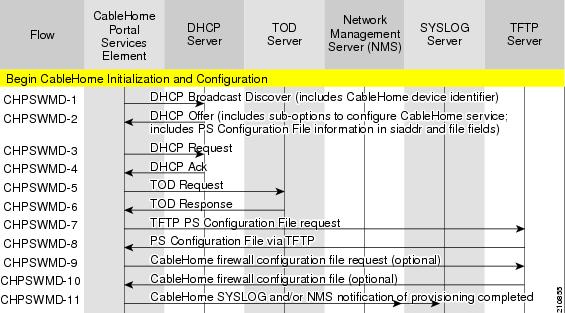
Table 7-1 describes the provisioning flow in a non-secure CableHome deployment.
Configuring CableHome
This section describes how to configure Network Registrar, the CMTS.
Configuring Network Registrar
Step 1  Create selection tags for provisioned and unprovisioned WAN-MAN and also for provisioned WAN-Data.
Step 2 Configure unprovisioned and provisioned client classes and scopes for cable modems, as specified in Cisco Network Registrar User's Guide, 6.2.1.
Step 3 Configure unprovisioned and provisioned client classes and scopes for WAN-MAN.
Step 4 Configure provisioned client classes and scopes for WAN-Data.
Step 5 Add routes to all the subnets.
Configuring the RDU
To configure CableHome support on the RDU, perform these configurations:
•Configuring CableHome WAN-MAN
•Configuring CableHome WAN-Data
Configuring CableHome WAN-MAN
Step 1 Create a DHCP Criteria for the provisioned WAN-MAN. To do this, set the client class to a client-class name that is configured in Network Registrar CableHome WAN-MAN.
Step 2 Create a Class of Service for the provisioned WAN-MAN.
•Set the /cos/chWanMan/file to a CableHome configuration file appropriate for the Class of Service.
•Set the /chWanMan/firewall/file to the desired firewall configuration file.
Configuring CableHome WAN-Data
Configure these WAN-Data parameters whenever you want portal services to obtain the WAN-Data IP addresses:
Step 1 Create DHCP Criteria for WAN-Data.
Step 2 Create Class of Service for WAN-Data.
Configuring the DPE
To configure the DPE to support the CableHome technology:
Step 1 Open the CableHome device provisioning WAN-MAN config file and verify that DHCP Option 60 is set to either CableHome1.0 or CableHome1.1. Some manufacturers use a proprietary MIB object to instruct a device to behave as a pure cable modem, a non-CableHome router, or a CableHome router. The device appears as a Computer whenever the device DHCP packet does not contain CableHome1.0 or CableHome1.1 in the DHCP Option 60.
Step 2 If you want the portal services to obtain IP addresses for WAN-Data:
•Ensure that the WAN-MAN configuration file contains TLV 28 that sets cabhCdpWanDataIpAddrCount to a value that is greater than 0.
•In the cable modem configuration file, set the maximum number of CPE to include the number of WAN-Data IP addresses.
Step 3 To enable self-provisioning when the CableHome device boots:
•In the unprov-wan-man.cfg portal services configuration file, set the portal services in the passthrough mode.
•In the cable modem configuration file, set the maximum number of CPE to at least 2 to allow provisioning of the WAN-MAN and a computer. The computer can directly access sign-up web pages to be self-provisioned.
 Feedback