- Preface
- Chapter 1 - Broadband Access Center Overview
- Chapter 2 - Broadband Access Center Architecture
- Chapter 3 - Configuration Workflows and Checklists
- Chapter 4 - DOCSIS Configuration
- Chapter 5 - PacketCable Voice Configuration
- Chapter 6 - Troubleshooting PacketCable eMTA Provisioning
- Chapter 7 - CableHome Configuration
- Chapter 8 - Configuration Templates Management
- Chapter 9 - Understanding the Administrator User Interface
- Chapter 10 - Using the Administrator User Interface
- Chapter 11 - Configuring Broadband Access Center
- Chapter 12 - Configuring and Using the Sample User Interface
- Chapter 13 - Support Tools and Advanced Concepts
- Chapter 14 - Database Management
- Appendix A - Alert and Error Messages
- Appendix B - PacketCable DHCP Options to BAC Properties Mapping
- Appendix C - API Use Cases
- Glossary
- Index
DOCSIS Configuration
This chapter describes the provisioning flow in a Broadband Access Center (BAC) DOCSIS deployment. It also provides information required before configuration and describes the available tools.
• Using MIBs with Dynamic DOCSIS Templates
•BAC Features for DOCSIS Configurations
•Troubleshooting DOCSIS Networks

Note See DOCSIS Option Support, page 8-15, for information on DOCSIS options supported by this
BAC release.
DOCSIS Workflow
Figure 4-1 shows the provisioning workflow contained in the DOCSIS Provisioning Specification. Each step is described subsequently.
Figure 4-1 DOCSIS Provisioning Flow
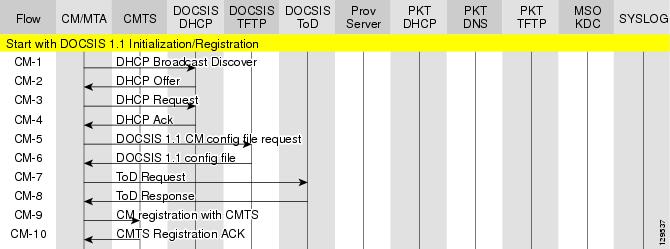
Table 4-1 describes the potential problems that can exist at various DOCSIS provisioning steps illustrated in Figure 4-1.
|
|
|
|
|---|---|---|
CM1 -1 |
DHCP Discover |
• • • • • Network Registrar DHCP • • BAC Network Registrar Extension • • • • RDU • • • • • • • DPE • • • |
CM-2 |
DHCP Offer |
Routing issues between DHCP and CMTS2 |
CM-3 |
DHCP Request |
init(i) state DHCP server did not provide all the parameters required |
CM-4 |
DHCP Ack |
|
CM-5 |
TFTP Request |
• • • • • • • |
CM-6 |
TFTP Response |
Routing issues between DPE and CMTS |
CM-7 |
ToD Request |
init(t) state - No route from time server (DPE) to modem |
CM-8 |
ToD Response |
|
CM-9 |
CM registration with CMTS |
• • |
CM-10 |
CMTS registration Ack |
Acceptable states are: • • • • |
1 CM = cable modem 2 CMTS = cable modem termination system |
Using MIBs with Dynamic DOCSIS Templates
For a full list of MIBs that BAC ships with, see SNMP VarBind, page 8-5.
Two versions of the DOCSIS MIB are loaded into the RDU:
•DOCS-CABLE-DEVICE-MIB-OBSOLETE (experimental branch)
•DOCS-CABLE-DEVICE-MIB (mib2 branch)
For information on how to use them, see DOCSIS MIBs, page 8-5.
You can add MIBs using an API call or by modifying rdu.properties. For more details, see Configuring Euro PacketCable MIBs, page 5-30.
You can add SNMP TLVs to a template:
•When no MIB is available. See Adding SNMP TLVs Without a MIB, page 8-8.
•With vendor-specific MIBs. See Adding SNMP TLVs With Vendor-Specific MIBs, page 8-9.
BAC Features for DOCSIS Configurations
This section describes BAC value-added features as they relate to the DOCSIS technology.
Dynamic Configuration TLVs
The DPE adds the following TLVs when it receives a TFTP request for dynamic DOCSIS configuration:
•TLV 19: TFTP Server Timestamp (optional)—Displays in the Configure DOCSIS Defaults page as the TFTP Time Stamp Option. See Table 11-4 for more information. This TLV requires NTP synchronization on CMTS and DPE.
•TLV 20: TFTP Server Provisioned Modem Address (optional)—Displays in the Configure DOCSIS Defaults page as the TFTP Modem Address Option. See Table 11-4 for more information.
Note This feature is incompatible with the Cisco CMTS DSS feature. If DSS is set on the Cisco CMTS, you must ensure that the TFTP Server Provisioned Modem Address is disabled.
•TLV 6: CM MIC Configuration Setting (required)
•TLV 7: CMTS MIC Configuration Setting (required)—Displays in the Configure DOCSIS Defaults page as the CMTS Shared Secret. See Table 11-4 for more information.
Note When configuring CMTS MIC, note the following CMTS IOS release dependencies:
•DOCSIS 2.0 CMTS MIC requires CMTS IOS 12.3BC when including TLV 39 or TLV 40.
•Certain CMTS IOS commands are assumed to be configured by BAC:
–ip dhcp relay information option
–no ip dhcp relay information check
–cable helper-address x.x.x.x
where x.x.x.x is the IP address of the Network Registrar DHCP server.
–cable dhcp-giaddr primary
DPE TFTP IP Validation
For dynamic configuration files, the DPE TFTP server verifies if the IP address of the TFTP client matches the expected DOCSIS cable modem IP address. If it does not match, the request is dropped. This feature is incompatible with the Cisco CMTS DMIC feature.
Use the no tftp verify-ip command to disable the verification of requestor IP addresses on dynamic configuration TFTP requests. For detailed information, refer to the Cisco Broadband Access Center DPE CLI Reference, 2.7.1.
DOCSIS 1.0, 1.1, 2.0 Support
BAC 2.7.1 supports DOCSIS 1.0, 1.1, and 2.0. See Support Tools and Advanced Concepts, page 13-1, for information describing the TLVs and options that this BAC release supports in each DOCSIS version.
Dynamic DOCSIS Version Selection
BAC can detect a cable modem's DOCSIS version from an incoming DHCP request. It can also detect the CMTS DOCSIS version from a customer-supplied source that provides a mapping of GIADDR to the CMTS DOCSIS version.
Using this information, BAC, if so configured, determines the optimum DOCSIS configuration file for the device. This is the highest common DOCSIS version between the device and the CMTS. For example, if the device supports DOCSIS 2.0 and the CMTS supports DOCSIS 1.1, the DOCSIS 1.1 file is used.
Note You can specify the DOCSIS version by using the Configuration File Utility. For more information, see Using the Configuration File Utility, page 8-27. This function that the file utility performs is different from RDU verification, during which the RDU DOCSIS Version Selector feature determines the latest DOCSIS version supported by a CMTS.
DOCSIS Configuration File Based on DOCSIS Version
The following Class of Service properties are supported by the BAC administrator user interface and the API:
/cos/docsis/file/1.0
/cos/docsis/file/1.1
/cos/docsis/file/2.0
Optionally, you can add these properties to a DOCSIS Class of Service to associate a DOCSIS configuration filename with a particular DOCSIS version. Each of these properties (if set) causes the RDU to establish a database relationship between the Class of Service and the file named by the property value, as is done for the existing DOCSIS configuration filename property.
GIADDR-Based Dynamic DOCSIS Version Selection
During configuration generation, the service-level selection extension for DOCSIS modems looks for the /docsis/cmts/version/giaddrToVersionMap property. The value of this property is the name of an external file containing a mapping of the GIADDR to the DOCSIS version supported by the cable modem. This mapping file must be named giaddr-docsis-map.txt.
Note You can add the giaddr-docsis-map.txt to the RDU:
•From the API via the Configuration.addExternalFile() call.
•From the administrator user interface via Configuration > External Files. See Adding External Files, page 11-27.
The giaddr-docsis-map.txt file must include the necessary information in the following format:
IPv4_address DOCSIS_version
•IPv4_address—IPv4 address of the CMTS interface
•docsis_version—DOCSIS version that the cable modem supports
For example, if the CMTS interface had IP address 10.30.0.1 with DOCSIS version 1.0, the file would include:
10.30.0.1 1.0
Note If the device GIADDR is not found in the mapping file, the extension uses the value of the /docsis/cmts/version/default property for the DOCSIS version of the cable modem. The default value of this property is 1.0.
To dynamically update the giaddr-docsis-map.txt file, edit it and replace it in the RDU via the replaceExternalFile API or via the administrator user interface.
Note If the properties for the DOCSIS version selection are not specified on the Class of Service, the original file is used, allowing for systematic upgrades across the network.
Troubleshooting DOCSIS Networks
For information on troubleshooting the DOCSIS technology with respect to BAC and the Cisco uBR7246 CMTS, refer to Troubleshooting uBR Cable Modems Not Coming Online at:
http://www.cisco.com/en/US/tech/tk86/tk89/technologies_tech_note09186a0080094eb1.shtml
 Feedback