Contents

Hot Standby Pseudowire Support for ATM and TDM Access Circuits

The Hot Standby Pseudowire Support for ATM and TDM Access Circuits feature is an enhancement to the L2VPN Pseudowire Redundancy feature in the following ways:

  • Faster failover of to the backup pseudowire
  • Less traffic loss during failover

The Hot Standby Pseudowire Support for ATM and TDM Access Circuits feature allows the backup pseudowire to be in a “hot standby” state, so that it can immediately take over if the primary pseudowire fails. The following sections explain the concepts and configuration tasks for this feature.

Finding Feature Information

Your software release may not support all the features documented in this module. For the latest caveats and feature information, see Bug Search Tool and the release notes for your platform and software release. To find information about the features documented in this module, and to see a list of the releases in which each feature is supported, see the feature information table at the end of this module.

Use Cisco Feature Navigator to find information about platform support and Cisco software image support. To access Cisco Feature Navigator, go to www.cisco.com/​go/​cfn. An account on Cisco.com is not required.

Prerequisites for Hot Standby Pseudowire Support for ATM and TDM Access Circuits

  • This feature requires that you understand how to configure Layer 2 virtual private networks (VPNs). You can find that information in the following documents:
    • Any Transport over MPLS
    • L2 VPN Interworking
    • L2VPN Pseudowire Redundancy
  • For information on configuring this feature on the Cisco 7600 series routers, see the following:
  • The Hot Standby Pseudowire Support for ATM and TDM Access Circuits feature recommends that the following mechanisms be in place to enable faster detection of a failure in the network:
    • Label-switched paths (LSP) Ping/Traceroute and Any Transport over MPLS Virtual Circuit Connection Verification (AToM VCCV)
    • Local Management Interface (LMI)
    • Operation, Administration, and Maintenance (OAM)

Restrictions for Hot Standby Pseudowire Support for ATM and TDM Access Circuits

  • Hot Standby Pseudowire Support for ATM and TDM Access Circuits is not supported on L2TPv3. Only MPLS L2VPNs are supported.
  • More than one backup pseudowire is not supported.
  • Different pseudowire encapsulation types on the MPLS pseudowire are not supported.
  • If you use Hot Standby Pseudowire Support for ATM and TDM Access Circuits with L2VPN Interworking, the interworking method must be the same for the primary and backup pseudowires. For TDM access circuits, interworking is not supported.
  • Only dynamic pseudowires are supported.

Information About Hot Standby Pseudowire Support for ATM and TDM Access Circuits

How the Hot Standby Pseudowire Support for ATM and TDM Access Circuits Feature Works

The Hot Standby Pseudowire Support for ATM and TDM Access Circuits feature improves the availability of L2VPN pseudowires by detecting failures and handling them with minimal disruption to the service.

The Hot Standby Pseudowire Support for ATM and TDM Access Circuits feature allows the backup pseudowire to be in a “hot standby” state, so that it can immediately take over if the primary pseudowire fails. The L2VPN Pseudowire Redundancy feature allows you to configure a backup pseudowire too, but in a cold state. With the L2VPN Pseudowire Redundancy feature, if the primary pseudowire fails, it takes time for the backup pseudowire to take over, which causes a loss in traffic.

If you have configured L2VPN Pseudowire Redundancy on your network and upgrade to Cisco IOS Release 15.1(1)S, you do not need add any other commands to achieve Hot Standby Pseudowire Support for ATM and TDM Access Circuits. The backup pseudowire will automatically be in a hot standby state.

Supported Transport Types

The Hot Standby Pseudowire Support for ATM and TDM Access Circuits feature supports the following transport types:

  • ATM
    • ATM AAL5 in VC mode
    • ATM packed cell relay in VC Mode
    • ATM in VP mode
    • ATM packed cell relay in VP mode
    • ATM in port mode
    • ATM packed cell relay in port mode
  • Time division multiplexing (TDM)
    • Structure-Agnostic TDM over Packet (SAToP)
    • Circuit Emulation Services over PSN (CESoPSN)

How to Configure Hot Standby Pseudowire Support for ATM and TDM Access Circuits

The Hot Standby Pseudowire Support for ATM and TDM Access Circuits feature enables you to configure a backup pseudowire in case the primary pseudowire fails. When the primary pseudowire fails, the PE router can immediately switch to the backup pseudowire.

Configuring a Pseudowire Class for Static VPLS

The configuration of pseudowires between provider edge (PE) devices helps in the successful transmission of the Layer 2 frames between PE devices.

Use the pseudowire template to configure the virtual circuit (VC) type for the virtual path identifier (VPI) pseudowire. In the following task, the pseudowire will go through a Multiprotocol Label Switching (MPLS)-Tunneling Protocol (TP) tunnel.

The pseudowire template configuration specifies the characteristics of the tunneling mechanism that is used by the pseudowires, which are:

  • Encapsulation type
  • Control protocol
  • Payload-specific options
  • Preferred path

Perform this task to configure a pseudowire template for static Virtual Private LAN Services (VPLS).

SUMMARY STEPS

    1.    enable

    2.    configure terminal

    3.    template type pseudowire name

    4.    encapsulation mpls

    5.    exit

    6.    interface pseudowire number

    7.    source template type pseudowire name

    8.    neighbor peer-address vcid-value

    9.    signaling protocol none

    10.    preferred-path interface Tunnel-tp interface-number

    11.    end


DETAILED STEPS
     Command or ActionPurpose
    Step 1 enable


    Example:
    Device> enable
     

    Enables privileged EXEC mode.

    • Enter your password if prompted.
     
    Step 2 configure terminal


    Example:
    Device# configure terminal
     

    Enters global configuration mode.

     
    Step 3 template type pseudowire name


    Example:
    Device(config)# template type pseudowire static-vpls
     

    Specifies the template type as pseudowire and enters template configuration mode.

     
    Step 4 encapsulation mpls


    Example:
    Device(config-template)# encapsulation mpls 
     
    Specifies the tunneling encapsulation.
    • For Any Transport over MPLS (AToM), the encapsulation type is MPLS.
     
    Step 5 exit


    Example:
    Device(config-template)# exit
     

    Exits template configuration mode and returns to global configuration mode.

     
    Step 6 interface pseudowire number


    Example:
    Device(config)# interface pseudowire 1
     

    Establishes a pseudowire interface and enters interface configuration mode.

     
    Step 7 source template type pseudowire name


    Example:
    Device(config-if)# source template type pseudowire static-vpls
     

    Configures the source template type of the configured pseudowire.

     
    Step 8 neighbor peer-address vcid-value


    Example:
    Device(config-if)#  neighbor 10.0.0.1 123
     

    Specifies the peer IP address and VC ID value of a Layer 2 VPN (L2VPN) pseudowire.

     
    Step 9 signaling protocol none


    Example:
    Device(config-if)# signaling protocol none 
     

    Specifies that no signaling protocol is configured for the pseudowire class.

     
    Step 10 preferred-path interface Tunnel-tp interface-number


    Example:
    Device(config-if)# preferred-path interface Tunnel-tp 1
     

    (Optional) Specifies the path that traffic uses: an MPLS Traffic Engineering (TE) tunnel or destination IP address and Domain Name Server (DNS) name.

     
    Step 11 end


    Example:
    Device(config-if)# end
     

    Exits interface configuration mode and returns to privileged EXEC mode.


    Configuring Hot Standby Pseudowire Support for ATM and TDM Access Circuits

    Use the following steps to configure the Hot Standby Pseudowire Support for ATM and TDM Access Circuits feature.

    Before You Begin

    For each transport type, the xconnectcommand is configured slightly differently.

    SUMMARY STEPS

      1.    enable

      2.    configure terminal

      3.    interface atm number

      4.    pvc [name] vpi/vci l2transport

      5.    xconnect peer-router-id vcid {encapsulation mpls| pw-class pw-class-name}

      6.    backup peer peer-router-ip-addr vcid [pw-class pw-class-name]

      7.    backup delay e nable-delay {disable-delay | never}


    DETAILED STEPS
       Command or ActionPurpose
      Step 1 enable


      Example:
      Router> enable
       

      Enables privileged EXEC mode.

      • Enter your password if prompted.
       
      Step 2 configure terminal


      Example:
      Router# configure terminal
       

      Enters global configuration mode.

       
      Step 3 interface atm number


      Example:
      Router(config)# interface atm4/1/0
       

      Specifies the ATM interface and enters interface configuration mode.

       
      Step 4 pvc [name] vpi/vci l2transport


      Example:
      Router(config-if)# pvc 1/100 l2transport
       

      Creates or assigns a name to an ATM PVC and enters L2transport PVC configuration mode.

       
      Step 5 xconnect peer-router-id vcid {encapsulation mpls| pw-class pw-class-name}


      Example:
      Router(config-if-atm-l2trans-pvc)# xconnect 10.0.0.1 123 pw-class atom
       

      Binds the attachment circuit to a pseudowire VC.

       
      Step 6 backup peer peer-router-ip-addr vcid [pw-class pw-class-name]


      Example:
      Router(config-if-atm-l2trans-pvc)# backup peer 10.0.0.3 125 pw-class atom 
       

      Specifies a redundant peer for the pseudowire VC.

      The pseudowire class name must match the name you specified when you created the pseudowire class, but you can use a different pw-class in the backup peer command than the name that you used in the primary xconnect command.

       
      Step 7 backup delay e nable-delay {disable-delay | never}


      Example:
      Router(config-if-atm-l2trans-pvc)# backup delay 5 never
       

      Specifies how long (in seconds) the backup pseudowire VC should wait to take over after the primary pseudowire VC goes down. The range is 0 to 180.

      Specifies how long the primary pseudowire should wait after it becomes active to take over for the backup pseudowire VC. The range is 0 to 180 seconds. If you specify the never keyword, the primary pseudowire VC never takes over for the backup.


      Verifying the Hot Standby Pseudowire Support for ATM and TDM Access Circuits Configuration

      Use the following commands to verify that the backup pseudowire is provisioned for hot standby support.

      SUMMARY STEPS

        1.    show atm acircuit

        2.    show atm pvc

        3.    show cem acircuit

        4.    show cem acircuit detail


      DETAILED STEPS
        Step 1   show atm acircuit

        If the output of the show atm acircuitcommand shows two entries for the same vpi/vci, then the backup pseudowire has been correctly provisioned, as shown in the following example:


        Example:
        Router# show atm acircuit
         
        Interface          VPI  VCI    AC    Id      Switch   Segment  St  Flg  Prov
        ---------          ---  ---    --    --      -------  -------- --  ---  ----
        ATM2/1/0.2         11   111    ATA5  1        2003    4007     2    0    Y 
        ATM2/1/0.2         11   111    ATA5  1        1002    3006     2    0    Y 
        
        Step 2   show atm pvc

        If the output of the show atm pvc command includes “Red Prov: Yes,” then the backup pseudowire has been correctly provisioned, as shown in bold in the following example:


        Example:
        Router# show atm pvc 1/1010
        Interworking Method: like to like
        AC Type: ATM AAL5,  Circuit Id: 2,  AC State: UP,  Prov: YES
        Switch Hdl: 0x1005,  Segment hdl: 0x4011
        Red Switch Hdl: 0x3007, Red Segment hdl: 0x6010, Red Prov: YES
        AC Hdl: 0x7200000F,  AC Peer Hdl: 0x5D000012,  Flg:0,  Platform Idx:10
        Status: UP
        
        Step 3   show cem acircuit

        If the output of the show cem acircuit command includes “Redundancy Member Prov: Yes,” then the backup pseudowire has been correctly provisioned, as shown in bold in the following example:


        Example:
        Router# show cem acircuit
        CEM Int.   ID  Flags  Swhdl    Seghdl    Ckttype  Provisioned 
        ---------------------------------------------------------------- 
        CEM3/0/0   1    0    B00E       201E       19        Yes
        Redundancy Switch hdl: 0xC00F Redundancy Segment hdl: 0x401F   Redundancy Member Prov: Yes
        
        Step 4   show cem acircuit detail

        If the output of the show cem acircuit detail command includes “Redundancy Member Prov: Yes,” then the backup pseudowire has been correctly provisioned, as shown in bold in the following example:


        Example:
        Router# show cem acircuit detail
         
        CEM3/0/0    Cemid 1    
        PW Ckt_type: 19  Aie hdl: EE00000B Peer aie hdl: 0x2000000C 
        Switch hdl: 0xB00E     Segment hdl: 0x201E     Redundancy Switch hdl: 0x1000     Redundancy Segment hdl: 0x4002     Redundancy Member Prov: Yes


        Configuration Examples for Hot Standby Pseudowire Support for ATM and TDM Access Circuits

        Configuring Hot Standby Pseudowire Support for ATM and TDM Access Circuits on CEM Circuits Example

        The figure below shows the configuration of Hot Standby Pseudowire Support for ATM and TDM Access Circuits, where the backup pseudowire is on the same PE router.
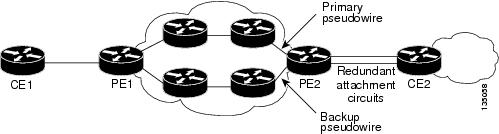
        Figure 1. Hot Standby Pseudowire Topology

        The configuration shown in the figure above is used in the following examples:

        Table 1 Configuring Hot Standby Pseudowire Support for ATM and TDM Access Circuits on CEM Circuits: Example

        PE1

        PE2

        interface Loopback0
         ip address 10.4.4.4 255.255.255.255
        !
        Controller E1 9/2/0
         clock source internal
         cem-group 0 timeslots 1-4
        !
        pseudowire-class atom
         encapsulation mpls
        !
        interface CEM9/2/0
         no ip address
         class int cesopsn_1
         cem 0
          xconnect 10.2.2.2 5000 pw-class atom
           backup peer 10.2.2.2 5005 pw-class atom
           backup delay 0 5
        
        interface Loopback0
         ip address 10.2.2.2 255.255.255.255
        !
        Controller E1 2/2/0
         clock source internal
         cem-group 0 timeslots 1-4  <<<<<< Primary 
         cem-group 5 timeslots 21-24<<<<< Backup
        !
        interface CEM2/2/0
         no ip address
         class int cesopsn_1
         cem 0<<<<<<<<<< Primary
          service-policy input cem_exp_6
          xconnect 10.4.4.4 5000 encapsulation mpls
        !
        cem 5<<<<<<<<<< Backup
          xconnect 10.4.4.4 5005 encapsulation mpls
        
        Table 2 Configuring Hot Standby Pseudowire Support for ATM and TDM Access Circuits on ATM Circuits: Example

        PE1

        PE2

        interface Loopback0
         ip address 10.44.44.44 255.255.255.255
        !
        interface POS3/3/0
         ip address 10.4.4.4 255.255.255.0
         mpls ip
        !
        interface ATM4/1/0
         no ip address
         no atm enable-ilmi-trap
         pvc 1/100 l2transport
          xconnect 10.22.22.22 1 encapsulation mpls
           backup peer 10.22.22.22 2
        
        interface Loopback0
         ip address 10.22.22.22 255.255.255.255
        !
        interface POS3/3/0
         ip address 10.4.4.1 255.255.255.0
         mpls ip
        !
        interface ATM4/1/0
         no ip address
         no atm enable-ilmi-trap
         pvc 1/100 l2transport
          xconnect 10.44.44.44 1 encapsulation mpls
        !
         pvc 1/200 l2transport
          xconnect 10.44.44.44 2 encapsulation mpls

        Additional References

        The following sections provide references related to the Hot Standby Pseudowire Support for ATM and TDM Access Circuits feature.

        Related Documents

        Related Topic

        Document Title

        Cisco IOS commands

        Cisco IOS Master Commands List, All Releases

        MPLS commands

        Cisco IOS Multiprotocol Label Switching Command Reference

        L2VPNs on 7600 series router

        Circuit Emulation Services over Packet Switched Network (CESoPSN) mode and Structure-Agnostic TDM over Packet (SAToP) mode

        Overview of the CEoP and Channelized ATM SPAs

        Configuring a CEM Pseudowire

        Configuring the CEoP and Channelized ATM SPAs

        Configuring Pseudowire Redundancy on circuit emulation (CEM) pseudowires

        Configuring the CEoP and Channelized ATM SPAs

        L2VPN pseudowires

        • Any Transport over MPLS
        • L2 VPN Interworking
        • L2VPN Pseudowire Redundancy

        NSF/SSO for L2VPNs

        NSF/SSO—Any Transport over MPLS and AToM Graceful Restart

        Ping and traceroute for L2VPNs

        MPLS LSP Ping/Traceroute for LDP/TE, and LSP Ping for VCCV

        Standards

        Standard

        Title

        draft-muley-pwe3-redundancy

        Pseudowire Redundancy

        draft-ietf-pwe3-iccp-xx.txt

        Inter-Chassis Communication Protocol for L2VPN PE Redundancy

        MIBs

        MIB

        MIBs Link

        • CISCO-IETF-PW-ATM-MIB

        To locate and download MIBs for selected platforms, Cisco IOS releases, and feature sets, use Cisco MIB Locator found at the following URL:

        http:/​/​www.cisco.com/​go/​mibs

        RFCs

        RFC

        Title

        RFC 5085

        Pseudowire Virtual Circuit Connectivity Verification (VCCV): A Control Channel for Pseudowires

        Technical Assistance

        Description

        Link

        The Cisco Support website provides extensive online resources, including documentation and tools for troubleshooting and resolving technical issues with Cisco products and technologies.

        To receive security and technical information about your products, you can subscribe to various services, such as the Product Alert Tool (accessed from Field Notices), the Cisco Technical Services Newsletter, and Really Simple Syndication (RSS) Feeds.

        Access to most tools on the Cisco Support website requires a Cisco.com user ID and password.

        http:/​/​www.cisco.com/​cisco/​web/​support/​index.html

        Feature Information for Hot Standby Pseudowire Support for ATM and TDM Access Circuits

        The following table provides release information about the feature or features described in this module. This table lists only the software release that introduced support for a given feature in a given software release train. Unless noted otherwise, subsequent releases of that software release train also support that feature.

        Use Cisco Feature Navigator to find information about platform support and Cisco software image support. To access Cisco Feature Navigator, go to www.cisco.com/​go/​cfn. An account on Cisco.com is not required.

        Table 3 Feature Information for Hot Standby Pseudowire Support for ATM and TDM Access Circuits

        Feature Name

        Releases

        Feature Information

        Hot Standby Pseudowire Support for ATM and TDM Access Circuits

        15.1(1)S

        The Hot Standby Pseudowire Support for ATM and TDM Access Circuits feature allows the backup pseudowire to be in a “hot standby” state, so that it can immediately take over if the primary pseudowire fails.

        In 15.1(1)S, this feature was introduced on the Cisco 7600.

        The following sections provide information about this feature:

        No commands were introduced or modified.


        Hot Standby Pseudowire Support for ATM and TDM Access Circuits

        Contents

        Hot Standby Pseudowire Support for ATM and TDM Access Circuits

        The Hot Standby Pseudowire Support for ATM and TDM Access Circuits feature is an enhancement to the L2VPN Pseudowire Redundancy feature in the following ways:

        • Faster failover of to the backup pseudowire
        • Less traffic loss during failover

        The Hot Standby Pseudowire Support for ATM and TDM Access Circuits feature allows the backup pseudowire to be in a “hot standby” state, so that it can immediately take over if the primary pseudowire fails. The following sections explain the concepts and configuration tasks for this feature.

        Finding Feature Information

        Your software release may not support all the features documented in this module. For the latest caveats and feature information, see Bug Search Tool and the release notes for your platform and software release. To find information about the features documented in this module, and to see a list of the releases in which each feature is supported, see the feature information table at the end of this module.

        Use Cisco Feature Navigator to find information about platform support and Cisco software image support. To access Cisco Feature Navigator, go to www.cisco.com/​go/​cfn. An account on Cisco.com is not required.

        Prerequisites for Hot Standby Pseudowire Support for ATM and TDM Access Circuits

        • This feature requires that you understand how to configure Layer 2 virtual private networks (VPNs). You can find that information in the following documents:
          • Any Transport over MPLS
          • L2 VPN Interworking
          • L2VPN Pseudowire Redundancy
        • For information on configuring this feature on the Cisco 7600 series routers, see the following:
        • The Hot Standby Pseudowire Support for ATM and TDM Access Circuits feature recommends that the following mechanisms be in place to enable faster detection of a failure in the network:
          • Label-switched paths (LSP) Ping/Traceroute and Any Transport over MPLS Virtual Circuit Connection Verification (AToM VCCV)
          • Local Management Interface (LMI)
          • Operation, Administration, and Maintenance (OAM)

        Restrictions for Hot Standby Pseudowire Support for ATM and TDM Access Circuits

        • Hot Standby Pseudowire Support for ATM and TDM Access Circuits is not supported on L2TPv3. Only MPLS L2VPNs are supported.
        • More than one backup pseudowire is not supported.
        • Different pseudowire encapsulation types on the MPLS pseudowire are not supported.
        • If you use Hot Standby Pseudowire Support for ATM and TDM Access Circuits with L2VPN Interworking, the interworking method must be the same for the primary and backup pseudowires. For TDM access circuits, interworking is not supported.
        • Only dynamic pseudowires are supported.

        Information About Hot Standby Pseudowire Support for ATM and TDM Access Circuits

        How the Hot Standby Pseudowire Support for ATM and TDM Access Circuits Feature Works

        The Hot Standby Pseudowire Support for ATM and TDM Access Circuits feature improves the availability of L2VPN pseudowires by detecting failures and handling them with minimal disruption to the service.

        The Hot Standby Pseudowire Support for ATM and TDM Access Circuits feature allows the backup pseudowire to be in a “hot standby” state, so that it can immediately take over if the primary pseudowire fails. The L2VPN Pseudowire Redundancy feature allows you to configure a backup pseudowire too, but in a cold state. With the L2VPN Pseudowire Redundancy feature, if the primary pseudowire fails, it takes time for the backup pseudowire to take over, which causes a loss in traffic.

        If you have configured L2VPN Pseudowire Redundancy on your network and upgrade to Cisco IOS Release 15.1(1)S, you do not need add any other commands to achieve Hot Standby Pseudowire Support for ATM and TDM Access Circuits. The backup pseudowire will automatically be in a hot standby state.

        Supported Transport Types

        The Hot Standby Pseudowire Support for ATM and TDM Access Circuits feature supports the following transport types:

        • ATM
          • ATM AAL5 in VC mode
          • ATM packed cell relay in VC Mode
          • ATM in VP mode
          • ATM packed cell relay in VP mode
          • ATM in port mode
          • ATM packed cell relay in port mode
        • Time division multiplexing (TDM)
          • Structure-Agnostic TDM over Packet (SAToP)
          • Circuit Emulation Services over PSN (CESoPSN)

        How to Configure Hot Standby Pseudowire Support for ATM and TDM Access Circuits

        The Hot Standby Pseudowire Support for ATM and TDM Access Circuits feature enables you to configure a backup pseudowire in case the primary pseudowire fails. When the primary pseudowire fails, the PE router can immediately switch to the backup pseudowire.

        Configuring a Pseudowire Class for Static VPLS

        The configuration of pseudowires between provider edge (PE) devices helps in the successful transmission of the Layer 2 frames between PE devices.

        Use the pseudowire template to configure the virtual circuit (VC) type for the virtual path identifier (VPI) pseudowire. In the following task, the pseudowire will go through a Multiprotocol Label Switching (MPLS)-Tunneling Protocol (TP) tunnel.

        The pseudowire template configuration specifies the characteristics of the tunneling mechanism that is used by the pseudowires, which are:

        • Encapsulation type
        • Control protocol
        • Payload-specific options
        • Preferred path

        Perform this task to configure a pseudowire template for static Virtual Private LAN Services (VPLS).

        SUMMARY STEPS

          1.    enable

          2.    configure terminal

          3.    template type pseudowire name

          4.    encapsulation mpls

          5.    exit

          6.    interface pseudowire number

          7.    source template type pseudowire name

          8.    neighbor peer-address vcid-value

          9.    signaling protocol none

          10.    preferred-path interface Tunnel-tp interface-number

          11.    end


        DETAILED STEPS
           Command or ActionPurpose
          Step 1 enable


          Example:
          Device> enable
           

          Enables privileged EXEC mode.

          • Enter your password if prompted.
           
          Step 2 configure terminal


          Example:
          Device# configure terminal
           

          Enters global configuration mode.

           
          Step 3 template type pseudowire name


          Example:
          Device(config)# template type pseudowire static-vpls
           

          Specifies the template type as pseudowire and enters template configuration mode.

           
          Step 4 encapsulation mpls


          Example:
          Device(config-template)# encapsulation mpls 
           
          Specifies the tunneling encapsulation.
          • For Any Transport over MPLS (AToM), the encapsulation type is MPLS.
           
          Step 5 exit


          Example:
          Device(config-template)# exit
           

          Exits template configuration mode and returns to global configuration mode.

           
          Step 6 interface pseudowire number


          Example:
          Device(config)# interface pseudowire 1
           

          Establishes a pseudowire interface and enters interface configuration mode.

           
          Step 7 source template type pseudowire name


          Example:
          Device(config-if)# source template type pseudowire static-vpls
           

          Configures the source template type of the configured pseudowire.

           
          Step 8 neighbor peer-address vcid-value


          Example:
          Device(config-if)#  neighbor 10.0.0.1 123
           

          Specifies the peer IP address and VC ID value of a Layer 2 VPN (L2VPN) pseudowire.

           
          Step 9 signaling protocol none


          Example:
          Device(config-if)# signaling protocol none 
           

          Specifies that no signaling protocol is configured for the pseudowire class.

           
          Step 10 preferred-path interface Tunnel-tp interface-number


          Example:
          Device(config-if)# preferred-path interface Tunnel-tp 1
           

          (Optional) Specifies the path that traffic uses: an MPLS Traffic Engineering (TE) tunnel or destination IP address and Domain Name Server (DNS) name.

           
          Step 11 end


          Example:
          Device(config-if)# end
           

          Exits interface configuration mode and returns to privileged EXEC mode.


          Configuring Hot Standby Pseudowire Support for ATM and TDM Access Circuits

          Use the following steps to configure the Hot Standby Pseudowire Support for ATM and TDM Access Circuits feature.

          Before You Begin

          For each transport type, the xconnectcommand is configured slightly differently.

          SUMMARY STEPS

            1.    enable

            2.    configure terminal

            3.    interface atm number

            4.    pvc [name] vpi/vci l2transport

            5.    xconnect peer-router-id vcid {encapsulation mpls| pw-class pw-class-name}

            6.    backup peer peer-router-ip-addr vcid [pw-class pw-class-name]

            7.    backup delay e nable-delay {disable-delay | never}


          DETAILED STEPS
             Command or ActionPurpose
            Step 1 enable


            Example:
            Router> enable
             

            Enables privileged EXEC mode.

            • Enter your password if prompted.
             
            Step 2 configure terminal


            Example:
            Router# configure terminal
             

            Enters global configuration mode.

             
            Step 3 interface atm number


            Example:
            Router(config)# interface atm4/1/0
             

            Specifies the ATM interface and enters interface configuration mode.

             
            Step 4 pvc [name] vpi/vci l2transport


            Example:
            Router(config-if)# pvc 1/100 l2transport
             

            Creates or assigns a name to an ATM PVC and enters L2transport PVC configuration mode.

             
            Step 5 xconnect peer-router-id vcid {encapsulation mpls| pw-class pw-class-name}


            Example:
            Router(config-if-atm-l2trans-pvc)# xconnect 10.0.0.1 123 pw-class atom
             

            Binds the attachment circuit to a pseudowire VC.

             
            Step 6 backup peer peer-router-ip-addr vcid [pw-class pw-class-name]


            Example:
            Router(config-if-atm-l2trans-pvc)# backup peer 10.0.0.3 125 pw-class atom 
             

            Specifies a redundant peer for the pseudowire VC.

            The pseudowire class name must match the name you specified when you created the pseudowire class, but you can use a different pw-class in the backup peer command than the name that you used in the primary xconnect command.

             
            Step 7 backup delay e nable-delay {disable-delay | never}


            Example:
            Router(config-if-atm-l2trans-pvc)# backup delay 5 never
             

            Specifies how long (in seconds) the backup pseudowire VC should wait to take over after the primary pseudowire VC goes down. The range is 0 to 180.

            Specifies how long the primary pseudowire should wait after it becomes active to take over for the backup pseudowire VC. The range is 0 to 180 seconds. If you specify the never keyword, the primary pseudowire VC never takes over for the backup.


            Verifying the Hot Standby Pseudowire Support for ATM and TDM Access Circuits Configuration

            Use the following commands to verify that the backup pseudowire is provisioned for hot standby support.

            SUMMARY STEPS

              1.    show atm acircuit

              2.    show atm pvc

              3.    show cem acircuit

              4.    show cem acircuit detail


            DETAILED STEPS
              Step 1   show atm acircuit

              If the output of the show atm acircuitcommand shows two entries for the same vpi/vci, then the backup pseudowire has been correctly provisioned, as shown in the following example:


              Example:
              Router# show atm acircuit
               
              Interface          VPI  VCI    AC    Id      Switch   Segment  St  Flg  Prov
              ---------          ---  ---    --    --      -------  -------- --  ---  ----
              ATM2/1/0.2         11   111    ATA5  1        2003    4007     2    0    Y 
              ATM2/1/0.2         11   111    ATA5  1        1002    3006     2    0    Y 
              
              Step 2   show atm pvc

              If the output of the show atm pvc command includes “Red Prov: Yes,” then the backup pseudowire has been correctly provisioned, as shown in bold in the following example:


              Example:
              Router# show atm pvc 1/1010
              Interworking Method: like to like
              AC Type: ATM AAL5,  Circuit Id: 2,  AC State: UP,  Prov: YES
              Switch Hdl: 0x1005,  Segment hdl: 0x4011
              Red Switch Hdl: 0x3007, Red Segment hdl: 0x6010, Red Prov: YES
              AC Hdl: 0x7200000F,  AC Peer Hdl: 0x5D000012,  Flg:0,  Platform Idx:10
              Status: UP
              
              Step 3   show cem acircuit

              If the output of the show cem acircuit command includes “Redundancy Member Prov: Yes,” then the backup pseudowire has been correctly provisioned, as shown in bold in the following example:


              Example:
              Router# show cem acircuit
              CEM Int.   ID  Flags  Swhdl    Seghdl    Ckttype  Provisioned 
              ---------------------------------------------------------------- 
              CEM3/0/0   1    0    B00E       201E       19        Yes
              Redundancy Switch hdl: 0xC00F Redundancy Segment hdl: 0x401F   Redundancy Member Prov: Yes
              
              Step 4   show cem acircuit detail

              If the output of the show cem acircuit detail command includes “Redundancy Member Prov: Yes,” then the backup pseudowire has been correctly provisioned, as shown in bold in the following example:


              Example:
              Router# show cem acircuit detail
               
              CEM3/0/0    Cemid 1    
              PW Ckt_type: 19  Aie hdl: EE00000B Peer aie hdl: 0x2000000C 
              Switch hdl: 0xB00E     Segment hdl: 0x201E     Redundancy Switch hdl: 0x1000     Redundancy Segment hdl: 0x4002     Redundancy Member Prov: Yes


              Configuration Examples for Hot Standby Pseudowire Support for ATM and TDM Access Circuits

              Configuring Hot Standby Pseudowire Support for ATM and TDM Access Circuits on CEM Circuits Example

              The figure below shows the configuration of Hot Standby Pseudowire Support for ATM and TDM Access Circuits, where the backup pseudowire is on the same PE router.

              Figure 1. Hot Standby Pseudowire Topology

              The configuration shown in the figure above is used in the following examples:

              Table 1 Configuring Hot Standby Pseudowire Support for ATM and TDM Access Circuits on CEM Circuits: Example

              PE1

              PE2

              interface Loopback0
               ip address 10.4.4.4 255.255.255.255
              !
              Controller E1 9/2/0
               clock source internal
               cem-group 0 timeslots 1-4
              !
              pseudowire-class atom
               encapsulation mpls
              !
              interface CEM9/2/0
               no ip address
               class int cesopsn_1
               cem 0
                xconnect 10.2.2.2 5000 pw-class atom
                 backup peer 10.2.2.2 5005 pw-class atom
                 backup delay 0 5
              
              interface Loopback0
               ip address 10.2.2.2 255.255.255.255
              !
              Controller E1 2/2/0
               clock source internal
               cem-group 0 timeslots 1-4  <<<<<< Primary 
               cem-group 5 timeslots 21-24<<<<< Backup
              !
              interface CEM2/2/0
               no ip address
               class int cesopsn_1
               cem 0<<<<<<<<<< Primary
                service-policy input cem_exp_6
                xconnect 10.4.4.4 5000 encapsulation mpls
              !
              cem 5<<<<<<<<<< Backup
                xconnect 10.4.4.4 5005 encapsulation mpls
              
              Table 2 Configuring Hot Standby Pseudowire Support for ATM and TDM Access Circuits on ATM Circuits: Example

              PE1

              PE2

              interface Loopback0
               ip address 10.44.44.44 255.255.255.255
              !
              interface POS3/3/0
               ip address 10.4.4.4 255.255.255.0
               mpls ip
              !
              interface ATM4/1/0
               no ip address
               no atm enable-ilmi-trap
               pvc 1/100 l2transport
                xconnect 10.22.22.22 1 encapsulation mpls
                 backup peer 10.22.22.22 2
              
              interface Loopback0
               ip address 10.22.22.22 255.255.255.255
              !
              interface POS3/3/0
               ip address 10.4.4.1 255.255.255.0
               mpls ip
              !
              interface ATM4/1/0
               no ip address
               no atm enable-ilmi-trap
               pvc 1/100 l2transport
                xconnect 10.44.44.44 1 encapsulation mpls
              !
               pvc 1/200 l2transport
                xconnect 10.44.44.44 2 encapsulation mpls

              Additional References

              The following sections provide references related to the Hot Standby Pseudowire Support for ATM and TDM Access Circuits feature.

              Related Documents

              Related Topic

              Document Title

              Cisco IOS commands

              Cisco IOS Master Commands List, All Releases

              MPLS commands

              Cisco IOS Multiprotocol Label Switching Command Reference

              L2VPNs on 7600 series router

              Circuit Emulation Services over Packet Switched Network (CESoPSN) mode and Structure-Agnostic TDM over Packet (SAToP) mode

              Overview of the CEoP and Channelized ATM SPAs

              Configuring a CEM Pseudowire

              Configuring the CEoP and Channelized ATM SPAs

              Configuring Pseudowire Redundancy on circuit emulation (CEM) pseudowires

              Configuring the CEoP and Channelized ATM SPAs

              L2VPN pseudowires

              • Any Transport over MPLS
              • L2 VPN Interworking
              • L2VPN Pseudowire Redundancy

              NSF/SSO for L2VPNs

              NSF/SSO—Any Transport over MPLS and AToM Graceful Restart

              Ping and traceroute for L2VPNs

              MPLS LSP Ping/Traceroute for LDP/TE, and LSP Ping for VCCV

              Standards

              Standard

              Title

              draft-muley-pwe3-redundancy

              Pseudowire Redundancy

              draft-ietf-pwe3-iccp-xx.txt

              Inter-Chassis Communication Protocol for L2VPN PE Redundancy

              MIBs

              MIB

              MIBs Link

              • CISCO-IETF-PW-ATM-MIB

              To locate and download MIBs for selected platforms, Cisco IOS releases, and feature sets, use Cisco MIB Locator found at the following URL:

              http:/​/​www.cisco.com/​go/​mibs

              RFCs

              RFC

              Title

              RFC 5085

              Pseudowire Virtual Circuit Connectivity Verification (VCCV): A Control Channel for Pseudowires

              Technical Assistance

              Description

              Link

              The Cisco Support website provides extensive online resources, including documentation and tools for troubleshooting and resolving technical issues with Cisco products and technologies.

              To receive security and technical information about your products, you can subscribe to various services, such as the Product Alert Tool (accessed from Field Notices), the Cisco Technical Services Newsletter, and Really Simple Syndication (RSS) Feeds.

              Access to most tools on the Cisco Support website requires a Cisco.com user ID and password.

              http:/​/​www.cisco.com/​cisco/​web/​support/​index.html

              Feature Information for Hot Standby Pseudowire Support for ATM and TDM Access Circuits

              The following table provides release information about the feature or features described in this module. This table lists only the software release that introduced support for a given feature in a given software release train. Unless noted otherwise, subsequent releases of that software release train also support that feature.

              Use Cisco Feature Navigator to find information about platform support and Cisco software image support. To access Cisco Feature Navigator, go to www.cisco.com/​go/​cfn. An account on Cisco.com is not required.

              Table 3 Feature Information for Hot Standby Pseudowire Support for ATM and TDM Access Circuits

              Feature Name

              Releases

              Feature Information

              Hot Standby Pseudowire Support for ATM and TDM Access Circuits

              15.1(1)S

              The Hot Standby Pseudowire Support for ATM and TDM Access Circuits feature allows the backup pseudowire to be in a “hot standby” state, so that it can immediately take over if the primary pseudowire fails.

              In 15.1(1)S, this feature was introduced on the Cisco 7600.

              The following sections provide information about this feature:

              No commands were introduced or modified.