Cable and Port Specifications

This section includes the cables and connectors used with the Cisco MDS 9396V Multilayer Fabric Switch.


Caution


We strongly recommend that power cable runs and other potential noise sources be located as far away as practical from network cabling that terminates on Cisco equipment. In situations where long parallel cable runs exist but cannot be separated by at least 3.3 ft. (1 m), we recommend that you shield these potential noise sources. To avoid interference, the source should be shielded by housing it in a grounded metallic conduit.


Cables and Adapters

The Cisco MDS 9396V Switch accessory kit includes the following:

  • RJ-45 to RJ-45 rollover cable

  • RJ-45 to DB-9 female DTE adapter (labeled “Terminal”)

  • RJ-45 to DB-25 female DTE adapter (labeled “Terminal”)

  • RJ-45 to DB-25 male DCE adapter (labeled “Modem”)


Note


Additional cables and adapters can be ordered from your customer service representative.


Note


If you purchased this product through a Cisco reseller, contact the reseller directly for technical support. If you purchased this product directly from Cisco, contact Cisco Technical Support at this URL: http://www.cisco.com/c/en/us/support/index.html.


Console Port

The console port is an asynchronous RS-232 serial port with an RJ-45 connector. You can use the RJ-45 to RJ-45 rollover cable and the RJ-45 to DB-9 female adapter or the RJ-45 to DB-25 female DTE adapter (depending on your computer serial port) to connect the console port to a computer running terminal emulation software.

Console Port Pinouts

The following table lists the pinouts for the console port on the Cisco MDS 9396V Switch.

Pin Signal
11 RTS
2 DTR
3 TxD
4 GND
5 GND
6 RxD
7 DSR
8 CTS
1 Pin 1 is connected internally to pin 8.

Connecting the Console Port to a Computer Using the DB-9 Adapter

You can use the RJ-45 to RJ-45 rollover cable and RJ-45 to DB-9 female DTE adapter (labeled “Terminal”) to connect the console port to a computer running terminal emulation software. The following table lists the pinouts for the console port, the RJ-45 to RJ-45 rollover cable, and the RJ-45 to DB-9 female DTE adapter.

Port Mode Signaling and Pinouts with DB-9 Adapter

Console Port RJ-45 to RJ-45 Rollover Cable RJ-45 to DB-9 Terminal Adapter Console Device
Signal RJ-45 Pin RJ-45 Pin DB-9 Pin Signal
RTS 1 8 8 CTS
DTR 2 7 6 DSR
TxD 3 6 2 RxD
GND 4 5 5 GND
GND 5 4 5 GND
RxD 6 3 3 TxD
DSR 7 2 4 DTR
CTS 8 1 7 RTS

Connecting the Console Port to a Computer Using the DB-25 Adapter

You can use the RJ-45 to RJ-45 rollover cable and RJ-45 to DB-25 female DTE adapter (labeled “Terminal”) to connect the console port to a computer running terminal emulation software. The following table lists the pinouts for the console port, the RJ-45 to RJ-45 rollover cable, and the RJ-45 to DB-25 female DTE adapter.

Port Mode Signaling and Pinouts with DB-25 Adapter

Console Port RJ-45 to RJ-45 Rollover Cable RJ-45 to DB-25 Terminal Adapter Console Device
Signal RJ-45 Pin RJ-45 Pin DB-25 Pin Signal
RTS 1 8 5 CTS
DTR 2 7 6 DSR
TxD 3 6 3 RxD
GND 4 5 7 GND
GND 5 4 7 GND
RxD 6 3 2 TxD
DSR 7 2 20 DTR
CTS 8 1 4 RTS

MGMT 10/100/1000 Ethernet Port

Use a modular, RJ-45, straight-through UTP cable to connect the 10/100/1000 management Ethernet port to external hubs and switches. To connect to a router, use a crossover cable.


Note


We recommend that you use mgmt0 with 1 Gbps if you’re using features such as SAN Analytics and telemetry.


Figure 1. RJ-45 Interface Cable Connector
1 Pin 1 2 Pin 8

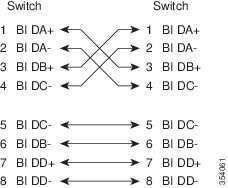
The following table lists the connector pinouts and signal names for a 10/100/1000BASE-T management port (MDI) cable pinout.

Pin Signal
1 BI DA+
2 BI DA-
3 BI DB+
4 BI DC+
5 BI DC-
6 BI DB-
7 BI DD+
8 BI DD-

The following figure shows a schematic of the 10/100/1000BASE-T cable.

Figure 2. Twisted-Pair 10/100/1000BASE-T Cable Schematic

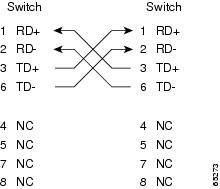
The following table lists the connector pinouts and signal names for a 10/100BASE-T management port (MDI) cable pinouts.

Pin Signal
1 TD+
2 TD-
3 RD+
4 RD-
5 Not used
6 Not used
7 Not used
8 Not used

The following figure shows a schematic of the 10/100BASE-T cable.

Figure 3. Twisted-Pair 10/100BASE-T Cable Schematic

Supported AC Power Cords and Plugs

Each switch AC power supply unit requires one power cord. Cisco approved cords may be ordered with the product. Standard power cords with a country specific plug can be used with wall outlets. Jumper power cords can be used with cabinet outlets. The user may also source their own power cords for the product, as long as they meet the power cord specifications for this product.

Only standard power cords and jumper power cords provided with the switch are supported.

Not all cables are compatible with the locking mechanism.

If you do not order a power cord with the system, you are responsible for selecting the appropriate power cord for the product. Using a non-compatible power cord with this product may result in electrical safety hazard. Orders delivered to Argentina, Brazil, and Japan must have the appropriate power cord ordered with the system.

Wall Outlet Power Cords

The following table lists the supported standard power cords and their dimensions.

Standard Power Cords for Cisco MDS 9396V Switch

Description Part Number Length
Feet Meters
Power Cord, 250VAC 10A IRAM 2073 Plug, Argentina CAB-9K10A-AR 8.2 2.5
Power Cord, 250VAC 10A 3112 Plug, Australia CAB-9K10A-AU 8.2 2.5
Power Cord, 250VAC 10A, Brazil CAB-250V-10A-BR 8.2 2.5
Power Cord, 250VAC 10A GB1002 Plug, China CAB-9K10A-CH 8.2 2.5
Power Cord, 250VAC 10A CEE 7/7 Plug, EU CAB-9K10A-EU 8.2 2.5
Power Cord, 250VAC 10A SI16S3 Plug, Israel CAB-9K10A-ISR 8.2 2.5
Power Cord, 250VAC 10A CEI 23-16/VII Plug, Italy CAB-9K10A-IT 8.2 2.5
Power Cord, 125VAC 13A KSC8305 Plug, Korea CAB-9K10A-KOR 8.2 2.5
Power Cord, 125VAC 13A NEMA 5-15 Plug, North America CAB-9K12A-NA 8.2 2.5
Power Cord, 250VAC 10A SABS 164/1 Plug, South Africa CAB-9K10A-SA 5.12 1.82
Power Cord, 250VAC 10A, Straight C15, MP232 Plug, SWITZ CAB-9K10A-SW 8.2 2.5
Power Cord, 125VAC 15A CNS10917-2, Taiwan CAB-9K10A-TWN 8.2 2.5
Power Cord, 250VAC 10A BS1363 Plug (13 A fuse), UK CAB-9K10A-UK 8.2 2.5

Jumper Power Cords

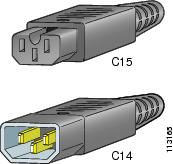
Jumper power cords for 1400 W AC PSUs have an IEC C15 connector on the outlet end of the cord and an IEC C14 connector on the inlet end of the cord. These cords are compatible with IEC C13 outlet receptacles.

Jumper power cords for HVAC PSUs have a Saf-D-Grid connector on the outlet end of the cord and an IEC C14 connector on the inlet end of the cord. This type of outlet receptacle is commonly used for power distribution inside cabinets.

The following table lists the supported cabinet jumper cords and their dimensions.

Cabinet Jumper Power Cords for Cisco MDS 9396V Switch

Description

Part Number

Length

Feet

Meters

Cabinet Jumper Power Cord, 250 VAC 13A, C14-C15 Connectors

CAB-C15-CBN

4

1.22

Cabinet Jumper Power Cord, 250 VAC 13A, C14-C15 Connectors, China, Republic of Korea

CAB-C15-CBN-CK

9.1

3

Cabinet Jumper Power Cord, 250 VAC 13A, C14-C15 Connectors, EU, Russian Federation, Belarus, Kazakhstan and Australia

CAB-C15-CBN-EURA

9.1

3

Cabinet Jumper Power Cord, 250 VAC 16A, C20-C19 Connectors

CAB-C19-CBN

8.9

2.74

The following figures show the available jumper cord plug types.

Figure 4. Jumper power cord for 1400 W AC PSU