Device Configurations

This section provides device configurations that are necessary for device onboarding and multiple SR-PCE setup. For more information on adding devices and SR-PCE providers, see the "Manage Inventory" chapter in the Cisco Crosswork Optimization Engine User Guide.

Prerequisites for Onboarding Devices

Before adding devices, you must ensure that the devices themselves are configured to collect and transmit telemetry data properly and communicate successfully with Cisco Crosswork Optimization Engine. The following sections provide sample configurations for a variety of communications options. Use them as a guide to configuring the devices you plan to manage using Cisco Crosswork Optimization Engine.

Pre-Onboarding SNMP v2 Device Configuration


Note

Only SNMPv2 and SNMPv3 (NoAuth/NoPriv) traps are supported.


The following commands provide a sample pre-onboarding device configuration that sets the correct SNMPv2 and NETCONF configuration, and SSH and Telnet rate limits. The NETCONF setting is only needed if the device is MDT-capable.

logging console debugging
logging monitor debugging
telnet vrf default ipv4 server max-servers 100
telnet vrf default ipv6 server max-servers 100
crypto key generate rsa
line default
 exec-timeout 0 0
 width 107
 length 37
 absolute-timeout 0
!
snmp-server community public RO
snmp-server community robot-demo2 RO
snmp-server ifindex persist
ntp
 server <NTPServerIPAddress>
!
service cli history size 5000
service cli interactive disable
ssh server v2
ssh server vrf default
ssh server netconf vrf default
ssh server logging
ssh server rate-limit 100
ssh server session-limit 100
!         
netconf agent tty
!         
netconf-yang agent
 ssh      
!

Pre-Onboarding SNMPv3 Device Configuration

If you want to enable SNMPv3 data collection, repeat the SNMPv2 configuration commands in the previous section, and add the following commands:

snmp-server group grpauthpriv v3 priv notify v1default
snmp-server user <user-ID> grpauthpriv v3 auth md5 <password> priv aes 128 <password>

Multiple Cisco SR-PCE HA Pairs

You can set up to three Cisco SR-PCE HA pairs (total of six SR-PCEs) to ensure high availability (HA). Each HA pair of Cisco SR-PCE providers must have matching configurations, supporting the same network topology. In HA, if the primary SR-PCE becomes unreachable, Cisco Crosswork Optimization Engine uses the secondary SR-PCE to discover the network topology. If this pair fails, then the next HA pair takes over and so forth. The network topology will continue to be updated correctly and you can view SR-PCE connectivity events in the Events table (Show Events icon).

Multiple HA Pairs

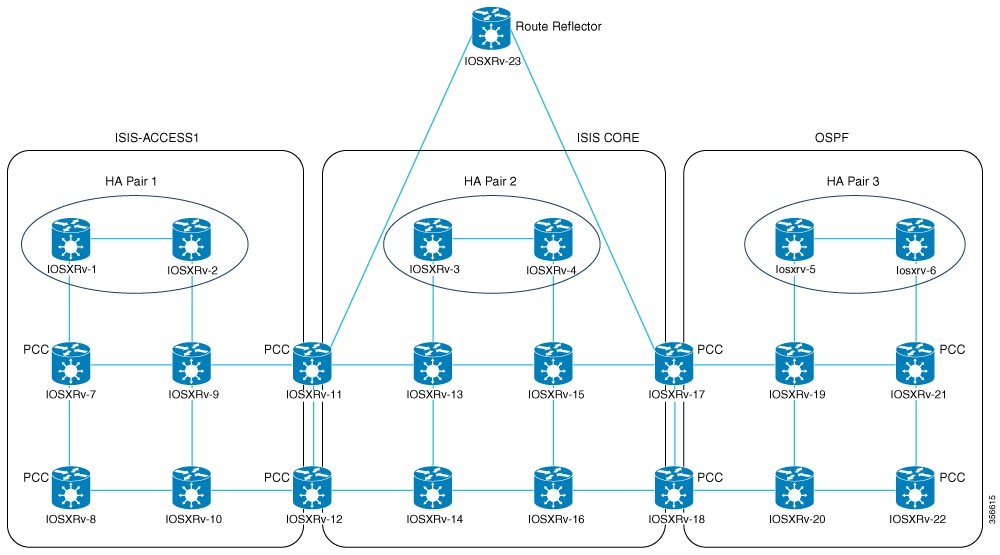
In the case of multiple SR-PCE HA pairs, each SR-PCE pair sees the same topology but manages and only knows about tunnels created from its Path Computation Clients (PCCs). In the figure below, note the following:

  • HA Pair 1—PCE iosxrv-1 and iosxrv-2 provisions and discovers only tunnels whose headends are iosxrv-7 and iosxrv-8. Note that iosxrv-9 and iosxrv-10 are not PCC routers.

  • HA Pair 2—PCE iosxrv-3 and iosxrv-4 provisions and discovers only tunnels whose headends are iosxrv-11, iosxrv-12, iosxrv-17, and iosxrv-18. Note that iosxrv-13, iosxrv-14, iosxrv-15, and iosxrv-16 are not PCC routers.

  • HA Pair 3—PCE iosxrv-5 and iosxrv-6 provisions and discovers only about tunnels whose headends are iosxrv-21, and iosxrv-22. Note that iosxrv-19, and iosxrv-20 are not PCC routers.

Figure 1. Sample 3 HA Pair Topology
Sample 3 HA Pair Topology

Configure HA

The following configurations must be done to enable each pair of HA Cisco SR-PCE providers to be added in Cisco Crosswork Optimization Engine.


Note

There must be resilient IPv4 connectivity between both SR-PCEs to enable HA. The PCE IP address of the other SR-PCE should be reachable by the peer at all times.


Issue the following commands on each of the Cisco SR-PCE devices:

Enable the interface:
# interface <interface><slot>/<port>
ipv4 address <sync-link-interface-ip-address> <subnet-mask>
no shut

Enable HA:


# pce rest sibling ipv4 <other-node-pce-address>
Establish a sync link between the two SR-PCEs:
# router static
address-family ipv4 unicast
<other-node-pce-ip-address>/<subnet-mask-length> <remote-sync-link-ip-address>

(Optional) # pce segment-routing traffic-eng peer ipv4 <other-node-pce-ip-address>

It should be entered for each PCC and not for other PCE nodes.

Issue the following command on the PCC:

For SR Policies: # segment-routing traffic-eng pcc redundancy pcc-centric

For RSVP-TE Tunnels: # mpls traffic-eng pce stateful-client redundancy pcc-centric

Confirm Sibling SR-PCE Configuration

From the SR-PCE, enter the show tcp brief command to verify synchronization between SR-PCEs in HA are intact:

#show tcp brief | include <remote-SR-PCE-router-id>

Confirm that following information is correct:

Local Address Foreign Address

State

<local-SR-PCE-router-id>:8080

<remote-SR-PCE-router-id>:<any-port-id>

ESTAB

<local-SR-PCE-router-id>:<any-port-id>

<remote-SR-PCE-router-id>:8080

ESTAB

For example:

RP/0/0/CPU0:iosxrv-1#sh tcp brief | i 192.168.0.2:
Mon Jun 22 18:43:09.044 UTC
0x153af340 0x60000000 0 0 192.168.0.1:47230 192.168.0.2:8080 ESTAB
0x153aaa6c 0x60000000 0 0 192.168.0.1:8080 192.168.0.2:16765 ESTAB

In this example, 192.168.0.2 is the remote SR-PCE IP.

SR-PCE Delegation

Depending on where an SR policy is created, the following SR-PCE delegation occurs:

  • SR-PCE initiated—Policies configured on a PCE. SR policies are delegated back to the source SR-PCE.


    Note

    • The policy can be PCE initiated even if it is created using the UI, but in that case it is not configured explicitly on SR-PCE.

    • RSVP-TE tunnels cannot be configured directly on a PCE.


  • PCC initiated—An SR policy or RSVP-TE tunnel that is configured directly on a device. The SR-PCE configured with the lowest precedence is the delegated SR-PCE. If precedence is not set, then SR-PCE with the lowest PCE IP address is the delegated SR-PCE. The following configuration example, shows that 10.0.0.1 is assigned a precedence value of 10 and will be the delegated SR-PCE.

    segment-routing
      traffic-eng
        pcc
          source-address ipv4 10.0.0.2
          pce address ipv4 10.0.0.1
            precedence 10
           !
          pce address ipv4 10.0.0.8
            precedence 20
           !
           report-all
           redundancy pcc-centric

    For RSVP-TE Tunnel:

    mpls traffic-eng
    interface GigabitEthernet0/0/0/0
    !
    interface GigabitEthernet0/0/0/1
    !
    interface GigabitEthernet0/0/0/2
    !
    pce
      peer source ipv4 192.168.0.02
      peer ipv4 192.168.0.9
        precedence 10
      !
      peer ipv4 192.168.0.10
        precedence 20
      !
      stateful-client
       instantiation
       report
       redundancy pcc-centric
       autoroute-announce
      !
    !
    auto-tunnel pcc
      tunnel-id min 1000 max 5000
  • Cisco Crosswork Optimization Engine SR-PCE initiated—An SR policy that is configured using Cisco Crosswork Optimization Engine. SR-PCE delegation is random per policy.


    Note

    Only SR policies or RSVP-TE tunnels created by Cisco Crosswork Optimization Engine can be modified or deleted by Cisco Crosswork Optimization Engine.

HA Notes and Limitations

  • It is assumed that all PCCs are PCEP connected to both SR-PCEs.

  • When an SR-PCE is disconnected only from Cisco Crosswork Optimization Engine, the following occur:

    • SR-PCE delegation assignments remain, but the SR-PCE that has been disconnected will not appear in Cisco Crosswork Optimization Engine.

    • You are not able to modify Cisco Crosswork Optimization Engine SR-PCE initiated SR policies if the disconnected SR-PCE is the delegated PCE.

  • After an SR-PCE reloads, do the following:

    1. Execute the following command:
      # process restart pce_server
    2. From the UI, navigate to Admin > Providers, remove and then add the provider again.

  • In some cases, when an SR policy that was created via the UI is automatically deleted (intentional and expected) from Cisco Crosswork Optimization Engine, a warning message does not appear. For example, if the source PCC is reloaded, the UI created SR policy disappears and the user is not informed.

  • In an extreme case where one SR-PCE fails on all links (to PCCs/topology devices) except the up-link to Cisco Crosswork Optimization Engine, then topology information will not be accurate in Cisco Crosswork Optimization Engine. When this happens, fix the connectivity issue or delete both SR-PCEs from the Provider page and re-add the one that is reachable.

SR-PCE Configuration Examples

The following configurations are examples to guide you in a multiple SR-PCE setup for HA. Please modify accordingly.

Sample redundant SR-PCE configuration (on PCE)


pce
 address ipv4 192.168.0.7
 rest
  sibling ipv4 192.168.0.6

Sample redundant SR-PCE Configuration (PCC)

segment-routing
 traffic-eng
  pcc
   source-address ipv4 192.0.2.1
   pce address ipv4 192.0.2.6
    precedence 200
   !
   pce address ipv4 192.0.2.7
    precedence 100
   !
   report-all
   redundancy pcc-centric

Sample redundant SR-PCE Configuration (on PCC) for RSVP-TE


Note

Loopback0 represents the TE router ID.


ipv4 unnumbered mpls traffic-eng Loopback0
!
mpls traffic-eng
 pce
  peer source ipv4 209.165.255.1
  peer ipv4 209.165.0.6
   precedence 200
  !
  peer ipv4 209.165.0.7
   precedence 100
  !
  stateful-client
   instantiation
   report
   redundancy pcc-centric
   autoroute-announce
  !
 !
 auto-tunnel pcc
  tunnel-id min 1000 max 1999
 !
!

Sample SR-TM Configuation


telemetry model-driven
 destination-group crosswork
  address-family ipv4 198.18.1.219 port 9010
   encoding self-describing-gpb
   protocol tcp
  !
 !
 sensor-group SRTM
  sensor-path Cisco-IOS-XR-infra-tc-oper:traffic-collector/afs/af/counters/tunnels
  sensor-path Cisco-IOS-XR-infra-tc-oper:traffic-collector/vrf-table/default-vrf/afs/af/counters/prefixes
 !
 subscription OE
  sensor-group-id SRTM sample-interval 60000
  destination-id crosswork
  source-interface Loopback0
!
traffic-collector
 interface GigabitEthernet0/0/0/3
 !
 statistics
  history-size 10

Note

The destination address uses the southbound data interface (eth1) address of the Cisco Crosswork Data Gateway VM.


It is required to push sensor path on telemetry configuration via NSO to get prefix and tunnel counters. It is assumed that the Traffic Collector has been configured with all the traffic ingress interface. This configuration is needed for demands in the Bandwidth on Demand and Bandwidth Optimization function packs to work.

Telemetry Sensor Path

sensor-path Cisco-IOS-XR-infra-tc-oper:traffic-collector/afs/af/counters/tunnels/tunnel
sensor-path Cisco-IOS-XR-infra-tc-oper:traffic-collector/vrf-table/default-vrf/afs/af/counters/prefixes/prefix
 

Telemetry configuration pushed by Cisco Crosswork Optimization Engine to all the headend routers via NSO


telemetry model-driven
 destination-group CW_43dc8a5ea99529715899b4f5218408a785e40fce
  vrf default
  address-family ipv4 172.19.68.206 port 9010
   encoding self-describing-gpb
   protocol tcp
  !
 !
 destination-group CW_4b3c69a200668b0a8dc155caff295645c684a8f8
  vrf default
  address-family ipv4 172.19.68.206 port 9010
   encoding self-describing-gpb
   protocol tcp
  !
 !
 sensor-group CW_43dc8a5ea99529715899b4f5218408a785e40fce
    sensor-path Cisco-IOS-XR-infra-tc-oper:traffic-collector/afs/af/counters/tunnels
 !
 sensor-group CW_4b3c69a200668b0a8dc155caff295645c684a8f8
    sensor-path Cisco-IOS-XR-infra-tc-oper:traffic-collector/vrf-table/default-vrf/afs/af/counters/prefixes
 !
 subscription CW_43dc8a5ea99529715899b4f5218408a785e40fce
  sensor-group-id CW_43dc8a5ea99529715899b4f5218408a785e40fce sample-interval 300000  destination-id CW_43dc8a5ea99529715899b4f5218408a785e40fce
  destination-id CW_43dc8a5ea99529715899b4f5218408a785e40fce
!
 subscription CW_4b3c69a200668b0a8dc155caff295645c684a8f8
  sensor-group-id CW_4b3c69a200668b0a8dc155caff295645c684a8f8 sample-interval 300000
  destination-id CW_4b3c69a200668b0a8dc155caff295645c684a8f8

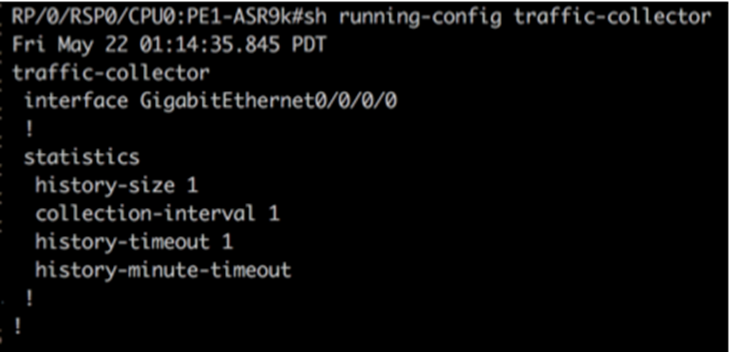
Traffic Collector configurations (all Ingress traffic interface to be added below in the Traffic Collector)

Traffic collector configurations (all the ingress traffic interface to be added below in traffic collector)
Add BGP neighbor next-hop-self for all the prefix (to show TM rate counters)
bgp router-id 5.5.5.5
address-family ipv4 unicast
  network 5.5.5.5/32
  redistribute static
!
address-family link-state link-state
!
neighbor 1.1.1.1
  remote-as 65000
  update-source Loopback0
  address-family ipv4 unicast
   next-hop-self
  !
!

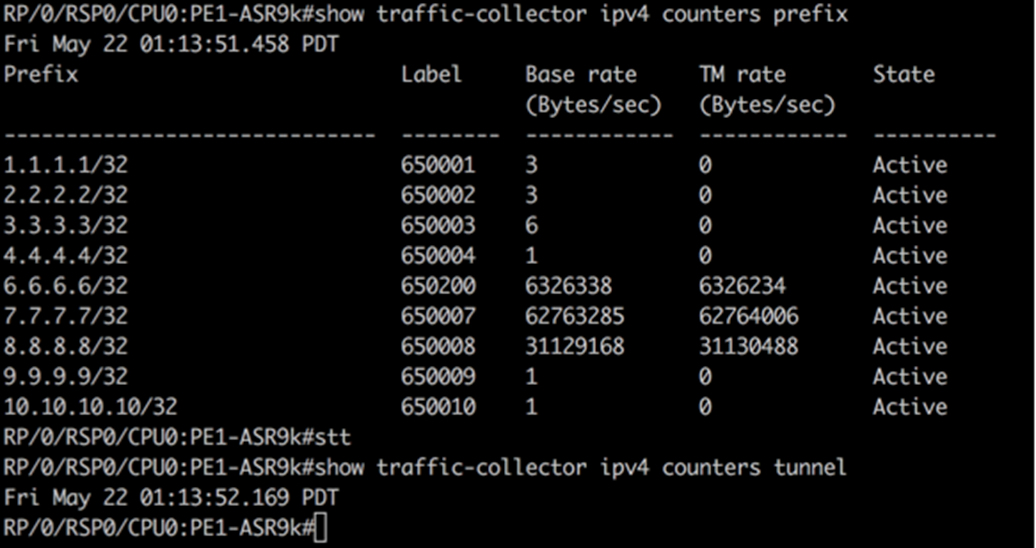
Traffic collector tunnel and prefix counters

Traffic collector tunnel and prefix counters