- Zone-Based Policy Firewalls
- Zone-Based Policy Firewall IPv6 Support
- VRF-Aware Cisco IOS XE Firewall
- Layer 2 Transparent Firewalls
- Nested Class Map Support for Zone-Based Policy Firewall
- Zone Mismatch Handling
- Configuring Firewall Stateful Interchassis Redundancy
- Box-to-Box High Availability Support for IPv6 Zone-Based Firewalls
- Interchassis Asymmetric Routing Support for Zone-Based Firewall and NAT
- Interchassis High Availability Support in IPv6 Zone-Based Firewalls
- Firewall Box to Box High Availability Support for Cisco CSR1000v Routers
- Firewall Stateful Inspection of ICMP
- Firewall Support of Skinny Client Control Protocol
- Configuring the VRF-Aware Software Infrastructure
- IPv6 Zone-Based Firewall Support over VASI Interfaces
- Protection Against Distributed Denial of Service Attacks
- Configuring Firewall Resource Management
- IPv6 Firewall Support for Prevention of Distributed Denial of Service Attacks and Resource Management
- Configurable Number of Simultaneous Packets per Flow
- LISP and Zone-Based Firewalls Integration and Interoperability
- Firewall High-Speed Logging
- TCP Reset Segment Control
- Loose Checking Option for TCP Window Scaling in Zone-Based Policy Firewall
- Enabling ALGs and AICs in Zone-Based Policy Firewalls
- Configuring Firewall TCP SYN Cookie
- Object Groups for ACLs
- Cisco Firewall-SIP Enhancements ALG
- MSRPC ALG Support for Firewall and NAT
- Sun RPC ALG Support for Firewalls and NAT
- vTCP for ALG Support
- ALG—H.323 vTCP with High Availability Support for Firewall and NAT
- FTP66 ALG Support for IPv6 Firewalls
- SIP ALG Hardening for NAT and Firewall
- SIP ALG Resilience to DoS Attacks
- Zone-Based Firewall ALG and AIC Conditional Debugging and Packet Tracing Support
- Finding Feature Information
- Prerequisites for VRF-Aware Cisco IOS XE Firewall
- Restrictions for VRF-Aware Cisco IOS XE Firewall
- Information About VRF-Aware Cisco IOS XE Firewall
VRF-Aware Cisco IOS XE Firewall
The VRF-Aware Cisco IOS XE Firewall applies the Cisco IOS XE Firewall functionality to VPN Routing and Forwarding (VRF) interfaces when the firewall is configured on a service provider (SP) or large enterprise edge routers. SPs provide managed services to small and medium business markets.
The VRF-Aware Cisco IOS XE Firewall supports VRF-lite (also known as Multi-VRF CE) and Application Inspection and Control (AIC) for various protocols.
The VRF-aware firewall supports VRF-lite (also known as Multi-VRF CE) and Application Inspection and Control (AIC) for various protocols.
 Note | Cisco IOS XE Releases do not support Context-Based Access Control (CBAC) firewalls. |
- Finding Feature Information
- Prerequisites for VRF-Aware Cisco IOS XE Firewall
- Restrictions for VRF-Aware Cisco IOS XE Firewall
- Information About VRF-Aware Cisco IOS XE Firewall
- How to Configure VRF-Aware Cisco IOS XE Firewall
- Configuration Examples for VRF-Aware Cisco IOS XE Firewall
- Additional References for VRF-Aware Cisco IOS XE Firewall
- Feature Information for VRF-Aware Cisco IOS XE Firewall
- Glossary
Finding Feature Information
Your software release may not support all the features documented in this module. For the latest caveats and feature information, see Bug Search Tool and the release notes for your platform and software release. To find information about the features documented in this module, and to see a list of the releases in which each feature is supported, see the feature information table.
Use Cisco Feature Navigator to find information about platform support and Cisco software image support. To access Cisco Feature Navigator, go to www.cisco.com/go/cfn. An account on Cisco.com is not required.
Prerequisites for VRF-Aware Cisco IOS XE Firewall
Restrictions for VRF-Aware Cisco IOS XE Firewall
-
If two VPN networks have overlapping addresses, VRF-aware Network Address Translation (NAT) is required for them to support VRF-aware firewalls. NAT does not support inter-VRF routing. You can use the VRF-aware software infrastructure (VASI) for the inter-VRF routing functionality.
When crypto tunnels that belong to multiple VPNs terminate on a single interface, you cannot apply per-VRF firewall policies.
The same zone cannot be applied to interfaces that are configured on different VRFs.
Information About VRF-Aware Cisco IOS XE Firewall
- VRF-Aware Cisco IOS XE Firewall
- Address Space Overlap
- VRF
- VRF-Lite
- MPLS VPN
- VRF-Aware NAT
- VRF-Aware ALG
- VRF-Aware IPsec
- VRF-Aware Software Infrastructure
- Security Zones
- VRF-Aware Cisco Firewall Deployment
VRF-Aware Cisco IOS XE Firewall
A VRF-aware firewall inspects IP packets that are sent or received within a VRF. VRF allows multiple instances of routing tables to coexist within a single router. This allows VPN segregation and the ability to have independent overlapping of IP address spaces. VRF allows traffic from the customers of one service provider to be isolated from another. The Cisco IOS XE VRF support splits the router into multiple routing domains, with each routing domain consisting of its own set of interfaces and routing and forwarding tables. Each routing domain is referenced by a unique identifier called the table ID. The global routing domain and the default routing domain (that is not associated with any VRF) is addressed with the table ID, zero. VRF supports overlapping of IP address space, thereby allowing the traffic from nonintersecting VRFs to have the same IP address.
The VRF-Aware Cisco IOS XE Firewall provides the following benefits:
Scalable deployment—Scales to meet any network’s bandwidth and performance requirements.
VPN support—Provides a complete VPN solution based on Cisco IOS XE IPsec and other software-based technologies, including Layer 2 Tunneling Protocol (L2TP) tunneling, and quality of service (QoS).
AIC support—Provides policy maps for the Internet Message Access Protocol (IMAP), Post Office Protocol 3 (POP3), Simple Mail Transfer Protocol (SMTP), and Sun Remote Procedure Call (SUN RPC)
Allows users to configure a per-VRF firewall. The firewall inspects IP packets that are sent and received within a VRF. The firewall also inspects traffic between two different VRFs (intersecting VRFs).
Allows SPs to deploy the firewall on the provider edge (PE) router.
Supports overlapping IP address space, thereby allowing traffic from nonintersecting VRFs to have the same IP address.
Supports VRF (not global) firewall command parameters and Denial-of-Service (DoS) parameters so that the VRF-aware firewall can run as multiple instances (with VRF instances) that are allocated to various VPN customers.
Generates high-speed logging (HSL) messages that contain the VRF ID; however these messages are collected by a single collector.
The VRF-aware firewall allows you to limit the number of firewall sessions. If the firewall sessions are not limited, it would be difficult for VRFs to share router resources because one VRF may consume a maximum amount of resources, leaving few resources for other VRFs and thereby causing the denial of service to other VRFs.
Note | On the Cisco ASR 1000 Series Aggregation Services Routers the firewall supports a maximum of 4000 VRFs. |
Address Space Overlap
A VRF splits the device into multiple routing domains. Each of these routing domains contain their own set of interfaces and routing tables. A routing table is referenced by using a per-VRF unique table ID. Zero is the default global routing table ID that is not associated with a VPN routing and forwarding (VRF).
Nonintersecting VRFs are allowed to have overlapping address spaces (that is, the IP address of one VRF may be contained in others).
VRF
VPN routing and forwarding (VRF) allows multiple instances of routing tables to coexit within a single device. A VRF contains a template of a VRF table in a provider edge (PE) device.
The overlapping addresses, usually resulting from the use of private IP addresses in customer networks, are one of the major obstacles to the successful deployment of a peer-to-peer (P2P) VPN implementation. You can use the Multiprotocol Label Switching (MPLS) VPN technology to overcome the overlapping addresses issue.
Each VPN has its own routing and forwarding table in the device so that any customer or site that belongs to a VPN is provided access only to the set of routes contained within that table. Any PE device in the MPLS VPN network therefore contains a number of per-VPN routing tables and a global routing table that is used to reach other devices in the service provider (SP) network. Effectively, a number of virtual devices are created in a single physical device.
VRF-Lite
The VRF-Lite Aware Firewall feature, also called the VRF without MPLS-aware firewall, allows a firewall zone to be applied to non-MPLS-enabled VPN routing and forwarding (VRF) interfaces.
The VRF-Lite Aware Firewall feature enables a service provider (SP) to support two or more VPNs, in which IP addresses can be overlapped among VPNs. VRF-lite uses input interfaces to distinguish routes for different VPNs and forms virtual packet forwarding tables by associating one or more Layer 3 interfaces with each VRF. Interfaces in a VRF can be physical, such as Ethernet ports, or logical, such as VLAN switched virtual interfaces (SVIs). However, a Layer 3 interface cannot belong to more than one VRF at a time.
Note | All VRF-lite interfaces must be Layer 3 interfaces. |
VRF-lite includes the following devices:
Customer edge (CE) devices provide customers access to the SP network over a data link. The CE device advertises the site’s local routes to the provider edge (PE) device and learns about the remote VPN routes from the PE device.
PE devices exchange routing information with CE devices by using static routing or a routing protocol such as Border Gateway Protocol (BGP), Routing Information Protocol Version 1 (RIPv1), or RIPv2.
PE devices (or core devices) are any devices in the SP network that are not attached to CE devices.
A PE device is only required to maintain VPN routes for those VPNs to which it is directly attached, eliminating the need for the PE device to maintain all the SP VPN routes. Each PE device maintains a VRF for each of its directly connected sites. Multiple interfaces on a PE device can be associated with a single VRF, if all of these sites are part of the same VPN. Each VPN is mapped to a specified VRF. After learning local VPN routes from CE devices, a PE device exchanges VPN routing information with other PE devices by using internal BGP (iBPG).
With VRF-lite, multiple customers can share one CE device, and only one physical link is used between the CE device and the PE device. The shared CE device maintains a separate VRF table for each customer, and switches or routes packets for each customer based on its own routing table. VRF-lite extends the limited PE device functionality to a CE device, giving it the ability to maintain separate VRF tables to extend the privacy and security of a VPN to the branch office.

MPLS VPN
The Multiprotocol Label Switching (MPLS) VPN Feature allows multiple sites to interconnect transparently through a service provider (SP)network. One SP network can support several IP VPNs. Each VPN appears to its users as a private network, separate from all other networks. Within a VPN, each site can send IP packets to any other site in the same VPN.
Each VPN is associated with one or more VPN routing and forwarding (VRF) instances. A VRF consists of an IP routing table, a derived Cisco Express Forwarding table, and a set of interfaces that use the forwarding table.
The device maintains a separate routing and Cisco Express Forwarding table for each VRF. This prevents information from being sent outside the VPN and allows the same subnet to be used in several VPNs without causing duplicate IP address problems.
The device using Multiprotocol BGP (MP-BGP) distributes the VPN routing information using the MP-BGP extended communities.
VRF-Aware NAT
Network Address Translation (NAT) allows a single device, such as a device, to act as an agent between the Internet (or public network) and a local (or private) network. Although NAT systems can provide broad levels of security advantages, their main objective is to economize on address space.
NAT allows organizations to resolve the problem of IP address depletion when they have existing networks and need to access the Internet. Sites that do not possess Network Information Center (NIC)-registered IP addresses must acquire them. NAT eliminates the concern of NIC-registered IP addresses by dynamically mapping thousands of hidden internal addresses to a range of easy-to-get addresses.
A NAT system makes it difficult for an attacker to determine the following:
Number of systems running on a network.
Type of machines and operating systems running on the network.
Network topology and arrangement.
NAT integration with Multiprotocol Label Switching (MPLS) VPNs allows multiple MPLS VPNs to be configured on a single device to work together. NAT can differentiate the MPLS VPNs from which it receives the IP traffic, even if all MPLS VPNs use the same IP addressing scheme. This enables multiple MPLS VPN customers to share services while ensuring that each MPLS VPN is completely separate from the other.
To provide value-added services, such as, Internet connectivity, domain name servers (DNS), and VoIP service to customers, MPLS service providers must use NAT. NAT helps MPLS VPN customers to use overlapped IP addresses in their network.
NAT can be implemented on a customer edge (CE) device or on a provider edge (PE) device. The NAT integration with MPLS VPNs feature enables the implementation of NAT on a PE device in an MPLS cloud.
VRF-Aware ALG
An application-layer gateway (ALG) is an application that translates the IP address information inside the payload of an application packet. The ALGs identify the address information in the packet payload that needs to be overwritten by NAT and supply the address information to NAT and firewall to create subordinate flows or doors to allow data to flow properly (an example of data flow is FTP data flow. Doors are transient structures that allow incoming traffic that matches a specific criterion. A door is created when there is not enough information to create a complete NAT session entry. A door contains information about the source and destination IP address and the destination port. However, it does not have information about the source port. When media data arrives, the source port information is known and the door is promoted to a real NAT session.
VRF-Aware IPsec
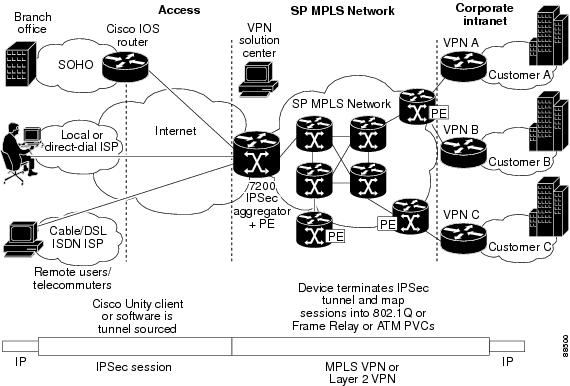
The VRF-Aware IPsec feature maps an IPsec tunnel to a Multiprotocol Label Switching (MPLS) VPN. Using the VRF-Aware IPsec feature, you can map IPsec tunnels to VPN routing and forwarding (VRF) instances using a single public-facing IP address.
Each IPsec tunnel is associated with two VRF domains. The outer encapsulated packet belongs to a VRF domain called the Front Door VRF (FVRF). The inner, protected IP packet belongs to a domain called the Inside VRF (IVRF). In other words, the local endpoint of the IPsec tunnel belongs to the FVRF, whereas source and destination addresses of the inside packet belong to the IVRF.
One or more IPsec tunnels can terminate on a single interface. The FVRF of all these tunnels is the same and is set to the VRF that is configured on that interface. The IVRF of these tunnels can be different and depends on the VRF that is defined in the Internet Security Association and Key Management Protocol (ISAKMP) profile that is attached to a crypto map entry.
The following figure illustrates a scenario showing IPsec to MPLS and Layer 2 VPNs.
VRF-Aware Software Infrastructure
The VRF-Aware Software Infrastructure (VASI) allows you to apply services such as access control lists (ACLs), NAT, policing, and zone-based firewalls to traffic that is flowing across two different VRF instances. The VASI interfaces support redundancy of the Route Processor (RP) and Forwarding Processor (FP). This feature supports IPv4 and IPv6 unicast traffic on VASI interfaces.
The primary use of VASI is to allow better isolation of VRFs. The VASI allows for per-VRF-specific features to be applied to the VASI interface without any impact to other VRFs that may share a common interface (for example, all VRFs may share the same interface to the Internet). For the firewall, this feature allows zones to be applied to the VASI.
VASI is implemented by using virtual interface pairs, where each of the interfaces in the pair is associated with a different VRF. The VASI virtual interface is the next hop interface for any packet that needs to be switched between these two VRFs. VASI interfaces provide the framework necessary to support NAT between two VRFs.
Each interface pair is associated with two different VRF instances. The two virtual interfaces, called vasileft and vasiright, in a pair are logically wired back-to-back and are completely symmetrical. Each interface has an index. The association of the pairing is done automatically based on the two interface indexes such that vasileft automatically gets paired to vasiright. You can configure either static routing or dynamic routing with BGP, Enhanced Interior Gateway Routing Protocol (EIGRP), or Open Shortest Path First (OSPF). BGP dynamic routing protocol restrictions and configuration are valid for BGP routing configurations between VASI interfaces. For more information on VASI, see the “Configuring the VRF-Aware Software Infrastructure” feature.
Security Zones
A security zone is a group of interfaces to which a policy can be applied.
Grouping interfaces into zones involves two procedures:
-
Creating a zone so that interfaces can be attached to it.
-
Configuring an interface to be a member of a given zone.
By default, traffic flows among interfaces that are members of the same zone.
When an interface is a member of a security zone, all traffic (except traffic going to the device or initiated by the device) between that interface and an interface within a different zone is dropped by default. To permit traffic to and from a zone-member interface and another interface, you must make that zone part of a zone pair and apply a policy to that zone pair. If the policy permits traffic through inspect or pass actions, traffic can flow through the interface.
The following are basic rules to consider when setting up zones:
-
Traffic from a zone interface to a nonzone interface or from a nonzone interface to a zone interface is always dropped; unless default zones are enabled (default zone is a nonzone interface).
-
Traffic between two zone interfaces is inspected if there is a zone pair relationship for each zone and if there is a configured policy for that zone pair.
-
By default, all traffic between two interfaces in the same zone is always allowed.
-
A zone pair can be configured with a zone as both source and destination zones. An inspect policy can be configured on this zone pair to inspect or drop the traffic between two interfaces in the same zone.
-
An interface can be a member of only one security zone.
-
When an interface is a member of a security zone, all traffic to and from that interface is blocked unless you configure an explicit interzone policy on a zone pair involving that zone.
-
Traffic cannot flow between an interface that is a member of a security zone and an interface that is not a member of a security zone because a policy can be applied only between two zones.
-
For traffic to flow among all interfaces in a device, these interfaces must be members of one security zone or another. It is not necessary for all device interfaces to be members of security zones.
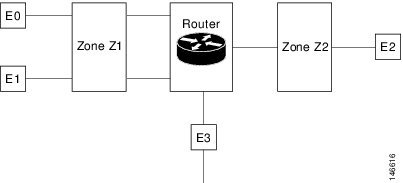
The figure below illustrates the following:
-
Interfaces E0 and E1 are members of security zone Z1.
-
Interface E2 is a member of security zone Z2.
-
Interface E3 is not a member of any security zone.
The following situations exist:
-
The zone pair and policy are configured in the same zone. Traffic flows freely between interfaces E0 and E1 because they are members of the same security zone (Z1).
-
If no policies are configured, traffic will not flow between any other interfaces (for example, E0 and E2, E1 and E2, E3 and E1, and E3 and E2).
-
Traffic can flow between E0 or E1 and E2 only when an explicit policy permitting traffic is configured between zone Z1 and zone Z2.
-
Traffic can never flow between E3 and E0/E1/E2 unless default zones are enabled.
Note | On the Cisco ASR 1000 Series Aggregation Services Routers the firewall supports a maximum of 4000 zones. |
VRF-Aware Cisco Firewall Deployment
A firewall can be deployed at many points within the network to protect VPN sites from shared service (or the Internet) and vice versa. This section describes the following firewall deployment scenarios:
- Distributed Network Inclusion of VRF-Aware Cisco Firewall
- Hub-and-Spoke Network Inclusion of VRF-Aware Cisco Firewall
Distributed Network Inclusion of VRF-Aware Cisco Firewall
The following figure illustrates a typical situation in which a service provider (SP) offers firewall services to VPN customers VPN1 and VPN2, thereby protecting VPN sites from an external network (for example, shared services and the Internet) and vice versa.
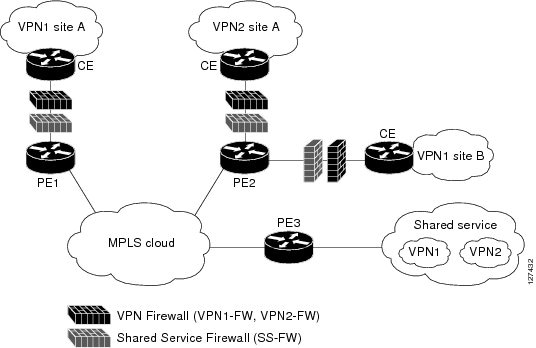
In this example, VPN1 has two sites, Site A and Site B, that span across the Multiprotocol Label Switching (MPLS) core. Site A is connected to PE1, and Site B is connected to PE2. VPN2 has only one site that is connected to PE2. Each VPN has a VLAN segment in the shared service that is connected to the corresponding VLAN subinterface on PE3.
Each of the VPNs (VPN1 and VPN2) has two firewall rules—one to protect the VPN site from the shared service and another to protect the shared service from the VPN site. The firewall that protects the VPN site from the shared service is called the VPN firewall, and the firewall that protects the shared service from the VPN site is called the shared service firewall. Both firewall rules are applied on the VPN routing and forwarding (VRF) interface of each ingress provider edge (PE) device that is connected to the VPN site. The VPN firewall rule is applied in the ingress direction, because the VRF interface is ingress to the VPN site; and the shared service firewall rule is applied in the egress direction, because the VRF interface is egress to the shared service.
Because the firewall deployment is distributed across a Multiprotocol Label Switching (MPLS) cloud, the firewall processing load is distributed to all ingress PE devices.
The shared service is protected from VPN sites at the ingress PE device, and hence malicious packets from VPN sites are filtered at the ingress PE device before they enter the MPLS cloud.
VPN firewall features can be deployed in the ingress direction.
Hub-and-Spoke Network Inclusion of VRF-Aware Cisco Firewall
The following figure illustrates a hub-and-spoke network where firewalls for all VPN sites are applied on the egress PE device, PE3, which is connected to the shared service.
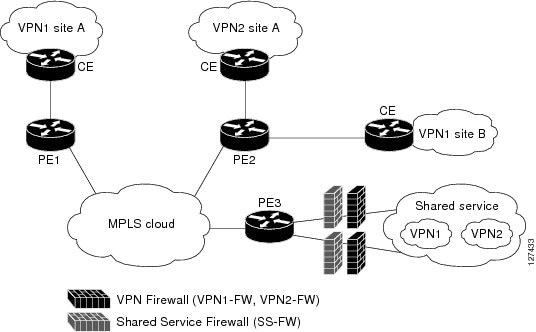
Typically, each VPN has a VLAN and/or a VPN routing and forwarding (VRF) subinterface that is connected to the shared service. When a packet arrives at a Multiprotocol Label Switching (MPLS) interface, MPLS routes the packet to the corresponding subinterface that is connected to the shared service. Firewall policies on each VPN are applied on the corresponding subinterface (VRF interface) as shown in the above figure. The VPN firewall rule is applied in the egress direction because the subinterface is egress to the VPN site. And the shared service firewall rule is applied in the ingress direction because the subinterface is ingress to the shared service.
Because the firewall deployment is centralized to the egress provider edge (PE) device (PE3), deploying and managing the firewall is easy.
The shared service firewall feature can be applied in the ingress direction.
The VPN site is protected from the shared service at the egress PE device, and hence malicious packets from the shared service are filtered at the PE device before they enter the MPLS cloud.
How to Configure VRF-Aware Cisco IOS XE Firewall
- Defining VRFs, Class Maps, and Policy Maps
- Defining Zones and Zone Pairs
- Applying Zones to Interfaces and Defining Routes
Defining VRFs, Class Maps, and Policy Maps
1.
enable
2.
configure terminal
3.
ip vrf
vrf-name
4.
rd
route-distinguisher
5.
route-target export
route-target-ext-community
6.
route-target import
route-target-ext-community
7.
exit
8.
class-map type inspect match-any
class-map-name
9.
match protocol tcp
10.
match protocol h323
11.
exit
12.
policy-map type inspect
policy-map-name
13.
class type inspect
class-map-name
14.
inspect
[parameter-map-name]
15.
exit
16.
class class-default
17.
end
DETAILED STEPS
Defining Zones and Zone Pairs
1.
enable
2.
configure terminal
3.
zone security
security-zone-name
4.
exit
5.
zone security
security-zone-name
6.
exit
7.
zone-pair security
zone-pair-name
source
source-zone
destination
destination-zone
8.
service-policy type inspect
policy-map-name
9.
end
DETAILED STEPS
Applying Zones to Interfaces and Defining Routes
1.
enable
2.
configure terminal
3.
interface
type number
4.
ip vrf forwarding
name
5.
ip address
ip-address mask
6.
zone-member security
zone-name
7.
negotiation auto
8.
exit
9.
interface
type number
10.
ip address
ip-address mask
11.
zone-member security
zone-name
12.
negotiation auto
13.
exit
14.
ip route vrf
vrf-name destination-ip-address destination-prefix interface-type number
[global]
15.
end
DETAILED STEPS
Configuration Examples for VRF-Aware Cisco IOS XE Firewall
Example: Defining VRFs, Class Maps, and Policy Maps
Router# configure terminal
Router(config)# ip vrf vrf1
Router(config-vrf)# rd 10:1
Router(config-vrf)# route-target export 10:1
Router(config-vrf)# route-target import 10:1
Router(config-vrf)# exit
Router(config)# class-map type inspect match-any class-map1
Router(config-cmap)# match protocol tcp
Router(config-cmap)# match protocol h323
Router(config-cmap)# exit
Router(config)# policy-map type inspect global-vpn1-pmap
Router(config-pmap)# class type inspect match-acl-111
Router(config-pmap-c)# inspect match-acl-111
Router(config-pmap-c)# exit
Router(config-pmap)# class class-default
Router(config-pmap)# end
Example: Defining Policy Maps, Zones, and Zone Pairs
Router# configure terminal
Router(config)# zone security vpn1-zone
Router(config-sec-zone)# exit
Router(config)# zone security global-zone
Router(config-sec-zone)# exit
Router(config)# zone-pair security vpn1-global-zone-pair source vpn1-zone destination global-zone
Router(config-sec-zone-pair)# service-policy type inspect vpn1-global-pmap
Router(config-sec-zone-pair)# end
Example: Applying Zones to Interfaces and Defining Routes
Router# configure terminal
Router(config)# interface gigabitethernet 0/0/0
Router(config-if)# ip vrf forwarding vrf1
Router(config-if)# ip address 10.1.1.1 255.255.255.0
Router(config-if)# zone-member security vpn1-zone
Router(config-if)# negotiation auto
Router(config-if)# exit
Router(config)# interface gigabitethernet 1/1/1
Router(config-if)# ip address 10.111.111.111 255.255.255.0
Router(config-if)# zone-member security global-zone
Router(config-if)# negotiation auto
Router(config-if)# exit
Router(config)# ip route vrf vpn1 10.111.111.0 255.255.255.0 gigabitethernet 1/1/1 global
Router(config)# end
Additional References for VRF-Aware Cisco IOS XE Firewall
Related Documents
|
Related Topic |
Document Title |
|---|---|
|
Cisco IOS commands |
|
|
Security commands |
|
|
NAT |
|
|
MPLS VPN |
onfiguring a Basic MPLS VPN |
|
Zone-based Policy Firewall |
Zone-based Policy Firewall |
Technical Assistance
|
Description |
Link |
|---|---|
|
The Cisco Support and Documentation website provides online resources to download documentation, software, and tools. Use these resources to install and configure the software and to troubleshoot and resolve technical issues with Cisco products and technologies. Access to most tools on the Cisco Support and Documentation website requires a Cisco.com user ID and password. |
Feature Information for VRF-Aware Cisco IOS XE Firewall
The following table provides release information about the feature or features described in this module. This table lists only the software release that introduced support for a given feature in a given software release train. Unless noted otherwise, subsequent releases of that software release train also support that feature.
Use Cisco Feature Navigator to find information about platform support and Cisco software image support. To access Cisco Feature Navigator, go to www.cisco.com/go/cfn. An account on Cisco.com is not required.|
Feature Name |
Releases |
Feature Information |
|---|---|---|
|
VRF-Aware Cisco IOS XE Firewall |
Cisco IOS XE Release 2.5 |
The VRF-Aware Cisco IOS XE Firewall feature applies the Cisco IOS XE Firewall functionality to VRF interfaces when the firewall is configured on an SP or large enterprise edge router. |
|
Firewall--VRF-Aware ALG Support |
Cisco IOS XE Release 2.5 |
The Firewall--VRF-Aware ALG Support feature allows ALG to extract the correct IP address and VRF ID from cached information when creating ALG tokens that require correct IP address VRF ID pairs. |
Glossary
C3PL --Cisco Common Classification Policy Language. Structured, feature-specific configuration commands that use policy maps and class maps to create traffic policies based on events, conditions, and actions.
EHLO --Extended HELO substitute command for starting the capability negotiation. This command identifies the sender (client) connecting to the remote SMTP server by using the ESMTP protocol.
ESMTP --Extended Simple Mail Transfer Protocol. Extended version of the Simple Mail Transfer Protocol (SMTP), which includes additional functionality, such as delivery notification and session delivery. ESMTP is described in RFC 1869, SMTP Service Extensions.
HELO --Command that starts the SMTP capability negotiation. This command identifies the sender (client) connecting to the remote SMTP server by its fully qualified DNS hostname.
MAIL FROM --Start of an e-mail message that identifies the sender e-mail address (and name, if used), which appears in the From: field of the message.
MIME --Multipurpose Internet Mail Extension. Standard for transmitting nontext data (or data that cannot be represented in plain ASCII code) in e-mail, such as binary, foreign language text (such as Russian or Chinese), audio, or video data. MIME is defined in RFC 2045.
RCPT TO --Recipient e-mail address (and name, if used) that can be repeated multiple times for a likely message to deliver a single message to multiple recipients.
SMTP --Simple Mail Transfer Protocol. Internet protocol providing e-mail services.
 Feedback