- Zone-Based Policy Firewalls
- Zone-Based Policy Firewall IPv6 Support
- VRF-Aware Cisco IOS XE Firewall
- Layer 2 Transparent Firewalls
- Nested Class Map Support for Zone-Based Policy Firewall
- Zone Mismatch Handling
- Configuring Firewall Stateful Interchassis Redundancy
- Box-to-Box High Availability Support for IPv6 Zone-Based Firewalls
- Interchassis Asymmetric Routing Support for Zone-Based Firewall and NAT
- Interchassis High Availability Support in IPv6 Zone-Based Firewalls
- Firewall Box to Box High Availability Support for Cisco CSR1000v Routers
- Firewall Stateful Inspection of ICMP
- Firewall Support of Skinny Client Control Protocol
- Configuring the VRF-Aware Software Infrastructure
- IPv6 Zone-Based Firewall Support over VASI Interfaces
- Protection Against Distributed Denial of Service Attacks
- Configuring Firewall Resource Management
- IPv6 Firewall Support for Prevention of Distributed Denial of Service Attacks and Resource Management
- Configurable Number of Simultaneous Packets per Flow
- LISP and Zone-Based Firewalls Integration and Interoperability
- Firewall High-Speed Logging
- TCP Reset Segment Control
- Loose Checking Option for TCP Window Scaling in Zone-Based Policy Firewall
- Enabling ALGs and AICs in Zone-Based Policy Firewalls
- Configuring Firewall TCP SYN Cookie
- Object Groups for ACLs
- Cisco Firewall-SIP Enhancements ALG
- MSRPC ALG Support for Firewall and NAT
- Sun RPC ALG Support for Firewalls and NAT
- vTCP for ALG Support
- ALG—H.323 vTCP with High Availability Support for Firewall and NAT
- FTP66 ALG Support for IPv6 Firewalls
- SIP ALG Hardening for NAT and Firewall
- SIP ALG Resilience to DoS Attacks
- Zone-Based Firewall ALG and AIC Conditional Debugging and Packet Tracing Support
- Finding Feature Information
- Restrictions for Configuring the VRF-Aware Software Infrastructure
- Information About Configuring the VRF-Aware Software Infrastructure
- How to Configure the VRF-Aware Software Infrastructure
- Configuration Examples for the VRF-Aware Software Infrastructure
- Additional References for Configuring the VRF-Aware Software Infrastructure
- Feature Information for Configuring the VRF-Aware Software Infrastructure
Configuring the VRF-Aware
Software Infrastructure
The VRF-Aware Software Infrastructure feature allows you to apply services such as, access control lists (ACLs), Network Address Translation (NAT), policing, and zone-based firewalls, to traffic that flows across two different virtual routing and forwarding (VRF) instances. VRF-Aware Software Infrastructure (VASI) interfaces support the redundancy of Route Processors (RPs) and Forwarding Processors (FPs), IPsec, and IPv4 and IPv6 unicast and multicast traffic.
This module describes how to configure VASI interfaces.
- Finding Feature Information
- Restrictions for Configuring the VRF-Aware Software Infrastructure
- Information About Configuring the VRF-Aware Software Infrastructure
- How to Configure the VRF-Aware Software Infrastructure
- Configuration Examples for the VRF-Aware Software Infrastructure
- Additional References for Configuring the VRF-Aware Software Infrastructure
- Feature Information for Configuring the VRF-Aware Software Infrastructure
Finding Feature Information
Your software release may not support all the features documented in this module. For the latest caveats and feature information, see Bug Search Tool and the release notes for your platform and software release. To find information about the features documented in this module, and to see a list of the releases in which each feature is supported, see the feature information table.
Use Cisco Feature Navigator to find information about platform support and Cisco software image support. To access Cisco Feature Navigator, go to www.cisco.com/go/cfn. An account on Cisco.com is not required.
Restrictions for Configuring the VRF-Aware Software Infrastructure
-
Multiprotocol Label Switching (MPLS) traffic over VRF-Aware Software Infrastructure (VASI) interfaces is not supported.
-
VASI interfaces do not support the attachment of queue-based features. The following commands are not supported on Modular QoS CLI (MQC) policies that are attached to VASI interfaces: -
VASI 2000 pairs are not supported on Open Shortest Path First (OSPF).
-
Web Cache Communication Protocol (WCCP) is not supported.
Information About Configuring the VRF-Aware Software Infrastructure
VASI Overview
VRF-Aware Software Infrastructure (VASI) provides the ability to apply services such as, a firewall, IPsec, and Network Address Translation (NAT), to traffic that flows across different virtual routing and forwarding (VRF) instances. VASI is implemented by using virtual interface pairs, where each of the interfaces in the pair is associated with a different VRF instance. The VASI virtual interface is the next-hop interface for any packet that needs to be switched between these two VRF instances. VASI interfaces provide the framework to configure a firewall or NAT between VRF instances.
Each interface pair is associated with two different VRF instances. The pairing is done automatically based on the two interface indexes such that the vasileft interface is automatically paired to the vasiright interface. For example, in the figure below, vasileft1 and vasiright1 are automatically paired, and a packet entering vasileft1 is internally handed over to vasiright1.
On VASI interfaces, you can configure either static routing or dynamic routing with Internal Border Gateway Protocol (IBGP), Enhanced Interior Gateway Routing Protocol (EIGRP), or Open Shortest Path First (OSPF). IBGP dynamic-routing protocol restrictions and configurations are valid for IBGP routing configurations between VASI interfaces.
The following figure shows an inter-VRF VASI configuration on the same device.
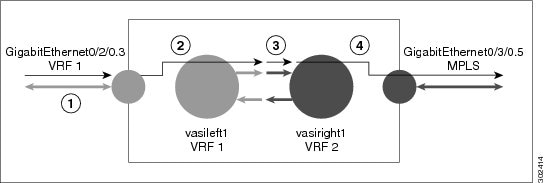
A packet enters the physical interface that belongs to VRF 1 (Gigabit Ethernet 0/2/0.3).
Before forwarding the packet, a forwarding lookup is done in the VRF 1 routing table. Vasileft1 is chosen as the next hop, and the Time to Live (TTL) value is decremented from the packet. Usually, the forwarding address is selected on the basis of the default route in the VRF. However, the forwarding address can also be a static route or a learned route. The packet is sent to the egress path of vasileft1 and then automatically sent to the vasiright1 ingress path.
When the packet enters vasiright1, a forwarding lookup is done in the VRF 2 routing table, and the TTL is decremented again (second time for this packet).
VRF 2 forwards the packet to the physical interface, Gigabit Ethernet 0/3/0.5.
The following figure shows how VASI works in a Multiprotocol Label Switching (MPLS) VPN configuration.
 Note | In the following figure, MPLS is enabled on the Gigabit Ethernet interface, but MPLS traffic is not supported across VASI pairs. |
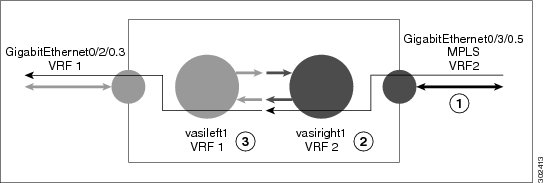
A packet arrives on the MPLS interface with a VPN label.
The VPN label is stripped from the packet, a forwarding lookup is done within VRF 2, and the packet is forwarded to vasiright1. The TTL value is decremented from the packet.
The packet enters vasileft1 on the ingress path, and another forwarding lookup is done in VRF 1. The packet is sent to the egress physical interface in VRF1 (Gigabit Ethernet 0/2/0.3). The TTL is again decremented from the packet.
Multicast and Multicast VPN on VASI
VRF-Aware Service Infrastructure (VASI) applies services like the zone-based firewall, Network Address Translation (NAT), and IPsec to traffic that travels across different virtual routing and forwarding (VRF) instances. The Multicast and MVPN on VASI feature supports IPv4 and IPv6 multicast and multicast VPN (MVPN) on VASI interfaces. This feature is independent of the multicast modes (sparse, source-specific multicast [SSM] and so on) configured at the customer site and also independent of the MVPN mode—generic routing encapsulation (GRE)-based or Multicast Label Distribution Protocol (MLDP)-based—in the core network.
Multicast reduces traffic in a network by simultaneously delivering a single stream of information to potentially thousands of recipients. Multicast delivers source traffic from an application to multiple receivers without burdening the source or receivers and uses a minimum of network bandwidth. Multicast VPN (MVPN) provides the ability to support multicast over Layer 3 VPNs.
VASI is implemented using virtual interface pairs, where each of the interfaces in the pair is associated with a different VRF. VASI virtual interface is the next hop interface for any packet that needs to be switched between these two VRFs. VASI interfaces are virtual interfaces and you can configure IP address and other services like other logical interfaces. You need to enable multicast on VASI interface pairs for this feature to work.
How to Configure the VRF-Aware Software Infrastructure
Configuring a VASI Interface Pair
To configure a VRF-Aware Software Infrastructure (VASI) interface pair, you must configure the interface vasileft command on one interface and the interface vasiright command on the second interface. The interface numbers must be identical to pair vasileft with vasiright. You can configure a virtual routing and forwarding (VRF) instance on any VASI interface.
1.
enable
2.
configure
terminal
3.
interface
type number
4.
vrf
forwarding table-name
5.
ip
address {ip-address
mask [secondary] |
pool
pool-name}
6.
exit
7.
ip
route
[vrf
vrf-name]
destination-prefix
destination-prefix-mask
interface-type
interface-number
8.
interface
type
number
9.
vrf
forwarding
table-name
10.
ip
address {ip-address
mask [secondary] |
pool
pool-name}
11.
exit
12.
ip
route
[vrf
vrf-name]
destination-prefix
destination-prefix-mask
interface-type
interface-number
13.
end
DETAILED STEPS
Configuration Examples for the VRF-Aware Software Infrastructure
Example: Configuring a VASI Interface Pair
A virtual routing and forwarding (VRF) instance must be enabled for each interface of the VASI pair (VASILEFT and VASIRIGHT). The below example shows how to configure a VASI interface pair.
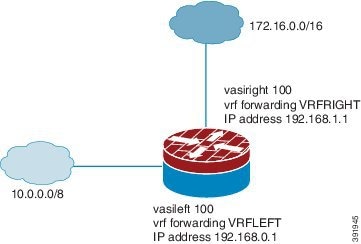
Device(config)# interface vasileft 100
Device(config-if)# vrf forwarding VRFLEFT
Device(config-if)# ip address 192.168.0.1 255.255.255.0
Device(config-if)# exit
Device(config)# ip route vrf VRFLEFT 172.16.0.0 255.255.0.0 vasileft 100
Device(config)# interface vasiright 100
Device(config-if)# vrf forwarding VRFRIGHT
Device(config-if)# ip address 192.168.1.1 255.255.255.0
Device(config-if)# exit
Device(config)# ip route vrf VRFRIGHT 10.0.0.0 255.0.0.0 vasiright 100
Device(config)# end
Example: Configuring Multicast and MVPN on VASI
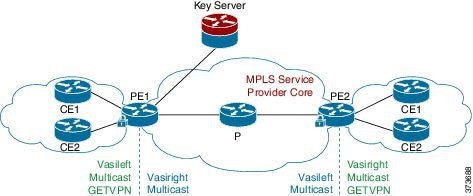
The following example shows how to configure generic routing encapsulation (GRE)-based Multicast VPN (MVPN) and GETVPN on VASI interface pairs. Here, the cryptomap is applied to the vasileft interface. The vasileft interface acts as the customer edge (CE) device and does encryption; the interface is part of the vrf-cust1 virtual routing and forwarding (VRF) instance. The vasiright interface is part of the vrf-core1 VRF instance, to pass traffic across the Multiprotocol Label Switching (MPLS) core and for applied crypto services. The core network supports multicast, and multicast in the VRFs is in stateful switchover (SSO) mode.
! PE1 Configuration
Device(config)# vrf definition Mgmt-intf
Device(config-vrf)# address-family ipv4
Device(config-vrf-af)# exit-address-family
Device(config-vrf)# address-family ipv6
Device(config-vrf-af)# exit-address-family
Device(config-vrf)# exit
!
Device(config)# vrf definition vrf-core1
Device(config-vrf)# rd 2:1
Device(config-vrf)# address-family ipv4
Device(config-vrf-af)# mdt default 203.0.113.1 ! Enables GRE-based MVPN and mdt default tree
Device(config-vrf-af)# mdt data 203.0.113.33 255.255.255.224 ! Enables the mdt data tree
Device(config-vrf-af)# route-target export 2:1
Device(config-vrf-af)# route-target import 2:1
Device(config-vrf-af)# exit-address-family
Device(config-vrf)# address-family ipv6
Device(config-vrf-af)# mdt default 203.0.113.1
Device(config-vrf-af)# mdt data 203.0.113.33 255.255.255.224
Device(config-vrf-af)# route-target export 2:1
Device(config-vrf-af)# route-target import 2:1
Device(config-vrf-af)# exit-address-family
Device(config-vrf)# exit
!
Device(config)# vrf definition vrf-cust1
Device(config-vrf)# rd 1:1
Device(config-vrf)# address-family ipv4
Device(config-vrf-af)# exit-address-family
Device(config-vrf)# address-family ipv6
Device(config-vrf-af)# exit-address-family
Device(config-vrf)# exit
!
Device(config)# logging buffered 10000000
Device(config)# no logging console
!
Device(config)# no aaa new-model
Device(config)# clock timezone CST 8 0
!
Device(config)# ip multicast-routing distributed
Device(config)# ip multicast-routing vrf vrf-core1 distributed
Device(config)# ip multicast-routing vrf vrf-cust1 distributed
!
Device(config)# ipv6 unicast-routing
Device(config)# ipv6 multicast-routing
Device(config)# ipv6 multicast-routing vrf vrf-core1
Device(config)# ipv6 multicast-routing vrf vrf-cust1
!
Device(config)# subscriber templating
Device(config)# mpls label protocol ldp
Device(config)# multilink bundle-name authenticated
Device(config)# spanning-tree extend system-id
!
Device(config)# cdp run
Device(config)# ip ftp source-interface GigabitEthernet 0
Device(config)# ip tftp source-interface GigabitEthernet 0
Device(config)# ip tftp blocksize 8192
!
Device(config)# class-map match-any maincampus-ratelimit
Device(config-cmap)# match access-group 101
Device(config-cmap)# exit
!
Device(config)# policy-map transit-limt
Device(config-pmap)# description 160mb transit rate limit
Device(config-pmap)# class maincampus-ratelimit
Device(config-pmap-c)# police 160000000 30000000 60000000 conform-action transmit exceed-action drop
Device(config-pmap-c-police)# exit
Device(config-pmap-c)# exit
Device(config-pmap)# exit
!
Device(config)# crypto keyring vrf-cust1 vrf vrf-cust1 ! enables GETVPN
Device(conf-keyring)# pre-shared-key address 0.0.0.0 0.0.0.0 key cisco
Device(conf-keyring)# exit
!
Device(config)# crypto isakmp policy 1
Device(config-isakmp)# encryption 3des
Device(config-isakmp)# authentication pre-share
Device(config-isakmp)# group 2
Device(config-isakmp)# exit
Device(config)# crypto isakmp key cisco address 10.0.3.2
!
Device(config)# crypto gdoi group secure-wan
Device(config-gkm-group)# identity number 12345
Device(config-gkm-group)# server address ipv4 10.0.3.4
Device(config-gkm-group)# exit
!
Device(config)# crypto gdoi group ipv6 ipv6-secure-wan
Device(config-gkm-group)# identity number 123456
Device(config-gkm-group)# server address ipv4 10.0.3.6
Device(config-gkm-group)# exit
!
Device(config)# crypto map getvpn 1 gdoi
Device(config-crypto-map)# set group secure-wan
Device(config-crypto-map)# exit
!
Device(config)# crypto map ipv6 getvpn-v6 1 gdoi
Device(config-crypto-map)# set group ipv6-secure-wan
Device(config-crypto-map)# exit
!
Device(config)# interface loopback 0
Device(config-if)# ip address 198.51.100.241 255.255.255.240
Device(config-if)# ip pim sparse-mode
Device(config-if)# ipv6 address 2001:DB8::1/32
Device(config-if)# ipv6 enable
Device(config-if)# ospfv3 100 ipv6 area 0
Device(config-if)# exit
!
Device(config)# interface GigabitEthernet 0/0/0
Device(config-if)# vrf forwarding vrf-cust1
Device(config-if)# ip address 192.0.2.1 255.255.255.240
Device(config-if)# shutdown
Device(config-if)# negotiation auto
!
Device(config)# interface GigabitEthernet 0/0/1
Device(config-if)# no ip address
Device(config-if)# negotiation auto
Device(config-if)# exit
!
Device(config)# interface GigabitEthernet 0/2/0
Device(config-if)# ip address 192.0.2.18 255.255.255.240
Device(config-if)# ip pim sparse-mode
Device(config-if)# negotiation auto
Device(config-if)# mpls ip
Device(config-if)# exit
!
Device(config)# interface GigabitEthernet 0/2/1
Device(config-if)# vrf forwarding vrf-cust1
Device(config-if)# ip address 10.0.3.1 255.255.255.0
Device(config-if)# negotiation auto
Device(config-if)# exit
!
Device(config)# interface GigabitEthernet 0/2/2
Device(config-if)# no ip address
Device(config-if)# negotiation auto
Device(config-if)# exit
!
Device(config)# interface GigabitEthernet 0/2/3
Device(config-if)# vrf forwarding vrf-cust1
Device(config-if)# ip address 192.0.2.34 255.255.255.240
Device(config-if)# ip pim sparse-mode
Device(config-if)# ip igmp version 3
Device(config-if)# negotiation auto
Device(config-if)# ipv6 address 2001:DB8:0000:0000:0000:0000:0000:0001/48
Device(config-if)# ospfv3 100 ipv6 area 0
Device(config-if)# exit
!
Device(config)# interface GigabitEthernet 0/2/4
Device(config-if)# no ip address
Device(config-if)# negotiation auto
Device(config-if)# exit
!
Device(config)# interface GigabitEthernet 0
Device(config-if)# vrf forwarding Mgmt-intf
Device(config-if)# ip address 10.74.30.161 255.255.255.0
Device(config-if)# negotiation auto
Device(config-if)# exit
!
Device(config)# interface vasileft 1 ! On the vasileft interface, enable multicast and GETVPN.
Device(config-if)# vrf forwarding vrf-cust1
Device(config-if)# ip address 209.165.202.129 255.255.255.0
Device(config-if)# ip pim sparse-mode
Device(config-if)# ipv6 address FE80::CEEF:48FF:FEEA:C501 link-local
Device(config-if)# ipv6 address 2001:B000::2/64
Device(config-if)# ipv6 crypto map getvpn-v6
Device(config-if)# ospfv3 100 ipv6 area 0
Device(config-if)# no keepalive
Device(config-if)# crypto map getvpn
Device(config-if)# exit
!
Device(config)# interface vasiright 1 ! On the vasiright interface, only enable multicast.
Device(config-if)# vrf forwarding vrf-core1
Device(config-if)# ip address 209.165.202.130 255.255.255.0
Device(config-if)# ip pim sparse-mode
Device(config-if)# ipv6 address 2001:B000::1/64
Device(config-if)# ospfv3 100 ipv6 area 0
Device(config-if)# no keepalive
Device(config-if)# exit
!
Device(config)# router ospfv3 100
Device(config-router)# address-family ipv6 unicast
Device(config-router-af)# redistribute bgp 1
Device(config-router-af)# exit-address-family
!
Device(config-router)# address-family ipv6 unicast vrf vrf-cust1
Device(config-router-af)# redistribute bgp 1
Device(config-router-af)# exit-address-family
!
Device(config-router)# address-family ipv6 unicast vrf vrf-core1
Device(config-router-af)# redistribute bgp 1
Device(config-router-af)# exit-address-family
!
Device(config)# router ospf 1
Device(config-router)# network 1.1.1.1 0.0.0.0 area 0
Device(config-router)# network 192.0.2.0 0.0.0.255 area 0
Device(config-router)# exit
!
Device(config)# router bgp 1 ! Use BGP routing protocol to broadcast vrf-cust1 routing entry.
Device(config-router)# bgp log-neighbor-changes
Device(config-router)# neighbor 172.16.0.1 remote-as 1
Device(config-router)# neighbor 172.16.0.1 update-source Loopback0
!
Device(config-router)# address-family ipv4
Device(config-router-af)# neighbor 172.16.0.1 activate
Device(config-router-af)# neighbor 172.16.0.1 send-community both
Device(config-router-af)# exit-address-family
!
Device(config-router)# address-family vpnv4
Device(config-router-af)# neighbor 172.16.0.1 activate
Device(config-router-af)# neighbor 172.16.0.1 send-community both
Device(config-router-af)# exit-address-family
!
Device(config-router)# address-family ipv4 mdt ! For MVPN neighbor setup
Device(config-router-af)# neighbor 172.16.0.1 activate
Device(config-router-af)# neighbor 172.16.0.1 send-community both
Device(config-router-af)# exit-address-family
!
Device(config-router)# address-family vpnv6
Device(config-router-af)# neighbor 192.168.0.1 activate
Device(config-router-af)# neighbor 192.168.0.1 send-community both
Device(config-router-af)# exit-address-family
!
Device(config-router)# address-family ipv4 vrf vrf-core1
Device(config-router-af)# bgp router-id 209.165.202.130
Device(config-router-af)# redistribute connected
Device(config-router-af)# neighbor 209.165.202.129 remote-as 65002
Device(config-router-af)# neighbor 209.165.202.129 local-as 65001 no-prepend replace-as
Device(config-router-af)# neighbor 209.165.202.129 activate
Device(config-router-af)# exit-address-family
!
Device(config-router)# address-family ipv6 vrf vrf-core1
Device(config-router-af)# redistribute connected
Device(config-router-af)# redistribute ospf 100 include-connected
Device(config-router-af)# bgp router-id 209.165.202.130
Device(config-router-af)# neighbor 2001:B000::2 remote-as 10000
Device(config-router-af)# neighbor 2001:B000::2 local-as 65000 no-prepend replace-as
Device(config-router-af)# neighbor 2001:B000::2 activate
Device(config-router-af)# exit-address-family
!
Device(config-router)# address-family ipv4 vrf vrf-cust1
Device(config-router-af)# bgp router-id 209.165.202.129
Device(config-router-af)# redistribute connected
Device(config-router-af)# neighbor 209.165.202.130 remote-as 65001
Device(config-router-af)# neighbor 209.165.202.130 local-as 65002 no-prepend replace-as
Device(config-router-af)# neighbor 209.165.202.130 activate
Device(config-router-af)# exit-address-family
Device(config-router)# exit
!
Device(config-router)# address-family ipv6 vrf vrf-cust1
Device(config-router-af)# redistribute connected
Device(config-router-af)# redistribute ospf 100 include-connected
Device(config-router-af)# bgp router-id 209.165.202.129
Device(config-router-af)# neighbor 2001:B000::1 remote-as 65000
Device(config-router-af)# neighbor 2001:B000::1 local-as 10000 no-prepend replace-as
Device(config-router-af)# neighbor 2001:B000::1 activate
Device(config-router-af)# exit-address-family
!
Device(config)# ip forward-protocol nd
!
Device(config)# no ip http server
Device(config)# no ip http secure-server
Device(config)# ip pim rp-address 1.1.1.1
Device(config)# ip pim vrf vrf-core1 ssm default
Device(config)# ip pim vrf vrf-cust1 ssm default
Device(config)# ip route 192.0.2.0 255.255.255.240 10.11.12.10
Device(config)# ip route vrf Mgmt-intf 0.0.0.0 0.0.0.0 10.74.9.1
!
Device(config)# ip access-list standard bidir
Device(config-std-nacl)# exit
!
Device(config)# access-list 101 deny ip 198.51.100.1 255.255.255.240 198.51.100.177 255.255.255.240
Device(config)# ipv6 router eigrp 300
Device(config-rtr)# passive-interface Loopback 0
Device(config-rtr)# redistribute connected
Device(config-rtr)# exit
!
Device(config)# mpls ldp router-id Loopback 0
Device(config)# control-plane
Device(config-cp)# exit
!
Device(config)# line con 0
Device(config-line)# exec-timeout 0 0
Device(config-line)# privilege level 15
Device(config-line)# logging synchronous
Device(config-line)# stopbits 1
Device(config-line)# exit
Device(config)# line vty 0 4
Device(config-line)# exec-timeout 0 0
Device(config-line)# privilege level 15
Device(config-line)# logging synchronous
Device(config-line)# no login
Device(config-line)# end
Verifying Multicast VASI Configuration
Use the following commands to verify the multicast VRF-Aware Software Infrastructure (VASI) configuration:
1.
enable
2.
show
ip
mroute
3.
show
ip
mroute
vrf
DETAILED STEPS
| Step 1 |
enable
Example: Device> enable |
| Step 2 | show
ip
mroute
Displays the contents of the multicast routing (mroute) table. Example: Device# show ip mroute
IP Multicast Routing Table
Flags: D - Dense, S - Sparse, B - Bidir Group, s - SSM Group, C - Connected,
L - Local, P - Pruned, R - RP-bit set, F - Register flag,
T - SPT-bit set, J - Join SPT, M - MSDP created entry, E - Extranet,
X - Proxy Join Timer Running, A - Candidate for MSDP Advertisement,
U - URD, I - Received Source Specific Host Report,
Z - Multicast Tunnel, z - MDT-data group sender,
Y - Joined MDT-data group, y - Sending to MDT-data group,
G - Received BGP C-Mroute, g - Sent BGP C-Mroute,
N - Received BGP Shared-Tree Prune, n - BGP C-Mroute suppressed,
Q - Received BGP S-A Route, q - Sent BGP S-A Route,
V - RD & Vector, v - Vector, p - PIM Joins on route,
x - VxLAN group
Outgoing interface flags: H - Hardware switched, A - Assert winner, p - PIM Join
Timers: Uptime/Expires
Interface state: Interface, Next-Hop or VCD, State/Mode
(*, 203.0.113.1), 04:33:39/stopped, RP 0.0.0.0, flags: D
Incoming interface: Null, RPF nbr 0.0.0.0
Outgoing interface list:
GigabitEthernet0/0/2, Forward/Sparse-Dense, 04:33:39/stopped
GigabitEthernet0/0/0, Forward/Sparse-Dense, 04:33:39/stopped
(10.0.0.3, 203.0.113.1), 04:33:36/00:00:36, flags: T
Incoming interface: GigabitEthernet0/0/2, RPF nbr 10.1.1.3
Outgoing interface list:
GigabitEthernet0/0/0, Forward/Sparse-Dense, 04:33:36/stopped
(10.0.0.1, 203.0.113.1), 04:33:39/00:02:44, flags: T
Incoming interface: GigabitEthernet0/0/0, RPF nbr 10.1.1.0
Outgoing interface list:
GigabitEthernet0/0/2, Forward/Sparse-Dense, 04:33:39/stopped
|
| Step 3 | show
ip
mroute
vrf
Filters the output to display only the contents of the multicast routing table that pertains to the Multicast VPN (MVPN) routing and forwarding (MVRF) instance specified for the vrf-name argument. Example: Device# show ip mroute vrf cust1
(10.2.1.1, 203.1.113.4), 00:40:09/00:02:44, flags: sTI
Incoming interface: vasileft1, RPF nbr 36.1.1.2
Outgoing interface list:
GigabitEthernet0/0/1.1, Forward/Sparse-Dense, 00:40:09/00:02:44
PE1#sh ip mroute vrf cust1-core
(10.2.1.1, 203.1.113.4), 04:22:09/00:02:50, flags: sT
Incoming interface: Tunnel0, RPF nbr 10.0.0.3
Outgoing interface list:
vasiright1, Forward/Sparse-Dense, 04:22:09/00:02:50
PE1#sh ip mroute
(*, 203.1.113.4), 21:08:36/stopped, RP 0.0.0.0, flags: DCZ
Incoming interface: Null, RPF nbr 0.0.0.0
Outgoing interface list:
GigabitEthernet0/0/0, Forward/Sparse-Dense, 04:27:50/stopped
MVRF cust1-core, Forward/Sparse-Dense, 21:06:53/stopped
(10.0.0.3, 203.1.113.4), 04:26:53/00:01:22, flags: TZ
Incoming interface: GigabitEthernet0/0/0, RPF nbr 10.1.1.1
Outgoing interface list:
MVRF cust1-core, Forward/Sparse-Dense, 04:26:53/stopped
|
Additional References for Configuring the VRF-Aware Software Infrastructure
Related Documents
Related Topic |
Document Title |
|---|---|
|
Cisco IOS commands |
|
|
Security commands |
|
Technical Assistance
|
Description |
Link |
|---|---|
|
The Cisco Support and Documentation website provides online resources to download documentation, software, and tools. Use these resources to install and configure the software and to troubleshoot and resolve technical issues with Cisco products and technologies. Access to most tools on the Cisco Support and Documentation website requires a Cisco.com user ID and password. |
Feature Information for Configuring the VRF-Aware Software Infrastructure
The following table provides release information about the feature or features described in this module. This table lists only the software release that introduced support for a given feature in a given software release train. Unless noted otherwise, subsequent releases of that software release train also support that feature.
Use Cisco Feature Navigator to find information about platform support and Cisco software image support. To access Cisco Feature Navigator, go to www.cisco.com/go/cfn. An account on Cisco.com is not required.|
Feature Name |
Releases |
Feature Information |
|---|---|---|
|
Multicast and Multicast VPN on VASI |
Cisco IOS XE Release 3.14S |
The Multicast and MVPN on VASI feature supports IPv4 and IPv6 multicast and multicast VPN (MVPN) on VASI interfaces. This feature is independent of the multicast modes (sparse, source-specific multicast [SSM] and so on) configured at the customer site and also independent of the MVPN mode—generic routing encapsulation (GRE)-based or Multicast Label Distribution Protocol (MLDP)-based—in the core network. No new commands have been introduced or modified for this feature. |
|
VRF-Aware Software Infrastructure |
Cisco IOS XE Release 2.6 |
The VRF-Aware Software Infrastructure feature allows you to apply services such as ACLs, NAT, policing, and zone-based firewalls to traffic that flows across two different VRF instances. The VRF-Aware Software Infrastructure (VASI) interfaces support redundancy of the RP and FP. This feature supports IPv4 and IPv6 unicast and multicast traffic on VASI interfaces. |
|
VASI (VRF-Aware Software Infrastructure) Enhancements Phase I |
Cisco IOS XE Release 3.1S |
The VASI Enhancements Phase I feature provides the following enhancements to VASI: |
|
VASI (VRF-Aware Software Infrastructure) Enhancements Phase II |
Cisco IOS XE Release 3.2S |
The VASI Enhancements Phase II feature provides the following enhancements to VASI: |
|
VASI (VRF-Aware Software Infrastructure) Scale |
Cisco IOS XE Release 3.3S |
The VASI Scale feature provides support for 1000 VASI interfaces. The following command was introduced or modified: interface (VASI). |
|
VASI 2000 Pair Scale |
Cisco IOS XE Release 3.10S |
The VASI 2000 Pair Scale feature provides support for 2000 VASI interfaces. 2000 VASI interfaces are supported on Border Gateway Protocol (BGP). The following command was introduced or modified: interface (VASI). |
 Feedback