- mGRE Tunnel Support over IPv6
- IP over IPv6 Tunnels
- IPv6 Rapid Deployment
- Configuring LAN Interfaces
- Fast EtherChannel
- Configuring Serial Interfaces
- Circuit Emulation over IP
- Lossless Compression R1 ATM Cell Switching and External BITS Clocking Source
- Minimal Disruptive Restart of VIP Cards
- Rate Based Satellite Control Protocol
- Configuring Virtual Interfaces
- Implementing Tunnels
- Tunnel Route Selection
- MPLS VPN over mGRE
- IP Tunnel MIBs
- Managing Dial Shelves
- Router-Shelf Redundancy for the Cisco AS5800
- Route-Switch-Controller Handover Redundancy on the Cisco AS5850
- Route Processor Redundancy Plus (RPR+)
- Manually Configured IPv6 over IPv4 Tunnels
- IPv6 Automatic 6to4 Tunnels
- IPv6 Automatic IPv4-Compatible Tunnels
- IPv6 GRE Tunnels in CLNS Networks
- ISATAP Tunnel Support for IPv6
- IPv6 over IPv4 GRE Tunnels
Contents
- Implementing Tunnels
- Finding Feature Information
- Prerequisites for Implementing Tunnels
- Restrictions for Implementing Tunnels
- Information About Implementing Tunnels
- Tunneling Versus Encapsulation
- Definition of Tunneling Types by OSI Layer
- Benefits of Tunneling
- Tunnel ToS
- Mobile IP Tunneling
- Generic Routing Encapsulation
- GRE Tunnel IP Source and Destination VRF Membership
- EoMPLS over GRE
- Multipoint GRE Tunneling
- GRE CLNS Tunnel Support for IPv4 and IPv6 Packets
- GRE IPv4 Tunnel Support for IPv6 Traffic
- Overlay Tunnels for IPv6
- IPv6 Manually Configured Tunnels
- Automatic 6to4 Tunnels
- Automatic IPv4-Compatible IPv6 Tunnels
- ISATAP Tunnels
- Rate-Based Satellite Control Protocol Tunnels
- Path MTU Discovery
- QoS Options for Tunnels
- How to Implement Tunnels
- Determining the Tunnel Type
- What to Do Next
- Configuring a GRE Tunnel
- GRE Tunnel Keepalive
- What to Do Next
- Configuring GRE IPv6 Tunnels
- What to Do Next
- Configuring GRE Tunnel IP Source and Destination VRF Membership
- What to Do Next
- Configuring a CTunnel
- CTunnel
- Troubleshooting Tips
- What to Do Next
- Configuring GRE CLNS CTunnels to Carry IPv4 and IPv6 Packets
- Tunnels for IPv4 and IPv6 Packets over CLNS Networks
- What to Do Next
- Configuring Manual IPv6 Tunnels
- What to Do Next
- Configuring 6to4 Tunnels
- What to Do Next
- Configuring IPv4-Compatible IPv6 Tunnels
- What to Do Next
- Configuring ISATAP Tunnels
- What to Do Next
- Configuring the RBSCP Tunnel
- What to Do Next
- Verifying Tunnel Configuration and Operation
- Verifying RBSCP Tunnel Configuration and Operation
- Verifying That the RBSCP Tunnel Is Active
- Verifying the RBSCP Traffic
- Configuration Examples for Implementing Tunnels
- Example Configuring GRE IPv4 Tunnels
- Example: Configuring GRE IPv6 Tunnels
- Example Configuring GRE Tunnel IP Source and Destination VRF Membership
- Example Routing Two AppleTalk Networks Across an IP-Only Backbone
- Example Routing a Private IP Network and a Novell Network Across a Public Service Provider
- Example Configuring a CTunnel
- Example Configuring GRE CLNS CTunnels to Carry IPv4 and IPv6 Packets
- Example Configuring Manual IPv6 Tunnels
- Example Configuring 6to4 Tunnels
- Example Configuring IPv4-Compatible IPv6 Tunnels
- Example Configuring ISATAP Tunnels
- Example Configuring the RBSCP Tunnel
- Example Configuring Routing for the RBSCP Tunnel
- Example Configuring QoS Options on Tunnel Interfaces
- Example Configuring EoMPLS over GRE
- Where to Go Next
- Additional References
- Feature Information for Implementing Tunnels
Implementing Tunnels
This module describes the various types of tunneling techniques available using Cisco IOS software. Configuration details and examples are provided for the tunnel types that use physical or virtual interfaces. Many tunneling techniques are implemented using technology-specific commands, and links are provided to the appropriate technology modules.
Tunneling provides a way to encapsulate arbitrary packets inside a transport protocol. Tunnels are implemented as a virtual interface to provide a simple interface for configuration. The tunnel interface is not tied to specific "passenger" or "transport" protocols, but rather is an architecture to provide the services necessary to implement any standard point-to-point encapsulation scheme.
 Note | Cisco ASR 1000 Series Aggregation Services Routers support VPN routing and forwarding (VRF)-aware generic routing encapsulation (GRE) tunnel keepalive features. |
- Finding Feature Information
- Prerequisites for Implementing Tunnels
- Restrictions for Implementing Tunnels
- Information About Implementing Tunnels
- How to Implement Tunnels
- Configuration Examples for Implementing Tunnels
- Where to Go Next
- Additional References
- Feature Information for Implementing Tunnels
Finding Feature Information
Your software release may not support all the features documented in this module. For the latest caveats and feature information, see Bug Search Tool and the release notes for your platform and software release. To find information about the features documented in this module, and to see a list of the releases in which each feature is supported, see the feature information table at the end of this module.
Use Cisco Feature Navigator to find information about platform support and Cisco software image support. To access Cisco Feature Navigator, go to www.cisco.com/go/cfn. An account on Cisco.com is not required.
Prerequisites for Implementing Tunnels
This module assumes that you are running Cisco IOS Release 12.2 software or a later release.
Restrictions for Implementing Tunnels
In early versions of Cisco IOS software, only processor switching was supported. Fast switching of GRE tunnels was introduced in Cisco IOS Release 11.1. Cisco Express Forwarding (CEF) switching is also now commonly used by the IPv6 and other tunneling protocols.
It is important to allow the tunnel protocol through a firewall and to allow it to pass access control list (ACL) checking.
Multiple point-to-point tunnels can saturate the physical link with routing information if the bandwidth is not configured correctly on the tunnel interface.
A tunnel looks like a single hop, and routing protocols may prefer a tunnel over a multihop physical path. This can be deceptive because the tunnel, although it may look like a single hop, may traverse a slower path than a multihop link. A tunnel is as robust and fast, or as unreliable and slow, as the links that it actually traverses. Routing protocols that make their decisions on the sole basis of hop count will often prefer a tunnel over a set of physical links. A tunnel might appear to be a one-hop, point-to-point link and have the lowest-cost path, but may actually cost more in terms of latency than an alternative physical topology. For example, in the topology shown in the figure below, packets from Host 1 will appear to travel across networks w, t, and z to get to Host 2 instead of taking the path w, x, y, and z because the tunnel hop count appears shorter. In fact, the packets going through the tunnel will still be traveling across Router A, B, and C, but they must also travel to Router D before coming back to Router C.
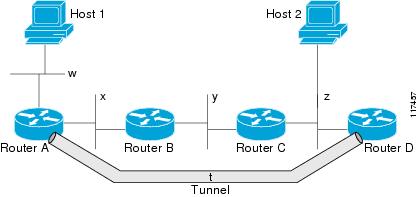
If routing is not carefully configured, the tunnel may have a recursive routing problem. When the best path to the "tunnel destination" is via the tunnel itself, recursive routing causes the tunnel interface to flap. To avoid recursive routing problems, keep the control-plane routing separate from the tunnel routing using the following methods:
When you have recursive routing to the tunnel destination, the following error is displayed:
%TUN-RECURDOWN Interface Tunnel 0
temporarily disabled due to recursive routing
Note | You cannot configure an IP tunnel or a GRE tunnel on Cisco 7600 series routers which has an MPLS Traffic Engineering (TE) tunnel as the egress path, because the configuration results in forwarding loops. |
Information About Implementing Tunnels
- Tunneling Versus Encapsulation
- Definition of Tunneling Types by OSI Layer
- Benefits of Tunneling
- Tunnel ToS
- Mobile IP Tunneling
- Generic Routing Encapsulation
- GRE Tunnel IP Source and Destination VRF Membership
- EoMPLS over GRE
- Multipoint GRE Tunneling
- GRE CLNS Tunnel Support for IPv4 and IPv6 Packets
- GRE IPv4 Tunnel Support for IPv6 Traffic
- Overlay Tunnels for IPv6
- IPv6 Manually Configured Tunnels
- Automatic 6to4 Tunnels
- Automatic IPv4-Compatible IPv6 Tunnels
- ISATAP Tunnels
- Rate-Based Satellite Control Protocol Tunnels
- Path MTU Discovery
- QoS Options for Tunnels
Tunneling Versus Encapsulation
To understand how tunnels work, it is important to distinguish between the concepts of encapsulation and tunneling. Encapsulation is the process of adding headers to data at each layer of a particular protocol stack. The Open Systems Interconnection (OSI) reference model describes the functions of a network as seven layers stacked on top of each other. When data has to be sent from one host (a PC for example) on a network to another host, the process of encapsulation is used to add a header in front of the data at each layer of the protocol stack in descending order. The header must contain a data field that indicates the type of data encapsulated at the layer immediately above the current layer. As the packet ascends the protocol stack on the receiving side of the network, each encapsulation header is removed in the reverse order.
Tunneling encapsulates data packets from one protocol inside a different protocol and transports the data packets unchanged across a foreign network. Unlike encapsulation, tunneling allows a lower-layer protocol, or same-layer protocol, to be carried through the tunnel. A tunnel interface is a virtual (or logical) interface. For more details on other types of virtual interfaces, see the "Configuring Virtual Interfaces" module. Although many different types of tunnels have been created to solve different network problems, tunneling consists of three main components:
Passenger protocol--The protocol that you are encapsulating. Examples of passenger protocols are AppleTalk, connectionless network service (CLNS), IP, and IPX.
Carrier protocol--The protocol that does the encapsulating. Examples of carrier protocols are GRE, IP-in-IP, Layer 2 Tunneling Protocol (L2TP), multiprotocol label switching (MPLS), STUN, and DLSw+.
Transport protocol--The protocol used to carry the encapsulated protocol. The main transport protocol is IP.
To understand the process of tunneling, consider connecting two AppleTalk networks with a non-AppleTalk backbone, such as IP. The relatively high bandwidth consumed by the broadcasting of Routing Table Maintenance Protocol (RTMP) data packets can severely hamper the backbone’s network performance. This problem can be solved by tunneling AppleTalk through a foreign protocol, such as IP. Tunneling encapsulates an AppleTalk packet inside the foreign protocol packet (AppleTalk inside GRE inside IP), which is then sent across the backbone to a destination router. The destination router then removes the encapsulation from the AppleTalk packet and routes the packet.
Definition of Tunneling Types by OSI Layer
Tunnels are used by many different technologies to solve different network challenges, and the resulting variety of tunnel types makes it difficult to determine which tunneling technique to use. The different carrier protocols can be grouped according to the OSI layer model. The table below shows the different carrier protocols grouped by OSI layer. Below the table, each carrier protocol is defined, and if the tunnel configuration is not covered within this module, a link to the appropriate module is included.
BSTUN
A Block Serial Tunnel (BSTUN) enables support for devices using the Bisync data-link protocol. This protocol enables enterprises to transport Bisync traffic over the same network that supports their Systems Network Architecture (SNA) and multiprotocol traffic, eliminating the need for separate Bisync facilities.
For more details about configuring BSTUN, see the "Configuring Serial Tunnel and Block Serial Tunnel" module in the Cisco IOS Bridging and IBM Networking Configuration Guide.
CLNS
The ISO Connectionless Network Service (CLNS) protocol is a standard for the network layer of the OSI model. IP traffic can be transported over CLNS; for instance, on the data communications channel (DCC) of a SONET ring. An IP over CLNS tunnel (CTunnel) is a virtual interface that enhances interactions with CLNS networks, allowing IP packets to be tunneled through the Connectionless Network Protocol (CLNP) to preserve TCP/IP services. CLNS can also be used as a transport protocol with GRE as a carrier protocol (GRE/CLNS), carrying both IPv4 and IPv6 packets.
DLSw+
Data-link switching plus (DLSw+) is Cisco’s implementation of the DLSw standard for Systems Network Architecture (SNA) and NetBIOS devices, and it supports several additional features and enhancements. DLSw+ is a means of transporting SNA and NetBIOS traffic over a campus or WAN. The end systems can attach to the network over Token Ring, Ethernet, Synchronous Data Link Control (SDLC), Qualified Logical Link Control (QLLC), or Fiber Distributed Data Interface (FDDI). DLSw+ switches between diverse media and locally terminates the data links, keeping acknowledgments, keepalives, and polling off the WAN.
For more details about configuring DLSw+, see the "Configuring Data-Link Switching Plus" module in the Cisco IOS Bridging and IBM Networking Configuration Guide .
GRE
Generic routing encapsulation (GRE) is defined in RFC 2784. GRE is a carrier protocol that can be used with a variety of underlying transport protocols, and GRE can carry a variety of passenger protocols. RFC 2784 also covers the use of GRE with IPv4 as the transport protocol and the passenger protocol. Cisco IOS software supports GRE as the carrier protocol with many combinations of passenger and transport protocols.
For more details about GRE, see the Generic Routing Encapsulation.
IP-in-IP
IP-in-IP is a Layer 3 tunneling protocol--defined in RFC 2003--that alters the normal routing of an IP packet by encapsulating it within another IP header. The encapsulating header specifies the address of a router that would not ordinarily be selected as a next-hop router on the basis of the real destination address of the packet. The intermediate node decapsulates the packet, which is then routed to the destination as usual.
IPsec
In simple terms, IP Security (IPsec) provides secure tunnels between two peers, such as two routers. You define which packets are considered sensitive and should be sent through these secure tunnels, and you define the parameters that should be used to protect these packets by specifying characteristics of these tunnels. IPsec peers set up a secure tunnel and encrypt the packets that traverse the tunnel to the remote peer.
IPsec also works with the GRE and IP-in-IP, L2F, L2TP, and DLSw+ tunneling protocols; however, multipoint tunnels are not supported. Other Layer 3 tunneling protocols may not be supported for use with IPsec.
For more details about configuring IPSec, see the "Configuring Security for VPNs with IPSec" module in the Cisco IOS Security Configuration Guide.
IPv6
IP version 6 (IPv6) is a new version of the Internet Protocol based on and designed as the successor to IP version 4. IPv6 adds a much larger address space--128 bits--and improvements such as a simplified main header and extension headers. IPv6 is described initially in RFC 2460, Internet Protocol, Version 6 (IPv6) . The use of IPv6 as a carrier protocol is described in RFC 2473, Generic Packet Tunneling in IPv6 Specification .
L2F
Layer 2 Forwarding (L2F) tunneling is used in virtual private dialup networks (VPDNs). A VPDN allows separate and autonomous protocol domains to share common access infrastructure including modems, access servers, and ISDN routers by the tunneling of link-level (Layer 2) frames. Typical L2F tunneling use includes Internet service providers (ISPs) or other access service creating virtual tunnels to link to remote customer sites or remote users with corporate intranet or extranet networks.
L2TP
Layer 2 Tunneling Protocol (L2TP) is an open standard created by the Internet Engineering Task Force (IETF) that uses the best features of L2F and Point-to-Point Tunneling Protocol (PPTP). L2TP is designed to secure the transmission of IP packets across uncontrolled and untrusted network domains, and it is an important component of Virtual Private Networks (VPNs). VPNs extend remote access to users over a shared infrastructure while maintaining the same security and management policies as a private network.
For more details about configuring L2TP, see the Cisco IOS Dial Technologies Configuration Guide.
MPLS
Multiprotocol Label Switching (MPLS) is a high-performance packet forwarding technology that integrates the performance and traffic management capabilities of data-link-layer (Layer 2) switching with the scalability, flexibility, and performance of network-layer (Layer 3) routing. The MPLS architecture has been designed to allow data to be transferred over any combination of Layer 2 technologies, to support all Layer 3 protocols, and to scale. Using CEF, MPLS can efficiently enable the delivery of IP services over an ATM switched network. MPLS is an integration of Layer 2 and Layer 3 technologies. By making traditional Layer 2 features available to Layer 3, MPLS enables traffic engineering.
For more details about how MPLS traffic engineering uses tunnels, see the Cisco IOS Multiprotocol Label Switching Configuration Guide.
PPPoA
PPP over ATM (PPPoA) is mainly implemented as part of Asymmetric Digital Subscriber Line (ADSL). It relies on RFC 1483, operating in either Logical Link Control-Subnetwork Access Protocol (LLC-SNAP) or VC-Mux mode. A customer premises equipment (CPE) device encapsulates the PPP session based on this RFC for transport across the ADSL loop and the digital subscriber line access multiplexer (DSLAM).
PPPoE
RFC 2516 defines PPP over Ethernet (PPPoE) as providing the ability to connect a network of hosts over a simple bridging access device to a remote access concentrator or aggregation concentrator. As customers deploy ADSL, they must support PPP-style authentication and authorization over a large installed base of legacy bridging customer premises equipment (CPE). Using a form of tunneling encapsulation, PPPoE allows each host to use its own PPP stack, thus presenting the user with a familiar user interface. Access control, billing, and type of service (ToS) can be done on a per-user, rather than a per-site, basis.
For more details about configuring PPPoE, see the Cisco IOS Broadband Access Aggregation and DSL Configuration Guide.
PPTP
Point-to-Point Tunneling Protocol (PPTP) is a network protocol that enables the secure transfer of data from a remote client enterprise server by creating a VPN across TCP/IP data networks. PPTP supports on-demand, multiprotocol virtual private networking over public networks such as the Internet.
RBSCP
Rate-Based Satellite Control Protocol (RBSCP) was designed for wireless or long-distance delay links with high error rates, such as satellite links. Using tunnels, RBSCP can improve the performance of certain IP protocols, such as TCP and IP Security (IPsec), over satellite links without breaking the end-to-end model.
SSL Tunnels
Secure Socket Layer (SSL) is designed to make use of TCP sessions to provide a reliable end-to-end secure service. The main role of SSL is to provide security for web traffic. Security includes confidentiality, message integrity, and authentication. SSL achieves these elements of security through the use of cryptography, digital signatures, and certificates. SSL protects confidential information through the use of cryptography. Sensitive data is encrypted across public networks to achieve a level of confidentiality.
SSL is implemented using the Cisco Application and Content Networking System (ACNS). For more details about configuring SSL, see the latest Cisco ACNS Software Deployment and Configuration Guide .
STUN
Cisco’s Serial Tunneling (STUN) implementation allows Synchronous Data Link Control (SDLC) protocol devices and High-Level Data Link Control (HDLC) devices to connect to one another through a multiprotocol internetwork rather than through a direct serial link. STUN encapsulates SDLC frames in either the TCP/IP or the HDLC protocol. STUN provides a straight passthrough of all SDLC traffic (including control frames, such as Receiver Ready) end-to-end between Systems Network Architecture (SNA) devices.
For more details about configuring STUN, see the "Configuring Serial Tunnel and Block Serial Tunnel" module in the Cisco IOS Bridging and IBM Networking Configuration Guide .
UDLR Tunnels
Unidirectional link routing (UDLR) provides mechanisms for a router to emulate a bidirectional link to enable the routing of unicast and multicast packets over a physical unidirectional interface, such as a broadcast satellite link. However, there must be a back channel or other path between the routers that share a physical unidirectional link (UDL). A UDLR tunnel is a mechanism for unicast and multicast traffic; Internet Group Management Protocol (IGMP) UDLR is a related technology for multicast traffic.
For more details, see Cisco IOS IP Multicast Configuration Guide.
Benefits of Tunneling
The following are several situations in which tunneling (encapsulating traffic in another protocol) is useful:
To enable multiprotocol local networks over a single-protocol backbone.
To provide workarounds for networks that use protocols that have limited hop counts; for example, RIP version 1, AppleTalk (see the figure below).
To connect discontiguous subnetworks.
To allow virtual private networks across WANs.

Tunnel ToS
Tunnel ToS allows you to tunnel your network traffic and group all your packets in the same specific ToS byte value. The ToS byte values and Time-to-Live (TTL) hop-count value can be set in the encapsulating IP header of tunnel packets for an IP tunnel interface on a router. The Tunnel ToS feature is supported for CEF, fast switching, and process switching.
The ToS and TTL byte values are defined in RFC 791. RFC 2474 and RFC 2780 obsolete the use of the ToS byte as defined in RFC 791. RFC 791 specifies that bits 6 and 7 of the ToS byte (the first two least significant bits) are reserved for future use and should be set to 0. The Tunnel ToS feature does not conform to this standard and allows you to set the whole ToS byte value, including bits 6 and 7, and to decide to which RFC standard the ToS byte of your packets should confirm.
Mobile IP Tunneling
New devices and business practices, such as PDAs and the next-generation of data-ready cellular phones and services, are driving interest in the ability of a user to roam while maintaining network connectivity. The requirement for data connectivity solutions for this group of users is very different than it is for the fixed dialup user or the stationary wired LAN user. Solutions need to accommodate the challenge of movement during a data session or conversation.
Mobile IP is a tunneling-based solution that takes advantage of the Cisco-created generic routing encapsulation (GRE) tunneling technology and simpler IP-in-IP tunneling protocol.
Mobile IP is comprises the following three components, as shown in the figure below:
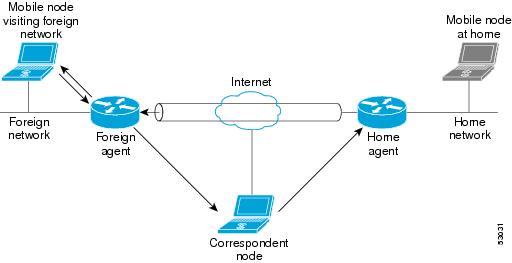
An MN is a node, for example, a PDA, a laptop computer, or a data-ready cellular phone, that can change its point of attachment from one network or subnet to another. This node can maintain ongoing communications while using only its home IP address. In the figure above, the current location of the MN--a laptop computer--is shown in bold.
An HA is a router on the home network of the MN that maintains an association between the home IP address of the MN and its care-of address , which is the current location of the MN on a foreign or visited network. The HA redirects packets by tunneling them to the MN while it is away from home.
An FA is a router on a foreign network that assists the MN in informing its HA of its current care-of address. The FA detunnels packets that were tunneled by the HA and delivers them to the MN. The FA also acts as the default router for packets generated by the MN while it is connected to the foreign network.
The traffic destined for the MN is forwarded in a triangular manner. When a device on the Internet, called a correspondent node (CN), sends a packet to the MN, the packet is routed to the home network of the MN, the HA redirects the packet by tunneling to the care-of address (current location) of the MN on the foreign network, as shown in the figure above. The FA receives the packet from the HA and forwards it locally to the MN. However, packets sent by the MN are routed directly to the CN.
For more details about configuring Mobile IP, see the Cisco IOS IP Mobility Configuration Guide.
Generic Routing Encapsulation
Generic routing encapsulation (GRE) is defined in RFC 2784. GRE is a carrier protocol that can be used with a variety of underlying transport protocols and that can carry a variety of passenger protocols. RFC 2784 also covers the use of GRE with IPv4 as the transport protocol and the passenger protocol. Cisco IOS software supports GRE as the carrier protocol with many combinations of passenger and transport protocols such as:
The following descriptions of GRE tunnels are included:
GRE Tunnel IP Source and Destination VRF Membership
GRE Tunnel IP Source and Destination VRF Membership allows you to configure the source and destination of a tunnel to belong to any VRF tables. A VRF table stores routing data for each VPN. The VRF table defines the VPN membership of a customer site attached to the network access server (NAS). Each VRF table comprises an IP routing table, a derived CEF table, and guidelines and routing protocol parameters that control the information that is included in the routing table.
Previously, Generic Routing Encapsulation (GRE) IP tunnels required the IP tunnel destination to be in the global routing table. The implementation of this feature allows you to configure a tunnel source and destination to belong to any VRF. As with existing GRE tunnels, the tunnel becomes disabled if no route to the tunnel destination is defined.
EoMPLS over GRE
Ethernet over multiprotocol label switching (EoMPLS) is a tunneling mechanism that allows you to tunnel Layer 2 traffic through a Layer 3 MPLS network. EoMPLS is also known as Layer 2 tunneling.
EoMPLS effectively facilitates the Layer 2 extension over long distances. EoMPLS over GRE helps to create the GRE tunnel as hardware-based switched, and with high performance that encapsulates EoMPLS frames within the GRE tunnel. The GRE connection is established between the two core routers, and then the MPLS LSP is tunneled over.
GRE encapsulation is used to define a packet that has some additional header information added to it prior to being forwarded. De-encapsulation is the process of removing the additional header information when the packet reaches the destination tunnel endpoint.
When a packet is forwarded through a GRE tunnel, two new headers are appended at the front of the packet and hence the context of the new payload changes. After encapsulation, what was originally the data payload and separate IP header is now known as the GRE payload. A GRE header is added to the packet to provide information on the protocol type and also a recalculated checksum. Also, a new IP header is added to the front of the GRE header. This IP header contains the destination IP address of the tunnel.
The GRE header is appended to the packet (IP, L2VPN, L3VPN, etc.) before entering the tunnel. All routers along the path that receive the encapsulated packet will use the new IP header to determine where to send the packet in an effort for it to reach the tunnel endpoint.
In the IP forwarding case on reaching the tunnel destination endpoint, the new IP header and GRE header are removed from the packet and the original IP header is then used to forward the packet to it’s final destination.
In the EoMPLS over GRE cases, the new IP header and GRE header will be removed from the packet at the tunnel destination and the MPLS (VC or VPN) label will be used to forward the packets to the appropriate L2 attachment circuit or L3 VRF.
The following scenarios describe the L2VPN and L3VPN over GRE deployment on provider edge (PE) or provider (P) routers:
PE to PE GRE Tunnels
In the PE to PE GRE tunnels scenario, a customer does not generally transition any part of the core to MPLS but prefers to offer EoMPLS and basic MPLS VPN services. Hence, GRE tunneling of the MPLS labeled traffic is done between PEs. This is the most common scenario seen in various customers networks.
P to P GRE Tunnels
The P to P GRE tunnels scenario is one where MPLS has been enabled between PE and P routers, but the network core may have non-MPLS-aware routers or IP encryption boxes. In this scenario, GRE tunneling of the MPLS labeled packets is done between P routers.
PE to P GRE Tunnels
The PE to P GRE tunnels scenario demonstrates a network where the P to P nodes are MPLS-aware, while GRE tunneling is done between a PE to P non MPLS network segment.
The following features are required for the deployment of scenarios described above:
GRE Specific:
Tunnel endpoints can be loopbacks or physical interfaces.
Configurable tunnel keepalive timer parameters per end point, and syslog message must be generated when the keepalive timer expires.
BFD support for tunnel failures and for IGPs using tunnels.
IGP loadsharing across GRE tunnels.
IGP redundancy across GRE tunnels.
Fragmentation across GRE tunnels.
Ability to pass jumbo frames.
Support for all IGP control plane traffic.
Support for IP TOS preservation across tunnel.
Tunnel should be independent of endpoint physical interface types such as POS, Gig, TenGig, and ATM.
Support for up to 100 GRE tunnels.
EoMPLS Specific:
MPLS-VPN Specific:
Support for PE Role with IPv4 VRFs
Support for all PE-CE protocols
Load sharing through multiple tunnels and equal-cost IGP paths with a single tunnel
Support for redundancy via unequal-cost IGP paths with a single tunnel
Support for the IP Precedence value being copied onto the EXP bits field of the MPLS label, and then onto the Precedence bits on the outer IPv4 ToS field of the GRE packet.
For a sample configuration sequence of EoMPLS over GRE, see Example Configuring EoMPLS over GRE. For more details about EoMPLS over GRE, see Deploying and Configuring MPLS Virtual Private Networks In IP Tunnel Environments .
Multipoint GRE Tunneling
Enhanced multipoint GRE (mGRE) tunneling technology provides a Layer 3 (L3) transport mechanism for use in IP networks. This same dynamic Layer 3 tunneling transport can be used within IP networks to transport VPN traffic across service provider and enterprise networks, as well as to provide interoperability for packet transport between IP and MPLS VPNs. This feature provides support for RFC 2547, which defines the outsourcing of IP-backbone services for enterprise networks.
Multipoint tunnels use the Next Hop Resolution Protocol (NHRP) in the same way that a Frame Relay multipoint interface uses information obtained by the reverse ARP mechanism to learn the Layer 3 addresses of the remote data-link connection identifiers (DLCIs).
In Cisco IOS Release 12.2(8)T and later releases, CEF-switching over mGRE tunnels was introduced. Previously, only process switching was available for mGRE tunnels. CEF-switching over mGRE tunnels enables CEF switching of IP traffic to and from multipoint GRE tunnels. Tunnel traffic can be forwarded to a prefix through a tunnel destination when both the prefix and the tunnel destination are specified by the application.
GRE CLNS Tunnel Support for IPv4 and IPv6 Packets
GRE tunneling of IPv4 and IPv6 packets through CLNS networks enables Cisco CLNS tunnels (CTunnels) to interoperate with networking equipment from other vendors. This feature provides compliance with RFC 3147.
The optional GRE services defined in header fields, such as checksums, keys, and sequencing, are not supported. Any packet that is received and requests such services will be dropped.
GRE IPv4 Tunnel Support for IPv6 Traffic
IPv6 traffic can be carried over IPv4 generic routing encapsulation (GRE) tunnels using the standard GRE tunneling technique that is designed to provide the services necessary to implement any standard point-to-point encapsulation scheme. As in IPv6 manually configured tunnels, GRE tunnels are links between two points, with a separate tunnel for each link. The tunnels are not tied to a specific passenger or transport protocol, but in this case, IPv6 is the passenger protocol, GRE is the carrier protocol, and IPv4 is the transport protocol.
The primary use of GRE tunnels is for stable connections that require regular secure communication between two edge routers or between an edge router and an end system. The edge routers and the end systems must be dual-stack implementations.
GRE has a protocol field that identifies the passenger protocol. GRE tunnels allow IS-IS or IPv6 to be specified as a passenger protocol, allowing both IS-IS and IPv6 traffic to run over the same tunnel. If GRE did not have a protocol field, it would be impossible to distinguish whether the tunnel was carrying IS-IS or IPv6 packets. The GRE protocol field is why it is desirable that you tunnel IS-IS and IPv6 inside GRE.
Overlay Tunnels for IPv6
Overlay tunneling encapsulates IPv6 packets in IPv4 packets for delivery across an IPv4 infrastructure (a core network or the Internet). (See the figure below.) By using overlay tunnels, you can communicate with isolated IPv6 networks without upgrading the IPv4 infrastructure between them. Overlay tunnels can be configured between border routers or between a border router and a host; however, both tunnel endpoints must support both the IPv4 and IPv6 protocol stacks. Cisco IOS IPv6 currently supports the following types of overlay tunneling mechanisms:
Manual
Generic routing encapsulation (GRE)
IPv4-compatible
6to4
Intra-Site Automatic Tunnel Addressing Protocol (ISATAP)
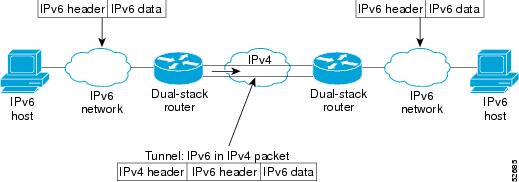
Note | Overlay tunnels reduce the maximum transmission unit (MTU) of an interface by 20 octets (assuming that the basic IPv4 packet header does not contain optional fields). A network that uses overlay tunnels is difficult to troubleshoot. Therefore, overlay tunnels that connect isolated IPv6 networks should not be considered as a final IPv6 network architecture. The use of overlay tunnels should be considered as a transition technique toward a network that supports both the IPv4 and IPv6 protocol stacks or just the IPv6 protocol stack. |
Use the table below to help you determine which type of tunnel you want to configure to carry IPv6 packets over an IPv4 network.
|
Tunneling Type |
Suggested Usage |
Usage Notes |
|---|---|---|
|
Manual |
Simple point-to-point tunnels that can be used within a site or between sites. |
Can carry IPv6 packets only. |
|
GRE/IPv4 |
Simple point-to-point tunnels that can be used within a site or between sites. |
Can carry IPv6, CLNS, and many other types of packets. |
|
Compatible |
Point-to-multipoint tunnels. |
Uses the ::/96 prefix. Currently, we do not recommend using this tunnel type. |
|
6to4 |
Point-to-multipoint tunnels that can be used to connect isolated IPv6 sites. |
Sites use addresses from the 2002::/16 prefix. |
|
ISATAP |
Point-to-multipoint tunnels that can be used to connect systems within a site. |
Sites can use any IPv6 unicast addresses. |
Individual tunnel types are discussed in more detail in the following concepts, and we recommend that you review and understand the information on the specific tunnel type that you want to implement. When you are familiar with the type of tunnel you need, the table below provides a quick summary of the tunnel configuration parameters that you may find useful.
|
Overlay Tunneling Type |
Overlay Tunnel Configuration Parameter |
|||
|---|---|---|---|---|
|
Tunnel Mode |
Tunnel Source |
Tunnel Destination |
Interface Prefix/Address |
|
|
Manual |
ipv6ip |
An IPv4 address or a reference to an interface on which IPv4 is configured. |
An IPv4 address. |
An IPv6 address. |
|
GRE/IPv4 |
gre ip |
An IPv4 address. |
An IPv6 address. |
|
|
Compatible |
ipv6ip auto-tunnel |
Not required. These are all point-to-multipoint tunneling types. The IPv4 destination address is calculated, on a per-packet basis, from the IPv6 destination. |
Not required. The interface address is generated as ::tunnel-source/96. |
|
|
6to4 |
ipv6ip 6to4 |
An IPv6 address. The prefix must embed the tunnel source IPv4 address. |
||
|
ISATAP |
ipv6ip isatap |
An IPv6 prefix in modified eui-64 format. The IPv6 address is generated from the prefix and the tunnel source IPv4 address. |
IPv6 Manually Configured Tunnels
A manually configured tunnel is equivalent to a permanent link between two IPv6 domains over an IPv4 backbone. The primary use is for stable connections that require regular secure communication between two edge routers or between an end system and an edge router, or for connection to remote IPv6 networks.
An IPv6 address is manually configured on a tunnel interface, and manually configured IPv4 addresses are assigned to the tunnel source and the tunnel destination. The host or router at each end of a configured tunnel must support both the IPv4 and IPv6 protocol stacks. Manually configured tunnels can be configured between border routers or between a border router and a host. CEF switching can be used for IPv6 manually configured tunnels, or CEF switching can be disabled if process switching is needed.
Automatic 6to4 Tunnels
An automatic 6to4 tunnel allows isolated IPv6 domains to be connected over an IPv4 network to remote IPv6 networks. The key difference between automatic 6to4 tunnels and manually configured tunnels is that the tunnel is not point-to-point; it is point-to-multipoint. In automatic 6to4 tunnels, routers are not configured in pairs because they treat the IPv4 infrastructure as a virtual nonbroadcast multiaccess (NBMA) link. The IPv4 address embedded in the IPv6 address is used to find the other end of the automatic tunnel.
An automatic 6to4 tunnel may be configured on a border router in an isolated IPv6 network, which creates a tunnel on a per-packet basis to a border router in another IPv6 network over an IPv4 infrastructure. The tunnel destination is determined by the IPv4 address of the border router extracted from the IPv6 address that starts with the prefix 2002::/16, where the format is 2002:border-router-IPv4-address ::/48. Following the embedded IPv4 address are 16 bits that can be used to number networks within the site. The border router at each end of a 6to4 tunnel must support both the IPv4 and IPv6 protocol stacks. 6to4 tunnels are configured between border routers or between a border router and a host.
The simplest deployment scenario for 6to4 tunnels is to interconnect multiple IPv6 sites, each of which has at least one connection to a shared IPv4 network. This IPv4 network could be the global Internet or a corporate backbone. The key requirement is that each site have a globally unique IPv4 address; the Cisco IOS software uses this address to construct a globally unique 6to4/48 IPv6 prefix. As with other tunnel mechanisms, appropriate entries in a Domain Name System (DNS) that map between hostnames and IP addresses for both IPv4 and IPv6 allow the applications to choose the required address.
Automatic IPv4-Compatible IPv6 Tunnels
Automatic IPv4-compatible tunnels use IPv4-compatible IPv6 addresses. IPv4-compatible IPv6 addresses are IPv6 unicast addresses that have zeros in the high-order 96 bits of the address and an IPv4 address in the low-order 32 bits. They can be written as 0:0:0:0:0:0:A.B.C.D or ::A.B.C.D, where "A.B.C.D" represents the embedded IPv4 address.
The tunnel destination is automatically determined by the IPv4 address in the low-order 32 bits of IPv4-compatible IPv6 addresses. The host or router at each end of an IPv4-compatible tunnel must support both the IPv4 and IPv6 protocol stacks. IPv4-compatible tunnels can be configured between border routers or between a border router and a host. Using IPv4-compatible tunnels is an easy method to create tunnels for IPv6 over IPv4, but the technique does not scale for large networks.
Note | IPv4-compatible tunnels were initially supported for IPv6, but are currently being deprecated. Cisco now recommends that you use a different IPv6 tunneling technique named ISATAP tunnels. |
ISATAP Tunnels
The Intra-Site Automatic Tunnel Addressing Protocol (ISATAP) is an automatic overlay tunneling mechanism that uses the underlying IPv4 network as a nonbroadcast multiaccess (NBMA) link layer for IPv6. ISATAP is designed for transporting IPv6 packets within a site where a native IPv6 infrastructure is not yet available; for example, when sparse IPv6 hosts are deployed for testing. ISATAP tunnels allow individual IPv4/IPv6 dual-stack hosts within a site to communicate with other such hosts on the same virtual link, basically creating an IPv6 network using the IPv4 infrastructure.
The ISATAP router provides standard router advertisement network configuration support for the ISATAP site. This feature allows clients to automatically configure themselves as they would do if they were connected to an Ethernet. It can also be configured to provide connectivity out of the site. ISATAP uses a well-defined IPv6 address format composed of any unicast IPv6 prefix (/64), which can be link-local or global (including 6to4 prefixes), enabling IPv6 routing locally or on the Internet. The IPv4 address is encoded in the last 32 bits of the IPv6 address, enabling automatic IPv6-in-IPv4 tunneling.
While the ISATAP tunneling mechanism is similar to other automatic tunneling mechanisms, such as IPv6 6to4 tunneling, ISATAP is designed for transporting IPv6 packets within a site, not between sites.
ISATAP uses unicast addresses that include a 64-bit IPv6 prefix and a 64-bit interface identifier. The interface identifier is created in modified EUI-64 format in which the first 32 bits contain the value 000:5EFE to indicate that the address is an IPv6 ISATAP address. The table below shows the layout of an ISATAP address.
|
64 Bits |
32 Bits |
32 Bits |
|---|---|---|
|
Link local or global IPv6 unicast prefix |
0000:5EFE |
IPv4 address of the ISATAP link |
As shown in the table above, an ISATAP address consists of an IPv6 prefix and the ISATAP interface identifier. This interface identifier includes the IPv4 address of the underlying IPv4 link. The following example shows what an actual ISATAP address would look like if the prefix is 2001:0DB8:1234:5678::/64 and the embedded IPv4 address is 10.173.129.8. In the ISATAP address, the IPv4 address is expressed in hexadecimal as 0AAD:8108.
Example
2001:0DB8:1234:5678:0000:5EFE:0AAD:8108
Rate-Based Satellite Control Protocol Tunnels
Rate-Based Satellite Control Protocol (RBSCP) was designed for wireless or long-distance delay links with high error rates, such as satellite links. Using tunnels, RBSCP can improve the performance of certain IP protocols, such as TCP and IP Security (IPsec), over satellite links without breaking the end-to-end model.
Satellite links have several characteristics that affect the performance of IP protocols over the link. The figure below shows that satellite links can have a one-way delay of 275 milliseconds. A round-trip time (RTT) of 550 milliseconds is a very long delay for TCP. Another issue is the high error rates (packet loss rates) that are typical of satellite links as compared to wired links in LANs. Even the weather affects satellite links, causing a decrease in available bandwidth and an increase in RTT and packet loss.
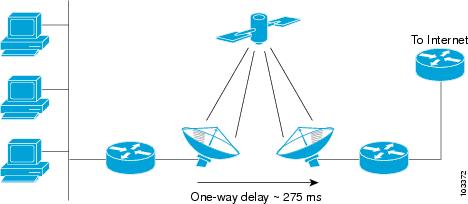
Long RTT keeps TCP in a slow start mode, which increases the time before the satellite link bandwidth is fully used. TCP and Stream Control Transmission Protocol (SCTP) interpret packet loss events as congestion in the network and start to perform congestion recovery procedures, which reduce the traffic being sent over the link.
Although available satellite link bandwidths are increasing, the long RTT and high error rates experienced by IP protocols over satellite links are producing a high bandwidth-delay product (BDP).
To address the problem of TCP being kept in a slow start mode when a satellite link is used, a disruptive performance enhancing proxy (PEP) solution is often introduced into the network. In the figure below, you can see that the transport connection is broken up into three sections with hosts on the remote side connecting to the Internet through their default router. The router sends all Internet-bound traffic to the TCP PEP, which terminates the TCP connection to the Internet. The PEP generates a local TCP ACK (TCP spoofing) for all data. Traffic is buffered and retransmitted through a single PEP protocol connection over the satellite link. The second PEP receives the data from the satellite link and retransmits the data over separate TCP connections to the Internet. TCP transmission is disrupted, so dropped packets are not interpreted as TCP congestion and can be retransmitted from buffered data. Minimal TCP ACKs and reduced TCP slow starts allow more bandwidth to be used.
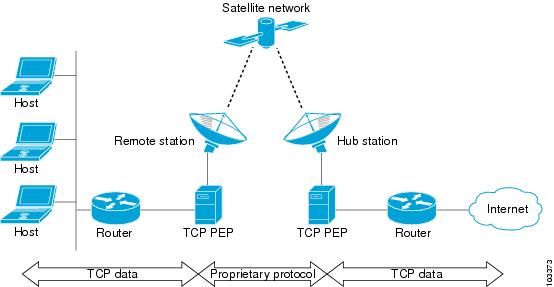
One of the disadvantages to using disruptive TCP PEP is the breaking of the end-to-end model. Some applications cannot work when the flow of traffic is broken, and the PEP has no provision for handling encrypted traffic (IPsec). New transport protocols such as SCTP require special handling or additional code to function with disruptive TCP PEP. An additional managed network component is also required at every satellite router.
RBSCP has been designed to preserve the end-to-end model and provide performance improvements over the satellite link without using a PEP solution. IPsec encryption of clear-text traffic (for example a VPN service configuration) across the satellite link is supported. RBSCP allows two routers to control and monitor the sending rates of the satellite link, thereby increasing the bandwidth utilization. Lost packets are retransmitted over the satellite link by RBSCP, preventing the end host TCP senders from going into slow start mode.
RBSCP is implemented using a tunnel interface as shown in the figure below. The tunnel can be configured over any network interface supported by Cisco IOS software that can be used by a satellite modem or internal satellite modem network module. IP traffic is sent across the satellite link with appropriate modifications and enhancements that are determined by the router configuration. Standard routing or policy-based routing can be used to determine the traffic to be sent through the RBSCP tunnel.

RBSCP tunnels can be configured for any of the following features:
Time Delay --One of the RBSCP routers can be configured to hold frames due for transmission through the RBSCP tunnel. The delay time increases the RTT at the end host and allows RBSCP time to retransmit lost TCP frames or other protocol frames. If the retransmission is successful, it prevents lost frame events from reaching the end host where congestion procedures would be enabled. In some cases, the retransmission can be completed by RBSCP without inserting the delay. This option should be used only when the RTT of the satellite link is greater than 700 milliseconds.
ACK Splitting --Performance improvements can be made for clear-text TCP traffic using acknowledgement (ACK) splitting in which a number of additional TCP ACKs are generated for each TCP ACK received. TCP will open a congestion window by one maximum transmission unit (MTU) for each TCP ACK received. Opening the congestion window results in increased bandwidth becoming available. Configure this feature only when the satellite link is not using all the available bandwidth. Encrypted traffic cannot use ACK splitting.
Window Stuffing --Clear-text TCP and SCTP traffic can benefit from the RBSCP window stuffing feature. RBSCP can buffer traffic so that the advertised window can be incremented up to the available satellite link bandwidth or the available memory in the router. The end host that sends the packets is fooled into thinking that a larger window exists at the receiving end host and sends more traffic. Use this feature with caution because the end host may send too much traffic for the satellite link to handle and the resulting loss and retransmission of packets may cause link congestion.
SCTP Drop Reporting --SCTP uses an appropriate byte counting method instead of ACK counting to determine the size of the transmission window, so ACK splitting does not work with SCTP. The RBSCP tunnel can generate an SCTP packet-dropped report for packets dropped across the satellite but not as a result of congestion loss. This SCTP drop reporting is on by default and provides a chance to retransmit the packet without affecting the congestion window size. Actual congestion losses are still reported, and normal recovery mechanisms are activated.
Path MTU Discovery
Path MTU Discovery (PMTUD) can be enabled on a GRE or IP-in-IP tunnel interface. When PMTUD (RFC 1191) is enabled on a tunnel interface, the router performs PMTUD processing for the GRE (or IP-in-IP) tunnel IP packets. The router always performs PMTUD processing on the original data IP packets that enter the tunnel. When PMTUD is enabled, packet fragmentation is not permitted for packets that traverse the tunnel because the Don’t Fragment (DF) bit is set on all the packets. If a packet that enters the tunnel encounters a link with a smaller MTU, the packet is dropped and an ICMP message is sent back to the sender of the packet. This message indicates that fragmentation was required (but not permitted) and provides the MTU of the link that caused the packet to be dropped.
For more detailed information about PMTUD, see the IP Fragmentation and PMTUD document.
Note | PMTUD on a tunnel interface requires that the tunnel endpoint be able to receive ICMP messages generated by routers in the path of the tunnel. Check that ICMP messages can be received before using PMTUD over firewall connections. |
Use the tunnel path-mtu-discovery command to enable PMTUD for the tunnel packets, and use the show interfaces tunnel command to verify the tunnel PMTUD parameters. PMTUD currently works only on GRE and IP-in-IP tunnel interfaces.
QoS Options for Tunnels
A tunnel interface supports many of the same quality of service (QoS) features as a physical interface. QoS provides a way to ensure that mission-critical traffic has an acceptable level of performance. QoS options for tunnels include support for applying generic traffic shaping (GTS) directly on the tunnel interface and support for class-based shaping using the modular QoS CLI (MQC). Tunnel interfaces also support class-based policing, but they do not support committed access rate (CAR).
Note | Service policies are not supported on tunnel interfaces on the Cisco 7500 series routers. |
GRE tunnels allow the router to copy the IP precedence bit values of the ToS byte to the tunnel or the GRE IP header that encapsulates the inner packet. Intermediate routers between the tunnel endpoints can use the IP precedence values to classify the packets for QoS features such as policy routing, weighted fair queueing (WFQ), and weighted random early detection (WRED).
When packets are encapsulated by tunnel or encryption headers, QoS features are unable to examine the original packet headers and correctly classify the packets. Packets that travel across the same tunnel have the same tunnel headers, so the packets are treated identically if the physical interface is congested. Tunnel packets can, however, be classified before tunneling and encryption can occur by using the QoS preclassify feature on the tunnel interface or on the crypto map.
Note | Class-based WFQ (CBWFQ) inside class-based shaping is not supported on a multipoint interface. |
For examples of how to implement some QoS features on a tunnel interface, see the Example Configuring QoS Options on Tunnel Interfaces.
How to Implement Tunnels
- Determining the Tunnel Type
- Configuring a GRE Tunnel
- Configuring GRE IPv6 Tunnels
- Configuring GRE Tunnel IP Source and Destination VRF Membership
- Configuring a CTunnel
- Configuring GRE CLNS CTunnels to Carry IPv4 and IPv6 Packets
- Configuring Manual IPv6 Tunnels
- Configuring 6to4 Tunnels
- Configuring IPv4-Compatible IPv6 Tunnels
- Configuring ISATAP Tunnels
- Configuring the RBSCP Tunnel
- Verifying Tunnel Configuration and Operation
- Verifying RBSCP Tunnel Configuration and Operation
Determining the Tunnel Type
Before configuring a tunnel, you must determine what type of tunnel you need to create.
1. Determine the passenger protocol.
2. Determine the tunnel CLI type.
3. Determine the tunnel mode command keyword, if appropriate.
DETAILED STEPS
What to Do Next
To configure an RBSCP tunnel to carry IP data packets over a satellite or other long-distance delay link with high error rates, proceed to the Configuring the RBSCP Tunnel.
Configuring a GRE Tunnel
Perform this task to configure a GRE tunnel. A tunnel interface is used to pass protocol traffic across a network that does not normally support the protocol. To build a tunnel, a tunnel interface must be defined on each of two routers and the tunnel interfaces must reference each other. At each router, the tunnel interface must be configured with a L3 address. The tunnel endpoints, tunnel source, and tunnel destination must be defined, and the type of tunnel must be selected. Optional steps can be performed to customize the tunnel.
Remember to configure the router at each end of the tunnel. If only one side of a tunnel is configured, the tunnel interface may still come up and stay up (unless keepalive is configured), but packets going into the tunnel will be dropped.
In Cisco IOS Release 12.2(8)T and later releases, CEF-switching over multipoint GRE tunnels was introduced. Previously, only process switching was available for multipoint GRE tunnels.
GRE Tunnel Keepalive
Keepalive packets can be configured to be sent over IP-encapsulated GRE tunnels. You can specify the rate at which keepalives will be sent and the number of times that a device will continue to send keepalive packets without a response before the interface becomes inactive. GRE keepalive packets may be sent from both sides of a tunnel or from just one side.
Ensure that the physical interface to be used as the tunnel source in this task is up and configured with the appropriate IP address. For hardware technical descriptions and information about installing interfaces, see the hardware installation and configuration publication for your product.
Note | GRE tunnel keepalive is not supported in cases where virtual route forwarding (VRF) is applied to a GRE tunnel. > |
1.
enable
2.
configure
terminal
3.
interface
type
number
4.
bandwidth
kbps
5.
keepalive
[period [retries]]
6.
tunnel
source
{ip-address |
interface-type
interface-number}
7.
tunnel
destination
{hostname |
ip-address}
8.
tunnel
key
key-number
9.
tunnel
mode
{gre
ip|
gre
multipoint}
10.
ip
mtu
bytes
11.
ip
tcp
mss
mss-value
12.
tunnel
path-mtu-discovery
[age-timer {aging-mins|
infinite}]
13.
end
DETAILED STEPS
| Command or Action | Purpose | |||
|---|---|---|---|---|
| Step 1 |
enable
Example: Router> enable |
Enables privileged EXEC mode. | ||
| Step 2 |
configure
terminal
Example: Router# configure terminal |
Enters global configuration mode. | ||
| Step 3 |
interface
type
number
Example: Router(config)# interface tunnel 0 |
Specifies the interface type and number and enters interface configuration mode. | ||
| Step 4 |
bandwidth
kbps
Example: Router(config-if)# bandwidth 1000 |
Sets the current bandwidth value for an interface and communicates it to higher-level protocols. Specifies the tunnel bandwidth to be used to transmit packets.
| ||
| Step 5 |
keepalive
[period [retries]]
Example: Router(config-if)# keepalive 3 7 |
(Optional) Specifies the number of times that the device will continue to send keepalive packets without response before bringing the tunnel interface protocol down.
| ||
| Step 6 |
tunnel
source
{ip-address |
interface-type
interface-number}
Example: Router(config-if)# tunnel source Ethernet 1 |
Configures the tunnel source.
| ||
| Step 7 |
tunnel
destination
{hostname |
ip-address}
Example: Router(config-if)# tunnel destination 172.17.2.1 |
Configures the tunnel destination.
| ||
| Step 8 |
tunnel
key
key-number
Example: Router(config-if)# tunnel key 1000 |
(Optional) Enables an ID key for a tunnel interface.
| ||
| Step 9 |
tunnel
mode
{gre
ip|
gre
multipoint}
Example: Router(config-if)# tunnel mode gre ip |
Specifies the encapsulation protocol to be used in the tunnel. | ||
| Step 10 |
ip
mtu
bytes
Example: Router(config-if)# ip mtu 1400 |
(Optional) Set the maximum transmission unit (MTU) size of IP packets sent on an interface.
| ||
| Step 11 |
ip
tcp
mss
mss-value
Example: Router(config-if)# ip tcp mss 250 |
(Optional) Specifies the maximum segment size (MSS) for TCP connections that originate or terminate on a router. | ||
| Step 12 |
tunnel
path-mtu-discovery
[age-timer {aging-mins|
infinite}]
Example: Router(config-if)# tunnel path-mtu-discovery |
(Optional) Enables Path MTU Discovery (PMTUD) on a GRE or IP-in-IP tunnel interface. | ||
| Step 13 |
end
Example: Router(config-if)# end |
Exits interface configuration mode and returns to privileged EXEC mode. |
What to Do Next
Proceed to the Verifying Tunnel Configuration and Operation.
Configuring GRE IPv6 Tunnels
Perform this task to configure a GRE tunnel on an IPv6 network. GRE tunnels can be configured to run over an IPv6 network layer and transport IPv6 and IPv4 packets through IPv6 tunnels.
When GRE IPv6 tunnels are configured, IPv6 addresses are assigned to the tunnel source and the tunnel destination. The tunnel interface can have either IPv4 or IPv6 addresses (this is not shown in the task below). The host or device at each end of the configured tunnel must support both IPv4 and IPv6 protocol stacks.
1.
enable
2.
configure
terminal
3.
interface
tunnel
tunnel-number
4.
tunnel
source
{ipv6-address |
interface-type
interface-number}
5.
tunnel
destination
ipv6-address
6.
tunnel
mode
gre
ipv6
7.
end
DETAILED STEPS
| Command or Action | Purpose | |||
|---|---|---|---|---|
| Step 1 |
enable
Example: Device> enable |
Enables privileged EXEC mode. | ||
| Step 2 |
configure
terminal
Example: Device# configure terminal |
Enters global configuration mode. | ||
| Step 3 |
interface
tunnel
tunnel-number
Example: Device(config)# interface tunnel 0 |
Specifies a tunnel interface and number and enters interface configuration mode. | ||
| Step 4 |
tunnel
source
{ipv6-address |
interface-type
interface-number}
Example: Device(config-if)# tunnel source ethernet 0 |
Specifies the source IPv6 address or the source interface type and number for the tunnel interface.
| ||
| Step 5 |
tunnel
destination
ipv6-address
Example: Device(config-if)# tunnel destination 2001:0DB8:0C18:2::300 |
Specifies the destination IPv6 address for the tunnel interface.
| ||
| Step 6 |
tunnel
mode
gre
ipv6
Example: Device(config-if)# tunnel mode gre ipv6 |
Specifies a GRE IPv6 tunnel.
| ||
| Step 7 |
end
Example: Device(config-if)# end |
Exits interface configuration mode and returns to privileged EXEC mode. |
What to Do Next
Proceed to the “Verifying Tunnel Configuration and Operation” section.
Configuring GRE Tunnel IP Source and Destination VRF Membership
This task explains how to configure the source and destination of a tunnel to belong to any virtual private network (VPN) routing/forwarding (VRFs) tables
Note | Cisco 10000 Series Routers
|
1.
enable
2.
configure
{terminal | memory | network}
3.
interface
tunnel
slot
4.
ip
vrf
forwarding
vrf-name
5.
ip
address
ip-address
subnet-mask
6.
tunnel
source
{ip-address | type number}
7.
tunnel
destination
{hostname | ip-address}
8.
tunnel
vrf
vrf-name
DETAILED STEPS
| Command or Action | Purpose | |
|---|---|---|
| Step 1 |
enable
Example: Router> enable |
Enables higher privilege levels, such as privileged EXEC mode.
|
| Step 2 |
configure
{terminal | memory | network} Example: Router# configure terminal |
Enters global configuration mode. |
| Step 3 |
interface
tunnel
slot
Example: Router(config)# interface tunnel 0 |
Enters interface configuration mode for the specified interface. |
| Step 4 |
ip
vrf
forwarding
vrf-name
Example: Router(config-if)# ip vrf forwarding green |
Defines the VRF. |
| Step 5 |
ip
address
ip-address
subnet-mask
Example: Router(config-if)# ip address 10.7.7.7 255.255.255.255 |
Specifies the ip address and subnet mask. |
| Step 6 |
tunnel
source
{ip-address | type number} Example: Router(config-if)# tunnel source loop 0 |
Specifies the tunnel source. |
| Step 7 |
tunnel
destination
{hostname | ip-address} Example: Router(config-if)# tunnel destination 10.5.5.5 |
Defines the tunnel destination. |
| Step 8 |
tunnel
vrf
vrf-name
Example: Router(config-if)# tunnel vrf finance1 |
Defines the VRF. |
What to Do Next
Proceed to the Verifying Tunnel Configuration and Operation.
Configuring a CTunnel
Perform this task to configure an IP over CLNS tunnel (CTunnel). To configure a CTunnel between a single pair of routers, a tunnel interface must be configured with an IP address, and a tunnel destination must be defined. The destination network service access point (NSAP) address for Router A would be the NSAP address of Router B, and the destination NSAP address for Router B would be the NSAP address of Router A. Ideally, the IP addresses used for the virtual interfaces at either end of the tunnel should be in the same IP subnet. Remember to configure the router at each end of the tunnel.
CTunnel
A CTunnel lets you transport IP traffic over Connectionless Network Service (CLNS), for example, on the data communications channel (DCC) of a SONET ring. CTunnels allow IP packets to be tunneled through the Connectionless Network Protocol (CLNP) to preserve TCP/IP services.
Configuring a CTunnel allows you to telnet to a remote router that has only CLNS connectivity. Other management facilities can also be used, such as Simple Network Management Protocol (SNMP) and TFTP, which otherwise would not be available over a CLNS network.
1.
enable
2.
configure
terminal
3.
interface
ctunnel
interface-number
4.
ip
address
ip-address
mask
5.
ctunnel
destination
remote-nsap-address
6.
end
7.
show
interfaces
ctunnel
interface-number
DETAILED STEPS
| Command or Action | Purpose | |||
|---|---|---|---|---|
| Step 1 |
enable
Example: Router> enable |
Enables privileged EXEC mode.
| ||
| Step 2 |
configure
terminal
Example: Router# configure terminal |
Enters global configuration mode. | ||
| Step 3 |
interface
ctunnel
interface-number
Example: Router(config)# interface ctunnel 102 |
Creates a virtual interface to transport IP over a CLNS tunnel and enters interface configuration mode.
| ||
| Step 4 |
ip
address
ip-address
mask
Example: Router(config-if)# ip address 10.0.0.1 255.255.255.0 |
Enables IP on the interface.
| ||
| Step 5 |
ctunnel
destination
remote-nsap-address
Example: Router(config-if)# ctunnel destination 49.0001.2222.2222.2222.00 |
Specifies the destination NSAP address of the CTunnel, where the packets exit the tunnel.
| ||
| Step 6 |
end
Example: Router(config-if)# end |
Exits interface configuration mode and returns to privileged EXEC mode. | ||
| Step 7 |
show
interfaces
ctunnel
interface-number
Example: Router# show interfaces ctunnel 102 |
(Optional) Displays information about an IP over CLNS tunnel.
|
Troubleshooting Tips
Use the ping command to diagnose basic network connectivity issues.
What to Do Next
Proceed to the Verifying Tunnel Configuration and Operation.
Configuring GRE CLNS CTunnels to Carry IPv4 and IPv6 Packets
Perform this task to configure a CTunnel in GRE mode to transport IPv4 and IPv6 packets in a CLNS network.
To configure a CTunnel between a single pair of routers, a tunnel interface must be configured with an IP address, and a tunnel destination must be defined. The destination network service access point (NSAP) address for Router A would be the NSAP address of Router B, and the destination NSAP address for Router B would be the NSAP address of Router A. Ideally, the IP addresses used for the virtual interfaces at either end of the tunnel should be in the same IP subnet. Remember to configure the router at each end of the tunnel.
Tunnels for IPv4 and IPv6 Packets over CLNS Networks
Configuring the ctunnel mode gre command on a CTunnel interface enables IPv4 and IPv6 packets to be tunneled over CLNS in accordance with RFC 3147. Compliance with this RFC should allow interoperation between Cisco equipment and that of other vendors in which the same standard is implemented.
RFC 3147 specifies the use of GRE for tunneling packets. The implementation of this feature does not include support for GRE services defined in header fields, such as those used to specify checksums, keys, or sequencing. Any packets received that specify the use of these features will be dropped.
The default CTunnel mode continues to use the standard Cisco encapsulation, which will tunnel only IPv4 packets. If you want to tunnel IPv6 packets, you must use the GRE encapsulation mode. Both ends of the tunnel must be configured with the same mode for either method to work.
An IPv4 or IPv6 address must be configured on a CTunnel interface, and manually configured CLNS addresses must be assigned to the CTunnel destination.
The host or router at each end of a configured CTunnel must support both the IPv4 and IPv6 protocol stacks.
The CTunnel source and destination must both be configured to run in the same mode.
Note | GRE services, such as those used to specify checksums, keys, or sequencing, are not supported. Packets that request use of those features will be dropped. > |
1.
enable
2.
configure
terminal
3.
interface
ctunnel
interface-number
5.
ctunnel
destination
remote-nsap-address
6.
ctunnel
mode
gre
7.
end
8.
show
interfaces
ctunnel
interface-number
DETAILED STEPS
| Command or Action | Purpose | |||
|---|---|---|---|---|
| Step 1 |
enable
Example: Router> enable |
Enables privileged EXEC mode. | ||
| Step 2 |
configure
terminal
Example: Router# configure terminal |
Enters global configuration mode. | ||
| Step 3 |
interface
ctunnel
interface-number
Example: Router(config)# interface ctunnel 102 |
Creates a virtual interface to transport IP over a CLNS tunnel and enters interface configuration mode.
| ||
| Step 4 | Do one of the following:
Example: Router(config-if)# ipv6 address 2001:0DB8:1234:5678::3/126 |
Specifies the IPv4 or IPv6 network assigned to the interface and enables IPv4 or IPv6 packet processing on the interface.
| ||
| Step 5 |
ctunnel
destination
remote-nsap-address
Example: Router(config-if)# ctunnel destination 192.168.30.1 |
Specifies the destination NSAP address of the CTunnel, where the packets are extracted. | ||
| Step 6 |
ctunnel
mode
gre
Example: Router(config-if)# ctunnel mode gre |
Specifies a CTunnel running in GRE mode for both IPv4 and IPv6 traffic.
| ||
| Step 7 |
end
Example: Router(config-if)# end |
Exits interface configuration mode and returns to privileged EXEC mode. | ||
| Step 8 |
show
interfaces
ctunnel
interface-number
Example: Router# show interfaces ctunnel 102 |
(Optional) Displays information about an IP over CLNS tunnel. |
What to Do Next
Proceed to the Verifying Tunnel Configuration and Operation.
Configuring Manual IPv6 Tunnels
This task explains how to configure a manual IPv6 overlay tunnel.
With manually configured IPv6 tunnels, an IPv6 address is configured on a tunnel interface and manually configured IPv4 addresses are assigned to the tunnel source and the tunnel destination. The host or router at each end of a configured tunnel must support both the IPv4 and IPv6 protocol stacks.
1.
enable
2.
configure
terminal
3.
interface
tunnel
tunnel-number
4.
ipv6
address
ipv6-prefix
/
prefix-length
[eui-64]
5.
tunnel
source
{ip-address|
interface-type
interface-number}
6.
tunnel
destination
ip-address
7.
tunnel
mode
ipv6ip
8.
end
DETAILED STEPS
| Command or Action | Purpose | |||
|---|---|---|---|---|
| Step 1 |
enable
Example: Router> enable |
Enables privileged EXEC mode. | ||
| Step 2 |
configure
terminal
Example: Router# configure terminal |
Enters global configuration mode. | ||
| Step 3 |
interface
tunnel
tunnel-number
Example: Router(config)# interface tunnel 0 |
Specifies a tunnel interface and number and enters interface configuration mode. | ||
| Step 4 |
ipv6
address
ipv6-prefix
/
prefix-length
[eui-64]
Example: Router(config-if)# ipv6 address 2001:0DB8:1234:5678::3/126 |
Specifies the IPv6 network assigned to the interface and enables IPv6 processing on the interface.
| ||
| Step 5 |
tunnel
source
{ip-address|
interface-type
interface-number}
Example: Router(config-if)# tunnel source ethernet 0 |
Specifies the source IPv4 address or the source interface type and number for the tunnel interface. | ||
| Step 6 |
tunnel
destination
ip-address
Example: Router(config-if)# tunnel destination 192.168.30.1 |
Specifies the destination IPv4 address for the tunnel interface. | ||
| Step 7 |
tunnel
mode
ipv6ip
Example: Router(config-if)# tunnel mode ipv6ip |
Specifies a manual IPv6 tunnel.
| ||
| Step 8 |
end
Example: Router(config-if)# end |
Exits interface configuration mode and returns to privileged EXEC mode. |
What to Do Next
Proceed to the Verifying Tunnel Configuration and Operation.
Configuring 6to4 Tunnels
This task explains how to configure a 6to4 overlay tunnel.
With 6to4 tunnels, the tunnel destination is determined by the border-router IPv4 address, which is concatenated to the prefix 2002::/16 in the format 2002:border-router-IPv4-address::/48. The border router at each end of a 6to4 tunnel must support both the IPv4 and IPv6 protocol stacks.
Note | The configuration of only one IPv4-compatible tunnel and one 6to4 IPv6 tunnel is supported on a router. If you choose to configure both of these tunnel types on the same router, we strongly recommend that they not share the same tunnel source. The reason that a 6to4 tunnel and an IPv4-compatible tunnel cannot share the same interface is that both of them are NBMA "point-to-multipoint" access links and only the tunnel source can be used to reorder the packets from a multiplexed packet stream into a single packet stream for an incoming interface. So when a packet with an IPv4 protocol type of 41 arrives on an interface, that packet is mapped to an IPv6 tunnel interface on the basis of the IPv4 address. However, if both the 6to4 tunnel and the IPv4-compatible tunnel share the same source interface, the router cannot determine the IPv6 tunnel interface to which it should assign the incoming packet. IPv6 manually configured tunnels can share the same source interface because a manual tunnel is a "point-to-point" link, and both the IPv4 source and IPv4 destination of the tunnel are defined. > |
1.
enable
2.
configure
terminal
3.
interface
tunnel
tunnel-number
4.
ipv6
address
ipv6-prefix
/
prefix-length
[eui-64]
5.
tunnel
source
{ip-address|
interface-type
interface-number}
6.
tunnel
mode
ipv6ip
6to4
7.
exit
8.
ipv6
route
ipv6-prefix
/
prefix-length
tunnel
tunnel-number
DETAILED STEPS
| Command or Action | Purpose | |||
|---|---|---|---|---|
| Step 1 |
enable
Example: Router> enable |
Enables privileged EXEC mode. | ||
| Step 2 |
configure
terminal
Example: Router# configure terminal |
Enters global configuration mode. | ||
| Step 3 |
interface
tunnel
tunnel-number
Example: Router(config)# interface tunnel 0 |
Specifies a tunnel interface and number and enters interface configuration mode. | ||
| Step 4 |
ipv6
address
ipv6-prefix
/
prefix-length
[eui-64]
Example: Router(config-if)# ipv6 address 2002:c0a8:6301:1::1/64 |
Specifies the IPv6 address assigned to the interface and enables IPv6 processing on the interface.
| ||
| Step 5 |
tunnel
source
{ip-address|
interface-type
interface-number}
Example: Router(config-if)# tunnel source ethernet 0 |
Specifies the source IPv4 address or the source interface type and number for the tunnel interface.
| ||
| Step 6 |
tunnel
mode
ipv6ip
6to4
Example: Router(config-if)# tunnel mode ipv6ip 6to4 |
Specifies an IPv6 overlay tunnel using a 6to4 address. | ||
| Step 7 |
exit
Example: Router(config-if)# exit |
Exits interface configuration mode and returns to global configuration mode. | ||
| Step 8 |
ipv6
route
ipv6-prefix
/
prefix-length
tunnel
tunnel-number
Example: Router(config)# ipv6 route 2002::/16 tunnel 0 |
Configures a static route for the IPv6 6to4 prefix 2002::/16 to the specified tunnel interface.
|
What to Do Next
Proceed to the Verifying Tunnel Configuration and Operation.
Configuring IPv4-Compatible IPv6 Tunnels
This task explains how to configure an IPv4-compatible IPv6 overlay tunnel.
With an IPv4-compatible tunnel, the tunnel destination is automatically determined by the IPv4 address in the low-order 32 bits of IPv4-compatible IPv6 addresses. The host or router at each end of an IPv4-compatible tunnel must support both the IPv4 and IPv6 protocol stacks.
Note | IPv4-compatible tunnels were initially supported for IPv6, but Cisco now recommends that you use a different IPv6 overlay tunneling technique. > |
1.
enable
2.
configure
terminal
3.
interface
tunnel
tunnel-number
4.
tunnel
source
{ip-address| interface-type interface-number}
5.
tunnel
mode
ipv6ip
auto-tunnel
DETAILED STEPS
| Command or Action | Purpose | |||
|---|---|---|---|---|
| Step 1 |
enable
Example: Router> enable |
Enables privileged EXEC mode.
| ||
| Step 2 |
configure
terminal
Example: Router# configure terminal |
Enters global configuration mode. | ||
| Step 3 |
interface
tunnel
tunnel-number
Example: Router(config)# interface tunnel 0 |
Specifies a tunnel interface and number and enters interface configuration mode. | ||
| Step 4 |
tunnel
source
{ip-address| interface-type interface-number} Example: Router(config-if)# tunnel source ethernet 0 |
Specifies the source IPv4 address or the source interface type and number for the tunnel interface.
| ||
| Step 5 |
tunnel
mode
ipv6ip
auto-tunnel
Example: Router(config-if)# tunnel mode ipv6ip auto-tunnel |
Specifies an IPv4-compatible tunnel using an IPv4-compatible IPv6 address. |
What to Do Next
Proceed to the Verifying Tunnel Configuration and Operation.
Configuring ISATAP Tunnels
This task describes how to configure an ISATAP overlay tunnel.
The tunnel source command used in the configuration of an ISATAP tunnel must point to an interface that is configured with an IPv4 address. The ISATAP IPv6 address and prefix (or prefixes) advertised are configured for a native IPv6 interface. The IPv6 tunnel interface must be configured with a modified EUI-64 address because the last 32 bits in the interface identifier are constructed using the IPv4 tunnel source address.
1.
enable
2.
configure
terminal
3.
interface
tunnel
tunnel-number
4.
ipv6
address
ipv6-prefix
prefix-length
[eui-64]
5.
no
ipv6
nd
suppress-ra
6.
tunnel
source
{ip-address |
interface-type
interface-number}
7.
tunnel
mode
ipv6ip
isatap
8.
end
DETAILED STEPS
| Command or Action | Purpose | |||
|---|---|---|---|---|
| Step 1 |
enable
Example: Device> enable |
Enables privileged EXEC mode. | ||
| Step 2 |
configure
terminal
Example: Device# configure terminal |
Enters global configuration mode. | ||
| Step 3 |
interface
tunnel
tunnel-number
Example: Device(config)# interface tunnel 1 |
Specifies a tunnel interface and number and enters interface configuration mode. | ||
| Step 4 |
ipv6
address
ipv6-prefix
prefix-length
[eui-64]
Example: Device(config-if)# ipv6 address 2001:0DB8:6301::/64 eui-64 |
Specifies the IPv6 address assigned to the interface and enables IPv6 processing on the interface.
| ||
| Step 5 |
no
ipv6
nd
suppress-ra
Example: Device(config-if)# no ipv6 nd suppress-ra |
Enables sending of IPv6 device advertisements to allow client autoconfiguration. | ||
| Step 6 |
tunnel
source
{ip-address |
interface-type
interface-number}
Example: Device(config-if)# tunnel source GigabitEthernet 1/0/1 |
Specifies the source IPv4 address or the source interface type and number for the tunnel interface.
| ||
| Step 7 |
tunnel
mode
ipv6ip
isatap
Example: Device(config-if)# tunnel mode ipv6ip isatap |
Specifies an IPv6 overlay tunnel using an ISATAP address. | ||
| Step 8 |
end
Example: Device(config-if)# end |
Exits interface configuration mode and returns to privileged EXEC mode. |
What to Do Next
Proceed to the Verifying Tunnel Configuration and Operation.
Configuring the RBSCP Tunnel
Perform this task to configure the RBSCP tunnel. Remember to configure the router at each end of the tunnel.
Ensure that the physical interface to be used as the tunnel source in this task is already configured.
Note |
|
1.
enable
2.
configure
terminal
3.
interface
type
number
4.
ip
unnumbered
interface-type
interface-number
5.
tunnel
source
{ip-address | interface-type interface-number}
6.
tunnel
destination
{hostname | ip-address}
7.
tunnel
bandwidth
{receive | transmit} bandwidth
8.
tunnel
mode
rbscp
9.
tunnel
rbscp
ack-split
split-size
10.
tunnel
rbscp
delay
11.
tunnel
rbscp
report
12.
tunnel
rbscp
window-stuff
step-size
13.
end
DETAILED STEPS
| Command or Action | Purpose | |||
|---|---|---|---|---|
| Step 1 |
enable
Example: Router> enable |
Enables privileged EXEC mode.
| ||
| Step 2 |
configure
terminal
Example: Router# configure terminal |
Enters global configuration mode. | ||
| Step 3 |
interface
type
number
Example: Router(config)# interface tunnel 0 |
Specifies the interface type and number and enters interface configuration mode. | ||
| Step 4 |
ip
unnumbered
interface-type
interface-number
Example: Router(config-if)# ip unnumbered Ethernet 1 |
Enables IP processing on an interface without assigning an explicit IP address.
| ||
| Step 5 |
tunnel
source
{ip-address | interface-type interface-number} Example: Router(config-if)# tunnel source Ethernet 1 |
Configures the tunnel source.
| ||
| Step 6 |
tunnel
destination
{hostname | ip-address} Example: Router(config-if)# tunnel destination 172.17.2.1 |
Configures the tunnel destination.
| ||
| Step 7 |
tunnel
bandwidth
{receive | transmit} bandwidth Example: Router(config-if)# tunnel bandwidth transmit 1000 |
Specifies the tunnel bandwidth to be used to transmit packets.
| ||
| Step 8 |
tunnel
mode
rbscp
Example: Router(config-if)# tunnel mode rbscp |
Specifies the protocol to be used in the tunnel.
| ||
| Step 9 |
tunnel
rbscp
ack-split
split-size
Example: Router(config-if)# tunnel rbscp ack-split 6 |
(Optional) Enables TCP acknowledgement (ACK) splitting with RBSCP tunnels.
| ||
| Step 10 |
tunnel
rbscp
delay
Example: Router(config-if)# tunnel rbscp delay |
(Optional) Enables RBSCP tunnel delay.
| ||
| Step 11 |
tunnel
rbscp
report
Example: Router(config-if)# tunnel rbscp report |
(Optional) Reports dropped RBSCP packets to SCTP.
| ||
| Step 12 |
tunnel
rbscp
window-stuff
step-size
Example: Router(config-if)# tunnel rbscp window-stuff 1 |
(Optional) Enables TCP window stuffing by increasing the value of the TCP window scale for RBSCP tunnels.
| ||
| Step 13 |
end
Example: Router(config-if)# end |
Exits interface configuration mode and returns to privileged EXEC mode. |
What to Do Next
This task must be repeated on the router on the other side of the satellite link. Substitute the sample IP addresses, hostnames, and other parameters for the appropriate values on the second router.
After the task is completed on the router on the other side of the satellite link, proceed to the Verifying RBSCP Tunnel Configuration and Operation.
Verifying Tunnel Configuration and Operation
This optional task explains how to verify tunnel configuration and operation. The commands contained in the task steps can be used in any sequence and may need to be repeated. The following commands can be used for GRE tunnels, IPv6 manually configured tunnels, and IPv6 over IPv4 GRE tunnels. This process includes the following general steps (details follow):
On Router A, ping the IP address of the CTunnel interface of Router B.
On Router B, ping the IP address of the CTunnel interface of Router A.
1.
enable
2.
show
interfaces
tunnel
number
[accounting]
3.
ping
[protocol] destination
4.
show
ip
route
[address[mask]]
5.
ping
[protocol] destination
DETAILED STEPS
| Step 1 |
enable
Enables privileged EXEC mode. Enter your password if prompted. Example: Router> enable | ||
| Step 2 |
show
interfaces
tunnel
number
[accounting] Assuming a generic example suitable for both IPv6 manually configured tunnels and IPv6 over IPv4 GRE tunnels, two routers are configured to be endpoints of a tunnel. Router A has Ethernet interface 0/0 configured as the source for tunnel interface 0 with an IPv4 address of 10.0.0.1 and an IPv6 prefix of 2001:0DB8:1111:2222::1/64. Router B has Ethernet interface 0/0 configured as the source for tunnel interface 1 with an IPv4 address of 10.0.0.2 and an IPv6 prefix of 2001:0DB8:1111:2222::2/64. To verify that the tunnel source and destination addresses are configured, use the show interfaces tunnel command on Router A. Example:
RouterA# show interfaces tunnel 0
Tunnel0 is up, line protocol is up
  Hardware is Tunnel
  MTU 1514 bytes, BW 9 Kbit, DLY 500000 usec,
     reliability 255/255, txload 1/255, rxload 1/255
  Encapsulation TUNNEL, loopback not set
  Keepalive not set
  Tunnel source 10.0.0.1 (Ethernet0/0), destination 10.0.0.2, fastswitch TTL 255
  Tunnel protocol/transport GRE/IP, key disabled, sequencing disabled
  Tunnel TTL 255
  Checksumming of packets disabled,  fast tunneling enabled
  Last input 00:00:14, output 00:00:04, output hang never
  Last clearing of "show interface" counters never
  Input queue: 0/75/0/0 (size/max/drops/flushes); Total output drops: 0
  Queueing strategy: fifo
  Output queue :0/0 (size/max)
  5 minute input rate 0 bits/sec, 0 packets/sec
  5 minute output rate 0 bits/sec, 0 packets/sec
     4 packets input, 352 bytes, 0 no buffer
     Received 0 broadcasts, 0 runts, 0 giants, 0 throttles
     0 input errors, 0 CRC, 0 frame, 0 overrun, 0 ignored, 0 abort
     8 packets output, 704 bytes, 0 underruns
     0 output errors, 0 collisions, 0 interface resets
     0 output buffer failures, 0 output buffers swapped out
| ||
| Step 3 |
ping
[protocol] destination To check that the local endpoint is configured and working, use the ping command on Router A. Example: RouterA# ping 2001:0DB8:1111:2222::2 Type escape sequence to abort. Sending 5, 100-byte ICMP Echos to 2001:0DB8:1111:2222::2, timeout is 2 seconds: !!!!! Success rate is 100 percent (5/5), round-trip min/avg/max = 20/20/20 ms | ||
| Step 4 |
show
ip
route
[address[mask]] To check that a route exists to the remote endpoint address, use the show ip route command. Example:
RouterA# show ip route 10.0.0.2
Routing entry for 10.0.0.0/24
  Known via "connected", distance 0, metric 0 (connected, via interface)
  Routing Descriptor Blocks:
  * directly connected, via Ethernet0/0
      Route metric is 0, traffic share count is 1
| ||
| Step 5 |
ping
[protocol] destination To check that the remote endpoint address is reachable, use the ping command on Router A.
Example: RouterA# ping 10.0.0.2 Type escape sequence to abort. Sending 5, 100-byte ICMP Echos to 10.0.0.2, timeout is 2 seconds: !!!!! Success rate is 100 percent (5/5), round-trip min/avg/max = 20/21/28 ms To check that the remote IPv6 tunnel endpoint is reachable, use the ping command again on Router A. The same note on filtering also applies to this example. Example: RouterA# ping 1::2 Type escape sequence to abort. Sending 5, 100-byte ICMP Echos to 1::2, timeout is 2 seconds: !!!!! Success rate is 100 percent (5/5), round-trip min/avg/max = 20/20/20 ms These steps may be repeated at the other endpoint of the tunnel. |
Verifying RBSCP Tunnel Configuration and Operation
Perform one or both of the following optional tasks to verify the configuration and operation of the RBSCP tunnel configured in the Configuring the RBSCP Tunnel.
Verifying That the RBSCP Tunnel Is Active
Perform this task to verify that the RBSCP tunnel is active.
1.
enable
2.
show
rbscp
[all| state| statistics] [tunnel tunnel-number]
DETAILED STEPS
| Step 1 |
enable
Enables privileged EXEC mode. Enter your password if prompted. Example: Router> enable |
| Step 2 |
show
rbscp
[all| state| statistics] [tunnel tunnel-number] Use this command with the state and tunnelkeywords to display information about the current state of the tunnel. In the following sample output the tunnel is shown in an open state. Example: Router# show rbscp state tunnel 1 Tunnel1 is up, line protocol is up RBSCP operational state: OPEN RBSCP operating mode: (264h) ack-split window-stuffing inorder SCTP-report window step: 1 drop scale: 0 ACK split size: 4 input drop scale: 2 initial TSN: 1h fuzz factor: 0 max burst: tunnel 0, network 0 next TSN: 1h next sequence: 16Bh current outstanding: 0 max out per RTT: 2062500 packets since SACK: 0 cumulative ack: 0h TSN at SACK: 0h last cumulative ack: 0h last delivered TSN: 0h next FWDTSN corr: 0h RTO: 704 ms RTT: 550 ms srtt_sa: 4391 srtt_sv: 3 sentQ: num packets: 0, num bytes: 0 tmitQ: num packets: 0, num bytes: 0 Use this command with the statistics and tunnelkeywords to display statistical information about the tunnel. All counters display totals accumulated since the last clear rbscp command was issued. Example: Router# show rbscp statistics tunnel 0 Tunnel0 is up, line protocol is up RBSCP protocol statistics: Init FWD-TSNs sent 0, received 0 TUNNEL-UPs sent 0, received 0 CLOSEDs sent 0, received 0 TSNs sent 0, resent 0, lost by sender 0 TSNs received 0 (duplicates 0) FWD-TSNs sent 144 (heartbeats 0) FWD-TSNs received 0 (ignored 0) FWD-TSNs caused 0 packet drops, 0 whole window drops SACKs sent 0, received 0 (ignored 0) Recovered with RTX 0 Received with delay 0 Most released at once 0 Failed sends into the: tunnel 1, network 0 Dropped due to: excess delay 0, tmit queue full 0 Max on any queue: num packets: 0, num bytes: 0 Max outstanding: 0 |
Verifying the RBSCP Traffic
Perform this task to verify that the traffic is being transmitted through the RBSCP tunnel and across the satellite link.
1.
enable
2.
show
interfaces
tunnel
number
[accounting]
DETAILED STEPS
| Step 1 |
enable
Enables privileged EXEC mode. Enter your password if prompted. Example: Router> enable |
| Step 2 |
show
interfaces
tunnel
number
[accounting] Use this command to show that traffic is being transmitted through the RBSCP tunnel. Example:
Router# show interfaces tunnel 0
Tunnel0 is up, line protocol is down
 Hardware is Tunnel
 Internet address is 172.17.1.4/24
 MTU 1514 bytes, BW 9 Kbit, DLY 500000 usec,
    reliability 255/255, txload 1/255, rxload 1/255
 Encapsulation TUNNEL, loopback not set
 Keepalive not set
 Tunnel source 172.17.1.2, destination 172.20.1.3
 Tunnel protocol/transport RBSCP/IP, key disabled, sequencing disabled
 Tunnel TTL 255
 Checksumming of packets disabled
 Tunnel transmit bandwidth 1000 (kbps)
 Tunnel receive bandwidth 8000 (kbps)
RBSCP operational state:  invalid (0h)
RBSCP operating mode: (2EEh) delay dual-delay drop-long-delay ack-split window-t
 window step: 3
 drop scale : 0
 ACK split size: 6
 input drop scale: 5
 initial TSN: 1h
 fuzz factor: 0
 next TSN: 1h
 next sequence: 1h
 current outstanding: 0
 max out per RTT: 550000
 packets since SACK: 0
 cumulative ack: 0h
 TSN at SACK: 1h
 last cumulative ack: 0h
 last delivered TSN: 0h
 next FWDTSN corr: 0h
 RTO: 704 ms
 RTT: 550 ms     srtt_sa: 0      srtt_sv: 4
 sentQ: num packets: 0, num bytes: 0
 tmitQ: num packets: 0, num bytes: 0
Last input never, output never, output hang never
 Last clearing of "show interface" counters never
 Input queue: 0/75/0/0 (size/max/drops/flushes); Total output drops: 0
 Queueing strategy: fifo
 Output queue: 0/0 (size/max)
 5 minute input rate 0 bits/sec, 0 packets/sec
 5 minute output rate 0 bits/sec, 0 packets/sec
    0 packets input, 0 bytes, 0 no buffer
    Received 0 broadcasts, 0 runts, 0 giants, 0 throttles
    0 input errors, 0 CRC, 0 frame, 0 overrun, 0 ignored, 0 abort
    0 packets output, 0 bytes, 0 underruns
    0 output errors, 0 collisions, 0 interface resets
    0 output buffer failures, 0 output buffers swapped out
|
Configuration Examples for Implementing Tunnels
- Example Configuring GRE IPv4 Tunnels
- Example: Configuring GRE IPv6 Tunnels
- Example Configuring GRE Tunnel IP Source and Destination VRF Membership
- Example Routing Two AppleTalk Networks Across an IP-Only Backbone
- Example Routing a Private IP Network and a Novell Network Across a Public Service Provider
- Example Configuring a CTunnel
- Example Configuring GRE CLNS CTunnels to Carry IPv4 and IPv6 Packets
- Example Configuring Manual IPv6 Tunnels
- Example Configuring 6to4 Tunnels
- Example Configuring IPv4-Compatible IPv6 Tunnels
- Example Configuring ISATAP Tunnels
- Example Configuring the RBSCP Tunnel
- Example Configuring Routing for the RBSCP Tunnel
- Example Configuring QoS Options on Tunnel Interfaces
- Example Configuring EoMPLS over GRE
Example Configuring GRE IPv4 Tunnels
The following example shows a simple configuration of GRE tunneling. Note that Ethernet interface 0/1 is the tunnel source for Router A and the tunnel destination for Router B. Fast Ethernet interface 0/1 is the tunnel source for Router B and the tunnel destination for Router A.
Router A
interface Tunnel0
 ip address 10.1.1.2 255.255.255.0
 tunnel source Ethernet0/1
 tunnel destination 192.168.3.2
 tunnel mode gre ip
!
interface Ethernet0/1
 ip address 192.168.4.2 255.255.255.0
Router B
interface Tunnel0
 ip address 10.1.1.1 255.255.255.0
 tunnel source FastEthernet0/1
 tunnel destination 192.168.4.2
 tunnel mode gre ip
!
interface FastEthernet0/1
 ip address 192.168.3.2 255.255.255.0
The following example configures a GRE tunnel running both IS-IS and IPv6 traffic between Router A and Router B.
Router A
ipv6 unicast-routing
clns routing
!
interface Tunnel0
 no ip address
 ipv6 address 2001:0DB8:1111:2222::1/64
 ipv6 router isis
 tunnel source Ethernet0/0
 tunnel destination 10.0.0.2
 tunnel mode gre ip
!
interface Ethernet0/0
 ip address 10.0.0.1 255.255.255.0
!
router isis
 network 49.0000.0000.000a.00
Router B
ipv6 unicast-routing
clns routing
!
interface Tunnel0
 no ip address
 ipv6 address 2001:0DB8:1111:2222::2/64
 ipv6 router isis
 tunnel source Ethernet0/0
 tunnel destination 10.0.0.1
 tunnel mode gre ip
!
interface Ethernet0/0
 ip address 10.0.0.2 255.255.255.0
!
router isis
 network 49.0000.0000.000b.00
 address-family ipv6
 redistribute static
 exit-address-family
Example: Configuring GRE IPv6 Tunnels
The following example shows how to configure a GRE tunnel over an IPv6 transport. In this example, Ethernet0/0 has an IPv6 address, and this is the source address used by the tunnel interface. The destination IPv6 address of the tunnel is specified directly. In this example, the tunnel carries both IPv4 and IS-IS traffic.
interface Tunnel0
 ip address 10.1.1.1 255.255.255.0
 ip router isis
 tunnel source Ethernet0/0
 tunnel destination 2001:DB8:1111:2222::1
 tunnel mode gre ipv6
!
interface Ethernet0/0
 no ip address
 ipv6 address 2001:DB8:1111:1111::1/64
!
router isis
 net 49.0001.0000.0000.000a.00
Example Configuring GRE Tunnel IP Source and Destination VRF Membership
In this example, packets received on interface e0 using VRF green, will be forwarded out of the tunnel through interface e1 using VRF blue. The figure below shows a simple tunnel scenario:

The following example shows the configuration for the tunnel in the figure above.
ip vrf blue
 rd 1:1
ip vrf green
 rd 1:2
interface loopback0
 ip vrf forwarding blue
 ip address 10.7.7.7 255.255.255.255
interface tunnel0
 ip vrf forwarding green
 ip address 10.3.3.3 255.255.255.0
 tunnel source loopback 0
 tunnel destination 10.5.5.5
 tunnel vrf blue
interface ethernet0
 ip vrf forwarding green
 ip address 10.1.1.1 255.255.255.0
interface ethernet1
 ip vrf forwarding blue
 ip address 10.2.2.2 255.255.255.0
 ip route vrf blue 10.5.5.5 255.255.255.0 ethernet 1
Example Routing Two AppleTalk Networks Across an IP-Only Backbone
The figure below is an example of connecting multiprotocol subnetworks across a single-protocol backbone. The configurations of Router A and Router B follow the figure.

Router A
interface ethernet 0
 description physics department AppleTalk LAN
 appletalk cable-range 4001-4001 32
 !
interface fddi 0
 description connection to campus backbone
 ip address 10.0.8.108 255.255.255.0
interface tunnel 0
 tunnel source fddi 0
 tunnel destination 10.0.21.20
 appletalk cable-range 5313-5313 1
Router B
interface ethernet 0
 description chemistry department AppleTalk LAN
 appletalk cable-range 9458-9458 3
 !
interface fddi 0
 description connection to campus backbone
 ip address 10.0.21.20 255.255.255.0
interface tunnel 0
 tunnel source fddi 0
 tunnel destination 10.0.8.108
 appletalk cable-range 5313-5313 2
Example Routing a Private IP Network and a Novell Network Across a Public Service Provider
The figure below is an example of routing a private IP network and a Novell network across a public service provider. The configurations of Router A and Router B follow the figure.
Router A
interface ethernet 0
 description Boston office
 ip address 10.1.1.1 255.255.255.0
 novell network 1e
!
interface serial 0
 description connection to public service provider
 ip address 172.17.2.1 255.255.255.0
!
interface tunnel 0
 tunnel source serial 0
 tunnel destination 172.28.5.2
 ip address 10.1.2.1 255.255.255.0
 novell network 1f
Router B
interface ethernet 0
 description Menlo Park office
 ip address 10.1.3.1 255.255.255.0
 novell network 31
 !
interface serial 4
 description connection to public service provider
 ip address 172.28.5.2 255.255.255.0
 !
interface tunnel 0
 tunnel source serial 4
 tunnel destination 172.17.2.1
 ip address 10.1.2.2 255.255.255.0
 novell network 1f
Example Configuring a CTunnel
The figure below illustrates the creation of a CTunnel between Router A and Router B, as accomplished in the configuration examples that follow.
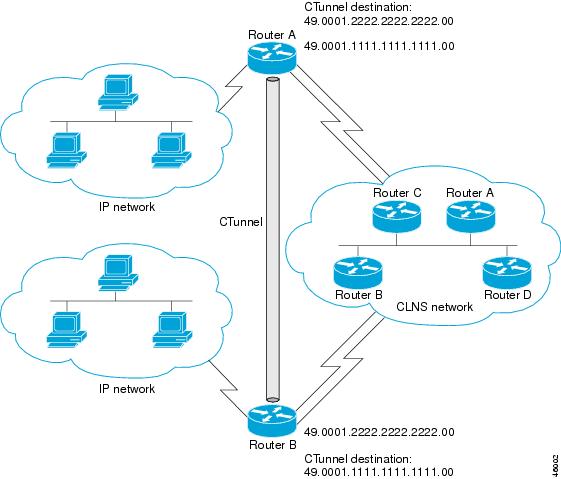
Router A
ip routing
clns routing
interface ctunnel 102
 ip address 10.0.0.1 255.255.255.0
 ctunnel destination 49.0001.2222.2222.2222.00
interface Ethernet0/1
 clns router isis
router isis
 network 49.0001.1111.1111.1111.00
router rip
 network 10.0.0.0
Router B
ip routing
clns routing
interface ctunnel 201
 ip address 10.0.0.2 255.255.255.0
 ctunnel destination 49.0001.1111.1111.1111.00
interface Ethernet0/1
 clns router isis
router isis
 network 49.0001.2222.2222.2222.00
router rip
 network 10.0.0.0
Example Configuring GRE CLNS CTunnels to Carry IPv4 and IPv6 Packets
The following example configures a GRE CTunnel running both IS-IS and IPv6 traffic between Router A and Router B in a CLNS network. The ctunnel mode gre command provides a method of tunneling that is compliant with RFC 3147 and should allow tunneling between Cisco equipment and third-party networking devices.
Router A
ipv6 unicast-routing
clns routing
interface ctunnel 102
 ipv6 address 2001:0DB8:1111:2222::1/64
 ctunnel destination 49.0001.2222.2222.2222.00
 ctunnel mode gre
interface Ethernet0/1
 clns router isis
router isis
 network 49.0001.1111.1111.1111.00
Router B
ipv6 unicast-routing
clns routing
interface ctunnel 201
 ipv6 address 2001:0DB8:1111:2222::2/64
 ctunnel destination 49.0001.1111.1111.1111.00
 ctunnel mode gre
interface Ethernet0/1
 clns router isis
router isis
 network 49.0001.2222.2222.2222.00
To turn off GRE mode and restore the CTunnel to the default Cisco encapsulation routing only between endpoints on Cisco equipment, use either the no ctunnel mode command or the ctunnel mode cisco command. The following example shows the same configuration modified to transport only IPv4 traffic.
Router A
ip routing
clns routing
interface ctunnel 102
 ip address 10.2.2.5 255.255.255.0
 ctunnel destination 49.0001.2222.2222.2222.00
 ctunnel mode cisco
interface Ethernet0/1
 clns router isis
router isis
 network 49.0001.1111.1111.1111.00
Router B
ip routing
clns routing
interface ctunnel 201
 ip address 10.0.0.5 255.255.255.0
 ctunnel destination 49.0001.1111.1111.1111.00
 ctunnel mode cisco
interface Ethernet0/1
 clns router isis
router isis
 network 49.0001.2222.2222.2222.00
Example Configuring Manual IPv6 Tunnels
The following example configures a manual IPv6 tunnel between Router A and Router B. In the example, tunnel interface 0 for both Router A and Router B is manually configured with a global IPv6 address. The tunnel source and destination addresses are also manually configured.
Router A
interface ethernet 0
 ip address 192.168.99.1 255.255.255.0
interface tunnel 0
 ipv6 address 2001:0db8:c18:1::3/126
 tunnel source ethernet 0
 tunnel destination 192.168.30.1
 tunnel mode ipv6ip
Router B
interface ethernet 0
 ip address 192.168.30.1 255.255.255.0
interface tunnel 0
 ipv6 address 2001:0db8:c18:1::2/126
 tunnel source ethernet 0
 tunnel destination 192.168.99.1
 tunnel mode ipv6ip
Example Configuring 6to4 Tunnels
The following example configures a 6to4 tunnel on a border router in an isolated IPv6 network. The IPv4 address is 192.168.99.1, which translates to the IPv6 prefix of 2002:c0a8:6301::/48. The IPv6 prefix is subnetted into 2002:c0a8:6301::/64 for the tunnel interface: 2002:c0a8:6301:1::/64 for the first IPv6 network and 2002:c0a8:6301:2::/64 for the second IPv6 network. The static route ensures that any other traffic for the IPv6 prefix 2002::/16 is directed to tunnel interface 0 for automatic tunneling.
interface Ethernet0
 description IPv4 uplink
 ip address 192.168.99.1 255.255.255.0
!
interface Ethernet1
 description IPv6 local network 1
 ipv6 address 2002:c0a8:6301:1::1/64
!
interface Ethernet2
 description IPv6 local network 2
 ipv6 address 2002:c0a8:6301:2::1/64
!
interface Tunnel0
 description IPv6 uplink
 no ip address
 ipv6 address 2002:c0a8:6301::1/64
 tunnel source Ethernet0
 tunnel mode ipv6ip 6to4
!
ipv6 route 2002::/16 Tunnel0
Example Configuring IPv4-Compatible IPv6 Tunnels
The following example configures an IPv4-compatible IPv6 tunnel that allows BGP to run between a number of routers without having to configure a mesh of manual tunnels. Each router has a single IPv4-compatible tunnel, and multiple BGP sessions can run over each tunnel, one to each neighbor. Ethernet interface 0 is used as the tunnel source. The tunnel destination is automatically determined by the IPv4 address in the low-order 32 bits of an IPv4-compatible IPv6 address. Specifically, the IPv6 prefix 0:0:0:0:0:0 is concatenated to an IPv4 address (in the format 0:0:0:0:0:0:A.B.C.D or ::A.B.C.D) to create the IPv4-compatible IPv6 address. Ethernet interface 0 is configured with a global IPv6 address and an IPv4 address (the interface supports both the IPv6 and IPv4 protocol stacks).
Multiprotocol BGP is used in the example to exchange IPv6 reachability information with the peer 10.67.0.2. The IPv4 address of Ethernet interface 0 is used in the low-order 32 bits of an IPv4-compatible IPv6 address and is also used as the next-hop attribute. Using an IPv4-compatible IPv6 address for the BGP neighbor allows the IPv6 BGP session to be automatically transported over an IPv4-compatible tunnel.
interface tunnel 0
 tunnel source Ethernet 0
 tunnel mode ipv6ip auto-tunnel
interface ethernet 0
 ip address 10.27.0.1 255.255.255.0
 ipv6 address 3000:2222::1/64
router bgp 65000
 no synchronization
 no bgp default ipv4-unicast
 neighbor ::10.67.0.2 remote-as 65002
address-family ipv6
 neighbor ::10.67.0.2 activate
 neighbor ::10.67.0.2 next-hop-self
 network 2001:2222:d00d:b10b::/64
Example Configuring ISATAP Tunnels
The following example shows the tunnel source defined on Ethernet 0 and the tunnel mode command used to configure the ISATAP tunnel. Router advertisements are enabled to allow client autoconfiguration.
interface Tunnel1
 tunnel source ethernet 0
 tunnel mode ipv6ip isatap
 ipv6 address 2001:0DB8::/64 eui-64
 no ipv6 nd suppress-ra
Example Configuring the RBSCP Tunnel
In the following example, Router 1 and Router 2 are configured to send traffic through an RBSCP tunnel over a satellite link.
Router 1
interface Tunnel 0
 ip unnumbered ethernet1
 tunnel source ethernet1
 tunnel destination 172.17.2.1
 tunnel bandwidth transmit 1000
 tunnel mode rbscp
 tunnel rbscp ack-split 6
 tunnel rbscp report
!
interface ethernet1
 description Satellite Link
 ip address 172.20.1.2 255.255.255.0
Router 2
interface Tunnel 0
 ip unnumbered ethernet1
 tunnel source ethernet1
 tunnel destination 172.20.1.2
 tunnel bandwidth transmit 1000
 tunnel mode rbscp
 tunnel rbscp ack-split 6
 tunnel rbscp report
!
interface ethernet1
 description Satellite Link
 ip address 172.17.2.1 255.255.255.0
Example Configuring Routing for the RBSCP Tunnel
To control the type of traffic that uses the RBSCP tunnel, you must configure the appropriate routing. If you want to direct all traffic through the tunnel, you can configure a static route.
Note | To prevent routing flaps, remember to configure the tunnel interface as passive if dynamic routing protocols are used. |
The following example shows how to use policy-based routing to route some specific protocol types through the tunnel. In this example, an extended access list allows TCP, Stream Control Transmission Protocol (SCTP), Encapsulating Security Payload (ESP) protocol, and Authentication Header (AH) traffic to travel through the tunnel. All IP traffic is denied.
Router 1 (Local Side)
interface Tunnel1
 ip unnumbered FastEthernet1/1
 tunnel source FastEthernet1/1
 tunnel destination 10.12.0.20
 tunnel mode rbscp
 tunnel ttl 5
 tunnel bandwidth transmit 30000
 tunnel rbscp window-stuff 1
 tunnel rbscp ack-split 4
!
interface FastEthernet0/0
 ip address 10.13.0.1 255.255.255.0
 ip policy route-map rbscp-pbr
 duplex auto
 speed auto
!
interface FastEthernet1/1
 description Satellite Link
 ip address 10.12.0.1 255.255.255.0
 duplex auto
 speed auto
!
ip route 10.15.0.0 255.255.255.0 FastEthernet1/1
!
ip access-list extended rbscp-acl
 permit tcp any 10.15.0.0 0.0.0.255
 permit 132 any 10.15.0.0 0.0.0.255
 permit esp any 10.15.0.0 0.0.0.255
 permit ahp any 10.15.0.0 0.0.0.255
 deny ip any any
!
route-map rbscp-pbr permit 10
 match ip address rbscp-acl
 set interface Tunnel1
Router 2 (Remote Side)
ip dhcp pool CLIENT
 import all
 network 10.15.0.0 255.255.255.0
 default-router 10.15.0.1
 domain-name engineer.chicago.il.us
 dns-server 10.10.0.252
!
interface Tunnel1
 ip unnumbered FastEthernet0/1
 tunnel source FastEthernet0/1
 tunnel destination 10.12.0.1
 tunnel mode rbscp
 tunnel ttl 5
 tunnel bandwidth transmit 30000
 tunnel rbscp window-stuff 1
 tunnel rbscp ack-split 4
!
interface FastEthernet0/0
 description Local LAN
 ip address 10.15.0.1 255.255.255.0
 ip policy route-map rbscp-pbr
 duplex auto
 speed auto
!
interface FastEthernet0/1
 description Satellite Link
 ip address 10.12.0.20 255.255.255.0
 duplex auto
 speed auto
!
ip route 0.0.0.0 0.0.0.0 FastEthernet0/1
!
ip access-list extended rbscp-acl
 permit tcp any any
 permit 132 any any
 permit esp any any
 permit ahp any any
 deny ip any any
!
route-map rbscp-pbr permit 10
 match ip address rbscp-acl
 set interface Tunnel1
Example Configuring QoS Options on Tunnel Interfaces
The following sample configuration applies generic traffic shaping (GTS) directly on the tunnel interface. In this example the configuration shapes the tunnel interface to an overall output rate of 500 kbps. For more details on GTS, see the " Regulating Packet Flow Using Traffic Shaping " chapter of the Cisco IOS Quality of Service Solutions Configuration Guide.
interface Tunnel0
 ip address 10.1.2.1 255.255.255.0
 traffic-shape rate 500000 125000 125000 1000
 tunnel source 10.1.1.1
 tunnel destination 10.2.2.2
The following sample configuration shows how to apply the same shaping policy to the tunnel interface with the Modular QoS CLI (MQC) commands. For more details on MQC, see the "Modular Quality of Service Command-Line Interface" chapter of the Cisco IOS Quality of Service Solutions Configuration Guide .
policy-map tunnel
 class class-default
 shape average 500000 125000 125000
!
interface Tunnel0
 ip address 10.1.2.1 255.255.255.0
 service-policy output tunnel
 tunnel source 10.1.35.1
 tunnel destination 10.1.35.2
Policing Example
When an interface becomes congested and packets start to queue, you can apply a queueing method to packets that are waiting to be transmitted. Cisco IOS logical interfaces--tunnel interfaces in this example--do not inherently support a state of congestion and do not support the direct application of a service policy that applies a queueing method. Instead, you need to apply a hierarchical policy. Create a "child" or lower-level policy that configures a queueing mechanism, such as low latency queueing with the priority command and class-based weighted fair queueing (CBWFQ) with the bandwidth command.
policy-map child
 class voice
 priority 512
Create a "parent" or top-level policy that applies class-based shaping. Apply the child policy as a command under the parent policy because admission control for the child class is done according to the shaping rate for the parent class.
policy-map tunnel
 class class-default
 shape average 2000000
 service-policy child
Apply the parent policy to the tunnel interface.
interface tunnel0
 service-policy tunnel
In the following example, a tunnel interface is configured with a service policy that applies queueing without shaping. A log message is displayed noting that this configuration is not supported.
interface tunnel1
 service-policy output child
 Class Based Weighted Fair Queueing not supported on this interface
For more details on QoS traffic policing, see the Cisco IOS Quality of Service Solutions Configuration Guide .
Example Configuring EoMPLS over GRE
The following sample provides the EoMPLS over GRE configuration sequence:
PE1 Configuration
vrf definition VPN1
 rd 100:1
 address-family ipv4
 route-target both 100:1
 exit-address-family
 !
mpls label protocol ldp
mpls ldp neighbor 10.10.10.11 targeted
mpls ldp router-id Loopback0 force
!
interface Tunnel0
 ip address 100.1.1.11 255.255.255.0
 mpls label protocol ldp
 mpls ip
 keepalive 10 3
 tunnel source TenGigabitEthernet2/1/0
 tunnel destination 50.1.3.2
!
interface Loopback0
 ip address 10.10.10.10 255.255.255.255
 !
interface TenGigabitEthernet2/1/0
 mtu 9216
 ip address 10.1.1.1 255.255.255.0
!
interface TenGigabitEthernet9/1
 no ip address
!
interface TenGigabitEthernet9/1.11
 vrf forwarding VPN1
 encapsulation dot1Q 300
 ip address 192.168.1.1 255.255.255.0
!
interface TenGigabitEthernet9/2
 mtu 9216
 no ip address
xconnect 10.10.10.11 200 encapsulation mpls
!
router bgp 65000
 bgp log-neighbor-changes
 neighbor 10.10.10.11 remote-as 65000
 neighbor 10.10.10.11 update-source Loopback0
neighbor 192.168.1.2 remote-as 100
 !
address-family vpnv4
  neighbor 10.10.10.11 activate
  neighbor 10.10.10.11 send-community extended
 !
 address-family ipv4 vrf VPN1
  no synchronization
  neighbor 192.168.1.2 remote-as 100
  neighbor 192.168.1.2 activate
  neighbor 192.168.1.2 send-community extended
!
ip route 10.10.10.11 255.255.255.255 Tunnel0
ip route 10.1.3.0 255.255.255.0 10.1.1.2
PE2 Configuration
vrf definition VPN1
 rd 100:1
 address-family ipv4
 route-target both 100:1
exit-address-family
 !
mpls ldp neighbor 10.10.10.10 targeted
mpls label protocol ldp
mpls ldp router-id Loopback0 force
!
interface Tunnel0
 ip address 100.1.1.10 255.255.255.0
 mpls label protocol ldp
 mpls ip
 keepalive 10 3
 tunnel source TenGigabitEthernet3/3/0
 tunnel destination 10.1.1.1
!
interface Loopback0
 ip address 10.10.10.11 255.255.255.255
!
interface TenGigabitEthernet2/1
 mtu 9216
 no ip address
 xconnect 10.10.10.10 200 encapsulation mpls
!
interface TenGigabitEthernet2/3
 mtu 9216
 no ip address
!
interface TenGigabitEthernet2/3.11
 vrf forwarding VPN1
 encapsulation dot1Q 300
 ip address 192.168.2.1 255.255.255.0
!
interface TenGigabitEthernet3/3/0
 mtu 9216
 ip address 10.1.3.2 255.255.255.0
!
router bgp 65000
 bgp log-neighbor-changes
 neighbor 10.10.10.10 remote-as 65000
 neighbor 10.10.10.10 update-source Loopback0
 neighbor 192.168.2.2 remote-as 200
 !
 address-family vpnv4
  neighbor 10.10.10.10 activate
  neighbor 10.10.10.10 send-community extended
 exit-address-family
 !
 address-family ipv4 vrf VPN1
  no synchronization
  neighbor 192.168.2.2 remote-as 200
  neighbor 192.168.2.2 activate
  neighbor 192.168.2.2 send-community extended
 exit-address-family
¡
ip route 10.10.10.10 255.255.255.255 Tunnel0
ip route 10.1.1.0 255.255.255.0 10.1.3.1
Where to Go Next
If you have implemented IPv6 tunnels, you may want to proceed to one of the following modules:
If you have configured an automatic 6to4 tunnel, you can design your IPv6 network around the /48 6to4 prefix that you have created from your IPv4 address.
If you want to implement routing protocols, see the " Implementing RIP for IPv6 ," " Implementing IS-IS for IPv6 ," " Implementing OSPF for IPv6 ," or " Implementing Multiprotocol BGP for IPv6 " modules.
If you want to implement security features for your IPv6 network, see the " Implementing Security for IPv6 " module.
Additional References
Related Documents
|
Related Topic |
Document Title |
|---|---|
|
Cisco IOS commands |
|
|
Tunnel commands: complete command syntax, command mode, defaults, command history, usage guidelines, and examples |
Cisco IOS Interface and Hardware Component Command Reference |
|
CLNS commands: complete command syntax, command mode, defaults, command history, usage guidelines, and examples |
Cisco IOS ISO CLNS Command Reference |
|
IP commands: complete command syntax, command mode, defaults, command history, usage guidelines, and examples |
|
|
IPv6 commands: complete command syntax, command mode, defaults, command history, usage guidelines, and examples |
Cisco IOS IPv6 Command Reference |
|
IPv6 Features |
Cisco IOS IPv6 Configuration Guide |
|
Regulating Packet Flow on a Per-Interface Basis - Using Generic Traffic Shaping |
Cisco IOS Quality of Service Solutions Configuration Guide |
|
Modular QoS CLI configuration |
Cisco IOS Quality of Service Solutions Configuration Guide |
|
Virtual interface configuration |
Cisco IOS Interface and Hardware Component Configuration Guide |
|
Configuration example for GRE over IP Security (IPSec) where the GRE/IPSec tunnel is going through a firewall doing Network Address Translation (NAT) |
|
|
Configuring Multiprotocol Label Switching |
Cisco IOS Multiprotocol Label Switching Configuration Guide |
Standards
|
Standard |
Title |
|---|---|
|
No new or modified standards are supported, and support for existing standards has not been modified. |
-- |
MIBs
|
MIB |
MIBs Link |
|---|---|
|
No new or modified MIBs are supported, and support for existing MIBs has not been modified. |
To locate and download MIBs for selected platforms, Cisco IOS releases, and feature sets, use Cisco MIB Locator found at the following URL: |
RFCs
|
RFC |
Title |
|---|---|
|
RFC 791 |
Internet Protocol |
|
RFC 1191 |
Path MTU Discovery |
|
RFC 1323 |
TCP Extensions for High Performance |
|
RFC 1483 |
Multiprotocol Encapsulation over ATM Adaptation Layer 5 |
|
RFC 2003 |
IP Encapsulation Within IP |
|
RFC 2018 |
TCP Selective Acknowledgment Options |
|
RFC 2460 |
Internet Protocol, Version 6 (IPv6) |
|
RFC 2473 |
Generic Packet Tunneling in IPv6 Specification |
|
RFC 2474 |
Differentiated Services Field (DS Field) in the IPv4 and IPv6 Headers |
|
RFC 2516 |
A Method for Transmitting PPP over Ethernet (PPPoE) |
|
RFC 2547 |
BGP/MPLS VPNs |
|
RFC 2780 |
IANA Allocation Guidelines for Values in the Internet Protocol and Related Headers |
|
RFC 2784 |
Generic Routing Encapsulation (GRE) |
|
RFC 2890 |
Key and Sequence Number Extensions to GRE |
|
RFC 2893 |
Transition Mechanisms for IPv6 Hosts and Routers |
|
RFC 3056 |
Connection of IPv6 Domains via IPv4 Clouds |
|
RFC 3147 |
Generic Routing Encapsulation over CLNS Networks |
Technical Assistance
|
Description |
Link |
|---|---|
|
The Cisco Support and Documentation website provides online resources to download documentation, software, and tools. Use these resources to install and configure the software and to troubleshoot and resolve technical issues with Cisco products and technologies. Access to most tools on the Cisco Support and Documentation website requires a Cisco.com user ID and password. |
Feature Information for Implementing Tunnels
The following table provides release information about the feature or features described in this module. This table lists only the software release that introduced support for a given feature in a given software release train. Unless noted otherwise, subsequent releases of that software release train also support that feature.
Use Cisco Feature Navigator to find information about platform support and Cisco software image support. To access Cisco Feature Navigator, go to . An account on Cisco.com is not required.|
Feature Name |
Releases |
Feature Configuration Information |
|---|---|---|
|
CEF-Switched Multipoint GRE Tunnels |
12.2(8)T 15.0(1)M |
The CEF-Switched Multipoint GRE Tunnels feature enables CEF switching of IP traffic to and from multipoint GRE tunnels. Tunnel traffic can be forwarded to a prefix through a tunnel destination when both the prefix and the tunnel destination are specified by the application. This feature introduces CEF switching over multipoint GRE tunnels. Previously, only process switching was available for multipoint GRE tunnels. No commands were introduced or modified by this feature. |
|
CLNS Support for GRE Tunneling of IPv4 and IPv6 Packets in CLNS Networks |
12.3(7)T 12.2(25)S 12.2(33)SRA |
Support of the GRE tunnel mode allows Cisco CTunnels to transport IPv4 and IPv6 packets over CLNS-only networks in a manner that allows interoperation between Cisco networking equipment and that of other vendors. This feature provides compliance with RFC 3147. The following command was introduced by this feature: ctunnel mode. |
|
GRE Tunnel IP Source and Destination VRF Membership |
12.0(23)S 12.2(20)S 12.2(27)SBC 12.3(2)T 12.2(33)SRA 12.2(33)SRB 12.2(31)SB5 12.4(15)T |
Allows you to configure the source and destination of a tunnel to belong to any VPN VRF table. In 12.0(23)S, this feature was introduced. In 12.2(20)S this feature became available on Cisco 7304 router using the NSE-100 in the PXF processing path. In 12.2(31)SB5, support was added for the Cisco 10000 series router for the PRE2 and PRE3. The following command was introduced to support this feature: tunnel vrf. |
|
GRE Tunnel Keepalive |
12.2(8)T 12.0(23)S 15.0(1)M Cisco IOS XE 3.1.0SG 15.3(1)S 15.1(2)SY |
The GRE Tunnel Keepalive feature provides the capability of configuring keepalive packets to be sent over IP-encapsulated generic routing encapsulation (GRE) tunnels. You can specify the rate at which keepalives will be sent and the number of times that a device will continue to send keepalive packets without a response before the interface becomes inactive. GRE keepalive packets may be sent from both sides of a tunnel or from just one side. The following command was introduced by this feature: keepalive (tunnel interfaces). |
|
IP Tunnel-- SSO |
15.1(1)SY |
High availability support was added to IP Tunnels. No new commands were introduced or modified by this feature. |
|
Rate-Based Satellite Control Protocol |
12.3(7)T |
Rate-Based Satellite Control Protocol (RBSCP) was designed for wireless or long-distance delay links with high error rates, such as satellite links. Using tunnels, RBSCP can improve the performance of certain IP protocols, such as TCP and IP Security (IPSec), over satellite links without breaking the end-to-end model. The following commands were introduced or modified by this feature: clear rbscp, debug tunnel rbscp, show rbscp, tunnel bandwidth, tunnel mode, tunnel rbscp ack-split, tunnel rbscp delay, tunnel rbscp input-drop, tunnel rbscp long-drop, tunnel rbscp report, tunnel rbscp window-stuff. |
|
Tunnel ToS |
12.0(17)S 12.0(17)ST 12.2(8)T 12.2(14)S 15.0(1)M |
The Tunnel ToS feature allows you to configure the ToS and Time-to-Live (TTL) byte values in the encapsulating IP header of tunnel packets for an IP tunnel interface on a router. The Tunnel ToS feature is supported on Cisco Express Forwarding (CEF), fast switching, and process switching forwarding modes. The following commands were introduced or modified by this feature: show interfaces tunnel, tunnel tos, tunnel ttl. |