IPSec/GRE with NAT on IOS Router Configuration Example
Available Languages
Contents
Introduction
This sample configuration shows how to configure generic routing encapsulation (GRE) over IP Security (IPSec) where the GRE/IPSec tunnel is going through a firewall doing Network Address Translation (NAT).
Before You Begin
Conventions
For more information on document conventions, see the Cisco Technical Tips Conventions.
Prerequisites
This kind of configuration could be used to tunnel and encrypt traffic that normally would not go through a firewall, such as IPX (as in our example here) or routing updates. In this example, the tunnel between the 2621 and the 3660 only works when traffic is generated from devices on the LAN segments (not an extended IP/IPX ping from the IPSec routers). IP/IPX connectivity was tested with IP/IPX ping between devices 2513A and 2513B.
Note: This does not work with Port Address Translation (PAT).
Components Used
The information in this document is based on the software and hardware versions below.
-
Cisco IOS® 12.4
-
Cisco PIX Firewall 535
-
Cisco PIX Firewall Software Release 7.x and later
The information presented in this document was created from devices in a specific lab environment. All of the devices used in this document started with a cleared (default) configuration. If you are working in a live network, ensure that you understand the potential impact of any command before using it.
Configure
In this section, you are presented with the information to configure the features described in this document.
Note: To find additional information on the commands used in this document, use the Command Lookup Tool (registered customers only) .
IOS Configuration Note: With Cisco IOS 12.2(13)T and later codes (higher numbered T-train codes, 12.3 and later codes) the configured IPSEC "crypto map" only needs to be applied to the physical interface and is no longer required to be applied on the GRE tunnel interface. Having the "crypto map" on the physical and tunnel interface when using the 12.2.(13)T and later codes still works. However, it is highly recommended to apply it just on the physical interface.
Network Diagram
This document uses the network setup shown in the diagram below.
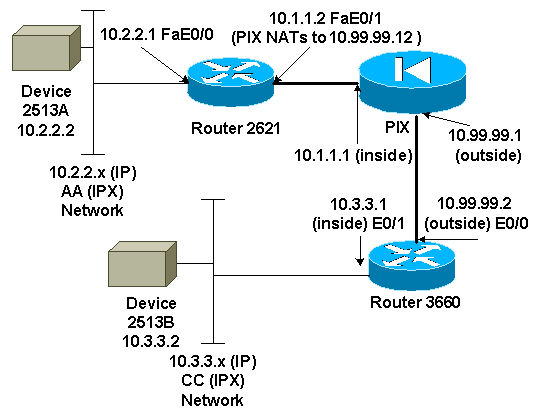
Note: The IP addresses used in this configuration are not legally routable on the Internet. They are RFC 1918  addresses that have been used in a lab environment.
Network Diagram Notes
-
GRE tunnel from 10.2.2.1 to 10.3.3.1 (IPX network BB)
-
IPSec tunnel from 10.1.1.2 (10.99.99.12) to 10.99.99.2
Configurations
| Device 2513A |
|---|
ipx routing 00e0.b064.20c1 ! interface Ethernet0 ip address 10.2.2.2 255.255.255.0 no ip directed-broadcast ipx network AA ! ip route 0.0.0.0 0.0.0.0 10.2.2.1 !--- Output Suppressed |
| 2621 |
|---|
version 12.4 service timestamps debug uptime service timestamps log uptime no service password-encryption ! hostname 2621 ! ip subnet-zero ! ip audit notify log ip audit po max-events 100 ipx routing 0030.1977.8f80 isdn voice-call-failure 0 cns event-service server ! crypto isakmp policy 10 hash md5 authentication pre-share crypto isakmp key cisco123 address 10.99.99.2 ! crypto ipsec transform-set myset esp-des esp-md5-hmac ! crypto map mymap local-address FastEthernet0/1 crypto map mymap 10 ipsec-isakmp set peer 10.99.99.2 set transform-set myset match address 101 ! controller T1 1/0 ! interface Tunnel0 ip address 192.168.100.1 255.255.255.0 no ip directed-broadcast ipx network BB tunnel source FastEthernet0/0 tunnel destination 10.3.3.1 crypto map mymap ! interface FastEthernet0/0 ip address 10.2.2.1 255.255.255.0 no ip directed-broadcast duplex auto speed auto ipx network AA ! interface FastEthernet0/1 ip address 10.1.1.2 255.255.255.0 no ip directed-broadcast duplex auto speed auto crypto map mymap ! ip classless ip route 10.3.3.0 255.255.255.0 Tunnel0 ip route 10.3.3.1 255.255.255.255 10.1.1.1 ip route 10.99.99.0 255.255.255.0 10.1.1.1 no ip http server ! access-list 101 permit gre host 10.2.2.1 host 10.3.3.1 ! line con 0 transport input none line aux 0 line vty 0 4 ! no scheduler allocate end !--- Output Suppressed |
| PIX |
|---|
pixfirewall# sh run : Saved : PIX Version 7.0 ! hostname pixfirewall enable password 2KFQnbNIdI.2KYOU encrypted names ! interface Ethernet0 nameif outside security-level 0 ip address 10.99.99.1 255.255.255.0 ! interface Ethernet1 nameif inside security-level 100 ip address 10.1.1.1 255.255.255.0 ! global (outside) 1 10.99.99.50-10.99.99.60 nat (inside) 1 0.0.0.0 0.0.0.0 0 0 static (inside,outside) 10.99.99.12 10.1.1.2 netmask 255.255.255.255 0 0 access-list 102 permit esp host 10.99.99.12 host 10.99.99.2 access-list 102 permit udp host 10.99.99.12 host 10.99.99.2 eq isakmp route outside 0.0.0.0 0.0.0.0 10.99.99.2 1 route inside 10.2.2.0 255.255.255.0 10.1.1.2 1 !--- Output Suppressed |
| 3660 |
|---|
version 12.4 service timestamps debug datetime service timestamps log uptime no service password-encryption ! hostname 3660 ! memory-size iomem 30 ip subnet-zero no ip domain-lookup ! ipx routing 0030.80f2.2950 cns event-service server ! crypto isakmp policy 10 hash md5 authentication pre-share crypto isakmp key cisco123 address 10.99.99.12 ! crypto ipsec transform-set myset esp-des esp-md5-hmac ! crypto map mymap local-address FastEthernet0/0 crypto map mymap 10 ipsec-isakmp set peer 10.99.99.12 set transform-set myset match address 101 ! interface Tunnel0 ip address 192.168.100.2 255.255.255.0 no ip directed-broadcast ipx network BB tunnel source FastEthernet0/1 tunnel destination 10.2.2.1 crypto map mymap ! interface FastEthernet0/0 ip address 10.99.99.2 255.255.255.0 no ip directed-broadcast ip nat outside duplex auto speed auto crypto map mymap ! interface FastEthernet0/1 ip address 10.3.3.1 255.255.255.0 no ip directed-broadcast ip nat inside duplex auto speed auto ipx network CC ! ip nat pool 3660-nat 10.99.99.70 10.99.99.80 netmask 255.255.255.0 ip nat inside source list 1 pool 3660-nat ip classless ip route 0.0.0.0 0.0.0.0 Tunnel0 ip route 10.2.2.1 255.255.255.255 10.99.99.1 ip route 10.99.99.12 255.255.255.255 10.99.99.1 no ip http server ! access-list 1 permit 10.3.3.0 0.0.0.255 access-list 101 permit gre host 10.3.3.1 host 10.2.2.1 ! line con 0 transport input none line aux 0 line vty 0 4 login ! end !--- Output Suppressed |
| Device 2513B |
|---|
ipx routing 00e0.b063.e811 ! interface Ethernet0 ip address 10.3.3.2 255.255.255.0 no ip directed-broadcast ipx network CC ! ip route 0.0.0.0 0.0.0.0 10.3.3.1 !--- Output Suppressed |
Verify
This section provides information you can use to confirm your configuration is working properly.
Certain show commands are supported by the Output Interpreter Tool (registered customers only) , which allows you to view an analysis of show command output.
-
show crypto ipsec sa - Shows the phase 2 security associations.
-
show crypto isakmp sa - Shows the current active encrypted session connections for all crypto engines.
-
Optionally: show interfaces tunnel number - Shows tunnel interface information.
-
show ip route - Shows all static IP routes, or those installed using the AAA (authentication, authorization, and accounting) route download function.
-
show ipx route - Shows the contents of the IPX routing table.
Troubleshoot
This section provides information you can use to troubleshoot your configuration.
Troubleshooting Commands
Certain show commands are supported by the Output Interpreter Tool (registered customers only) , which allows you to view an analysis of show command output.
Note: Before issuing debug commands, please see Important Information on Debug Commands.
-
debug crypto engine - Shows the traffic that is encrypted.
-
debug crypto ipsec - Shows the IPSec negotiations of phase 2.
-
debug crypto isakmp - Shows the Internet Security Association and Key Management Protocol (ISAKMP) negotiations of phase 1.
-
Optionally: debug ip routing - Shows information on Routing Information Protocol (RIP) routing table updates and route-cache updates.
-
debug ipx routing {activity | events} - debug ipx routing {activity | events} - Shows information on IPX routing packets that the router sends and receives.
Clearing Security Associations (SAs)
-
clear crytpo ipsec sa - Clears all IPSec security associations.
-
clear crypto isakmp - Clears the IKE security associations.
-
Optionally: clear ipx route * - Deletes all routes from the IPX routing table.
Related Information
Revision History
| Revision | Publish Date | Comments |
|---|---|---|
1.0 |
11-Dec-2001
|
Initial Release |
 Feedback
Contact Cisco
- Open a Support Case

- (Requires a Cisco Service Contract)