Introduction
This document describes the formats for text, image, and command conventions used in Cisco technical tips and content.
General Conventions
The general conventions must be followed for:
- Text
- Alerts and Icons
- Cisco IOS® Software Commands
- Configuration Examples
- IP Addresses (Please use caution here.)
- Comments in Code Blocks
Text
-
Bold indicates text the user must enter or select, such as menu items, buttons, and commands.
-
Italics indicate emphasis.
-
The forward angle bracket ( >) indicates the progression of menu choices the user must select in a graphical user interface (GUI), such as File > Print.
- Output examples from Cisco devices are displayed in Courier font; for example (commands are in bold, do not use color other than black):
3524xl# show running-config
Building configuration...

Current configuration:

!
version 12.0
no service pad
service timestamps debug uptime
service timestamps log uptime
no service password-encryption
!
Alert Messages and Icons
Note: Means reader take note. Notes contain helpful suggestions or references to material not covered in the document. It is recommended that you read any Note within the article.
Tip: Means this information can help you solve a problem. The tips information cannot be a suggested way to troubleshoot information or even an action, but could be useful information. Tips are optional reading.
Caution: Means reader be careful. In this situation, your action could result in equipment damage or loss of data. You must read Caution statements.
Warning: Warning means danger. You are in a situation that could cause bodily injury. Before you work on any equipment, you must be aware of the hazards involved with electrical circuitry. You must be familiar with standard practices for accident prevention. To see translated versions of the warning, refer to the Regulatory Compliance and Safety document that accompanied your device. You must read Warning statements.
The exit icon  shows that you are about to exit the Cisco website. This image appears at the end of a link to websites external to Cisco.com and opens in a separate browser window. Cisco is not responsible for the content of other websites.
Cisco IOS® Software Commands
The next conventions for Cisco IOS commands are also used in the command reference guides. For more information about conventions in Cisco IOS documentation, refer to the Cisco Technical Content Style Guide .
-
Vertical bars ( | ) separate alternative, mutually exclusive arguments. Example: req-qos {best-effort | controlled-load | guaranteed-delay}
-
Square brackets ([ ]) indicate optional elements. Example: [no] ip route-cache [cbus]
-
Braces ({ }) indicate a required choice. Example: access-list number [{permit | deny}]
-
Braces within square brackets ([{ }]) indicate required choices within optional elements.
-
Angle brackets (< >) indicate arguments in contexts that do not allow italics, and in examples indicate character strings a user enters that do not appear on the screen (for example, a password).
-
Bold indicates commands and keywords.
-
Italics indicate user variables.
Configuration Examples
Generic router names, hostnames, usernames, passwords, and IP addresses are used in configuration examples. These must be replaced with the names, passwords, and addresses appropriate for your company.
Caution: Do not use username cisco or password cisco in your configurations. To use cisco as a password or username, or to use any trivial password, is a security risk. Also note, it is not recommended that you include Cisco in the article title.
IP Addresses
Caution: IP addresses conform to RFC 1918 definitions of private network addresses. See image below. There has been a recent breach due to a client IP address exposed in a Cisco.com article. Use judgment and caution when you include an IP address anywhere in your article. Check your images for IP addresses that could be in violation of this.
Three blocks of IP addresses are reserved by the Internet Assigned Numbers Authority (IANA) for private Internets:
-
Range: 10.0.0.0 - 10.255.255.255 (10/8 prefix)
-
Range: 172.16.0.0 - 172.31.255.255 (172.16/12 prefix)
-
Range: 192.168.0.0 - 192.168.255.255 (192.168/16 prefix)
IP Address Reference
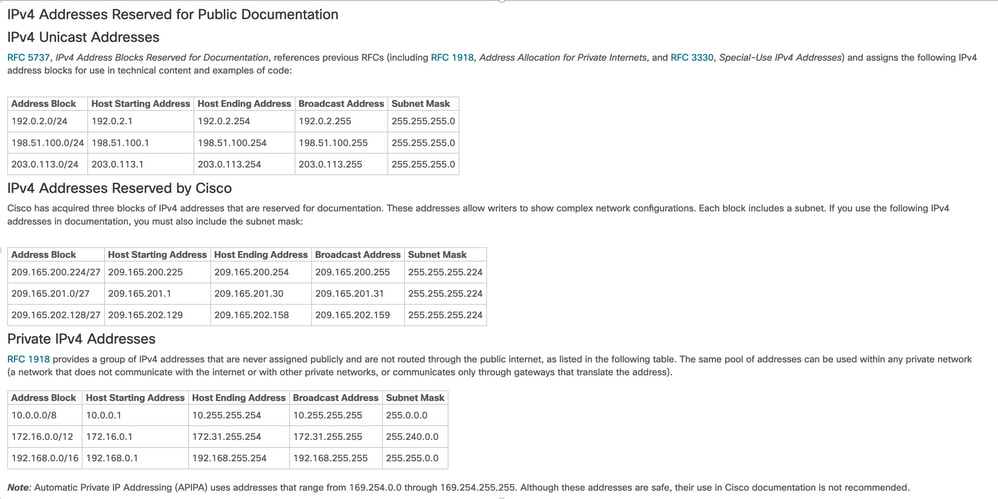 IP Addresses Reserved for Public Documentation
Comments in Code Blocks
Often comments are included in the configuration examples. Comments are italicized. They must be shown as black text only; colors are unacceptable except when they appear in a screen shot. They provide more information about the configuration output and commands used. Configuration comments appear similar to:
!--- Define IPSec traffic of interest.
!--- This line covers traffic between the LAN segment behind two PIXes.
!--- It also covers the SNMP/syslog traffic between the SNMP/syslog server
!--- and the network devices located on the Ethernet segment behind PIX 515.

access-list 101 permit ip 172.18.124.0 255.255.255.0 10.99.99.0 255.255.255.0
Note: It is recommended that you shorten codeblock examples so that no slider appears at the end of the example.
Related Information

 Feedback