- Preface
- Product Overview
- Getting Started
- Deploying Cisco Mobility Express Solution
- Creating DHCP Scopes for Wireless Networks
- Configuring Mobility Express for Site Survey
- Creating Wireless Networks
- Managing WLAN Users
- Managing Access Points
- Managing the Mobility Express Network
- Using Advanced Settings
- Primary AP Failover and Electing a New Primary
- Cisco Mobility Express with Cisco CMX Cloud
- Managing Mobility Express Deployments from Cisco Prime Infrastructure
Cisco Mobility Express Deployment Guide–Release 8.3.102.0
Bias-Free Language
The documentation set for this product strives to use bias-free language. For the purposes of this documentation set, bias-free is defined as language that does not imply discrimination based on age, disability, gender, racial identity, ethnic identity, sexual orientation, socioeconomic status, and intersectionality. Exceptions may be present in the documentation due to language that is hardcoded in the user interfaces of the product software, language used based on RFP documentation, or language that is used by a referenced third-party product. Learn more about how Cisco is using Inclusive Language.
- Updated:
- August 8, 2016
Chapter: Master AP Failover and Electing a New Master
Master AP Failover
and Electing a New Master
Cisco Mobility Express is supported on Cisco 1830, 1850, 2800 and 3800 series Access Points and the Master AP election process determines which Cisco of the supported Access Point will be elected to run Mobility Express controller function in case of a Failover. VRRP is used to detect a failure of Master AP and to elect a new Master.
 Note | Mobility Express uses MAC 00-00-5E-00-01-VRID where VRID is 1 so if there are other instances of VRRP running in the environment, use VRID other than 1 for those instances. |
Master AP Failover
To have redundancy in the Mobility Express network, it must have two or more Mobility Express capable Access Points. These Access Points should have AP Image type as MOBILITY EXPRESS IMAGE and AP Configuration as MOBILITY EXPRESS CAPABLE. In an event of a failure of Master AP, another Mobility Express capable AP is elected as a Master automatically. The newly elected Master AP has the same IP and configuration as the original Master AP.
Note | Access Points, which have the Mobility Express Image but AP Configuration, is NOT MOBILITY EXPRESS CAPABLE, will not participate in the Master AP election process. |
Master Election
The Master election process is based on a set of priorities. An AP with the highest priority is elected as the Master AP, running Mobility Express controller function.
Note | During the Master Election process, even though the Master AP running the controller function is down, the remaining Access points will fall into Standalone mode and will continue to service connected clients and switch data traffic locally. After the new Master is elected, the Standalone Access points will move to connected mode. |
-
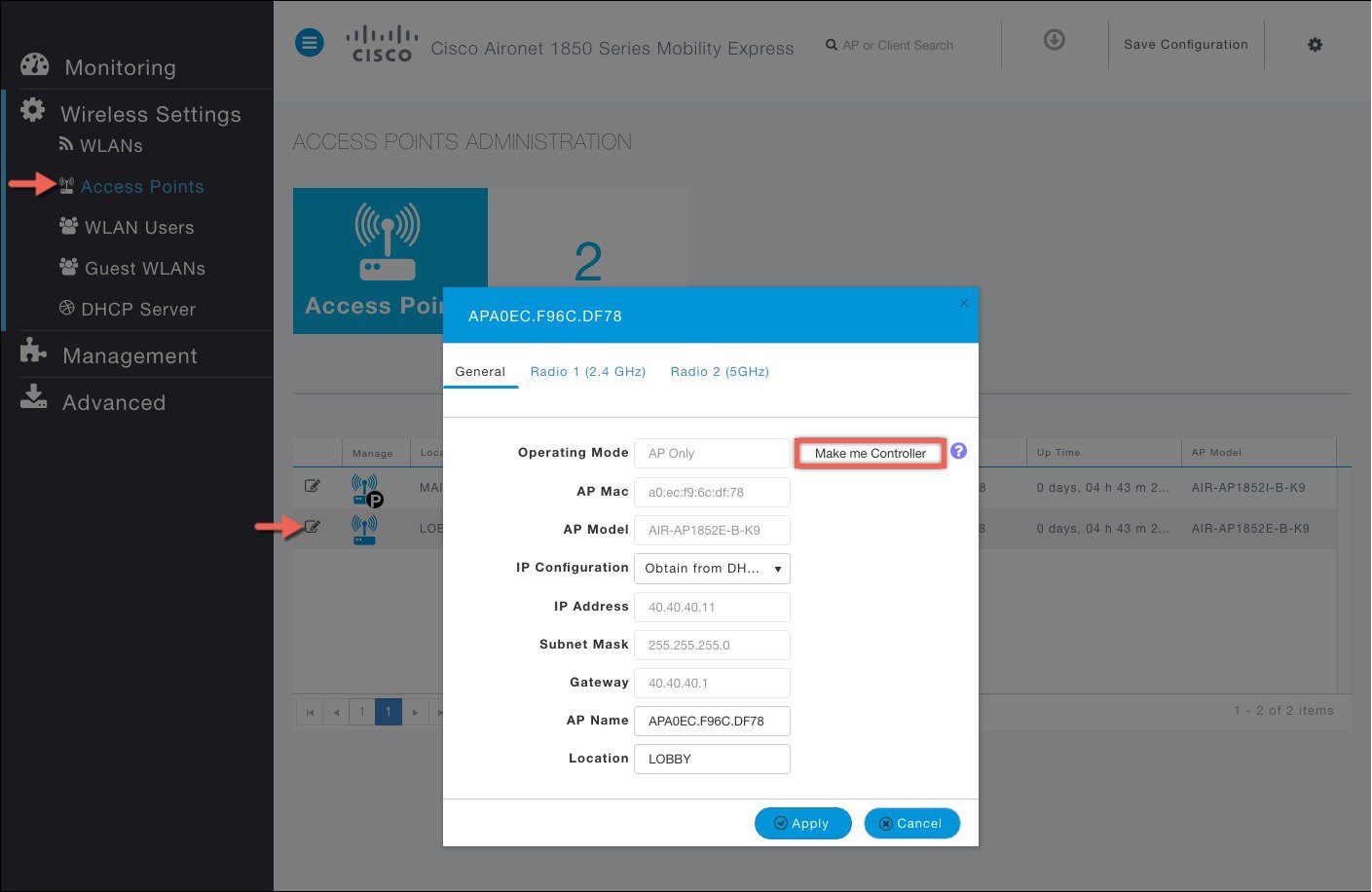
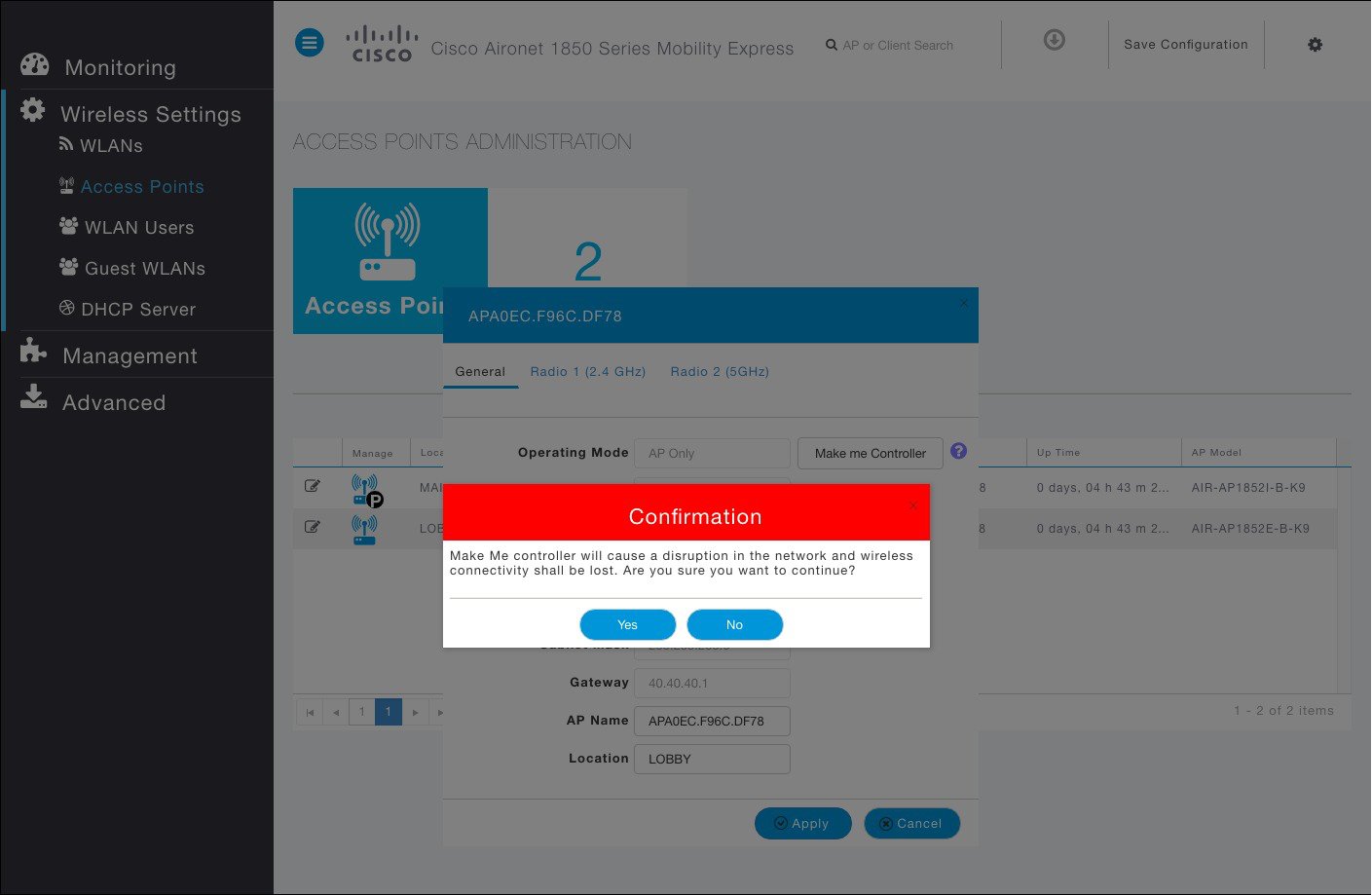
User Defined Master—User can select an Access Point to be the Master Access Point. If such a selection is made, no new Master will be elected in case of a reboot of the Master Access Point. After five minutes, if the current Master is still not active, it will be assumed dead and Master Election will begin to elect a new Master. To manually define a Master, follow the steps below:
Step 1: Navigate to Wireless Settings > Access Points.
Step 2: From the list of Access Points, click Edit icon of the Access Point which you would like to define as the Master AP.
Step 3: Under the General tab, click Make me Controller button.
Step 4: Click Yes on the Confirmation window.
Note
To clear the user defined priority, login to the Controller CLI and execute the following command:
Cisco Controller) >clear ap next-preferred-master
If a preferred Master AP has to be elected incase of a failover, the following command can be entered on the controller CLI to define the preferred Master.
(Cisco Controller) >config ap next-preferred-master <Cisco AP>
	<Cisco AP> Enter the name of the Cisco AP
To view the preferred master, use the following command:
(Cisco Controller) >show ap next-preferred-master
-
Most capable Access Point - If the user priority is not set, Master AP Election algorithm will select the new Master based on capability of the Access Point. For example, 3800 is the most capable followed by 2800 and then 1850 and finally 1830.
-
Least Client Load— If there are multiple Access Points with the same capability i.e. multiple 3800 Access points, the one with least client load is elected as the Master AP.
-
Lowest MAC Address—If the User defined priority is not configured and everything else is the same, then Access Point with the lowest MAC gets elected as the Master AP.
 Feedback