Contents

System Upgrade Preparation

This section discusses information to be aware of before performing the actual upgrade process, such as the general upgrade approach for different components, upgrade release versions of components involved in the upgrade, and release version compatibility.


Note


The following upgrade strategies are recommendations only. No formal upgrade testing was done for the UC 9.0 system release.


Note


Many of the IPT component names have changed as part of Cisco Unified Communications System releases. The latest product names are used in this document, even when referencing products from previous releases.


System Upgrade Approach

The general approach is to upgrade each Cisco Unified Communications Manager cluster and its associated IP telephony components one at a time before upgrading the next cluster.


Note


Access and download the license files required to upgrade (or newly install) and operate the appropriate software at: http:/​/​www.cisco.com/​go/​license.


For each cluster, upgrade the components of the Cisco Unified Communications System solution in the following order:

  1. Infrastructure components, including switches, routers, and security components. These components should be upgraded first to ensure that the infrastructure is able to support the services required by Cisco Unified Communications System components.
  2. Cisco data and voice gateways and gatekeepers (including videoconferencing MCUs and 3G gateways).

    Note


    These components should be upgraded first to ensure that the infrastructure is able to support the services required by Cisco Unified Communications System components.


  3. Network Management Components
  4. Call processing components, such as Unified Communications Manager clusters
  5. Queuing and self-service components such as Cisco Unified Contact Center Express
  6. Messaging components such as Cisco Unity Connection
  7. Cisco Unified MeetingPlace components
  8. Video Conferencing components
  9. Cisco applications co-resident on servers

After all the Unified Communications Manager clusters in the network have been upgraded, install any new components included in the target release set and remove obsolete or end-of-life components.

The upgrade sequence of the IP telephony components should be dictated by the following considerations:

  • The criticality of the service that these components provide. For example, basic phone service is considered to be of greater importance than supplementary services or voice messaging services.
  • Backward compatibility of the software releases of these components.
  • The components which provide more critical service should be upgraded first. See Upgrade Release Versions section, which describes, for each base release set, whether components need to be upgraded before or after upgrading Unified Communications Manager, or if the upgrade order does not matter.
Related References
Backward compatibility issues
Related Information
System upgrade

System Upgrade Dependencies

Cisco Unified Communications System Release 9.0(1) offers support for new hardware for several components and has removed support for some of the existing hardware platforms. The bridge upgrade provides a migration path for customers who use discontinued server models. A bridge upgrade works on unsupported or discontinued hardware for the purpose of creating a DRS backup. The DRS backup can be restored on new hardware after completion of a fresh installation. When preparing for an upgrade to Release 9.0(1), read all product upgrade documentation if you plan to migrate to the new hardware offerings.


Note


You can set up a virtualized environment by running Unified Communications applications on a virtual machine on a Unified Computing System (UCS). For additional details, including UCS hardware information and third-party requirements, see: www.cisco.com/​go/​uc-virtualized.


Components within each release set are compatible with each other and will interoperate correctly. That is, components in a specific base release set are compatible with each other and will interoperate, and components in the target release set are compatible with each other and will interoperate.

The order of operations also needs to taken into account the impact of backward compatibility or incompatibility, especially for multistage system and multisite migration upgrades, where each stage (or maintenance window) upgrades only some of the components in the release set. Additional backward compatibility information is provided later in this section.

As you upgrade individual components of the integrated system, the overall system may operate in a state of degraded service when some components have been upgraded to the next release level and do not interoperate with components that are still at the previous release level.

Components that are upgraded first should interoperate with other components that are still at the previous release level. For example, Gateways are upgraded first so they can interoperate with Cisco Unified Communications Manager that is still on the base release.

Cisco Unified Communications Manager Upgrade and Compatibility Considerations

As some of the components have to be upgraded prior to Unified Communications Manager, there are certain upgrade issues and considerations to be aware of. For bridge upgrade and migration on Unified Communications Manager hardware, see New and Changed Document for Cisco Unified Communications Manager 9.0(1) at:

http:/​/​www.cisco.com/​en/​US/​docs/​voice_ip_comm/​cucm/​rel_notes/​9_0_1/​delta/​CUCM_​BK_​N38FD301_​00_​cucm-new-and-changed-90.pdf

Pre-upgrade Migration

You can migrate Cisco Unified Communications System applications before upgrading Unified Communications Manager, if:

  • Existing version of the application is incompatible with the new version of Unified Communications Manager
  • New version of the application is compatible with both the existing and new versions of Unified Communications Manager

Post-upgrade Migration

You should migrate Cisco Unified Communications System applications after upgrading Unified Communications Manager, if:

  • Existing version of application is compatible with new version of Unified Communications Manager
  • New version of application is compatible with the new version of Unified Communications Manager, but incompatible with the existing version

For compatibility and interoperability information about Unified Communications Manager and Unified Communications components, see the following sites:

Cisco Unified Communications Manager (CallManager) Compatibility Information: http:/​/​www.cisco.com/​en/​US/​products/​sw/​voicesw/​ps556/​products_​device_​support_​tables_​list.html

Refresh Upgrade Feature When Upgrading to Cisco Unified Communications Manager Release 9.0(1)

Refresh Upgrade is a feature that allows upgrades between incompatible OS.

When you install 9.0(1) upgrade software, there is a temporary server outage while the Cisco Unified Communications Manager software is installed. Once you start the upgrade using either the command line or graphical user interface, the data is exported, and the system automatically reboots, at which point the server outage begins. The duration of this outage depends on your configuration and amount of data.


Caution


If you are upgrading your software on HP 7825H3 or HP7828H3 hardware, there is no option to revert to the previous version of Cisco Unified Communications Manager. To perform an upgrade on one of these machines, you must use a 16GB USB key to migrate the data from the old system to the new installation.


When the upgrade is complete, you can choose to activate the partition with the new upgrade software or return to using the partition with the previous version of the software. With the exception of HP 7825H3 and HP7828H3 hardware upgrades, the previous software remains in the inactive partition until the next upgrade. Your configuration information migrates automatically to the upgraded version in the active partition.


Note


All upgrade paths prior to 8.5(2) require the installation of a Cisco Option Package (COP) file. The COP file delivers functionality to allow the upgrade path to be supported and to provide user experience enhancements.


For more information and detailed procedures, see Software Upgrades chapter in Cisco Unified Communications Operating System Administration Guide.

Unified Communications Manager L2 Upgrade Space Issue

The Cisco Unified Communications Manager System may experience issues during an L2 upgrade if the necessary disk space is not available during the upgrade. The issue is more common if the Unified Communication Manager implementation comprises different types of endpoints where the TFTP directory can significantly increase due to the different endpoints firmware. You may also experience issues if you enable detailed logs and traces in a particular Cisco Unified Communications node. In this case, the issue may not appear immediately, but could be seen over time. For more detailed information on ensuring you have the necessary disk space before performing a Unified Communications Manager L2 upgrade see: http:/​/​docwiki.cisco.com/​wiki/​Unified_​CM_​L2_​Upgrade_​Disk_​Space_​issues.

Cisco Unified Contact Center Express Considerations

Unified CCX versions prior to 8.5(1) are not supported with Unified Communications Manager 9.0. You must upgrade Unified CCX to 8.5(1)SU3 or 9.0(1) before upgrading Unified Communications Manager to 9.0(1).

Related References
Multistage system upgrade

Cisco Unified Communications Manager IM and Presence Service

Cisco Unified Presence (now known as Cisco Unified Communications Manager IM and Presence Service) is integrated into Cisco Unified Communications Manager 9.0(1) as a service.

Upgrade Unified Communications Manager before you upgrade Cisco Unified Communications Manager IM and Presence Service. Be aware of the following considerations while upgrading Unified Communications Manager IM and Presence Service.


Note


Cisco Unified Communications Manager IM and Presence Service provides a bridge upgrade for customers to migrate from a discontinued hardware to supported hardware. The bridge upgrade allows you to create a DRS backup on the discontinued hardware. You can then restore the DRS backup on supported hardware after you complete a fresh Cisco Unified Communications Manager IM and Presence Service installation on the supported hardware.


If you are performing a bridge upgrade to Cisco Unified Communications Manager IM and Presence Service 8.5(1), do the following:

Upgrade from Unified Communications Manager IM and Presence Service Release 6.x to Release 8.5(1)

  1. 6.x to 8.x upgrade is not supported. You must first upgrade to Release 7.x before upgrading to Release 8.x.
  2. Change the SIP Trunk Destination Port on Unified Communications Manager to 5060, since the SIP Trunk listening port for Unified Communications Manager IM and Presence Service Release 7.x has changed to 5060.
  3. Perform a DRS backup.
  4. Then complete a fresh installation of Unified Communications Manager IM and Presence Service Release 7.x on the supported hardware.
  5. Finally restore the DRS backup on the supported hardware and upgrade to Unified Communications Manager IM and Presence Service 8.5(1).

Upgrading from Unified Communications Manager IM and Presence Service Release 7.x to Release 8.5(1)

  1. Upgrade from 7.x to 8.x on the discontinued hardware. Perform a DRS backup of the Unified Communications Manager IM and Presence Service Release 8.x.
  2. Then complete a fresh installation of Unified Communications Manager IM and Presence Service Release 8.5(1) on the supported hardware. For multi-node cluster, install first node, do post-install configuration, configure second node in GUI, and install second node.
  3. Finally restore the DRS backup on the supported hardware (restore as a cluster, both nodes at the same time) and upgrade to Unified Presence Release 8.5(1).

  • After upgrading Unified Communications Manager, stop and then restart the Intercluster Sync Agent using the Serviceability Pages in Unified Communications Manager IM and Presence Service. This enables a complete reinitialization and resynchronization required due to database schema changes between Unified Communications Manager 6.x, 7.x and 8.x.
  • Upgrade both nodes in a Unified Communications Manager IM and Presence Service cluster, starting with the first node and then the subsequent node.

Proxy Profiles need not be configured for Release 8.x. If upgrading from Unified Presence Release 6.0(2) to 8.x, delete any Proxy Profiles that have been configured. They are not inaccessible and are not used in Release 8.x.

Cisco Unified IP Phones Considerations

The following are considerations to be aware of when upgrading Unified IP Phones:

  • When you upgrade your Unified Communications Manager servers, note that the Unified IP Phone firmware is also automatically upgraded to the version bundled with the Unified Communications Manager.

For more detailed information about SIP Unified IP Phones and the differences between features on the SCCP and SIP phones, see the following documentation:

Secure SIP Trunk Security Profile Considerations

For a Cisco Extension Mobility Cross Cluster (EMCC) solution, a Secure SIP Trunk profile cannot be configured on the special EMCC SIP Trunk. This means that Transport Layer Security (TLS) will not be used to encrypt signaling for any calls that are initiated by the Home cluster to a Visiting cluster Local Route Group or PSTN gateway. For more information, see CSCtw76154.

Migration to Cisco Unified MeetingPlace 8.5(3)MR1 from Cisco Unified MeetingPlace Express

Currently Cisco supports migrations from only Cisco Unified MeetingPlace Express Release 2.1.2 to Cisco Unified MeetingPlace Release 8.x; therefore, if you are using an earlier version of Cisco Unified MeetingPlace Express, you must first upgrade to Cisco Unified MeetingPlace Express Release 2.1.2.

Perform the following to migrate to Cisco Unified MeetingPlace Release 8.x from Cisco Unified MeetingPlace Express:

  1. Use the migrate_tool utility to export data from the Cisco Unified MeetingPlace Express system.
  2. Install and configure your Cisco Unified MeetingPlace Release 8.5(3)MR1 system.
  3. Get new licenses for your Cisco Unified MeetingPlace Release 8.5(3)MR1 system. Licenses for Cisco Unified MeetingPlace Express do not work with a Cisco Unified MeetingPlace Release 8.x system.
  4. Use the migrate_tool utility to import data to the Cisco Unified MeetingPlace Release 8.5(3)MR1 system.

    Note


    Do not run any other processes or tasks on your system during the data migration. This can potentially affect the data that is being transferred from one system to another.


  5. Verify that the data was successfully migrated to the Cisco Unified MeetingPlace Release 8.5(3)MR1 by comparing the number of user profiles on the Cisco Unified MeetingPlace Express system with the number of user profiles on the Cisco Unified MeetingPlace system.

For more information on migrating to Cisco Unified MeetingPlace Release 8.5(3)MR1 from Cisco Unified MeetingPlace Express, see the Cisco Unified MeetingPlace Documentation at:

http:/​/​www.cisco.com/​en/​US/​products/​sw/​ps5664/​ps5669/​tsd_​products_​support_​series_​home.html

Cisco Unified MeetingPlace Considerations

You can upgrade your system from Cisco Unified MeetingPlace Release 8.0(1) directly to Release 8.5(3)MR1.

However, to upgrade from Release 6.1(1) or Release 7.1(3) to Release 8.5(3)MR1, you need to migrate your system. Migration means that you can use an old configuration, but you have to reinstall the software system completely.

For detailed information about Unified MeetingPlace migration procedures, see the documentation at:

http:/​/​www.cisco.com/​en/​US/​docs/​voice_ip_comm/​meetingplace/​8_5/​english/​books/​install_guide/​85mpinst.html

Backward Compatibility Issues

In multistage system upgrade scenarios, you may have to consider additional issues such as backward compatibility across components.

A version of one component is backward compatible with a previous version of another component when service functionality and behavior are maintained between the two component versions. Backward compatibility between two components or applications may limit the order of upgrade of the components and cause service outage during upgrades.

If two components are upgraded during separate maintenance windows, as in the multistage system or multisite migration upgrade scenarios, the whole system exists in a partially upgraded state in the interval between the two maintenance windows.

The service capability during the period between maintenance windows depends on backward compatibility between the two components, as discussed in this section. If the two components are not backward compatible, service outages occur in the interval between the two maintenance windows.

Related References
Compatibility guides
Related Information
Backward compatibility scenarios

Backward Compatibility Scenarios

Both New Versions are Backward Compatible

It is possible for versions of two components to each be backward compatible with the previous version of the other component, for example Unified MeetingPlace and Unified Communications Manager. In this case, there is no backward compatibility restriction in the order of upgrades. Either component may be upgraded first and will be able to interoperate with the other component as illustrated in the figure below.

You can perform the upgrade for these components across multiple maintenance windows.
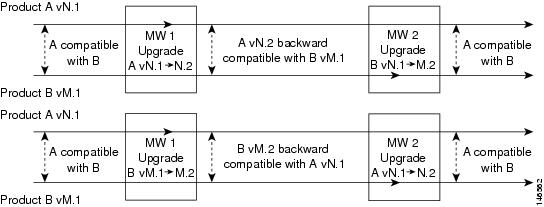
Figure 1. Both New Release Versions are Backward Compatible

Related Information
System upgrade planning
Only One New Version is Backward Compatible

It is possible that only one of the new versions is backward compatible with the previous version of the other component. There are no components that fit this model.

In this case, the component that is backward compatible should be upgraded first to avoid a service outage during the upgrade, as illustrated in the following figure.

You should perform the upgrade for these components across two separate maintenance windows. This type of upgrade is described in the multistage system and multisite migration upgrade approaches in System Upgrade Planning
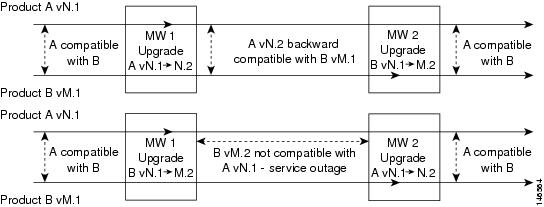
Figure 2. One New Release Version is Backward Compatible

Neither New Version is Backward Compatible

It is possible that neither of the new versions is backward compatible with the previous version of the other component, as with Unified Contact Center Express and Unified Communications Manager.

In this case, a service outage exists from the time the first product is upgraded until the second component is upgraded, as shown in the following figure.
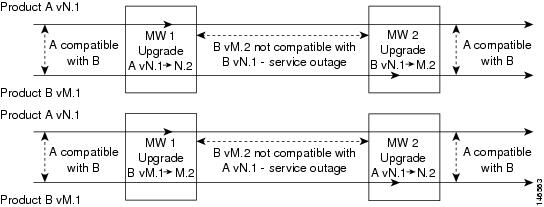
Figure 3. Neither New Release Version is Backward Compatible

Related Information
System upgrade planning

Upgrade Release Versions

The tables in this section list the component release versions of the base and target release sets in relation to Unified Communications Manager 9.0(1).


Note


The starting point of the upgrade will be the latest maintenance or service release of the same train on Cisco.com, if available. For example, Unified Communications 7.1(3) Release exited test with Cisco Unified Communications Manager version 7.1(3); however, the latest service release on Cisco.com is 7.1(3) XX. Therefore, Unified Communications Manager 7.1(3) XX would be the starting point of the upgrade for the Unified Communications 7.1(3) solution set.


IP Telephony Components in Release 8.6(1) and Release 9.0(1) Software Release Sets

The following table lists the software versions for the IP telephony components in the Cisco Unified Communications System Release 8.6(1) and Release 9.0(1) release sets.

Table 1 IP Telephony Components in Cisco Unified Communications System Release 8.6(1) and Release 9.0(1) Release Sets

Component

Release 9.0(1)

Release 8.6(1)

Cisco Unified Communications Manager

9.0(1)

8.6(1a)

Cisco Unified Communications Manager—Cisco IP Telephony Operating System

Bundled with Unified Communications Manager

Bundled with Unified Communications Manager

Cisco Business Edition 3000

8.6(4)

8.6(1a)

Cisco Unified Communications Manager Express

9.0(1)

15.2(3)T1

8.6(1)

15.1.(4)M1

Cisco Unified Survivable Remote Site Telephony (SRST)

9.0(1)

15.2(3)T1

8.6(1)

15.1(4)M1

Cisco TelePresence Video Communication Server

X.7.2

X6.1

Cisco TelePresence Video Communication Server Expressway

X7.2

X6.1

Cisco Unified Contact Center Express

9.0(1)

8.5(1)SU1

Cisco Unified Contact Center Express Operating System

Bundled with Unified Contact Center Express

Bundled with Unified Contact Center Express

Cisco Unified Communications Manager IM and Presence Service (formerly Cisco Unified Presence)

9.0(1)

8.5(1)

Cisco Unified SIP Proxy

8.5(3)

8.5(2)

Cisco Emergency Responder

9.0(1)

8.6(1a)

Cisco Emergency Responder—Cisco IP Telephony Operating System

Bundled with Cisco Emergency Responder

Bundled with Cisco Emergency Responder

Cisco Unified Business Attendant Console and Unified Department Attendant Console

9.0(1)

8.6(1)

Cisco Unified Enterprise Attendant Console

9.0(1)

8.6(1)

Cisco Unified MeetingPlace

8.5(3) MR1

8.5(1)

Microsoft Outlook for Cisco Unified MeetingPlace

8.5(1)

8.5(1)

Cisco Unified Media Server for 3545 MCU (video)

5.7.0.0.4

5.7.0.0.4

Cisco Unified Media Server for 3545 MCU (audio)

6.1.0.0.16

6.1.0.0.16

Cisco Unified Videoconferencing 3522 BRI Gateways

5.0.0.0.22

5.0.0.0.22

Cisco Unified Videoconferencing 3526, 3527, and 3545 PRI Gateways

5.0.0.0.22

5.0.0.0.22

Cisco Voice Conferencing for ISR Routers

15.1(4)M3

15.1(4)M1

Cisco Integrated Services Router (ISR) 1861

15.1(4)M3

15.1(4)M1

Cisco Voice and Video Conferencing for ISR G2 Routers

15.2(3)T1

15.1(4)M1

Cisco Integrated Services Router (ISR) 2901, 2911, 2921, 2951, 3925, 3945, 3925E, 3945E

15.2(3)T1

15.1(4)M1

Cisco Hosted Collaboration Solution

8.6(2)

8.6(1)

Cisco TelePresence System 500 Series, 1000, 1100, 1300 Series, 3000 Series, 3200 Series

CTS 1.9

CTS 1.7.3

Cisco TelePresence System EX90 and Cisco TelePresence System EX60 1

TE 6

TC 5.0

Cisco TelePresence System Profile Series. 42-inch, 52-inch, 52-inch Dual, 65-inch, and 65-inch Dual

TC 6.0.0

TC 5.0

Cisco TelePresence System Quick Set C20 and Cisco TelePresence System Integrator Package C40, C60, and C90

TC 6.0.0

TC 5.0

Cisco IP Video Phone E20 2

TE 6

TE 4.1

Cisco TelePresence MX 200 Series

TC 6.0.0

--

Cisco TelePresence System 1700 MXP

F 9.0.2 PAL

F 9.0.2 PAL

Cisco TelePresence Server 7010

2.2

2.2

Cisco TelePresence MCU MSE Series

4.3

4.2

Cisco Telepresence ISDN Gateway 3241

2.1

2.1

Cisco Unity Connection

9.0(1)

8.6.(1)

Cisco Unity Express

8.6(3)

8.6(1)

Cisco Unified IP Phones models 7906G, 7911G, 7931, 7941G, 7942G, 7945G, 7961G, 7962G, 7965G, 7970G, 7971G, 7975G

Bundled with Unified Communications Manager

Firmware 9.3(1)

Bundled with Unified Communications Manager

Firmware 9.2(1)SR1

Cisco Unified IP Phones model 7937G

1.4(4)

1.4(4)

Cisco Unified IP Phones models 7921G, 7925G

1.4(2)

1.4(1)

Cisco Unified IP Phone model 3905

Firmware 9.2(1)

Firmware 9.2(1)

Cisco Unified IP Phones model 3911, 3951

8.1(4a)

8.1(4a)

Cisco Unified IP Phones models 6921, 6941, 6961

Firmware 9.3(1)

Firmware 9.2(1)

Cisco Unified IP Phones models 6901, 6911

Firmware 9.3(1)

Firmware 9.2(1)

Cisco Unified IP Phones models 8961, 9951, 9971

Firmware 9.3(1)

Firmware 9.2(1)

Cisco Unified IP Phones model 6945

Firmware 9.3(1)

Firmware 9.2(1)

Cisco Virtualization Experience Clients

Firmware 9.2(1)

Firmware 9.2(1)

Cisco Cius

9.2(4)

8.6(1)

Cisco IP Communicator

8.6(1)

8.6(1)

Cisco Unified Personal Communicator

8.5(5)

8.5(1)

Cisco UC Integration for Microsoft Lync (formerly Microsoft Office Communicator)

8.5(2)

8.5(2)

Cisco Unified Communications for RTX

9.0(1)

8.5(1)

Cisco Aironet 3502 Access Point

AIR-WLC4400-K9 -7-0-116-0-ER.aes

AIR-WLC4400-K9 -7-0-116-0-ER.aes

Cisco Aironet 1142 Access Point

AIR-WLC4400-K9 -7-0-116-0-ER.aes

AIR-WLC4400-K9 -7-0-116-0-ER.aes

Cisco 4400 Series Wireless LAN Controllers

AIR-WLC4400-K9 -7-0-230-0.aes

AIR-WLC4400-K9 -7-0-116-0-ER.aes

Cisco 5508 Series Wireless LAN Controllers

AIR-CT5500-K9 -7-2-103-0.aes

AIR-WLC4400-K9 -7-0-116-0-ER.aes

Cisco Mobile for Nokia

8.5(1)

8.5(1)

Cisco Mobile for Android

8.5(1)

8.5(1)

Cisco ASA Adaptive Security Appliance

8.4(3)

8.4(1)

Cisco Intrusion Prevention System (AIP-SSM, IDSM-2 Module, IPS-4200)

7.1(4)E4

7.0(2)E3

Management Center for Cisco Security Agents

5.2.1

5.2.1

Cisco Security Agent for Cisco Unified Communications Manager

Bundled with Unified Communications Manager

Bundled with Unified Communications Manager

Cisco Security Agent for Cisco Emergency Responder

Bundled with Unified Communications Manager

Bundled with Unified Communications Manager

Cisco Security Agent for Unified Contact Center Express

Bundled with Unified Contact Center Express

Bundled with Unified Contact Center Express

Cisco Security Agent for Cisco Unified MeetingPlace

6.0(1)

6.0(1)

Cisco Virtual Desktop Integration

9.2(1)

9.2(1)

Cisco IOS Extended Maintenance Deployment

15.1(4)M3

15.1(4)M1

Cisco 2801, 2821, 2851, 3825, 3845 (router, voice/data gateway)

15.1(4)M3

15.1(4)M1

Cisco 38xx Gatekeepers

15.1(4)M3

15.1(4)M1

Cisco Integrated Services Router (ISR) 1861

15.1(4)M3

15.1(4)M1

Cisco Integrated Services Router (ISR) 2901, 2911, 2921, 2951, 3925, 3945, 3925E, 3945E

15.2(3)T1

15.1(4)M1

Cisco 4451-X Integrated Services Router

IOS-XE 3.9.1

IOS-XE 3.9.1

Cisco Unified Border Element Enterprise Edition for Cisco ISR Series

15.2(3)T1

15.1(4)M1

Cisco Unified Border Element Enterprise Edition for Cisco ASR 1000 Series

3.6

3.3

Cisco Catalyst 4503 Switch

12.2(53)SE2

12.2(53)SE2

Cisco Catalyst 4506 (access switch)

12.2(54)SG

12.2(54)SG

Cisco Catalyst 6506, 6509 (voice access switch, supervisor 2/MSFC2)

12.2(33)SXI4Cat OS8.6(6a)

12.2(33)SXI4Cat OS8.6(6a)

Cisco Catalyst 6506, 6509 (core switch, supervisor 720)

12.2(33)SXI4

12.2(33)SXI4

Cisco Catalyst 6608, 6624 (voice gateway)

Bundled with Unified Communications Manager

Bundled with Unified Communications Manager

Cisco VG202 and 204 (analog voice gateway)

15.1(4)M3

15.1(4)M1

Cisco VG224 (analog voice gateway)

15.1(4)M3

15.1(4)M1

Cisco VG248 (analog voice gateway)

1.3(2)

1.3(2)

Cisco VG350 (analog voice gateway)

15.2(4)M

--

Cisco ATA 187 (analog telephony adaptor)

9.3(1)

9.2(1)

McAfee Antivirus3

Enterprise 8.7.0i

Enterprise 8.7.0i

1 Component does not support CTI OS based silent monitoring.
2 Component does not support CTI OS based silent monitoring.
3 You can install third-party antivirus agents on Windows-based servers such as Unified Operations Manager and Unified Provisioning Manager, but not on non-Windows appliances such as Unified Communications Manager and Unified Communications Manager Business Edition.

System Upgrade Preparation

Contents

System Upgrade Preparation

This section discusses information to be aware of before performing the actual upgrade process, such as the general upgrade approach for different components, upgrade release versions of components involved in the upgrade, and release version compatibility.


Note


The following upgrade strategies are recommendations only. No formal upgrade testing was done for the UC 9.0 system release.


Note


Many of the IPT component names have changed as part of Cisco Unified Communications System releases. The latest product names are used in this document, even when referencing products from previous releases.


System Upgrade Approach

The general approach is to upgrade each Cisco Unified Communications Manager cluster and its associated IP telephony components one at a time before upgrading the next cluster.


Note


Access and download the license files required to upgrade (or newly install) and operate the appropriate software at: http:/​/​www.cisco.com/​go/​license.


For each cluster, upgrade the components of the Cisco Unified Communications System solution in the following order:

  1. Infrastructure components, including switches, routers, and security components. These components should be upgraded first to ensure that the infrastructure is able to support the services required by Cisco Unified Communications System components.
  2. Cisco data and voice gateways and gatekeepers (including videoconferencing MCUs and 3G gateways).

    Note


    These components should be upgraded first to ensure that the infrastructure is able to support the services required by Cisco Unified Communications System components.


  3. Network Management Components
  4. Call processing components, such as Unified Communications Manager clusters
  5. Queuing and self-service components such as Cisco Unified Contact Center Express
  6. Messaging components such as Cisco Unity Connection
  7. Cisco Unified MeetingPlace components
  8. Video Conferencing components
  9. Cisco applications co-resident on servers

After all the Unified Communications Manager clusters in the network have been upgraded, install any new components included in the target release set and remove obsolete or end-of-life components.

The upgrade sequence of the IP telephony components should be dictated by the following considerations:

  • The criticality of the service that these components provide. For example, basic phone service is considered to be of greater importance than supplementary services or voice messaging services.
  • Backward compatibility of the software releases of these components.
  • The components which provide more critical service should be upgraded first. See Upgrade Release Versions section, which describes, for each base release set, whether components need to be upgraded before or after upgrading Unified Communications Manager, or if the upgrade order does not matter.
Related Information

System Upgrade Dependencies

Cisco Unified Communications System Release 9.0(1) offers support for new hardware for several components and has removed support for some of the existing hardware platforms. The bridge upgrade provides a migration path for customers who use discontinued server models. A bridge upgrade works on unsupported or discontinued hardware for the purpose of creating a DRS backup. The DRS backup can be restored on new hardware after completion of a fresh installation. When preparing for an upgrade to Release 9.0(1), read all product upgrade documentation if you plan to migrate to the new hardware offerings.


Note


You can set up a virtualized environment by running Unified Communications applications on a virtual machine on a Unified Computing System (UCS). For additional details, including UCS hardware information and third-party requirements, see: www.cisco.com/​go/​uc-virtualized.


Components within each release set are compatible with each other and will interoperate correctly. That is, components in a specific base release set are compatible with each other and will interoperate, and components in the target release set are compatible with each other and will interoperate.

The order of operations also needs to taken into account the impact of backward compatibility or incompatibility, especially for multistage system and multisite migration upgrades, where each stage (or maintenance window) upgrades only some of the components in the release set. Additional backward compatibility information is provided later in this section.

As you upgrade individual components of the integrated system, the overall system may operate in a state of degraded service when some components have been upgraded to the next release level and do not interoperate with components that are still at the previous release level.

Components that are upgraded first should interoperate with other components that are still at the previous release level. For example, Gateways are upgraded first so they can interoperate with Cisco Unified Communications Manager that is still on the base release.

Cisco Unified Communications Manager Upgrade and Compatibility Considerations

As some of the components have to be upgraded prior to Unified Communications Manager, there are certain upgrade issues and considerations to be aware of. For bridge upgrade and migration on Unified Communications Manager hardware, see New and Changed Document for Cisco Unified Communications Manager 9.0(1) at:

http:/​/​www.cisco.com/​en/​US/​docs/​voice_ip_comm/​cucm/​rel_notes/​9_0_1/​delta/​CUCM_​BK_​N38FD301_​00_​cucm-new-and-changed-90.pdf

Pre-upgrade Migration

You can migrate Cisco Unified Communications System applications before upgrading Unified Communications Manager, if:

  • Existing version of the application is incompatible with the new version of Unified Communications Manager
  • New version of the application is compatible with both the existing and new versions of Unified Communications Manager

Post-upgrade Migration

You should migrate Cisco Unified Communications System applications after upgrading Unified Communications Manager, if:

  • Existing version of application is compatible with new version of Unified Communications Manager
  • New version of application is compatible with the new version of Unified Communications Manager, but incompatible with the existing version

For compatibility and interoperability information about Unified Communications Manager and Unified Communications components, see the following sites:

Cisco Unified Communications Manager (CallManager) Compatibility Information: http:/​/​www.cisco.com/​en/​US/​products/​sw/​voicesw/​ps556/​products_​device_​support_​tables_​list.html

Refresh Upgrade Feature When Upgrading to Cisco Unified Communications Manager Release 9.0(1)

Refresh Upgrade is a feature that allows upgrades between incompatible OS.

When you install 9.0(1) upgrade software, there is a temporary server outage while the Cisco Unified Communications Manager software is installed. Once you start the upgrade using either the command line or graphical user interface, the data is exported, and the system automatically reboots, at which point the server outage begins. The duration of this outage depends on your configuration and amount of data.


Caution


If you are upgrading your software on HP 7825H3 or HP7828H3 hardware, there is no option to revert to the previous version of Cisco Unified Communications Manager. To perform an upgrade on one of these machines, you must use a 16GB USB key to migrate the data from the old system to the new installation.


When the upgrade is complete, you can choose to activate the partition with the new upgrade software or return to using the partition with the previous version of the software. With the exception of HP 7825H3 and HP7828H3 hardware upgrades, the previous software remains in the inactive partition until the next upgrade. Your configuration information migrates automatically to the upgraded version in the active partition.


Note


All upgrade paths prior to 8.5(2) require the installation of a Cisco Option Package (COP) file. The COP file delivers functionality to allow the upgrade path to be supported and to provide user experience enhancements.


For more information and detailed procedures, see Software Upgrades chapter in Cisco Unified Communications Operating System Administration Guide.

Unified Communications Manager L2 Upgrade Space Issue

The Cisco Unified Communications Manager System may experience issues during an L2 upgrade if the necessary disk space is not available during the upgrade. The issue is more common if the Unified Communication Manager implementation comprises different types of endpoints where the TFTP directory can significantly increase due to the different endpoints firmware. You may also experience issues if you enable detailed logs and traces in a particular Cisco Unified Communications node. In this case, the issue may not appear immediately, but could be seen over time. For more detailed information on ensuring you have the necessary disk space before performing a Unified Communications Manager L2 upgrade see: http:/​/​docwiki.cisco.com/​wiki/​Unified_​CM_​L2_​Upgrade_​Disk_​Space_​issues.

Cisco Unified Contact Center Express Considerations

Unified CCX versions prior to 8.5(1) are not supported with Unified Communications Manager 9.0. You must upgrade Unified CCX to 8.5(1)SU3 or 9.0(1) before upgrading Unified Communications Manager to 9.0(1).

Related References

Cisco Unified Communications Manager IM and Presence Service

Cisco Unified Presence (now known as Cisco Unified Communications Manager IM and Presence Service) is integrated into Cisco Unified Communications Manager 9.0(1) as a service.

Upgrade Unified Communications Manager before you upgrade Cisco Unified Communications Manager IM and Presence Service. Be aware of the following considerations while upgrading Unified Communications Manager IM and Presence Service.


Note


Cisco Unified Communications Manager IM and Presence Service provides a bridge upgrade for customers to migrate from a discontinued hardware to supported hardware. The bridge upgrade allows you to create a DRS backup on the discontinued hardware. You can then restore the DRS backup on supported hardware after you complete a fresh Cisco Unified Communications Manager IM and Presence Service installation on the supported hardware.


If you are performing a bridge upgrade to Cisco Unified Communications Manager IM and Presence Service 8.5(1), do the following:

Upgrade from Unified Communications Manager IM and Presence Service Release 6.x to Release 8.5(1)

  1. 6.x to 8.x upgrade is not supported. You must first upgrade to Release 7.x before upgrading to Release 8.x.
  2. Change the SIP Trunk Destination Port on Unified Communications Manager to 5060, since the SIP Trunk listening port for Unified Communications Manager IM and Presence Service Release 7.x has changed to 5060.
  3. Perform a DRS backup.
  4. Then complete a fresh installation of Unified Communications Manager IM and Presence Service Release 7.x on the supported hardware.
  5. Finally restore the DRS backup on the supported hardware and upgrade to Unified Communications Manager IM and Presence Service 8.5(1).

Upgrading from Unified Communications Manager IM and Presence Service Release 7.x to Release 8.5(1)

  1. Upgrade from 7.x to 8.x on the discontinued hardware. Perform a DRS backup of the Unified Communications Manager IM and Presence Service Release 8.x.
  2. Then complete a fresh installation of Unified Communications Manager IM and Presence Service Release 8.5(1) on the supported hardware. For multi-node cluster, install first node, do post-install configuration, configure second node in GUI, and install second node.
  3. Finally restore the DRS backup on the supported hardware (restore as a cluster, both nodes at the same time) and upgrade to Unified Presence Release 8.5(1).

  • After upgrading Unified Communications Manager, stop and then restart the Intercluster Sync Agent using the Serviceability Pages in Unified Communications Manager IM and Presence Service. This enables a complete reinitialization and resynchronization required due to database schema changes between Unified Communications Manager 6.x, 7.x and 8.x.
  • Upgrade both nodes in a Unified Communications Manager IM and Presence Service cluster, starting with the first node and then the subsequent node.

Proxy Profiles need not be configured for Release 8.x. If upgrading from Unified Presence Release 6.0(2) to 8.x, delete any Proxy Profiles that have been configured. They are not inaccessible and are not used in Release 8.x.

Cisco Unified IP Phones Considerations

The following are considerations to be aware of when upgrading Unified IP Phones:

  • When you upgrade your Unified Communications Manager servers, note that the Unified IP Phone firmware is also automatically upgraded to the version bundled with the Unified Communications Manager.

For more detailed information about SIP Unified IP Phones and the differences between features on the SCCP and SIP phones, see the following documentation:

Secure SIP Trunk Security Profile Considerations

For a Cisco Extension Mobility Cross Cluster (EMCC) solution, a Secure SIP Trunk profile cannot be configured on the special EMCC SIP Trunk. This means that Transport Layer Security (TLS) will not be used to encrypt signaling for any calls that are initiated by the Home cluster to a Visiting cluster Local Route Group or PSTN gateway. For more information, see CSCtw76154.

Migration to Cisco Unified MeetingPlace 8.5(3)MR1 from Cisco Unified MeetingPlace Express

Currently Cisco supports migrations from only Cisco Unified MeetingPlace Express Release 2.1.2 to Cisco Unified MeetingPlace Release 8.x; therefore, if you are using an earlier version of Cisco Unified MeetingPlace Express, you must first upgrade to Cisco Unified MeetingPlace Express Release 2.1.2.

Perform the following to migrate to Cisco Unified MeetingPlace Release 8.x from Cisco Unified MeetingPlace Express:

  1. Use the migrate_tool utility to export data from the Cisco Unified MeetingPlace Express system.
  2. Install and configure your Cisco Unified MeetingPlace Release 8.5(3)MR1 system.
  3. Get new licenses for your Cisco Unified MeetingPlace Release 8.5(3)MR1 system. Licenses for Cisco Unified MeetingPlace Express do not work with a Cisco Unified MeetingPlace Release 8.x system.
  4. Use the migrate_tool utility to import data to the Cisco Unified MeetingPlace Release 8.5(3)MR1 system.

    Note


    Do not run any other processes or tasks on your system during the data migration. This can potentially affect the data that is being transferred from one system to another.


  5. Verify that the data was successfully migrated to the Cisco Unified MeetingPlace Release 8.5(3)MR1 by comparing the number of user profiles on the Cisco Unified MeetingPlace Express system with the number of user profiles on the Cisco Unified MeetingPlace system.

For more information on migrating to Cisco Unified MeetingPlace Release 8.5(3)MR1 from Cisco Unified MeetingPlace Express, see the Cisco Unified MeetingPlace Documentation at:

http:/​/​www.cisco.com/​en/​US/​products/​sw/​ps5664/​ps5669/​tsd_​products_​support_​series_​home.html

Cisco Unified MeetingPlace Considerations

You can upgrade your system from Cisco Unified MeetingPlace Release 8.0(1) directly to Release 8.5(3)MR1.

However, to upgrade from Release 6.1(1) or Release 7.1(3) to Release 8.5(3)MR1, you need to migrate your system. Migration means that you can use an old configuration, but you have to reinstall the software system completely.

For detailed information about Unified MeetingPlace migration procedures, see the documentation at:

http:/​/​www.cisco.com/​en/​US/​docs/​voice_ip_comm/​meetingplace/​8_5/​english/​books/​install_guide/​85mpinst.html

Backward Compatibility Issues

In multistage system upgrade scenarios, you may have to consider additional issues such as backward compatibility across components.

A version of one component is backward compatible with a previous version of another component when service functionality and behavior are maintained between the two component versions. Backward compatibility between two components or applications may limit the order of upgrade of the components and cause service outage during upgrades.

If two components are upgraded during separate maintenance windows, as in the multistage system or multisite migration upgrade scenarios, the whole system exists in a partially upgraded state in the interval between the two maintenance windows.

The service capability during the period between maintenance windows depends on backward compatibility between the two components, as discussed in this section. If the two components are not backward compatible, service outages occur in the interval between the two maintenance windows.

Related References

Backward Compatibility Scenarios

Both New Versions are Backward Compatible

It is possible for versions of two components to each be backward compatible with the previous version of the other component, for example Unified MeetingPlace and Unified Communications Manager. In this case, there is no backward compatibility restriction in the order of upgrades. Either component may be upgraded first and will be able to interoperate with the other component as illustrated in the figure below.

You can perform the upgrade for these components across multiple maintenance windows.

Figure 1. Both New Release Versions are Backward Compatible

Related Information
Only One New Version is Backward Compatible

It is possible that only one of the new versions is backward compatible with the previous version of the other component. There are no components that fit this model.

In this case, the component that is backward compatible should be upgraded first to avoid a service outage during the upgrade, as illustrated in the following figure.

You should perform the upgrade for these components across two separate maintenance windows. This type of upgrade is described in the multistage system and multisite migration upgrade approaches in System Upgrade Planning

Figure 2. One New Release Version is Backward Compatible

Neither New Version is Backward Compatible

It is possible that neither of the new versions is backward compatible with the previous version of the other component, as with Unified Contact Center Express and Unified Communications Manager.

In this case, a service outage exists from the time the first product is upgraded until the second component is upgraded, as shown in the following figure.

Figure 3. Neither New Release Version is Backward Compatible

Related Information

Upgrade Release Versions

The tables in this section list the component release versions of the base and target release sets in relation to Unified Communications Manager 9.0(1).


Note


The starting point of the upgrade will be the latest maintenance or service release of the same train on Cisco.com, if available. For example, Unified Communications 7.1(3) Release exited test with Cisco Unified Communications Manager version 7.1(3); however, the latest service release on Cisco.com is 7.1(3) XX. Therefore, Unified Communications Manager 7.1(3) XX would be the starting point of the upgrade for the Unified Communications 7.1(3) solution set.


IP Telephony Components in Release 8.6(1) and Release 9.0(1) Software Release Sets

The following table lists the software versions for the IP telephony components in the Cisco Unified Communications System Release 8.6(1) and Release 9.0(1) release sets.

Table 1 IP Telephony Components in Cisco Unified Communications System Release 8.6(1) and Release 9.0(1) Release Sets

Component

Release 9.0(1)

Release 8.6(1)

Cisco Unified Communications Manager

9.0(1)

8.6(1a)

Cisco Unified Communications Manager—Cisco IP Telephony Operating System

Bundled with Unified Communications Manager

Bundled with Unified Communications Manager

Cisco Business Edition 3000

8.6(4)

8.6(1a)

Cisco Unified Communications Manager Express

9.0(1)

15.2(3)T1

8.6(1)

15.1.(4)M1

Cisco Unified Survivable Remote Site Telephony (SRST)

9.0(1)

15.2(3)T1

8.6(1)

15.1(4)M1

Cisco TelePresence Video Communication Server

X.7.2

X6.1

Cisco TelePresence Video Communication Server Expressway

X7.2

X6.1

Cisco Unified Contact Center Express

9.0(1)

8.5(1)SU1

Cisco Unified Contact Center Express Operating System

Bundled with Unified Contact Center Express

Bundled with Unified Contact Center Express

Cisco Unified Communications Manager IM and Presence Service (formerly Cisco Unified Presence)

9.0(1)

8.5(1)

Cisco Unified SIP Proxy

8.5(3)

8.5(2)

Cisco Emergency Responder

9.0(1)

8.6(1a)

Cisco Emergency Responder—Cisco IP Telephony Operating System

Bundled with Cisco Emergency Responder

Bundled with Cisco Emergency Responder

Cisco Unified Business Attendant Console and Unified Department Attendant Console

9.0(1)

8.6(1)

Cisco Unified Enterprise Attendant Console

9.0(1)

8.6(1)

Cisco Unified MeetingPlace

8.5(3) MR1

8.5(1)

Microsoft Outlook for Cisco Unified MeetingPlace

8.5(1)

8.5(1)

Cisco Unified Media Server for 3545 MCU (video)

5.7.0.0.4

5.7.0.0.4

Cisco Unified Media Server for 3545 MCU (audio)

6.1.0.0.16

6.1.0.0.16

Cisco Unified Videoconferencing 3522 BRI Gateways

5.0.0.0.22

5.0.0.0.22

Cisco Unified Videoconferencing 3526, 3527, and 3545 PRI Gateways

5.0.0.0.22

5.0.0.0.22

Cisco Voice Conferencing for ISR Routers

15.1(4)M3

15.1(4)M1

Cisco Integrated Services Router (ISR) 1861

15.1(4)M3

15.1(4)M1

Cisco Voice and Video Conferencing for ISR G2 Routers

15.2(3)T1

15.1(4)M1

Cisco Integrated Services Router (ISR) 2901, 2911, 2921, 2951, 3925, 3945, 3925E, 3945E

15.2(3)T1

15.1(4)M1

Cisco Hosted Collaboration Solution

8.6(2)

8.6(1)

Cisco TelePresence System 500 Series, 1000, 1100, 1300 Series, 3000 Series, 3200 Series

CTS 1.9

CTS 1.7.3

Cisco TelePresence System EX90 and Cisco TelePresence System EX60 1

TE 6

TC 5.0

Cisco TelePresence System Profile Series. 42-inch, 52-inch, 52-inch Dual, 65-inch, and 65-inch Dual

TC 6.0.0

TC 5.0

Cisco TelePresence System Quick Set C20 and Cisco TelePresence System Integrator Package C40, C60, and C90

TC 6.0.0

TC 5.0

Cisco IP Video Phone E20 2

TE 6

TE 4.1

Cisco TelePresence MX 200 Series

TC 6.0.0

--

Cisco TelePresence System 1700 MXP

F 9.0.2 PAL

F 9.0.2 PAL

Cisco TelePresence Server 7010

2.2

2.2

Cisco TelePresence MCU MSE Series

4.3

4.2

Cisco Telepresence ISDN Gateway 3241

2.1

2.1

Cisco Unity Connection

9.0(1)

8.6.(1)

Cisco Unity Express

8.6(3)

8.6(1)

Cisco Unified IP Phones models 7906G, 7911G, 7931, 7941G, 7942G, 7945G, 7961G, 7962G, 7965G, 7970G, 7971G, 7975G

Bundled with Unified Communications Manager

Firmware 9.3(1)

Bundled with Unified Communications Manager

Firmware 9.2(1)SR1

Cisco Unified IP Phones model 7937G

1.4(4)

1.4(4)

Cisco Unified IP Phones models 7921G, 7925G

1.4(2)

1.4(1)

Cisco Unified IP Phone model 3905

Firmware 9.2(1)

Firmware 9.2(1)

Cisco Unified IP Phones model 3911, 3951

8.1(4a)

8.1(4a)

Cisco Unified IP Phones models 6921, 6941, 6961

Firmware 9.3(1)

Firmware 9.2(1)

Cisco Unified IP Phones models 6901, 6911

Firmware 9.3(1)

Firmware 9.2(1)

Cisco Unified IP Phones models 8961, 9951, 9971

Firmware 9.3(1)

Firmware 9.2(1)

Cisco Unified IP Phones model 6945

Firmware 9.3(1)

Firmware 9.2(1)

Cisco Virtualization Experience Clients

Firmware 9.2(1)

Firmware 9.2(1)

Cisco Cius

9.2(4)

8.6(1)

Cisco IP Communicator

8.6(1)

8.6(1)

Cisco Unified Personal Communicator

8.5(5)

8.5(1)

Cisco UC Integration for Microsoft Lync (formerly Microsoft Office Communicator)

8.5(2)

8.5(2)

Cisco Unified Communications for RTX

9.0(1)

8.5(1)

Cisco Aironet 3502 Access Point

AIR-WLC4400-K9 -7-0-116-0-ER.aes

AIR-WLC4400-K9 -7-0-116-0-ER.aes

Cisco Aironet 1142 Access Point

AIR-WLC4400-K9 -7-0-116-0-ER.aes

AIR-WLC4400-K9 -7-0-116-0-ER.aes

Cisco 4400 Series Wireless LAN Controllers

AIR-WLC4400-K9 -7-0-230-0.aes

AIR-WLC4400-K9 -7-0-116-0-ER.aes

Cisco 5508 Series Wireless LAN Controllers

AIR-CT5500-K9 -7-2-103-0.aes

AIR-WLC4400-K9 -7-0-116-0-ER.aes

Cisco Mobile for Nokia

8.5(1)

8.5(1)

Cisco Mobile for Android

8.5(1)

8.5(1)

Cisco ASA Adaptive Security Appliance

8.4(3)

8.4(1)

Cisco Intrusion Prevention System (AIP-SSM, IDSM-2 Module, IPS-4200)

7.1(4)E4

7.0(2)E3

Management Center for Cisco Security Agents

5.2.1

5.2.1

Cisco Security Agent for Cisco Unified Communications Manager

Bundled with Unified Communications Manager

Bundled with Unified Communications Manager

Cisco Security Agent for Cisco Emergency Responder

Bundled with Unified Communications Manager

Bundled with Unified Communications Manager

Cisco Security Agent for Unified Contact Center Express

Bundled with Unified Contact Center Express

Bundled with Unified Contact Center Express

Cisco Security Agent for Cisco Unified MeetingPlace

6.0(1)

6.0(1)

Cisco Virtual Desktop Integration

9.2(1)

9.2(1)

Cisco IOS Extended Maintenance Deployment

15.1(4)M3

15.1(4)M1

Cisco 2801, 2821, 2851, 3825, 3845 (router, voice/data gateway)

15.1(4)M3

15.1(4)M1

Cisco 38xx Gatekeepers

15.1(4)M3

15.1(4)M1

Cisco Integrated Services Router (ISR) 1861

15.1(4)M3

15.1(4)M1

Cisco Integrated Services Router (ISR) 2901, 2911, 2921, 2951, 3925, 3945, 3925E, 3945E

15.2(3)T1

15.1(4)M1

Cisco 4451-X Integrated Services Router

IOS-XE 3.9.1

IOS-XE 3.9.1

Cisco Unified Border Element Enterprise Edition for Cisco ISR Series

15.2(3)T1

15.1(4)M1

Cisco Unified Border Element Enterprise Edition for Cisco ASR 1000 Series

3.6

3.3

Cisco Catalyst 4503 Switch

12.2(53)SE2

12.2(53)SE2

Cisco Catalyst 4506 (access switch)

12.2(54)SG

12.2(54)SG

Cisco Catalyst 6506, 6509 (voice access switch, supervisor 2/MSFC2)

12.2(33)SXI4Cat OS8.6(6a)

12.2(33)SXI4Cat OS8.6(6a)

Cisco Catalyst 6506, 6509 (core switch, supervisor 720)

12.2(33)SXI4

12.2(33)SXI4

Cisco Catalyst 6608, 6624 (voice gateway)

Bundled with Unified Communications Manager

Bundled with Unified Communications Manager

Cisco VG202 and 204 (analog voice gateway)

15.1(4)M3

15.1(4)M1

Cisco VG224 (analog voice gateway)

15.1(4)M3

15.1(4)M1

Cisco VG248 (analog voice gateway)

1.3(2)

1.3(2)

Cisco VG350 (analog voice gateway)

15.2(4)M

--

Cisco ATA 187 (analog telephony adaptor)

9.3(1)

9.2(1)

McAfee Antivirus3

Enterprise 8.7.0i

Enterprise 8.7.0i

1 Component does not support CTI OS based silent monitoring.
2 Component does not support CTI OS based silent monitoring.
3 You can install third-party antivirus agents on Windows-based servers such as Unified Operations Manager and Unified Provisioning Manager, but not on non-Windows appliances such as Unified Communications Manager and Unified Communications Manager Business Edition.