VPN-Less Access to Finesse Desktop

This feature provides the flexibility for agents and supervisors to access the Finesse desktop from anywhere through the Internet without requiring VPN connectivity to the Enterprise data center. To enable this feature, a reverse-proxy pair must be deployed in the DMZ. This feature is supported in Unified CCE, Packaged CCE, and HCS for CC.

The following are supported from Release 12.6(1) ES02:

  • Finesse supports authentication of all requests at the proxy. Proxy configuration also provides further security enhancements detailed in the Nginx TechNote article.

  • CUIC supports Historical and Real Time reports in Finesse supervisor desktop.

Media access remains unchanged in reverse-proxy deployments. To connect to the media, agents and supervisors can use Cisco Jabber over MRA or the Mobile Agent capability of Contact Center Enterprise with a PSTN or mobile endpoint.

If you have already deployed a reverse-proxy and want to access the Finesse desktop without connecting to VPN, refer to the VPN Less Cisco Finesse Configurations section. Otherwise, refer to the Reverse-Proxy Selection and Configurations section.


Note

For Nginx-based reverse-proxy rules, installation, configuration, and security hardening instructions, refer to the Nginx TechNote article. Any reverse-proxy supporting the required criteria (as mentioned in Reverse-Proxy Selection Criteria) can be used in place of Nginx for supporting this feature.


For the list of caveats, see the Caveats section.

Prerequisites

To configure VPN-less access to the Finesse desktop:

  • Finesse, IdS, and CUIC must be 12.6(1) ES01.

  • In coresident deployments, LiveData and CUIC should be 12.6 ES01 or above.


    Note

    LiveData and Unified CCE must be of the same version for a given deployment.
  • LiveData standalone must be on 11.6 or above with the latest ES for the respective versions.

  • Unified CCE and HCS for CC must be 11.6(1) and above.

  • Packaged CCE must be 12.0(1) and above.

  • DMZ with internet connectivity must be available to host the reverse-proxy.

Supported Reverse-Proxy Deployment Models

Reverse-Proxy deployment allows agents and supervisors to concurrently access the Finesse desktop from both LAN and via reverse-proxy. Cisco Contact Center supports the following two deployment models for VPN-less access to Finesse desktop using reverse-proxy:

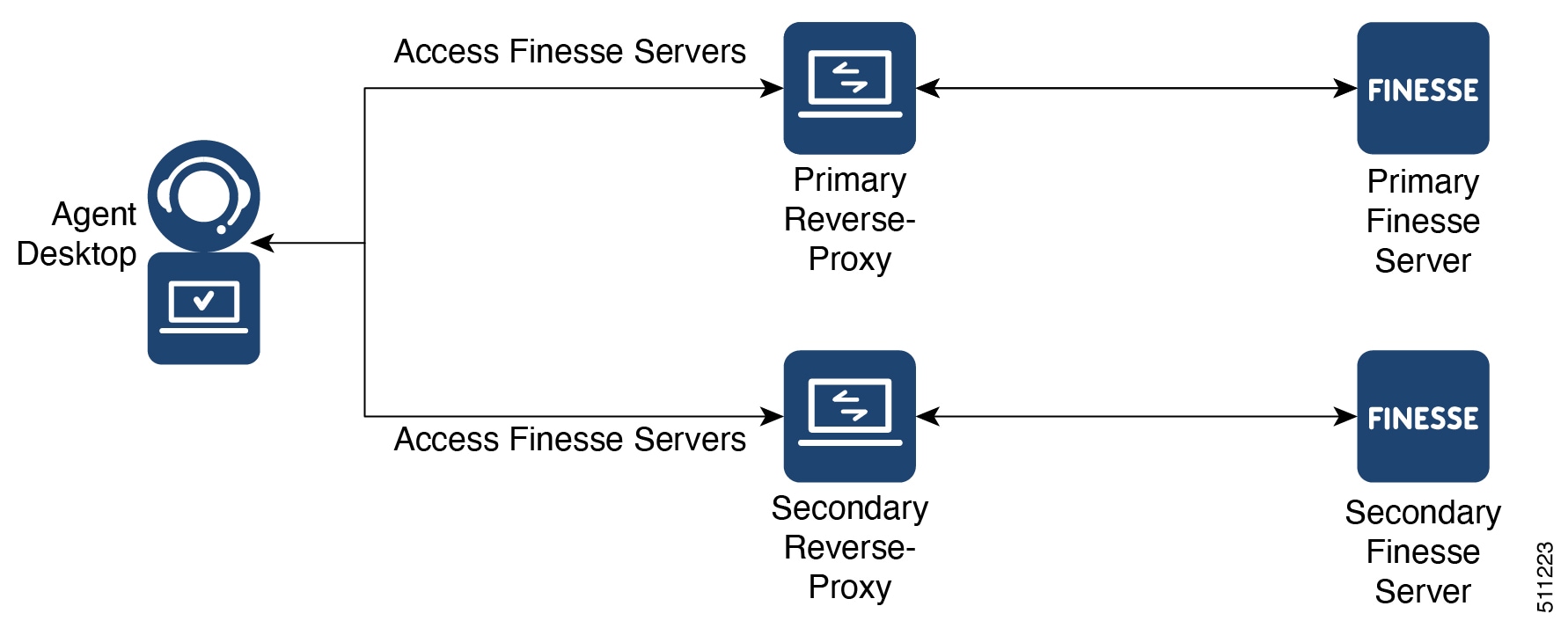
  • One Finesse cluster connects to one HA pair of reverse-proxy.

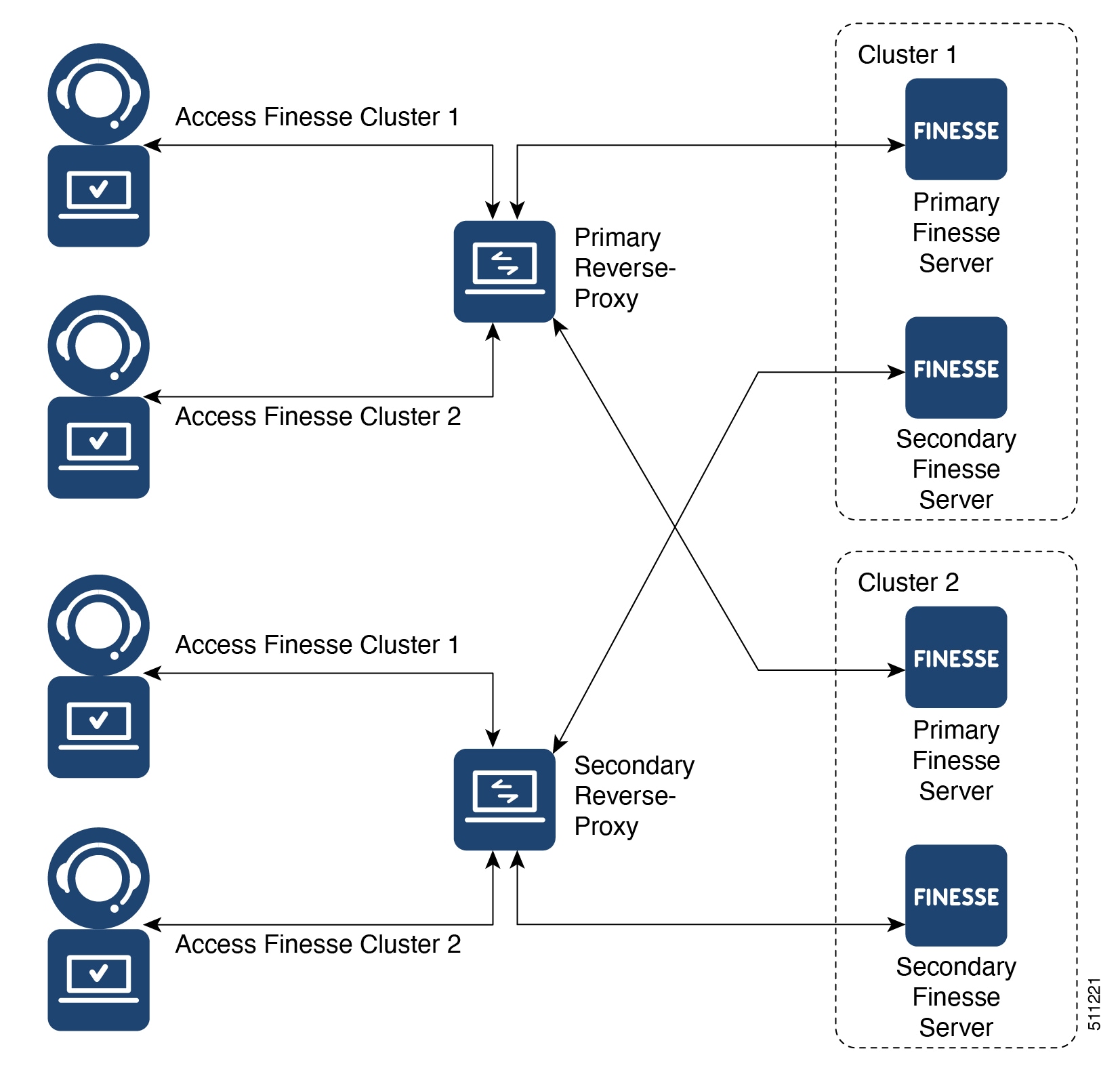
  • Multiple Finesse clusters connect to one HA pair of reverse-proxy.


Note

This is applicable to Finesse, IdS, CUIC, and Live Data clusters.


Figure 1. Single Finesse Cluster per HA Reverse-Proxy
Figure 2. Multiple Finesse Clusters per HA Reverse-Proxy

Authentication

Finesse release 12.6(1) ES02 introduces authentication at the edge for the reverse-proxy. Authentication is supported for both SSO and Non-SSO deployments.

For all requests and protocols that are accepted at the proxy, authenticaton is enforced before they are forwarded to the respective component servers (Finesse, LD, CUIC, and IM&P). The component servers also enforce authentication locally. Authentications made at the proxy use the Finesse login credentials, irrespective of the component server to which the requests are made.

Persistent connections such as WebSockets that rely on post connection application protocols (such as XMPP) for authentication, are authenticated at the proxy by verifying the peer IP address of the connection. The peer IP address must correspond to a system that has successfully authenticated an API request prior to establishing the socket connection.

Requests that do not require authentication, such as static files and images, are configured to be served by the reverse-proxy from its cache.

Non-SSO

Non-SSO authentication does not require any extra component configurations and will work in conjunction with Finesse 12.6(1) ES02 and above, along with the Nginx authentication scripts provided with 12.6(1) ES02. Authentication relies on the Finesse login credentials. Access to all the end points are validated using Finesse authentication services.

SSO

The IdS token encryption key can be obtained from the IdS server using the show ids secret CLI command. For the SSO authentication to work, the key has to be configured as part of one of the mandatory replacements that the administrator must perform. For more information about configuration, refer to the Nginx TechNote article.

IdS SAML configuration has to be performed for the SSO authentication to work at the proxy. For more information on IdS SAML configuration, see the Single Sign-On chapter.

After SSO authentication is configured, a pair of valid tokens can be used to access any of the end points in the system.

Host Mapping File for Network Translation

Reverse-proxy deployment requires a mapping file to configure the list of externally visible hostname/port combinations and their mapping to the actual server names and ports that are used by the Finesse, IdS, and CUIC servers.

For all the requests that come through the reverse-proxy, the Finesse, IdS, and CUIC servers check the host mapping file, to translate the internal hostnames and ports that are used on the LAN. They are translated to the publicly resolvable hostnames and ports that have to be used on the Internet. This mapping file, referred to as the Proxy-config map file, is the key configuration that allows the clients connected over the reverse-proxy to be redirected to the required hosts and ports that are used on the internet.

The Proxy-config map file can be configured by using CLI available on Finesse, IdS, and CUIC servers. For details on the mapping file format and the data configured, refer to the Populate Network Translation Data For details on the CLI used to configure the file, refer to the Configure Proxy Mapping by Using CLI.

DNS Configuration for Finesse, IdS, and CUIC Servers

Each Finesse, IdS, CUIC, IM&P, and third-party component serversUnified CCX and Customer Collaboration Platform servers corresponding to a host that needs Internet access must be addressable from the Internet. This calls for a hostname and associated port which is resolvable from the Internet to be mapped to the public port and matching IP of the reverse-proxy so that the traffic is directed to the respective component servers.

DNS registration of the publicly resolvable hostnames and the corresponding IP addresses is mandatory before the requests reach the reverse-proxy.

SSL Certificates

For the hostnames that are configured, corresponding to each unique hostname that is used by the internet client, the respective certificates must be acquired and configured on the reverse-proxy. Even though self-signed certificates are supported, they are risky because the users access directly from the internet. The clients can be more secure by using CA-signed certificates. The best practice is to get CA certificates for proxy servers and third-party-gadget servers.

VPN-less Finesse Configurations

To configure VPN-less access to Finesse desktop, the Contact Center administrators and the network administrators must work in tandem. The configuration steps are as follows:


Note

Do not allow access to the reverse-proxy in your external firewall until all security configurations are in place. To test your changes, use a host that is not accessible publicly.


Populate Network Translation Data

The Proxy-config map file is similar to a plain property file in which the values are separated by the equal sign. Left Hand Side (LHS) contains the host and port of Finesse, IdS, and CUIC. Right Hand Side (RHS) contains the values of the host and port that are exposed via reverse-proxy to access the Finesse desktop.

Network administrator and Finesse administrator should create a Proxy-config map file that has the mapping for all the default ports of the Cisco components, to which external traffic from the Internet clients have to be redirected. For example, 8445 port of Finesse, 8553 port of IdS, and 8444 port of CUIC.

The Proxy-config map file must be hosted on a web server that is accessible by the Finesse, IdS, and CUIC servers. The following list is an example of systems and hosts that are required for a two-node Finesse cluster with two CUIC nodes using SSO mode:

  • Publisher = finesse1.internal.com

  • Subscriber = finesse2.internal.com

  • IdS Publisher = idspub.internal.com

  • IdS Subscriber = idssub.internal.com

  • IdP = idp.internal.com

  • CUIC Publisher = cuicpub.internal.com

  • CUIC Subscriber = cuicsub.internal.com

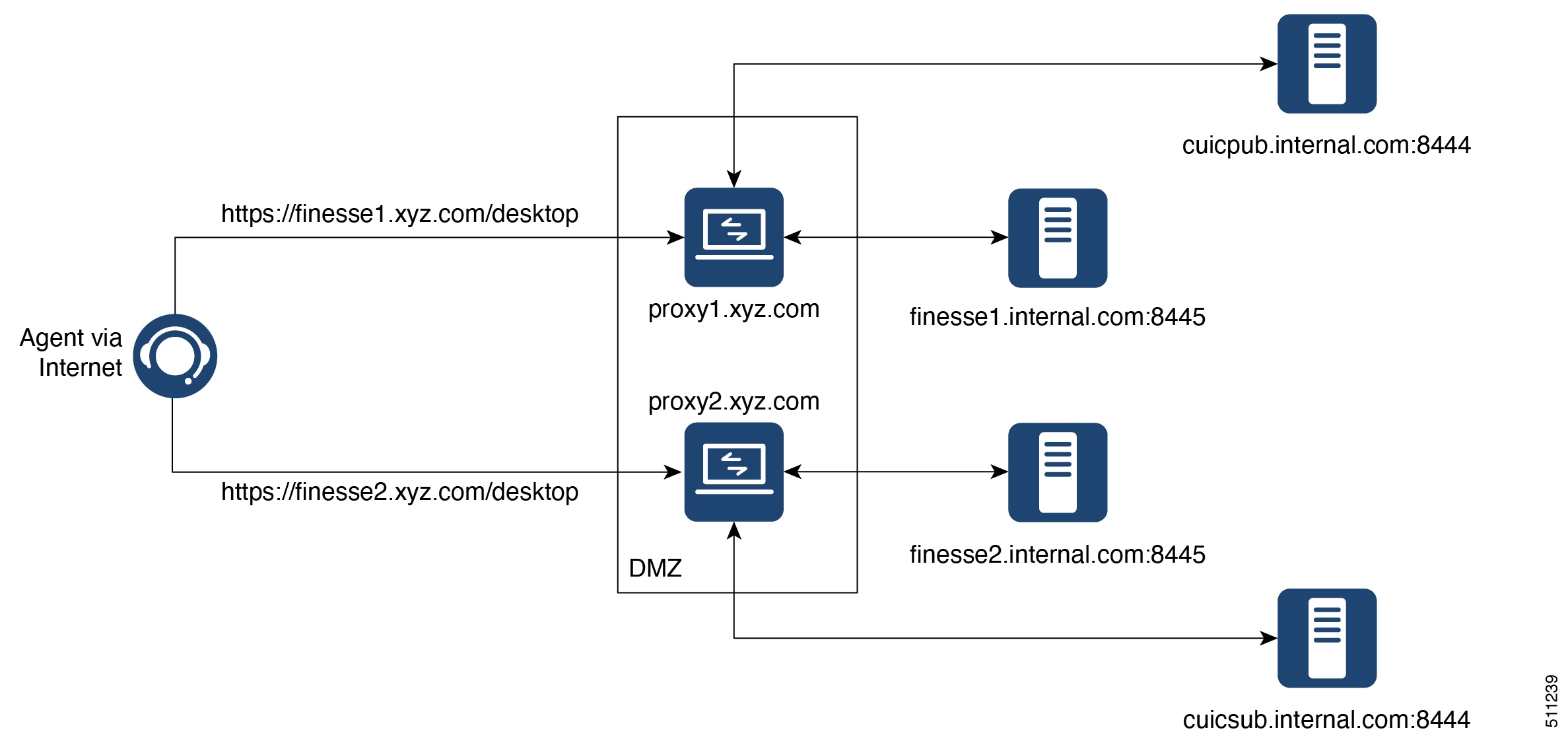
  • Proxy Node1 = proxy1.xyz.com

  • Proxy Node2 = proxy2.xyz.com

If the selected proxy supports port-based forwarding, the following is an example of a mapping file that contains the entries required for a two-node Finesse cluster with two CUIC nodes using non-SSO mode.


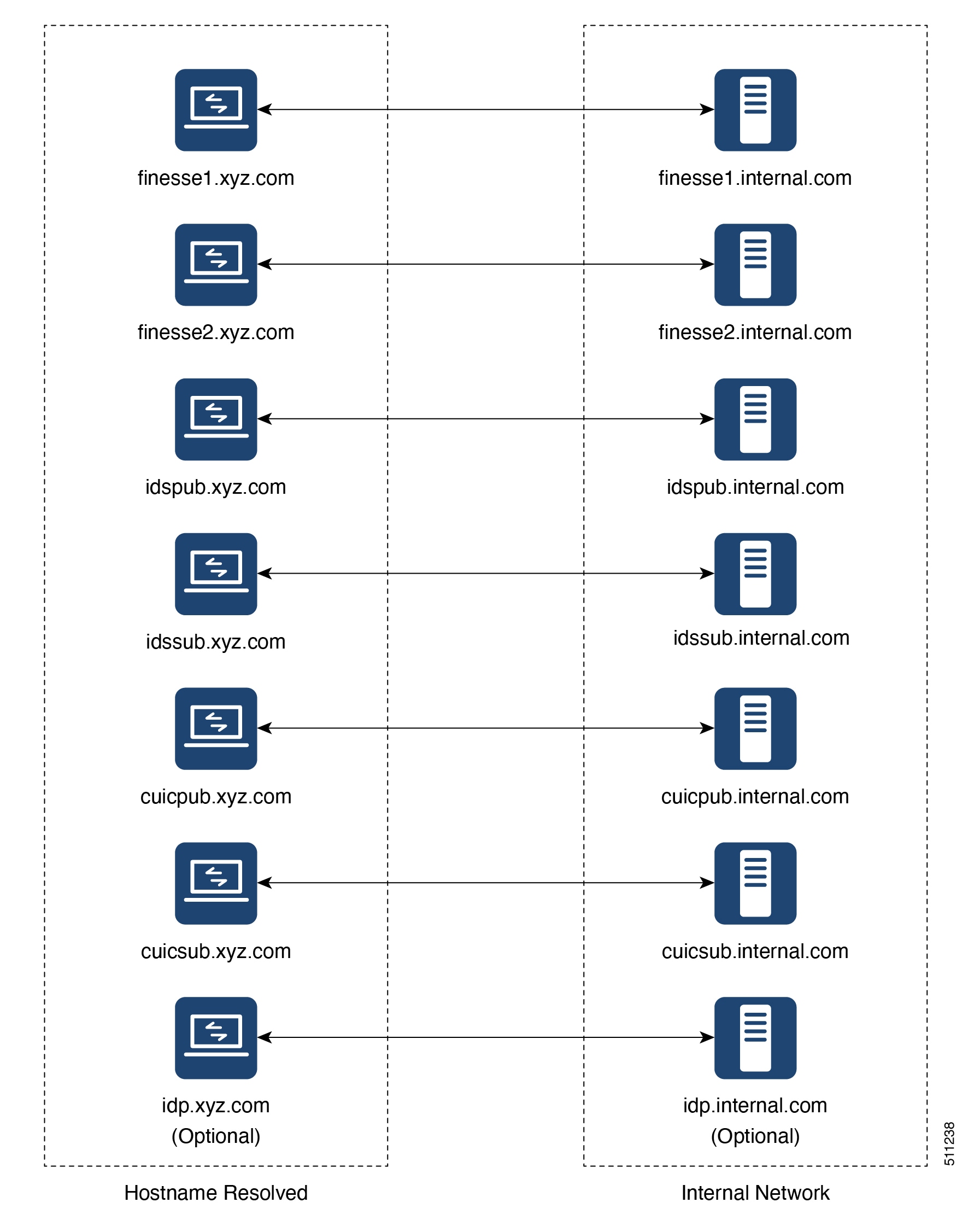
finesse1.internal.com:8445=finesse1.xyz.com:443
finesse2.internal.com:8445=finesse2.xyz.com:443
idspub.internal.com:8553=idspub.xyz.com:443
idssub.internal.com:8553=idssub.xyz.com:443
idp.internal.com:443=idp.xyz.com:443
cuicpub.internal.com:8444=cuicpub.xyz:8444
cuicsub.internal.com:8444=cuicsub.xyz:8444
Figure 3. Hostname Mapping Example
Figure 4. Network Architecture Example

Host the Mapping File

The mapping file that is created in the Populate Network Translation Data section, is used by the solution components (Finesse, IdS, and CUIC servers) to modify their responses, to enable clients to access the solution via the reverse-proxy. This requires the file to be hosted on any web server accessible by the component servers. The reverse-proxy server, Finesse server, or any web server configured by the administrator can be used for this purpose.

To access the mapping file, the host server's SSL certificate must be uploaded (using the cmplatform admin application) to the individual nodes of the services. After uploading the file, verify if the URL is accessible from Finesse, IdS, and CUIC servers. For example, https://proxyserver.xyz.com:10000/proxymap.txt. HTTP-based URLs are allowed for hosting the mapping file through HTTPS, which is the recommended access scheme.

Add Proxy IP by Using CLI

The administrator must use CLI to add the list of trusted proxy IP addresses and their corresponding hostnames that are accessible through the reverse-proxy. This must be done on all the nodes of Finesse, IdS, CUIC, and LiveData (12.6(1) ES01 and above) . These components consider only requests from the configured hosts or IP addresses as valid.

The following is an example of the CLI to add the hosts and IP addresses:


admin:utils system reverse-proxy allowed-hosts add <10.78.95.178,proxy.xyz.com>
Source 10.78.95.178 successfully added
Source proxy.xyz.com successfully added

Restart Cisco Web Proxy Service for the changes to take effect: utils service restart Cisco Web Proxy Service

After adding proxy hosts as trusted hosts through CLI on individual nodes, you must upload proxy server certificates to the Tomcat trust store of the respective components. This is required for proxy authentication to work. Otherwise, the traffic from proxy will be rejected by the components.


Note

If you are upgrading from 12.6(1) ES01, you must copy and upload proxy server certificates to the Tomcat trust store of the respective components.


The following is an example of the CLI to view the list of allowed hosts and IP addresses:


admin:utils system reverse-proxy allowed-hosts list

Source proxy.xyz.com successfully added list

The following source(s) are configured:

1. 10.78.95.178
2. proxy.xyz.com
3. proxy125.xyz.com

The following is an example of the CLI to delete an entry from the list of allowed hosts and IP addresses. This command lists all the configured proxy hosts and IP addresses, and gets user input to delete specific or all proxy hosts and IP addresses.


admin:utils system reverse-proxy allowed-hosts delete
Select the reverse-proxy source IP to delete:

 1) 10.78.95.178
 2) proxy.xyz.com
 3) proxy125.xyz.com
 4) all
 5) quit

Please select an option (1 - 5 or "q" ): 1

Delete operation successful

Configure Proxy Mapping by Using CLI

The Proxy-config map file can be configured in the Finesse, IdS, and CUIC servers using the utils system reverse-proxy config-uri command. If the URL is configured to use HTTPS protocol, Finesse, IdS, and CUIC must have the certificate (certificate of the web server hosting the URL) uploaded in /cmplatform. The administrator can configure a maximum of two URLs. The most recently added URL takes precedence and that URL is polled to detect changes in the mapping. When this URL is not accessible, the alternate URL is used. The following is an example of the CLI to list the configured Proxy-config map URLs:


admin:utils system reverse-proxy config-uri list

Currently no source is configured

The following is an example of the CLI to configure the Proxy-config map URL on the Finesse, IdS, and CUIC servers:


admin:utils system reverse-proxy config-uri add https://saproxy.xyz.com:10000/proxyconfig.txt

Operation failed, please enter valid source(s). Source https://saproxy.xyz.com:10000/proxyconfig.txt is invalid

admin:utils system reverse-proxy config-uri add https://saproxy.xyz.com:10000/proxymap.txt

Source https://saproxy.xyz.com:10000/proxymap.txt successfully added

admin:utils system reverse-proxy config-uri list

The following source(s) are configured:

1. https://saproxy.cisco.com:10000/proxymap.txt

The following is an example of the CLI to delete existing Proxy-config map URLs. This command lists all the configured Proxy-config URLs and gets user input to delete specific or all Proxy-config URLs:


admin:utils system reverse-proxy config-uri delete
Select the reverse-proxy source URI to delete:

 1) https://saproxy.xyz.com:10000/proxymap.txt
 2) all
 q) quit

Please select an option (1 - 2 or "q" ): 1

Delete operation successful

The following is an example of the CLI to set the Proxy-config update frequency (in minutes). Based on the set frequency, the local file system of Finesse, IdS, and CUIC are updated with the content from the Proxy-config map file. Before configuring the URL, this command does not return any value. After configuring the Proxy-config map URL, by default it returns one minute as the value.


admin:utils system reverse-proxy show-config-update-frequency
No config-uri configured

admin:utils system reverse-proxy config-uri add https://saproxy.xyz.com:10000/proxymap.txt

Source https://saproxy.xyz.com:10000/proxymap.txt successfully added

admin:utils system reverse-proxy show-config-update-frequency
1 minute

admin:utils system reverse-proxy set-config-update-frequency 5

admin:utils system reverse-proxy show-config-update-frequency
5 minutes

Configure CORS and Frame-Ancestors

Add both the primary and secondary reverse-proxy origins on publisher and subscriber nodes of Finesse and CUIC. If you change Cross-Origin Resource Sharing (CORS) allowed list and frame-ancestors, you must restart Finesse Notification and Tomcat services. For information about restarting Finesse notification service, see the Cisco Finesse Services section in Cisco Finesse Administration Guide.

  • Administrators must add the list of proxy server origins on the allowed list of CORS origins, if the CORS setting is enabled on Finesse, CUIC, and Live Data .

  • Frame-ancestors are added automatically while adding the reverse-proxy trusted hosts in Finesse servers.

  • Administrators must add frame-ancestors while adding reverse-proxy trusted hosts in CUIC servers.

  • Administrators must delete the corresponding allowed list of CORS and frame-ancestors entries while deleting the trusted hosts of a reverse-proxy.


    Caution

    If you do not delete the corresponding CORS and frame-ancestors entries, it becomes a security vulnerability.


Note

CORS and Frame-Ancestors are not applicable to IdS.


For information about deleting CORS see the Cross-Origin Resource Sharing (CORS) section in the Cisco Finesse Administration Guide.

For more information about configuring CORS, see the Live Data CORS Configuration section in Cisco Unified Contact Center Enterprise Installation and Upgrade Guide.

For information about deleting frame-ancestors see the Supported Content Security Policy Directives section in the Cisco Finesse Administration Guide.

Serviceability

Monitor Connected Agents and Supervisors

The reverse-proxy has to be monitored by using the proxy-specific features. For more information, refer to the specific reverse-proxy documentation.

Cisco Finesse allows administrators to view the list of currently connected agents and supervisors in cfadmin. The administrator can filter and see the agents and supervisors who are connected to the Finesse desktop based on the connection type. For example, agents and supervisors connected through the Contact Center network and those connected through reverse-proxy can be seen. For more information, see the Connected Agents section in Cisco Finesse Administration Guide at https://www.cisco.com/c/en/us/support/customer-collaboration/finesse/products-maintenance-guides-list.html. Administrators can also view the summary of connected users by using the following CLI command:

admin:utils finesse show_connected_users summary

Total Connected Users: 6

Desktop Users: 1
FIPPA Users: 2
Third-party Users: 3

Users connected to Finesse via LAN/WAN: 5
Users connected to Finesse via Proxy: 1

To view the complete list of signed-in users, log in to the Cisco Finesse
Administration Console, and navigate to the Connected Agents tab.

To view the real-time list of connected users by using an API, see the ConnectedUsersInfo section in Cisco Finesse Web Services Developer Guide at https://developer.cisco.com/docs/finesse/#!rest-api-dev-guide.

API Modifications to Support Reverse-Proxy Deployments

Finesse SystemInfo API

SystemInfo API is now secured when it is accessed through a reverse-proxy. The API is accessible with agent and supervisor credentials. The following field has been added to support this feature:

  • httpsPort: HTTPS port has to be used for all Finesse API and desktop notifications.

For more information, see the SystemInfo and ConnectedUsersInfo sections in Cisco Finesse Web Services Developer Guide at https://developer.cisco.com/docs/finesse/#!rest-api-dev-guide.

Reverse-Proxy Selection and Configurations

Reverse-Proxy Selection Criteria

Contact Center administrators must select an appropriate reverse-proxy. Any reverse-proxy that meets the following minimum requirements can be used:

  • Supports HTTP2/TLS 1.2 and secure Websockets.

  • Has proper logging mechanism for easy debugging of issues

  • Supports multiple Finesse, IdS, and CUIC servers from a single reverse-proxy.

  • Supports periodic revalidation of cached content. This is required because any updates or installations on the internal hosts don't require a manual intervention to clear the cached content of the proxy.

  • Supports custom authentications or provides alternative mechanisms such as an enterprise login to prevent unauthenticated access of solution components. Custom authentication is typically implemented using user-provided modules (such as Lua scripts deployed at Nginx) for efficient authentication at the proxy. Authentication mechanisms that don't integrate with the solution results in multiple logins for the user.

  • Enables caching of static resources with support for cache-control header to reduce DoS/DDoS attack vectors and to scale the proxy. Any proxy that needs to support more than a few hundred users and does not provide response caching features should be deployed with a Content Delivery Network (CDN) with support for cache-control headers so that load and security guidelines are met.


    Note

    CDN deployment is also recommended with caching proxies such as Nginx to eliminate the impact of DDoS attacks.


  • Supports X-Forwarded headers. These headers are used by the solution to decide how to handle a request.

Additional Requirements

Some desirable requirements in a reverse-proxy are as follows:

  • Consider deploying proxies that are built on non-blocking IO-based technology instead of the traditional thread-per-request architecture, to scale better.

  • Consider proxies that provide response substitution capabilities which allow workarounds for custom gadgets as custom gadgets may not work with reverse-proxy directly.


    Note

    Finesse Desktop Chat over reverse-proxy requires response substitution capability.


  • Support for port-based forwarding can be used to reduce the cost of deployment by avoiding the need for multiple externally resolvable hostnames, public DNS records, and corresponding certificates for each internal server that has to be accessed.

  • Support for custom plugin/modules, which can be used to enhance the authentication model and provide a more robust security posture.

Configure Reverse-Proxy

Install the host OS and reverse-proxy of your choice. Consider the following points while configuring the reverse-proxy:

  • Configure SSL certificates as required.

  • Refer to the specific proxy documentation and configure the proxy rules for each service with the same host and port that is configured in the mapping file.

  • IdS and IdP trust should be configured before proxy mapping configuration is done. Otherwise, proxy configuration changes will not be processed by IdS.

  • For IdS hosts, if proxy configuration is changed, the administrator must re-establish trust on IdP for new IdS proxy hosts after downloading new metadata file from IdS admin.

  • For Finesse hosts, if proxy configuration is changed, the administrator must manually add or update the allowed Finesse client redirect URIs from IdS administration interface.

  • Whenever SAML certificate is regenerated or IdP metadata is uploaded, proxy configurations are generated afresh.

Determine Scale and Hardware for Proxy

Contact Center administrators should analyze the hardware required for the reverse-proxy, based on the number of agents and supervisors who may access the Finesse desktop without connecting to VPN. You can use the reference request rates provided for Finesse, IdS, and CUIC in the Nginx TechNote article.

The type of proxy selected guides the hardware to be used, depending on whether the proxy is shipped as an installable software or is a hardware-based application.

Sizing configurations are pre-tested for Nginx proxy. Custom proxy deployments should consult their product documentation or run basic scaling tests to determine the rates that can be supported by the respective proxy and scale their hardware accordingly.

Determine Gadget Compatibility

Determining the gadget compatibility is an important activity for planning a VPN-less Finesse deployment.

After deploying the reverse-proxy, all Cisco-provided gadgets (Cisco Finesse, CUIC, and ECE) work seamlessly with their respective servers of Release 12.6 or later.

In some scenarios, depending on the gadget design, custom third-party gadgets require workarounds to enable them to work with the reverse-proxy deployment. Refer to the following sections to determine if any of your gadgets require workarounds.


Note

Gadgets that are loaded from servers other than Finesse server, should use exclude-url feature in the gadget XML specification to load the Finesse resources such as Finesse.js. For more information, refer to the Using Gadget URI Exclude Feature to Refer to Finesse Resources section.


Gadget Types and VPN-less Compatibility

Finesse gadgets are classified into the following types based on how they are designed operationally:

  • Gadgets that are self-contained within the desktop without making any additional network requests or is restricted to exclusively invoke Finesse APIs, APIs on the internet, or both.

  • Gadgets that provide their functionality by communicating with an accompanying server that is deployed in the DMZ and is reachable directly from the internet and LAN.


    Note

    To enable the same desktop layout to be used by both LAN & internet-based clients, server installed in a DMZ should also be reachable from servers such as Finesse in LAN, and from clients that are running within the LAN.


  • Gadgets that need to communicate with an accompanying server deployed in LAN, but uses desktop provided makeRequest API to communicate to the server. The makeRequest API routes all the requests through the Finesse server and does not directly reach the server that is deployed in the LAN.


    Note

    These requests succeed in a reverse-proxy deployment only if the requests are made using the hostname and port. The hostname and the port must be reachable from LAN because the requests are executed by Finesse server which runs on LAN.


  • Gadgets that have to communicate directly with any one of the following types of accompanying server:

    • Server deployed within the LAN and is not reachable directly from the internet

    • Server that communicate with an additional port apart from the HTTP port used to load the gadget

The last two types of gadgets have to be modified to be used in a reverse-proxy deployment. The steps required to enable these gadgets to be accessed from internet clients are as follows:

  • Enable VPN-less access for custom gadgets

  • Send hostname and port information to gadgets

  • Use gadget's URI Exclude feature to refer to Finesse resources

Enable VPN-Less Access for Custom Gadgets

Gadgets that communicate directly with accompanying servers that are deployed in LAN must handle the following aspects to work correctly in a reverse-proxy deployment:

  • Use the right hostname and port for communicating with its accompanying server.

    A gadget can find the correct hostname and port corresponding to the server from which the gadget was loaded using the API gadgets.util.getUrlParameters().up_urlPrefs API provided by the Finesse Javascript API.

    To find additional ports or hostnames that are required, data can be passed in as gadget preference such that the additional host and port information can be sent to the gadget. For more information, refer to the Sending Hostname and Port Information to Gadgets section .

  • Ensure that the communications are forwarded correctly by the reverse-proxy.

    After the gadget starts communicating with the correct host and port information, the hostname and port number have to be forwarded to the server deployed in the LAN by opening the appropriate ports in the DMZ firewall. Also, ensure that the appropriate ports and rules are added to the reverse-proxy rules to forward the traffic to the correct server in the LAN.

  • Best Practice: If requests to external servers are made using Finesse authentication headers, a common validation is enabled to authenticate the requests at the proxy. Gadgets that do not use Finesse authentication should plan to implement their own custom authentication schemes to ensure that the requests are validated at the proxy before sending to the Finesse server.

Send Hostname and Port Information to Gadgets

Gadgets that send host and port information corresponding to a server deployed within the LAN can use the UserPreferences feature supported by Finessse gadgets. This feature allows a configurable, named information to be passed to the gadget. The information can be referenced within the gadget XML or programmatically by using a Javascript.

For more information on how to use UserPreferences method, refer to https://developer.cisco.com/docs/finesse/#!gadget-preferences.

The UserPreferences created for this purpose should start with the keyword externalServerHostAndPort in its name. This enables Finesse to substitute the host and port provided to be replaced by the corresponding entry from the proxyMap file. For example:

<UserPref name="externalServerHostAndPort_chat” display_name="Chat_externalServerHostAndPort" default_value="SMHostName:7443" datatype ="hidden"/>

When accessed from the LAN, the UserPreferences continues to have the default value that is configured in the XML. However, when accessed through the reverse-proxy, the UserPreferences receives the value from the proxyMap file. For example:

SMHostName:7443=external-proxy-host:4043

When accessed through the reverse-proxy, the gadget receives the port 4043 and host name as external-proxy-host.

Use Gadget URI Exclude Feature to Refer to Finesse Resources

Add the following content within the ModulePrefs tag of the gadget XML to ensure that the resources loaded from Finesse server are excluded from concatenation. This step is mandatory for gadgets which load their XML from custom servers.

<Optional feature="content-rewrite">
<!-- these files will be directly served by Finesse, not through shindig -->
<Param name="exclude-url">finesse.min.js</Param></Optional>
Finesse URL

Agents and supervisors should bookmark two different pairs of URLs (publisher and subscriber) for accessing the Finesse desktop through both the Contact Center network and the reverse-proxy.

Caveats

Reverse-Proxy deployment allows agents and supervisors to concurrently access the Cisco Finesse desktop from both LAN and via reverse-proxy. After configuring the reverse-proxy, when the agents and supervisors access the Finesse desktop via LAN, all the features work seamlessly. However, when the Finesse desktop is accessed via the reverse-proxy, the caveats are as follows:

  • Finesse IP Phone Agent (FIPPA) is not supported.

  • Administrative applications and the corresponding APIs of Finesse, IdS, and CUIC are not supported.

  • Multiple devices accessing Finesse desktop via Network Address Translation (NAT) is not supported.

  • If threshold images are used in Live Data, Real Time, and Historical gadgets, add the reverse-proxy rules to allow images to be accessed through reverse-proxy. For more information on threshold images rules, refer to the Nginx TechNote article.

  • After upgrading Finesse to 12.6(1), CUIC must be upgraded to 12.6(1) for the Live Data (LD) gadgets to work. Refer to the Unified CCE Compatibility Matrix for general compatibility between CUIC and Finesse when accessed via the Contact Center network or the reverse-proxy.

  • Third-party gadgets on the Finesse desktop could be incompatible with the reverse-proxy deployment. For more information on gadget compatibility, see the Determine Gadget Compatibility section.

  • Finesse API Compatibility:

    • Finesse Desktop supports only Web Socket notification mechanism over reverse-proxy. For third-party servers, BOSH/XMPP over TCP communication through reverse-proxy isn’t supported.

    • When SystemInfo API is accessed via a reverse-proxy, the authorization headers are required.