Cisco Unified SIP Phone 3905
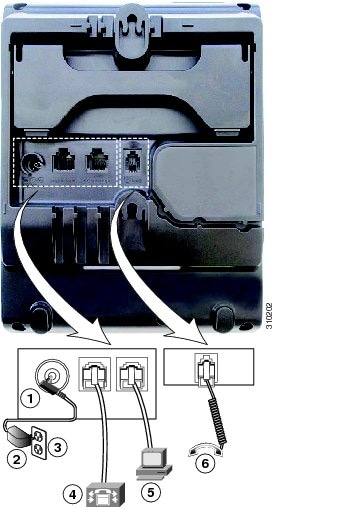
Phone Connections
|
1 |
DC adapter port (DC 4.2V). |
4 |
Network port (10/100 SW) connection. IEEE 802.3af power enabled. |
|
2 |
AC-to-DC power supply (optional). |
5 |
Access port (10/100 PC) connection. |
|
3 |
AC power wall connection. |
6 |
Handset connection. |
 Note |
In the EU and UK, your phone is shipped with a power switch cable that is required in order to provide power to your phone when using an AC-to-DC power supply. Connect the power cord to the power switch cable and then connect the other end of the power switch cable to the DC adapter port. |
Buttons and Hardware
|
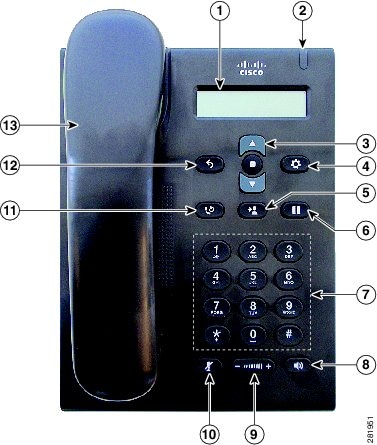
1 |
Phone screen |
Shows information about your phone such as directory number, active call, and phone menu listings. |
|
2 |
Light strip |
Indicates an incoming call (flashing red) or new voice message (steady red). |
|
3 |
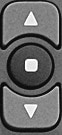 |
The Navigation bar allows you to scroll through menus and highlight items. The Select button (in the middle of the Navigation bar) allows you to select a highlighted item. When the phone is off-hook, the Select button functions as the Feature button. You can access these features:
|
|
4 |
 |
Opens or closes the Applications menu. Use it to access call history, user preferences, phone settings, and phone model information. |
|
5 |
 |
Transfers a call. |
|
6 |
 |
Places an active call on hold or resumes a held call. |
|
7 |
Keypad |
Allows you to dial phone numbers. |
|
8 |
 |
Selects the speakerphone as the default audio path and initiates a new call, picks up an incoming call, or ends a call. The speakerphone audio path does not change until a new default audio path is selected (for example, by picking up the handset). |
|
9 |
 |
Controls the handset and speakerphone volume (off-hook) and the ringer volume (on hook). |
|
10 |
 |
Toggles the microphone on or off. |
|
11 |
 |
Dials the last dialed number. |
|
12 |
 |
Returns to the previous screen or menu. |
|
13 |
Handset |
Phone handset. |
 Feedback