The documentation set for this product strives to use bias-free language. For the purposes of this documentation set, bias-free is defined as language that does not imply discrimination based on age, disability, gender, racial identity, ethnic identity, sexual orientation, socioeconomic status, and intersectionality. Exceptions may be present in the documentation due to language that is hardcoded in the user interfaces of the product software, language used based on RFP documentation, or language that is used by a referenced third-party product. Learn more about how Cisco is using Inclusive Language.
This offering increases the speed with which Cisco technical assistance staff can diagnose issues with your infrastructure.
It automates the tasks of finding, retrieving and storing diagnostic logs and information into an SR case, and triggering
analysis against diagnostic signatures so that TAC can more efficiently identify and resolve issues with your on-premises
equipment.
This capability uses Serviceability Connector deployed on your premises. Serviceability Connector is a piece of software that resides on a dedicated Expressway in your network ('connector host'). It connects to Cisco Webex
to receive requests to collect data, and uses the APIs of your on-premises equipment to collect the requested data. The requested
data is securely uploaded to Cisco’s SR file store and attached to your SR case.
Benefits of Using Serviceability Service
Speeds up the collection of logs by allowing TAC engineers to request relevant logs as they perform the diagnosis of the problem
– avoiding the delays of requesting additional logs and manual collection and delivery steps. This can take days off your
problem resolution time.
In conjunction with TAC’s Collaboration Solution Analyser and its database of diagnostic signatures, the logs are automatically
analysed, known issues identified and known fixes or workarounds recommended.
Differences to Other Hybrid Services
You deploy and manage Serviceability Connectors through Control Hub in a similar way to other Expressway-based Hybrid Services
such as Hybrid Calendar Service and Hybrid Call Service, but there are several important differences.
The main difference is that Serviceability Service does not have features for users. The TAC is the predominant user of this
service, so, while it would benefit organizations that are using Hybrid Services, it is more commonly used for organizations
that don’t use other Hybrid Services.
If you already have your organization configured in Control Hub, you can enable the service through your existing organization
administrator login.
The Serviceability Connector has a different load profile to those other connectors that provide features directly to users.
It is always available, so that TAC can collect data when necessary, but it does not have a steady load over time. The TAC
representatives manually initiate data collection, and they negotiate an appropriate time to do it, so as to minimize the
impact on other services provided by the same infrastructure.
Short Description of How it Works
Your administrators work with Cisco TAC to deploy Serviceability service - see Deployment Architecture.
TAC learns of a problem with one of your Cisco devices (when you open a case).
TAC representative uses the Collaborations Solution Analyzer (CSA) web interface to request Serviceability Connector to collect
data from relevant devices.
Your Serviceability Connector translates the request into API commands that the device(s) understand in order to collect the
requested data from the managed devices.
Your Serviceability Connector collects, encrypts, and uploads that data over an encrypted link to Customer Service Central
(CSC), and associates the data with your Service Request.
The data can be analyzed against the TAC database of more than 1000 diagnostic signatures.
The TAC representative reviews the results, checking the original logs if necessary.
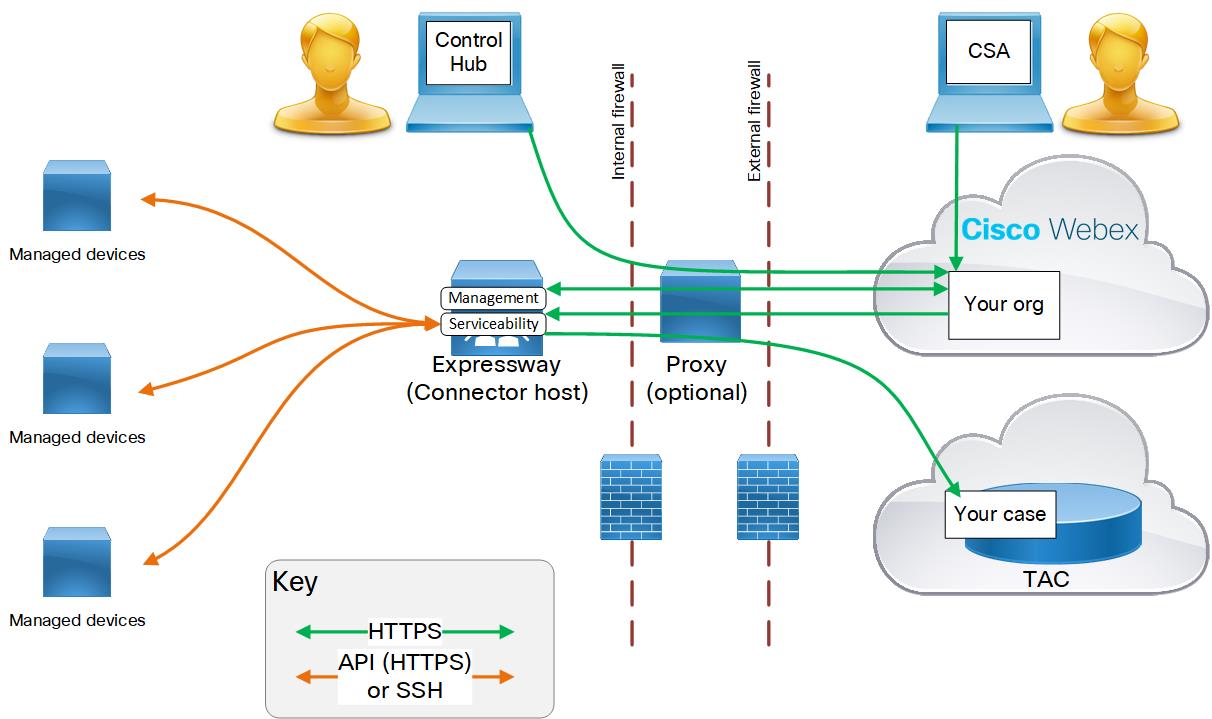
Deployment Architecture
Description of the components
(from left top to bottom right)
Managed devices - includes any devices you want to be able to query for logs using Serviceability Service. You can configure up to 150 managed
devices with one Serviceability connector.
The service currently works with the following devices:
Cisco Unified Communications Manager
Cisco Unified CM IM and Presence Service
Cisco Expressway Series
Cisco TelePresence Video Communication Server (VCS)
Cisco Unified Contact Center Express (UCCX)
Cisco Unified Border Element (CUBE)
Cisco BroadWorks Application Server (AS)
Cisco BroadWorks Profile Server (PS)
Cisco BroadWorks Messaging Server (UMS)
Cisco BroadWorks Execution Server (XS)
Your administrator - Uses Cisco Webex Control Hub to register a connector host and enable Serviceability Service. The URL is https://admin.webex.com and you need your “organization administrator” credentials.
Expressway connector host - An Expressway that hosts the Management connector and the Serviceability Connector.
Management Connector (on Expressway) and the corresponding Management Service (in Cisco Webex) are the components that manage your Expressway’s
registration; persisting the connection, updating connectors when required, and reporting status and alarms.
Serviceability Connector - a small piece of software that the connector host Expressway downloads from Cisco Webex after your organization is enabled
for Serviceability service.
Proxy - optional. If you change the proxy configuration after starting Serviceability Connector, then you must restart the Serviceability
Connector.
Cisco Webex cloud - is where Webex Teams, Webex Calling, Webex Meetings, and Webex Hybrid Services are hosted.
Technical Assistance Center, which contains:
TAC representative using CSA to communicate with your Serviceability Connector(s) via Cisco Webex cloud.
TAC case management system (CSC) with your case and associated logs collected by Serviceability Connector.
 Feedback