Introduction to Cisco Business Edition 6000H/M
Who Should Use this Guide?
This guide will help you set up your Business Edition appliance if you can answer yes to the questions below.
-
Are you are doing a manual installation of applications on a Cisco Business Edition appliance? This guide covers everything that you need to do to customize it for your business needs.

Note
On the other hand, if you ordered your appliance via the Business Edition Management portal, your appliance arrives with core UC applications pre-installed. You should use Business Edition Management to complete the configuration tasks. For more information, see http://www.cisco.com/c/dam/en/us/td/docs/voice_ip_comm/cucm/BE6000/BusinessEditionManagement/business-edition-management-configuration-guide.pdf.
Cisco partners can find more information on http://www.cisco.com/go/bepartner.
-
Does your deployment fit within the Supported System Capacities described in Appendix B?"
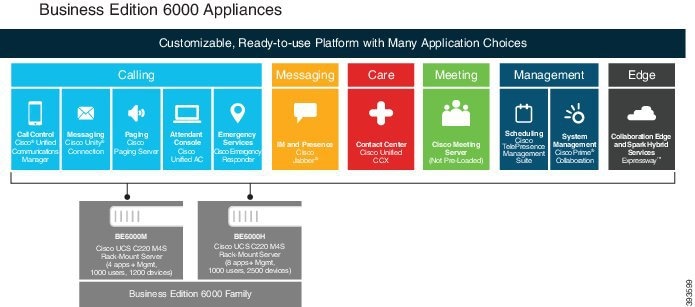
Business Edition 6000 Appliances are shown in following:
Essential Documents for Installation of BE6000
You can proceed with the installation by using this document alone, but we recommend that you also refer to the following information about deployment options, equipment, and applications. All of these documents are available at http://www.cisco.com/c/en/us/support/unified-communications/business-edition-6000/tsd-products-support-series-home.html. Choose the product version, and then refer to the documents described below.
-
Deployment Options—To gain insights to help you plan your deployment, read Preferred Architecture guides and the Cisco Validated Designs that are relevant to your business needs.
-
Equipment—Use the Quick Start Guide to unpack the appliance and install it in a rack.
-
Applications—To find out more about applications, refer to these documents:
-
Cisco Business Edition 6000 and Cisco Business Edition 7000 Co-residency Policy Requirements—This document contains information on the Cisco virtualized applications that are available for installation on a Cisco Business Edition 6000 system and the conditions that you must meet to run those applications and any third-party applications on a Business Edition appliance.
-
Business Edition 6000 Software Load Summary—This document contains information on ISO and OVA files that are pre-loaded in your server's datastore.
-
Other documents for UC applications are listed on the Component Documentation tab.
-
 Feedback