Overview of Cisco UCS Fabric Interconnects

Cisco UCS 6500 Series Fabric Interconnects

Cisco UCS 6536 Fabric Interconnect Overview

The Cisco UCS 6536 Fabric Interconnect is a core part of the Cisco Unified Computing System, providing both network connectivity and management capabilities for the system. The Cisco UCS 6536 Fabric Interconnect provides the communication backbone and management connectivity for UCS B-series blade servers and UCS C-series rack servers.

Cisco UCS 6500 Series Fabric Interconnects currently include Cisco UCS 6536 Fabric Interconnect. All servers attached to a Cisco UCS 6536 Fabric Interconnect become part of a single, highly available management domain. In addition, by supporting a unified fabric, Cisco UCS 6536 Fabric Interconnect provides both LAN and SAN connectivity for all servers within its domain.

The Cisco UCS 6536 Fabric Interconnect supports multiple traffic classes over a lossless Ethernet fabric from the server through the fabric interconnect.

Cisco UCS 6536 Fabric Interconnect

The Cisco UCS 6536 Fabric Interconnect (UCSC-FI-6536) is a One-rack unit (1RU), top of rack (TOR), fixed-port data center platform that provides both network connectivity and management capabilities to the Cisco UCS system.

The fabric interconnect can provide Ethernet and Fibre Channel connectivity to the servers in the system. The servers connect to the fabric interconnect, and then to the LAN or SAN.

Cisco UCS Manager on UCS 6536 Fabric Interconnect supports Cisco UCS X-Series Compute Nodes, B-Series Blade Servers and C-Series Rack Servers, Cisco UCS S-Series Storage Servers, as well as the associated storage resources and networks.

High availability and redundancy can be achieved by connecting a pair of fabric interconnects to each other through L1 or L2 ports in cluster mode configuration.

Each Cisco UCS 6536 Fabric Interconnect offers the following features:

  • Thirty-six QSFP28 ports capable of 100G including 4 unified ports (33-36). Ports also support:

    • Autonegotiating with peer devices to speeds of 100G, 40G, 25G, 10G, and 1G.

    • Port breakout is supported for Ethernet ports (1-32) and Unified ports (33-36).

      • Ethernet breakout is supported on switch ports 1 through 36 when each port is configured with a breakout cable.

        • The Dynamic Ethernet Breakout feature enables converting a standard Ethernet port to a breakout port on-the-fly so that you do not need to reboot the Fabric Interconnect. Dynamic Ethernet Breakout also supports converting breakout ports back to a standard Ethernet port without a reboot.

      • FC breakout is supported on ports 33 through 36 wherein each port is configured with a four-port breakout cable. For example 1/33/1, 1/33/2, 1/33/3, and 1/33/4 are the four FC breakout ports on the physical port 33.


        Note


        Fibre Channel support is only available through the configuration of Unified Ports (33-36) as FC breakout port.


        • FC breakout ports support peer communication at fixed speeds of 8Gbs, 16 Gbps, and 32 Gbps.

        • All four FC breakout ports must be configured with the same speed. Mixed speeds on a QSFP port's FC breakout ports are not supported.

        • Using breakout ports enables the fabric interconnect to support the maximum 16 FC ports supported by Fibre Channel.


      Note


      • Converting from Ethernet to FC breakout ports, or FC breakout ports back to Ethernet, requires a reboot/reload after changing the breakout type.

      • FCoE storage ports are not supported.


  • One management port (one 10/100/1000BASE-T port)

  • Two L1/L2 Ethernet RJ-45 ports for high availability or cluster configurations. Ethernet ports support 10/100/1000Mb speed.

  • One console port (RS-232)

  • One USB 3.0 port

  • CPU: 4 Core, 1.8GHz, Intel 5th-Generation core processor

  • Memory:

    • 32 GB DDR4 DIMMs

    • 128 GB M.2 SSD Flash Drive

    • 32 GB Boot Flash (16 MB primary, and 16 MB standby/golden)

This fabric interconnect includes the following user-replaceable components:

  • Fan modules (6), each is a port-side exhaust fan module with dark grey latch coloring (UCS-FAN-6536).

  • Power supply modules (2). One power supply module (PSU) is the active module for operations, and the second PSU is the standby for redundancy [1+1]) with the following choices:

    • 1100-W AC power supply with dark grey latch coloring (UCS-PSU-6536-AC)


    Note


    All fan modules and power supplies must use the same airflow direction.


The following figure shows the fabric interconnect features on the port side of the chassis.
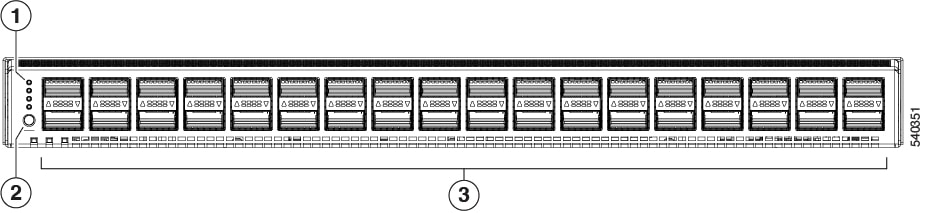
1

LEDs

3

36 40/100-Gigabit QSFP28 ports

2

Lane Select button

To determine which transceivers, adapters, and cables are support the fabric interconnect, see the Cisco Transceiver Modules Compatibility Information document.

The following figure shows the fabric interconnect features on the power supply side of the chassis.
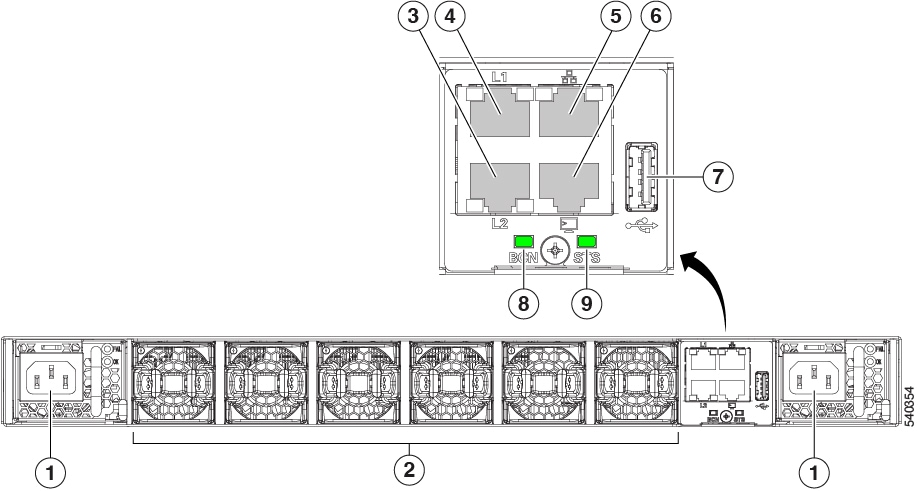
1

Power supply modules (1 or 2) (AC power supplies shown) with slots numbered 1 (left) and 2 (right).

2

Fan modules (6) with slots numbered from 1 (left) to 6 (right).

3

Layer 2 (L2) Ethernet port, 10/100/100Mb autonegotiating.

Supports high availability (HA) or clustering through an RJ-45 port.

4

Layer 1 (L1) Ethernet port, 10/100/100Mb autonegotiating.

Supports high availability (HA) or clustering through an RJ-45 port.

5

Ethernet network management port (RJ45), 10/100/1000Mb autonegotiating

6

Serial Console port (RJ45), 9600 baud.

7

USB 3.0/2.0 port

Supports booting the system and downloading scripts.

8

Beacon (BCN) LED

9

Status (STS) LED

-

The following figure shows the side of the chassis.
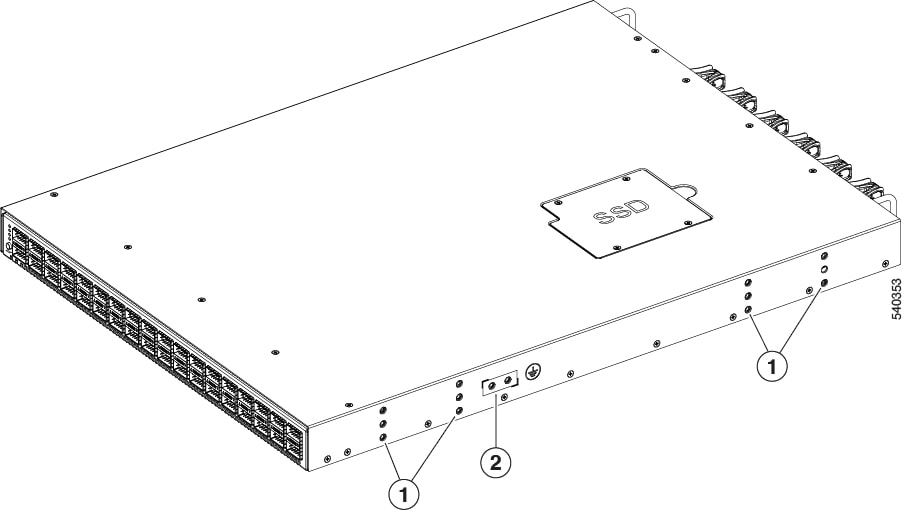
1

Screw holes for mounting brackets

2

Grounding pad

Plan to position the ports in a hot aisle so that fans and power supplies intake air from the cold aisle, blow the cool air through the fabric interconnect, and exhaust the heated air into the hot aisle.

The fan and power supply modules are field replaceable. You can replace one fan module or one power supply module during operations so long as the other modules are installed and operating. If you have only one power supply installed, you can install the replacement power supply in the open slot before removing the original power supply.


Note


All fan and power supply modules must have the same direction of airflow. Otherwise, the fabric interconnect can overheat and shut down.


Caution


Because fans and power supply modules have port-side exhaust airflow (blue coloring for fan modules), you must locate the ports in the hot aisle. If you locate the air intake in a hot aisle, the fabric interconnect can overheat and shut down.


Cisco UCS 6400 Series Fabric Interconnects

Cisco UCS 6400 Series Fabric Interconnect Overview

Cisco UCS 6400 Series Fabric Interconnect provides both network connectivity and management capabilities to the Cisco UCS system. The fabric interconnect provides Ethernet and Fibre Channel to the servers in the system, the servers connect to the fabric interconnect, and then to the LAN or SAN.

Each Cisco UCS 6400 Series Fabric Interconnect runs Cisco UCS Manager to fully manage all Cisco UCS elements. The fabric interconnect supports 10/25 Gigabit ports in the fabric with 40/100 Gigabit uplink ports. High availability can be achieved when a Cisco UCS 6400 Series Fabric Interconnect is connected to another Cisco UCS 6400 Series Fabric Interconnect through the L1 or L2 port on each device.

Cisco UCS 6400 Series Fabric Interconnect consists of:

  • Cisco UCS 6454 Fabric Interconnects

  • Cisco UCS 64108 Fabric Interconnects

The Cisco UCS 6400 Series fabric interconnect supports Cisco UCS B-Series Blade Servers, UCS 5108 B-Series Server Chassis, C-Series Rack Servers, and UCS S-Series Storage Servers.

Cisco UCS 64108 Fabric Interconnect

The Cisco UCS 64108 Fabric Interconnect is a 2 RU top-of-rack (TOR) switch that mounts in a standard 19-inch rack such as the Cisco R Series rack.

The high-density Cisco UCS 64108 Fabric Interconnect has 96 10/25 Gb SFP28 ports and 12 40/100 Gb QSFP28 ports. Each 40/100 Gb port can break out into 4 x 10/25 Gb uplink ports. Ports 1 - 16 are unified ports that support 10/25 GbE or 8/16/32G Fibre Channel speeds. Ports 89-96 support 1Gbps Ethernet speeds.

The Cisco UCS 64108 Fabric Interconnect supports either:

  • Eight FCoE port channels

  • Or Four SAN port channels

  • or Four SAN port channels and four FCoE port channels

The Cisco UCS 64108 Fabric Interconnect also has one network management port, one RS-232 serial console port for setting the initial configuration, and one USB port for saving or loading configurations. The FI also includes L1/L2 ports for connecting two fabric interconnects in a high-availability configuration.

The Cisco UCS 64108 Fabric Interconnect also contains a CPU board that consists of:

  • Intel Xeon Processor, 6 core

  • 64 GB of RAM

  • 8 MB of NVRAM (4 x NVRAM chips)

  • 128 GB SSD (bootflash)

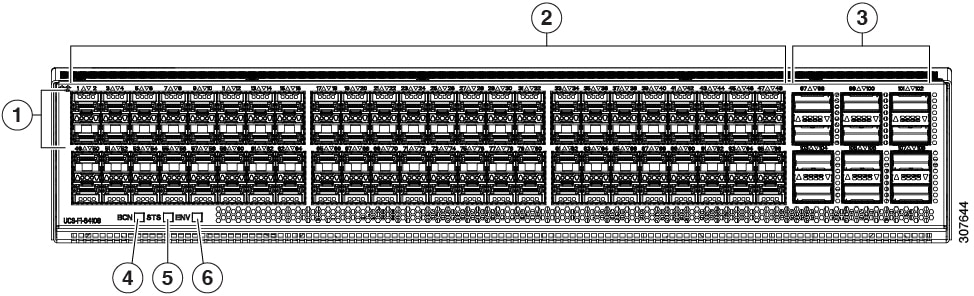
Figure 1. Cisco UCS 64108 Fabric Interconnect Rear View

1

Ports 1-16

Unified ports:

  • 10/25 Gbps Ethernet or FCoE

  • 8/16/32 Gbps Fibre Channel

2

Ports 17-88

(10/25 Gbps Ethernet or FCoE)

3

Ports 89-96

  • 10/25 Gbps Ethernet or FCoE

  • 1 Gbps Ethernet

4

Uplink Ports 97-108 (40/100 Gbps Ethernet or FCoE)

Each of these ports can be 4 x 10/25 Gbps Ethernet or FCoE uplink ports when using a breakout cable.

5

System environment (fan fault) LED

6

System status LED

7

Beacon LED

The Cisco UCS 64108 Fabric Interconnect has two power supplies (redundant as 1+1) and three fans (redundant as 2+1).

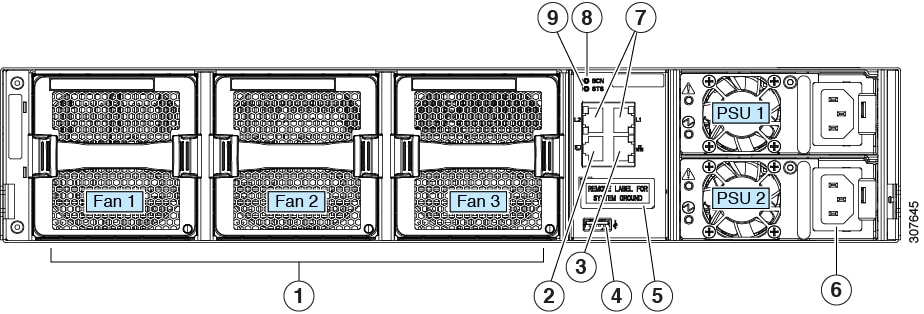
Figure 2. Cisco UCS 64108 Fabric Interconnect Front View

1

Cooling fans

(hot swappable, 2+1 redundancy)

2

RS-232 serial console port (RJ-45 connector)

3

Network management port (RJ-45 connector)

4

USB port

5

Grounding pad for two-hole grounding lug (under protective label)

6

Power supplies

Two identical AC or DC PSUs, hot-swappable, 1+1 redundancy)

7

L1/L2 high-availability ports (RJ-45 connector)

8

Beacon LED

9

System status LED

Cisco UCS 6454 Fabric Interconnect

The Cisco UCS 6454 Fabric Interconnect (FI) is a 1-RU top-of-rack switch that mounts in a standard 19-inch rack such as the Cisco R Series rack.

The Cisco UCS 6454 Fabric Interconnect has 48 10/25 Gb SFP28 ports (16 unified ports) and 6 40/100 Gb QSFP28 ports. Each 40/100 Gb port can break out into 4 x 10/25 Gb uplink ports. The sixteen unified ports support 10/25 GbE or 8/16/32G Fibre Channel speeds.


Note


The Cisco UCS 6454 Fabric Interconnect supported 8 unified ports (ports 1 - 8) with Cisco UCS Manager 4.0(1) and 4.0(2), but with release 4.0(4) and later it supports 16 unified ports (ports 1 - 16).


The Cisco UCS 6454 Fabric Interconnect supports:

  • Maximum of 8 FCoE port channels

  • Or 4 SAN port channels

  • Or a maximum of 8 SAN port channels and FCoE port channels (4 each)

The Cisco UCS 6454 Fabric Interconnect also has one network management port, one console port for setting the initial configuration, and one USB port for saving or loading configurations. The FI also includes L1/L2 ports for connecting two fabric interconnects for high availability.

The Cisco UCS 6454 Fabric Interconnect also contains a CPU board that consists of:

  • Intel Xeon D-1528 v4 Processor, 1.6 GHz

  • 64 GB of RAM

  • 8 MB of NVRAM (4 x NVRAM chips)

  • 128 GB SSD (bootflash)

Figure 3. Cisco UCS 6454 Fabric Interconnect Rear View

1

Ports 1-16 (Unified Ports 10/25 Gbps Ethernet or FCoE or 8/16/32 Gbps Fibre Channel)

Note


When using Cisco UCS Manager releases earlier than 4.0(4), only ports 1-8 are Unified Ports.

2

Ports 17-44 (10/25 Gbps Ethernet or FCoE)

Note


When using Cisco UCS Manager releases earlier than 4.0(4), ports 9-44 are 10/25 Gbps Ethernet or FCoE.

3

Ports 45-48 (1/10/25 Gbps Ethernet or FCoE)

4

Uplink Ports 49-54 (40/100 Gbps Ethernet or FCoE)

Each of these ports can be 4 x 10/25 Gbps Ethernet or FCoE uplink ports when using an appropriate breakout cable.

The Cisco UCS 6454 Fabric Interconnect chassis has two power supplies and four fans. Two of the fans provide front to rear airflow.

Figure 4. Cisco UCS 6454 Fabric Interconnect Front View

1

Power supply and power cord connector

2

Fans 1 through 4, numbered left to right, when facing the front of the chassis.

3

L1 port, L2 port, RJ45, console, USB port, and LEDs

Ports on the Cisco UCS Fabric Interconnects

Cisco UCS Fabric Interconnects 9108 100G (Cisco UCS X-Series Direct) has eight ports that include:

  • Ports 1 & 2 that are unified ports to manage all SAN features and configurations.

  • The 100G Ethernet ports [1-8] can also be configured as 25Gx4 SFP28 compatible breakout ports or 4x10G ports, offering flexible networking solutions to accommodate a range of data center needs.

  • The 32G Fibre Channel ports [1 & 2] can also be configured as 8Gx4 SFP28 compatible breakout ports offering flexible networking solutions to accommodate a range of data center needs.


Note


Migration of any previous generation Fabric Interconnects to the Cisco UCS 9108 100G Intelligent Fabric Module is currently not supported.


Ports on the Cisco UCS 6536 Fabric Interconnects can be configured to carry either Ethernet or Fibre Channel traffic. You can configure only ports 33-36 to carry Fibre Channel traffic. The ports cannot be used by a Cisco UCS domain until you configure them.

Ports on the Cisco UCS 6400 Series Fabric Interconnects can be configured to carry either Ethernet or Fibre Channel traffic. You can configure only ports 1-16 to carry Fibre Channel traffic. The ports cannot be used by a Cisco UCS domain until you configure them.


Note


  • The Cisco UCS 6454 Fabric Interconnect supported 8 unified ports (ports 1 - 8) with Cisco UCS Manager 4.0(1) and 4.0(2), but with Release 4.0(4) and later releases, it supports 16 unified ports (ports 1 - 16).

    When you configure a port on a Fabric Interconnect, the administrative state is automatically set to enabled. If the port is connected to another device, this may cause traffic disruption. The port can be disabled and enabled after it has been configured.


The following table summarizes the port support for third, fourth, fifth generation of Cisco UCS Fabric Interconnects, and Cisco UCS Fabric Interconnects 9108 100G.

Third Generation

Fourth Generation

Fifth Generation

Cisco UCS X-Series Direct

Item

Cisco UCS 6332

Cisco UCS 6332-16UP

Cisco UCS 6454

Cisco UCS 64108

Cisco UCS 6536

Cisco UCS 9108 100G FI

Description

32-Port Fabric Interconnect

40-Port Fabric Interconnect

54-Port Fabric Interconnect

108-Port Fabric Interconnect

36-Port Fabric Interconnect

8 Ports

Form factor

1 RU

1 RU

1 RU

2 RU

1 RU

1 RU

Number of fixed 10 GB Interfaces

96 (40G to 4 x 10G breakout cables), QSA, Port 13 and 14 do not support 40G to 10G breakout

88 (40G to 4 x 10G breakout cables)

48 10G/25G interfaces

96 10G/25G interfaces

36 10G/25G/40G/100G interfaces

Note


144 breakout ports (36x4)

Number of Unified Ports

16

16

This FI supported 8 unified ports (ports 1 - 8) with Cisco UCS Manager 4.0(1) and 4.0(2), but with Release 4.0(4) and later it supports 16 unified ports (ports 1 - 16).

16

ports 1-16

4

Note


16 breakout ports (4x4)

Ports 1-2

Unified Port Speeds in Gbps

1G/10G or 4G/8G/16G-FC

10G/25G or 8G/16G/32G-FC

10G/25G or 8G/16G/32G-FC

10G/25G/40G/100G FC

8G/16G/32G FC

Number of 40-Gbps ports

32

24

6 40G/100G

12 40G/100G

36

Unified Port Range

None

Ports 1-16

Ports 1-16

Ports 1-16

Ports 33-36

Ports 1-2

Compatibility with the IOM

UCS 2204, UCS 2208, UCS 2304, UCS 2304V2

UCS 2204, UCS 2208, UCS 2304, UCS 2304V2

UCS 2204, UCS 2208, UCS 2408

UCS 2204, UCS 2208, UCS 2408

UCS 2408, UCS 2304, UCS 2304V2

Compatibility with the FEX

Cisco Nexus 2232PP

Cisco Nexus 2232TM-E

Cisco Nexus 2348UPQ

Cisco Nexus 2232PP

Cisco Nexus 2232TM-E

Cisco Nexus 2348UPQ

Cisco Nexus 2232PP

Cisco Nexus 2232TM-E

Cisco Nexus 93180YC-FX3

Cisco Nexus 2232PP

Cisco Nexus 2232TM-E

Cisco Nexus 93180YC-FX3

Cisco Nexus 93180YC-FX3

N2K-C2348UPQ

Expansion Slots

None

None

None

None

None

Fan Modules

4

4

4

3

6

3

Power Supplies

2 (AC/DC)

2 (AC/DC)

2 (AC/DC)

2 (AC/DC)

2 (AC)

Supplied by chassis