Introduction

This chapter contains the following sections:

Overview of Cisco IMC PowerTool

Cisco IMC PowerTool is a PowerShell module that uses XML APIs to help automate aspects of Cisco IMC. It enables easy integration with existing IT management processes and tools.

The PowerTool cmdlets work on the Cisco IMC Management Information Tree (MIT). The cmdlets allows you to create, modify, or delete actions on the Managed Objects (MOs) in the tree.

Management Information Model

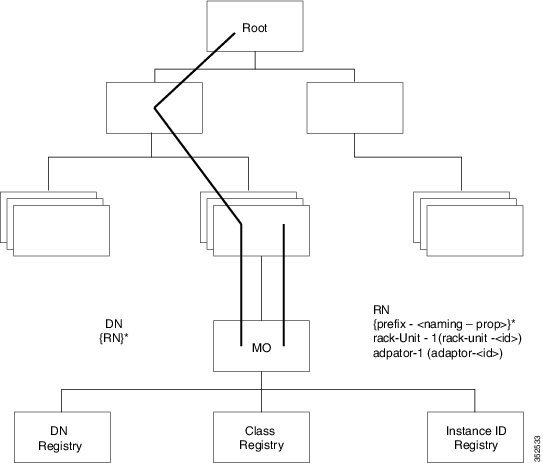
All the physical and logical components that compose a Cisco IMC are represented in a hierarchical Management Information Model (MIM), referred as the MIT. Each node in the tree represents a Managed Object (MO), identified by its unique distinguished name (DN).

Management Information Model

Managed Objects

Managed Objects are abstractions of Cisco IMC MIT resources, such as CPUs, DIMMs, adapter cards, fans, and power supply units. MOs represent any physical or logical entity configured or managed in the Cisco IMC MIT. For example, physical entities-CPUs, DIMMs, adapter cards, and fans and logical entities-users, communication services like HTTP, SSH are represented as MOs.

Managed Objects

Each MO is identified in the tree with its Distinguish Name (DN). The MO can be identified within the context of its parent with its relative name (RN). The DN identifies the place of the MO in the MIT. A DN is a concatenation of all the relative names that start from the root to the MO itself. Essentially, DN = [RN]/[RN]/[RN]/…/[RN].

In the following example, DN provides a fully qualified name for adapter-1 in the model.

< dn = "sys/rack-unit-1/adapter-1" />

This DN is composed of the following RN:

topSystem MO: rn="sys" computeRackUnit MO: rn="rack-unit-1" adapterUnit MO: rn ="adapter-<id>"

An RN has a value of one or more of the MO properties embedded in it. It allows you to differentiate multiple MOs of the same type within the context of the parent. Any properties that form part of the RN, are referred as "naming properties".

For instance, adapter MOs reside under a rack unit MO. The adapter MO contains the adapter identifier as part of its Rn (adapter-[Id]), which uniquely identifies each adapter MO in the context of a rack unit.

System Requirements

Before installing Cisco IMC PowerTool, ensure that the system meets the following requirements:

  • Install Windows PowerShell 5.1 or higher

  • .NET Framework Version 4.7.1 or higher

  • Windows PowerShell 4.0 or higher for DSC

Cisco UCS C-Series Servers

Cisco IMC PowerTool is compatible with the following Cisco IMC releases:

  • Release 4.2

  • Release 4.1

  • Release 4.0

  • Release 3.1

  • Release 3.0

  • Release 2.0 and higher

  • Release 1.5 and higher

Cisco UCS E-Series Servers

Cisco IMC PowerTool is compatible with the following Cisco UCS E-Series releases:

  • Release 2.2(1) and higher for the E-Series servers

Methods

Methods are Cisco IMC XML APIs used to manage and monitor the system. The following methods are supported:

  • Authentication

  • aaaLogin—Initial method for a login

  • aaaRefresh—Refreshes the current authentication cookie

  • aaaLogout—Exits the current session and deactivates the corresponding authentication cookie

  • configResolveDn—Retrieves objects by DN

  • configResolveClass—Retrieves objects of a given class

  • configResolveChildren—Retrieves the child objects of an object

  • configResolveParent—Retrieves the parent object of an object

  • configConfMo—Affects a single managed object. For example, a DN

  • eventSubscribe—Used to register events

Cisco IMC PowerTool Mapping

Most of the Cisco IMC PowerTool cmdlets are generated from the MO specification. A noun is used in place of the type (Fan instead of EquipmentFan, and so on). Get, Add, Set, Remove cmdlets, or a subset are generated for the various MO types. All cmdlets support the XML parameter, which dumps the XML request and response on the screen.

Add Cmdlet

-Uses the ConfigConfMo method with the MO status "created" with the specified property values. If the Force parameter is specified, there is no prompt for confirmation.

Get Cmdlet

-Uses the ConfigResolveClass method to retrieve MOs. XML API of Cisco IMC does not support any filters. Once the property parameters are specified, the PowerTool collects the instances of the specified class and filters on the client side using, the property values.

Set Cmdlet

-Uses the ConfigConfMo method with MO status "modified" with the specified property values. If the Force parameter is specified, there is no prompt for confirmation.

Remove Cmdlet

-Uses the ConfigConfMo method with the MO status "deleted." If the Force parameter is specified, there is no prompt for confirmation.

This table lists the properties that can be specified for a given verb:

Property

Get

Add

Set

Naming

Yes (Positional)

Yes (Positional)

No

Create-Only

Yes

Yes

No

Read-Write

Yes

Yes

Yes

Operational/ Read-Only

Yes

No

No

This table lists the type that appears in the pipeline for corresponding cmdlets:

Verb or Type

Pipeline Input

Get

Singleton-None non-singleton-Parent Type

Add

Singleton-None non-singleton-Parent Type

Set

MO has naming property-Same type MO has no naming property-Same or Parent Type

Remove/Clear

Same Type

This table lists the methods invoked to generate the required XML requests:

Cmdlet

Method

Add-Imc

Set-Imc

ConfigConfMo

Get-Imc

ConfigResolveClass with client-side filters

Get-ImcManagedObject -ClassId

ConfigResolveClass

Get-ImcManagedObject -ClassId -Dnlist

ConfigResolveClass (The output is then filtered for the matching Dns

Get-ImcManagedObject -Dn

ConfigResolveDn

Connect-Imc

AaaLogin

Disconnect-Imc

AaaLogout

Background

This is not a cmdlet. It is a background service

AaaRefresh

Get-ImcChild

ConfigResolveChildren

Get-ImcCmdletMeta is used to explore the MO types, the corresponding nouns, supported verbs, and properties of the MOs. It is also used to view the details of properties including the type, such as, naming, Read, or Write, and Cisco IMC version in which the property was introduced.