Overview

This document describes server node installation and replacement of internal server node components.

This section gives an overview of components and features.

Cisco UCS S3260 M5 Software/Firmware Requirements

The Cisco UCS S3260 system firmware and software requirements for using the Cisco UCS S3260 M5 server nodes are listed in the following table.

Table 1. S3260 System Minimum Levels for S3260 M5 Server Nodes

Software or Firmware

Minimum Version

Cisco IMC

3.1(3)

BIOS

3.1(3)

Cisco UCS Manager

(UCS Manager-controlled system only)

3.2(3)

Cisco UCS S3260 M5 Server Node External Features

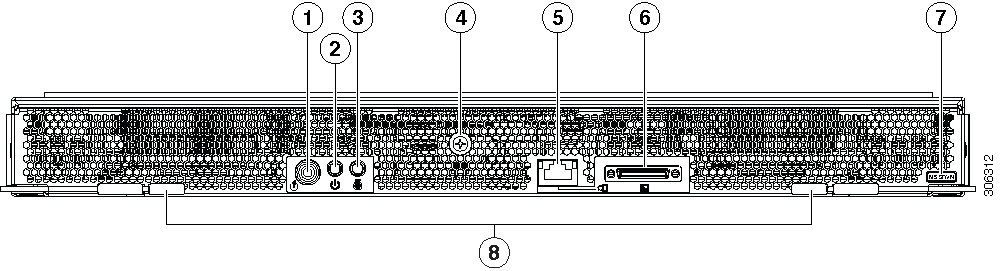
Figure 1. M5 Server Node Rear Panel

1

Server node reset button

5

1 Gb Ethernet LOM port

2

Server node power button/LED

6

KVM cable connector

Used with KVM cable that provides one DB-15 VGA, one DB-9 serial, and two USB connectors.

3

Unit identification button/LED

7

S3260 M5 server node label (M5 SVRN)

4

Captive thumbscrew for internal NVMe SSD sled

8

Ejector levers (two)

Externally Viewable LEDs

Table 2. S3260 M5 Server Node Externally Viewable LEDs

LED

Definition of States

Server node power

  • Off—There is no power to the server node.

  • Amber—The server node is in standby power mode. Power is supplied only to the Cisco IMC.

  • Green—The server node is in main power mode. Power is supplied to all server node components.

Unit identification

  • Off—The identification LED is not activated.

  • Blue, blinking—The identification LED is activated.

1 Gb Ethernet management port link speed (the LED on the left side of the port)

  • Off—Link speed is 10 Mbps.

  • Amber—Link speed is 100 Mbps.

  • Green—Link speed is 1 Gbps.

1 Gb Ethernet management port link status (the LED on the right side of the port)

  • Off—No link is present.

  • Green—Link is active.

  • Green, Blinking—Traffic is present on the active link.

Rear Panel Buttons

  • Reset button—You can hold this button down for 5 seconds and then release it to restart the server node controller chipset if other methods of restarting do not work.

  • Server node power button/LED—You can press this button to put the server node in a standby power state or return it to full power instead of shutting down the entire system.

  • Unit identification button/LED—This LED can be activated by pressing the button or by activating it from the software interface. This helps to locate a specific server node.

Local Console Connection

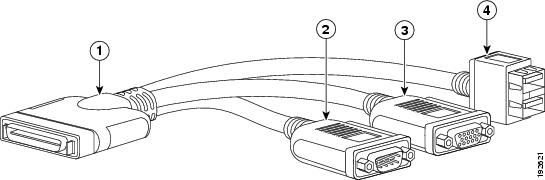
The local console connector allows a direct connection to a server node to allow management tasks to be done directly rather than remotely. The port uses the KVM cable N20-BKVM; it has a DB9 serial connector, a VGA connector for a monitor, and dual USB ports for a keyboard and mouse.

Figure 2. KVM Cable for Blade Servers

1

Connector to blade server local console connection

2

DB9 serial connector

3

VGA connector for a monitor

4

2-port USB connector for a mouse and keyboard

S3260 M5 Server Node Internal Component Locations

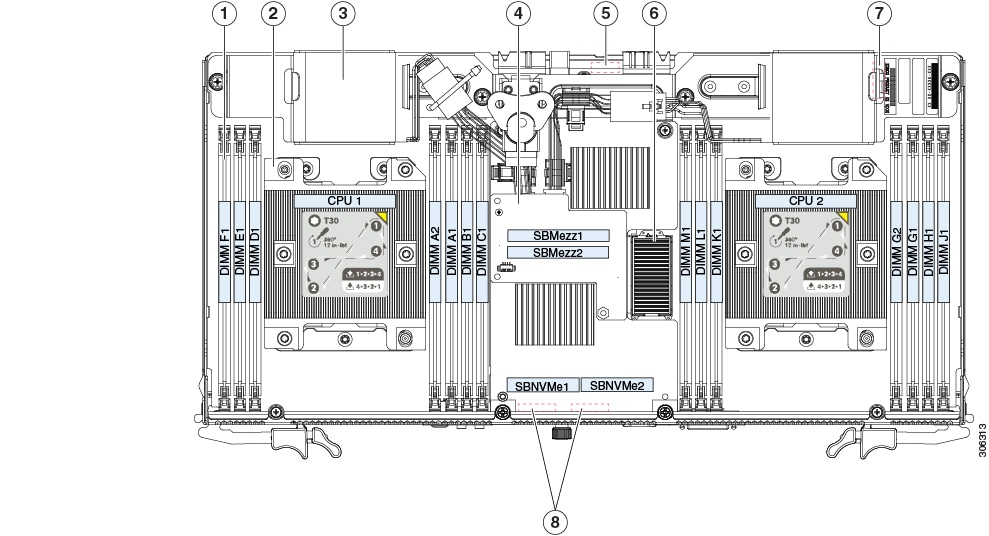
Figure 3. M5 Server Node Internal Components

1

DIMM sockets (7 sockets for each CPU, 14 total)

5

Trusted platform module (TPM) socket location on server board

2

CPUs and heatsinks (two)

6

Mezzanine-style connector for optional I/O expander module

3

RAID supercap unit on RAID card bracket (two, one on each side)

7

RTC battery CR2032 socket location on server board

4

Cisco storage controller card, dual RAID or dual HBA

There is one mezzanine-style connector for the card, but the software designations of the dual controllers are SBMezz1 and SBMezz2.

8

NVMe SSD socket locations, not visible in this view on server board under storage controller card

Software designation of connectors SBNVMe1, SBNVMe2)

The NVMe SSD sled, which holds up to two 2.5-inch NVMe PCIe SSDs, plugs into both sockets.

I/O Expander Internal Component Locations


Note

When using S3260 M5 server nodes in the chassis, the supported storage controllers are supported in the server nodes only. The storage controllers are not supported in the I/O expander.


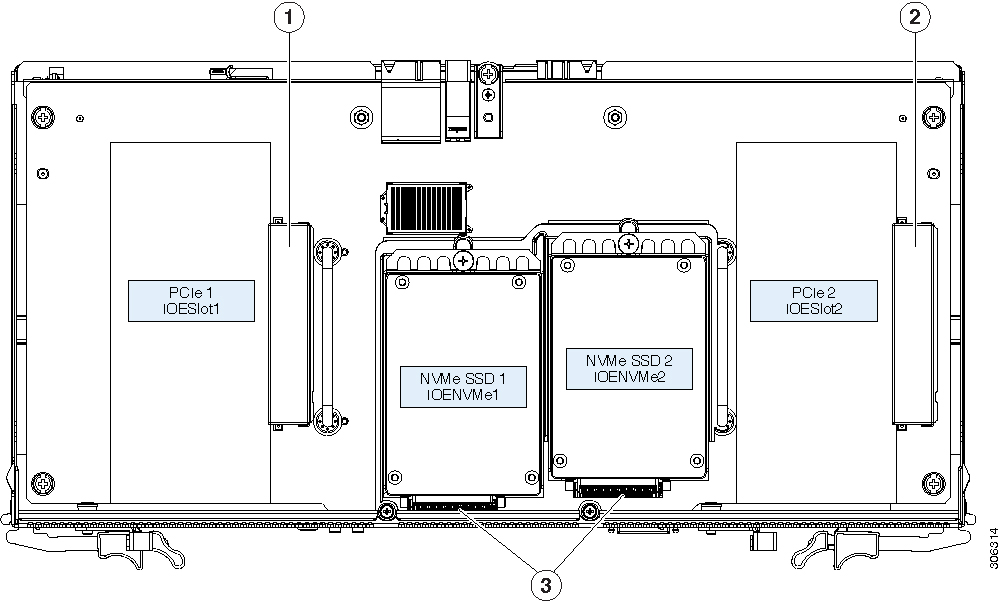
Figure 4. I/O Expander Internal Components

1

PCIe slot 1

(software designation IOESlot1)

x8 electrical lane, x16 physical

3

NVMe SSD sockets

(software designations IOENVMe1 and IOENVMe2)

2

PCIe slot 2

(software designation IOESlot2)

x8 electrical lane, x16 physical

-