Cisco UCS C-Series Integration with Cisco UCS Manager
This chapter includes the following sections:
- Overview
- Integrating C-Series Rack Mount Server with Cisco UCS Manager
- FEX Connection Mode and Discovery
- Maximum Configurable vNICs/vHBAs Based on Number of FEX Uplinks
- Supported RAID/Storage Controller Configurations
Overview
This guide contains information and procedures for installing Cisco UCS Rack Mount Servers for integration with Cisco UCS Manager release 2.2.
Cisco UCS C-Series Rack-Mount Servers are managed by the built-in standalone software, Cisco Integrated Management Controller (CIMC) . When a C-Series Rack-Mount Server is integrated with Cisco UCS Manager, the CIMC does not manage the server anymore. Instead it is managed with the Cisco UCS Manager software. You will manage the server using the Cisco UCS Manager GUI or Cisco UCS Manager CLI.
If your server is not factory new, make sure to reset the CIMC to factory default settings before integrating the server with Cisco UCS Manager.
You can integrate Cisco UCS C-Series Rack-Mount Servers with Cisco UCS Manager in either one of the following setup:
Integrating C-Series Rack Mount Server with Cisco UCS Manager
Cisco UCS Manager 2.2 provides three connectivity modes for Cisco UCS C-Series Rack-Mount Server management. The following are the connectivity modes:
-
Dual-wire Management (Shared LOM): Shared LAN on Motherboard (LOM) ports on the rack server are used exclusively for carrying management traffic. A separate cable connected to one of the ports on the PCIe card carries the data traffic. Using two separate cables for managing data traffic and management traffic is also referred to as dual-wire management.
- SingleConnect (Sideband): Using Network Controller Sideband Interface (NC-SI), Cisco UCS VIC 1225 Virtual Interface Card (VIC) connects one cable that can carry both data traffic and management traffic. This feature is referred to as SingleConnect. For more information, see SingleConnect.
-
Direct Connect Mode: Cisco UCS Manager release version 2.2 introduces an additional rack server management mode using direct connection (Sideband) to the Fabric Interconnect.
 Note | The LOM ports on Cisco UCS C-Series Rack-Mount Servers integrated with Cisco UCS Manager can not be used for data traffic. The LOM ports are disabled when the C-Series Rack-Mount Servers are in Cisco UCS Manager mode. |
The general prerequisites for Dual-wire integration with Cisco UCS Manager are built into the C-Series Rack-Mount Server CIMC release 1.4(6) or later. If you want to use the SingleConnect or direct connect modes you must have the following:
-
Server CIMC release 1.4(6) or later
-
Cisco UCS VIC 1225 Virtual Interface Card
-
Cisco UCS VIC 1227 (MLOM)
-
Cisco UCS VIC 1225T Virtual Interface Card
-
Cisco UCS VIC 1227T (MLOM)
-
Cisco UCS VIC 1387 (MLOM)
-
Cisco UCS VIC 1385
For the third generation Cisco UCS VIC adapter or later (VIC 13xx), we recommend that you reset CIMC to factory default before connecting the Cisco VIC adapter to the UCS Fabric Interconnect switch.
The following table lists theC-Series Rack-Mount Servers and supported management options:
|
Servers |
SingleConnect |
Direct Connect Mode |
Dual-wire Management |
|---|---|---|---|
|
Cisco UCS C22 M3 Server |
Yes |
Yes |
Yes |
|
Cisco UCS C24 M3 Server |
Yes |
Yes |
Yes |
|
Cisco UCS C200 M2 Server |
No |
No |
Yes |
|
Cisco UCS C210 M2 Server |
No |
No |
Yes |
|
Cisco UCS C220 M3 Server |
Yes |
Yes |
Yes |
|
Cisco UCS C220 M4 Server |
Yes |
Yes |
Yes |
|
Cisco UCS C240 M3 Server |
Yes |
Yes |
Yes |
|
Cisco UCS C240 M4 Server |
Yes |
Yes |
Yes |
|
Cisco UCS C250 M2 Server |
No |
No |
Yes |
|
Cisco UCS C260 M2 Server |
Yes |
Yes |
Yes |
|
Cisco UCS C420 M3 Server |
Yes |
Yes |
Yes |
|
Cisco UCS C460 M2 Server |
Yes |
Yes |
Yes |
|
Cisco UCS C460 M4 Server |
Yes |
Yes |
Yes |
Note | If you have a Cisco UCS Manager release earlier than 2.2(2a), integration is not supported for Cisco UCS C22 and C24 servers that have Intel E5-2400 v2 CPUs at this time. This integration is supported only with Intel E5-2400 v1 CPUs. |
Based on your server model and CIMC version, you can use either one of these three integration options to connect the rack server withCisco UCS Manager 2.2.
Cisco UCS Manager runs within the fabric interconnect (FI). With earlier Cisco UCS Manager releases, you need to use Fabric Extenders to connect the c-series server with the Fabric Interconnect to enable management with Cisco UCS Manager. With Cisco UCS Manager release 2.2, you can directly connect the server adapter with the Fabric Interconnect without using the Fabric Extender.
You can use any of the interfaces available with this management service to access, configure, administer, and monitor the network and server resources for all chassis connected to the fabric interconnect. For information about the Cisco UCS 6100 Series or 6200 Series fabric interconnects, see the documentation at the following links:
For information about the Cisco Nexus 2232 fabric extenders (FEXes) in the configuration, see the documentation at the following link:
Hardware Maintenance
Replacing servers and certain adapter cards requires that the server be decommissioned and recommissioned. See the Decommissioning a Rack-Mount Server and Recommissioning a Rack-Mount Server sections in the appropriate Cisco UCS Manager Configuration Guide.
FEX Connection Mode and Discovery
You can connect the FEX to the FI in two ways. Cisco UCS Manager FI discovers the FEX based on the FEX/Chassis discovery mode. The FEX connection modes are:
-
Hard-Pinning mode: The server facing FEX ports are pinned to the connected uplink ports when the FEX is discovered. Cisco UCS Manager pins the server-facing ports to the uplink ports based on the number of acknowledged uplink ports. After the pinning, if you add a new uplink or delete an existing uplink, you must manually acknowledge the FEX to apply the changes.
-
Port-Channel mode: Port-Channel mode does not have pinning. A single port channel works as the uplink to all server-facing ports. And all uplink ports are members of this single port channel. If one of the uplink ports go down, the traffic is automatically distributed to another available uplink port.
Note | Port channel mode applies only to the 6200 series FIs. |
-
When port-channel uplinks from the FEX are connected only within a set of eight ports managed by a single chip, Cisco UCS Manager maximizes the number of VIFs used in service profiles deployed on the servers.
-
If uplink connections are distributed across ports managed by separate chips, the VIF count is decreased. For example, if you connect seven members of the port channel to ports 1–7, but the eighth member to port 9, this port channel can only support VIFs as though it had one member.
The Cisco UCS 6200 Series FI has six sets of eight contiguous ports. Each set of ports is managed by a single chip. For more information on FEX discovery policies and port-channel allocation, see the appropriate Cisco UCS Manager Configuration Guide.
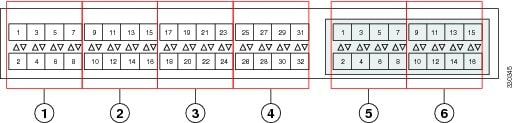
Maximum Configurable vNICs/vHBAs Based on Number of FEX Uplinks
The following table describes maximum configurable vNICs/vHBAs on a VIC adapter based on the number of FEX uplinks:
|
Acknowledged link between FEX and FI |
Maximum configurable vNICs/vHBA on a VIC adapter for the VIC adapter 1225, 1225T, 1227, 1227T, 1385, 1387T |
Maximum configurable vNICs/vHBA on a VIC adapter for the adapter VIC P81E |
|---|---|---|
|
1 |
Not supported |
Not supported |
|
2 |
3 |
4 |
|
4 |
9 |
10 |
|
8 |
21 |
22 |
|
Acknowledged link between FEX and FI |
Maximum configurable vNICs/vHBA on a VIC adapter for the VIC adapter 1225, 1225T, 1227, 1227T, 1385, 1387T |
Maximum configurable vNICs/vHBA on a VIC adapter for the VIC adapter P81E |
|---|---|---|
|
1 |
12 |
13 |
|
2 |
27 |
28 |
|
4 |
57 |
58 |
|
8 |
117 |
118 |
Supported RAID/Storage Controller Configurations
The following RAID/Storage controllers are supported for C-Series rack-mount servers integration with Cisco UCS Manager.
| Server | Supported RAID Controller |
|---|---|
|
Cisco UCS C240 M3 (UCSC-C240-M3) |
|
|
Cisco UCS 220 M3 (UCSC-C220-M3) |
|
|
Cisco UCS 22 M3 (UCSC-C22-M3) |
|
|
Cisco UCS C24 M3 (UCSC-C24-M3) |
|
|
Cisco UCS C240 M4 (UCSC-C240-M4) |
|
|
Cisco UCS C220 M4 (UCSC-C220-M4) |
|
|
Cisco UCS C460 M4 (UCSC-C460-M4) |
|
Only servers without expanders can have more than one RAID controllers in the Cisco UCS Manager integrated mode. The following servers are allowed to have more than one RAID controllers in the Cisco UCS Manager integrated mode:
-
Cisco UCS C24 M3 (UCSC-C24-M3S2)
-
Cisco UCS C420 M3 (UCSC-C420-M3)
-
Cisco UCS C240 M3 (UCSC-C240-M3S2)
-
Cisco UCS C240 M3 NEBS (UCSC-C240-SNEBS)
-
Cisco UCS C260 M2 (C260-BASE-2646)
Any server not on this list that has more than one RAID controllers installed fails discovery.
Note | The Embedded MegaRAID (Intel Corporation Patsburg Dual 4-Port SATA Storage Control Unit) controller is not supported in the Cisco UCS Manager integration. |
 Feedback