Configuring MLD Snooping

Information About MLD Snooping

Multicast Listener Discovery (MLD) is part of the IPv6 protocol to support and manage IPv6 multicast between a host and the multicast router. IP multicast allows IP datagrams to be transmitted to a set of hosts that make up a multicast group. Hosts can dynamically join or leave multicast groups to minimize network load and to achieve effective data transmission.

MLD snooping monitors the MLD packets between a host and the router. MLD snooping dynamically creates, maintains, and deletes the multicast address table based on the joining and leaving of the multicast group members. With MLD snooping, IPv6 multicast data is selectively forwarded to a list of ports that want to receive the data, instead of being flooded to all ports in a VLAN. This list is constructed by snooping IPv6 multicast control packets and maintained in a multicast address table.
How to Configure MLD Snooping

The following sections provide configuration information about MLD snooping.

Enabling MLD Snooping

To enable MLD Snooping on the device, perform the following procedure:

Procedure

  Command or Action Purpose
Step 1

configure terminal

Example:

Device#configure terminal

Enters global configuration mode.

Step 2

mld-snooping

Example:

Device(config)# mld-snooping

Enables MLD snooping on the device.

Configuring MLD Snooping Timer

To configure MLD Snooping timer, perform the following procedure:

SUMMARY STEPS

  1. configure terminal
  2. mld-snooping host-aging-time time
  3. mld-snooping max-response-time time

DETAILED STEPS

  Command or Action Purpose
Step 1

configure terminal

Example:

Device#configure terminal

Enters global configuration mode.

Step 2

mld-snooping host-aging-time time

Example:

Device(config)# mld-snooping host-aging-time 1000

Configures the aging time of dynamic multicast ports.

By default, the aging time of a dynamic multicast port is 300 seconds.

Step 3

mld-snooping max-response-time time

Example:

Device(config)# mld-snooping max-response-time 7

Configures the maximum response time of the leave packets.

By default, the maximum response time of leave packets is 10 seconds.

Configuring Fast-Leave

Fast Leave feature allows a port to be immediately removed from a multicast group upon receiving a leave packet on that port. If the Fast Leave feature is not enabled, MLD Snooping waits for a period of time before removing the port from the multicast group. Enabling the Fast Leave feature when there is only one user on the port provides for effective bandwidth utilization.

SUMMARY STEPS

  1. configure terminal
  2. interface ethernet interface-num
  3. mld-snooping fast-leave

DETAILED STEPS

  Command or Action Purpose
Step 1

configure terminal

Example:

Device# configure terminal

Enters global configuration mode.

Step 2

interface ethernet interface-num

Example:

Device(config)# interface ethernet 1/1

Enters the interface configuration mode.

Step 3

mld-snooping fast-leave

Example:

Device(config-if-ethernet-1/1)# mld-snooping fast-leave

Enables the Fast Leave feature on the port.

To disable Fast Leave, use the no mld-snooping fast-leave command.

By default, Fast Leave is disabled on the device.

Configuring Maximum Multicast Groups on a Port

To set the maximum number of multicast groups that a port can join, perform the following procedure.

SUMMARY STEPS

  1. configure terminal
  2. interface ethernet interface-num
  3. mld-snooping group-limit number

DETAILED STEPS

  Command or Action Purpose
Step 1

configure terminal

Example:

Device#configure terminal

Enters global configuration mode.

Step 2

interface ethernet interface-num

Example:

Device(config)#interface ethernet 1/1

Enters the interface configuration mode.

Step 3

mld-snooping group-limit number

Example:

Device(config-if)#mld-snooping group-limit 100

Specifies the maximum number of multicast groups that the interface can join.

By default, the maximum number of multicast groups on an interface is the largest number of multicast packets that a device can learn.

Configuring Multicast Learning Strategy of MLD Snooping

You can configure a multicast learning strategy to allow the device to discover only specific multicast groups. The device can discover only those multicast groups that are a part of allowed list. Multicast groups that are a part of blocked list are not discovered by the device.

SUMMARY STEPS

  1. configure terminal
  2. mld-snooping { permit| deny}{ group all | vlan vlanid}
  3. interface ethernet interface-num
  4. mld-snooping { permit| deny} group-range MAC multi-count num vlan vlanid
  5. mld-snooping { permit | deny} group MAC vlan vlanid

DETAILED STEPS

  Command or Action Purpose
Step 1

configure terminal

Example:

Device#configure terminal

Enters global configuration mode.

Step 2

mld-snooping { permit| deny}{ group all | vlan vlanid}

Example:

Device(config)#mld-snooping permit vlan 2

Specifies a learning rule on the device for the multicast groups that are not a part of blocked list or the allowed list.

By default, the device discovers all those multicast groups that are not part of the blocked list or the allowed list.

Step 3

interface ethernet interface-num

Example:

Device(config)#interface ethernet 1/1

Enters the interface configuration mode.

Step 4

mld-snooping { permit| deny} group-range MAC multi-count num vlan vlanid

Example:

Device(config-if-ethernet-1/1)# mld-snooping permit group-range 33:33:5e:09:08:07 multi-count 5 vlan 4

Specifies the list of multicast groups that are permitted or denied by MLD snooping in the particular VLAN for the given range of MAC addresses.

Step 5

mld-snooping { permit | deny} group MAC vlan vlanid

Example:

Device(config-if-ethernet-1/1)# mld-snooping permit group 33:33:5e:09:08:07 vlan 5

Specifies the list of multicast groups that are permitted or denied by MLD snooping in the particular VLAN.

Configuring MLD Snooping Querier

In a network where IP multicast routing is configured, the IP multicast router acts as the MLD querier. If the IP multicast traffic in a VLAN only needs to be Layer 2 switched, an IP multicast router is not required, but without an IP multicast router on the VLAN, you must configure another switch as the MLD querier so that it can send queries.

When enabled, the MLD snooping querier sends out periodic MLD queries that trigger MLD report messages from the device that wants to receive IP multicast traffic. MLD snooping listens to these MLD reports to establish appropriate forwarding.

You can enable the MLD snooping querier on all the devices in the VLAN, but for each VLAN that is connected to devices that use MLD to report interest in IP multicast traffic, you must configure at least one device as the MLD snooping querier.

You can configure the MLD snooping querier to forward the source address, maximum response time, and query interval for sending general query messages.

SUMMARY STEPS

  1. configure terminal
  2. mld-snooping querier
  3. mld-snooping query-interval interval
  4. mld-snooping query-max-respond time
  5. mld-snooping querier-vlan vlanid

DETAILED STEPS

  Command or Action Purpose
Step 1

configure terminal

Example:

Device#configure terminal

Enters global configuration mode.

Step 2

mld-snooping querier

Example:

Device(config)#mld-snooping querier

Enables the MLD snooping querier.

Step 3

mld-snooping query-interval interval

Example:

Device(config)#mld-snooping query-interval 1000

Specifies the time period that the device waits after sending a group-specific query to determine if hosts are still interested in a specific multicast group.

Valid query interval is 1 to 30000 seconds.

Step 4

mld-snooping query-max-respond time

Example:

Device(config)#mld-snooping query-max-respond 10

Specifies the maximum response time for the general query packets.

Valid values are 1 to 25 seconds.

Step 5

mld-snooping querier-vlan vlanid

Example:

Device(config)#mld-snooping querier-vlan 3

Specifies the VLAN that carries the general query packets.

Configuring a Routing Port

You can add a router port to the dynamic multicast so that the routing port also forwards the multicast traffic packets. To configure a multicast routing port, perform the following procedure.

SUMMARY STEPS

  1. configure terminal
  2. mld-snooping route-port forward
  3. mld-snooping router-port-age { on| off| age-time}
  4. mld-snooping route-port vlan vlanid interface { all | ethernet interface-num }

DETAILED STEPS

  Command or Action Purpose
Step 1

configure terminal

Example:

Device#configure terminal

Enters global configuration mode.

Step 2

mld-snooping route-port forward

Example:

Device(config)#mld-snooping route-port forward

Configures the routing port to forward mutlicast traffic.

Step 3

mld-snooping router-port-age { on| off| age-time}

Example:

Device(config)# mld-snooping router-port-age on

Configures the aging time of the dynamic routing port, in seconds.

Step 4

mld-snooping route-port vlan vlanid interface { all | ethernet interface-num }

Example:

Device(config)#mld-snooping route-port vlan 5 interface all

Configures the mutlicast router VLAN ID and specifies the interface to the multicast router.

Configuring a Multicast VLAN

You can configure multicast VLAN on a port, which ensures a more efficient distribution of multicast packets across the network. After the multicast VLAN feature is enabled on a port, the device forwards the MLD packets to the multicast VLAN regardless of the VLAN to which the MLD packets belong.

SUMMARY STEPS

  1. configure terminal
  2. interface ethernet interface-num
  3. mld-snooping multicast vlan vlanid

DETAILED STEPS

  Command or Action Purpose
Step 1

configure terminal

Example:

Device#configure terminal

Enters global configuration mode.

Step 2

interface ethernet interface-num

Example:

Device(config)#interface ethernet 1/1

Enters the interface configuration mode.

Step 3

mld-snooping multicast vlan vlanid

Example:

Device(config-if)# mld-snooping multicast vlan 9

Configures a multicast VLAN on the interface.

You can disable the mutlicast VLAN for a port using the no form the command.

Configuring a Port to Record Host MAC Address

To enable the recording of MAC address of the source of an MLD report packet, perform the following procedure.

SUMMARY STEPS

  1. configure terminal
  2. interface ethernet interface-num
  3. mld-snooping record-host

DETAILED STEPS

  Command or Action Purpose
Step 1

configure terminal

Example:

Device# configure terminal

Enters global configuration mode.

Step 2

interface ethernet interface-num

Example:

Device(config)# interface ethernet 1/1

Enters the interface configuration mode.

Step 3

mld-snooping record-host

Example:

Device(config-if)# mld-snooping record-host

Configures the port to record the host MAC address.

Verifying MLD Snooping Configuration

To verify the MLD snooping configuration, run these commands, as required.

Command

Description

show mld-snooping

Displays MLD snooping configurations.

show mld-snooping router-dynamic

Displays dynamic router ports.

show mld-snooping router-static

Displays static route ports.

show multicast mld-snooping interface { ethernet interface-num | gpon interface-num }

Displays information about the multicast group.

Configuration Example for MLD Snooping

Network Requirements

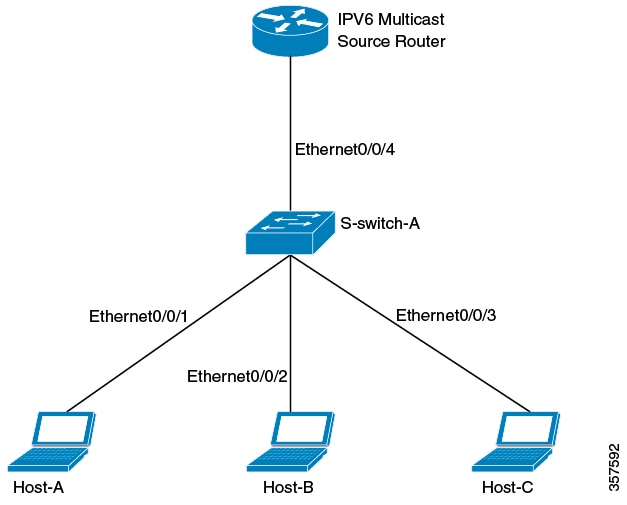
Consider a network topology wherein hosts Host-A, Host-B, and Host-C belong to VLAN 2, VLAN 3, and VLAN 4 respectively. The hosts are configured to receive the data of the multicast group with the address FF02::01::0101, FF02::01::0102 and FF02::01::0103 respectively.

Figure 1. MLD Snooping Configuration

Configuration Steps

  1. Configure S-switch-A

    Configure VLAN 2, VLAN 3 and VLAN 4, and then add Ethernet 0/0/1, Ethernet 0/0/2 and Ethernet 0/0/3 to VLAN 2, VLAN 3, and VLAN 4 respectively.

    S-switch-A(config)# vlan 2
    S-switch-A(config-if-vlan)# switchport ethernet 0/0/1
    S-switch-A(config-if-vlan)# exit
    S-switch-A(config)# vlan 3
    S-switch-A(config-if-vlan)# switchport ethernet 0/0/2
    S-switch-A(config-if-vlan)# exit
    S-switch-A(config)# vlan 4
    S-switch-A(config-if-vlan)# switchport ethernet 0/0/3
    S-switch-A(config-if-vlan)# exit
    
  2. Enable MLD Snooping

    S-switch-A(config)# mld-snooping

    When Host-A, Host-B, and Host-C send MLD report packets to S-switch-A, S-switch-A learns the corresponding multicast group entries. When the IPv6 Multicast Source Router sends MLD query packets to S-switch-A, S-switch-A learns the corresponding routing port entries.

  3. Display and verify the multicast groups learned by S-switch-A

    S-switch-A(config)# show multicast mld-snooping interface
    show mld-snooping multicast table information
    MAC Address : 33:33:00:01:00:01
    IP Address   :  FF02::01::0101
    VLAN ID     : 2 
    Aging time: 297
    MLD Port   : e1/1
    MLD Version: V1, V2
    
    MAC Address : 33:33:00:01:00:02 
    IP Address   :  FF02::01::0102
    VLAN ID     : 3  
    Aging time: 290
    MLD Port   : e1/1
    MLD Version: V1, V2
    . 
    
    MAC Address : 33:33:00:01:00:03 
    IP Address   :  FF02::01::0103
    VLAN ID     : 4  
    Aging time: 281
    MLD Port   : e1/1
    MLD Version: V1, V2
    
    Total entries: 3 .
    
    S-switch-A(config)# show mld-snooping router-dynamic  
      Port        VID     Age       Type
      e0/0/4       2       284      { QUERY }
      e0/0/4       3       284      { QUERY }
      e0/0/4       4       284      { QUERY }
    Total Record: 3
    

    When a Multicast Source Router sends the multicast data stream FF02::01::0101, FF02::01::0102 and FF02::01::0103, S-switch-A distributes the corresponding data stream to Host-A, Host-B and Host-C.