Configuring IGMP Snooping

Information About IGMP Snooping

Internet Group Management Protocol (IGMP) is a part of the IP and supports and manages IP multicast between a host and a multicast router. IP multicast allows the transfer of IP data to a host collection formed by a multicast group. The relationships of the multicast group members are dynamic. A host can dynamically add or exit this group to reduce network load to a minimum, and to improve effective data transmission in a network.

IGMP Snooping monitors IGMP packets between a host and routers. It can dynamically create, maintain, and delete a multicast address table. A multicast frame can transfer a packet according to its own multicast address table.
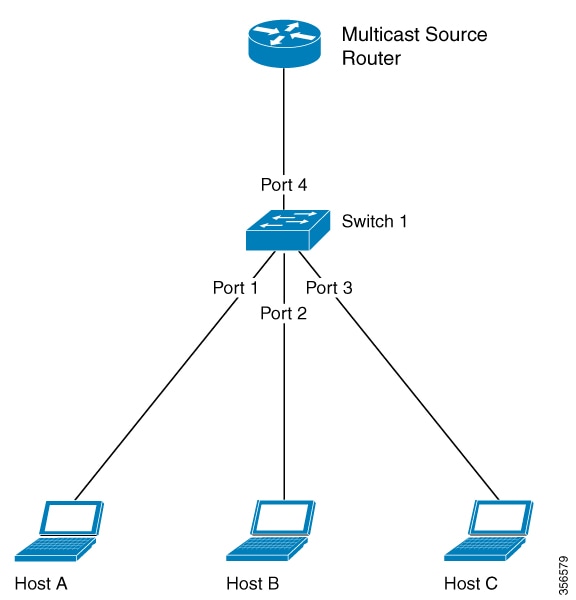
Figure 1. IGMP Snooping Configuration

How to Configure SNMP Snooping

The following topics provide information about the procedures you should perform to configure the IGMP snooping feature.

Enabling IGMP Snooping

To enable IGMP snooping, perform this procedure.

SUMMARY STEPS

  1. enable
  2. configure terminal
  3. igmp-snooping

DETAILED STEPS

  Command or Action Purpose
Step 1

enable

Example:

Device> enable 

Enables privileged EXEC mode. Enter your password, if prompted.

Step 2

configure terminal

Example:

Device#configure terminal 

Enters global configuration mode.

Step 3

igmp-snooping

Example:

Device(config)# igmp-snooping

Enables IGMP snooping.

Configuring the IGMP Snooping Timer

After receiving an IGMP leave message, IGMP snooping does not delete a port directly from the multicast group. Instead, it waits for a time period before deleting the port from the multicast group. You can configure this time period using the IGMP snooping timer. To configure IGMP snooping timer, perform this procedure.

SUMMARY STEPS

  1. enable
  2. configure terminal
  3. igmp-snooping host-aging-time time
  4. igmp-snooping max-response-time time

DETAILED STEPS

  Command or Action Purpose
Step 1

enable

Example:

Device> enable 

Enables privileged EXEC mode. Enter your password, if prompted.

Step 2

configure terminal

Example:

Device#configure terminal 

Enters global configuration mode.

Step 3

igmp-snooping host-aging-time time

Example:

Device(config)# igmp-snooping host-aging time 300

Configures the aging time of dynamic multicast members. By default, the aging time of dynamic multicast member is 300 seconds.

Step 4

igmp-snooping max-response-time time

Example:

Device(config)# igmp-snooping max-response-time 10

Configures the maximum response time of IGMP snooping queries. It also configures the maximum waiting time for deleting group ports after receiving a leave packet. The default setting is 10 seconds.

Configuring Fast Leave

Fast Leave is a feature that allows a port to be removed from a multicast group upon receiving an IGMP Leave message.When you configure Fast Leave, IGMP Snooping removes the port directly from the multicast group upon receiving an IGMP Leave message. Fast Leave helps save bandwidth. To enable Fast Leave, perform this procedure.

SUMMARY STEPS

  1. enable
  2. configure terminal
  3. interface ethernet port-number
  4. igmp-snooping fast-leave

DETAILED STEPS

  Command or Action Purpose
Step 1

enable

Example:

Device> enable 

Enables privileged EXEC mode. Enter your password, if prompted.

Step 2

configure terminal

Example:

Device#configure terminal 

Enters global configuration mode.

Step 3

interface ethernet port-number

Example:

Device(config)# interface ethernet 1/1

Enters interface configuration mode.

Step 4

igmp-snooping fast-leave

Example:

Device (config-if)# igmp-snooping fast-leave

Configures Fast Leave. Note that Fast Leave isn't configured by default.

To disable Fast Leave, use the no igmp-snooping fast-leave command.

Configuring the Maximum Number of Multicast Groups

To configure the maximum number of multicast groups that an interface or a port can learn, perform this procedure.

SUMMARY STEPS

  1. enable
  2. configure terminal
  3. interface ethernet port-number
  4. igmp-snooping group-limit number
  5. igmp-snooping group-limit action { replace| drop}

DETAILED STEPS

  Command or Action Purpose
Step 1

enable

Example:

Device> enable 

Enables privileged EXEC mode. Enter your password, if prompted.

Step 2

configure terminal

Example:

Device#configure terminal 

Enters global configuration mode.

Step 3

interface ethernet port-number

Example:

Device(config)# interface ethernet 1/1

Enters interface configuration mode.

Step 4

igmp-snooping group-limit number

Example:

Device(config-if)# igmp-snooping group-limit 20

Configures the maximum number of multicast groups that the port can learn.

IGMP-Snooping group-limit refers to the maximum number of multicast groups which the port can learn. It also refers to the maximum number of multicast groups which the interface can learn. The maximum number for each may be different.

To disable the learning of the maximum number of multicast groups, use the no igmp-snooping group-limit command.

Step 5

igmp-snooping group-limit action { replace| drop}

Example:

Device(config-if)# igmp-snooping group-limit action replace

Configures the action that the port performs when it reaches the maximum number of multicast groups it can learn.

What to do next


Note

IGMP-Snooping group-limit refers to the maximum number of multicast groups which the port can learn. It also refers to the maximum number of multicast groups which the interface can learn. The maximum number for each may be different.


Configuring the IGMP-Snooping Learning Strategy

You can configure a learning strategy to control the multicast groups that a device learns. If you add a multicast group to the blocked list, the router will not learn the multicast group. If you add a multicast group to the allowed list, the router learns the multicast group.

SUMMARY STEPS

  1. enable
  2. configure terminal
  3. igmp-snooping { permit| deny} { group all| vlan vlan-id}
  4. interface ethernet port-number
  5. igmp-snooping { permit| deny} group-range MAC multi-count multi-count-numbervlan vlan-id
  6. igmp-snooping{ permit| deny} { group all| vlanvlan-list}

DETAILED STEPS

  Command or Action Purpose
Step 1

enable

Example:

Device> enable 

Enables privileged EXEC mode. Enter your password, if prompted.

Step 2

configure terminal

Example:

Device#configure terminal 

Enters global configuration mode.

Step 3

igmp-snooping { permit| deny} { group all| vlan vlan-id}

Example:

Device(config)# igmp-snooping permit group all

Configures the default learning rule for multicast groups that are not in the blocked list or the allowed list. By default, the learning rule for all the multicast groups that are not in the blocked list or the allowed list is to learn all the multicast groups.

Step 4

interface ethernet port-number

Example:

Device(config)# interface ethernet 1/1

Enters interface configuration mode.

Step 5

igmp-snooping { permit| deny} group-range MAC multi-count multi-count-numbervlan vlan-id

Example:

Device(config)# igmp-snooping permit group range 01:00:5e:09:08:07 multi-count 12 vlan 1 

Configures the port to learn (or not learn) the range of MAC addresses and VLAN IDs.

Step 6

igmp-snooping{ permit| deny} { group all| vlanvlan-list}

Example:

Device (config)# igmp-snooping permit vlan 1-50

Configures the port to learn (or not to learn) groups and list of VLAn IDs.

Configuring the IGMP Snooping Querier

You can configure the IGMP snooping querier to enable a Layer 2 switch to send general query packets. The querier sends the packets on the data link layer to establish and maintain multicast forwarding entries. You can also configure the IGMP snooping querier to send VLANs, source addresses, maximum response times, and query cycles for general queries. To configure the IGMP snooping querier, perform this procedure.

SUMMARY STEPS

  1. enable
  2. configure terminal
  3. igmp-snooping querier
  4. igmp-snooping querier version version-id
  5. igmp-snooping querier-vlan vlan-list
  6. igmp-snooping query-interval interval
  7. igmp-snooping query-max-respond time
  8. igmp-snooping general-query source-ip ip-address

DETAILED STEPS

  Command or Action Purpose
Step 1

enable

Example:

Device> enable 

Enables privileged EXEC mode. Enter your password, if prompted.

Step 2

configure terminal

Example:

Device#configure terminal 

Enters global configuration mode.

Step 3

igmp-snooping querier

Example:

Device(config)# igmp-snooping querier

Enables the IGMP snooping querier.

Disable the IGMP snooping querier by using the no igmp-snooping querier command.

Step 4

igmp-snooping querier version version-id

Example:

Device(config)# igmp-snooping querier version 2

Configures the version of the querier. The default version is version 2.

Step 5

igmp-snooping querier-vlan vlan-list

Example:

Device(config)# igmp-snooping querier-vlan 1-50

Configures VLANs for general query packets.

Disable the VLAN configurations for the general query packets by using the no igmp-snooping querier-vlan command.

Step 6

igmp-snooping query-interval interval

Example:

Device(config)# igmp-snooping query-interval 500

Configures the interval, in seconds, for sending the general query packets. The range is 1 to 30000 seconds.

Disable the interval for sending general query packets by using the no igmp-snooping query-interval command.

Step 7

igmp-snooping query-max-respond time

Example:

Device(config)# igmp-snooping query-max-respond 10

Configures the maximum response time, in seconds, for the general query packets. The range is 1to 25 seconds.

Disable the maximum response time configuration for general query packets by using the no igmp-snooping query-max-respond command.

Step 8

igmp-snooping general-query source-ip ip-address

Example:

Device(config)# igmp-snooping general-query source-ip 192.0.2.255

Configures the source IP address for sending general query packets.

Disable the source IP address for sending general query packets by using the no igmp-snooping general-query source-ip command.

Configuring the Route Port

The route port is automatically added to the dynamic multicast group learned by IGMP snooping. The route port is able to forward multicast traffic packets. When the device receives a membership report from a host, the device forwards the report to the route port.

SUMMARY STEPS

  1. enable
  2. configure terminal
  3. igmp-snooping route-port forward
  4. igmp-snooping router-port-age { on| off| age-time}
  5. igmp-snooping route-port vlan vlan-id interface{ all| channel-group channel-group-id| ethernet interface-number

DETAILED STEPS

  Command or Action Purpose
Step 1

enable

Example:

Device> enable 

Enables privileged EXEC mode. Enter your password, if prompted.

Step 2

configure terminal

Example:

Device#configure terminal 

Enters global configuration mode.

Step 3

igmp-snooping route-port forward

Example:

Device(config)# igmp-snooping route-port forward

Configures the hybrid route function.

Disable the hybrid route function by using the no igmp-snooping route-port forward command.

Step 4

igmp-snooping router-port-age { on| off| age-time}

Example:

Device(config)# igmp-snooping router-port-age on

Configures the aging time, in seconds, for the dynamic route port. The aging time is set to 300 seconds by default.

Disable the aging time of the dynamic route port by using the no igmp-snooping router-port-age command.

Step 5

igmp-snooping route-port vlan vlan-id interface{ all| channel-group channel-group-id| ethernet interface-number

Example:

Device(config)# igmp-snooping route-port vlan 50 interface all

Configures a static route port.

Disable the static route port using the no igmp-snooping route-port command.

Configuring a Multicast VLAN for Internet Group Management Protocol Packets

After you enable the multicast VLAN function on a port, the device modifies the VLAN of the Internet Group Management Protocol (IGMP) packets to a multicast VLAN. This is regardless of the VLAN to which the received IGMP packets belong. To configure a multicast VLAN for IGMP packets, perform this procedure.

SUMMARY STEPS

  1. enable
  2. configure terminal
  3. interface ethernet port-number
  4. igmp-snooping multicast vlan vlan-id

DETAILED STEPS

  Command or Action Purpose
Step 1

enable

Example:

Device> enable 

Enables privileged EXEC mode. Enter your password, if prompted.

Step 2

configure terminal

Example:

Device#configure terminal 

Enters global configuration mode.

Step 3

interface ethernet port-number

Example:

Device(config)# interface ethernet 1/1

Enters interface configuration mode.

Step 4

igmp-snooping multicast vlan vlan-id

Example:

Device(config-if)# igmp-snooping multicast vlan 50

Configures the multicast VLAN for the port.

Disable the multicast VLAN for the port by using the no igmp-snooping multicast vlan command.

Configuring a Port to Record the Host MAC Address

To enable the recording of the MAC address of the source of an IGMP report packet, perform this procedure.

SUMMARY STEPS

  1. enable
  2. configure terminal
  3. interface ethernet port-number
  4. igmp-snooping record-host

DETAILED STEPS

  Command or Action Purpose
Step 1

enable

Example:

Device> enable 

Enables privileged EXEC mode. Enter your password, if prompted.

Step 2

configure terminal

Example:

Device#configure terminal 

Enters global configuration mode.

Step 3

interface ethernet port-number

Example:

Device(config)# interface ethernet 1/1

Enters interface configuration mode.

Step 4

igmp-snooping record-host

Example:

Device(config)# igmp-snooping record-host

Configures the port to record the host MAC address.

Disable the recording of the host MAC address using the no igmp-snooping record-host command.

Configuring the Suppression of a Multicast Report

When you enable IGMP snooping suppression of multicast reports, the following changes take place:

  • Each multicast group sends only one multicast report to the mroute port. When the first report is received, the source MAC address is replaced with the MAC address from the device. The report is forwarded to the mroute port. This report is not forwarded to the client. If another multicast report is received from the same group later, only the local member or timer information is updated. The report is not forwarded to the mroute port.

  • After receiving a general query, the device encapsulates all the packets in the report packet and forwards it to the mroute port. The mroute port then forwards the query to all the clients. When receiving a specific query, the device encapsulates the specified group into a report packet and sends it to the mroute port. The mroute port then forwards the query to the specified client. If the device has not learnt the specified group, it discards the query.

  • After receiving a leave report, the member that sent the leave report is deleted. If there are other members in the multicast group a report is not sent to the mroute port. If the member sending the leave report is the last member to leave the multicast group, the source MAC address is replaced with the device MAC address and the report is forwarded to the mroute port.

SUMMARY STEPS

  1. enable
  2. configure terminal
  3. igmp-snooping report-suppresion

DETAILED STEPS

  Command or Action Purpose
Step 1

enable

Example:

Device> enable 

Enables privileged EXEC mode. Enter your password, if prompted.

Step 2

configure terminal

Example:

Device#configure terminal 

Enters global configuration mode.

Step 3

igmp-snooping report-suppresion

Example:

Device(config)# igmp-snooping report-suppression

Configures the suppression of multicast reports.

Disable the suppression of multicast reports by using the no igmp-snooping report-suppression command.

Configuring the Dropping of Query and Report Packets

By default, ports receive all IGMP packets. To configure a port to drop query or report packets, perform this procedure.

SUMMARY STEPS

  1. enable
  2. configure terminal
  3. interface ethernet port-number
  4. igmp-snooping drop { query| report}

DETAILED STEPS

  Command or Action Purpose
Step 1

enable

Example:

Device> enable 

Enables privileged EXEC mode. Enter your password, if prompted.

Step 2

configure terminal

Example:

Device#configure terminal 

Enters global configuration mode.

Step 3

interface ethernet port-number

Example:

Device(config)# interface ethernet 1/1

Enters interface configuration mode.

Step 4

igmp-snooping drop { query| report}

Example:

Device(conif-if)# igmp-snooping drop query

Configures the port to drop IGMP query or report packets.

Enable the port to start receiving IGMP query or report packets by using the no igmp-snooping drop query command.

Configuring the IGMP Snooping Blocked List and Allowed List Profiles

IGMP snooping provides blocked list and allowed list profiles. You can create several profiles in global configuration mode, and then configure the profile list referenced by the corresponding port under interface configuration mode. You can configure the type and range of the IGMP snooping profile. An IGMP snooping profile takes effect only when it is referenced by a port. To configure a port to reference a profile, specify the same profile for multiple ports. A port can reference only one type of profile, for example, permit or deny.

  • When a port references the permit profile, it can learn only the multicast groups defined by the permit profile.

  • When a port references a deny profile, it can learn all the multicast groups, except the ones defined in the deny profile.

  • If the port does not reference any profile, it learns all the multicast groups as usual.

SUMMARY STEPS

  1. enable
  2. configure terminal
  3. igmp-snooping profile profile-id
  4. profile limit { permit| deny}
  5. ip range start-ip-address end-ip-address vlan vlan-id
  6. mac range start-mac-address end-mac-address vlan vlan-id
  7. interface ethernet port-number
  8. igmp-snooping profile refer profile-list

DETAILED STEPS

  Command or Action Purpose
Step 1

enable

Example:

Device> enable 

Enables privileged EXEC mode. Enter your password, if prompted.

Step 2

configure terminal

Example:

Device#configure terminal 

Enters global configuration mode.

Step 3

igmp-snooping profile profile-id

Example:

Device(config)# igmp-snooping profile 1

Creates an IGMP snooping profile. Enters profile configuration mode.

Disable profile configuration using no igmp-snooping profile command.

Step 4

profile limit { permit| deny}

Example:

Device(config-igmp-profile)# profile limit permit

Configures the profile type.

Step 5

ip range start-ip-address end-ip-address vlan vlan-id

Example:

Device(config-igmp-profile)# ip range  224.0.0.1 239.255.255.254 vlan 10

Configures the range of IP addresses and VLAN IDs for the profile. The IP address range is from 224.0.0.1 to 239.255.255.254. The VLAN ID range is from 1 to 4094.

Step 6

mac range start-mac-address end-mac-address vlan vlan-id

Example:

Device(config-igmp-profile)# mac range 01:00:5e:09:08:07 01:00:5e:09:09:08 vlan 10

Configures the range of MAC addresses and VLAN IDs for the profile. The VLAN ID range is from 1 to 4094.

Step 7

interface ethernet port-number

Example:

Device(config)# interface ethernet 1/1

Enters interface configuration mode.

Step 8

igmp-snooping profile refer profile-list

Example:

Device(config-if)# igmp-snooping profile refer 1-5

Configures the profile reference of the port.

Disable the profile reference of a port using the no igmp-snooping profile refer command.

Verifying IGMP Snooping Configuration

To verify the IGMP snooping configuration, run these commands, as required.

Command

Description

show igmp-snooping

Displays IGMP snooping configurations.

show igmp-snooping router-dynamic

Displays a dynamic route port

show igmp-snooping router-static

Displays a static route port

igmp-snooping statistics { interface[ all| ethernet ethernet-port-id| GPON GPON-port-id] vlan}

Displays the statistics of igmp-snooping packets.

show igmp-snooping record-host [ interface]

Displays the MAC address of a record host.

show igmp-snooping profile

Displays the configurations of a profile.

show multicast

Displays a multicast table.

show multicast igmp-snooping interface

Displays detailed information about a multicast table.

Configuration Examples for IGMP Snooping

The following sections provide examples of IGMP snooping configurations.

Example: Enabling IGMP Snooping

The following example shows how to enable IGMP snooping on a device. The example also shows how to add Ethernet 0 / 1, Ethernet 0 / 2, and Ethernet 0 / 3 to VLAN 2, VLAN 3, and VLAN 4 respectively.

Device(config)# igmp-snooping
Device(config)# vlan 2
Device(config-if-vlan)# switchport ethernet 1/1
Device(config-if-vlan)# exit
Device(config)# vlan 3
Device(config-if-vlan)# switchport ethernet 1/2
Device(config-if-vlan)# exit
Device(config)# vlan 4
Device(config-if-vlan)# switchport ethernet 1/3
Device(config-if-vlan)# exit

Example: Displaying the Multicast Group Learnt by a Device

The following example shows how to display the multicast groups learnt by a device:

Device(config)# show multicast 
show multicast table information
MAC Address       : 01:00:5e:00:01:01
VLAN ID           : 2
Static port list        :.
IGMP port list       : e1/1
Dynamic port list     : 
 
MAC Address       : 01:00:5e:00:01:02
VLAN ID           : 3
Static port list        :.
IGMP port list       : e1/2
Dynamic port list     : 
 
MAC Address       : 01:00:5e:00:01:03
VLAN ID           : 4
Static port list        :
IGMP port list       : e1/3.
Dynamic port list     :
 
Total entries: 3 .
Switch (config)#show igmp-snooping router-dynamic
  Port        VID     Age       Type
  e1/4       2       284      { STATIC }
  e1/4       3       284      { STATIC }s
  e1/4       4       284      { STATIC }

Total Record: 3