Sample Configuration and Reference Information
This chapter provides sample DHCP server configurations. It includes the following sections:
DHCP Server Settings on Linux
The following is sample configuration that is saved in dhcpd.conf file. Use this as reference when you configure DHCP server settings on Linux.
This sample output covers a scenario where different files are sent to multiple devices of the same vendor specific class, but each one of the devices has a different MAC address.
Comments throughout the sample configuration provide guidelines for important steps.
Note You must restart the DHCP service every time you make a change in the dhcpd.conf file.
#DEFINE AN OPTION SPACE. "EXAMPLE" IS USED HERE. IT IS A VARIABLE YOU CAN SET.
#MAINTAIN code 1,2 AND 3 CONSISTENTLY SINCE THE VALUES CORRESPOND TO CONFIG,SCRIPT AND OVA FILES RESEPCTIVELY.
option EXAMPLE.startup-config code 1=text;
option EXAMPLE.user-script code 2=text;
option EXAMPLE.user-ova code 3=text;
#ENTER THESE DETAILS AS APPLICABLE TO YOUR NETWORK
option domain-name "example.com";
option domain-name-servers 192.168.20.10, 192.168.10.10, 72.163.128.140;
option subnet-mask 255.255.255.0;
option broadcast-address 192.168.20.255;
#DEFINE A CLASS FOR THE VENDOR-SPECIFIC IDENTIFIER NAME THAT THE DEVICE HAS.
#EXAMPLE:FOR SUP8E/8LE IT IS "WS-X45-SUP8L-E"
#FOR CATALYST 4500-X IT IS "WS-4500X-16"
#ALSO DEFINE THE ROUTER,TFTP SERVER IDENTIFIER,NEXT SERVER IP DETAILS - AS APPLICABLE TO YOUR NETWORK
match pick-first-value (option dhcp-client-identifier, hardware);
option routers 192.168.20.2;
option subnet-mask 255.255.255.0;
server-identifier 192.168.10.10;
next-server 10.106.24.187;
match pick-first-value (option dhcp-client-identifier, hardware);
option routers 192.168.20.2;
option subnet-mask 255.255.255.0;
server-identifier 192.168.10.10;
next-server 10.106.24.187;
#DEFINE A SUBCLASS TO ADD THE DEVICE BASED ON IT'S MAC ADDRESS TO RECEIVE CONFIGURATION FILES.
#THIS APPLIES WHEN YOU HAVE MULTIPLE DEVICES WITH SAME VENDOR-SPECIFIC IDENTIFIER AND YOU WANT TO PUSH DIFFERENT CONFIGURATIONS BASED ON THE MAC ADDRESS
subclass "WS-X45-SUP8L-E" 1:e4:aa:5d:c4:a5:a6 {
# MENTION THE BOOTFILENAME.THIS.BIN IMAHE FILE SHOULD RESIDE IN THE TFTPBOOT FOLDER.
filename "cat4500es8-universalk9.SSA.03.09.00.PR4.47.152-5.0.47.PR4.bin";
option routers 192.168.20.2;
#SPECIFY THAT THE OPTION 43 AND ROUTER(3) DETAILS HAVE TO BE SENT TO THE CLIENT SWITCH
option dhcp-parameter-request-list 43,3;
option vendor-class-identifier "WS-X45-SUP8L-E";
vendor-option-space EXAMPLE;
#SPECIFY THE PATH OF THE FILES YOU WANT TO SEND.
#MAKE SURE THESE FILES RESIDE IN IDENTICAL FOLDERS (configs/,scripts/,container/) IN the TFTPBOOT FOLDER. YOU MUST CREATE THE IDENTICAL FOLDERS WITH THE SAME NAME AND CASE.
#ENTER A FILE NAME. MAKE SURE THAT CONFIG, SCRIPT, AND CONTAINER FILE EXTENTIONS ARE <config-file>.config,<script-file>.script,<container-file>.ova RESPECTIVELY.
option EXAMPLE.startup-config "configs/sup8le.config";
option EXAMPLE.user-script "scripts/hello.script";
option EXAMPLE.user-ova "container/cat4500e_20160801-172004_47.ova";
option dhcp-parameter-request-list 43,3;
subclass "WS-X45-SUP8L-E" 1:e4:aa:5d:c4:a5:a1 {
filename "cat4500es8-universalk9.SSA.03.09.00.PR4.47.152-5.0.47.PR4.bin";
option routers 192.168.20.2;
option dhcp-parameter-request-list 43,3;
option vendor-class-identifier "WS-X45-SUP8L-E";
vendor-option-space EXAMPLE;
option EXAMPLE1.startup-config "configs/sup8le-config.config";
option EXAMPLE1.user-script "scripts/hello12.script";
option EXAMPLE1.user-ova "container/cat4500es8_20160801-172004_47.ova";
option dhcp-parameter-request-list 43,3;
subclass "WS-4500X-16" 1:30:e4:db:f8:a4:9f {
filename "cat4500e-universalk9.SSA.03.09.00.PR4.47.152-5.0.47.PR4.bin";
option routers 192.168.20.2;
option dhcp-parameter-request-list 43,3;
option vendor-class-identifier "WS-4500X-16";
vendor-option-space EXAMPLE;
option EXAMPLE1.startup-config "configs/4500X_start.config";
option EXAMPLE1.user-script "scripts/hello12.script";
option EXAMPLE1.user-ova "container/cat4500e_20160801-170415_47.ova";
option dhcp-parameter-request-list 43,3;
#ASSIGN A POOL TO GIVE IP ADDRESSES TO THE MEMBERS OF THE VENDOR-SPECIFIC CLASS
subnet 192.168.20.0 netmask 255.255.255.0 {
allow members of "WS-X45-SUP8L-E";
range 192.168.20.10 192.168.20.50;
allow members of "WS-4500X-16";
range 192.168.20.51 192.168.20.100;
subnet 192.168.10.0 netmask 255.255.255.0 {
range 192.168.10.12 92.168.10.100;
option routers 192.168.10.10;
option subnet-mask 255.255.255.0;
server-identifier 192.168.10.10;
next-server 10.106.24.187;
Configuring DHCP Option 43 (for Microsoft Windows)
DHCP Option 43 is used by clients and servers to exchange vendor-specific information. (RFC 2132).
This section describes the DHCP Option 43 configuration information that pertains to sending device configuration files, script files, and.ova files to the switch. It is applicable only if you use OpenDhcpServer as the DHCP server, with Microsoft Windows. Other DHCP servers have their own methods to configure this option and the information is available on the Internet.
To send any file, you must convert the file name along with the extension, to a hexadecimal format.
< File code >< length of filename.ext in hexadecimal value >< hex value of the filename.ext >
Use the relevant codes to specify the type of file you want to send
– code 01—A configuration file. For example, to send a text.config file, the format is:
43=<01>:<0B>:<74:65:78:74:2E:63:6F:6E:66:69:67>
– code 02—A script file. For example to send a t1.script file, the format is:
43=<02>:<09?:74:31:2E:73:63:72:69:70:74,
– code 03—A.ova file. For example, to send a Sup8E.ova file, the format is:
43=<03>:<09>:53:75:70:38:45:2E:6F:76:61
This example concatenates the configuration, script, and.ova files:
43=01:0B:74:65:78:74:2e:63:6f:6e:66:69:67:02:09:74:31:2e:73:63:72:69:70:74:03:09:53:75:70:38:45:2e:6f:76:61:ff
Microsoft Windows DHCP Server Configuration
The following example shows how to configure the DHCP Server on Microsoft Windows.
Note The example uses OpenDhcpServer and Solarwinds TFTP server. Information about configuring both is available on the Internet. The use of both applications here is only meant to serve as an example for configuration, and are not product recommendations.
Figure 2-1 Solarwinds TFTP Server
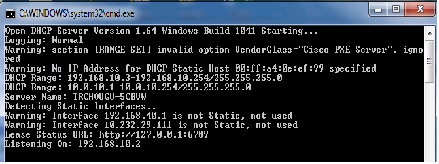
Figure 2-2 OpenDHCPServer
The important sections of this sample configuration are bold :
#This is configuration file.
#Any entry starting with a punctuation character will be a comment
#This file should be in the same folder where exe file is.
#You need to remove ; from begining of sample values and replace with
#your own values below if you need change settings
#Specify the Interfaces you would like Server to listen
#if you have more than one NIC card on your server
#always specify which cards will listen DHCP/DNS requests
#Requests from diffent Interfaces look for matching DHCP ranges.
#Requests from relay agents look for matching range to relay agent IP.
#upto 125 interfaces can be specified
#Default is All static Interfaces
#LogLevel can be set as None, Errors or All
#It is advisable to keep logging to Normal, Normal include errors
#and DHCP renewal messages. Normal is defaul logging also.
#You can have 2 instances of Open DHCP Servers in a network. Open DHCP Server
#will send replication inform messages to other instance of Open DHCP
#server and leases will be replicated. The IP address alloted by one server
#will not be realotted by other server to another host. Also when one server
#goes down, other can will renew the leases, without NAK and DISCOVER. You need
#to specify Primary and secondary servers for replication to work.
#Make sure that Primary & Secondary Server entries are identical on both
#servers. You may copy the entire ini file on both servers and change the
#LISTEN_ON on individual servers, if needed.
#This is http inerface for viewing lease status,
#Default is first interface, port 6789
#You can change it here to any network interface.
;HTTPServer=192.168.55.1:6789
#Also to limit the clients access, you can specify upto 8
#HTTP client IPs Here. If no Client IP is specified then All
#Clients can access the HTTP Interface
;HTTPClient=192.168.23.123
#You can also change the title of html page
;HTTPTitle=This is Custom Title
#Sections below are other DHCP Sections. Clients can be alotted addresses in
#two ways, dynamically from DHCP Range or statically. For static addresses,
#client section needs to be created for each static client
#against its MAC Address. BOOTP clients are allways static.
#The DHCP Ranges are grouped into [RANGE_SET]s, so that range specific options
#can be specified for a group of ranges at one place. The total ranges together
#in all [RANGE_SET]s is also 125 and there can also be 125 [RANGE_SET]s max.
#You can specify one or more ranges in each [RANGE_SET] section, in format
#specified. Open DHCP Server will alot addresses from these ranges. Static Hosts
#and BootP clients do not need ranges. No need to specify any [RANGE_SET]
#or DHCP_Range if all clients are Static.
#The Policy for alloting dynamic address is:-
#1)First Look if MacAddress is specified as Static DHCP Client and use that IP
#2)If not found look for old expired/active address of same host
#3)If not,look at requested IP Address and it is free
#4)If not, allot virgin IP Adress, if any available
#5)If no virgin IP address exists, allot expired IP address of other host.
#From 2) to 6), requests from diffent Interfaces look for matching DHCP ranges
#of Interface IP and requests from relay agents look for matching range to
#All the ranges in a [RANGE_SET] section can be further restricted
#by Filter_Mac_Range, Filter_Vender_Class and Filter_User_Class
#If for example Mac Range is specified, then this section's ranges
#will only be available to hosts, whoes Mac Address
#Falls in this range. Also if any host has matching Filter_Mac_Range in
#any DHCP_RANGE section then other DHCP Range sections
#without Filter_Mac_Range or not having matching Mac Range will
#not be available to it. Each Manufacturer has a fixed Mac Range.
#Same Mac ranges can repeat in many DHCP_RANGE sections.
#For Filter_Vendor_Class (option 60) and Filter_User_Class filter (option 77),
#the range would only be available to matching value of Filter_Vender_Class
#and Filter_User_Class sent in client request. If Filter_Vender_Class and
#Filter_User_Class do match in one or more ranges, other ranges with missing
#or not matching values would not be available to such clients.
#You can specify upto 32 Filter_Mac_Range, Filter_Vender_Class and
#Filter_User_Class in each [RANGE_SET].
#Generally you dont have to specify any filters for relay agent. The range is
#automatically selected based on relay agent IP and range's subnetmask. Relay agent
#always sends it's subnet side IP. This server would only use the DHCP Range, which
#matches this IP. This would ensure that correct range is used. This feature
#eliminate the need of additional configuration. For matching purpose, range is
#recalculated using Subnet Mask of range and Relay Agent IP. However if you want
#to manually configure the subnet selection, you can use FilterSubnetSelection in
#a RANGE_SET. If this fitler is specified it will be first matched with SubnetSelection
#Option 118 sent by client. If client sends no such option, it will be matched
#with relay Agent IP. If not relay agent IP is sent, Listening Interface's IP
#will be matched. You can also override the Target Relay Agent using TargetRelayAgent option.
#This is first and simple DHCP range section example,
#This example may be good enough for simple/home use.
#If you need range filters, look at example below
DHCPRange=192.168.10.3-192.168.10.254
VendorClass="Cisco PXE Server"
43=01:0B:74:65:78:74:2e:63:6f:6e:66:69:67:02:09:74:31:2e:73:63:72:69:70:74:03:09:53:75:70:38:45:2e:6f:76:61
;43="text.config"01:0B:74:65:78:74:2E:63:6F:6E:66:69:67,"t1.script"02:09:74:31:2E:73:63:72:69:70:74,";;Sup8E.ova"03:09:53:75:70:38:45:2E:6F:76:61
#Following are range specific DHCP options.
#You can copy more options names from [GLOBAL_OPTIONS]
;DomainServer=192.168.10.2
#Lease Time can be different for this Range
#This section is also simple [RANGE_SET] section
#Here the options are specified as flat options.
;DHCPRange=192.168.0.1-192.168.0.254
;DHCPRange=192.168.4.1-192.168.4.254
;DHCPRange=192.168.5.1-192.168.5.254
#Following are flat range specific DHCP options.
;6=192.168.0.1, 192.168.0.2
#This is filtered [RANGE_SET] section.
#First eight entries in this example are filters.
#Currently only following types of filters are supported
#However 32 filters of each type can be specified
;FilterMacRange=00:0d:60:c5:4e:00-00:0d:60:c5:4e:ff
;FilterMacRange=00:0e:12:c5:4e:00-00:0e:12:c5:4e:ff
;FilterMacRange=00:0f:60:c5:4e:a1-00:0f:60:c5:4e:a1
;FilterVendorClass="MSFT 5.0"
;FilterVendorClass="MSFT 5.1"
;FilterVendorClass="MSFT 5.2"
;FilterUserClass="My User Class 4.0"
;FilterUserClass=123,56,87,123,109,0,23,56,156,209,234,56
;FilterUserClass=00:0d:60:c5:4e:0d:60:c5:4e
#You can select RANGE_SET based on FilterSubnetSelection
;FilterSubnetSelection=192.168.55.1
;FilterSubnetSelection=192.168.33.1
;TargetRelayAgent=192.168.44.11
#Next few are actual ranges of this section.
;DHCPRange=10.0.0.5-10.0.0.10
DHCPRange=10.0.10.1-10.0.10.254
;DHCPRange=10.0.1.1-10.0.1.254
;DHCPRange=10.0.2.1-10.0.2.254
#Following are range specific DHCP options.
#You can copy more option names from [GLOBAL_OPTIONS]
#or add flat options like 240="this is the string value"
#or as IP like 6=192.168.5.1
#or byte array like 6=123,45,1,0,3,67,4,3,22,4,3,5
#or hex array like 6=23:89:a5:ba:a9:e4
;SubnetMask=255.255.255.0
;DomainServer=10.5.6.90, 11.4.5.6
;Router=11.5.6.7, 10.0.99.1
#AddressTime can be different for this range
#specify 0 for infinity.AddressTime
;NETBIOSNameSrv=192.168.0.201
#You can also use hex array or byte array with named options
#If you want to send option 43 back to client for
#ranges in this section, specify it as flat option like:-
;43="this is return string"
#or use the byte array in value
;43=123,56,87,123,109,0,23,56,156,209,234,56
#or use the hex array in value
;43=a6:87:b6:c9:ae:eb:89:09:a4:67:d5
#These are global DHCP Options and would supplement
#client specific options and [RANGE_SET] options.
#Options tags start with 1 and goes up to 254, you can
#always specify option like 1=255.255.255.0, but it may
#be difficult to remember option tags. Try using Option Names
#If no matching name found, you can use tag=value (flat options)
#You can also specify the value as byte array or even hex array.
#Some options having sub-options can only be specified as hex/byte
#array If options have client specific values, move/copy them
#to specific Static Client's section. If any option has DHCP range
#specific value, move/copy them to [RANGE_SET] sections.
#You may quote stings values (must quote if sting contain chars
#like comma, dot or colon) for example NDS_Tree_Name="my.NDS.Tree"
#or 43="this is return string" or use the byte array in value
#like 43=123,56,87,123,109,0,23,56,156,209,234,56 or use the hex
#array in value 43=a6:87:b6:c9:ae:eb:89:09:a4:67:d5
;DomainName="workgroup.com"
;SubNetMask=255.255.255.0
;DomainServer=192.168.1.1, 192.168.1.2
#AddressTime is default lease time for server
#specify 0 for infinity lease time
#NextServer is PXEBoot TFTP Server
;QuotesServer=192.168.0.1
;ImpressServer=192.168.0.1
;ExtensionFile=bootdir/files
;PolicyFilter=192.168.34.1/255.255.255.240
;MTUPlateau=ac:c0:12:09:02:24:0a:4D:61:63:20:48:44:5F:4E:42:53
;BroadcastAddress=192.168.0.255
;RouterRequest=192.168.67.1
;StaticRoute=192.168.11.1/255.255.255.0, 192.168.12.1/255.255.255.0
;NISServers=192.168.110.1, 192.168.120.1, 192.168.130.1
;NTPServers=192.168.116.1, 192.168.126.1, 192.168.136.1
;NETBIOSNameSrv=192.168.5.1
;NETBIOSDistSrv=192.168.5.1
;NETBIOSScope=NETBIOS.COM
;XWindowManager=192.168.0.1
;NetwareIPDomain=NETWAREDOMAIN.COM
;NetWareIPOption=123,7,0,45,234,20,27,167,198,34,112,45
;NISDomainName=NISDOMAINNAME.COM
;NISServerAddr=192.168.0.1
;TFTPServerName=MyTFTPServer
BootFileName=cat4500es8-universalk9.SSA.03.09.00.PR4.9.152-5.0.9.PR4.bin
;BootFileOption=BootFileOption.ini
;HomeAgentAddrs=192.168.0.1
;FingerServer=192.168.0.1
;StreetTalkServer=192.168.0.1
;LDAP="ldap://192.168.1.1"
;NameServiceSearch=23,0,235,4,2,0,236,7,94,34,87,4,127,254,23
;SubnetSelectionOption=255.255.255.240
#Option TFTPServerIPaddress is for phone use only, for PXEBoot use NextServer option
;TFTPServerIPaddress=192.168.4.1
;CallServerIPaddress=192.168.0.1
;RemoteStatisticsServerIPAddress=192.168.50.1
;HTTPProxyPhone=192.168.51.1
;IPTelephone="MCIPADD=10.10.0.1,MCPORT=1719,TFTPSRVR=10.10.0.254,TFTPDIR=,VLANTEST=0"
#next few are sample flat option, (global mac boot options)
;234=ac:11:00:09:02:24:0a:4D:61:63:20:48:44:5F:4E:42:53:00:00:00:0:02:1b:53:68:61:72:65:64:49:6D:61;:67:65:73:00:4E:65:74:42:6F:6F:74:20:48:44:2E:69:6D:67
;235="\opt\isv\boot\bootimage.bin"
#Following sections are Static Client DHCP entries/options
#If no IP is given, then that host will never be allooted any IP
#More option Names can be copied from DHCP-OPTIONS to clients.
#For BOOTP requests, only these options would be sent.
#For DHCP requests. Missing Options will be supplimented from
#first [DHCP-RANGE] options (if IP falls in any range), other
#options will be supplemented from [DHCP-OPTIONS].
#This is a client with MAC addr 00:41:42:41:42:00
#No other options specified for this client
#For non BOOPT requests, Missing Options will be supplemented from first [RANGE_SET]
#options, if IP falls in any range. and other missing would be added from [GLOBAL_OPTIONS].
#This is a client with MAC addr 00:41:42:41:42:05
#DHCP will offer following hostname to this client
#For example, you can specify DNS Servers, Routers separately for this client
;DomainServer=10.5.6.90, 11.4.5.6
;Router=11.5.6.7, 4.6.7.34
#AddressTime can be different for this client
#specify 0 for infinity.AddressTime
#this is an example for MacOsX network boot, client specific options
#for client having MAC addr 00:ff:a4:0e:ef:d5
#you can omit the comments, these are for guidance only
#Next Server (TFTP Boot Server) and Boot File can be different for this client
#option mac-nc-client-unknown
;221=4D:61:63:20:4E:43:20:23:38
#option mac-client-nb-img
;238="\opt\isv\boot\image.bin"
#This host will never get an
#IP, even from Dynamic Ranges
#You can disable a host from
#Getting an IP from this Server.
#using this kind of entries


 Feedback