- Finding Feature Information
- Information About LISP ESM Multihop Mobility
- Licensing Requirements for LISP
- Guidelines and Limitations for LISP ESM Multihop Mobility
- Default Settings for LISP
- Configuring LISP ESM Multihop Mobility
- Configuration Examples for LISP ESM Multihop Mobility
- Additional References
- Feature Information for LISP ESM Multihop Mobility
Configuring LISP ESM Multihop Mobility
This chapter describes how to configure the Extended Subnet Mode (ESM) multihop mobility feature to separate the Locator/ID Separation Protocol (LISP) dynamic host detection function from the LISP encapsulation/decapsulation function within a LISP topology.
This chapter contains the following sections:
- Finding Feature Information
- Information About LISP ESM Multihop Mobility
- Licensing Requirements for LISP
- Guidelines and Limitations for LISP ESM Multihop Mobility
- Default Settings for LISP
- Configuring LISP ESM Multihop Mobility
- Configuration Examples for LISP ESM Multihop Mobility
- Additional References
- Feature Information for LISP ESM Multihop Mobility
Finding Feature Information
Your software release might not support all the features documented in this module. For the latest caveats and feature information, see the Bug Search Tool at https://tools.cisco.com/bugsearch/ and the release notes for your software release. To find information about the features documented in this module, and to see a list of the releases in which each feature is supported, see the “New and Changed Information” chapter or the Feature History table below.
Information About LISP ESM Multihop Mobility
This section includes the following topics:
LISP ESM Multihop Mobility Overview
A device configured as both an ingress tunnel router (ITR) and an egress tunnel router (ETR) is known as an xTR. A first-hop router (FHR) detects the presence of a dynamic host endpoint identifier (EID) and notifies the site gateway xTR. The site gateway xTR registers the dynamic EID with a map server. The Site Gateway xTR performs Locator/ID Separation Protocol (LISP) encapsulation/decapsulation of the traffic from or to the dynamic EID to or from remote sites.
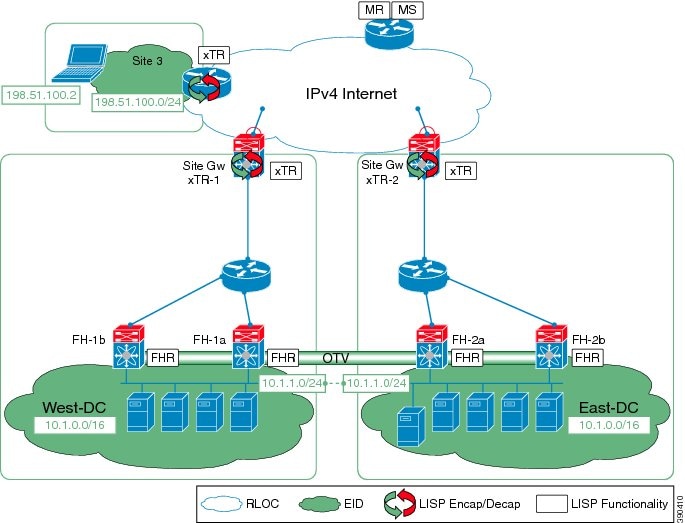
Multiple Layer 3 hops can exist between the FHR and the site gateway xTR when deploying the LISP ESM Multihop Mobility feature. You can insert non-LISP devices like firewalls and load-balancers into the data center.
 Note | LISP supports redistributing host routes for servers discovered by LISP into Interior Gateway Protocol (IGP) via Open Shortest Path First (OSPF) protocol, Intermediate System-to-Intermediate System (IS-IS) protocol, Routing Information Protocol (RIP), Border Gateway Protocol (BGP), and Enhanced Interior Gateway Routing Protocol (EIGRP). |
The following figure shows the topology for configuring LISP ESM multihop mobility on a Locator ID/Separation Protocol (LISP) site with three IPv4 routing locators (RLOCs). In this topology, a LISP site uses a single edge router configured as both an ITR and an ETR (known as an xTR) with two connections to the upstream provider. Both the RLOCs and the endpoint identifier (EID) prefix are IPv4. The LISP site registers to a map resolver map server (MRMS) device in the network core.
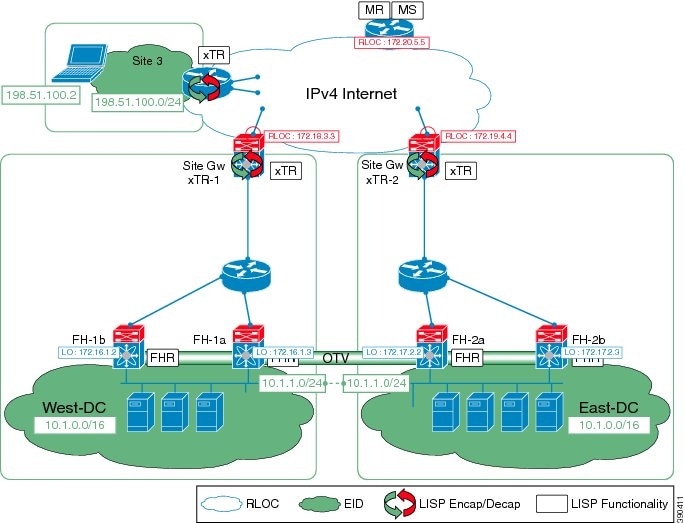
The components illustrated in the topology shown in the above figure are described below:
- The customer premises equipment (CPE) in Site 3 functions as a LISP ITR and ETR (xTR).
- The LISP xTR in West-DC is authoritative for the IPv4 EID prefix of 10.1.0.0/16.
- The LISP xTR in both West-DC and East-DC has one RLOC connection to the core. The RLOC connection to xTR-1 is 172.18.3.3; the RLOC connection to xTR-2 is 172.19.4.4.
Licensing Requirements for LISP
Product |
License Requirement |
|---|---|
Cisco NX-OS |
This feature requires the Transport Services license. For a complete explanation of the Cisco NX-OS licensing scheme, see the Cisco NX-OS Licensing Guide. |
Guidelines and Limitations for LISP ESM Multihop Mobility
LISP ESM multihop mobility has the following guidelines and limitations:
-
Locator/ID Separation Protocol (LISP) multihop mobility is supported only in Extended Subnet Mode (ESM) and it is recommended in combination with Overlay Transport Virtualization (OTV).
-
ESM multihop mobility requires OTV First Hop Redundancy Protocol (FHRP) isolation to avoid hair-pinning of traffic across the OTV Data Center Interconnect (DCI) framework.
-
ESM multihop mobility does not support Network Address Translated (NAT’d) endpoint identifiers (EIDs).
-
To properly route traffic between extended VLANs when the source and destination hosts are detected by FHRs at different data centers, we recommend one of the following designs:
-
Establish a routing protocol adjacency between the first-hop routers (FHRs) in the different data centers over a dedicated extended VLAN; redistribute host routes from LISP into the routing protocol for discovered hosts at each data center FHR.
-
Separate each mobile VLAN in a VRF and configure the LISP FHR within the related virtual routing and forwarding (VRF) context. Set up an external site gateway xTR to act as router for all of the mobile VLANs (VRFs).
-
Default Settings for LISP
Parameters |
Default |
|---|---|
feature lisp command |
Disabled |
Configuring LISP ESM Multihop Mobility
This section includes the following topics:
- Configuring the First-Hop Device
- Configuring the Site Gateway xTR
- Configuring xTR
- Configuring the Map Server
Configuring the First-Hop Device
Configuring the Site Gateway xTR
| Command or Action | Purpose | |
|---|---|---|
| Step 1 | switch# configure terminal |
Enters global configuration mode. |
| Step 2 | switch# lisp instance-id iid | (Optional)
Configures an association between a VRF or the default VRF and a LISP instance ID. The value of the instance ID configured on the FHR, Site Gateway xTR, MSMR, and remote xTR must match. This command modifies the value of the instance ID (iid) from the default (0) to the specified value. The range of the iid argument is from 1 to 16777215. |
| Step 3 | switch(config)# ip lisp itr-etr |
Configures a Cisco NX-OS device to act as both an IPv4 LISP Ingress Tunnel Router (ITR) and Egress Tunnel Router (ETR), also known as an xTR. |
| Step 4 | switch(config)# ip lisp database-mapping EID-prefix { locator | dynamic } priority priority weight weight |
Configures an IPv4 endpoint identifier to Routing Locator (EID-to-RLOC) mapping relationship and its associated traffic policy. |
| Step 5 | Repeat the preceding step for each locator. |
switch(config)# ip lisp database-mapping 192.168.0.0/16 10.0.1.2 priority 1 weight 5 switch(config)# ip lisp database-mapping 192.168.0.0/16 10.0.2.2 priority 1 weight 5 |
| Step 6 | switch(config)# ip lisp itr map-resolver map-resolver-address |
Configures a Cisco NX-OS device to act as an IPv4 Locator/ID Separation Protocol (LISP) Map-Resolver (MR). |
| Step 7 | switch(config)# ip lisp etr map-server map-server-address {[key key-type authentication-key ] | proxy-reply } |
Configures the IPv4 or IPv6 locator address of the Locator/ID Separation Protocol (LISP) Map-Server to be used by the egress tunnel router (ETR) when registering for IPv4 EIDs. |
| Step 8 | switch(config)# lisp dynamic-eid dynamic-EID-policy-name |
Configures a LISP Virtual Machine (VM) Mobility (dynamic-EID roaming) policy and enters the LISP dynamic-EID configuration mode. |
| Step 9 | switch(config-lisp-dynamic-eid)# database-mapping dynamic-EID-prefix locator priority priority weight weight |
Configures a IPv4 or IPv6 dynamic-endpoint identifier to Routing Locator (EID-to-RLOC) mapping relationship and its associated traffic policy. |
| Step 10 | switch(config-lisp-dynamic-eid)# eid-notify authentication-key { 0 unencrypted-password | 6 encrypted-password | password} |
Specifies an authentication key to validate the endpoint identifier (EID)-notify messages received from a device. |
| Step 11 | Repeat the preceding three steps to enable sending EID presence notifications to each additional site gateway. |
Exits LISP locator-set configuration mode and returns to LISP configuration mode. |
| Step 12 | switch(config-lisp-dynamic-eid)# end |
Returns to privileged EXEC mode. |
Configuring xTR
| Command or Action | Purpose | |
|---|---|---|
| Step 1 | switch# configure terminal |
Enters global configuration mode. |
| Step 2 | switch# lisp instance-id iid | (Optional)
Configures an association between a VRF or the default VRF and a LISP instance ID. The value of the instance ID configured on the FHR, Site Gateway xTR, MSMR, and remote xTR must match. This command modifies the value of the instance ID (iid) from the default (0) to the specified value. The range of the iid argument is from 1 to 16777215. |
| Step 3 | switch(config)# ip lisp itr-etr |
Configures a Cisco NX-OS device to act as both an IPv4 LISP Ingress Tunnel Router (ITR) and Egress Tunnel Router (ETR), also known as an xTR. |
| Step 4 | switch(config)# ip lisp database-mapping EID-prefix { locator | dynamic } priority priority weight weight |
Configures an IPv4 endpoint identifier to Routing Locator (EID-to-RLOC) mapping relationship and its associated traffic policy. |
| Step 5 | switch(config)# ip lisp database-mapping EID-prefix { locator | dynamic } priority priority weight weight |
Configures an IPv4 endpoint identifier to Routing Locator (EID-to-RLOC) mapping relationship and its associated traffic policy. |
| Step 6 | switch(config)# ip lisp itr map-resolver map-resolver-address |
Configures a Cisco NX-OS device to act as an IPv4 Locator/ID Separation Protocol (LISP) Map-Resolver (MR). |
| Step 7 | switch(config)# ip lisp etr map-server map-server-address {[key key-type authentication-key ] | proxy-reply } |
Configures the IPv4 or IPv6 locator address of the Locator/ID Separation Protocol (LISP) Map-Server to be used by the egress tunnel router (ETR) when registering for IPv4 EIDs. |
| Step 8 | switch(config)# exit |
Exits global configuration mode and returns to privileged EXEC mode. |
Configuring the Map Server
| Command or Action | Purpose | |
|---|---|---|
| Step 1 | switch# configure terminal |
Enters global configuration mode. |
| Step 2 | switch(config)# ip lisp itr map-resolver map-resolver-address |
Configures a Cisco NX-OS device to act as an IPv4 Locator/ID Separation Protocol (LISP) Map-Resolver (MR). |
| Step 3 | switch(config)# ip lisp etr map-server map-server-address {[key key-type authentication-key ] | proxy-reply } |
Configures the IPv4 or IPv6 locator address of the Locator/ID Separation Protocol (LISP) Map-Server to be used by the egress tunnel router (ETR) when registering for IPv4 EIDs. |
| Step 4 | switch(config)# lisp site site-name | Configures a Locator/ID Separation Protocol (LISP) site and enter site configuration mode on a LISP Map-Server. |
| Step 5 | switch(config-lisp-site)# eid-prefix [instance-id iid ] { EID-prefix [route-tag tag ]} [accept-more-specifics ] | Configures a list of endpoint identifier (EID)-prefixes that are allowed in a Map-Register message sent by an egress tunnel router (ETR) when registering to the Map Server. |
| Step 6 | switch(config-lisp-site)# authentication-key key-type password | Configures the password used to create the SHA-1 HMAC hash for authenticating the Map-Register message sent by an egress tunnel router (ETR) when registering to the Map-Server. |
| Step 7 | Repeat the preceding three steps to configure each additional LISP site. | — |
| Step 8 | switch(config-lisp-site)# end |
Returns to privileged EXEC mode. |
Configuration Examples for LISP ESM Multihop Mobility
This section includes the following examples for configuring the topology in the preceding figure:
- Example: First-Hop Router Configuration
- Example: Site Gateway xTR Configuration
- Example: xTR Configuration
- Example: MSMR Configuration
- Example: Multi-Hop Mobility Interworking with Routing Protocols Configuration
Example: First-Hop Router Configuration
The following example shows how to configure the first hop "FH-1a" in the sample topology:
ip lisp etr
lisp dynamic-eid VLAN-11
 database-mapping 10.1.1.0/24 172.16.1.2 pr 10 w 50
 database-mapping 10.1.1.0/24 172.16.1.3 pr 10 w 50
 eid-notify 172.16.0.1 key 3 75095fe9112836e3
 map-notify-group 225.1.1.1
lisp dynamic-eid VLAN-12
 database-mapping 10.1.2.0/24 172.16.1.2 pr 10 w 50
 database-mapping 10.1.2.0/24 172.16.1.3 pr 10 w 50
 eid-notify 172.16.0.1 key 3 75095fe9112836e3
 map-notify-group 225.1.1.2

interface Vlan11
 lisp mobility VLAN-11
 lisp extended-subnet-mode
 ip address 10.1.1.3/24
 ip ospf passive-interface
 ip router ospf 100 area 0.0.0.1
 hsrp 1
    ip 10.1.1.1

interface Vlan12
 lisp mobility VLAN-12
 lisp extended-subnet-mode
 ip address 10.1.2.3/24
 ip ospf passive-interface
 ip router ospf 100 area 0.0.0.1
 hsrp 2
  ip 10.1.2.1
The following example shows how to configure the first hop "FH-2a" in the sample topology:
ip lisp etr
lisp dynamic-eid VLAN-11
 database-mapping 10.1.1.0/24 172.17.2.2 pr 10 w 50
 database-mapping 10.1.1.0/24 172.17.2.3 pr 10 w 50
 eid-notify 172.17.0.1 key 3 6d018260cf71b07c
 map-notify-group 225.1.1.1
lisp dynamic-eid VLAN-12
 database-mapping 10.1.2.0/24 172.17.2.2 pr 10 w 50
 database-mapping 10.1.2.0/24 172.17.2.3 pr 10 w 50
 eid-notify 172.17.0.1 key 3 6d018260cf71b07c
 map-notify-group 225.1.1.2

interface Vlan11
 lisp mobility VLAN-11
 lisp extended-subnet-mode
 ip address 10.1.1.4/24
 ip ospf passive-interface
 ip router ospf 100 area 0.0.0.2
 hsrp 1
  ip 10.1.1.1

interface Vlan12
 lisp mobility VLAN-12
 lisp extended-subnet-mode
 ip address 10.1.2.4/24
 ip ospf passive-interface
 ip router ospf 100 area 0.0.0.2
 hsrp 2
  ip 10.1.2.1
The following additional configuration ensures that the FHRs can route traffic from other attached subnets to servers that belong to the mobile subnet site1 and are discovered in the opposite data center. For this purpose the FHRs are configured to establish an adjacency over a dedicated extended VLAN using a dedicated routing protocol instance and to redistribute host routes from LISP.
For FH-1a:
ip prefix-list DiscoveredServers seq 5 permit 10.1.0.0/22 ge 32

route-map LISP2EIGRP permit 10
 match ip address prefix-list DiscoveredServers

interface Vlan100
 no shutdown
 ip address 10.255.0.1/30
 ip router eigrp 100

router eigrp 100
 autonomous-system 100
 redistribute lisp route-map LISP2EIGRP
For FHA-2a:
ip prefix-list DiscoveredServers seq 5 permit 10.1.0.0/22 ge 32

route-map LISP2EIGRP permit 10
 match ip address prefix-list DiscoveredServers

interface Vlan100
 no shutdown
 ip address 10.255.0.2/30
 ip router eigrp 100

router eigrp 100
 autonomous-system 100
 redistribute lisp route-map LISP2EIGRP
Example: Site Gateway xTR Configuration
The following example shows how to configure the site gateway "Site GW xTR-1" in the sample topology:
ip lisp itr-etr
ip lisp database-mapping 10.1.0.0/16 172.18.3.3 priority 10 weight 50
ip lisp itr map-resolver 172.20.5.5
ip lisp etr map-server 172.20.5.5 key 3 0b50279df3929e28
lisp dynamic-eid VLAN11
database-mapping 10.1.1.0/24 172.18.3.3 priority 10 weight 50
 eid-notify authentication-key 3 75095fe9112836e3
 lisp dynamic-eid VLAN12
database-mapping 10.1.2.0/24 172.18.3.3 priority 10 weight 50
 eid-notify authentication-key 3 75095fe9112836e3

interface Ethernet3/1
 description Inside DC West
 ip address 172.16.0.1/30
 ip router ospf 1 area 0.0.0.1
The following example configuration is for the site gateway "Site GW xTR-2" in the sample topology:
ip lisp itr-etr
ip lisp database-mapping 10.2.2.0/24 172.19.4.4 priority 10 weight 50
ip lisp itr map-resolver 172.20.5.5
ip lisp etr map-server 172.20.5.5 key 3 0b50279df3929e28
lisp dynamic-eid VLAN11
database-mapping 10.1.1.0/24 172.19.4.4 priority 10 weight 50
 eid-notify authentication-key 3 6d018260cf71b07c
 lisp dynamic-eid VLAN12
database-mapping 10.1.2.0/24 172.19.4.4 priority 10 weight 50
 eid-notify authentication-key 3 6d018260cf71b07c

interface Ethernet3/1
 description Inside DC East
 ip address 172.17.0.1/30
 ip router ospf 1 area 0.0.0.2
Example: xTR Configuration
The following example shows how to configure the xTR (at Site 3):
ip lisp itr-etr
ip lisp database-mapping 198.51.100.0/24 172.21.1.5 priority 10 weight 50
ip lisp itr map-resolver 172.20.5.5
ip lisp etr map-server 172.20.5.5 key 3 0b50279df3929e28
Example: MSMR Configuration
The following example shows how to configure the map server map resolver (MSMR) device in the sample topology:
ip lisp map-resolver
ip lisp map-server
lisp site roaming1
	eid-prefix 10.1.0.0/16 accept-more-specifics
	authentication-key 3 0b50279df3929e28
lisp site site2
	eid-prefix 10.2.2.0/24
	authentication-key 3 0b50279df3929e28
lisp site site3
	eid-prefix 198.51.100.0/24
	authentication-key 3 0b50279df3929e28
Example: Multi-Hop Mobility Interworking with Routing Protocols Configuration
The following example shows how to dynamically redistribute LISP host routes for discovered servers into OSPF at the first-hop router (FHR):
ip prefix-list lisp-pflist seq 10 permit 10.1.1.0/24 ge 32
route-map lisp-rmap permit 10
match ip address prefix-list lisp-pflist
router ospf 100
redistribute lisp route-map lisp-rmap
The following example shows how to automatically convert host routes from a routing protocol into LISP dynamic EID entries at a Site Gateway xTR (in lieu of an EID notification coming from a FHR):
ip lisp itr-etr
ip lisp database-mapping 10.1.0.0/16 172.18.3.3 priority 10 weight 50
ip lisp itr map-resolver 172.20.5.5
ip lisp etr map-server 172.20.5.5 key 3 0b50279df3929e28
lisp dynamic-eid site1
	database-mapping 10.1.1.0/24 172.18.3.3 priority 10 weight 50
	register-route-notifications
Additional References
This section includes additional information related to implementing LISP.
Feature Information for LISP ESM Multihop Mobility
|
Feature Name |
Release |
Feature Information |
|---|---|---|
|
LISP ESM multihop mobility |
6.2(8) |
This feature was introduced. The LISP Extended Subnet Mode (ESM) Multihop Mobility feature separates the Locator/ID Separation Protocol (LISP) dynamic host detection function from the LISP encapsulation and decapsulation function within a LISP topology. |
|
Dynamic-EID Route Import |
6.2(8) |
This feature was introduced. This feature provides the ability for a Site Gateway xTR to perform server presence detection upon receiving host routes updates. |
 Feedback