- New and Changed Information
- Preface
-
- Configuring the MPLS Label Distribution Protocol
- Configuring MPLS LDP Autoconfiguration
- Configuring MPLS LDP Session Protection
- Configuring MPLS LDP IGP Synchronization
- Configuring MPLS LDP Lossless MD5 Session Authentication
- Configuring MPLS LDP Label Filtering
- Configuring MPLS LDP Static Label Binding
- Configuring MPLS LDP Graceful Restart
-
- Configuring Basic MPLS TE
- Configuring Automatic Bandwidth Adjustment for MPLS TE Tunnels
- Configuring MPLS TE RSVP
- Configuring the Path Selection Metric for MPLS TE Tunnels
- Configuring LSP Attributes for MPLS TE
- Configuring MPLS TE Verbatim Paths
- Configuring MPLS TE Forwarding Adjacency
- Configuring MPLS TE Class-Based Tunnel Selection
- Configuring MPLS TE Path Protection
- Configuring MPLS TE Fast Reroute Link and Node Protection
-
- Configuring Any Transport over MPLS
- Configuring Any Transport over MPLS Pseudowire Provisioning
- Configuring Ethernet over MPLS
- Configuring EoMPLS Layer 2 VPN Graceful Restart
- Configuring Virtual Private LAN Service
- Configuring Layer 2 VPN Pseudowire Redundancy
- Configuring Layer 2 VPN VPLS Dual-Homing with a vPC
- Configuration Limits for Cisco NX-OS MPLS
- RFCs
Cisco Nexus 7000 Series NX-OS MPLS Configuration Guide
Bias-Free Language
The documentation set for this product strives to use bias-free language. For the purposes of this documentation set, bias-free is defined as language that does not imply discrimination based on age, disability, gender, racial identity, ethnic identity, sexual orientation, socioeconomic status, and intersectionality. Exceptions may be present in the documentation due to language that is hardcoded in the user interfaces of the product software, language used based on RFP documentation, or language that is used by a referenced third-party product. Learn more about how Cisco is using Inclusive Language.
- Updated:
- June 4, 2014
Chapter: Configuring MPLS LDP Label Filtering
- Finding Feature Information
- Information About MPLS LDP Label Filtering
- Licensing Requirements for MPLS LDP Label Filtering
- Prerequisites for MPLS LDP Label Filtering
- Guidelines and Limitations for MPLS LDP Label Filtering
- Default Settings for MPLS LDP Label Filtering
- Configuring MPLS LDP Label Filtering
- Verifying the MPLS LDP Label Filtering Configuration
- Configuration Examples for MPLS LDP Label Filtering
- Examples: Creating a Prefix List for MPLS LDP Local Label Allocation Filtering
- Examples: Configuring MPLS LDP Local Label Allocation Filtering
- Sample MPLS LDP Local Label Allocation Filtering Configuration Example
- Examples: Configuring MPLS LDP Outbound Label Filtering
- Examples: Configuring MPLS LDP Inbound Label Filtering
- Additional References for MPLS LDP Label Filtering
- Feature History for MPLS LDP Label Filtering
Configuring MPLS LDP Label Filtering
This chapter describes how to configure Multiprotocol Label Switching (MPLS) Label Distribution Protocol (LDP) label filtering on Cisco NX-OS devices.
This chapter includes the following sections:
- Finding Feature Information
- Information About MPLS LDP Label Filtering
- Licensing Requirements for MPLS LDP Label Filtering
- Prerequisites for MPLS LDP Label Filtering
- Guidelines and Limitations for MPLS LDP Label Filtering
- Default Settings for MPLS LDP Label Filtering
- Configuring MPLS LDP Label Filtering
- Verifying the MPLS LDP Label Filtering Configuration
- Configuration Examples for MPLS LDP Label Filtering
- Additional References for MPLS LDP Label Filtering
- Feature History for MPLS LDP Label Filtering
Finding Feature Information
Your software release might not support all the features documented in this module. For the latest caveats and feature information, see the Bug Search Tool at https://tools.cisco.com/bugsearch/ and the release notes for your software release. To find information about the features documented in this module, and to see a list of the releases in which each feature is supported, see the “New and Changed Information” chapter or the Feature History table below.
Information About MPLS LDP Label Filtering
The following topics provide information about MPLS LDP label filtering:
Local Label Allocation Filtering
This MPLS LDP feature enables you to configure filtering policies for selective local label binding assignments to improve LDP scalability and convergence. This section includes the following topics:
Overview of MPLS LDP Local Label Allocation Filtering
LDP allocates a local label for every route that is learned from the Interior Gateway Protocol (IGP). In the absence of inbound and outbound label filtering, these local labels are advertised to and learned by all LDP peers.
In most Layer 3 virtual private network (VPN) configurations, only the label switched paths (LSPs) created to reach the /32 host routes or Border Gateway Protocol (BGP) next hops between the provider edge (PE) routers carry traffic and are relevant to the Layer 3 VPNs. LSPs between the PE routers that are not members of a VPN use more memory and create additional processing in LDP across the core.
With load increases in the enterprise and service provider domains, scalability has become more important in enterprise and service provider networks. Controlling the local label allocation could offload LDP processing of non-VPN LSPs in the network core routers.
The MPLS LDP local label allocation filtering feature enables you to configure LDP to selectively allocate local labels for a subset of the prefixes learned from the IGP. You can select the LDP allocate local labels for prefixes configured in a prefix list in the global table or for host routes in the global table.
Local label allocation filtering reduces the number of local labels allocated and therefore the number of messages exchanged with peers, which improves LDP scalability and convergence. Figure 8-1 and Figure 8-2 show how controlling local label allocation can reduce the local label space size and greatly reduce the number of advertisements to peers. Figure 8-1 shows the label allocation behavior when LDP allocates a local label for every route and advertises a label binding for every route that is learned from the IGP.
Figure 8-1 Default LDP Local Label Allocation Behavior

Figure 8-2 shows the LDP behavior with local label allocation control configured. The size of the local label space and the number of label binding advertisements are reduced with local label allocation filtering through the use of a prefix list. The decrease in the number of local labels and label binding advertisement messages reduces the amount of memory used and improves the convergence time for LDP. The MPLS LDP local label allocation filtering feature also allows for more efficient use of the label space.
Figure 8-2 LDP Behavior with Local Label Allocation Controls
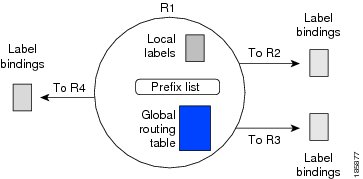
Figure 8-2 shows that router R1 learns the number of routes from its IGP neighbors on routers R2, R3, and R4. A prefix list that is defined on router R1 specifies the prefixes for which LDP allocates a local label.

Note The number of label information base (LIB) entries remains the same regardless of the kind of label filtering used because the remote label bindings for the prefixes that are filtered are kept in the LIB. Memory use is reduced because local label filtering decreases the number of local labels allocated and the number of label bindings advertised to and stored by the peers of an LSR. When all neighboring LSRs are configured with the same local label allocation filter, the number of LIB entries can be reduced (that is, no, or few, LIB entries are created to store remote label bindings).
Prefix Lists for MPLS LDP Local Label Allocation Filtering
The local label allocation filtering feature allows you to configure LDP to allocate local labels for a subset of the learned prefixes. LDP accepts the prefix and allocates a local label if the prefix is permitted by a prefix list. If the prefix list is not defined, LDP accepts all prefixes and allocates local labels based on its default mode of operation.
The benefits of using prefix lists for LDP local label allocation filtering are as follows:
- Prefix lists provide more flexibility for specifying a subset of prefixes and masks.
- Prefix lists use a tree-based matching technique, which is more efficient than evaluating prefixes or host routes sequentially.
- Prefix lists are easy to modify.
Note Prefix lists are also used for outbound label filtering and inbound label filtering. For information on configuring prefix lists, see the “Creating a Prefix List for MPLS LDP Label Filtering” section.
Local Label Allocation Filtering and LDP Actions
Local label allocation filtering modifies the LDP’s local label allocation handling. This feature supports local label allocation filtering through the specification of a prefix list or host routes.
With this feature, LDP determines whether a prefix filter is already configured to control the local label allocation on the local node. If a prefix list exists, the local label allocation is confined to the list of prefixes permitted by the configured prefix list.
LDP also responds to local label allocation configuration changes and to configuration changes that affect the prefix list that is used by LDP. Any of the following configuration changes can trigger LDP actions:
- Creating a local label allocation configuration
- Deleting or changing a local label allocation configuration
- Creating a new prefix list for a local label allocation configuration
- Deleting or changing a prefix list for a local label allocation configuration
LDP responds to local label allocation configuration changes by updating the LIB and the forwarding table in the global routing table. To update the LIB after a local label filter configuration change without a session reset, LDP keeps all remote bindings.
If you create a local label allocation configuration without defining a prefix list, no LDP action is required. The local label allocation configuration has no effect because the prefix list is created and permits all prefixes.
If you create or change a prefix list and prefixes that were previously allowed are rejected, LDP goes through a label withdraw and release procedure before the local labels for these prefixes are deallocated.
If you delete a prefix, LDP goes through the label withdraw and release procedure for the LIB local label. If the associated prefix is one for which no LIB entry should be allocated, LDP bypasses this procedure.
Note Local label allocation filtering has no impact on inbound or outbound label filtering because they all provide LDP filtering independently.
Outbound Label Filtering
MPLS LDP supports outbound label binding filtering. You can use this feature to control which label bindings are advertised to LDP neighbors.
Inbound Label Filtering
MPLS LDP supports inbound label binding filtering. You can use this feature to configure prefix lists for controlling the label bindings that an LSR accepts from its peer LSRs. You can limit LDP to accept a set of prefixes from a given LDP neighbor. By default, LDP accepts all labels for all prefixes from all LDP neighbors.
You can use the inbound label binding filtering feature to control the amount of memory used to store LDP label bindings advertised by other routers. For example, in a simple MPLS VPN environment, the VPN PE routers might require an LSP only to their peer PE routers (that is, they do not need LSPs to core routers). Inbound label filtering enables a PE router to accept labels only for other PE routers.
Licensing Requirements for MPLS LDP Label Filtering
Prerequisites for MPLS LDP Label Filtering
Guidelines and Limitations for MPLS LDP Label Filtering
MPLS LDP label filtering has the following configuration guidelines and limitations:
- The LDP local label allocation configuration for prefix lists or host routes is supported only in the global routing table.
- A maximum of one local label allocation filter is supported for the global table.
- Wildcard forwarding equivalence class (FEC) requests are not supported with local label allocation filtering.
- Remote label bindings are retained for prefixes even when the allocation of local labels for these prefixes is filtered out (local labels are not allocated).
MPLS LDP outbound label filtering has the following configuration guidelines and limitations:
- To prevent the distribution of any locally assigned labels, use the no advertise-labels command with no optional parameters. To reenable the distribution of all locally assigned labels to all LDP neighbors, use the advertise-labels command with no optional parameters.
- You can execute multiple advertise-labels commands. In the aggregate, such commands determine how the LSR advertises local labels. The following rules describe the effects of multiple commands:
1. Every advertise-labels command has a prefix-pfxlist, peer-pfxlist pair associated with it. The prefix-list pair associated with the advertise-labels command (in the absence of both the for and to keywords) is none, none. The prefix-list pair associated with the advertise-labels for prefix-pfxlist command (in the absence of the to keyword) is prefix-pfxlist, none.
2. A given prefix can have, at most, one prefix-pfxlist, peer-pfxlist pair that applies to it, as described as follows:
a. A given prefix-pfxlist, peer-pfxlist pair applies to a prefix only if the prefix-pfxlist matches the prefix. A match occurs if the prefix-pfxlist permits the prefix.
b. If more than one prefix-pfxlist, peer-pfxlist pair from multiple advertise-labels commands matches a prefix, the prefix-pfxlist, peer-pfxlist pair in the first such command (as determined by the show running mpls ldp command) applies to the prefix.
3. When an LSR is ready to advertise a label for a prefix, the LSR does the following:
a. Determines whether a prefix-pfxlist, peer-pfxlist pair applies to the prefix.
b. If none applies and the no advertise-labels command has been configured, the label for the prefix is not advertised to any peer; otherwise, the label is advertised to all peers.
c. If a prefix-pfxlist, peer-pfxlist pair applies to the prefix and the prefix pfxlist denies the prefix, the label is not advertised to any peer.
d. If the prefix pfxlist permits the prefix and the peer pfxlist is none (that is, the command that applies to the prefix is an mpls ldp advertise-labels for prefix-list command without the to keyword), the label is advertised to all peers.
e. If the prefix pfxlist permits the prefix and there is a peer pfxlist, the label is advertised to all peers permitted by the peer pfxlist.
Note Typically, LDP advertises labels only for IP prefixes that are in the routing table. You can use the mpls ldp advertise-labels interface command to force LDP to advertise a label for a prefix constructed from an interface address and a 32-bit mask. Such a prefix is not usually in the routing table. The output of the show mpls ip binding detail command includes the prefix-acl, peer-acl pairs that apply to each prefix.
Default Settings for MPLS LDP Label Filtering
Table 8-1 lists the default settings for MPLS LDP label filtering parameters.
|
|
|
|---|---|
Enabled. Allocate local labels for IGP-learned host routes (/32) only. |
|
Configuring MPLS LDP Label Filtering
This section includes the following topics:
- Creating a Prefix List for MPLS LDP Label Filtering
- Configuring MPLS LDP Local Label Allocation Filtering
- Configuring MPLS LDP Outbound Label Filtering
- Configuring MPLS LDP Inbound Label Filtering
Creating a Prefix List for MPLS LDP Label Filtering
You can create a prefix list for MPLS LDP local label allocation filtering, outbound filtering, or inbound filtering. A prefix list allows LDP to selectively allocate local labels for a subset of the routes learned from the IGP, restrict the advertisement of local labels to specific LDP peers, or control the label bindings that an LSR accepts from its peer LSRs.
Prerequisites
Ensure that you are in the correct VDC (or use the switchto vdc command).
SUMMARY STEPS
2. ip prefix-list prefix-list { description description | seq number [ deny network / length [ eq eq-length | ge ge-length | le le-length ] | permit network / length [ eq eq-length | ge ge-length | le le-length]] | deny network / length [ eq eq-length | ge ge-length | le le-length ] | permit network / length [ eq eq-length | ge ge-length | le le-length] }
DETAILED STEPS
Configuring MPLS LDP Local Label Allocation Filtering
You can configure the Cisco NX-OS device for MPLS LDP local label allocation filtering. You can configure a prefix list, host routes, or all routes as a filter for local label allocation.
Prerequisites
Ensure that you are in the correct VDC (or use the switchto vdc command).
SUMMARY STEPS
3. label allocate global {prefix-list prefix-list | host-routes | all-routes}
DETAILED STEPS
|
|
|
|
|---|---|---|
label allocate global { prefix-list prefix- list | host-routes | all-routes } |
Configures local label allocation filters for MPLS LDP.
|
|
(Optional) Displays the filter used for local label allocation. Note To see sample output from this command, see the “Sample MPLS LDP Local Label Allocation Filtering Configuration Example” section. |
||
(Optional) Copies the running configuration to the startup configuration. |
Configuring MPLS LDP Outbound Label Filtering
You can configure the Cisco NX-OS device for MPLS LDP outbound label filtering.
Prerequisites
Ensure that you are in the correct VDC (or use the switchto vdc command).
SUMMARY STEPS
2. ip prefix-list prefix-list permit network/length
3. ip prefix-list prefix-list permit network/length
5. advertise-labels [ for prefix-list [ to prefix-list ] | interface interface number ]
DETAILED STEPS
Configuring MPLS LDP Inbound Label Filtering
You can configure the Cisco NX-OS device for MPLS LDP inbound label filtering.
Prerequisites
Ensure that you are in the correct VDC (or use the switchto vdc command).
SUMMARY STEPS
2. ip prefix-list prefix-list permit network/length
4. neighbor nbr-address labels accept prefix-list
5. (Optional) show mpls ldp neighbor [ address | interface ] [ detail ]
DETAILED STEPS
Verifying the MPLS LDP Label Filtering Configuration
To display the MPLS LDP label filtering configuration, perform one of the following tasks:
|
|
|
|---|---|
Displays the contents of all current IP prefix lists or of a specified prefix list. Note It is important that you enter this command to see how the prefix list is defined; otherwise, you cannot verify MPLS LDP label filtering. |
|
Displays whether the LSR has remote bindings only from a specified peer for prefixes permitted by the prefix list. Note To see sample output from this command, see the “Sample MPLS LDP Local Label Allocation Filtering Configuration Example” section. |
|
Displays the filter used for local label allocation or for outbound labels. |
|
For detailed information about the fields in the output from these commands, see the Cisco Nexus 7000 Series NX-OS MPLS Command Reference.
Configuration Examples for MPLS LDP Label Filtering
This section provides configuration examples for MPLS LDP label filtering and includes the following topics:
- Examples: Creating a Prefix List for MPLS LDP Local Label Allocation Filtering
- Examples: Configuring MPLS LDP Local Label Allocation Filtering
- Sample MPLS LDP Local Label Allocation Filtering Configuration Example
- Examples: Configuring MPLS LDP Outbound Label Filtering
- Examples: Configuring MPLS LDP Inbound Label Filtering
Examples: Creating a Prefix List for MPLS LDP Local Label Allocation Filtering
The following examples show how to configure a prefix list for MPLS LDP local label allocation filtering.
In the following example, prefix list List1 permits only 192.168.0.0/16 prefixes. LDP accepts 192.168.0.0/16 prefixes but does not assign local labels for the following prefixes: 192.168.0.0/24 and 192.168.2.0/24.
In the following example, prefix list List2 permits a range of prefixes from 192.168.0.0/16 to /20. LDP accepts 192.168.0.0/16 prefixes but does not assign local labels for the following prefixes: 192.168.0.0/24 and 192.168.2.0/24.
In the following example, prefix list List3 permits a range of prefixes greater than /18. LDP accepts 192.168.17.0/20 and 192.168.2.0/24 prefixes but does not assign a local label for 192.168.0.0/16.
Examples: Configuring MPLS LDP Local Label Allocation Filtering
The following examples show how to configure an MPLS LDP local label allocation filter using a prefix list or host routes.
In the following example, a prefix list is configured as the local label allocation filter. Prefix list List3, which permits a range of prefixes greater than /18, is configured as the local label allocation filter for the router. LDP allows 192.168.17.0/20 and 192.168.2.0/24 prefixes but withdraws labels for prefixes not in the allowed range.
In the following example, host routes are configured as the local label allocation filter:
In the following example, all local label allocation filters are removed, and the default LDP local label allocation is restored without a session reset:
Sample MPLS LDP Local Label Allocation Filtering Configuration Example
Figure 8-3 is a sample configuration used to show how MPLS LDP local label allocation filtering works:
- Routers R1, R2, and R3 have loopback addresses 10.1.1.1, 10.2.2.2, and 10.3.3.3 defined and advertised by the IGP, respectively.
- 10.1.1.1 is the router ID of Router R1, 10.2.2.2 is the router ID of Router R2, and 10.3.3.3 is the router ID of Router R3.
- A prefix list is defined on Router R1 to specify the local labels for which LDP allocates a local label.
Router RI learns a number of routes from its IGP neighbors on Routers R2 and R3.
Figure 8-3 Sample MPLS LDP Local Label Allocation Filtering Configuration Example

Local Label Bindings on Router R1, Router R2, and Router R3
In the following examples, LDP uses the default behavior of allocating a local label for every route and advertising a label binding for every route learned from the IGP.
The following example shows the contents of the LIB on Router R1 based on the configuration in Figure 8-3:
For the first prefix list listed (10.1.1.1/32), Router R1 has received remote labels from Routers R2 and R3 (17 and 16, respectively). The local labels assigned to 10.2.2.2 and 10.3.3.3 on Router R1 (1000 and 1002, respectively) have been advertised to Routers R2 and R3.
The following example shows the contents of the LIB on Router R2 based on the configuration in Figure 8-3:
For the second prefix list listed (10.2.2.2/32), Router R2 has received remote labels from Routers R1 and R3 (1000 and 18, respectively). The local labels assigned to 10.1.1.1 and 10.3.3.3 on Router R2 (17 and 18, respectively) have been advertised to Routers R1 and R3.
The following example shows the contents of the LIB on Router R3 based on the configuration in Figure 8-3:
For the third prefix list listed (10.3.3.3/32), Router R3 has received remote labels from Routers R1 and R2 (1002 and 18, respectively). The local labels assigned to 10.1.1.1 and 10.2.2.2 on Router R3 (16 and 18, respectively) have been advertised to Routers R1 and R2.
Local Label Allocation Filtering Configuration on Router R1
The following examples show how to configure local label allocation filtering.
The following example shows the selection of host routes as the only filter on Router R1:
The following example shows how to configure a local label allocation filter that allows or denies prefixes based on prefix list ListA:
Local Label Allocation Filtering Changes Label Bindings on Router R1, Router R2, and Router R3
After configuring a local label allocation filter on Router R1, you can verify the changes in the local label bindings in the LIB on each router. Changes to the output in the LIB entries are highlighted in bold text.
The following example shows how the configuration of a local label allocation prefix-list filter changes the contents of the LIB on Router R1:
The following example shows how the configuration of a local label allocation prefix-list filter on Router R1 changes the contents of the LIB on Router R2:
The 10.10.7.0/24, 10.10.8.0/24, and 10.10.9.0/24 prefixes are no longer assigned with local labels. Therefore, Router R1 sends no label advertisement for these prefixes.
The following example shows how the configuration of a local label allocation prefix-list filter on Router R1 changes the contents of the LIB on Router R3:
The 10.10.7.0/24, 10.10.8.0/24, and 10.10.9.0/24 prefixes are no longer assigned with local labels. Again, Router R1 sends no label advertisement for these prefixes.
Examples: Configuring MPLS LDP Outbound Label Filtering
The following example shows how to configure the device to advertise the label for network 10.0.0.0 only to LSR 35.0.0.55 and the labels for all other prefixes to all LSRs:
Examples: Configuring MPLS LDP Inbound Label Filtering
The following example shows how to configure a prefix list to filter label bindings received on sessions with the neighbor 10.0.0.31.
Label bindings for prefixes that match 10. b. c. d are accepted, where b is less than or equal to 63, and c and d can be any integer between 0 and 128. Other label bindings received from 10.0.0.31 are rejected.
The following example shows label bindings that were learned from 10.0.0.31. It verifies that the LIB does not contain label bindings for prefixes that have been excluded.
lib entry: 3.3.0.0/16, rev 57
Additional References for MPLS LDP Label Filtering
For additional information related to implementing MPLS LDP label filtering, see the following sections:
Related Documents
|
|
|
|---|---|
MIBs
|
|
|
|---|---|
To locate and download MIBs, go to the following URL: http://www.cisco.com/public/sw-center/netmgmt/cmtk/mibs.shtml |
Feature History for MPLS LDP Label Filtering
Table 8-2 lists the release history for this feature.
|
|
|
|
|---|---|---|
 Feedback