- Preface
- New and Changed Information
- Overview
- Configuring Basic Interface Parameters
- Configuring Layer 2 Interfaces
- Configuring Layer 3 Interfaces
- Configuring Bidirectional Forwarding Detection
- Configuring Port Channels
- Configuring vPCs
- Configuring IP Tunnels
- Configuring Q-in-Q VLAN Tunnels
- Configuring Smart-Channel
- Configuring Static and Dynamic NAT Translation
- Configuring Layer 2 Data Center Interconnect
- IETF RFCs supported by Cisco NX-OS Interfaces
- Configuration Limits for Cisco NX-OS Interfaces
- Index
- About Port Channels
- Port Channels
- Port-Channel Interfaces
- Basic Settings
- Compatibility Requirements
- Load Balancing Using Port Channels
- Symmetric Hashing
- LACP
- Licensing Requirements for Port Channeling
- Prerequisites for Port Channeling
- Guidelines and Limitations
- Default Settings
- Configuring Port Channels
- Creating a Port Channel
- Adding a Layer 2 Port to a Port Channel
- Adding a Layer 3 Port to a Port Channel
- Configuring the Bandwidth and Delay for Informational Purposes
- Shutting Down and Restarting the Port-Channel Interface
- Configuring a Port-Channel Description
- Configuring the Speed and Duplex Settings for a Port-Channel Interface
- Configuring Load Balancing Using Port Channels
- Enabling LACP
- Configuring LACP Port-Channel Port Modes
- Configuring LACP Port-Channel Minimum Links
- Configuring the LACP Port-Channel MaxBundle
- Configuring the LACP Fast Timer Rate
- Configuring the LACP System Priority
- Configuring the LACP Port Priority
- Disabling LACP Graceful Convergence
- Disabling LACP Suspend Individual
- Reenabling LACP Suspend Individual
- Configuring Delayed LACP
- Configuring Port Channel Hash Distribution
- Verifying the Port-Channel Configuration
- Monitoring the Port-Channel Interface Configuration
- Example Configurations for Port Channels
- Related Documents
Configuring Port Channels
This chapter describes how to configure port channels and to apply and configure the Link Aggregation Control Protocol (LACP) for more efficient use of port channels in the Cisco NX-OS devices.
On a single switch, the port-channel compatibility parameters must be the same among all the port-channel members on the physical switch.
- About Port Channels
- Port Channels
- Port-Channel Interfaces
- Basic Settings
- Compatibility Requirements
- Load Balancing Using Port Channels
- Symmetric Hashing
- LACP
- Licensing Requirements for Port Channeling
- Prerequisites for Port Channeling
- Guidelines and Limitations
- Default Settings
- Configuring Port Channels
About Port Channels
A port channel is an aggregation of multiple physical interfaces that creates a logical interface. You can bundle up to 32 individual active links into a port channel to provide increased bandwidth and redundancy. Port channeling also load balances traffic across these physical interfaces. The port channel stays operational as long as at least one physical interface within the port channel is operational.
You can create a Layer 2 port channel by bundling compatible Layer 2 interfaces, or you can create Layer 3 port channels by bundling compatible Layer 3 interfaces. You cannot combine Layer 2 and Layer 3 interfaces in the same port channel.
You can apply port security to port channels. See the Cisco Nexus 9000 Series NX-OS Security Configuration Guide for information about port security.
You can also change the port channel from Layer 3 to Layer 2. See the Configuring Layer 2 Interfaces chapter for information about creating Layer 2 interfaces.
Any configuration changes that you apply to the port channel are applied to each member interface of that port channel. For example, if you configure Spanning Tree Protocol (STP) parameters on the port channel, the Cisco NX-OS software applies those parameters to each interface in the port channel.
 Note | After a Layer 2 port becomes part of a port channel, all switchport configurations must be done on the port channel; you can no longer apply switchport configurations to individual port-channel members. You cannot apply Layer 3 configurations to an individual port-channel member either; you must apply the configuration to the entire port channel. |
You can use static port channels, with no associated aggregation protocol, for a simplified configuration.
For more flexibility, you can use the Link Aggregation Control Protocol (LACP), which is defined in IEEE 802.3ad. When you use LACP, the link passes protocol packets. You cannot configure LACP on shared interfaces.
See the LACP Overview section for information about LACP.
Port Channels
A port channel bundles physical links into a channel group to create a single logical link that provides the aggregate bandwidth of up to 32 physical links. If a member port within a port channel fails, the traffic previously carried over the failed link switches to the remaining member ports within the port channel.
However, you can enable the LACP to use port channels more flexibly. Configuring port channels with LACP and static port channels require a slightly different procedure (see the “Configuring Port Channels” section).
Note | The device does not support Port Aggregation Protocol (PAgP) for port channels. |
Each port can be in only one port channel. All the ports in a port channel must be compatible; they must use the same speed and duplex mode (see the “Compatibility Requirements” section). When you run static port channels with no aggregation protocol, the physical links are all in the on channel mode; you cannot change this mode without enabling LACP (see the “Port-Channel Modes” section).
You can create port channels directly by creating the port-channel interface, or you can create a channel group that acts to aggregate individual ports into a bundle. When you associate an interface with a channel group, the software creates a matching port channel automatically if the port channel does not already exist. In this instance, the port channel assumes the Layer 2 or Layer 3 configuration of the first interface. You can also create the port channel first. In this instance, the Cisco NX-OS software creates an empty channel group with the same channel number as the port channel and takes the default Layer 2 or Layer 3 configuration, as well as the compatibility configuration (see the “Compatibility Requirements” section).
Note | The port channel is operationally up when at least one of the member ports is up and that port’s status is channeling. The port channel is operationally down when all member ports are operationally down. |
Port-Channel Interfaces
The following shows port-channel interfaces.
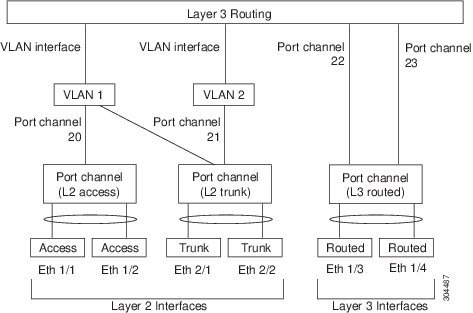
You can classify port-channel interfaces as Layer 2 or Layer 3 interfaces. In addition, you can configure Layer 2 port channels in either access or trunk mode. Layer 3 port-channel interfaces have routed ports as channel members.
You can configure a Layer 3 port channel with a static MAC address. If you do not configure this value, the Layer 3 port channel uses the router MAC of the first channel member to come up. See the Cisco Nexus 9000 Series NX-OS Layer 2 Switching Configuration Guide for information about configuring static MAC addresses on Layer 3 port channels.
See the "Configuring Layer 2 Interfaces" chapter for information about configuring Layer 2 ports in access or trunk mode and the "Configuring Layer 3 Interfaces" chapter for information about configuring Layer 3 interfaces and subinterfaces.
Basic Settings
You can configure the following basic settings for the port-channel interface:
-
Bandwidth—Use this setting for informational purposes only; this setting is to be used by higher-level protocols.
-
Delay—Use this setting for informational purposes only; this setting is to be used by higher-level protocols.
-
Description
-
Duplex
-
IP addresses
-
Maximum Transmission Unit (MTU)
-
Shutdown
-
Speed
Compatibility Requirements
When you add an interface to a channel group, the software checks certain interface attributes to ensure that the interface is compatible with the channel group. For example, you cannot add a Layer 3 interface to a Layer 2 channel group. The Cisco NX-OS software also checks a number of operational attributes for an interface before allowing that interface to participate in the port-channel aggregation.
The compatibility check includes the following operational attributes:
-
Network layer
-
(Link) speed capability
-
Speed configuration
-
Duplex capability
-
Duplex configuration
-
Port mode
-
Access VLAN
-
Trunk native VLAN
-
Tagged or untagged
-
Allowed VLAN list
-
MTU size
-
SPAN—Cannot be a SPAN source or a destination port
-
Storm control
-
Flow-control capability
-
Flow-control configuration
-
Media type, either copper or fiber
Use the show port-channel compatibility-parameters command to see the full list of compatibility checks that the Cisco NX-OS uses.
You can only add interfaces configured with the channel mode set to on to static port channels, and you can only add interfaces configured with the channel mode as active or passive to port channels that are running LACP. You can configure these attributes on an individual member port. If you configure a member port with an incompatible attribute, the software suspends that port in the port channel.
Alternatively, you can force ports with incompatible parameters to join the port channel if the following parameters are the same:
-
(Link) speed capability
-
Speed configuration
-
Duplex capability
-
Duplex configuration
-
Flow-control capability
-
Flow-control configuration
When the interface joins a port channel, some of its individual parameters are removed and replaced with the values on the port channel as follows:
-
Bandwidth
-
Delay
-
Extended Authentication Protocol over UDP
-
VRF
-
IP address
-
MAC address
-
Spanning Tree Protocol
-
NAC
-
Service policy
-
Access control lists (ACLs)
Many interface parameters remain unaffected when the interface joins or leaves a port channel as follows:
Note | When you delete the port channel, the software sets all member interfaces as if they were removed from the port channel. |
See the “LACP Marker Responders” section for information about port-channel modes.
Load Balancing Using Port Channels
The Cisco NX-OS software load balances traffic across all operational interfaces in a port channel by hashing the addresses in the frame to a numerical value that selects one of the links in the channel. Port channels provide load balancing by default. Port-channel load balancing uses MAC addresses, IP addresses, or Layer 4 port numbers to select the link. Port-channel load balancing uses either source or destination addresses or ports, or both source and destination addresses or ports.
You can configure the load- balancing mode to apply to all port channels that are configured on the entire device or on specified modules. The per-module configuration takes precedence over the load-balancing configuration for the entire device. You can configure one load-balancing mode for the entire device, a different mode for specified modules, and another mode for the other specified modules. You cannot configure the load-balancing method per port channel.
You can configure the type of load-balancing algorithm used. You can choose the load-balancing algorithm that determines which member port to select for egress traffic by looking at the fields in the frame.
The default load-balancing mode for Layer 3 interfaces is the source and destination IP address, and the default load-balancing mode for non-IP traffic is the source and destination MAC address. Use the port-channel load-balance command to set the load-balancing method among the interfaces in the channel-group bundle. The default method for Layer 2 packets is src-dst-mac. The default method for Layer 3 packets is src-dst-ip.
You can configure the device to use one of the following methods to load balance across the port channel:
-
Destination MAC address
-
Source MAC address
-
Source and destination MAC address
-
Destination IP address
-
Source IP address
-
Source and destination IP address
-
Source TCP/UDP port number
-
Destination TCP/UDP port number
-
Source and destination TCP/UDP port number
Non-IP and Layer 3 port channels both follow the configured load-balancing method, using the source, destination, or source and destination parameters. For example, when you configure load balancing to use the source IP address, all non-IP traffic uses the source MAC address to load balance the traffic while the Layer 3 traffic load balances the traffic using the source IP address. Similarly, when you configure the destination MAC address as the load-balancing method, all Layer 3 traffic uses the destination IP address while the non-IP traffic load balances using the destination MAC address.
You can configure load balancing either by the entire system or by specific modules.
The load-balancing algorithms that use port channels do not apply to multicast traffic. Regardless of the load-balancing algorithm you have configured, multicast traffic uses the following methods for load balancing with port channels:
-
Multicast traffic with Layer 4 information—Source IP address, source port, destination IP address, destination port
-
Multicast traffic without Layer 4 information—Source IP address, destination IP address
-
Non-IP multicast traffic—Source MAC address, destination MAC address
Note | Devices that run Cisco IOS can optimize the behavior of the member ports ASICs if a failure of a single member occurred by running the port-channel hash-distribution command. The Cisco Nexus 9000 Series device performs this optimization by default and does not require or support this command. Cisco NX-OS does support the customization of the load-balancing criteria on port channels through the port-channel load-balance command, either for the entire device or on a per-module basis. |
Symmetric Hashing
To be able to effectively monitor traffic on a port channel, it is essential that each interface connected to a port channel receives both forward and reverse traffic flows. Normally, there is no guarantee that the forward and reverse traffic flows will use the same physical interface. However, when you enable symmetric hashing on the port channel, bidirectional traffic is forced to use the same physical interface and each physical interface in the port channel is effectively mapped to a set of flows.
When symmetric hashing is enabled, the parameters used for hashing, such as the source and destination IP address, are normalized before they are entered into the hashing algorithm. This process ensures that when the parameters are reversed (the source on the forward traffic becomes the destination on the reverse traffic), the hash output is the same. Therefore, the same interface is chosen.
Only the following load-balancing algorithms support symmetric hashing:
LACP
LACP allows you to configure up to 16 interfaces into a port channel.
- LACP Overview
- Port-Channel Modes
- LACP ID Parameters
- LACP Marker Responders
- LACP-Enabled and Static Port Channels Differences
- LACP Compatibility Enhancements
- Delayed LACP
- LACP Port-Channel Minimum Links and MaxBundle
- LACP Fast Timers
- Virtualization Support
- High Availability
LACP Overview
Note | You must enable LACP before you can use LACP. By default, LACP is disabled. |
See the “Enabling LACP” section for information about enabling LACP.
The system automatically takes a checkpoint before disabling the feature, and you can roll back to this checkpoint. See the Cisco Nexus 9000 Series NX-OS System Management Configuration Guide for information about rollbacks and checkpoints.
The following figure shows how individual links can be combined into LACP port channels and channel groups as well as function as individual links.
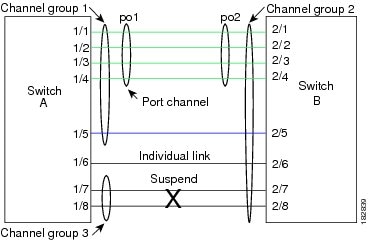
With LACP, you can bundle up to 16 interfaces in a channel group.
Note | When you delete the port channel, the software automatically deletes the associated channel group. All member interfaces revert to their original configuration. |
You cannot disable LACP while any LACP configurations are present.
Port-Channel Modes
Individual interfaces in port channels are configured with channel modes. When you run static port channels with no aggregation protocol, the channel mode is always set to on.
After you enable LACP globally on the device, you enable LACP for each channel by setting the channel mode for each interface to active or passive. You can configure either channel mode for individual links in the LACP channel group when you are adding the links to the channel group.
Note | You must enable LACP globally before you can configure an interface in either the active or passive channel mode. |
The following table describes the channel modes.
|
Channel Mode |
Description |
|---|---|
|
passive |
LACP mode that places a port into a passive negotiating state in which the port responds to LACP packets that it receives but does not initiate LACP negotiation. |
|
active |
LACP mode that places a port into an active negotiating state in which the port initiates negotiations with other ports by sending LACP packets. |
|
on |
All static port channels (that are not running LACP) remain in this mode. If you attempt to change the channel mode to active or passive before enabling LACP, the device displays an error message. You enable LACP on each channel by configuring the interface in that channel for the channel mode as either active or passive. When an LACP attempts to negotiate with an interface in the on state, it does not receive any LACP packets and becomes an individual link with that interface; it does not join the LACP channel group. The default port-channel mode is on. |
Both the passive and active modes allow LACP to negotiate between ports to determine if they can form a port channel based on criteria such as the port speed and the trunking state.The passive mode is useful when you do not know whether the remote system, or partner, supports LACP.
Ports can form an LACP port channel when they are in different LACP modes if the modes are compatible as in the following examples:
-
A port in active mode can form a port channel successfully with another port that is in active mode.
-
A port in active mode can form a port channel with another port in passive mode.
-
A port in passive mode cannot form a port channel with another port that is also in passive mode, because neither port will initiate negotiation.
-
A port in on mode is not running LACP and cannot form a port channel with another port that is in active or passive mode.
LACP ID Parameters
This section describes the LACP parameters.
LACP System Priority
Each system that runs LACP has an LACP system priority value. You can accept the default value of 32768 for this parameter, or you can configure a value between 1 and 65535. LACP uses the system priority with the MAC address to form the system ID and also uses the system priority during negotiation with other devices. A higher system priority value means a lower priority.
Note | The LACP system ID is the combination of the LACP system priority value and the MAC address. |
LACP Port Priority
Each port that is configured to use LACP has an LACP port priority. You can accept the default value of 32768 for the LACP port priority, or you can configure a value between 1 and 65535. LACP uses the port priority with the port number to form the port identifier.
LACP uses the port priority to decide which ports should be put in standby mode when there is a limitation that prevents all compatible ports from aggregating and which ports should be put into active mode. A higher port priority value means a lower priority for LACP. You can configure the port priority so that specified ports have a lower priority for LACP and are most likely to be chosen as active links, rather than hot-standby links.
LACP Administrative Key
LACP automatically configures an administrative key value equal to the channel-group number on each port configured to use LACP. The administrative key defines the ability of a port to aggregate with other ports. A port’s ability to aggregate with other ports is determined by these factors:
LACP Marker Responders
You can dynamically redistribute the data traffic by using port channels. This redistribution might result from a removed or added link or a change in the load-balancing scheme. Traffic redistribution that occurs in the middle of a traffic flow can cause misordered frames.
LACP uses the Marker Protocol to ensure that frames are not duplicated or reordered due to this redistribution. The Marker Protocol detects when all the frames of a given traffic flow are successfully received at the remote end. LACP sends Marker PDUs on each of the port-channel links. The remote system responds to the Marker PDU once it receives all the frames received on this link prior to the Marker PDU. The remote system then sends a Marker Responder. Once the Marker Responders are received by the local system on all member links of the port channel, the local system can redistribute the frames in the traffic flow with no chance of misordering. The software supports only Marker Responders.
LACP-Enabled and Static Port Channels Differences
The following table summarizes the major differences between port channels with LACP enabled and static port channels.
|
Configurations |
Port Channels with LACP Enabled |
Static Port Channels |
|---|---|---|
|
Protocol applied |
Enable globally |
Not applicable |
|
Channel mode of links |
Can be either: |
Can only be On |
|
Maximum number of links in channel |
32 |
32 |
LACP Compatibility Enhancements
When a Cisco Nexus 9000 Series device is connected to a non-Nexus peer, its graceful failover defaults may delay the time taken for a disabled port to be brought down or cause traffic from the peer to be lost. To address these conditions, the lacp graceful-convergence command was added.
By default, LACP sets a port to the suspended state if it does not receive an LACP PDU from the peer. In some cases, although this feature helps in preventing loops created due to misconfigurations, it can cause servers to fail to boot up because they require LACP to logically bring up the port. You can put a port into an individual state by using the lacp suspend-individual command.
Delayed LACP
LACP port-channels exchange LACP PDUs for quick bundling of links when connecting a server and a switch. However, the links go into suspended state when the PDUs are not received.
The delayed LACP feature enables one port-channel member, the delayed-LACP port, to come up first as a member of a regular port-channel before LACP PDUs are received. After it is connected in LACP mode, other members, the auxiliary LACP ports, are brought up. This avoids having the links becoming suspended when PDUs are not received.
LACP Port-Channel Minimum Links and MaxBundle
A port channel aggregates similar ports to provide increased bandwidth in a single manageable interface.
The introduction of the minimum links and maxbundle feature further refines LACP port-channel operation and provides increased bandwidth in one manageable interface.
The LACP port-channel minimum links feature does the following:
-
Configures the minimum number of ports that must be linked up and bundled in the LACP port channel.
-
Prevents the low-bandwidth LACP port channel from becoming active.
-
Causes the LACP port channel to become inactive if there are few active members ports to supply the required minimum bandwidth.
The LACP MaxBundle defines the maximum number of bundled ports allowed in a LACP port channel.
The LACP MaxBundle feature does the following:
-
Defines an upper limit on the number of bundled ports in an LACP port channel.
-
Allows hot-standby ports with fewer bundled ports. (For example, in an LACP port channel with five ports, you can designate two of those ports as hot-standby ports.)
Note | The minimum links and maxbundle feature works only with LACP port channels. However, the device allows you to configure this feature in non-LACP port channels, but the feature is not operational. |
LACP Fast Timers
You can change the LACP timer rate to modify the duration of the LACP timeout. Use the lacp rate command to set the rate at which LACP control packets are sent to an LACP-supported interface. You can change the timeout rate from the default rate (30 seconds) to the fast rate (1 second). This command is supported only on LACP-enabled interfaces. To configure the LACP fast time rate, see the “Configuring the LACP Fast Timer Rate” section.
ISSU and stateful switchover cannot be guaranteed with LACP fast timers.
Virtualization Support
You must configure the member ports and other port channel-related configuration from the virtual device context (VDC) that contains the port channel and member ports. You can use the numbers from 1 to 4096 in each VDC to number the port channels.
All ports in one port channel must be in the same VDC. When you are using LACP, all possible 8 active ports and all possible 8 standby ports must be in the same VDC.
Note | The port-channeling load-balancing mode works either for a single module or across the entire device. You must configure load balancing using port channels in the default VDC. See the “Load Balancing Using Port Channels” section on page 6-6 for more information about load balancing. |
High Availability
Port channels provide high availability by load balancing traffic across multiple ports. If a physical port fails, the port channel is still operational if there is an active member in the port channel. You can bundle ports from different modules and create a port channel that remains operational even if a module fails because the settings are common across the module.
Port channels support stateful and stateless restarts. A stateful restart occurs on a supervisor switchover. After the switchover, the Cisco NX-OS software applies the runtime configuration after the switchover.
The port channel goes down if the operational ports fall below the configured minimum links number.
Note | See the Cisco Nexus 9000 Series NX-OS High Availability and Redundancy Guide for complete information about high-availability features. |
Licensing Requirements for Port Channeling
The following table shows the licensing requirements for this feature:
|
Product |
License Requirement |
|---|---|
|
Cisco NX-OS |
Port channeling requires no license. Any feature not included in a license package is bundled with the Cisco NX-OS image and is provided at no extra charge to you. |
Prerequisites for Port Channeling
Port channeling has the following prerequisites:
-
You must be logged onto the device.
-
All ports for a single port channel must be either Layer 2 or Layer 3 ports.
-
All ports for a single port channel must meet the compatibility requirements. See the “Compatibility Requirements” section for more information about the compatibility requirements.
-
You must configure load balancing from the default VDC.
Guidelines and Limitations
Port channeling has the following configuration guidelines and limitations:
-
The LACP port-channel minimum links and maxbundle feature is not supported for host interface port channels.
-
You must enable LACP before you can use that feature.
-
You can configure multiple port channels on a device.
-
Do not put shared and dedicated ports into the same port channel. (See the “Configuring Basic Interface Parameters” chapter for information about shared and dedicated ports.)
-
For Layer 2 port channels, ports with different STP port path costs can form a port channel if they are compatibly configured with each other. See the “Compatibility Requirements” section for more information about the compatibility requirements.
-
In STP, the port-channel cost is based on the aggregated bandwidth of the port members.
-
After you configure a port channel, the configuration that you apply to the port channel interface affects the port channel member ports. The configuration that you apply to the member ports affects only the member port where you apply the configuration.
-
LACP does not support half-duplex mode. Half-duplex ports in LACP port channels are put in the suspended state.
-
You must remove the port-security information from a port before you can add that port to a port channel. Similarly, you cannot apply the port-security configuration to a port that is a member of a channel group.
-
Do not configure ports that belong to a port channel group as private VLAN ports. While a port is part of the private VLAN configuration, the port channel configuration becomes inactive.
-
Channel member ports cannot be a source or destination SPAN port.
-
Port-channels are not supported on devices with 100G ports.
Default Settings
The following table lists the default settings for port-channel parameters.
|
Parameters |
Default |
|---|---|
|
Port channel |
Admin up |
|
Load balancing method for Layer 3 interfaces |
Source and destination IP address |
|
Load balancing method for Layer 2 interfaces |
Source and destination MAC address |
|
Load balancing per module |
Disabled |
|
LACP |
Disabled |
|
Channel mode |
on |
|
LACP system priority |
32768 |
|
LACP port priority |
32768 |
|
Minimum links for LACP |
1 |
|
Maxbundle |
32 |
|
Minimum links for FEX fabric port channel |
1 |
Configuring Port Channels
Note | See the "Configuring Basic Interface Parameters” chapter for information about configuring the maximum transmission unit (MTU) for the port-channel interface. See the “Configuring Layer 3 Interfaces” chapter for information about configuring IPv4 and IPv6 addresses on the port-channel interface. |
Note | If you are familiar with the Cisco IOS CLI, be aware that the Cisco NX-OS commands for this feature might differ from the Cisco IOS commands that you would use. |
- Creating a Port Channel
- Adding a Layer 2 Port to a Port Channel
- Adding a Layer 3 Port to a Port Channel
- Configuring the Bandwidth and Delay for Informational Purposes
- Shutting Down and Restarting the Port-Channel Interface
- Configuring a Port-Channel Description
- Configuring the Speed and Duplex Settings for a Port-Channel Interface
- Configuring Load Balancing Using Port Channels
- Enabling LACP
- Configuring LACP Port-Channel Port Modes
- Configuring LACP Port-Channel Minimum Links
- Configuring the LACP Port-Channel MaxBundle
- Configuring the LACP Fast Timer Rate
- Configuring the LACP System Priority
- Configuring the LACP Port Priority
- Disabling LACP Graceful Convergence
- Disabling LACP Suspend Individual
- Reenabling LACP Suspend Individual
- Configuring Delayed LACP
- Configuring Port Channel Hash Distribution
- Verifying the Port-Channel Configuration
- Monitoring the Port-Channel Interface Configuration
- Example Configurations for Port Channels
- Related Documents
Creating a Port Channel
You can create a port channel before you create a channel group. The software automatically creates the associated channel group.
Note | When the port channel is created before the channel group, the port channel should be configured with all of the interface attributes that the member interfaces are configured with. Use the switchport mode trunk {allowed vlan vlan-id | native vlan-id} command to configure the members. |
This is required only when the channel group members are Layer 2 ports (switchport) and trunks (switchport mode trunk).
Enable LACP if you want LACP-based port channels.
1.
configure terminal
2.
interface port-channel
channel-number
3.
show port-channel summary
4.
show interface status error
policy [detail]
5.
no shutdown
6.
copy running-config startup-config
DETAILED STEPS
| Command or Action | Purpose | |
|---|---|---|
| Step 1 | configure terminal
Example: switch# configure terminal switch(config)# |
Enters global configuration mode. |
| Step 2 | interface port-channel
channel-number
Example: switch(config)# interface port-channel 1 switch(config-if) |
Specifies the port-channel interface to configure, and enters the interface configuration mode. The range is from 1 to 4096. The Cisco NX-OS software automatically creates the channel group if it does not already exist. |
| Step 3 | show port-channel summary
Example: switch(config-router)# show port-channel summary |
(Optional) Displays information about the port channel. |
| Step 4 | show interface status error
policy [detail]
Example: switch# show interface status error policy detail |
(Optional) Displays the interfaces and VLANs that produce an error during policy programming to ensure that policies are consistent with hardware policies. Use the detail command to display the details of the interfaces that produce an error. |
| Step 5 | no shutdown
Example: switch# configure terminal switch(config)# int e3/1 switch(config-if)# no shutdown |
(Optional) Clears the errors on the interfaces and VLANs where policies correspond with hardware policies. This command allows policy programming to continue and the port to come up. If policies do not correspond, the errors are placed in an error-disabled policy state. |
| Step 6 | copy running-config startup-config
Example: switch(config)# copy running-config startup-config |
(Optional) Copies the running configuration to the startup configuration. |
This example shows how to create a port channel:
switch# configure terminal switch (config)# interface port-channel 1
See the “Compatibility Requirements” section for details on how the interface configuration changes when you delete the port channel.
Adding a Layer 2 Port to a Port Channel
You can add a Layer 2 port to a new channel group or to a channel group that already contains Layer 2 ports. The software creates the port channel associated with this channel group if the port channel does not already exist.
Note | Use the no channel-group command to remove the port from the channel group.
|
Enable LACP if you want LACP-based port channels.
All Layer 2 member ports must run in full-duplex mode and at the same speed
1.
configure terminal
2.
interface
type
slot/port
3.
switchport
4.
switchport mode trunk
5.
switchport
trunk {allowed
vlan
vlan-id |
native
vlan-id}
6.
channel-group
channel-number [force] [mode {on |
active
|
passive}]
7.
show interface
type
slot/port
8.
show interface status error
policy [detail]
9.
no shutdown
10.
copy running-config startup-config
DETAILED STEPS
| Command or Action | Purpose | |||
|---|---|---|---|---|
| Step 1 | configure terminal
Example: switch# configure terminal switch(config)# |
Enters global configuration mode. | ||
| Step 2 | interface
type
slot/port
Example: switch(config)# interface ethernet 1/4 switch(config-if)# |
Specifies the interface that you want to add to a channel group, and enters the interface configuration mode. | ||
| Step 3 | switchport
Example: switch(config)# switchport |
Configures the interface as a Layer 2 access port. | ||
| Step 4 | switchport mode trunk
Example: switch(config)# switchport mode trunk |
(Optional) Configures the interface as a Layer 2 trunk port. | ||
| Step 5 |
switchport
trunk {allowed
vlan
vlan-id |
native
vlan-id}
Example: switch(config)# switchport trunk native 3 switch(config-if)# |
(Optional) Configures necessary parameters for a Layer 2 trunk port. | ||
| Step 6 |
channel-group
channel-number [force] [mode {on |
active
|
passive}]
Example: |
Configures the port in a channel group and sets the mode. The channel-number range is from 1 to 4096. This command creates the port channel associated with this channel group if the port channel does not already exist. All static port-channel interfaces are set to mode on. You must set all LACP-enabled port-channel interfaces to active or passive. The default mode is on. (Optional) Forces an interface with some incompatible configurations to join the channel. The forced interface must have the same speed, duplex, and flow control settings as the channel group.
| ||
| Step 7 | show interface
type
slot/port
Example: switch# show interface port channel 5 |
(Optional) Displays interface information. | ||
| Step 8 | show interface status error
policy [detail]
Example: switch# show interface status error policy detail |
(Optional) Displays the interfaces and VLANs that produce an error during policy programming to ensure that policies are consistent with hardware policies. Use the detail command to display the details of the interfaces that produce an error. | ||
| Step 9 | no shutdown
Example: switch# configure terminal switch(config)# int e3/1 switch(config-if)# no shutdown |
(Optional) Clears the errors on the interfaces and VLANs where policies correspond with hardware policies. This command allows policy programming to continue and the port to come up. If policies do not correspond, the errors are placed in an error-disabled policy state. | ||
| Step 10 | copy running-config startup-config
Example: switch(config)# copy running-config startup-config |
(Optional) Copies the running configuration to the startup configuration. |
This example shows how to add a Layer 2 Ethernet interface 1/4 to channel group 5:
switch# configure terminal switch (config)# interface ethernet 1/4 switch(config-if)# switchport switch(config-if)# channel-group 5
Adding a Layer 3 Port to a Port Channel
You can add a Layer 3 port to a new channel group or to a channel group that is already configured with Layer 3 ports. The software creates the port channel associated with this channel group if the port channel does not already exist.
If the Layer 3 port that you are adding has a configured IP address, the system removes that IP address before adding the port to the port channel. After you create a Layer 3 port channel, you can assign an IP address to the port-channel interface.
Note | Use the no channel-group command to remove the port from the channel group. The port reverts to its original configuration. You must reconfigure the IP addresses for this port.
|
Enable LACP if you want LACP-based port channels.
Remove any IP addresses configured on the Layer 3 interface.
1.
configure terminal
2.
interface
type
slot/port
3.
no switchport
4.
channel-group
channel-number [force] [mode {on |
active
|
passive}]
5.
show interface
type
slot/port
6.
show interface status error
policy [detail]
7.
no shutdown
8.
copy running-config startup-config
DETAILED STEPS
| Command or Action | Purpose | |
|---|---|---|
| Step 1 | configure terminal
Example: switch# configure terminal switch(config)# |
Enters global configuration mode. |
| Step 2 | interface
type
slot/port
Example: switch(config)# interface ethernet 1/4 switch(config-if)# |
Specifies the interface that you want to add to a channel group, and enters the interface configuration mode. |
| Step 3 | no switchport
Example: switch(config-if)# no switchport |
Configures the interface as a Layer 3 port. |
| Step 4 |
channel-group
channel-number [force] [mode {on |
active
|
passive}]
Example: |
Configures the port in a channel group and sets the mode. The channel-number range is from 1 to 4096. The Cisco NX-OS software creates the port channel associated with this channel group if the port channel does not already exist. (Optional) Forces an interface with some incompatible configurations to join the channel. The forced interface must have the same speed, duplex, and flow control settings as the channel group. |
| Step 5 | show interface
type
slot/port
Example: switch# show interface ethernet 1/4 |
(Optional) Displays interface information. |
| Step 6 | show interface status error
policy [detail]
Example: switch# show interface status error policy detail |
(Optional) Displays the interfaces and VLANs that produce an error during policy programming to ensure that policies are consistent with hardware policies. Use the detail command to display the details of the interfaces that produce an error. |
| Step 7 | no shutdown
Example: switch# configure terminal switch(config)# int e3/1 switch(config-if)# no shutdown |
(Optional) Clears the errors on the interfaces and VLANs where policies correspond with hardware policies. This command allows policy programming to continue and the port to come up. If policies do not correspond, the errors are placed in an error-disabled policy state. |
| Step 8 | copy running-config startup-config
Example: switch(config)# copy running-config startup-config |
(Optional) Copies the running configuration to the startup configuration. |
This example shows how to add a Layer 3 Ethernet interface 1/5 to channel group 6 in on mode:
switch# configure terminal switch (config)# interface ethernet 1/5 switch(config-if)# switchport switch(config-if)# channel-group 6
This example shows how to create a Layer 3 port-channel interface and assign the IP address:
switch# configure terminal switch (config)# interface port-channel 4 switch(config-if)# ip address 192.0.2.1/8
Configuring the Bandwidth and Delay for Informational Purposes
The bandwidth of the port channel is determined by the number of total active links in the channel.
You configure the bandwidth and delay on port-channel interfaces for informational purposes.
1.
configure terminal
2.
interface port-channel
channel-number
3.
bandwidth
value
4.
delay
value
5.
exit
6.
show interface port-channel
channel-number
7.
copy running-config startup-config
DETAILED STEPS
| Command or Action | Purpose | |
|---|---|---|
| Step 1 | configure terminal
Example: switch# configure terminal switch(config)# |
Enters global configuration mode. |
| Step 2 | interface port-channel
channel-number
Example: switch(config)# interface port-channel 2 switch(config-if)# |
Specifies the port-channel interface that you want to configure, and enters the interface mode. |
| Step 3 | bandwidth
value
Example: switch(config-if)# bandwidth 60000000 switch(config-if)# |
Specifies the bandwidth, which is used for informational purposes. The range is from 1 to 80,000,000 kbs. The default value depends on the total active interfaces in the channel group. |
| Step 4 |
delay
value
Example: switch(config-if)# delay 10000 switch(config-if)# |
Specifies the throughput delay, which is used for informational purposes. The range is from 1 to 16,777,215 tens of microseconds. The default value is 10 microseconds. |
| Step 5 |
exit
Example: switch(config-if)# exit switch(config)# |
Exits the interface mode and returns to the configuration mode. |
| Step 6 | show interface port-channel
channel-number
Example: switch# show interface port-channel 2 |
(Optional) Displays interface information for the specified port channel. |
| Step 7 | copy running-config startup-config
Example: switch(config)# copy running-config startup-config |
(Optional) Copies the running configuration to the startup configuration. |
This example shows how to configure the informational parameters of the bandwidth and delay for port channel 5:
switch# configure terminal switch (config)# interface port-channel 5 switch(config-if)# bandwidth 60000000 switch(config-if)# delay 10000 switch(config-if)#
Shutting Down and Restarting the Port-Channel Interface
You can shut down and restart the port-channel interface. When you shut down a port-channel interface, no traffic passes and the interface is administratively down.
1.
configure terminal
2.
interface port-channel
channel-number
3.
shutdown
4.
exit
5.
show interface port-channel
channel-number
6.
show interface status error policy
[detail]
7.
no shutdown
8.
copy running-config startup-config
DETAILED STEPS
| Command or Action | Purpose | |||
|---|---|---|---|---|
| Step 1 | configure terminal
Example: switch# configure terminal switch(config)# |
Enters global configuration mode. | ||
| Step 2 | interface port-channel
channel-number
Example: switch(config)# interface port-channel 2 switch(config-if)# |
Specifies the port-channel interface that you want to configure, and enters the interface mode. | ||
| Step 3 | shutdown
Example: switch(config-if)# shutdown switch(config-if)# |
Shuts down the interface. No traffic passes and the interface displays as administratively down. The default is no shutdown.
| ||
| Step 4 |
exit
Example: switch(config-if)# exit switch(config)# |
Exits the interface mode and returns to the configuration mode. | ||
| Step 5 | show interface port-channel
channel-number
Example: switch(config-router)# show interface port-channel 2 |
(Optional) Displays interface information for the specified port channel. | ||
| Step 6 | show interface status error policy
[detail]
Example: switch# show interface status error policy detail |
(Optional) Displays the interfaces and VLANs that produce an error during policy programming to ensure that policies are consistent with hardware policies. Use the detail command to display the details of the interfaces that produce an error. | ||
| Step 7 | no shutdown
Example: switch# configure terminal switch(config)# int e3/1 switch(config-if)# no shutdown |
(Optional) Clears the errors on the interfaces and VLANs where policies correspond with hardware policies. This command allows policy programming to continue and the port to come up. If policies do not correspond, the errors are placed in an error-disabled policy state. | ||
| Step 8 | copy running-config startup-config
Example: switch(config)# copy running-config startup-config |
(Optional) Copies the running configuration to the startup configuration. |
This example shows how to bring up the interface for port channel 2:
switch# configure terminal switch (config)# interface port-channel 2 switch(config-if)# no shutdown
Configuring a Port-Channel Description
You can configure a description for a port channel.
1.
configure terminal
2.
interface port-channel
channel-number
3.
description
4.
exit
5.
show interface port-channel
channel-number
6.
copy running-config startup-config
DETAILED STEPS
| Command or Action | Purpose | |
|---|---|---|
| Step 1 | configure terminal
Example: switch# configure terminal switch(config)# |
Enters global configuration mode. |
| Step 2 | interface port-channel
channel-number
Example: switch(config)# interface port-channel 2 switch(config-if)# |
Specifies the port-channel interface that you want to configure, and enters the interface mode. |
| Step 3 |
description
Example: switch(config-if)# description engineering switch(config-if)# |
Allows you to add a description to the port-channel interface. You can use up to 80 characters in the description. By default, the description does not display; you must configure this parameter before the description displays in the output. |
| Step 4 |
exit
Example: switch(config-if)# exit switch(config)# |
Exits the interface mode and returns to the configuration mode. |
| Step 5 | show interface port-channel
channel-number
Example: switch# show interface port-channel 2 |
(Optional) Displays interface information for the specified port channel. |
| Step 6 | copy running-config startup-config
Example: switch(config)# copy running-config startup-config |
(Optional) Copies the running configuration to the startup configuration. |
This example shows how to add a description to port channel 2:
switch# configure terminal switch (config)# interface port-channel 2 switch(config-if)# description engineering
Configuring the Speed and Duplex Settings for a Port-Channel Interface
You can configure the speed and duplex settings for a port-channel interface.
1.
configure terminal
2.
interface port-channel
channel-number
3.
speed {10 |
100 |
1000 |
auto}
4.
duplex {auto |
full |
half}
5.
exit
6.
show interface port-channel
channel-number
7.
copy running-config startup-config
DETAILED STEPS
| Command or Action | Purpose | |
|---|---|---|
| Step 1 | configure terminal
Example: switch# configure terminal switch(config)# |
Enters global configuration mode. |
| Step 2 | interface port-channel
channel-number
Example: switch(config)# interface port-channel 2 switch(config-if)# |
Specifies the port-channel interface that you want to configure, and enters the interface mode. |
| Step 3 |
speed {10 |
100 |
1000 |
auto}
Example: switch(config-if)# speed auto switch(config-if)# |
Sets the speed for the port-channel interface. The default is auto for autonegotiation. |
| Step 4 |
duplex {auto |
full |
half}
Example: switch(config-if)# speed auto switch(config-if)# |
Sets the duplex for the port-channel interface. The default is auto for autonegotiation. |
| Step 5 |
exit
Example: switch(config-if)# exit switch(config)# |
Exits the interface mode and returns to the configuration mode. |
| Step 6 | show interface port-channel
channel-number
Example: switch# show interface port-channel 2 |
(Optional) Displays interface information for the specified port channel. |
| Step 7 | copy running-config startup-config
Example: switch(config)# copy running-config startup-config |
(Optional) Copies the running configuration to the startup configuration. |
This example shows how to set port channel 2 to 100 Mb/s:
switch# configure terminal switch (config)# interface port-channel 2 switch(config-if)# speed 100
Configuring Load Balancing Using Port Channels
You can configure the load-balancing algorithm for port channels that applies to the entire device. Module-based load balancing takes precedence over device-based load balancing.
Note | Use the no port-channel load-balance command to restore the default load-balancing algorithm of source-dest-mac for non-IP traffic and source-dest-ip for IP traffic.
|
Enable LACP if you want LACP-based port channels.
1.
configure terminal
2.
port-channel
load-balance
method {dst ip |
dst
ip-port-vlan |
dst
ip-vlan |
dst
mac |
dst
port |
src-dst
ip [symmetric]
|
src-dst
ip-gre |
source-dst
mac |
source-dst
port |
src-ip
port | src-dst
ip-l4port [symmetric]
|
src-dst
l4port |
src-dst
mac |
src
ip |
src
mac |
src-port} [fex {fex-range |
all}] [rotate
rotate]
3.
show port-channel
load-balance
4.
copy running-config startup-config
DETAILED STEPS
| Command or Action | Purpose | |||||
|---|---|---|---|---|---|---|
| Step 1 | configure terminal
Example: switch# configure terminal switch(config)# |
Enters global configuration mode. | ||||
| Step 2 |
port-channel
load-balance
method {dst ip |
dst
ip-port-vlan |
dst
ip-vlan |
dst
mac |
dst
port |
src-dst
ip [symmetric]
|
src-dst
ip-gre |
source-dst
mac |
source-dst
port |
src-ip
port | src-dst
ip-l4port [symmetric]
|
src-dst
l4port |
src-dst
mac |
src
ip |
src
mac |
src-port} [fex {fex-range |
all}] [rotate
rotate]
Example: |
Specifies the load-balancing algorithm for the device. The range depends on the device. The default for Layer 3 is src-dst-ip for both IPv4 and IPv6, and the default for non-IP is src-dest-mac. Use the no port-channel load-balance src-dst mac asymmetric command to revert back to the default system settings (symmetrical).
| ||||
| Step 3 |
show port-channel
load-balance
Example: switch(config-router)# show port-channel load-balance |
(Optional) Displays the port-channel load-balancing algorithm. | ||||
| Step 4 | copy running-config startup-config
Example: switch(config)# copy running-config startup-config |
(Optional) Copies the running configuration to the startup configuration. |
Enabling LACP
LACP is disabled by default; you must enable LACP before you begin LACP configuration. You cannot disable LACP while any LACP configuration is present.
LACP learns the capabilities of LAN port groups dynamically and informs the other LAN ports. Once LACP identifies correctly matched Ethernet links, it group the links into a port channel. The port channel is then added to the spanning tree as a single bridge port.
To configure LACP, you must do the following:
-
Enable LACP globally by using the feature lacp command.
-
You can use different modes for different interfaces within the same LACP-enabled port channel. You can change the mode between active and passive for an interface only if it is the only interface that is designated to the specified channel group.
1.
configure terminal
2.
feature
lacp
3.
copy running-config startup-config
DETAILED STEPS
| Command or Action | Purpose | |
|---|---|---|
| Step 1 | configure terminal
Example: switch# configure terminal switch(config)# |
Enters global configuration mode. |
| Step 2 | feature
lacp
Example: switch(config)# feature lacp |
Enables LACP on the device. |
| Step 3 | copy running-config startup-config
Example: switch(config)# copy running-config startup-config |
(Optional) Copies the running configuration to the startup configuration. |
This example shows how to enable LACP:
switch# configure terminal switch (config)# feature lacp
Configuring LACP Port-Channel Port Modes
After you enable LACP, you can configure the channel mode for each individual link in the LACP port channel as active or passive. This channel configuration mode allows the link to operate with LACP.
When you configure port channels with no associated aggregation protocol, all interfaces on both sides of the link remain in the on channel mode.
1.
configure terminal
2.
interface
type
slot/port
3.
channel-group
number
mode {active |
on |
passive}
4.
show port-channel summary
5.
copy running-config startup-config
DETAILED STEPS
| Command or Action | Purpose | |
|---|---|---|
| Step 1 | configure terminal
Example: switch# configure terminal switch(config)# |
Enters global configuration mode. |
| Step 2 | interface
type
slot/port
Example: switch(config)# interface ethernet 1/4 switch(config-if)# |
Specifies the interface that you want to add to a channel group, and enters the interface configuration mode. |
| Step 3 |
channel-group
number
mode {active |
on |
passive}
Example: switch(config-if)# channel-group 5 mode active |
Specifies the port mode for the link in a port channel. After LACP is enabled, you configure each link or the entire channel as active or passive. When you run port channels with no associated aggregation protocol, the port-channel mode is always on. The default port-channel mode is on. |
| Step 4 |
show port-channel summary
Example: switch(config-if)# show port-channel summary |
(Optional) Displays summary information about the port channels. |
| Step 5 | copy running-config startup-config
Example: switch(config)# copy running-config startup-config |
(Optional) Copies the running configuration to the startup configuration. |
This example shows how to set the LACP-enabled interface to the active port-channel mode for Ethernet interface 1/4 in channel group 5:
switch# configure terminal switch (config)# interface ethernet 1/4 switch(config-if)# channel-group 5 mode active
Configuring LACP Port-Channel Minimum Links
You can configure the LACP minimum links feature. Although minimum links and maxbundles work only in LACP, you can enter the CLI commands for these features for non-LACP port channels, but these commands are nonoperational.
Note | Use the no lacp min-links command to restore the default port-channel minimum links configuration.
|
Ensure that you are in the correct port-channel interface.
1.
configure terminal
2.
interface port-channel
number
3.
lacp min-links
number
4.
show running-config interface
port-channel
number
DETAILED STEPS
| Command or Action | Purpose | |
|---|---|---|
| Step 1 | configure terminal
Example: switch# configure terminal switch(config)# |
Enters global configuration mode. |
| Step 2 |
interface port-channel
number
Example: switch(config)# interface port-channel 3 switch(config-if)# |
Specifies the interface to configure, and enters the interface configuration mode. |
| Step 3 |
lacp min-links
number
Example: switch(config-if)# lacp min-links 3 |
Specifies the port-channel interface to configure the number of minimum links and enters the interface configuration mode. The range is from 1 to 16. |
| Step 4 |
show running-config interface
port-channel
number
Example: switch(config-if)# show running-config interface port-channel 3 |
(Optional) Displays the port-channel minimum links configuration. |
This example shows how to configure the minimum number of port-channel interfaces on module 3:
switch# configure terminal switch (config)# lacp min-links 3
Configuring the LACP Port-Channel MaxBundle
You can configure the LACP maxbundle feature. Although minimum links and maxbundles work only in LACP, you can enter the CLI commands for these features for non-LACP port channels, but these commands are nonoperational.
Note | Use the no lacp max-bundle command to restore the default port-channel max-bundle configuration.
|
Ensure that you are in the correct port-channel interface.
1.
configure terminal
2.
interface port-channel
number
3.
lacp max-bundle
number
4.
show running-config interface
port-channel
number
DETAILED STEPS
| Command or Action | Purpose | |||
|---|---|---|---|---|
| Step 1 | configure terminal
Example: switch# configure terminal switch(config)# |
Enters global configuration mode. | ||
| Step 2 |
interface port-channel
number
Example: switch(config)# interface port-channel 3 switch(config-if)# |
Specifies the interface to configure, and enters the interface configuration mode. | ||
| Step 3 |
lacp max-bundle
number
Example: switch(config-if)# lacp max-bundle |
Specifies the port-channel interface to configure max-bundle, and enters the interface configuration mode. The default value for the port-channel max-bundle is 16. The allowed range is from 1 to 32.
| ||
| Step 4 |
show running-config interface
port-channel
number
Example: switch(config-if)# show running-config interface port-channel 3 |
(Optional) Displays the port-channel max-bundle configuration. |
This example shows how to configure the port channel interface max-bundle on module 3:
switch# configure terminal switch (config)# lacp max-bundle 3
Configuring the LACP Fast Timer Rate
You can change the LACP timer rate to modify the duration of the LACP timeout. Use the lacp rate command to set the rate at which LACP control packets are sent to an LACP-supported interface. You can change the timeout rate from the default rate (30 seconds) to the fast rate (1 second). This command is supported only on LACP-enabled interfaces.
Note | We do not recommend changing the LACP timer rate. HA and SSO are not supported when the LACP fast rate timer is configured. |
Ensure that you have enabled the LACP feature.
1.
configure terminal
2.
interface
type
slot/port
3.
lacp rate fast
DETAILED STEPS
| Command or Action | Purpose | |
|---|---|---|
| Step 1 | configure terminal
Example: switch# configure terminal switch(config)# |
Enters global configuration mode. |
| Step 2 | interface
type
slot/port
Example: switch(config)# interface ethernet 1/4 switch(config-if)# |
Specifies the interface to configure and enters the interface configuration mode. |
| Step 3 |
lacp rate fast
Example: switch(config-if)# lacp rate fast |
Configures the fast rate (one second) at which LACP control packets are sent to an LACP-supported interface. To reset the timeout rate to its default, use the no form of the command. |
This example shows how to configure the LACP fast rate on Ethernet interface 1/4:
switch# configure terminal switch (config)# interface ethernet 1/4 switch(config-if)# lacp rate fast
This example shows how to restore the LACP default rate (30 seconds) on Ethernet interface 1/4.
switch# configure terminal switch (config)# interface ethernet 1/4 switch(config-if)# no lacp rate fast
Configuring the LACP System Priority
The LACP system ID is the combination of the LACP system priority value and the MAC address.
Enable LACP.
1.
configure terminal
2.
lacp system-priority
priority
3.
show lacp system-identifier
4.
copy running-config startup-config
DETAILED STEPS
| Command or Action | Purpose | |||
|---|---|---|---|---|
| Step 1 | configure terminal
Example: switch# configure terminal switch(config)# |
Enters global configuration mode. | ||
| Step 2 |
lacp system-priority
priority
Example: switch(config)# lacp system-priority 40000 |
Configures the system priority for use with LACP. Valid values are from 1 through 65535, and higher numbers have a lower priority. The default value is 32768.
| ||
| Step 3 |
show lacp system-identifier
Example: switch(config-if)# show lacp system-identifier |
(Optional) Displays the LACP system identifier. | ||
| Step 4 | copy running-config startup-config
Example: switch(config)# copy running-config startup-config |
(Optional) Copies the running configuration to the startup configuration. |
This example shows how to set the LACP system priority to 2500:
switch# configure terminal switch(config)# lacp system-priority 2500
Configuring the LACP Port Priority
When you enable LACP, you can configure each link in the LACP port channel for the port priority.
Enable LACP.
1.
configure terminal
2.
interface
type
slot/port
3.
lacp port-priority
priority
4.
copy running-config startup-config
DETAILED STEPS
| Command or Action | Purpose | |
|---|---|---|
| Step 1 | configure terminal
Example: switch# configure terminal switch(config)# |
Enters global configuration mode. |
| Step 2 | interface
type
slot/port
Example: switch(config)# interface ethernet 1/4 switch(config-if)# |
Specifies the interface that you want to add to a channel group, and enters the interface configuration mode. |
| Step 3 |
lacp port-priority
priority
Example: switch(config-if)# lacp port-priority 40000 |
Configures the port priority for use with LACP. Valid values are from 1 through 65535, and higher numbers have a lower priority. The default value is 32768. |
| Step 4 | copy running-config startup-config
Example: switch(config-if)# copy running-config startup-config |
(Optional) Copies the running configuration to the startup configuration. |
This example shows how to set the LACP port priority for Ethernet interface 1/4 to 40000:
switch# configure terminal switch (config)# interface ethernet 1/4 switch(config-if)# lacp port-priority 40000
Disabling LACP Graceful Convergence
By default, LACP graceful convergence is enabled. In situations where you need to support LACP interoperability with devices where the graceful failover defaults may delay the time taken for a disabled port to be brought down or cause traffic from the peer to be lost, you can disable convergence. If the downstream access switch is not a Cisco Nexus device, disable the LACP graceful convergence option.
Note | The port channel has to be in the administratively down state before the command can be run. |
Enable LACP.
1.
configure terminal
2.
interface port-channel
number
3.
shutdown
4.
no lacp graceful-convergence
5.
no shutdown
6.
copy running-config startup-config
DETAILED STEPS
| Command or Action | Purpose | |
|---|---|---|
| Step 1 | configure terminal
Example: switch# configure terminal switch(config)# |
Enters global configuration mode. |
| Step 2 |
interface port-channel
number
Example: switch(config)# interface port-channel 1 switch(config-if)# |
Specifies the port channel interface to configure and enters the interface configuration mode. |
| Step 3 | shutdown
Example: switch(config-if) shutdown |
Administratively shuts down the port channel. |
| Step 4 |
no lacp graceful-convergence
Example: switch(config-if)# no lacp graceful-convergence |
Disables LACP graceful convergence on the port channel. |
| Step 5 | no shutdown
Example: switch(config-if) no shutdown |
Brings the port channel administratively up. |
| Step 6 | copy running-config startup-config
Example: switch(config)# copy running-config startup-config |
(Optional) Copies the running configuration to the startup configuration. |
This example shows how to disable LACP graceful convergence on a port channel:
switch# configure terminal switch (config)# interface port-channel 1 switch(config-if)# shutdown switch(config-if)# no lacp graceful-convergence switch(config-if)# no shutdown
Reenabling LACP Graceful Convergence
If the default LACP graceful convergence is once again required, you can reenable convergence.
1.
configure terminal
2.
interface port-channel
number
3.
shutdown
4.
lacp graceful-convergence
5.
no shutdown
6.
copy running-config startup-config
DETAILED STEPS
| Command or Action | Purpose | |
|---|---|---|
| Step 1 | configure terminal
Example: switch# configure terminal switch(config)# |
Enters global configuration mode. |
| Step 2 |
interface port-channel
number
Example: switch(config)# interface port-channel 1 switch(config-if)# |
Specifies the port channel interface to configure and enters the interface configuration mode. |
| Step 3 | shutdown
Example: switch(config-if) shutdown |
Administratively shuts down the port channel. |
| Step 4 |
lacp graceful-convergence
Example: switch(config-if)# lacp graceful-convergence |
Enables LACP graceful convergence on the port channel. |
| Step 5 | no shutdown
Example: switch(config-if) no shutdown |
Brings the port channel administratively up. |
| Step 6 | copy running-config startup-config
Example: switch(config)# copy running-config startup-config |
(Optional) Copies the running configuration to the startup configuration. |
This example shows how to enable LACP graceful convergence on a port channel:
switch# configure terminal switch (config)# interface port-channel 1 switch(config-if)# shutdown switch(config-if)# lacp graceful-convergence switch(config-if)# no shutdown
Disabling LACP Suspend Individual
LACP sets a port to the suspended state if it does not receive an LACP PDU from the peer. This process can cause some servers to fail to boot up as they require LACP to logically bring up the port.
Note | You should only enter the lacp suspend-individual command on edge ports. The port channel has to be in the administratively down state before you can use this command. |
Enable LACP.
1.
configure terminal
2.
interface port-channel
number
3.
shutdown
4.
no lacp suspend-individual
5.
no shutdown
6.
copy running-config startup-config
DETAILED STEPS
| Command or Action | Purpose | |
|---|---|---|
| Step 1 | configure terminal
Example: switch# configure terminal switch(config)# |
Enters global configuration mode. |
| Step 2 |
interface port-channel
number
Example: switch(config)# interface port-channel 1 switch(config-if)# |
Specifies the port channel interface to configure and enters the interface configuration mode. |
| Step 3 | shutdown
Example: switch(config-if) shutdown |
Administratively shuts down the port channel. |
| Step 4 |
no lacp suspend-individual
Example: switch(config-if)# no lacp suspend-individual |
Disables LACP individual port suspension behavior on the port channel. |
| Step 5 | no shutdown
Example: switch(config-if) no shutdown |
Brings the port channel administratively up. |
| Step 6 | copy running-config startup-config
Example: switch(config)# copy running-config startup-config |
(Optional) Copies the running configuration to the startup configuration. |
This example shows how to disable LACP individual port suspension on a port channel:
switch# configure terminal switch (config)# interface port-channel 1 switch(config-if)# shutdown switch(config-if)# no lacp suspend-individual switch(config-if)# no shutdown
Reenabling LACP Suspend Individual
You can reenable the default LACP individual port suspension.
1.
configure terminal
2.
interface port-channel
number
3.
shutdown
4.
lacp suspend-individual
5.
no shutdown
6.
copy running-config startup-config
DETAILED STEPS
| Command or Action | Purpose | |
|---|---|---|
| Step 1 | configure terminal
Example: switch# configure terminal switch(config)# |
Enters global configuration mode. |
| Step 2 |
interface port-channel
number
Example: switch(config)# interface port-channel 1 switch(config-if)# |
Specifies the port channel interface to configure and enters the interface configuration mode. |
| Step 3 | shutdown
Example: switch(config-if) shutdown |
Administratively shuts down the port channel. |
| Step 4 |
lacp suspend-individual
Example: switch(config-if)# lacp suspend-individual |
Enables LACP individual port suspension behavior on the port channel. |
| Step 5 | no shutdown
Example: switch(config-if) no shutdown |
Brings the port channel administratively up. |
| Step 6 | copy running-config startup-config
Example: switch(config)# copy running-config startup-config |
(Optional) Copies the running configuration to the startup configuration. |
This example shows how to reenable the LACP individual port suspension on a port channel:
switch# configure terminal switch (config)# interface port-channel 1 switch(config-if)# shutdown switch(config-if)# lacp suspend-individual switch(config-if)# no shutdown
Configuring Delayed LACP
You configure the delayed LACP with the lacp mode delay command followed by configuring the LACP port priority.
Note | For vPC, you must enable the delayed LACP on both vPC switches. |
Note | Delayed LACP is not supported on Layer 3 port channels, FEX modules, or the Cisco Nexus 9500 Series switch. |
Note | For vPC, when the delayed LACP port is on the primary switch and the primary switch fails to boot, you need to remove the vPC configuration on the delayed LACP port-channel of the acting primary switch and flap the port-channel for a new port to be chosen as the delayed LACP port on the existing port-channel. |
Note | When no lacp suspend-individual and the delayed LACP feature are configured on the same port, the non-delayed LACP ports belonging to the port are in individual state. When LACP is established, the member should be moved to up state. As a best practice, do not use no lacp suspend-individual together with the delayed LACP feature on the same port channel. |
1.
configure terminal
2.
interface port-channel
number
3.
lacp mode delay
DETAILED STEPS
| Command or Action | Purpose | |||||
|---|---|---|---|---|---|---|
| Step 1 | configure terminal
|
Enters global configuration mode. | ||||
| Step 2 | interface port-channel
number
|
Specifies the port channel interface to configure and enters the interface configuration mode. | ||||
| Step 3 | lacp mode delay
|
Enables delayed LACP.
Complete the configuration of the delayed LACP by configuring the LACP port priority. See the "Configuring the LACP Port Priority" section for details. The priority of a LACP port determines the election of the delayed LACP port. The port with the lowest numerical priority is elected. When two or more ports have the same best priority, the VDC system MAC is used to determine which vPC is used. Then within a non-vPC switch or the elected vPC switch, the smallest of the ethernet port names is used. When the delayed LACP feature is configured and made effective with a port channel flap, the delayed LACP port operates as a member of a regular port channel, allowing data to be exchanged between the server and switch. After receiving the first LACP PDU, the delayed LACP port transitions from a regular port member to a LACP port member.
|
The following example configures delayed LACP.
switch# config terminal switch(config)# interface po 1 switch(config-if)# lacp mode delay
switch# config terminal switch(config)# interface ethernet 1/1 switch(config-if)# lacp port-priority 1 switch(config-if)# channel-group 1 mode active
The following example disables delayed LACP.
switch# config terminal switch(config)# interface po 1 switch(config-if)# no lacp mode delay
Configuring Port Channel Hash Distribution
Cisco NX-OS supports the adaptive and fixed hash distribution configuration for both global and port-channel levels. This option minimizes traffic disruption by minimizing Result Bundle Hash (RBH) distribution changes when members come up or go down so that flows that are mapped to unchange RBH values continue to flow through the same links. The port-channel level configuration overrules the global configuration. The default configuration is adaptive globally, and there is no configuration for each port channel, so there is no change during an ISSU. No ports are flapped when the command is applied, and the configuration takes effect at the next member link change event. Both modes work with RBH module or non-module schemes.
During an ISSD to a lower version that does not support this feature, you must disable this feature if the fixed mode command is being used globally or if there is a port-channel level configuration.
- Configuring Port Channel Hash Distribution at the Global Level
- Configuring Port Channel Hash Distribution at the Port Channel Level
Configuring Port Channel Hash Distribution at the Global Level
1.
configure terminal
2.
no port-channel hash-distribution
{adaptive |
fixed}
3.
copy running-config startup-config
DETAILED STEPS
| Command or Action | Purpose | |
|---|---|---|
| Step 1 | configure terminal
Example: switch# configure terminal switch(config)# |
Enters global configuration mode. |
| Step 2 | no port-channel hash-distribution
{adaptive |
fixed}
Example: switch(config)# port-channel hash-distribution adaptive switch(config)# |
Specifies the port-channel hash distribution at the global level. The default is adaptive mode. The command does not take effect until the next member link event (link down/up/no shutdown/shutdown). (Do you still want to continue(y/n)? [yes]) |
| Step 3 | copy running-config startup-config
Example: switch(config)# copy running-config startup-config |
(Optional) Copies the running configuration to the startup configuration. |
This example shows how to configure hash distribution at the global level:
switch# configure terminal switch(config)# no port-channel hash-distribution fixed
Configuring Port Channel Hash Distribution at the Port Channel Level
1.
configure terminal
2.
interface port-channel
{channel-number |
range}
3.
no port-channel port hash-distribution
{adaptive |
fixed}
4.
copy running-config startup-config
DETAILED STEPS
| Command or Action | Purpose | |
|---|---|---|
| Step 1 | configure terminal
Example: switch# configure terminal switch(config)# |
Enters global configuration mode. |
| Step 2 | interface port-channel
{channel-number |
range}
Example: switch# interface port-channel 4 switch(config-if)# |
Specifies the interface to configure, and enters the interface configuration mode. |
| Step 3 | no port-channel port hash-distribution
{adaptive |
fixed}
Example: switch(config-if)# port-channel port hash-distribution adaptive switch(config-if) |
Specifies the port-channel hash distribution at the port channel level. There is no default. The command does not take effect until the next member link event (link down/up/no shutdown/shutdown). (Do you still want to continue(y/n)? [yes]) |
| Step 4 | copy running-config startup-config
Example: switch(config)# copy running-config startup-config |
(Optional) Copies the running configuration to the startup configuration. |
This example shows how to configure hash distribution as a global-level command:
switch# configure terminal switch(config)# no port-channel hash-distribution fixed
Verifying the Port-Channel Configuration
To display port-channel configuration information, perform one of the following tasks:
|
Command |
Purpose |
|---|---|
|
show interface port-channel channel-number |
Displays the status of a port-channel interface. |
|
show feature |
Displays enabled features. |
|
load- interval {interval seconds {1 | 2 | 3}} |
Sets three different sampling intervals to bit-rate and packet-rate statistics. |
|
show port-channel compatibility-parameters |
Displays the parameters that must be the same among the member ports in order to join a port channel. |
|
show port-channel database [interface port-channel channel-number] |
Displays the aggregation state for one or more port-channel interfaces. |
|
show port-channel load-balance |
Displays the type of load balancing in use for port channels. |
|
show port-channel summary |
Displays a summary for the port-channel interfaces. |
|
show port-channel traffic |
Displays the traffic statistics for port channels. |
|
show port-channel usage |
Displays the range of used and unused channel numbers. |
|
show lacp {counters [interface port-channel channel-number] | [interface type/slot] | neighbor [interface port-channel channel-number] | port-channel [interface port-channel channel-number] | system-identifier]]} |
Displays information about LACP. |
|
show running-config interface port-channel channel-number |
Displays information about the running configuration of the port-channel. |
Monitoring the Port-Channel Interface Configuration
Use the following commands to display port-channel interface configuration information.
|
Command |
Purpose |
|---|---|
|
clear counters interface port-channel channel-number |
Clears the counters. |
|
clear lacp counters [interface port-channel channel-number] |
Clears the LACP counters. |
|
load- interval {interval seconds {1 | 2 | 3}} |
Sets three different sampling intervals to bit-rate and packet-rate statistics. |
|
show interface counters [module module] |
Displays input and output octets unicast packets, multicast packets, and broadcast packets. |
|
show interface counters detailed [all] |
Displays input packets, bytes, and multicast and output packets and bytes. |
|
show interface counters errors [module module] |
Displays information about the number of error packets. |
|
show lacp counters |
Displays statistics for LACP. |
Example Configurations for Port Channels
This example shows how to create an LACP port channel and add two Layer 2 interfaces to that port channel:
switch# configure terminal switch (config)# feature lacp switch (config)# interface port-channel 5 switch (config-if)# interface ethernet 1/4 switch(config-if)# switchport switch(config-if)# channel-group 5 mode active switch(config-if)# lacp port priority 40000 switch(config-if)# interface ethernet 1/7 switch(config-if)# switchport switch(config-if)# channel-group 5 mode
This example shows how to add two Layer 3 interfaces to a channel group. The Cisco NX-OS software automatically creates the port channel:
switch# configure terminal
switch (config)# interface ethernet 1/5
switch(config-if)# no switchport
switch(config-if)# no ip address
switch(config-if)# channel-group 6 mode active
switch (config)# interface ethernet 2/5
switch(config-if)# no switchport
switch(config-if)# no ip address
switch(config-if)# channel-group 6 mode active
switch (config)# interface port-channel 6
switch(config-if)# ip address 192.0.2.1/8
Related Documents
|
Related Topic |
Document Title |
|---|---|
|
System management |
Cisco Nexus 9000 Series NX-OS System Management Configuration Guide |
|
High availability |
Cisco Nexus 9000 Series NX-OS High Availability and Redundancy Guide |
|
Licensing |
Cisco NX-OS Licensing Guide |
 Feedback