Configuring SPAN

This chapter describes how to configure an Ethernet switched port analyzer (SPAN) to analyze traffic between ports on Cisco NX-OS devices.

This chapter contains the following sections:

About SPAN

SPAN analyzes all traffic between source ports by directing the SPAN session traffic to a destination port with an external analyzer attached to it.

You can define the sources and destinations to monitor in a SPAN session on the local device.

SPAN Sources

The interfaces from which traffic can be monitored are called SPAN sources. Sources designate the traffic to monitor and whether to copy ingress, egress, or both directions of traffic. SPAN sources include the following:

  • Ethernet ports (but not subinterfaces)

  • Port channels

  • The inband interface to the control plane CPU


    Note

    When you specify the supervisor inband interface as a SPAN source, the device monitors all packets that arrive on the supervisor hardware in the ingress direction.
  • VLANs


    Note

    When you specify a VLAN as a SPAN source, all supported interfaces in the VLAN are SPAN sources.

    Note

    VLANs can be SPAN sources only in the ingress direction.
  • Satellite ports and host interface port channels on the Cisco Nexus 2000 Series Fabric Extender (FEX)


    Note

    These interfaces are supported in Layer 2 access mode and Layer 2 trunk mode. They are not supported in Layer 3 mode, and Layer 3 subinterfaces are not supported.

    Note

    FEX ports are supported as SPAN sources in the ingress direction for all traffic and in the egress direction only for known Layer 2 unicast traffic.

Note

A single SPAN session can include mixed sources in any combination of the above.

Characteristics of Source Ports

SPAN source ports have the following characteristics:

  • A port configured as a source port cannot also be configured as a destination port.

  • If you use the supervisor inband interface as a SPAN source, the following packets are monitored:

    • All packets that arrive on the supervisor hardware (ingress)
    • All packets generated by the supervisor hardware (egress)

SPAN Destinations

SPAN destinations refer to the interfaces that monitor source ports. Destination ports receive the copied traffic from SPAN sources. SPAN destinations include the following:

  • Ethernet ports in either access or trunk mode

  • Port channels in either access or trunk mode

  • Uplink ports on Cisco Nexus 9300 Series switches


Note

FEX ports are not supported as SPAN destination ports.

Characteristics of Destination Ports

SPAN destination ports have the following characteristics:

  • A port configured as a destination port cannot also be configured as a source port.

  • A destination port can be configured in only one SPAN session at a time.

  • Destination ports do not participate in any spanning tree instance. SPAN output includes bridge protocol data unit (BPDU) Spanning Tree Protocol hello packets.

SPAN Sessions

You can create SPAN sessions to designate sources and destinations to monitor.

See the Cisco Nexus 9000 Series NX-OS Verified Scalability Guide for information on the number of supported SPAN sessions.

This figure shows a SPAN configuration. Packets on three Ethernet ports are copied to destination port Ethernet 2/5. Only traffic in the direction specified is copied.
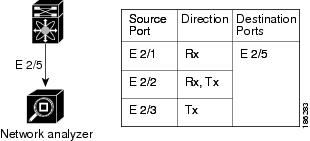
Figure 1. SPAN Configuration

Localized SPAN Sessions

A SPAN session is localized when all of the source interfaces are on the same line card. A session destination interface can be on any line card.


Note

A SPAN session with a VLAN source is not localized.


ACL TCAM Regions

You can change the size of the ACL ternary content addressable memory (TCAM) regions in the hardware. For information on the TCAM regions used by SPAN sessions, see the "Configuring IP ACLs" chapter of the Cisco Nexus 9000 Series NX-OS Security Configuration Guide.

High Availability

The SPAN feature supports stateless and stateful restarts. After a reboot or supervisor switchover, the running configuration is applied. For more information on high availability, see the Cisco Nexus 9000 Series NX-OS High Availability and Redundancy Guide.

Licensing Requirements for SPAN

Product

License Requirement

Cisco NX-OS

SPAN requires no license. Any feature not included in a license package is bundled with the nx-os image and is provided at no extra charge to you. For a complete explanation of the Cisco NX-OS licensing scheme, see the Cisco NX-OS Licensing Guide.

Prerequisites for SPAN

SPAN has the following prerequisites:

  • You must first configure the ports on each device to support the desired SPAN configuration. For more information, see the Cisco Nexus 9000 Series NX-OS Interfaces Configuration Guide.

Guidelines and Limitations for SPAN

SPAN has the following configuration guidelines and limitations:

  • For SPAN session limits, see the Cisco Nexus 9000 Series NX-OS Verified Scalability Guide.

  • All SPAN replication is performed in the hardware. The supervisor CPU is not involved.

  • You can configure a SPAN session on the local device only. This guideline does not apply for Cisco Nexus 9508 switches with N9K-X9636C-R and N9K-X9636Q-R line cards.

  • FEX and SPAN port-channel destinations are not supported on the Cisco Nexus 9500 platform switches with an -EX or –FX type line card.

  • You can configure only one destination port in a SPAN session.

  • A destination port can be configured in only one SPAN session at a time.

  • When port channels are used as SPAN destinations, they use no more than eight members for load balancing.

  • SPAN does not support destinations on N9K-X9408PC-CFP2 line card ports.

  • You cannot configure a port as both a source and destination port.

  • Enabling Unidirectional Link Detection (UDLD) on the SPAN source and destination ports simultaneously is not supported. If UDLD frames are expected to be captured on the source port of such SPAN session, disable UDLD on the destination port of the SPAN session.

  • SPAN is not supported for management ports.

  • Statistics are not support for the filter access group.

  • SPAN is supported in Layer 3 mode; however, SPAN is not supported on Layer 3 subinterfaces or Layer 3 port-channel subinterfaces.

  • When a SPAN session contains source ports that are monitored in the transmit or transmit and receive direction, packets that these ports receive might be replicated to the SPAN destination port even though the packets are not actually transmitted on the source ports. Some examples of this behavior on source ports are as follows:

    • Traffic that results from flooding

    • Broadcast and multicast traffic

  • SPAN sessions cannot capture packets with broadcast or multicast MAC addresses that reach the supervisor, such as ARP requests and Open Shortest Path First (OSPF) protocol hello packets, if the source of the session is the supervisor Ethernet in-band interface. To capture these packets, you must use the physical interface as the source in the SPAN sessions.

  • VLAN SPAN monitors only the traffic that enters Layer 2 ports in the VLAN.

  • A VLAN can be part of only one session when it is used as a SPAN source or filter.

  • VLAN ACL redirects to SPAN destination ports are not supported.

  • The number of SPAN sessions per line card reduces to two if the same interface is configured as a bidirectional source in more than one session. This guideline does not apply for Cisco Nexus 9508 switches with N9K-X9636C-R and N9K-X9636Q-R line cards.

  • A single forwarding engine instance supports four SPAN sessions. For Cisco Nexus 9300 Series switches, if the first three sessions have bidirectional sources, the fourth session has hardware resources only for Rx sources. This limitation might also apply to Cisco Nexus 9500 Series switches, depending on the SPAN source's forwarding engine instance mappings. This guideline does not apply for Cisco Nexus 9508 switches with N9K-X9636C-R and N9K-X9636Q-R line cards.

  • An access-group filter in a SPAN session must be configured as vlan-accessmap. This guideline does not apply for Cisco Nexus 9508 switches with N9K-X9636C-R and N9K-X9636Q-R line cards.

  • Supervisor-generated stream of bytes module header (SOBMH) packets have all of the information to go out on an interface and can bypass all forwarding lookups in the hardware, including SPAN and ERSPAN. CPU-generated frames for Layer 3 interfaces and the Bridge Protocol Data Unit (BPDU) class of packets are sent using SOBMH. This guideline does not apply for Cisco Nexus 9508 switches with N9K-X9636C-R and N9K-X9636Q-R line cards. The Cisco Nexus N9K-X9636C-R and N9K-X9636Q-R both support inband SPAN and local SPAN.

  • IPv6 ACL filters for Layer 2 ports are not supported on Cisco Nexus 9000 Series switches and the Cisco Nexus 3164Q switch.

  • Cisco NX-OS does not span Link Layer Discovery Protocol (LLDP) or Link Aggregation Control Protocol (LACP) packets when the source interface is not a host interface port channel.

The following guidelines and limitations apply to egress (Tx) SPAN:

  • SPAN copies for multicast packets are made prior to rewrite. Therefore, the TTL, VLAN ID, any remarking due to egress policy, and so on are not captured in the SPAN copy.

  • If SPAN is mirroring the traffic which ingresses on an interface in an ASIC instance and egresses on a layer 3 interface (SPAN Source) on a different ASIC instance, then TX mirrored packet will have a VLAN ID 4095 on Cisco Nexus 9000 platform modular switches using non-EX line cards.

  • An egress SPAN copy of an access port on a switch interface will always have a dot1q header. This guideline does not apply for Cisco Nexus 9508 switches with N9K-X9636C-R and N9K-X9636Q-R line cards.

  • The flows for post-routed unknown unicast flooded packets are in the SPAN session, even if the SPAN session is configured to not monitor the ports on which this flow is forwarded. This limitation applies to Network Forwarding Engine (NFE) and NFE2-enabled EOR switches and SPAN sessions that have Tx port sources.

  • Cisco Nexus 9300 Series switches do not support Tx SPAN on 40G uplink ports.

The following guidelines and limitations apply to ingress (Rx) SPAN:

  • A SPAN copy of Cisco Nexus 9300 Series switch 40G uplink interfaces will miss the dot1q information when spanned in the Rx direction.

  • VLAN sources are spanned only in the Rx direction. This guideline does not apply for Cisco Nexus 9508 switches with N9K-X9636C-R and N9K-X9636Q-R line cards.

  • Session filtering functionality (VLAN or ACL filters) is supported only for Rx sources. This guideline does not apply for Cisco Nexus 9508 switches with N9K-X9636C-R and N9K-X9636Q-R line cards.

The following guidelines and limitations apply to FEX ports:

  • The FEX NIF interfaces or port-channels cannot be used as a SPAN source or SPAN destination. If the FEX NIF interfaces or port-channels are specified as a SPAN source or SPAN destination, the software displays an unsupported error.

  • Cisco Nexus 9300 and 9500 platform switches support FEX ports as SPAN sources in the ingress direction for all traffic and in the egress direction only for known Layer 2 unicast traffic flows through the switch and FEX. Routed traffic might not be seen on FEX HIF egress SPAN.

  • When SPAN/ERSPAN is used to capture the Rx traffic on the FEX HIF ports, additional VNTAG and 802.1q tags are present in the captured traffic.

  • VLAN and ACL filters are not supported for FEX ports.

  • If the sources used in bidirectional SPAN sessions are from the same FEX, the hardware resources are limited to two SPAN sessions.

The following guidelines and limitations apply to Cisco Nexus 9200 and 9300-EX Series switches:

The following guidelines and limitations apply to VXLAN/VTEP:

  • SPAN source or destination is supported on any port.

  • Rx SPAN is supported. Tx or both (Tx and Rx) are not supported.

The following guidelines and limitations apply to SPAN truncation:

  • Truncation is supported only for local and SPAN source sessions. It is not supported for SPAN destination sessions.

  • Configuring MTU on a SPAN session truncates all of the packets egressing on the SPAN destination (for that session) to the MTU value specified.

  • The cyclic redundancy check (CRC) is recalculated for the truncated packet.

  • The bytes specified are retained starting from the header of the packets. The rest are truncated if the packet is longer than the MTU.

Default Settings for SPAN

The following table lists the default settings for SPAN parameters.

Parameters Default
SPAN sessions Created in the shut state

Configuring SPAN


Note

Cisco NX-OS commands for this feature may differ from those in Cisco IOS.

Configuring a SPAN Session

You can configure a SPAN session on the local device only. By default, SPAN sessions are created in the shut state.


Note

For bidirectional traditional sessions, you can configure the sessions without specifying the direction of the traffic.

Before you begin

You must configure the destination ports in access or trunk mode. For more information, see the Cisco Nexus 9000 Series NX-OS Interfaces Configuration Guide.

Procedure

  Command or Action Purpose
Step 1

configure terminal

Example:

switch# configure terminal
switch(config)#

Enters global configuration mode.

Step 2

interface interface slot/port

Example:

switch(config)# interface ethernet 2/5
switch(config-if)#

Enters interface configuration mode on the selected slot and port.

Step 3

switchport

Example:

switch(config-if)# switchport

Configures switchport parameters for the selected slot and port or range of ports.

Step 4

switchport monitor

Example:

switch(config-if)# switchport monitor

Configures the switchport interface as a SPAN destination.

Step 5

(Optional) Repeat Steps 2 through 4 to configure monitoring on additional SPAN destinations.

(Optional)

Step 6

no monitor session session-number

Example:

switch(config)# no monitor session 3

Clears the configuration of the specified SPAN session. The new session configuration is added to the existing session configuration.

Step 7

monitor session session-number {rx | tx } [shut ]

Example:

switch(config)# monitor session 3 rx
switch(config-monitor)# 

Example:

switch(config)# monitor session 3 tx
switch(config-monitor)#

Example:

switch(config)# monitor session 3 shut
switch(config-monitor)#

Enters the monitor configuration mode. The new session configuration is added to the existing session configuration. By default, the session is created in the shut state, and the session is a local SPAN session. The optional keyword shut specifies a shut state for the selected session.

Step 8

description description

Example:

switch(config-monitor)# description my_span_session_3

Configures a description for the session. By default, no description is defined. The description can be up to 32 alphanumeric characters.

Step 9

source {interface type [rx | tx | both ] | vlan {number | range} [rx ]}

Example:

switch(config-monitor)# source interface ethernet 2/1-3, ethernet 3/1 rx

Example:

switch(config-monitor)# source interface port-channel 2

Example:

switch(config-monitor)# source interface sup-eth 0 both

Example:

switch(config-monitor)# source vlan 3, 6-8 rx

Example:

switch(config-monitor)# source interface ethernet 101/1/1-3

Configures sources and the traffic direction in which to copy packets. You can enter a range of Ethernet ports, a port channel, an inband interface, a range of VLANs, or a satellite port or host interface port channel on the Cisco Nexus 2000 Series Fabric Extender (FEX).

You can configure one or more sources, as either a series of comma-separated entries or a range of numbers.

You can specify the traffic direction to copy as ingress (rx), egress (tx), or both.

Note 
Source VLANs are supported only in the ingress direction. Source FEX ports are supported in the ingress direction for all traffic and in the egress direction only for known Layer 2 unicast traffic.

For a unidirectional session, the direction of the source must match the direction specified in the session.

Step 10

(Optional) Repeat Step 9 to configure all SPAN sources.

(Optional)

Step 11

(Optional) filter vlan {number | range}

Example:

switch(config-monitor)# filter vlan 3-5, 7
(Optional)

Configures which VLANs to select from the configured sources. You can configure one or more VLANs, as either a series of comma-separated entries or a range of numbers.

Note 
A FEX port that is configured as a SPAN source does not support VLAN filters.
Step 12

(Optional) Repeat Step 11 to configure all source VLANs to filter.

(Optional)

Step 13

(Optional) filter access-group acl-filter

Example:

switch(config-monitor)# filter access-group ACL1
(Optional)

Associates an ACL with the SPAN session.

Step 14

destination interface type slot/port

Example:

switch(config-monitor)# destination interface ethernet 2/5

Configures a destination for copied source packets.

Note 
The SPAN destination port must be either an access port or a trunk port.
Note 
You must enable monitor mode on the destination port.
Step 15

no shut

Example:

switch(config-monitor)# no shut

Enables the SPAN session. By default, the session is created in the shut state.

Step 16

(Optional) show monitor session {all | session-number | range session-range} [brief ]

Example:

switch(config-monitor)# show monitor session 3
(Optional)

Displays the SPAN configuration.

Step 17

(Optional) copy running-config startup-config

Example:

switch(config)# copy running-config startup-config
(Optional)

Copies the running configuration to the startup configuration.

Shutting Down or Resuming a SPAN Session

You can shut down SPAN sessions to discontinue the copying of packets from sources to destinations. You can shut down one session in order to free hardware resources to enable another session. By default, SPAN sessions are created in the shut state.

You can resume (enable) SPAN sessions to resume the copying of packets from sources to destinations. In order to enable a SPAN session that is already enabled but operationally down, you must first shut it down and then enable it.

You can configure the shut and enabled SPAN session states with either a global or monitor configuration mode command.

Procedure

  Command or Action Purpose
Step 1

configure terminal

Example:

switch# configure terminal
switch(config)#

Enters global configuration mode.

Step 2

[no ] monitor session {session-range | all } shut

Example:

switch(config)# monitor session 3 shut

Shuts down the specified SPAN sessions. By default, sessions are created in the shut state.

The no form of the command resumes (enables) the specified SPAN sessions. By default, sessions are created in the shut state.

Note 
If a monitor session is enabled but its operational status is down, to enable the session, you must first specify the monitor session shut command followed by the no monitor session shut command.
Step 3

monitor session session-number

Example:

switch(config)# monitor session 3
switch(config-monitor)#

Enters the monitor configuration mode. The new session configuration is added to the existing session configuration.

Step 4

[no ] shut

Example:

switch(config-monitor)# shut

Shuts down the SPAN session. By default, the session is created in the shut state.

The no form of the command enables the SPAN session. By default, the session is created in the shut state.

Step 5

(Optional) show monitor

Example:

switch(config-monitor)# show monitor
(Optional)

Displays the status of SPAN sessions.

Step 6

(Optional) copy running-config startup-config

Example:

switch(config)# copy running-config startup-config
(Optional)

Copies the running configuration to the startup configuration.

Verifying the SPAN Configuration

To display the SPAN configuration, perform one of the following tasks:

Command Purpose
show monitor session {all | session-number | range session-range} [brief ] Displays the SPAN session configuration.

Configuration Examples for SPAN

Configuration Example for a SPAN Session

To configure a SPAN session, follow these steps:

Procedure


Step 1

Configure destination ports in access mode and enable SPAN monitoring.

Example:

switch# configure terminal
switch(config)# interface ethernet 2/5
switch(config-if)# switchport
switch(config-if)# switchport monitor
switch(config-if)# no shut
switch(config-if)# exit
switch(config)# 
			  
Step 2

Configure a SPAN session.

Example:

switch(config)# no monitor session 3
switch(config)# monitor session 3
switch(config-monitor)# source interface ethernet 2/1-3, ethernet 3/1 rx
switch(config-monitor)# source interface port-channel 2
switch(config-monitor)# source interface sup-eth 0 both
switch(config-monitor)# source vlan 3, 6-8 rx
switch(config-monitor)# source interface ethernet 101/1/1-3
switch(config-monitor)# filter vlan 3-5, 7
switch(config-monitor)# destination interface ethernet 2/5
switch(config-monitor)# no shut
switch(config-monitor)# exit
switch(config)# show monitor session 3
switch(config)# copy running-config startup-config


Configuration Example for a Unidirectional SPAN Session

To configure a unidirectional SPAN session, follow these steps:

Procedure


Step 1

Configure destination ports in access mode and enable SPAN monitoring.

Example:

switch# configure terminal
switch(config)# interface ethernet 2/5
switch(config-if)# switchport
switch(config-if)# switchport monitor
switch(config-if)# no shut
switch(config-if)# exit
switch(config)# 

Step 2

Configure a SPAN session.

Example:

switch(config)# no monitor session 3
switch(config)# monitor session 3 rx
switch(config-monitor)# source interface ethernet 2/1-3, ethernet 3/1 rx
switch(config-monitor)# filter vlan 3-5, 7
switch(config-monitor)# destination interface ethernet 2/5
switch(config-monitor)# no shut
switch(config-monitor)# exit
switch(config)# show monitor session 3
switch(config)# copy running-config startup-config 


Configuration Example for a SPAN ACL

This example shows how to configure a SPAN ACL:

switch# configure terminal
switch(config)# ip access-list match_11_pkts
switch(config-acl)# permit ip 11.0.0.0 0.255.255.255 any
switch(config-acl)# exit
switch(config)# ip access-list match_12_pkts
switch(config-acl)# permit ip 12.0.0.0 0.255.255.255 any
switch(config-acl)# exit
switch(config)# vlan access-map span_filter 5
switch(config-access-map)# match ip address match_11_pkts
switch(config-access-map)# action forward
switch(config-access-map)# exit
switch(config)# vlan access-map span_filter 10
switch(config-access-map)# match ip address match_12_pkts
switch(config-access-map)# action forward
switch(config-access-map)# exit
switch(config)# monitor session 1
switch(config-erspan-src)# filter access_group span_filter 

Additional References

Related Documents

Related Topic Document Title
FEX Cisco Nexus 2000 Series NX-OS Fabric Extender Software Configuration Guide for Cisco Nexus 9000 Series Switches