Contents

Overview

Overview

The Cisco Nexus 9372TX switch (N9K-C9372TX) is a 1 rack unit (RU) switch that supports 48 10GBASE-T ports (supporting 100-Megabit, 1-Gigabit, and 10-Gigabit speeds), six 40-Gigabit QSFP+ ports, one 100/1000 network management ports, one RS-232 console port for setting the initial switch configuration, and two USB ports for saving or loading switch configurations. The chassis for this switch includes the following user-replaceable components:

  • Fan modules (four) with the following airflow choices:

    • Port-side exhaust fan module with blue coloring (NXA-FAN-30CFM-F)

    • Port-side intake fan module with burgundy coloring (NXA-FAN-30CFM-B)

  • Power supply modules (two—one for operations and one for redundancy [1+1]) with the following choices:

    • 650-W port-side exhaust AC power supply with blue coloring (N9K-PAC-650W-B)

    • 650-W port-side intake AC power supply with burgundy coloring (N9K-PAC-650W)

    • 930-W port-side intake DC power supply with green coloring (UCSC-PSU-930WDC)


    Note


    You can use 650-W AC power supplies and 930-W DC power supplies interchangeably so long as they have the same direction of airflow (if DC power supplies are used, all of the fan and power supply modules must have port-side intake airflow).


The following figure shows the switch features on the port side of the chassis.
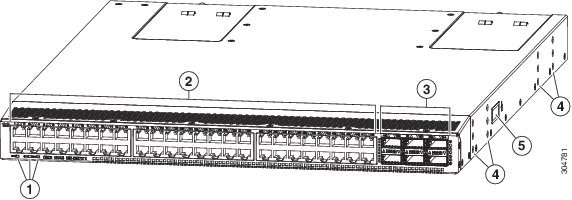
Figure 1. Chassis Features on the Port Side of the Chassis


1

Beacon (BCN), Status (STS), and Environment (ENV) LEDs

4

Screw holes for mounting brackets

2

10GBASE-T interface ports (48) (supporting 100-Megabit, 1-Gigabit, and 10-Gigabit speeds)

5

Grounding pad

3

QSFP+ 40-Gigabit interface ports (6)

To determine which transceivers, adapters, and cables are supported by this switch, see the Cisco Nexus 9000 Series (Fixed 9300) ACI Mode at http:/​/​www.cisco.com/​c/​en/​us/​support/​interfaces-modules/​transceiver-modules/​products-device-support-tables-list.html.

The following figure shows the switch features on the power supply side of the chassis.
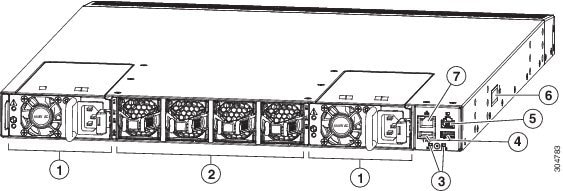
Figure 2. Chassis Features on the Power Supply Side of the Chassis


1

Power supply modules (1 or 2) (AC power supplies shown) with slots numbered 1 (left) and 2 (right)

5

Console port (1)

2

Fan modules (4) with slots numbered from 1 (left) to 4 (right)

6

Grounding pad

3

Beacon (BCN) and Status (STS) LEDs

7

Management port (1)

4

USB ports (2)

Depending on whether you plan to position the ports in a cold or hot aisle, you can order the fan and AC power supply modules with port-side intake or port-side exhaust airflow (you can order DC power supply modules with only port-side intake airflow). For port-side intake airflow the fan and AC power supply modules have burgundy coloring (DC power supply modules have green coloring). For port-side exhaust airflow, the fan and AC power supply modules have blue coloring.

The fan and power supply modules are field replaceable and you can replace one fan or one power supply module during operations so long as the other modules are installed and operating. If you have only one power supply installed, you can install the replacement power supply in the open slot before removing the original power supply.

NOTE: All of the fan and power supply modules must have the same direction of airflow. Otherwise, the switch can overheat and shut down.

CAUTION: If the switch has port-side intake airflow (burgundy coloring for fan and AC power supply modules, and green coloring for DC power supply modules), you must locate the ports in the cold aisle. If the switch has port-side exhaust airflow (blue coloring for fan and AC power supply modules), you must locate the ports in the hot aisle. If you locate the air intake in a hot aisle, the switch can overheat and shut down.


Overview

Overview

Overview

The Cisco Nexus 9372TX switch (N9K-C9372TX) is a 1 rack unit (RU) switch that supports 48 10GBASE-T ports (supporting 100-Megabit, 1-Gigabit, and 10-Gigabit speeds), six 40-Gigabit QSFP+ ports, one 100/1000 network management ports, one RS-232 console port for setting the initial switch configuration, and two USB ports for saving or loading switch configurations. The chassis for this switch includes the following user-replaceable components:

  • Fan modules (four) with the following airflow choices:

    • Port-side exhaust fan module with blue coloring (NXA-FAN-30CFM-F)

    • Port-side intake fan module with burgundy coloring (NXA-FAN-30CFM-B)

  • Power supply modules (two—one for operations and one for redundancy [1+1]) with the following choices:

    • 650-W port-side exhaust AC power supply with blue coloring (N9K-PAC-650W-B)

    • 650-W port-side intake AC power supply with burgundy coloring (N9K-PAC-650W)

    • 930-W port-side intake DC power supply with green coloring (UCSC-PSU-930WDC)


    Note


    You can use 650-W AC power supplies and 930-W DC power supplies interchangeably so long as they have the same direction of airflow (if DC power supplies are used, all of the fan and power supply modules must have port-side intake airflow).


The following figure shows the switch features on the port side of the chassis.

Figure 1. Chassis Features on the Port Side of the Chassis


1

Beacon (BCN), Status (STS), and Environment (ENV) LEDs

4

Screw holes for mounting brackets

2

10GBASE-T interface ports (48) (supporting 100-Megabit, 1-Gigabit, and 10-Gigabit speeds)

5

Grounding pad

3

QSFP+ 40-Gigabit interface ports (6)

To determine which transceivers, adapters, and cables are supported by this switch, see the Cisco Nexus 9000 Series (Fixed 9300) ACI Mode at http:/​/​www.cisco.com/​c/​en/​us/​support/​interfaces-modules/​transceiver-modules/​products-device-support-tables-list.html.

The following figure shows the switch features on the power supply side of the chassis.

Figure 2. Chassis Features on the Power Supply Side of the Chassis


1

Power supply modules (1 or 2) (AC power supplies shown) with slots numbered 1 (left) and 2 (right)

5

Console port (1)

2

Fan modules (4) with slots numbered from 1 (left) to 4 (right)

6

Grounding pad

3

Beacon (BCN) and Status (STS) LEDs

7

Management port (1)

4

USB ports (2)

Depending on whether you plan to position the ports in a cold or hot aisle, you can order the fan and AC power supply modules with port-side intake or port-side exhaust airflow (you can order DC power supply modules with only port-side intake airflow). For port-side intake airflow the fan and AC power supply modules have burgundy coloring (DC power supply modules have green coloring). For port-side exhaust airflow, the fan and AC power supply modules have blue coloring.

The fan and power supply modules are field replaceable and you can replace one fan or one power supply module during operations so long as the other modules are installed and operating. If you have only one power supply installed, you can install the replacement power supply in the open slot before removing the original power supply.

NOTE: All of the fan and power supply modules must have the same direction of airflow. Otherwise, the switch can overheat and shut down.

CAUTION: If the switch has port-side intake airflow (burgundy coloring for fan and AC power supply modules, and green coloring for DC power supply modules), you must locate the ports in the cold aisle. If the switch has port-side exhaust airflow (blue coloring for fan and AC power supply modules), you must locate the ports in the hot aisle. If you locate the air intake in a hot aisle, the switch can overheat and shut down.