Contents

Overview

Overview

The Cisco Nexus 93128TX switch (N9K-C93128TX) is a 3-RU, fixed-port switch designed for spine-leaf-APIC deployment in data centers. This switch has 96 fixed 1/10GBASE-T (copper) ports for APIC connections and 12 fixed 40-Gigabit QSFP+ (optical) ports (of which you can use 8 ports) provided through an uplink module for connections to spine switches. The chassis for this switch includes the following user-replaceable components:

  • Uplink modules (one of either of the following for uplink ports)
    • M6PQ uplink module

    • M12PQ uplink module

  • Fan trays (three—two for operations and one for redundancy [2+1]) with the following airflow choices:

    • Cold-Air-In version with blue stripe at top (N9K-C9300-FAN2-B)
    • Hot-Air-Out version with burgundy stripe at top (N9K-C9300-FAN2)
  • 1200-W AC Power supplies (two—one for operations and one for redundancy [1+1]) with the following airflow choices:

    • Cold-Air-In version with blue latch handle (N9K-PAC-1200W-B)
    • Hot-Air-Out version with burgundy latch handle (N9K-PAC-1200W)

The following figure shows the hardware features seen from the port side of the chassis.
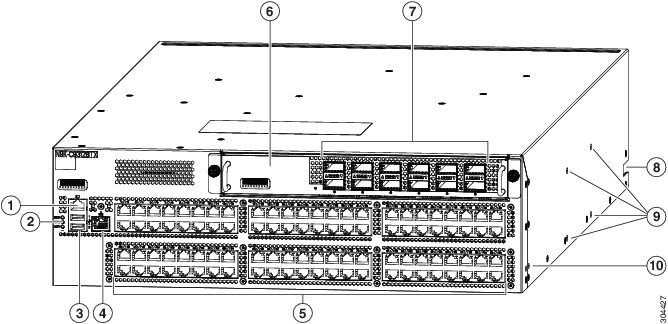
Figure 1. Hardware Features on the Port Side of the Chassis

1

Console port (RS232 port)

6

M6PQ or M12PQ uplink module (M12PQ uplink module shown).

2

Chassis LEDs

  • Beacon (BCN)
  • Status (STS)
  • Environment (ENV)

7

6 or 12 40-Gigabit Ethernet Quad Small Form-Factor Plugable (QSFP+) optical ports for uplink connections to spine switches (12-port uplink module shown)

Note   

For the 12-port uplink module, only the left-most eight ports are available for uplinks when using this switch.

3

Two USB ports used for saving or copying functions

Note   

USB support is limited to USB 2.0 devices that use less than 2.5 W (less than 0.5 A inclusive of surge current). Devices, such as external hard drives, that instantaneously draw more than 0.5 A are not supported.

8

Notch in both sides of the chassis for locking the power supply and fan tray end of the chassis to the bottom-support rails

4

Out-of-band management port (RJ-45 port)

9

Screw holes (4) for attaching a center-mount rack bracket for two-post racks (one bracket for each of two sides)

5

96 10GBASE-T copper ports (supporting speeds of 100 Megabits, 1 Gigabit, and 10 Gigabits) to Application Policy Infrastructure Controllers (APICs)

10

Screw holes (2) for attaching a front-mount bracket for four-post racks (one bracket on each of two sides)

The following figure shows the hardware features seen from the fan tray and power supply side of the chassis.
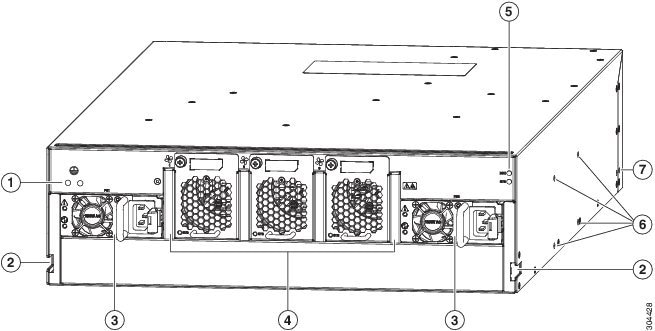
Figure 2. Hardware Features on the Fan Tray and Power Supply Side of the Chassis

1

Screw holes (2) for attaching the grounding lug.

5

Chassis LEDs include the following:

  • Beacon (BCN)
  • Status (STS)

2

A notch in both sides of the chassis for locking the power supply and fan tray end of the chassis to the bottom-support rails.

6

Screw holes (4) for attaching a center-mount rack bracket for two-post racks (one bracket for each of two sides).

3

Two 1200-W AC power supplies (one used for operations and one used for redundancy) of the following types:

  • Cold-Air-In version with blue latch handle (N9K-PAC-1200W-B)
  • Hot-Air-Out version with burgundy latch handle (N9K-PAC-1200W)

Power supply slots are numbered 1 on the left and 2 on the right (as seen when looking at the power supplies).

7

Screw holes (2) for attaching a front-mount bracket for four-post racks (one bracket on each of two sides).

4

Three fan trays (two used for operations and one used for redundancy) of the following types:

  • Cold-Air-In version with blue stripe at top (N9K-C9300-FAN2-B)
  • Hot-Air-Out version with burgundy stripe at top (N9K-C9300-FAN2)

Fan tray slots are numbered 1 (leftmost slot) to 3 (rightmost slot).


Overview

Overview

Overview

The Cisco Nexus 93128TX switch (N9K-C93128TX) is a 3-RU, fixed-port switch designed for spine-leaf-APIC deployment in data centers. This switch has 96 fixed 1/10GBASE-T (copper) ports for APIC connections and 12 fixed 40-Gigabit QSFP+ (optical) ports (of which you can use 8 ports) provided through an uplink module for connections to spine switches. The chassis for this switch includes the following user-replaceable components:

  • Uplink modules (one of either of the following for uplink ports)
    • M6PQ uplink module

    • M12PQ uplink module

  • Fan trays (three—two for operations and one for redundancy [2+1]) with the following airflow choices:

    • Cold-Air-In version with blue stripe at top (N9K-C9300-FAN2-B)
    • Hot-Air-Out version with burgundy stripe at top (N9K-C9300-FAN2)
  • 1200-W AC Power supplies (two—one for operations and one for redundancy [1+1]) with the following airflow choices:

    • Cold-Air-In version with blue latch handle (N9K-PAC-1200W-B)
    • Hot-Air-Out version with burgundy latch handle (N9K-PAC-1200W)

The following figure shows the hardware features seen from the port side of the chassis.

Figure 1. Hardware Features on the Port Side of the Chassis

1

Console port (RS232 port)

6

M6PQ or M12PQ uplink module (M12PQ uplink module shown).

2

Chassis LEDs

  • Beacon (BCN)
  • Status (STS)
  • Environment (ENV)

7

6 or 12 40-Gigabit Ethernet Quad Small Form-Factor Plugable (QSFP+) optical ports for uplink connections to spine switches (12-port uplink module shown)

Note   

For the 12-port uplink module, only the left-most eight ports are available for uplinks when using this switch.

3

Two USB ports used for saving or copying functions

Note   

USB support is limited to USB 2.0 devices that use less than 2.5 W (less than 0.5 A inclusive of surge current). Devices, such as external hard drives, that instantaneously draw more than 0.5 A are not supported.

8

Notch in both sides of the chassis for locking the power supply and fan tray end of the chassis to the bottom-support rails

4

Out-of-band management port (RJ-45 port)

9

Screw holes (4) for attaching a center-mount rack bracket for two-post racks (one bracket for each of two sides)

5

96 10GBASE-T copper ports (supporting speeds of 100 Megabits, 1 Gigabit, and 10 Gigabits) to Application Policy Infrastructure Controllers (APICs)

10

Screw holes (2) for attaching a front-mount bracket for four-post racks (one bracket on each of two sides)

The following figure shows the hardware features seen from the fan tray and power supply side of the chassis.

Figure 2. Hardware Features on the Fan Tray and Power Supply Side of the Chassis

1

Screw holes (2) for attaching the grounding lug.

5

Chassis LEDs include the following:

  • Beacon (BCN)
  • Status (STS)

2

A notch in both sides of the chassis for locking the power supply and fan tray end of the chassis to the bottom-support rails.

6

Screw holes (4) for attaching a center-mount rack bracket for two-post racks (one bracket for each of two sides).

3

Two 1200-W AC power supplies (one used for operations and one used for redundancy) of the following types:

  • Cold-Air-In version with blue latch handle (N9K-PAC-1200W-B)
  • Hot-Air-Out version with burgundy latch handle (N9K-PAC-1200W)

Power supply slots are numbered 1 on the left and 2 on the right (as seen when looking at the power supplies).

7

Screw holes (2) for attaching a front-mount bracket for four-post racks (one bracket on each of two sides).

4

Three fan trays (two used for operations and one used for redundancy) of the following types:

  • Cold-Air-In version with blue stripe at top (N9K-C9300-FAN2-B)
  • Hot-Air-Out version with burgundy stripe at top (N9K-C9300-FAN2)

Fan tray slots are numbered 1 (leftmost slot) to 3 (rightmost slot).