Cisco Nexus 6000 Series NX-OS Unicast Routing Configuration Guide, Release 7.x
Bias-Free Language
The documentation set for this product strives to use bias-free language. For the purposes of this documentation set, bias-free is defined as language that does not imply discrimination based on age, disability, gender, racial identity, ethnic identity, sexual orientation, socioeconomic status, and intersectionality. Exceptions may be present in the documentation due to language that is hardcoded in the user interfaces of the product software, language used based on RFP documentation, or language that is used by a referenced third-party product. Learn more about how Cisco is using Inclusive Language.
- Updated:
- March 22, 2015
Chapter: Configuring WCCPv2
Configuring WCCPv2
This chapter describes how to configure the Web Cache Communication Protocol version 2 (WCCPv2) on the Cisco NX-OS device.
Information About WCCPv2
WCCPv2 specifies interactions between one or more Cisco NX-OS routers and one or more cache engines. WCCPv2 transparently redirects selected types of traffic through a group of routers. The selected traffic is redirected to a group of cache engines to optimize resource usage and lower response times.
Cisco NX-OS does not support WCCPv1.
This section includes the following topics:
- WCCPv2 Overview
- WCCPv2 Authentication
- Redirection Method
- Packet Return Method
- Virtualization Support for WCCPv2
WCCPv2 Overview
WCCPv2 enables the Cisco NX-OS router to transparently redirect packets to cache engines. WCCPv2 does not interfere with normal router operations. Using WCCPv2, the router can redirect requests on configured interfaces to cache engines rather than to intended host sites. With WCCPv2, the router can balance traffic loads across a cluster of cache engines (cache cluster) and ensure fault-tolerant and fail-safe operation in the cluster. As you add or delete cache engines from a cache cluster, WCCPv2 dynamically redirects the packets to the currently available cache engines.
WCCPv2 accepts the traffic at the cache engine and establishes the connection with the traffic originator (the client). The cache engine acts as if it were the original destination server. If the requested object is not available on the cache engine, the cache engine establishes its own connection out to the original destination server to retrieve the object.
WCCPv2 communicates between routers and cache engines on UDP port 2048.
By allowing a cache cluster to connect to multiple routers, WCCPv2 provides redundancy and a distributed architecture for instances when a cache engine must connect to many interfaces. In addition, WCCPv2 allows you to keep all the cache engines in a single cluster, which avoids the unnecessary duplication of web pages across several clusters.
WCCPv2 Service Types
A service is a defined traffic type that the router redirects to a cache engine with the WCCPv2 protocol.
You can configure the router to run one of the following cache-related services:
Service Groups
A service group is a subset of cache engines within a cluster and the routers connected to the cluster that are running the same service. Figure 4-1 shows a service group within a cache cluster. The cache engines and the routers can be a part of multiple service groups.
Figure 4-1 WCCPv2 Cache Cluster and Service Group
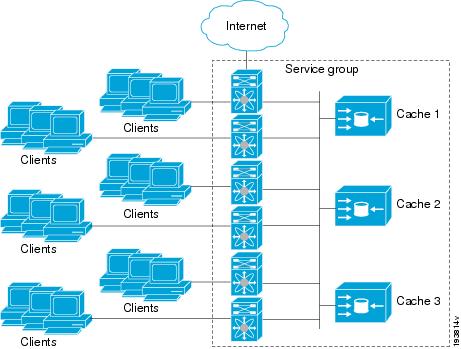
You can configure a service group as open or closed. An open service group forwards traffic without redirection if there is no cache engine to redirect the traffic to. A closed service group drops traffic if there is no cache engine to redirect the traffic to.
The service group defines the traffic that is redirected to individual cache engines in that service group. The service group definition consists of the following:
Service Group Lists
WCCPv2 requires that each cache engine be aware of all the routers in the service group. You can configure a list of router addresses for each of the routers in the group on each cache engine.
The following sequence of events details how WCCPv2 configuration works:
Step 1 You configure each cache engine with a list of routers.
Step 2 Each cache engine announces its presence and generates a list of all routers with which it has established communications.
Step 3 The routers reply with their view (list) of cache engines in the group.
The cache engines and routers exchange control messages every 10 seconds by default.
WCCPv2 Designated Cache Engine
WCCPv2 designates one cache engine as the lead. If there is a group of cache engines, the one seen by all routers and the one that has the lowest IP address becomes the designated cache engine. The designated cache engine determines how traffic should be allocated across cache engines. The traffic assignment method is passed to the entire service group from the designated cache engine so that the routers of the group can redirect the packets and the cache engines of the group can manage their traffic load better.
Cisco NX-OS uses the mask method to assign traffic. The designated cache engine assigns the mask and value sets to the router in the WCCP Redirect Assignment message. The router matches these mask and value sets to the source IP address, destination IP address, source port, and destination port of each packet. The router redirects the packet to the cache engine if the packet matches an assigned mask and value set. If the packet does not match an assigned mask and value set, the router forwards the packet without any redirection.
Redirection
You can use an IP access list as a redirect list to specify a subset of traffic to redirect with WCCPv2. You can apply this access list for ingress traffic on an interface. Figure 4-2 shows how redirection applies to ingress traffic.
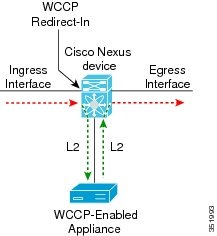
WCCPv2 Authentication
WCCPv2 can authenticate a device before it adds that device to the service group. Message Digest (MD5) authentication allows each WCCPv2 service group member to use a secret key to generate a keyed MD5 digest string that is part of the outgoing packet. At the receiving end, a keyed digest of an incoming packet is generated. If the MD5 digest within the incoming packet does not match the generated digest, WCCP ignores the packet.
Redirection Method
WCCPv2 negotiates the packet redirection method between the router and the cache engine. Cisco NX-OS uses this traffic redirection method for all cache engines in a service group.
WCCPv2 redirects packets using the following forwarding method:
- Layer 2 Destination MAC rewrite—WCCPv2 replaces the destination MAC address of the packet with the MAC address of the cache engine that needs to handle the packet. The cache engine and the router must be adjacent to Layer 2.
You can also configure an access control list (ACL), called a redirect list, for a WCCPv2 service group. This ACL can either permit a packet to go through the WCCPv2 redirection process or deny the WCCP redirection and send the packet through the normal packet forwarding procedure.
The set of translations for the permit and deny rules are given below:

Note In the list of translations, the Permit action translates to traffic redirection and Deny action translates to normal packet forwarding.
Note You can configure an Access Control List (ACL), called a redirect list for a WCCPv2 service group. If the ACL is configured with deny ip any any, then traffic will be forwarded normally and not through WCCP
Packet Return Method
WCCPv2 filters packets to determine which redirected packets have been returned from the cache engine and which packets have not. WCCPv2 does not redirect the returned packets, because the cache engine has determined that these packets should not be cached. WCCPv2 returns packets that the cache engine does not service to the router that transmitted them.
A cache engine might return a packet for one of the following reasons:
- The cache engine is overloaded and cannot service the packets.
- The cache engine is filtering certain conditions that make caching packets counterproductive such as when IP authentication has been turned on.
WCCPv2 negotiates the packet return method between the router and the cache engine. Cisco NX-OS uses this traffic return method for all cache engines in a service group.
WCCPv2 returns packets using the following forwarding method:
Virtualization Support for WCCPv2
WCCPv2 supports virtual routing and forwarding (VRF) instances. VRFs exist within virtual device contexts (VDCs). By default, Cisco Nexus 6000 Series switches place you in the default VDC and default VRF.
WCCP redirection occurs within a VRF. You must configure the WCCP cache engine so that the forward and return traffic to and from the cache engine occurs from interfaces that are a part of the same VRF.
The VRF used for the WCCP on an interface should match the VRF configured on that interface.
If you change the VRF membership of an interface, Cisco Nexus 6000 Series switches remove all Layer 3 configurations, including WCCPv2.
WCCPv2 Error Handling for SPM Operations
The Service Policy Manager (SPM) supervisor component acts as a data path manager for the WCCP Manager. The WCCP manager is shielded from the underlying platform specifics by the SPM and is portable to platform variations. The WCCP manager has a set of SPM APIs to pass the configurations that are mapped and programmed in the hardware. These APIs can process and parse the application data that is implemented and maintained in one single handler.
The interface redirects that failed to be programmed by the SPM are stored until there is a service group configuration change through the CLI or an RA message. The WCCP manager retries programming policies that failed previously.
The WCCP manager sends policy updates to the SPM in intervals to program TCAM entries in the hardware. These policy updates can be triggered by the CLI or through RA (Redirect-Assign) messages. When the WCCP is notified of an SPM error, a syslog message appears.
Support for Configurable Service Group Timers
A single WCCP service group can have up to 32 routers and 32 cache engines. The cache engine uses a WCCP Here I Am (HIA) message to send its properties to the router. HIA messages are sent every 10 seconds by default. You might need to configure the HIA timer for every service group. This timer is used to determine the HIA timeout for all clients on the service group.
Licensing Requirements for WCCPv2
The following table shows the licensing requirements for this feature:
|
|
|
|---|---|
WCCPv2 requires the LAN_BASE_SERVICES_PKG license. For a complete explanation of the Cisco NX-OS licensing scheme, see the Cisco NX-OS Licensing Guide. |
Prerequisites for WCCPv2
WCCPv2 has the following prerequisites:
- You must globally enable the WCCPv2 feature (see the “Enabling WCCPv2” section).
- You can configure WCCPv2 on Layer 3, VLAN interfaces, port channels, and port channel subinterfaces.
Guidelines and Limitations for WCCPv2
WCCPv2 has the following configuration guidelines and limitations:
- A WCCPv2 service group supports up to 32 routers and 32 cache engines.
- All cache engines in a cluster must include all routers that service the cluster in its configuration. If a cache engine within a cluster does not include one or more of the routers in its configuration, the service group detects the inconsistency and the cache engine is not allowed to operate within the service group.
- The cache engine cannot be on the same interface with the redirect in statement.
- WCCPv2 works with IPv4 networks only.
- Do not configure policy-based routing and WCCPv2 on the same interface.
- Do not configure more than one service of WCCPv2 on the same interface.
- Do not configure Network Address Translation (NAT) and WCCP on the same interface.
- Cisco Nexus 6000 Series switches remove all Layer 3 configuration on an interface when you change the interface VRF membership, port-channel membership, or the port mode to Layer 2.
- Wildcard masks are not supported for the WCCPv2 redirect list.
- Cisco NX-OS does not support WCCPv2 on tunnel interfaces.
- WCCPv2 requires the client, server, and WCCPv2 client to be on separate interfaces. If you migrate a topology from a Cisco Catalyst 6500 Series switch deployment, it might not be supported.
- WCCPv2 configured for use with HSRP/VRRP in non-VPC topologies does not support WCCP redirection. If HSRP/VRRP is configured, use VPC topology to perform WCCP redirection.
Default Settings
Table 4-1 lists the default settings for WCCPv2 parameters.
|
|
|
|---|---|
Configuring WCCPv2
To configure WCCPv2, follow these steps:
Step 1 Enable the WCCPv2 feature. See the “Enabling WCCPv2” section.
Step 2 Configure a service group. See the “Configuring a WCCPv2 Service Group” section.
Step 3 Apply WCCPv2 redirection to an interface. See the “Applying WCCPv2 Redirection to an Interface” section.
This section includes the following topics:
- Enabling WCCPv2
- Configuring a WCCPv2 Service Group
- Applying WCCPv2 Redirection to an Interface
- Configuring WCCPv2 in a VRF
Note If you are familiar with the Cisco IOS CLI, be aware that the Cisco NX-OS commands for this feature might differ from the Cisco IOS commands that you would use.
Enabling WCCPv2
You must enable the WCCPv2 feature before you can configure WCCPv2.
DETAILED STEPS
To enable the WCCPv2 feature, use the following command in global configuration mode:
|
|
|
|---|---|
To disable the WCCPv2 feature in a VDC and remove all associated configuration, use the following command in global configuration mode:
|
|
|
|---|---|
Disables the WCCPv2 feature in a VDC and removes all associated configuration. |
Configuring a WCCPv2 Service Group
You can configure a WCCPv2 service group. You can optionally configure the following:
- Open or closed mode (with a service list)—Controls the traffic type that this service group handles.
- WCCPv2 authentication—Authenticates the WCCPv2 messages using an MD5 digest. WCCPv2 discards messages that fail authentication.
Note You must configure the same authentication on all members of the WCCPv2 service group.
Closed mode for dynamic service groups requires a service list access control list (ACL) that specifies the protocol and port information that is used for the service group. If there are no members in the service group, packets that match the service-list ACL are dropped.
Note The service-list keyword ACL must have only protocol and port information. To restrict traffic that is considered for redirection, use the redirect-list keyword.
Note You must enter the ip wccp command with all your required parameters. Any subsequent entry of the ip wccp command overwrites the earlier configuration.
BEFORE YOU BEGIN
Enable the WCCPv2 feature (see the “Enabling WCCPv2” section).
DETAILED STEPS
To configure a WCCPv2 service group, use the following command in global configuration mode:
Applying WCCPv2 Redirection to an Interface
To apply WCCPv2 redirection on an interface, use the following commands in interface configuration mode:
|
|
|
|---|---|
Applies WCCPv2 redirection on the ingress traffic for this interface. |
|
Applies WCCPv2 redirection on the ingress web cache traffic for this interface. |
This example shows how to configure a router to redirect web-related packets without a destination of 19.20.2.1 to the web cache:
Configuring WCCPv2 in a VRF
You can configure WCCPv2 redirection on an interface in a VRF.
Note The WCCPv2 VRF must match the VRF configured on the interface.
SUMMARY STEPS
3. ip wccp { service-number | web-cache } [ mode { open [ redirect-list acl-name ] | closed service-list acl-name }]] [ password [ 0 - 7 ] pwstring ]
DETAILED STEPS
This example shows how to configure WCCPv2 in VRF Red on interface Ethernet 2/1:
Verifying the WCCPv2 Configuration
To display the WCCPv2 configuration, perform one of the following tasks:
|
|
|
|---|---|
show ip wccp [ vrf vrf-name ] [ service-number | web-cache ] |
Displays the WCCPv2 status for all groups or one group in a VRF. |
Configuration Examples for WCCPv2
This example shows how to configure WCCPv2 authentication on router redirect web-related packets without a destination of 192.0.2.1 to the web cache:
Note See the Cisco Nexus 6000 Series NX-OS Security Configuration Guide, Release 7.x, for information about IP access lists.
Additional References
For additional information related to implementing WCCPv2, see the following sections:
Related Documents
|
|
|
|---|---|
Cisco Nexus 6000 Series NX-OS Unicast Routing Command Reference, Release 7.x |
Standards
|
|
|
|---|---|
No new or modified standards are supported by this feature, and support for existing standards has not been modified by this feature. |
 Feedback