Configuring Cisco Unified FEX Nexus 2348UPQ with Fiber Channel Interfaces

This chapter provides details about configuring native fiber channels on Cisco Nexus 2348UPQ FEX, and contains the following sections:

Information About Fiber Channel Ports on Cisco Nexus 2348UPQ

Cisco Nexus 2348UPQ FEX ASIC supports native FC ports. This feature was introduced in 7.3(0)N1(1).

There are 48 host Interface (HIF) ports and six 40-G Network Interface (NI) ports. HIF ports are unified ports that enable a combination of 1 or 10-G Ethernet and 2, 4, 8, or 16G FC interfaces. You can convert and use the HIF ports as FC ports. You can configure the HIF ports to run 2, 4, 8, or 16-G FCs.

Save the port type configuration (port type FC or Ethernet) on the switch. After port type conversion, reload the FEX for the configuration to be downloaded and the conversion to take effect. If the ports are of FC type, only mode F is supported.

Note

If you reload only the switch, the FEX will not be reloaded. The port type conversion will not take place on the FEX unless you reload the FEX.


The FC ports on Nexus 2348UPQ are supported only on the Cisco Nexus 5600 switches.

Guidelines and Limitations

Cisco Nexus 2348UPQ FEX with FC interfaces has the following guidelines and limitations:

  • FEX number (ID) range is from 100 to 130.

  • You can configure only odd-numbered HIF ports for the 16-G FC. The adjacent even-numbered ports must be changed to the out-of-service state.

  • When there is a combination of both FC and Ethernet ports, there can only be one set of contiguous FC ports and one set of contiguous Ethernet ports. The FC ports should be the first set of ports. FC ports always start from port 1.

  • FC ports must be configured in groups of 4 ports.

  • When the speed is Auto , the 16-G port comes up at 8-G speed. For the ports to come up at 16-G speed, use the switchport speed 16000 command to explicitly set the speed to 16-G.

  • Configuration of the FC-HIF ports must be the same in both the primary and the secondary virtual PortChannel (vPC) switches. For example, the port speed, port mode, port vSAN and so on.

  • Any port range that is not explicitly configured with a port type is set to the other type on reload. For example, if ports 25 to 48 are explicitly configured as Ethernet, then ports 1 to 24 will be set to type FC on reload.

  • In the Active-Active FEX configuration with FC ports, the port-conversion CLI should be configured on both the vPC peer switches.

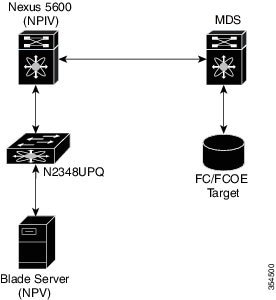
  • You cannot connect the NPV or NPIV device to the FC ports in the Cisco N2348UPQ FEX, but you can connect it directly to the the NPIV enabled parent switch of the Cisco Nexus 2348UPQ FEX.

  • We recommend that you operate the uplink port at 40-G speed. If you use the uplink in 10-G mode there will be over subscription.

  • When an odd-numbered HIF port is configured as 16-G FC, the even-numbered HIF port next to it cannot be used either as an Ethernet port or as an FC port. For the FC-FEX HIF odd-numbered port to operate at 16 Gbps speed, you must place the immediately succeeding even-numbered port in the ' out-of-service ’ state. This restriction does not apply for 2, 4, or 8-G speed.

  • Interface-based zoning using FC-FEX ports is not supported.

  • F-port trunking and F-port channel are not supported on FC-FEX ports.

  • For FC traffic, only Source IDentifier (SID) / Destination IDentifier (DID) based load-balancing is supported.

Fiber Channel Port Representation

The FC HIF ports on the FEX are represented on the switch through the following parameters:

fc FEX number/mod-number/port-number
For example, fc  100/1/1

Buffer-to-Buffer Credits

Buffer-to-buffer credits (BB_credits) are a flow-control mechanism to ensure that Fibre Channel interfaces do not drop frames. BB_credits are negotiated on a per-hop basis.

The default value of receive BB_credit is 32 and the maximum value is 128. The range is from 1 to 128.

Supported Small Form-Factor Pluggable (SFP)

The supported SFPs are: DS-SFP-FC16G-SW, DS-SFP-FC8G-SW, and DS-SFP-FC4G-SW.

SPAN Destinations for Fiber Channel-FEX Ports

SPAN destinations refer to the interfaces that monitor source ports. The Cisco Nexus 5600 Series switch supports Ethernet and Fibre Channel interfaces as SPAN destinations.

Table 1. SPAN Source and Destination

Source SPAN

Destination SPAN

Fibre Channel (HIF Port) Ethernet (Base Port)
Fibre Channel (HIF Port) Ethernet (HIF Port)

Topologies for Fiber Channel-FEX

The FC-FEX HIF ports can only be connected to FC devices and run as mode F. The Cisco Nexus 5600 switches connected to FEX N2348UPQ could either run in the Switching mode or the N Port Virtualization (NPV) mode.

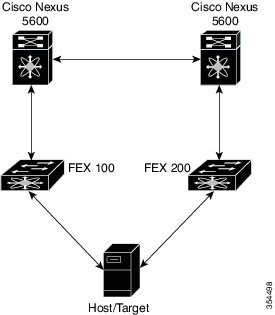
Straight-Through FEX

In the Straight-Through FEX topology, each FEX has one parent or a master switch which sends the port configuration to the FEX. On the switch, the FEX is first made FCoE operational. After which the FEX is attached to the switch and reloaded with the port configuration sent from the switch.
Figure 1. Straight-Through FEX


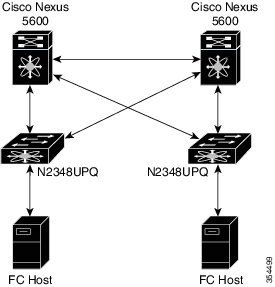
Active-Active FEX

In an Active - Active topology, each FEX is connected to two switches. The switch that connects to the FEX and configures FCoE first, becomes the primary or the master switch for the FEX. The master switch owns the FEX and the switch ID of the master switch is stored on the FEX.
Figure 2. Active-Active FEX


Note

In the Active-Active FEX configuration with FC ports, the port-conversion CLI should be configured on both the virtual PortChannel (vPC) peer switches.
The following scenario is not supported:
Figure 3. Scenario Not Supported


Configuring Fibre Channel-FEX Ports on Cisco Nexus 2348UPQ

Cisco Nexus 2348UPQ Fabric Extender (FEX) ASIC supports native Fiber Channel (FC) ports. This feature was introduced in 7.3(0)N1(1).

Perform the following task to configure the Fibre Channel-FEX ports on Cisco Nexus 2348UPQ.

Before you begin

  • You must enable FCoE using the feature fcoe command.

  • You must enable Fabric Extender (FEX) feature using the feature fex command.

For information on how to bring a FEX up, see the Cisco Nexus 5600 Series NX-OS Layer 2 Switching Configuration Guide, Release 7.x guide.

Procedure


Step 1

Enter global configuration mode:

switch# configure terminal

Step 2

Enter configuration mode for the specified FEX:

switch(config)# fex number

For FC-FEX support the FEX number range is from 100 to 130.

Step 3

Specify the range of ports that need to be converted to FC ports:

switch(config-fex)# port port-number type fc

The port numbers should always be in multiples of four. The FC port must be configured from port 1.

Note 

This command is accepted only when the FEX state is ONLINE.

Step 4

End the current configuration session and exit to EXEC mode:

switch(config-fex)# end

Step 5

Reload the specified FEX:

switch# reload fex number

Step 6

Enter global configuration mode:

switch# configure terminal

Step 7

Change the succeeding even port to the 'out-of-service' state for the port to operate in 16000 Mbps speed:

switch(config)# interface fc fex number/slot/port

switch(config-if)# out-of-service

Putting an interface out-of-service will cause its shared resource configuration to revert to default.

Do you wish to continue(y/n)? [n] y

Note 

When the odd numbered HIF port is configured as 16G FC, the even-numbered HIF port next to it cannot be used either as Ethernet port or as an FC port. For the FC-FEX HIF odd port to operate the 16000 Mbps speed, you must place the first immediately succeeding even port in the 'out-of-service' state. This restriction does not apply for 2/4/8G speed.

Step 8

Select the Fibre Channel interface and enter the interface configuration mode:

switch(config-if)# interface fc fex number/slot/port

Step 9

Configure the port speed:

switch(config-if)# switchport speed { 1000 | 16000 | 2000 | 4000 | 8000 | auto }

The default value is auto. When value of speed is auto, the port auto max speed is 8000 Mbps. The speed should be explicitly configured for 16000 Mbps.

Note 

FEX FC port does not support speed 1000.

Step 10

Configure the port mode:

switch(config-if)# switchport mode { E | F | NP | SD | auto }

The default mode is Auto. When the conversion is done, the port will come up in mode F automatically. Although other switchport modes can be configured, only mode F is supported.

Step 11

Configure the receive BB_credit for the port:

switch(config-if)# switchport fcrxbbcredit credit

The range is from 1 to 128.


Configuring Fiber Channel-FEX on Cisco Nexus 2348UPQ

This example shows a running configuration, followed by a verification command that displays the FC-FEX configuration details. Replace the placeholders with relevant values for your setup.

switch# configure terminal
switch(config)# fex 100
switch(config-fex)# port 1-8 type fc
switch (config-fex)# end
switch# reload fex 100
switch# configure terminal
switch(config)# interface fc100/1/2 
switch(config-if)out-of-service
switch(config-if)# interface fc 100/1/1
switch(config-if)# switchport speed 16000
switch(config-if)# switchport mode auto
switch(config-if)# switchport fcrxbbcredit 100
.
.
.
.
switch# show interface fc 100/1/1

fc100/1/1 is up
switch# show interface fc 100/1/1 
Fc100/1/1 is up
    Hardware is Fibre Channel, SFP is short wave laser w/o OFC (SN)
    Port WWN is 2d:01:8c:60:4f:36:a4:40
    Admin port mode is auto, trunk mode is on
    snmp link state traps are enabled
    Port mode is F, FCID is 0x4105c0
    Port vsan is 1001
    Speed is 16 Gbps
    Transmit B2B Credit is 32
    Receive B2B Credit is 32
    Receive data field Size is 2112
    Beacon is turned off
    1 minute input rate 0 bits/sec, 0 bytes/sec, 0 frames/sec
    1 minute output rate 0 bits/sec, 0 bytes/sec, 0 frames/sec
      470139527 frames input, 1006098506128 bytes
        0 discards, 0 errors
        0 CRC,  0 unknown class
        0 too long, 0 too short
      452260180 frames output, 967469790688 bytes
        0 discards, 0 errors
      2385 input OLS, 1 LRR, 0 NOS, 0 loop inits
      227 output OLS, 3 LRR, 2276 NOS, 0 loop inits
    last clearing of "show interface" counters never
      32 receive B2B credit remaining
      32 transmit B2B credit remaining
      0 low priority transmit B2B credit remaining
    Interface last changed at Tue Aug  7 10:15:57 2001
.
.
.
.
switch# show fex fcid-hash-info

FEX   INTERFACE   VSAN     FCID      Fabric Port   FEX Uplink (Port Name)
100   fc125/1/1    1001   0x410620   Eth8/7         9            (2/1)
.
.
.
.

switch# show fex 100 fcid-hash-info

FEX   INTERFACE   VSAN     FCID      Fabric Port   FEX Uplink (Port Name)
100   fc125/1/1    1001   0x410620   Eth8/7         9            (2/1)
.
.
.
.
switch# show fex 100 fcid-hash-info fcid 0x410620
FEX   INTERFACE   VSAN     FCID      Fabric Port   FEX Uplink (Port Name)
125   fc125/1/1    1001   0x410620   Eth8/7         9            (2/1)


Note

Use the show fex fcid-hash-info command to display the FEX uplink information for each FCID traffic flow.

Configuring Active-Active FEX

Before you begin

Configure vPC on both the switches (Switch 1 and Switch 2). To configure vPC, refer to the steps described in the Cisco Nexus 5000 Series Switches Virtual PortChannel Quick Configuration Guide.

Procedure


Step 1

On Switch 1, enter global configuration mode:

switch1# configure terminal

Step 2

On Switch 1, enter configuration mode for the specified FEX:

switch1(config)# fex number

For FC-FEX support the FEX number range is from 100 to 130.

Step 3

Specify the range of ports that need to be converted to FC ports:

switch1(config)# port port-number type fc

The port numbers should always be in multiples of four. The FC port must be configured from port 1.

Note 

This command is accepted only when the FEX state is ONLINE.

Note 

In the active-active topology, you must configure the port type CLI in both the switches (vPC peers) before reloading the FEX.

Step 4

Enable Fibre Channel over Ethernet traffic on the FEX:

switch1(config)# fcoe

Step 5

On Switch B, perform Step 1 to Step 4.

Step 6

On Switch 1, reload the specified FEX:

switch1(config)# reload fex number

Note 

For FEX interface related configuration, refer to the configuration steps in Configuring Fibre Channel-FEX Ports on Cisco Nexus 2348UPQ.


Configuring Active-Active FEX

This example shows you how to display information about the FEX configuration.


switch# show fex

  FEX         FEX           FEX              FEX              Fex       
Number    Description      State            Model            Serial     
------------------------------------------------------------------------------------------------------------------
120        FEX0120	Online	N2K-C2348UPQ          FOC1818R2MF