Optionality in Cisco NX-OS Software

This chapter describes optionality in Cisco NX-OS software.

Optionality in Cisco NX-OS Software

Beginning with Cisco NXOS Release 9.2(1), Cisco NX-OS software image supports modular package management. Cisco NX-OS software now provides flexibility to add, remove, and upgrade the features selectively without changing the base NX-OS software.

The advantages for using modular Cisco NX-OS software are:

  • Lean NX-OS software

  • Asynchronous delivery of the features and the fixes: Quick fixes are provided that are independent of the releases, including new features.

  • Reduced footprint of binaries and libraries at run time

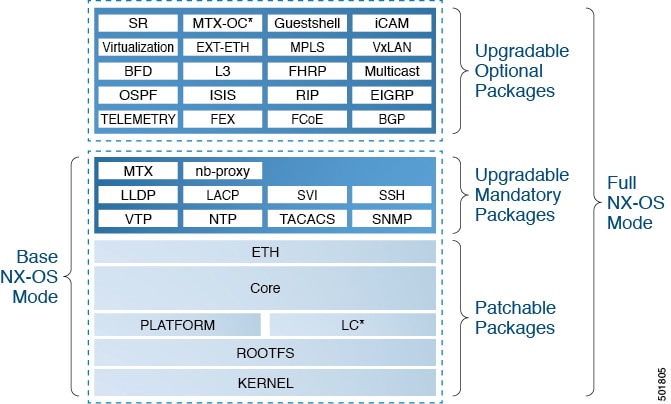
Cisco NX-OS software is provisioned to boot the NX-OS software in two modes as described in the following illustration:

  • Base NX-OS mode

  • Full NX-OS mode

Figure 1. Optionality in Cisco NX-OS Software
  • Base NX-OS mode contains:

    • Upgradable mandatory packages

    • Patchable packages

  • Full NX-OS mode contains:

    • Upgradable optional packages

    • Upgradable mandatory packages

    • Patchable packages


Note

The default mode is full NX-OS mode.


In base NX-OS mode, basic Layer 2 and Layer 3 features are available. All dynamic routing features (for example, BGP, OSPF, EIGRP, RIP, and ISIS ) and other optional feature RPMs are not available by default. You have to install the optional feature RPMs on top of the base image.

In full NX-OS mode, all feature RPMs are installed during boot time when Ethernet plugin is activated by the plugin manager. There is no change in the user behavior as compared to the previous releases.

Using Modular Packages

The Cisco NX-OS software image is traditionally constructed with the packaging that forms a Cisco Linux distribution. It makes upgrading certain packages difficult as each package is large in size.

This section describes a new package management for the Cisco NX-OS software image. Beginning with Cisco NX-OS Release 9.2(1), some NXOS features are considered as optional, for example, BGP, OSPF, VXLAN, MPLS, Segment Routing.

Each modular package has the following important characteristics:

  • Upgrade functionality: The modular packages can be independently upgraded. The modular packages should be used from the same release as performing upgrades on these packages across multiple releases is not supported.

  • Optionality: The modular packages are optional, for example, these packages can be removed or uninstalled at run time. The removal of the modular packages does not affect bringing-up the system and it does not affect any other functionality of the switches.


Note

All APIs exported by the modular package should be used only after the installation of the feature.


RPM and YUM

RPM (Red Hat Package Manager) is the package management system used for packaging in the Linux Standard Base (LSB). The RPM command options are grouped into three subgroups for:

  • Querying and verifying packages

  • Installing, upgrading, and removing packages

  • Performing miscellaneous functions

rpm is the command name for the main command that is used with RPM, whereas .rpm is the extension that is used for the RPM files.

YUM (Yellowdog Updater, Modified) is an open source command-line tool for RPM based Linux systems. It allows users and system administrators to easily install, update, remove, or search software packages on the systems. YUM adds the automatic updates and the package management, including dependency management, to the RPM systems. In addition to understanding the installed packages on a system, YUM works with the repositories that are collections of the packages and they are typically accessible over a network connection.

List of Cisco NX-OS Software Packages

The Cisco NX-OS software image consists of the third party packages.

  • Upgradable optional packages

  • Upgradable mandatory packages

  • Patchable packages

Upgradable Optional Packages

Each upgradable optional package has the following important characteristics:

  • It can be independently upgraded.

  • These packages are optional, for example, these packages can be removed or uninstalled at runtime. The removal of the upgradable optional packages does not affect bringing-up the system and it does not affect any other functionality on the switches.


    Note

    Use all the APIs that are exported by the optional package only after detecting the presence of the feature.


  • These packages can be upgraded, downgraded, activated, or deactivated.

The upgradable optional packages contain some of the following items:

  • BGP

  • BFD

  • EIGRP

  • Ext-Eth

  • FCoE

  • FEX

  • FHRP

  • Guestshell

  • ISIS

  • L3

  • MPLS

  • MTX-OC

  • Multicast

  • OPENSSH

  • OSPF

  • RIP

  • SR

  • TACACS+

  • Telemetry

  • Virtualization

  • VXLAN

Upgradable Mandatory Packages

The mandatory packages can only be upgraded or downgraded, but they cannot be deactivated. The status of the package can be active/install or inactive/uninstall. The upgradable mandatory packages contain the following:

  • LACP

  • LLDP

  • MTX

  • nb-proxy

  • NTP

  • SNMP

  • SSH

  • SVI

  • TACACS

  • VTP

Patchable Packages

The patchable packages contain the following:

  • Kernel

  • LC

  • Network-infra (aka Eth)

  • Platform

  • Rootfs

  • System-infra (aka Core)

Booting the NX-OS Image in Base or Full Mode

You can now boot the NX-OS image in base or full mode. The full boot mode installs the complete NX-OS software which is similar to the software of the previous releases. This is the default boot mode. The base boot mode has no optional RPMs installed.

To use the command line option, see the following steps:

  • Use the install reset nxos base option to install the NX-OS image in the base boot mode using the VSH prompt. After reload, the switch is in the base mode with no optional packages installed.

  • Use the install reset nxos full option to install the NX-OS image in the full boot mode using the VSH prompt. After reload, the switch is in the full mode with the optional packages automatically installed.

For more information, see Using Install CLIs for Feature RPM Operation section.

Support for ISSU

Beginning with Cisco NX-OS Release 9.2(1), there is no change in the ISSU on Cisco Nexus 9000 Series switches.

Information About RPMs

RPMs can be upgraded or downgraded to a new software version using NXOS install commands or by using YUM commands. An upgradable RPM can be optional or mandatory.

See the following sections for more information about optional and mandatory RPMs.

Optional RPMs and Their Associated Features

The optional RPMs are the RPMs that can be installed to enable the features without affecting the native NXOS behavior or they can be removed using the install deactivate command from the switch.

Optional RPMs, for example, EIGRP are not a part of the base software. They can be added, upgraded, and removed as required using either yum or install CLI commands from the switch.

See the following list of the optional RPMs and their associated features:

Table 1. List of Optional RPMs and Their Associated Features

Package Name

Associated Features

BGP

feature bgp

BFD

feature bfd

Container-tracker

feature container-tracker

EIGRP

feature eigrp

Ext-Eth

  • feature openflow

  • feature evb

  • feature imp

  • feature netflow

  • feature sla_sender

  • feature sla_responder

  • feature sla twamp-server

  • feature sflow

FCoE

  • feature-set fcoe

  • feature-set fcoe-npv

FEX

feature-set fex

FHRP

  • feature hsrp

  • feature vrrpv3

iCAM

feature icam

ISIS

feature isis

MPLS

  • feature mpls segment-routing

  • feature mpls evpn

Multicast

  • feature pim

  • feature pim6

  • feature msdp

  • feature ngmvpn

OSPF

  • feature ospf

  • feature ospfv3

RIP

feature rip

Services

feature catena

SR

feature mpls segment-routing traffic-engineering

TELEMETRY

feature telemetry

Virtualization

NA

VXLAN

  • feature nv overlay

  • feature fabric forwarding

Guidelines for NX-OS Feature RPM Installation

See the following NX-OS system RPM repositories that are present in the Cisco NX-OS Series switches for the RPM management.


Note

Avoid manually copying the RPMs to system repositories. Instead use the install or YUM commands.


Table 2. RPM Repositories That Are Present in the Switches

Repository Name

Repository Path

Description

groups-repo

/rpms

Part of the bundled NX-OS image. It is used to keep all the RPMs that are bundled as part of the NX-OS image. All RPMs based in this repository are known as base RPMs.

localdb

/bootflash/.rpmstore/patching/localrepo

Used for RPM persistency. When a user adds a NX-OS feature RPM as part of install add command, the RPM is copied to this location and it is persisted during the reloads. User has the responsibility to clean the repository.

To add a RPM to this repository, use install add command.

To remove a RPM from this repository, use install remove command.

YUM commands can be used to populate the repository too.

The maximum space for the repository is 200Mb along with the patching repository for Cisco Nexus 9000 Series switches except Cisco Nexus 3000 Series switches. For Cisco Nexus 3000 Series switches, the maximum space for the repository is 20 Mb only.

patching

/bootflash/.rpmstore/patching/patchrepo

Used for RPM persistency. When a user adds a NX-OS patch RPM to the switch, the patch RPM is copied to this repository.

thirdparty

/bootflash/.rpmstore/thirdparty

Used for RPM persistency when a user adds a third party RPM.

The groups-repo and localdb repositories hold the NX-OS feature RPMs that should be installed during the system boot or during activation. YUM commands or install command can be used for the installation or the removal of these RPMs.

The following rules are applied to the feature RPM installation procedure during boot or install time:

  • Only RPMs with the same NX-OS release number should be selected for the installation.

  • Base RPMs cannot be added to the localdb repository.

List of NX-OS Mandatory RPMs That Can Be Patched

See the list of the NX-OS mandatory RPMs that can be patched.

Table 3. List of the NX-OS Mandatory RPMs that can be Patched

Serial Number

RPM Name

Description

1

Core

NX-OS infrastructure software.

2

Platform

Cisco NX-OS platform specific software and some Linux modified software.

3

Eth

Cisco NX-OS features that are tightly coupled with the infrastructure.

4

Linecard

Cisco NX-OS arm based line cards in Cisco Nexus 9000 platform switches and x86_64 line cards in Cisco Nexus 9508 platform switches with -R series line cards.

5

Linecard 2

Cisco NX-OS x85_64 line card in Cisco Nexus 9000 Series switches.

6

TOR

Cisco NX-OS Top of Rack switches.

Using Install CLIs for Feature RPM Operation

See the following reference table for using install CLIs for the feature RPM operations:

Table 4. Reference for Install CLIs for the Feature RPM Operations

CLI

Description

install reset

This operation removes all the patches, persisted configurations, upgraded packages, third party installed packages, unsaved configurations, and reloads the switch's previous mode (Full/Base) with the default packages.

The install reset command also performs write erase operation. The following message is displayed at the prompt:


switch(config)# install reset 
======================================================
WARNING!!This operation will remove all pactches, upgraded packages,
persisted etc configs, third party packages installed,
startup configuration(write erase) and
reload the switch with default packages.
=======================================================
Do you want to proceed with reset operation? (y/n)? [n] 

install reset nxos base

This operation installs NXOS in base mode by removing all patches, upgraded packages, persisted etc configurations, third party packages installed, startup configuration (write erase), and reloads the switch with the default packages.

install reset nxos full

This operation installs NXOS with full mode by removing all patches, upgraded packages, persisted etc configs, third party packages installed, startup configuration (write erase), and reloads the switch with the default packages (with mandatory and optional RPMs).

install add <>

Adds an RPM file to respective repository and updates the repository (patch/feature/third-party ).

install activate <rpm name>

Installs an RPM that is present in the repository.

install commit <rpm name>

Used for the patch RPMs. Makes the patch persist during reload.

install deactivate <rpm name>

Un-installs an RPM.

install remove <rpm name>

Removes an RPM file from the repository and updates the repository.

sh install active

Displays the list of the installed RPMs in the system apart from base rootfs RPMs. (features/patch/third-party).

sh install inactive

Displays the list of the RPMs that are present in the repository but they are not installed.

sh install packages

Lists all the RPMs that are installed including rootfs RPMs.

Using Install CLIs for Digital Signature Support

See the following section for more information on using the install CLIs for digital signature support.

Procedure


Step 1

switch# install add bootflash:<keyfile> gpg-key

Example:

install add bootflash:RPM-GPG-KEY-puppetlabs gpg-key
[####################] 100%
Install operation 304 completed successfully at Thu Apr 19 16:40:28 2018

Cisco release RPMs are signed with Cisco GPG (GNU Privacy Guard) key. The public GPG key is present at /etc/pki/rpm-gpg/arm-Nexus9k-rel.gpg . To add other public keys from different sources, use the steps in this section.

Step 2

switch#install verify package <package-name> OR switch#install verify bootflash:<RPM file>

Example:


switch# install verify bootflash:vxlan-2.0.0.0-9.2.1.lib32_n9000.rpm
 
RSA signed
switch#

Displays the CLI to verify whether the RPM file is a signed or non-signed file.

Step 3

show install packages

Displays all packages with the signed or unsigned information.

Example:


switch# sh install packages 
 
Boot Image:
NXOS Image: bootflash:/nxos.9.2.1.bin

----------------------------------------------------
Installed Packages
attr.x86_64 2.4.47-r0.0 installed Unsigned
aufs-util.x86_64 3.14+git0+b59a2167a1-r0.0 installed Unsigned
base-files.n9000 3.0.14-r89.0 installed Unsigned
base-passwd.lib32_x86 3.5.29-r0.1.0 installed Unsigned
bash.lib32_x86 4.3.30-r0.0 installed Unsigned
bfd.lib32_n9000 2.0.0.0-9.2.1 installed Signed
bgp.lib32_n9000 2.0.0.0-9.2.1 installed Signed
binutils.x86_64 2.25.1-r0.0 installed Unsigned
bridge-utils.x86_64 1.5-r0.0 installed Unsigned
busybox.x86_64 1.23.2-r0.0 installed Unsigned
busybox-udhcpc.x86_64 1.23.2-r0.0 installed Unsigned
bzip2.x86_64 1.0.6-r5.0 installed Unsigned
ca-certificates.all 20150426-r0.0 installed Unsigned
cgroup-lite.x86_64 1.1-r0.0 installed Unsigned
chkconfig.x86_64 1.3.58-r7.0 installed Unsigned
container-tracker.lib32_n9000 2.0.0.0-9.2.1 installed Signed
containerd-docker.x86_64 0.2.3+gitaa8187dbd3b7ad67d8e5e3a15115d3eef43a7ed1-r0.0
installed Unsigned
core.lib32_n9000 2.0.0.0-9.2.1 installed Signed
coreutils.lib32_x86 8.24-r0.0 installed Unsigned
cpio.x86_64 2.12-r0.0 installed Unsigned
cracklib.lib32_x86 2.9.5-r0.0 installed Unsigned
cracklib.x86_64 2.9.5-r0.0 installed Unsigned
createrepo.x86_64 0.4.11-r9.0 installed Unsigned
cronie.x86_64 1.5.0-r0.0 installed Unsigned
curl.lib32_x86 7.60.0-r0.0 installed Unsigned
db.x86_64 6.0.30-r0.0 installed Unsigned
dbus-1.lib32_x86 1.8.20-r0.0 installed Unsigned
dhcp-client.x86_64 4.3.2-r0.0 installed Unsigned
dhcp-server.x86_64 4.3.2-r0.0 installed Unsigned
switch#

Querying All Installed RPMs

Complete the following step to query all the installed RPMs:

Procedure

Command or Action Purpose

show install packages

Example:


switch# show install packages  
 
Boot Image:
NXOS Image: bootflash:/nxos.9.2.1.bin

----------------------------------------------------
Installed Packages
attr.x86_64 2.4.47-r0.0 installed Unsigned
aufs-util.x86_64 3.14+git0+b59a2167a1-r0.0 installed Unsigned
base-files.n9000 3.0.14-r89.0 installed Unsigned
base-passwd.lib32_x86 3.5.29-r0.1.0 installed Unsigned
bash.lib32_x86 4.3.30-r0.0 installed Unsigned
bfd.lib32_n9000 2.0.0.0-9.2.1 installed Signed
bgp.lib32_n9000 2.0.0.0-9.2.1 installed Signed
binutils.x86_64 2.25.1-r0.0 installed Unsigned
bridge-utils.x86_64 1.5-r0.0 installed Unsigned
busybox.x86_64 1.23.2-r0.0 installed Unsigned
busybox-udhcpc.x86_64 1.23.2-r0.0 installed Unsigned
bzip2.x86_64 1.0.6-r5.0 installed Unsigned
ca-certificates.all 20150426-r0.0 installed Unsigned
cgroup-lite.x86_64 1.1-r0.0 installed Unsigned
chkconfig.x86_64 1.3.58-r7.0 installed Unsigned
container-tracker.lib32_n9000 2.0.0.0-9.2.1 installed Signed
containerd-docker.x86_64 0.2.3+gitaa8187dbd3b7ad67d8e5e3a15115d3eef43a7ed1-r0.0
installed Unsigned
core.lib32_n9000 2.0.0.0-9.2.1 installed Signed
coreutils.lib32_x86 8.24-r0.0 installed Unsigned
cpio.x86_64 2.12-r0.0 installed Unsigned
cracklib.lib32_x86 2.9.5-r0.0 installed Unsigned
cracklib.x86_64 2.9.5-r0.0 installed Unsigned
createrepo.x86_64 0.4.11-r9.0 installed Unsigned
cronie.x86_64 1.5.0-r0.0 installed Unsigned
curl.lib32_x86 7.60.0-r0.0 installed Unsigned
db.x86_64 6.0.30-r0.0 installed Unsigned
dbus-1.lib32_x86 1.8.20-r0.0 installed Unsigned
dhcp-client.x86_64 4.3.2-r0.0 installed Unsigned
dhcp-server.x86_64 4.3.2-r0.0 installed Unsigned
switch#

Queries all the installed RPMs.

Querying Only Installed Featured NX-OS RPMs

Complete the following step to query only the installed featured NX-OS RPMs:

Procedure

Command or Action Purpose

show install packages | grep <lib32_n9000>

Example:


switch# show install packages | grep lib32_n9000 
core.lib32_n9000                     2.0.0.0-9.2.1                  installed        Signed
eth.lib32_n9000                      2.0.0.0-9.2.1                  installed        Signed
lacp.lib32_n9000                     2.0.0.0-9.2.1                  installed        Signed
linecard2.lib32_n9000                2.0.0.0-9.2.1                  installed        Signed
lldp.lib32_n9000                     2.0.0.0-9.2.1                  installed        Signed
mtx-device.lib32_n9000               2.0.0.0-9.2.1                  installed        Signed
mtx-grpc-agent.lib32_n9000           2.0.0.0-9.2.1                  installed        Signed
mtx-infra.lib32_n9000                2.0.0.0-9.2.1                  installed        Signed
mtx-netconf-agent.lib32_n9000        2.0.0.0-9.2.1                  installed        Signed
mtx-restconf-agent.lib32_n9000       2.0.0.0-9.2.1                  installed        Signed
mtx-telemetry.lib32_n9000            2.0.0.0-9.2.1                  installed        Signed
ntp.lib32_n9000                      2.0.0.0-9.2.1                  installed        Signed
nxos-ssh.lib32_n9000                 2.0.0.0-9.2.1                  installed        Signed
platform.lib32_n9000                 2.0.0.0-9.2.1                  installed        Signed
snmp.lib32_n9000                     2.0.0.0-9.2.1                  installed        Signed
svi.lib32_n9000                      2.0.0.0-9.2.1                  installed        Signed
tacacs.lib32_n9000                   2.0.0.0-9.2.1                  installed        Signed
tor.lib32_n9000                      2.0.0.0-9.2.1                  installed        Signed
vtp.lib32_n9000                      2.0.0.0-9.2.1                  installed        Signed

Queries only the installed featured NX-OS RPMs.

Querying Only Installed Third Party RPMs

Complete the following step to query only the installed third party RPMs:

Procedure

Command or Action Purpose

show install packages | grep <x86_64>

Example:


switch# show install packages | grep x86_64 
attr.x86_64                          2.4.47-r0.0                    installed        Unsigned
aufs-util.x86_64                     3.14+git0+b59a2167a1-r0.0      installed        Unsigned
base-passwd.x86_64                   3.5.29-r0.1.0                  installed        Unsigned
binutils.x86_64                      2.25.1-r0.0                    installed        Unsigned
bridge-utils.x86_64                  1.5-r0.0                       installed        Unsigned
busybox.x86_64                       1.23.2-r0.0                    installed        Unsigned
busybox-udhcpc.x86_64                1.23.2-r0.0                    installed        Unsigned
bzip2.x86_64                         1.0.6-r5.0                     installed        Unsigned
cgroup-lite.x86_64                   1.1-r0.0                       installed        Unsigned
Queries the installed third-party RPMs.

Queries all the installed RPMs.

Installing the RPMs Using One Step Procedure

The CLIs for both install and upgrade RPMs are the same. See the following step to install the RPMs using one step procedure:

Procedure

Command or Action Purpose

install add <rpm> activate

Example:


switch# install add bootflash:chef.rpm activate 
Adding the patch (/chef.rpm)
[####################] 100%
Install operation 868 completed successfully at Tue May  8 11:20:10 2018
 
Activating the patch (/chef.rpm)
[####################] 100%
Install operation 869 completed successfully at Tue May  8 11:20:20 2018
  

Installs and activates the RPM.

Example


switch# show install active 
Boot Image:
        NXOS Image: bootflash:/nxos.9.2.1.bin
 
Active Packages:
bgp-2.0.1.0-9.2.1.lib32_n9000
chef-12.0.0alpha.2+20150319234423.git.1608.b6eb10f-1.el5.x86_64
 
Active Base Packages:
        lacp-2.0.0.0-9.2.1.lib32_n9000
        lldp-2.0.0.0-9.2.1.lib32_n9000
        mtx-device-2.0.0.0-9.2.1.lib32_n9000
        mtx-grpc-agent-2.0.0.0-9.2.1.lib32_n9000
        mtx-infra-2.0.0.0-9.2.1.lib32_n9000
        mtx-netconf-agent-2.0.0.0-9.2.1.lib32_n9000
        mtx-restconf-agent-2.0.0.0-9.2.1.lib32_n9000
        mtx-telemetry-2.0.0.0-9.2.1.lib32_n9000
        ntp-2.0.0.0-9.2.1.lib32_n9000
        nxos-ssh-2.0.0.0-9.2.1.lib32_n9000
        snmp-2.0.0.0-9.2.1.lib32_n9000
        svi-2.0.0.0-9.2.1.lib32_n9000
        tacacs-2.0.0.0-9.2.1.lib32_n9000
        vtp-2.0.0.0-9.2.1.lib32_n9000
switch(config)#

Installing the RPMs Using Two Steps Procedure

The CLIs for both install and upgrade RPMs are the same. See the following steps to install the RPMs using two steps procedure:

Procedure

  Command or Action Purpose
Step 1

install add <rpm>

Example:


switch# install add bootflash:vxlan-2.0.1.0-9.2.1.lib32_n9000.rpm
   
[####################] 100%
Install operation 892 completed successfully at Thu Jun  7 13:56:38 2018
 
switch(config)# sh install inactive | grep vxlan 

vxlan-2.0.1.0-9.2.1.lib32_n9000
      

Installs the RPM.

Step 2

install activate <rpm>

Example:

Activates the RPM.

Example


switch#install activate vxlan
 
[####################] 100%
Install operation 891 completed successfully at Thu Jun  7 13:53:07 2018
 
switch# show install active | grep vxlan 

vxlan-2.0.0.0-9.2.1.lib32_n9000

switch# sh install inactive | grep vxlan

switch#

Upgrading the RPMs Using One Step

The CLIs for both install and upgrade RPMs are the same. See the following steps to upgrade the RPMs:

Procedure

Command or Action Purpose

install add <rpm>activate upgrade

Example:


switch(config)# install add bootflash:bgp-2.0.2.0-9.2.1.lib32_n9000.rpm activate upgrade
 

Adding the patch (/bgp-2.0.2.0-9.2.1.lib32_n9000.rpm)
[####################] 100%
Install operation 870 completed successfully at Tue May 8 11:22:30 2018
 
Activating the patch (/bgp-2.0.2.0-9.2.1.lib32_n9000.rpm)
[####################] 100%
Install operation 871 completed successfully at Tue May 8 11:22:40 2018


Installs the RPM.

Example

switch(config)# show install active
 
Boot Image:
 NXOS Image: bootflash:/nxos.9.2.1.bin
 
Active Packages:
bgp-2.0.2.0-9.2.1.lib32_n9000
chef-12.0.0alpha.2+20150319234423.git.1608.b6eb10f-1.el5.x86_64
 
Active Base Packages:
 lacp-2.0.0.0-9.2.1.lib32_n9000
 lldp-2.0.0.0-9.2.1.lib32_n9000
 mtx-device-2.0.0.0-9.2.1.lib32_n9000
 mtx-grpc-agent-2.0.0.0-9.2.1.lib32_n9000
 mtx-infra-2.0.0.0-9.2.1.lib32_n9000
 mtx-netconf-agent-2.0.0.0-9.2.1.lib32_n9000
 mtx-restconf-agent-2.0.0.0-9.2.1.lib32_n9000
 mtx-telemetry-2.0.0.0-9.2.1.lib32_n9000
 ntp-2.0.0.0-9.2.1.lib32_n9000
 nxos-ssh-2.0.0.0-9.2.1.lib32_n9000
 snmp-2.0.0.0-9.2.1.lib32_n9000
 svi-2.0.0.0-9.2.1.lib32_n9000
 tacacs-2.0.0.0-9.2.1.lib32_n9000
 vtp-2.0.0.0-9.2.1.lib32_n9000 

Downgrading the RPMs

The downgrade procedure needs a special CLI attribute. See the following step to downgrade the RPMs using the one step procedure:

Procedure

Command or Action Purpose

install add <rpm>activate downgrade

Example:


switch(config)# install add bootflash:bgp-2.0.1.0-9.2.1.lib32_n9000.rpm activate downgrade
 

Adding the patch (/bgp-2.0.1.0-9.2.1.lib32_n9000.rpm)
[####################] 100%
Install operation 872 completed successfully at Tue May 8 11:24:43 2018
 
Activating the patch (/bgp-2.0.1.0-9.2.1.lib32_n9000.rpm)
[####################] 100%
Install operation 873 completed successfully at Tue May 8 11:24:52 2018
 

Downgrades the RPM.

Example


switch(config)# show install active 
Boot Image:
 NXOS Image: bootflash:/nxos.9.2.1.bin
 
Active Packages:
 bgp-2.0.1.0-9.2.1.lib32_n9000
 chef-12.0.0alpha.2+20150319234423.git.1608.b6eb10f-1.el5.x86_64
 
Active Base Packages:
 lacp-2.0.0.0-9.2.1.lib32_n9000
 lldp-2.0.0.0-9.2.1.lib32_n9000
 mtx-device-2.0.0.0-9.2.1.lib32_n9000
 mtx-grpc-agent-2.0.0.0-9.2.1.lib32_n9000
 mtx-infra-2.0.0.0-9.2.1.lib32_n9000
 mtx-netconf-agent-2.0.0.0-9.2.1.lib32_n9000
 mtx-restconf-agent-2.0.0.0-9.2.1.lib32_n9000
 mtx-telemetry-2.0.0.0-9.2.1.lib32_n9000
 ntp-2.0.0.0-9.2.1.lib32_n9000
 nxos-ssh-2.0.0.0-9.2.1.lib32_n9000
 snmp-2.0.0.0-9.2.1.lib32_n9000
 svi-2.0.0.0-9.2.1.lib32_n9000
 tacacs-2.0.0.0-9.2.1.lib32_n9000
 vtp-2.0.0.0-9.2.1.lib32_n9000
switch(config)#

Removing the RPMs

See the following steps to remove the RPMs:

Procedure

Command or Action Purpose

install remove <rpm>

Example:


switch(config)# show install inactive | grep vxlan 
   
        vxlan-2.0.0.0-9.2.1.lib32_n9000
switch(config)# install remove vxlan 

Proceed with removing vxlan? (y/n)?  [n] y
[####################] 100%
Install operation 890 Removal of base rpm package is not permitted  at Thu Jun  7 13:52:15 2018

Removes the RPM from the repository.

Format of the RPM

The general format of a RPM is <name>-<version>-<release>.<arch>.rpm. The same format is followed for NXOS feature RPMS.

  • Name: package name, for example, BGP

  • Version in <x.y.x.b> format: <major.minor.patch.build_number>, for example, 2.0.1.0

  • Release: The branch from which the RPM is created, for example, 9.2.1

  • Arch: The architecture type of the RPM, for example, lib32_n9000

See the following table for more information on the naming convention, for example, fex-2.0.0.0-9.2.1.lib32_n9000.rpm:

Table 5. RPM Naming Convention

RPM Naming Convention

Example: fex-2.0.0.0-9.2.1.lib32_n9000.rpm

Description

fex

Indicates the name of the component.

2

Indicates that the RPM is not backward compatible. Configuration loss takes place during an upgrade.

0

Indicates the incremental API changes/CLI changes/Schema changes with backward compatibility. It is applicable to the new features on top of the existing capabilities. No configuration is lost during an upgrade.

0

Indicates a bug fix without any functionality change. No configuration is lost during an upgrade.

0

This number tracks how many times the component has changed during the development cycle of a release. This value will be 0 for all the release images.

9.2.1

Indicates the release number or the distribution version for the RPM. It aligns to the NVR format. Since the feature RPM is only applicable to a NXOS release, this field has NXOS release version number present.

lib32_n9000

Indicates the architecture type of the RPM.

Rules for Managing RPM Version During Installation

The groups-repo and localdb repositories hold the NX-OS feature RPMs that should be installed during the system boot or during activation. The localdb repository holds all the persisted RPMs from the old installation. All inactive RPMs that are present in localdb that are not required any more, should be removed to make space for the new RPMs.

YUM commands or install commands can be used for the installation or the removal of these RPMs.

The following rules are applied to the feature RPM installation procedure during boot or install time:

  • The RPM files with the release number that is same as the NXOS release are the compatible files to be activated.

  • Users are not allowed to add a RPM to the localdb repository if the RPM is present in groups-repo repository. Any RPM version other than the groups-repo repository should be allowed.

  • If a RPM is present in groups-repo and it is also present in localdb repository with the same version, the RPM from the groups-repo repository is considered for the installation during boot time and install time. (This step is needed because in old releases, adding the base RPM allowed the installation to the localdb repository. This step is needed for the backward compatibility.)

  • When a non-base feature RPM is added, activated, deactivated, or removed, the respective entry should be present in inactive_feature_rpms.inf .

  • When a base RPM is deactivated or activated, the entry should be present in /bootflash/.rpmstore/nxos_preinstall_rpms_removed and /bootflash/.rpmstore/nxos_rpms_persisted respectively.

  • If a base RPM entry is not present in the /bootflash/.rpmstore/nxos_rpms_persisted file, any RPM version present in the groups-repo or localdb repository should not be considered for the installation during boot time. In this case, the removed entry should be part of /bootflash/.rpmstore/nxos_preinstall_rpms_removed .


Note

Avoid manually copying the RPMs to the system repositories. Instead, use the install or YUM commands.


Information About YUM Commands

See the following sections for more information about YUM commands.


Note

YUM commands do not support ctrl+c. Install commands do support ctrl+c. If YUM commands are aborted using ctrl+c, manual cleanup must be performed using "/isan/bin/patching_utils.py --unlock".


Performing Package Operations Using the YUM Commands

See the following sections for performing package operations using the YUM commands:


Note

YUM commands are accessed only from the BASH shell on the box and they are not allowed from the NXOS VSH terminal.


Note

Make sure that as a sudo user, you have access to the super user privileges.


Finding the Base Version RPM of the Image

Use the ls /rpms command to find the base version RPM of the image. The base RPM version is the pre-installed RPM that is archived in the system image.


#ls /rpms 

bfd-2.0.0.0-9.2.1.lib32_n9000.rpm                ins_tor_sdk_t2-1.0.0.0-9.2.0.77.lib32_n9000.rpm    mtx-netconf-agent-2.0.0.0-9.2.1.lib32_n9000.rpm   snmp-2.0.0.0-9.2.1.lib32_n9000.rpm
bgp-2.0.0.0-9.2.1.lib32_n9000.rpm                ins_tor_sdk_t3-1.0.0.0-9.2.0.77.lib32_n9000.rpm    mtx-restconf-agent-2.0.0.0-9.2.1.lib32_n9000.rpm  sr-2.0.0.0-9.2.1.lib32_n9000.rpm
container-tracker-2.0.0.0-9.2.1.lib32_n9000.rpm  isis-2.0.0.0-9.2.1.lib32_n9000.rpm                 mtx-telemetry-2.0.0.0-9.2.1.lib32_n9000.rpm       svi-2.0.0.0-9.2.1.lib32_n9000.rpm
eigrp-2.0.0.0-9.2.1.lib32_n9000.rpm              lacp-2.0.0.0-9.2.1.lib32_n9000.rpm                 nbproxy-2.0.0.0-9.2.1.lib32_n9000.rpm             tacacs-2.0.0.0-9.2.1.lib32_n9000.rpm
ext-eth-2.0.0.0-9.2.1.lib32_n9000.rpm            lldp-2.0.0.0-9.2.1.lib32_n9000.rpm                 ntp-2.0.0.0-9.2.1.lib32_n9000.rpm                 telemetry-2.3.4.0-9.2.1.lib32_n9000.rpm
fcoe-2.0.0.0-9.2.1.lib32_n9000.rpm               mcast-2.0.0.0-9.2.1.lib32_n9000.rpm                nxos-ssh-2.0.0.0-9.2.1.lib32_n9000.rpm            virtualization-2.0.0.0-9.2.1.lib32_n9000.rpm
fex-2.0.0.0-9.2.1.lib32_n9000.rpm                mpls-2.0.0.0-9.2.1.lib32_n9000.rpm                 ospf-2.0.0.0-9.2.1.lib32_n9000.rpm                vtp-2.0.0.0-9.2.1.lib32_n9000.rpm
fhrp-2.0.0.0-9.2.1.lib32_n9000.rpm               mtx-device-2.0.0.0-9.2.1.lib32_n9000.rpm           repodata                                          vxlan-2.0.0.0-9.2.1.lib32_n9000.rpm
guestshell-2.0.0.0-9.2.1.lib32_n9000.rpm         mtx-grpc-agent-2.0.0.0-9.2.1.lib32_n9000.rpm       rip-2.0.0.0-9.2.1.lib32_n9000.rpm
icam-2.0.0.0-9.2.1.lib32_n9000.rpm               mtx-infra-2.0.0.0-9.2.1.lib32_n9000.rpm            services-2.0.0.0-9.2.1.lib32_n9000.rpm

Checking the List of the Installed RPMs

Use the yum list installed command to query the feature and third party RPMs and grep a specific RPM. See the following example for feature RPMs:


bash-4.2# yum list installed | grep lib32_n9000 

bfd.lib32_n9000                        2.0.0.0-9.2.1           @groups-repo
core.lib32_n9000                       2.0.0.0-9.2.1           installed   
eth.lib32_n9000                        2.0.0.0-9.2.1           installed   
guestshell.lib32_n9000                 2.0.0.0-9.2.1           @groups-repo
lacp.lib32_n9000                       2.0.0.0-9.2.1           installed   
linecard2.lib32_n9000                  2.0.0.0-9.2.1           installed   
lldp.lib32_n9000                       2.0.0.0-9.2.1           installed   
mcast.lib32_n9000                      2.0.0.0-9.2.1           @groups-repo
mtx-device.lib32_n9000                 2.0.0.0-9.2.1           installed   
mtx-grpc-agent.lib32_n9000             2.0.0.0-9.2.1           installed   
mtx-infra.lib32_n9000                  2.0.0.0-9.2.1           installed   
mtx-netconf-agent.lib32_n9000          2.0.0.0-9.2.1           installed   
mtx-restconf-agent.lib32_n9000         2.0.0.0-9.2.1           installed   
mtx-telemetry.lib32_n9000              2.0.0.0-9.2.1           installed   
nbproxy.lib32_n9000                    2.0.0.0-9.2.1           installed   
ntp.lib32_n9000                        2.0.0.0-9.2.1           installed   
nxos-ssh.lib32_n9000                   2.0.0.0-9.2.1           installed   
ospf.lib32_n9000                       2.0.0.0-9.2.1           @groups-repo
platform.lib32_n9000                   2.0.0.0-9.2.1           installed   
snmp.lib32_n9000                       2.0.0.0-9.2.1           installed   
svi.lib32_n9000                        2.0.0.0-9.2.1           installed   
tacacs.lib32_n9000                     2.0.0.0-9.2.1           installed   
tor.lib32_n9000                        2.0.0.0-9.2.0.77        installed   
virtualization.lib32_n9000             2.0.1.0-9.2.1           @localdb    
vtp.lib32_n9000                        2.0.0.0-9.2.1           installed   
vxlan.lib32_n9000                      2.0.0.0-9.2.1           @groups-repo
...

Getting Details of the Installed RPMs

The yum info <rpmname> command lists out the detailed info of the installed RPM.

 
yum info vxlan 

Loaded plugins: downloadonly, importpubkey, localrpmDB, patchaction, patching, protect-packages
groups-repo                                                                                                                                                                                              | 1.1 kB     00:00 ... 
localdb                                                                                                                                                                                                  |  951 B     00:00 ... 
patching                                                                                                                                                                                                 |  951 B     00:00 ... 
thirdparty                                                                                                                                                                                               |  951 B     00:00 ... 
Installed Packages
Name        : vxlan
Arch        : lib32_n9000
Version     : 2.0.0.0
Release     : 9.2.1
Size        : 6.4 M
Repo        : installed
From repo   : groups-repo
Summary     : Cisco NXOS VxLAN
URL         : http://cisco.com/
License     : Proprietary
Description : Provides VxLAN support

Installing the RPMs

Installing the RPMs downloads the RPMs and copies the respective program to the switches. See the following example for installing the RPMs from a remote server (that is reachable in the network):

 
bash-4.3# yum install http://10.0.0.2/modularity/rpms/vxlan-2.0.1.0-9.2.1.lib32_n9000.rpm
 
Loaded plugins: downloadonly, importpubkey, localrpmDB, patchaction, patching, protect-packages
groups-repo                                                                                                                                   | 1.1 kB     00:00 ... 
localdb                                                                                                                                       |  951 B     00:00 ... 
localdb/primary                                                                                                                               |  886 B     00:00 ... 
localdb                                                                                                                                                          1/1
patching                                                                                                                                      |  951 B     00:00 ... 
thirdparty                                                                                                                                    |  951 B     00:00 ... 
Setting up Install Process
vxlan-2.0.1.0-9.2.1.lib32_n9000.rpm                                                                                                      | 1.6 MB     00:00     
Examining /var/tmp/yum-root-RaANgb/vxlan-2.0.1.0-9.2.1.lib32_n9000.rpm: vxlan-2.0.1.0-9.2.1.lib32_n9000
Marking /var/tmp/yum-root-RaANgb/vxlan-2.0.1.0-9.2.1.lib32_n9000.rpm to be installed
Resolving Dependencies
--> Running transaction check
---> Package vxlan.lib32_n9000 0:2.0.1.0-9.2.1 will be installed
--> Finished Dependency Resolution

Dependencies Resolved

=====================================================================================================================================================================
 Package                   Arch                            Version                                   Repository                                    Size
=====================================================================================================================================================================
Installing:
vxlan                     lib32_n9000                     2.0.1.0-9.2.1                        /vxlan-2.0.1.0-9.2.1.lib32_n9000                     6.4 M
Transaction Summary
=====================================================================================================================================================================
Install       1 Package

Total size: 6.4 M
Installed size: 6.4 M
Is this ok [y/N]: y
Downloading Packages:
Running Transaction Check
Running Transaction Test
Transaction Test Succeeded
Running Transaction
  Installing : vxlan-2.0.1.0-9.2.1.lib32_n9000                                                                                                              1/1 
starting pre-install package version mgmt for vxlan
pre-install for vxlan complete
starting post-install package version mgmt for vxlan
post-install for vxlan complete

Installed:
  vxlan.lib32_n9000 0:2.0.1.0-9.2.1                                                                                                                             

Complete! 

See the following example for installing the RPMs from local bootflash:


sudo yum install /bootflash/vxlan-2.0.1.0-9.2.1.lib32_n9000.rpm 

Loaded plugins: downloadonly, importpubkey, localrpmDB, patchaction, patching, protect-packages
groups-repo                                                                                                                                                                                              | 1.1 kB     00:00 ... 
localdb                                                                                                                                                                                                  |  951 B     00:00 ... 
patching                                                                                                                                                                                                 |  951 B     00:00 ... 
thirdparty                                                                                                                                                                                               |  951 B     00:00 ... 
Setting up Install Process
Examining /bootflash/vxlan-2.0.1.0-9.2.1.lib32_n9000.rpm: vxlan-2.0.1.0-9.2.1.lib32_n9000
Marking /bootflash/vxlan-2.0.1.0-9.2.1.lib32_n9000.rpm as an update to vxlan-2.0.0.0-9.2.1.lib32_n9000
Resolving Dependencies
--> Running transaction check
---> Package vxlan.lib32_n9000 0:2.0.0.0-9.2.1 will be updated
---> Package vxlan.lib32_n9000 0:2.0.1.0-9.2.1 will be an update
--> Finished Dependency Resolution

Dependencies Resolved

================================================================================================================================================================================================================================
 Package                                  Arch                                           Version                                                 Repository                                                                Size
================================================================================================================================================================================================================================
Updating:
 vxlan                                    lib32_n9000                                    2.0.1.0-9.2.1                                      /vxlan-2.0.1.0-9.2.1.lib32_n9000                                    6.4 M

Transaction Summary
================================================================================================================================================================================================================================
Upgrade       1 Package

Total size: 6.4 M
Is this ok [y/N]: y
Downloading Packages:
Running Transaction Check
Running Transaction Test
Transaction Test Succeeded
Running Transaction
  Updating   : vxlan-2.0.1.0-9.2.1.lib32_n9000                                                                                                                                                                         1/2 
starting pre-install package version mgmt for vxlan
pre-install for vxlan complete
starting post-install package version mgmt for vxlan
post-install for vxlan complete
  Cleanup    : vxlan-2.0.0.0-9.2.1.lib32_n9000                                                                                                                                                                         2/2 

Updated:
  vxlan.lib32_n9000 0:2.0.1.0-9.2.1                                                                                                                                                                                        

Complete!

See the following example for installing the RPM if it is available in a repository:


yum install eigrp 

Upgrading the RPMs

See the following example for upgrading the RPMs from a remote server (that is reachable in the network):


bash-4.3# yum upgrade http://10.0.0.2/modularity/rpms/vxlan-2.0.1.0-9.2.1.lib32_n9000.rpm 

Loaded plugins: downloadonly, importpubkey, localrpmDB, patchaction, patching, protect-packages
groups-repo                                                                                                                                   | 1.1 kB     00:00 ... 
localdb                                                                                                                                       |  951 B     00:00 ... 
patching                                                                                                                                      |  951 B     00:00 ... 
thirdparty                                                                                                                                    |  951 B     00:00 ... 
Setting up Upgrade Process
vxlan-2.0.1.0-9.2.1.lib32_n9000.rpm                                                                                                      | 1.6 MB     00:00     
Examining /var/tmp/yum-root-RaANgb/vxlan-2.0.1.0-9.2.1.lib32_n9000.rpm: vxlan-2.0.1.0-9.2.1.lib32_n9000
Marking /var/tmp/yum-root-RaANgb/vxlan-2.0.1.0-9.2.1.lib32_n9000.rpm as an update to vxlan-2.0.0.0-9.2.1.lib32_n9000
Resolving Dependencies
--> Running transaction check
---> Package vxlan.lib32_n9000 0:2.0.0.0-9.2.1 will be updated
---> Package vxlan.lib32_n9000 0:2.0.1.0-9.2.1 will be an update
--> Finished Dependency Resolution

Dependencies Resolved

=====================================================================================================================================================================
 Package                   Arch                            Version                                   Repository                                    Size
=====================================================================================================================================================================
Updating:
vxlan                     lib32_n9000                     2.0.1.0-9.2.1                        /vxlan-2.0.1.0-9.2.1.lib32_n9000                     6.4 M
Transaction Summary
=====================================================================================================================================================================
Upgrade       1 Package

Total size: 6.4 M
Is this ok [y/N]: y
Downloading Packages:
Running Transaction Check
Running Transaction Test
Transaction Test Succeeded
Running Transaction
** Found 1 pre-existing rpmdb problem(s), 'yum check' output follows:
busybox-1.23.2-r0.0.x86_64 has missing requires of busybox-syslog
  Updating   : vxlan-2.0.1.0-9.2.1.lib32_n9000                                                                                                              1/2 
starting pre-install package version mgmt for vxlan
pre-install for vxlan complete
starting post-install package version mgmt for vxlan
post-install for vxlan complete
  Cleanup    : vxlan-2.0.0.0-9.2.1.lib32_n9000                                                                                                              2/2 

Updated:
  vxlan.lib32_n9000 0:2.0.1.0-9.2.1                                                                                                                             

Complete!

See the following example for upgrading the RPMs from local bootflash:


sudo yum upgrade /bootflash/vxlan-2.0.1.0-9.2.1.lib32_n9000.rpm
 
Loaded plugins: downloadonly, importpubkey, localrpmDB, patchaction, patching, protect-packages
groups-repo                                                                                                                                                                                              | 1.1 kB     00:00 ... 
localdb                                                                                                                                                                                                  |  951 B     00:00 ... 
patching                                                                                                                                                                                                 |  951 B     00:00 ... 
thirdparty                                                                                                                                                                                               |  951 B     00:00 ... 
Setting up Upgrade Process
Examining /bootflash/vxlan-2.0.1.0-9.2.1.lib32_n9000.rpm: vxlan-2.0.1.0-9.2.1.lib32_n9000
Marking /bootflash/vxlan-2.0.1.0-9.2.1.lib32_n9000.rpm as an update to vxlan-2.0.0.0-9.2.1.lib32_n9000
Resolving Dependencies
--> Running transaction check
---> Package vxlan.lib32_n9000 0:2.0.0.0-9.2.1 will be updated
---> Package vxlan.lib32_n9000 0:2.0.1.0-9.2.1 will be an update
--> Finished Dependency Resolution

Dependencies Resolved

================================================================================================================================================================================================================================
 Package                                  Arch                                           Version                                           Repository                                                                Size
================================================================================================================================================================================================================================
Updating:
vxlan                                    lib32_n9000                                    2.0.1.0-9.2.1                                      /vxlan-2.0.1.0-9.2.1.lib32_n9000                                    6.4 M

Transaction Summary
================================================================================================================================================================================================================================
Upgrade       1 Package

Total size: 6.4 M
Is this ok [y/N]: y
Downloading Packages:
Running Transaction Check
Running Transaction Test
Transaction Test Succeeded
Running Transaction
  Updating   : vxlan-2.0.1.0-9.2.1.lib32_n9000                                                                                                                                                                         1/2 
starting pre-install package version mgmt for vxlan
pre-install for vxlan complete
starting post-install package version mgmt for vxlan
post-install for vxlan complete
  Cleanup    : vxlan-2.0.0.0-9.2.1.lib32_n9000                                                                                                                                                                         2/2 

Updated:
  vxlan.lib32_n9000 0:2.0.1.0-9.2.1                                                                                                                                                                                        

Complete!


See the following example for upgrading the RPMs if it is available in any repository:


yum upgrade eigrp 

Downgrading the RPMs

See the following example for downgrading the RPMs from a remote server (that is reachable in the network):


sudo yum downgrade vxlan-2.0.0.0-9.2.1.lib32_n9000 

Loaded plugins: downloadonly, importpubkey, localrpmDB, patchaction, patching, protect-packages
Setting up Downgrade Process
groups-repo                                                                                                                                                                                              | 1.1 kB     00:00 ... 
localdb                                                                                                                                                                                                  |  951 B     00:00 ... 
localdb/primary                                                                                                                                                                                          | 1.3 kB     00:00 ... 
localdb                                                                                                                                                                                                                     2/2
patching                                                                                                                                                                                                 |  951 B     00:00 ... 
thirdparty                                                                                                                                                                                               |  951 B     00:00 ... 
Resolving Dependencies
--> Running transaction check
---> Package vxlan.lib32_n9000 0:2.0.0.0-9.2.1 will be a downgrade
---> Package vxlan.lib32_n9000 0:2.0.1.0-9.2.1 will be erased
--> Finished Dependency Resolution

Dependencies Resolved

================================================================================================================================================================================================================================
 Package                                         Arch                                                  Version                                                Repository                                             Size
================================================================================================================================================================================================================================
Downgrading:
vxlan                                           lib32_n9000                                           2.0.0.0-9.2.1                                           groups-repo                                           1.6 M
Transaction Summary
================================================================================================================================================================================================================================
Downgrade     1 Package

Total download size: 1.6 M
Is this ok [y/N]: y
Downloading Packages:
Running Transaction Check
Running Transaction Test
Transaction Test Succeeded
Running Transaction
  Installing : vxlan-2.0.0.0-9.2.1.lib32_n9000                                                                                                                                                                         1/2 
starting pre-install package version mgmt for vxlan
pre-install for vxlan complete
starting post-install package version mgmt for vxlan
post-install for vxlan complete
  Cleanup    : vxlan-2.0.1.0-9.2.1.lib32_n9000                                                                                                                                                                         2/2 

Removed:
  vxlan.lib32_n9000 0:2.0.1.0-9.2.1                                                                                                                                                                                        

Installed:
  vxlan.lib32_n9000 0:2.0.0.0-9.2.1                                                                                                                                                                                        

Complete!
 

See the following example for downgrading the RPMs from local bootflash:


yum downgrade /bootflash/eigrp-2.0.0-9.2.1.lib32_n9000.rpm 

See the following example for downgrading the RPMs if it is available in any repository:


yum downgrade eigrp
 

Deleting the RPMs

Deleting the RPMs de-installs the RPMs and removes any configuration CLI of the feature. Use the yum erase <rpm> command to delete the RPMs.

 
bash-4.2# sudo yum erase vxlan 

Loaded plugins: downloadonly, importpubkey, localrpmDB, patchaction, patching, protect-packages
Setting up Remove Process
Resolving Dependencies
--> Running transaction check
---> Package vxlan.lib32_n9000 0:2.0.1.0-9.2.1 will be erased
--> Finished Dependency Resolution

Dependencies Resolved

================================================================================================================================================================================================================================
 Package                   Arch                                           Version                                          Repository                                        Size
================================================================================================================================================================================================================================
Removing:
 vxlan                     lib32_n9000                                    2.0.1.0-9.2.1                                    @/vxlan-2.0.1.0-9.2.1.lib32_n9000                  6.4 M
Transaction Summary
================================================================================================================================================================================================================================
Remove        1 Package

Installed size: 6.4 M
Is this ok [y/N]: y
Downloading Packages:
Running Transaction Check
Running Transaction Test
Transaction Test Succeeded
Running Transaction
  Erasing    : vxlan-2.0.1.0-9.2.1.lib32_n9000                                                                                                                                                                         1/1 
starting pre-remove package version mgmt for vxlan
pre-remove for vxlan complete

Removed:
  vxlan.lib32_n9000 0:2.0.1.0-9.2.1                                                                                                                                                                                        

Complete!

Support for YUM Groups

The support for YUM groups is part of the package management. It simplifies the management of the packages for the administrators and it provides greater flexibility.

The administrators can group a list of packages (RPMs) into a logical group and they can perform various operations. YUM supports the following group commands:

  • grouplist

  • groupinfo

  • groupinstall

  • groupremove

  • groupupdate

YUM groups can be broadly classified as L2, L3, routing, and management.

Using the grouplist Command

In Linux, number of packages are bundled to particular group. Instead of installing individual packages with yum, you can install particular group that will install all the related packages that belongs to the group. For example to list all the available groups, use the yum grouplist command:


bash-4.2# sudo yum grouplist
 
Loaded plugins: downloadonly, importpubkey, localrpmDB, patchaction, patching, protect-packages
Setting up Group Process
groups-repo                                                                                                                                                                                              | 1.1 kB     00:00 ... 
localdb                                                                                                                                                                                                  |  951 B     00:00 ... 
patching                                                                                                                                                                                                 |  951 B     00:00 ... 
thirdparty                                                                                                                                                                                               |  951 B     00:00 ... 
groups-repo/group                                                                                                                                                                                        | 1.6 kB     00:00 ... 
Installed Groups:
   L2
   L3
   management
Available Groups:
   routing
Done

bash-4.3$
Using the groupmembers Command

Use yum groupinfo command to display the description and the contents of a package group. The command lists out the feature members of the group.


bash-4.2# sudo yum groupinfo l2
 

Loaded plugins: downloadonly, importpubkey, localrpmDB, patchaction, patching, protect-packages
Setting up Group Process
groups-repo                                                                                                                                                                                              | 1.1 kB     00:00 ... 
localdb                                                                                                                                                                                                  |  951 B     00:00 ... 
patching                                                                                                                                                                                                 |  951 B     00:00 ... 
thirdparty                                                                                                                                                                                               |  951 B     00:00 ... 

Group: L2
 Mandatory Packages:
   lacp
   lldp
   svi
   vtp

Using the groupinstall Command

This command is for both install & upgrade of the members RPM. If the member is not installed, it will install the highest version available. If the member is already installed and higher RPM is available, it will upgrade that member.


bash-4.2# sudo yum groupinstall routing 

Loaded plugins: downloadonly, importpubkey, localrpmDB, patchaction, patching, protect-packages
groups-repo                                                                                                                                                                                              | 1.1 kB     00:00 ... 
localdb                                                                                                                                                                                                  |  951 B     00:00 ... 
patching                                                                                                                                                                                                 |  951 B     00:00 ... 
thirdparty                                                                                                                                                                                               |  951 B     00:00 ... 
Setting up Group Process
Package ospf-2.0.0.0-9.2.1.lib32_n9000 already installed and latest version
Resolving Dependencies
--> Running transaction check
---> Package bgp.lib32_n9000 0:2.0.0.0-9.2.1 will be installed
---> Package eigrp.lib32_n9000 0:2.0.0.0-9.2.1 will be installed
---> Package isis.lib32_n9000 0:2.0.0.0-9.2.1 will be installed
---> Package rip.lib32_n9000 0:2.0.0.0-9.2.1 will be installed
--> Finished Dependency Resolution

Dependencies Resolved

================================================================================================================================================================================================================================
 Package                Arch                                                  Version                                                  Repository                    Size
================================================================================================================================================================================================================================
Installing:
 bgp                    lib32_n9000                                           2.0.0.0-9.2.1                                           groups-repo                      2.4 M
 eigrp                  lib32_n9000                                           2.0.0.0-9.2.1                                           groups-repo                      428 k
 isis                   lib32_n9000                                           2.0.0.0-9.2.1                                           groups-repo                      1.2 M
 rip                    lib32_n9000                                           2.0.0.0-9.2.1                                           groups-repo                      214 k
Transaction Summary
================================================================================================================================================================================================================================
Install       4 Packages

Total download size: 4.2 M
Installed size: 19 M
Is this ok [y/N]: y
Downloading Packages:
--------------------------------------------------------------------------------------------------------------------------------------------------------------------------------------------------------------------------------
Total                                                                                                                                                                                           132 MB/s | 4.2 MB     00:00     
Running Transaction Check
Running Transaction Test
Transaction Test Succeeded
Running Transaction
  Installing : rip-2.0.0.0-9.2.1.lib32_n9000                                                                                                                                                                           1/4 
starting pre-install package version mgmt for rip
pre-install for rip complete
starting post-install package version mgmt for rip
post-install for rip complete
  Installing : isis-2.0.0.0-9.2.1.lib32_n9000                                                                                                                                                                          2/4 
starting pre-install package version mgmt for isis
pre-install for isis complete
starting post-install package version mgmt for isis
post-install for isis complete
  Installing : eigrp-2.0.0.0-9.2.1.lib32_n9000                                                                                                                                                                         3/4 
starting pre-install package version mgmt for eigrp
pre-install for eigrp complete
starting post-install package version mgmt for eigrp
post-install for eigrp complete
  Installing : bgp-2.0.0.0-9.2.1.lib32_n9000                                                                                                                                                                           4/4 
starting pre-install package version mgmt for bgp
pre-install for bgp complete
starting post-install package version mgmt for bgp
post-install for bgp complete

Installed:
  bgp.lib32_n9000 0:2.0.0.0-9.2.1                   eigrp.lib32_n9000 0:2.0.0.0-9.2.1                   isis.lib32_n9000 0:2.0.0.0-9.2.1                   rip.lib32_n9000 0:2.0.0.0-9.2.1                  

Complete!


Using the groupupdate Command

Use the yum groupupdate command to update any existing installed group packages.


bash-4.3# yum groupupdate routing 

Loaded plugins: downloadonly, importpubkey, localrpmDB, patchaction, patching, protect-packages
groups-repo                                                                                                                                                                                              | 1.1 kB     00:00 ... 
localdb                                                                                                                                                                                                  |  951 B     00:00 ... 
localdb/primary                                                                                                                                                                                          | 1.9 kB     00:00 ... 
localdb                                                                                                                                                                                                                     6/6
patching                                                                                                                                                                                                 |  951 B     00:00 ... 
thirdparty                                                                                                                                                                                               |  951 B     00:00 ... 
Setting up Group Process
Resolving Dependencies
--> Running transaction check
---> Package bgp.lib32_n9000 0:2.0.0.0-9.2.1 will be updated
---> Package bgp.lib32_n9000 0:2.0.1.0-9.2.1 will be an update
---> Package eigrp.lib32_n9000 0:2.0.0.0-9.2.1 will be updated
---> Package eigrp.lib32_n9000 0:2.0.1.0-9.2.1 will be an update
---> Package isis.lib32_n9000 0:2.0.0.0-9.2.1 will be updated
---> Package isis.lib32_n9000 0:2.0.1.0-9.2.1 will be an update
---> Package ospf.lib32_n9000 0:2.0.0.0-9.2.1 will be updated
---> Package ospf.lib32_n9000 0:2.0.1.0-9.2.1 will be an update
---> Package rip.lib32_n9000 0:2.0.0.0-9.2.1 will be updated
---> Package rip.lib32_n9000 0:2.0.1.0-9.2.1 will be an update
--> Finished Dependency Resolution

Dependencies Resolved

================================================================================================================================================================================================================================
 Package                   Arch                                                   Version                                                Repository              Size
================================================================================================================================================================================================================================
Updating:
 bgp                      lib32_n9000                                            2.0.1.0-9.2.1                                            localdb                 2.4 M
 eigrp                    lib32_n9000                                            2.0.1.0-9.2.1                                            locald                  428 k
 isis                     lib32_n9000                                            2.0.1.0-9.2.1                                            local                   1.2 M
 ospf                     lib32_n9000                                            2.0.1.0-9.2.1                                            localdb                 2.8 M
 rip                      lib32_n9000                                            2.0.1.0-9.2.1                                            localdb                 214 k
Transaction Summary
================================================================================================================================================================================================================================
Upgrade       5 Packages

Total download size: 7.0 M
Is this ok [y/N]: y
Downloading Packages:
--------------------------------------------------------------------------------------------------------------------------------------------------------------------------------------------------------------------------------
Total                                                                                                                                                                                           269 MB/s | 7.0 MB     00:00     
Running Transaction Check
Running Transaction Test
Transaction Test Succeeded
Running Transaction
  Updating   : eigrp-2.0.1.0-9.2.1.lib32_n9000                                                                                                                                                                        1/10 
starting pre-install package version mgmt for eigrp
pre-install for eigrp complete
starting post-install package version mgmt for eigrp
post-install for eigrp complete
  Updating   : ospf-2.0.1.0-9.2.1.lib32_n9000                                                                                                                                                                         2/10 
starting pre-install package version mgmt for ospf
pre-install for ospf complete
starting post-install package version mgmt for ospf
post-install for ospf complete
  Updating   : rip-2.0.1.0-9.2.1.lib32_n9000                                                                                                                                                                          3/10 
starting pre-install package version mgmt for rip
pre-install for rip complete
starting post-install package version mgmt for rip
post-install for rip complete
  Updating   : isis-2.0.1.0-9.2.1.lib32_n9000                                                                                                                                                                         4/10 
starting pre-install package version mgmt for isis
pre-install for isis complete
starting post-install package version mgmt for isis
post-install for isis complete
  Updating   : bgp-2.0.1.0-9.2.1.lib32_n9000                                                                                                                                                                          5/10 
starting pre-install package version mgmt for bgp
pre-install for bgp complete
starting post-install package version mgmt for bgp
post-install for bgp complete
  Cleanup    : bgp-2.0.0.0-9.2.1.lib32_n9000                                                                                                                                                                          6/10 
  Cleanup    : isis-2.0.0.0-9.2.1.lib32_n9000                                                                                                                                                                         7/10 
  Cleanup    : rip-2.0.0.0-9.2.1.lib32_n9000                                                                                                                                                                          8/10 
  Cleanup    : ospf-2.0.0.0-9.2.1.lib32_n9000                                                                                                                                                                         9/10 
  Cleanup    : eigrp-2.0.0.0-9.2.1.lib32_n9000                                                                                                                                                                       10/10 

Updated:
  bgp.lib32_n9000 0:2.0.1.0-9.2.1       eigrp.lib32_n9000 0:2.0.1.0-9.2.1       isis.lib32_n9000 0:2.0.1.0-9.2.1       ospf.lib32_n9000 0:2.0.1.0-9.2.1       rip.lib32_n9000 0:2.0.1.0-9.2.1      

Complete!
Using the grouperase Command

Use the yum grouperase command to delete the groups or all the RPM members of the group.

 
bash-4.3$ sudo yum grouperase routing
 
Loaded plugins: downloadonly, importpubkey, localrpmDB, patchaction, patching, protect-packages
Setting up Group Process
groups-repo                                                                                                                                                                                              | 1.1 kB     00:00 ... 
localdb                                                                                                                                                                                                  |  951 B     00:00 ... 
patching                                                                                                                                                                                                 |  951 B     00:00 ... 
thirdparty                                                                                                                                                                                               |  951 B     00:00 ... 
Resolving Dependencies
--> Running transaction check
---> Package bgp.lib32_n9000 0:2.0.0.0-9.2.1 will be erased
---> Package eigrp.lib32_n9000 0:2.0.0.0-9.2.1 will be erased
---> Package isis.lib32_n9000 0:2.0.0.0-9.2.1 will be erased
---> Package ospf.lib32_n9000 0:2.0.0.0-9.2.1 will be erased
---> Package rip.lib32_n9000 0:2.0.0.0-9.2.1 will be erased
--> Finished Dependency Resolution

Dependencies Resolved

================================================================================================================================================================================================================================
 Package              Arch                                                 Version                                                 Repository                  Size
================================================================================================================================================================================================================================
Removing:
 bgp                 lib32_n9000                                          2.0.0.0-9.2.1                                             @groups-repo              11 M
 eigrp               lib32_n9000                                          2.0.0.0-9.2.1                                             @groups-repo              2.0 M
 isis                lib32_n9000                                          2.0.0.0-9.2.1                                             @groups-repo              5.7 M
 ospf                lib32_n9000                                          2.0.0.0-9.2.1                                             @groups-repo              15 M
 rip                 lib32_n9000                                          2.0.0.0-9.2.1                                             @groups-repo              1.0 M

Transaction Summary
================================================================================================================================================================================================================================
Remove        5 Packages

Installed size: 34 M
Is this ok [y/N]: y
Downloading Packages:
Running Transaction Check
Running Transaction Test
Transaction Test Succeeded
Running Transaction
  Erasing    : isis-2.0.0.0-9.2.1.lib32_n9000                                                                                                                                                                          1/5 
starting pre-remove package version mgmt for isis
pre-remove for isis complete
  Erasing    : ospf-2.0.0.0-9.2.1.lib32_n9000                                                                                                                                                                          2/5 
starting post-remove package version mgmt for isis
post-remove for isis complete
starting pre-remove package version mgmt for ospf
pre-remove for ospf complete
  Erasing    : eigrp-2.0.0.0-9.2.1.lib32_n9000                                                                                                                                                                         3/5 
starting post-remove package version mgmt for ospf
post-remove for ospf complete
starting pre-remove package version mgmt for eigrp
pre-remove for eigrp complete
  Erasing    : rip-2.0.0.0-9.2.1.lib32_n9000                                                                                                                                                                           4/5 
starting post-remove package version mgmt for eigrp
post-remove for eigrp complete
starting pre-remove package version mgmt for rip
pre-remove for rip complete
  Erasing    : bgp-2.0.0.0-9.2.1.lib32_n9000                                                                                                                                                                           5/5 
starting post-remove package version mgmt for rip
post-remove for rip complete
starting pre-remove package version mgmt for bgp
pre-remove for bgp complete

Removed:
  bgp.lib32_n9000 0:2.0.0.0-9.2.1       eigrp.lib32_n9000 0:2.0.0.0-9.2.1       isis.lib32_n9000 0:2.0.0.0-9.2.1       ospf.lib32_n9000 0:2.0.0.0-9.2.1       rip.lib32_n9000 0:2.0.0.0-9.2.1      

Complete!

Finding Repositories

This command lists the repositories that the switch has along with the number of RPMs it has to those repositories.


bash-4.3# yum repolist all 

Loaded plugins: downloadonly, importpubkey, localrpmDB, patchaction, patching, protect-packages
groups-repo                                                                                                                                                                                              | 1.1 kB     00:00 ... 
localdb                                                                                                                                                                                                  |  951 B     00:00 ... 
patching                                                                                                                                                                                                 |  951 B     00:00 ... 
thirdparty                                                                                                                                                                                               |  951 B     00:00 ... 
repo id                                                                                             repo name                                                                                                        status
groups-repo                                                                                         Groups-RPM Database                                                                                              enabled: 37
localdb                                                                                             Local RPM Database                                                                                               enabled:  6
patching                                                                                            Patch-RPM Database                                                                                               enabled:  0
thirdparty                                                                                          Thirdparty RPM Database                                                                                          enabled:  0
open-nxos                                                                                           open-nxos                                                                                                        disabled
repolist: 43

Finding the Installed YUM Version

See the following example for listing the installed YUM version:

yum --version 
 
3.4.3
  Installed: rpm-5.4.14-r0.0.x86_64 at 2018-06-02 13:04
  Built    : Wind River <info@windriver.com> at 2018-04-27 08:36
  Committed: Wind River <info@windriver.com> at 2018-04-27

  Installed: yum-3.4.3-r9.0.x86_64 at 2018-06-02 13:05
  Built    : Wind River <info@windriver.com> at 2018-04-27 08:36
  Committed: Wind River <info@windriver.com> at 2018-04-27

Mapping the NX-OS CLI to the YUM Commands

See the following table for mapping the NX-OS CLI to the YUM commands:

Table 6. Patching Command Reference

NX-OS CLI Commands

YUM Commands

show install inactive

yum list --patch-only available

show install active

yum list --patch-only installed

show install committed

yum list --patch-only committed

show install packages

yum list --patch-only

show install pkg-info

yum info --patch-only

show install log

yum history --show-patch-log

where log_cmd:

  • opid= - Log that is specific to an operation ID.

  • last - Shows the latest operation log.

  • reverse – Shows the log in reverse order.

  • detail – Show detailed log.

  • from= - Shows logging from a specific operation ID.

clear install log

yum history --clear-patch-log=

where clear_log_cmd:

  • all - Clears the complete log.

  • - Clears the logs above this operation ID.

install add

yum install --add bootflash:/

install remove

yum install --remove

install remove inactive

yum install --remove all

install activate

yum install --no-persist  --nocommit

Note 

By default, all packages are activated and committed.

install deactivate

yum erase --nocommit

Note 

By default, all packages are de-activated and committed.

install commit

yum install --commit

Install commit

yum install --commit all

Creating User Roles for Install Operation

The install command is only available to the users of admin role. The install command can be available to a user by RBAC. See RBAC configuration guidelines for the same.