- Cisco Nexus 3000 Switch NX-OS Unicast Routing Configuration Guide, Release 6.x
- Contents
- Preface
- New and Changed Information
- Overview
- Part 1: IP
- Configuring IPv4
- Configuring IPv6
- Part 2: Routing
- Configuring OSPF
- Configuring OSPFv3
- Configuring EIGRP
- Configuring Basic BGP
- Configuring Advanced BGP
- Configuring BGP Additional Paths
- ECMP Recovery
- Configuring ECMP for Host Routes
- Configuring RIP
- Configuring Static Routing
- Configuring Layer 3 Virtualization
- Configuring the Unicast RIB and FIB
- Configuring Route Policy Manager
- Configuring Policy-Based Routing
- Configuring Bidirectional Forwarding Detection
- Part 3: First-Hop Redundancy Protocols
- Configuring HSRP
- Configuring VRRP
- Configuring Object Tracking
- IETF RFCs
- Glossary
- Index
Configuring BGP Additional Paths
This chapter describes how to configure additional paths for the Border Gateway Protocol (BGP).
Information About BGP Additional Paths
This section includes the following topics:
Overview
BGP routers and route reflectors (RRs) propagate only their best paths over their sessions. The advertisement of a prefix replaces the previous announcement of that prefix (this behavior is known as an implicit withdraw). The implicit withdraw can achieve better scaling, but at the cost of path diversity.
Path hiding can prevent efficient use of BGP multipath, prevent hitless planned maintenance, and lead to multi-exit discriminator (MED) oscillations and suboptimal hot-potato routing. In a next-hop failure, path hiding inhibits fast and local recovery because the network has to wait for BGP control plane convergence to restore traffic. The BGP Additional Paths feature offers path diversity; the best external or best internal features offer path diversity in limited scenarios.
The BGP Additional Paths feature allows multiple paths for the same prefix to be advertised without the new paths implicitly replacing the previous paths. Path diversity is achieved instead of path hiding.
Path-Hiding Scenario
The following figure shows prefix p with paths p1 and p2 advertised from BR1 and BR4 to RR1. RR1 selects the bes tpath of the two and then advertises only p1 to the PE.
Figure 9-1 RR Hiding an Additional Path
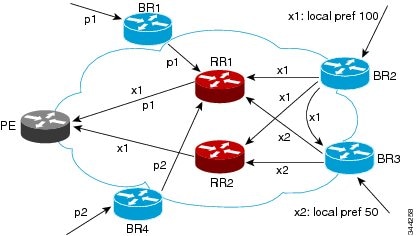
In the above figure, prefix x with path x1 is advertised from BR2 to BR3 (which has path x2) with local preference 100. BR3 also has path x2, but due to the routing policy, BR3 advertises to the RRs x1 (not shown) instead of x2, x2 is suppressed. You could turn on the advertisement of best external on BR3 and advertise x2 to the route reflectors (RRs), but, the RRs advertise only the best path.
Suboptimal Hot-Potato Routing Scenario
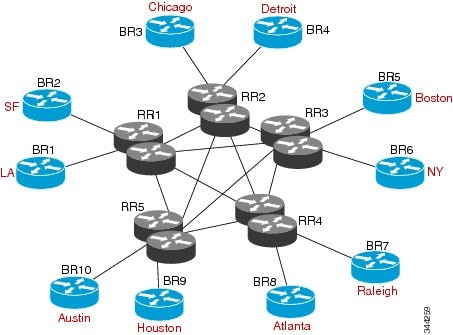
To minimize internal transport costs, transit Internet service providers try to forward packets to the closest exit point (according to the Interior Gateway Protocol (IGP) cost). This behavior is known as hot-potato routing. In the distributed RR cluster model of the figure below, assume traffic that is coming from LA must go to Mexico. All links have the same IGP cost. If there are two exit points toward Mexico—one toward Austin and one toward Atlanta—the border router will try to send traffic to Austin based on the lower IGP cost from LA toward Austin than toward Atlanta. In a centralized RR model where the central RR resides where RR3 is (and RR1, RR2, RR4, and RR5 do not exist), the closest exit point toward Mexico, as seen from RR3, might be Atlanta. Sending the traffic from LA toward the Atlanta border router (BR) results in suboptimal hot-potato routing and is not desirable.
Figure 9-2 Distributed RR Cluster
Benefits of Additional BGP Paths
BGP routers and route reflectors (RR) propagate only their best path over their sessions. The advertisement of a prefix replaces the previous announcement of that prefix (also known as an implicit withdraw).
While this behavior might achieve better scaling, it can prevent path diversity, which tends to be poor or completely lost. This behavior prevents efficient use of the BGP multipath, prevents hitless planned maintenance, and lead to multi-exit discriminator (MED) oscillations and suboptimal hot-potato routing. It also inhibits fast and local recovery for next-hop failures, because the network has to wait for BGP control plane convergence to restore traffic.
The BGP Additional Paths feature is a BGP extension that allows the advertisement of multiple paths for the same prefix without the new paths implicitly replacing any previous paths. This behavior promotes path diversity and reduces MED oscillations.
BGP Additional Paths Functionality
You can use the BGP Additional Paths feature by adding a path identifier to each path in the Network Layer Reachability Information (NLRI). The path identifier (ID) can be considered as something similar to a route distinguisher (RD) in virtual private networks (VPNs), except that a path ID can apply to any address family. Path IDs are unique to a peering session and are generated for each network. The path identifier is used to prevent a route announcement from implicitly withdrawing the previous one. The Additional Paths feature allows the advertisement of more paths, in addition to the best path and allows the advertisement of multiple paths for the same prefix, without the new paths implicitly replacing any previous paths.
The BGP Additional Paths feature requires you to take general steps:
1. Specify whether the device can send, receive, or send and receive additional paths at the address family level or the neighbor level. During session establishment, two BGP neighbors negotiate the additional path capabilities (whether they can send or receive) between them.
2. Select a set or sets of candidate paths for advertisement by specifying the selection criteria.
3. Advertise for a neighbor a set or sets of additional paths from the candidate paths marked.
To send or receive additional paths, the additional path capability must be negotiated between the neighbors. If no negotiation occurs, even if the selection criteria marks the best path and the neighbor is configured to advertise the marked paths, the selections are useless because only the best path is advertised.
Configuring BGP to send or receive additional paths triggers negotiation of an additional path’s capability with the device's peers. Neighbors that have negotiated the capability are grouped together in an update group (if other update group policies allow), and in a separate update group from those peers that have not negotiated the capability. Therefore, the additional path capability causes the neighbor's update group membership to be recalculated.
Additional Path Selection
Only the best path is advertised to peers unless you configure the set path-selection all advertise command which advertises all BGP paths as additional paths to peers if the receive capability is enabled.
Advertising a Subset of the Paths Selected
Take care when you select a set of paths but want to advertise a different set of paths. If the set of paths you want to advertise is not a subset of the selected paths, you will not advertise the paths that you want advertised.
Guidelines and Limitations
Configuring BGP Additional Paths has the following guidelines and limitations:
Configuring BGP Additional Paths
This section includes the following topics:
- Configuring BGP Additional Paths for each Address Family
- Configuring BGP Additional Paths for each Neighbor
- Configuring Additional Paths Using a Peer Policy Template
- Filtering and Setting Actions for Additional Paths
Configuring BGP Additional Paths for each Address Family
You can specify whether the device can send and receive additional paths to and from all neighbors within an address family.
BEFORE YOU BEGIN
SUMMARY STEPS
3. address family {ipv4 | ipv6} unicast
DETAILED STEPS

Configuring BGP Additional Paths for each Neighbor
You can configure whether a particular neighbor can send or receive additional paths.
BEFORE YOU BEGIN
Ensure that you have enabled the BGP feature (see the “Enabling the BGP Feature” section).
SUMMARY STEPS
3. neighbor { ipv4-address | ipv4-prefix/length | ipv6-address | ipv6-prefix/length } [ remote-as { as-num } [. as-num ]]
4. address family {ipv4 | ipv6} unicast
5. capability additional-paths receive [disable]
DETAILED STEPS
Configuring Additional Paths Using a Peer Policy Template
You can send and receive additional paths by using a peer policy template.
BEFORE YOU BEGIN
Ensure that you have enabled the BGP feature (see the “Enabling the BGP Feature” section).
SUMMARY STEPS
3. template peer-policy template-name
4. capability additional-paths receive [disable]
5. capability additional-paths send [disable]
7. neighbor { ipv4-address | ipv4-prefix/length | ipv6-address | ipv6-prefix/length } [ remote-as { as-num } [. as-num ]]
DETAILED STEPS
Filtering and Setting Actions for Additional Paths
You can optionally use a route map to filter the paths to be advertised by matching on the prefix of additional paths that are candidates to be advertised. (These prefixes are configured with the additional-paths selection command.)
You can also optionally set one or more actions to take for those paths that pass through the route map. This procedure uses the set metric command. Other set commands are available that are not shown in this task.
You would set a metric for paths marked with all (all paths with a unique next-hop) if the neighbor is receiving the same routes from its neighbors. Suppose the neighbor 2001:DB8::1037 is receiving the same route from different neighbors. Routes received from the local device have a metric of 565 and routes from another device have a metric of 700. Routes with metric 565 have precedence over the routes with metric 700.
SUMMARY STEPS
2. route-map route-name [ deny | permit ] [ sequence-number ]
DETAILED STEPS
Configuration Examples for BGP Additional Paths
This section includes the following topics:
- BGP Additional Paths Send and Receive Capabilities
- BGP Additional Paths Using a Peer Policy Template
BGP Additional Paths Send and Receive Capabilities
R1
In this example, R1's address is 2001:db8::1045; its neighbor R2 has an address of 2001:db8::1037. Updates are sent from R2 to R1 with additional-paths (all paths advertised). Updates are sent from R1 to R2 with only the classic BGP best path advertised because R2 can only send additional paths, not receive additional paths.
set path-selection all advertise
additional-paths selection route-map add_path4
R2
set path-selection all advertise
BGP Additional Paths Using a Peer Policy Template
This example shows that the neighbor with IP address 2001:db8::1037 has the send and receive capability for additional paths enabled through the template named rr-client-pt1:
additional-paths selection route-map add_path4
inherit peer-policy rr-client-pt1 10
template peer-policy rr-client-pt1
Verifying the BGP Additional Paths Configuration
To display information about the BGP additional paths configuration, perform the following tasks:
|
|
|
|---|---|
Displays the configured neighbors and the other information specific to individual neighbor. |
 Feedback