Configuring PIM and PIM6

This chapter describes how to configure the Protocol Independent Multicast (PIM) and PIM6 features on Cisco NX-OS switches in your IPv4 and IPv6 networks.

This chapter includes the following sections:

About PIM and PIM6

PIM, which is used between multicast-capable routers, advertises group membership across a routing domain by constructing multicast distribution trees. PIM builds shared distribution trees on which packets from multiple sources are forwarded, as well as source distribution trees on which packets from a single source are forwarded. For more information about multicast, see the About Multicast section.

Cisco NX-OS supports PIM sparse mode for IPv4 networks (PIM) and for IPv6 networks (PIM6). In PIM sparse mode, multicast traffic is sent only to locations of the network that specifically request it. You can configure PIM and PIM6 to run simultaneously on a router. You can use PIM and PIM6 global parameters to configure rendezvous points (RPs), message packet filtering, and statistics. You can use PIM and PIM6 interface parameters to enable multicast, identify PIM borders, set the PIM hello message interval, and set the designated router (DR) priority. For more information, see the Configuring PIM or PIM6 Sparse Mode section.


Note

Cisco NX-OS does not support PIM dense mode.

In Cisco NX-OS, multicast is enabled only after you enable the PIM and PIM6 features on each router and then enable PIM or PIM6 sparse mode on each interface that you want to participate in multicast. You can configure PIM for an IPv4 network and PIM6 for an IPv6 network. In an IPv4 network, if you have not already enabled IGMP on the router, PIM enables it automatically. In an IPv6 network, MLD is enabled by default. For information about configuring IGMP, see Configuring IGMP.

You use the PIM and PIM6 global configuration parameters to configure the range of multicast group addresses to be handled by these distribution modes:

  • Any Source Multicast (ASM) provides discovery of multicast sources. It builds a shared tree between sources and receivers of a multicast group and supports switching over to a source tree when a new receiver is added to a group. ASM mode requires that you configure an RP.

  • Source-Specific Multicast (SSM) builds a source tree originating at the designated router on the LAN segment that receives a request to join a multicast source. SSM mode does not require you to configure RPs. Source discovery must be accomplished through other means.

  • Bidirectional shared trees (Bidir) build a shared tree between sources and receivers of a multicast group but do not support switching over to a source tree when a new receiver is added to a group. Bidir mode requires that you configure an RP. Bidir forwarding does not require source discovery because only the shared tree is used.


Note

Cisco Nexus 3000 Series switches do not support PIM6 Bidir.

You can combine the modes to cover different ranges of group addresses. For more information, see the Configuring PIM and PIM6 section.

For more information about PIM sparse mode and shared distribution trees used by the ASM mode and Bidir mode, see RFC 4601.

For more information about PIM SSM mode, see RFC 3569.

For more information about PIM Bidir mode, see draft-ietf-pim-bidir-09.txt


Note

Multicast equal-cost multipathing (ECMP) is on by default in the Cisco NX-OS for the Cisco Nexus 3000 Series switches; you cannot turn ECMP off. If multiple paths exist for a prefix, PIM selects the path with the lowest administrative distance in the routing table.Cisco NX-OS supports up to 16 paths to a destination.

PIM SSM with vPC

Beginning with Cisco NX-OS Release 7.0(3)I4(1), you can enable PIM SSM on Cisco Nexus 3000 Series switches with an upstream Layer 3 cloud along with the vPC feature.

A PIM adjacency between a Switched Virtual Interface (SVI) on a vPC VLAN (a VLAN that is carried on a vPC Peer-Link) and a downstream device is not supported; this configuration can result in dropped multicast packets. If a PIM neighbor relationship is required with a downstream device, a physical Layer 3 interface must be used on the Nexus switches instead of a vPC SVI.

For SVIs on vPC VLANs, only one PIM adjacency is supported, which is with the vPC peer switch. PIM adjacencies over the vPC peer-link with devices other than the vPC peer switch for the vPC-SVI are not supported.

Figure 1. PIM SSM with vPC

Hello Messages

The PIM process begins when the router establishes PIM neighbor adjacencies by sending PIM hello messages to the multicast address 224.0.0.13 or IPv6 address FF02::d. Hello messages are sent periodically at the interval of 30 seconds. When all neighbors have replied, then the PIM software chooses the router with the highest priority in each LAN segment as the designated router (DR). The DR priority is based on a DR priority value in the PIM hello message. If the DR priority value is not supplied by all routers, or the priorities match, the highest IP address is used to elect the DR.


Caution

If you change the PIM hello interval to a lower value, we recommend that you ensure it is appropriate for your network environment.

The hello message also contains a hold-time value, which is typically 3.5 times the hello interval. If this hold time expires without a subsequent hello message from its neighbor, the device detects a PIM failure on that link.

For added security, you can configure an MD5 hash value that the PIM software uses to authenticate PIM hello messages with PIM neighbors.


Note

PIM6 does not support MD5 authentication.

Note

If PIM is disabled on the switch, the IGMP snooping software processes the PIM hello messages.

For information about configuring hello message authentication, see the Configuring PIM or PIM6 Sparse Mode section.

Join-Prune Messages

When the DR receives an IGMP membership report message from a receiver for a new group or source, the DR creates a tree to connect the receiver to the source by sending a PIM join message out the interface toward the rendezvous point (ASM or Bidir mode) or source (SSM mode). The rendezvous point (RP) is the root of a shared tree, which is used by all sources and hosts in the PIM domain in the ASM or Bidir mode. SSM does not use an RP but builds a shortest path tree (SPT) that is the lowest cost path between the source and the receiver.

When the DR determines that the last host has left a group or source, it sends a PIM prune message to remove the path from the distribution tree.

The routers forward the join or prune action hop by hop up the multicast distribution tree to create (join) or tear down (prune) the path.


Note

In this publication, the terms PIM join message and PIM prune message are used to simplify the action taken when referring to the PIM join-prune message with only a join or prune action.

Join-prune messages are sent as quickly as possible by the software. You can filter the join-prune messages by defining a routing policy. For information about configuring the join-prune message policy, see the Configuring PIM or PIM6 Sparse Mode section.

You can prebuild the SPT for all known (S,G) in the routing table by triggering PIM joins upstream. To prebuild the SPT for all known (S,G)s in the routing table by triggering PIM joins upstream, even in the absence of any receivers, use the ip pim pre-build-spt command. By default, PIM (S,G) joins are triggered upstream only if the OIF-list for the (S,G) is not empty.

State Refreshes

PIM requires that multicast entries are refreshed within a 3.5-minute timeout interval. The state refresh ensures that traffic is delivered only to active listeners, and it keeps routers from using unnecessary resources.

To maintain the PIM state, the last-hop DR sends join-prune messages once per minute. State creation applies to both (*, G) and (S, G) states as follows:

  • (*, G) state creation example—An IGMP (*, G) report triggers the DR to send a (*, G) PIM join message toward the RP.

  • (S, G) state creation example—An IGMP (S, G) report triggers the DR to send an (S, G) PIM join message toward the source.

If the state is not refreshed, the PIM software tears down the distribution tree by removing the forwarding paths in the multicast outgoing interface list of the upstream routers.

Rendezvous Points

A rendezvous point (RP) is a router that you select in a multicast network domain that acts as a shared root for a multicast shared tree. You can configure as many RPs as you like, and you can configure them to cover different group ranges.

Static RP

You can statically configure an RP for a multicast group range. You must configure the address of the RP on every router in the domain.

You can define static RPs for the following reasons:

  • To configure routers with the Anycast-RP address.

  • To manually configure an RP on a switch.

For information about configuring static RPs, see the Configuring Static RPs (PIM) section.

BSRs

The bootstrap router (BSR) ensures that all routers in the PIM domain have the same RP cache as the BSR. You can configure the BSR to help you select an RP set from BSR candidate RPs. The function of the BSR is to broadcast the RP set to all routers in the domain. You select one or more candidate BSRs to manage the RPs in the domain. Only one candidate BSR is elected as the BSR for the domain.


Caution

Do not configure both Auto-RP and BSR protocols in the same network.

The following figure shows where the BSR mechanism. Router A, the software-elected BSR, sends BSR messages out all enabled interfaces (shown by the solid lines in the figure). The messages, which contain the RP set, are flooded hop by hop to all routers in the network. Routers B and C are candidate RPs that send their candidate-RP advertisements directly to the elected BSR (shown by the dashed lines in the figure).

The elected BSR receives candidate-RP messages from all the candidate RPs in the domain. The bootstrap message that is sent by the BSR includes information about all the candidate RPs. Each router uses a common algorithm to select the same RP address for a given multicast group.
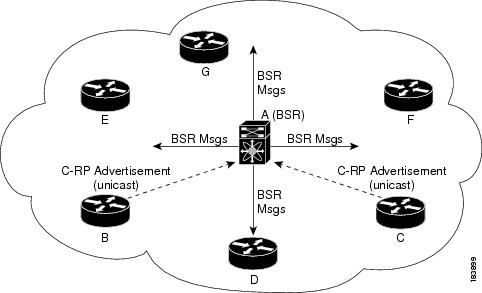
Figure 2. BSR Mechanism

In the RP selection process, the RP address with the best priority is determined by the software. If the priorities match for two or more RP addresses, the software may use the RP hash in the selection process. Only one RP address is assigned to a group.

By default, routers are not enabled to listen or forward BSR messages. You must enable the BSR listening and forwarding feature so that the BSR mechanism can dynamically inform all routers in the PIM domain of the RP set assigned to multicast group ranges.


Note

The BSR mechanism is a nonproprietary method of defining RPs that can be used with third-party routers.

Note

BSR is not supported for PIM6.

For information about configuring BSRs and candidate RPs, see the Configuring Static RPs (PIM6) section.

Auto-RP

Auto-RP is a Cisco protocol that was prior to the Internet standard bootstrap router mechanism. You configure Auto-RP by selecting candidate mapping agents and RPs. Candidate RPs send their supported group range in RP-Announce messages to the Cisco RP-Announce multicast group 224.0.1.39. An Auto-RP mapping agent listens for RP-Announce messages from candidate RPs and forms a Group-to-RP mapping table. The mapping agent multicasts the Group-to-RP mapping table in RP-Discovery messages to the Cisco RP-Discovery multicast group 224.0.1.40.


Caution

Do not configure both Auto-RP and BSR protocols in the same network.

The following figure shows the Auto-RP mechanism. Periodically, the RP mapping agent multicasts the RP information that it receives to the Cisco-RP-Discovery group 224.0.1.40 (shown by the solid lines in the figure).
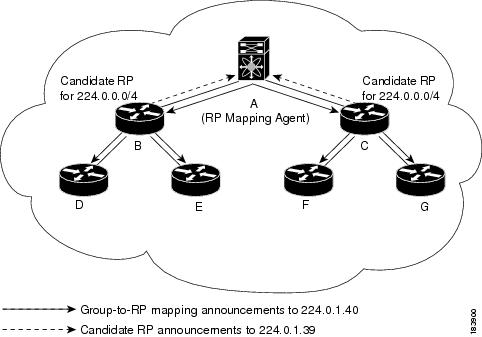
Figure 3. Auto-RP Mechanism

By default, routers are not enabled to listen or forward Auto-RP messages. You must enable the Auto-RP listening and forwarding feature so that the Auto-RP mechanism can dynamically inform routers in the PIM domain of the group-to-RP mapping.


Note

Auto-RP is not supported for PIM6.

For information about configuring Auto-RP, see the Configuring Auto-RP section.

Anycast-RP

Anycast-RP has two implementations: one uses Multicast Source Discovery Protocol (MSDP) and the other is based on RFC 4610. Anycast-RP Using Protocol Independent Multicast (PIM). This section describes how to configure PIM Anycast-RP.

You can use PIM Anycast-RP to assign a group of routers, called the Anycast-RP set, to a single RP address that is configured on multiple routers. The set of routers that you configure as Anycast-RPs is called the Anycast-RP set. This method is the only RP method that supports more than one RP per multicast group, which allows you to load balance across all RPs in the set. The Anycast RP supports all multicast groups.

PIM register messages are sent to the closest RP, and PIM join-prune messages are sent in the direction of the closest RP as determined by the unicast routing protocols. If one of the RPs goes down, unicast routing ensures that these messages will be sent in the direction of the next-closest RP.

You must configure PIM on the loopback interface that is used for the PIM Anycast RP and the PIM Bidir RP.

For more information about PIM Anycast-RP, see RFC 4610.

For information about configuring Anycast-RPs, see the Configuring a PIM Anycast-RP Set section.

PIM Register Messages

PIM register messages are unicast to the RP by designated routers (DRs) that are directly connected to multicast sources. The PIM register message has the following functions:

  • To notify the RP that a source is actively sending to a multicast group.

  • To deliver multicast packets that are sent by the source to the RP for delivery down the shared tree.

The DR continues to send PIM register messages to the RP until it receives a Register-Stop message from the RP. The RP sends a Register-Stop message in either of the following cases:

  • The RP has no receivers for the multicast group being transmitted.

  • The RP has joined the SPT to the source but has not started receiving traffic from the source.

You can use the ip pim register-source command to configure the IP source address of register messages when the IP source address of a register message is not a uniquely routed address to which the RP can send packets. This situation might occur if the source address is filtered so that the packets sent to it are not forwarded or if the source address is not unique to the network. In these cases, the replies that are sent from the RP to the source address fails to reach the DR, resulting in Protocol Independent Multicast sparse mode (PIM-SM) protocol failures.

The following example shows how to configure the IP source address of the register message to the loopback 3 interface of a DR:

switch # configuration terminal
switch(config)# vrf context Enterprise
switch(config-vrf)# ip pim register-source ethernet 2/3
switch(config-vrf)#

Note

In Cisco NX-OSInspur INOS-CN, PIM register messages are rate limited to avoid overwhelming the RP.

You can filter PIM register messages by defining a routing policy. For information about configuring the PIM register message policy, see the Configuring a PIM Anycast-RP Set (PIM6) section.

Designated Routers

In PIM ASM and SSM modes, the software chooses a designated router (DR) from the routers on each network segment. The DR is responsible for forwarding multicast data for specified groups and sources on that segment.

The DR for each LAN segment is determined as described in the PIM SSM with vPC section.

In ASM mode, the DR is responsible for unicasting PIM register packets to the RP. When a DR receives an IGMP membership report from a directly connected receiver, the shortest path is formed to the RP, which may or may not go through the DR. The result is a shared tree that connects all sources transmitting on the same multicast group to all receivers of that group.

In SSM mode, the DR triggers (*, G) or (S, G) PIM join messages toward the source. The path from the receiver to the source is determined hop by hop. The source must be known to the receiver or the DR.

For information about configuring the DR priority, see the Configuring PIM or PIM6 Sparse Mode section.

Designated Forwarders

In PIM Bidir mode, the software chooses a designated forwarder (DF) at RP discovery time from the routers on each network segment. The DF is responsible for forwarding multicast data for specified groups on that segment. The DF is elected based on the best metric from the network segment to the RP.

If the router receives a packet on the RPF interface toward the RP, the router forwards the packet out all interfaces in the OIF-list. If a router receives a packet on an interface on which the router is the elected DF for that LAN segment, the packet is forwarded out all interfaces in the OIF-list except the interface that it was received on and also out the RPF interface toward the RP.


Note

Cisco NX-OS puts the RPF interface into the OIF-list of the MRIB but not in the OIF-list of the MFIB.


Administratively Scoped IP Multicast

The administratively scoped IP multicast method allows you to set boundaries on the delivery of multicast data. For more information, see RFC 2365.

You can configure an interface as a PIM boundary so that PIM messages are not sent out that interface. For information about configuring the domain border parameter, see the Configuring PIM or PIM6 Sparse Mode section.

You can use the Auto-RP scope parameter to set a time-to-live (TTL) value. For more information, see the Configuring a PIM Anycast-RP Set (PIM6) section.

Virtualization Support

You can define multiple virtual routing and forwarding (VRF) instances. For each VRF, independent multicast system resources are maintained, including the MRIB.

You can use the PIM show commands with a VRF argument to provide a context for the information displayed. The default VRF is used if no VRF argument is supplied.

For information about configuring VRFs, see the Cisco Nexus 3000 Series NX-OS Unicast Routing Configuration Guide.

Prerequisites for PIM and PIM6

PIM and PIM6 have the following prerequisites:

  • You are logged on to the device.

  • For global commands, you are in the correct virtual routing and forwarding (VRF) mode. The default configuration mode shown in the examples in this chapter applies to the default VRF.

  • For PIM Bidir, you must configure the ACL TCAM region size using the hardware access-list tcam region mcast-bidir command.

    Use the hardware access-list tcam region ing-sup command to change the ACL TCAM region size and to configure the size of the ingress supervisor TCAM region.


    Note

    By default the mcast-bidir region size is zero. You need to allocate enough entries to this region in order to support PIM Bidir.


  • Make sure that the mask length for Bidir ranges is equal to or greater than 24 bits.

Guidelines and Limitations for PIM and PIM6

PIM and PIM6 have the following guidelines and limitations:

  • Configuring a secondary IP address as an RP address is not supported.

  • Cisco Nexus 3000 Series switches support PIM SSM mode on vPCs.

  • All Cisco Nexus 3000 Series switches support PIM6 ASM and SSM modes.

  • The Cisco Nexus 34180YC platform switch does not support PIM6.

  • Cisco Nexus 3000 Series switches do not support PIM adjacency with a vPC leg or with a router behind a vPC.

  • The PIM process is spawned only when at least one interface is PIM enabled. If no interface is PIM enabled, entering the show ip pim rp command sends the following error message: “Process is not running.”

  • The loopback interface that is used as a RP in multicast must have the ip[v6] pim sparse-mode configuration .

  • Cisco NX-OS PIM and PIM6 do not interoperate with any version of PIM dense mode or PIM sparse mode version 1.

  • PIM6 is not supported on SVIs and port-channel subinterfaces.

  • PIM bidirectional multicast source VLAN bridging is not supported on FEX ports.

  • PIM6 Bidirectional is not supported.

  • Cisco Nexus 3000 Series switches do not support PIM Bidir on vPCs or PIM6 ASM, SSM, and Bidirectional on vPCs.

  • You must configure PIM on the loopback interface that is used for the PIM Anycast RP and the PIM Bidir RP.

  • PIM6 does not support BSRs and Auto-RP.

  • On Cisco Nexus 3000 Series switches, you must carve the switch RACL TCAM regions in order to make IGMP and PIM work on Layer 3 interfaces. Some system default Multicast ACLs that are installed in the RACL regions are required for IGMP and PIM to work on Layer 3 interfaces.

  • Cisco Nexus 3000/3100 vPC secondary does not build the S,G interfaces when there is vPC attached source, vPC attached receiver, PIM-DR is on vPC primary, flow ingresses vPC Primary, and no Remote Peer (RP) is defined for this group.

    The traffic must only need to be interVLAN routed on these vPC peers and the PIM state is not required to be built on any other devices for an RP to not have to be defined.

    For Cisco Nexus 3000 Series devices, this topology cannot be supported because of the hardware limitation. Cisco Nexus 3000 ASIC does not have the capability to detect the RPF fail packets. As a result, the PIM Asserts cannot be generated on VPC when both primary and secondary have the Output Interface List (OIFL) populated. On Cisco Nexus 3000 Series switches, the incoming PIM join on the VPC Switch Virtual Interface (SVI) is ignored.

  • Cisco NX-OS 3000 Series switches do not support per multicast group statistics command from the show forward multicast route command.

  • Do not configure both Auto-RP and BSR protocols in the same network.

  • Configure candidate RP intervals to a minimum of 15 seconds.

  • If a switch is configured with a BSR policy that should prevent it from being elected as the BSR, the switch ignores the policy. This behavior results in the following undesirable conditions:

    • If a switch receives a BSM that is permitted by the policy, the switch, which incorrectly elected itself as the BSR, drops that BSM so that routers downstream fail to receive it. Downstream switches correctly filter the BSM from the incorrect BSR so that they do not receive RP information.

    • A BSM received by a BSR from a different switch sends a new BSM but ensures that downstream switches do not receive the correct BSM.

  • You must configure PIM on the loopback interface that is used for the PIM Anycast RP and the PIM Bidir RP.

  • PIM is enabled on all interfaces so that it is chosen as the RPF. It is not mandatory to enable the PIM feature for the IGMP host proxy functionality to work.

  • In PIM-SM, some duplication or drops of packets are expected behavior when there are changes in the forwarding path. This behavior results in the following undesirable conditions:

    • When switching from receiving on the shared tree to shortest path tree (SPT), there is typically a small window when packets get dropped. The SPT feature may prevent this, but it may cause duplication sometimes.

    • The RP which initially forward packets that it may have received via PIM registers or MSDP will next join the SPT for native forwarding, and there is a small window where the RP may forward the same data packet twice, once as a native packet and once after PIM register or MSDP decap.

    To resolve these issues, ensure that the forwarding path does not change by configuring a long (S,G) expiration time or by using SSM/PIM Bidir.

  • PIM must be configured on all L3 interfaces between sources, receivers, and rendezvous points (RPs).

Default Settings

This table lists the default settings for PIM and PIM6 parameters.

Table 1. Default PIM and PIM6 Parameters

Parameters

Default

Use shared trees only

Disabled

Flush routes on restart

Disabled

Log neighbor changes

Disabled

Auto-RP message action

Disabled

BSR message action

Disabled

SSM multicast group range or policy

232.0.0.0/8 for IPv4 and FF3x::/96 for IPv6

PIM sparse mode

Disabled

Designated router priority

0

Hello authentication mode

Disabled

Domain border

Disabled

RP address policy

No message filtering

PIM register message policy

No message filtering

BSR candidate RP policy

No message filtering

BSR policy

No message filtering

Auto-RP mapping agent policy

No message filtering

Auto-RP RP candidate policy

No message filtering

Join-prune policy

No message filtering

Neighbor adjacency policy

Become adjacent with all PIM neighbors

Configuring PIM and PIM6

You can configure both PIM and PIM6 for each interface, depending on whether that interface is running IPv4 or IPv6.


Note

Cisco NX-OS supports only PIM Sparse Mode version 2. In this publication, “PIM” refers to PIM Sparse Mode version 2.

You can configure separate ranges of addresses in the PIM or PIM6 domain using the multicast distribution modes that are described in the table below.

Table 2. PIM Multicast Distribution Modes

Multicast Distribution Mode

Requires RP Configuration

Description

ASM

Yes

Any source multicast

Bidir

Yes

Bidirectional shared trees

SSM

No

Single source multicast

RPF routes for multicast

No

RPF routes for multicast

Configuring PIM and PIM6


Note

If you are familiar with the Cisco IOS CLI, be aware that the Cisco NX-OS commands for this feature might differ from the Cisco IOS commands that you would use.

To configure PIM and PIM6, follow these steps:

Procedure


Step 1

From the multicast distribution modes that are described in Table 3-2, select the range of multicast groups that you want to configure in each mode.

Step 2

Enable the PIM or PIM6 features. See the Enabling the PIM or PIM6 Features section.

Step 3

Configure PIM Sparse Mode on each interface that you want to participate in a PIM domain. See the Configuring PIM or PIM6 Sparse Mode section.

Step 4

Follow the configuration steps for the multicast distribution modes that you selected in Step 1 as follows:

Step 5

Configure message filtering. See the Configuring Route Maps to Control RP Information Distribution (PIM6) section.


Enabling the PIM or PIM6 Feature

Before you can access the PIM or PIM6 commands, you must enable the PIM or PIM6 feature.


Note

Beginning with Cisco NX-OS Release 7.0(3)I5(1), you no longer need to enable at least one interface with IP PIM Sparse Mode in order to enable PIM or PIM6.

Before you begin

Ensure that you have installed the LAN Base Services license.

Procedure

  Command or Action Purpose
Step 1

configure terminal

Example:

switch# configure terminal
switch(config)#

Enters configuration mode.

Step 2

feature pim

Example:

switch(config)# feature pim

Enables PIM. By default, PIM is disabled.

Step 3

feature pim6

Example:

switch(config)# feature pim6

Enables PIM6. By default, PIM6 is disabled.

Step 4

(Optional) show running-configuration pim

Example:

switch(config)# show running-configuration pim
(Optional)

Shows the running-configuration information for PIM, including the feature command.

Step 5

(Optional) show running-configuration pim6

Example:


switch(config)# show running-configuration pim6
(Optional)

Shows the running-configuration information for PIM6, including the feature command.

Step 6

(Optional) copy running-config startup-config

Example:

switch(config)# copy running-config startup-config
(Optional)

Saves configuration changes.

Configuring PIM or PIM6 Sparse Mode

You configure PIM or PIM6 sparse mode on every switch interface that you want to participate in a sparse mode domain. You can configure the sparse mode parameters that are described in the table below.

Table 3. PIM and PIM6 Sparse Mode Parameters

Parameter

Description

Global to the switch

Auto-RP message action

Enables listening and forwarding of Auto-RP messages. The default is disabled, which means that the router does not listen or forward Auto-RP messages unless it is configured as a candidate RP or mapping agent.

Note 
PIM6 does not support the Auto-RP method.

BSR message action

Enables listening and forwarding of BSR messages. The default is disabled, which means that the router does not listen or forward BSR messages unless it is configured as a candidate RP or BSR candidate.

Note 
PIM6 does not support BSR.

Bidirectional RP limit

Configures the number of bidirectional RPs that you can configure for IPv4. The maximum number of bidirectional RPs supported per VRF for PIM cannot exceed 8. Values range from 0 to 8. The default is 6.

Note 
PIM6 does not support bidirectional.

Register rate limit

Configures the IPv4 or IPv6 register rate limit in packets per second. The range is from 1 to 65,535. The default is no limit.

Initial holddown period

Configures the IPv4 or IPv6 initial holddown period in seconds. This holddown period is the time that it takes for the MRIB to come up initially. If you want faster convergence, enter a lower value. The range is from 90 to 210. Specify 0 to disable the holddown period. The default is 210.

Per switch interface

PIM sparse mode

Enables PIM or PIM6 on an interface.

Designated router priority

Sets the designated router (DR) priority that is advertised in PIM hello messages on this interface. On a multi-access network with multiple PIM-enabled routers, the router with the highest DR priority is elected as the DR router. If the priorities match, the software elects the DR with the highest IP address. The DR originates PIM register messages for the directly connected multicast sources and sends PIM join messages toward the rendezvous point (RP) for directly connected receivers. Values range from 1 to 4294967295. The default is 1.

Hello authentication mode

Enables an MD5 hash authentication key, or password, in PIM hello messages on the interface so that directly connected neighbors can authenticate each other. The PIM hello messages are IPsec encoded using the Authentication Header (AH) option. You can enter an unencrypted (cleartext) key, or one of these values followed by a space and the MD5 authentication key:

  • 0—Specifies an unencrypted (cleartext) key

  • 3—Specifies a 3-DES encrypted key

  • 7—Specifies a Cisco Type 7 encrypted key

The authentication key can be up to 16 characters. The default is disabled.

Note 
PIM6 does not support MD5 authentication.

Hello interval

Configures the interval at which hello messages are sent in milliseconds. The range is from 1 to 4294967295. The default is 30000.

Domain border

Enables the interface to be on the border of a PIM domain so that no bootstrap, candidate-RP, or Auto-RP messages are sent or received on the interface. The default is disabled.

Note 
PIM6 does not support the Auto-RP method.

Neighbor policy

Configures which PIM neighbors to become adjacent to based on a prefix-list policy. To configure prefix-list policies, see the Cisco Nexus 3000 Series NX-OS Unicast Routing Configuration Guide. If the policy name does not exist or no prefix lists are configured in a policy, adjacency is established with all neighbors. The default is to become adjacent with all PIM neighbors.

Note 
We recommend that you should configure this feature only if you are an experienced network administrator.
Note 
The PIM neighbor policy supports only prefix lists. It does not support ACLs used inside a route map.

For information about configuring multicast route maps, see the Configuring Route Maps to Control RP Information Distribution section.


Note

To configure the join-prune policy, see the Configuring Route Maps to Control RP Information Distribution (PIM6) section.

Configuring PIM Sparse Mode Parameters

Before you begin

Ensure that you have installed the LAN Base Services license and enabled PIM.

Procedure

  Command or Action Purpose
Step 1

configure terminal

Example:

switch# configure terminal
switch(config)#

Enters configuration mode.

Step 2

(Optional) ip pim auto-rp {listen [forward] | forward [listen]}

Example:

switch(config)# ip pim auto-rp listen
(Optional)

Enables listening for or forwarding of Auto-RP messages. The default is disabled, which means that the software does not listen to or forward Auto-RP messages.

Step 3

(Optional) ip pim bsr {listen [forward] | forward [listen]}

Example:

switch(config)# ip pim bsr forward
(Optional)

Enables listening for or forwarding of BSR messages. The default is disabled, which means that the software does not listen for or forward BSR messages.

Step 4

(Optional) ip pim bidir-rp-limit limit

Example:

switch(config)# ip pim bidir-rp-limit 4
(Optional)

Specifies the number of Bidir RPs that you can configure for IPv4. The maximum number of Bidir RPs supported per VRF for PIM cannot exceed 8. Values range from 0 to 8. The default value is 6.

Step 5

ip pim rp [ip prefix] vrf vrf-name| all

Example:

switch(config)# show ip pim rp

Displays PIM RP information, including Auto-RP and BSR listen and forward states.

Step 6

(Optional) ip pim register-rate-limit rate

Example:

switch(config)# ip pim register-rate-limit 1000
(Optional)

Configures the rate limit in packets per second. The range is from 1 to 65,535. The default is no limit.

Step 7

(Optional) [ip |ipv4] routing multicast holddownholddown-period

Example:

switch(config)# ip routing multicast holddown 100
(Optional)

Configures the initial holddown period in seconds. The range is from 90 to 210. Specify 0 to disable the holddown period. The default is 210.

Step 8

(Optional) show running-configuration pim

Example:

switch(config)# show running-configuration pim
(Optional)

Displays PIM running-configuration information, including the Bidir RP limit and register rate limit.

Step 9

interface interface

Example:

switch(config)# interface ethernet 2/1
switch(config-if)#

Enters interface mode on the interface type and number, such as ethernet slot/port.

Step 10

no switchport

Example:

sswitch(config-if)# no switchport

Configures the interface as a Layer 3 routed interface.

Step 11

ip pim sparse-mode

Example:

switch(config-if)# ip pim sparse-mode

Enables PIM Sparse Mode on this interface. The default is disabled.

Step 12

(Optional) ip pim dr-priority priority

Example:

switch(config-if)# ip pim dr-priority 192
(Optional)

Sets the designated router (DR) priority that is advertised in PIM hello messages. Values range from 1 to 4294967295. The default is 1.

Step 13

(Optional) ip pim hello-authentication ah-md5 auth-key

Example:

switch(config-if)# ip pim hello-authentication ah-md5 my_key
(Optional)

Enables an MD5 hash authentication key in PIM hello messages. You can enter an unencrypted (cleartext) key or one of these values followed by a space and the MD5 authentication key:

  • 0-Specifies an unencrypted (cleartext) key

  • 3-Specifies a 3-DES encrypted key

  • 7-Specifies a Cisco Type 7 encrypted key

Step 14

(Optional) ip pim hello-interval interval

Example:

switch(config-if)# ip pim hello-interval 25000
(Optional)

Configures the interval at which hello messages are sent in milliseconds. The range is from 1 to 4294967295. The default is 30000.

Note 
The minimum value is 1 millisecond.
Step 15

(Optional) ip pim border

Example:

switch(config-if)# ip pim border
(Optional)

Enables the interface to be on the border of a PIM domain so that no bootstrap, candidate-RP, or Auto-RP messages are sent or received on the interface. The default is disabled.

Step 16

(Optional) ip pim neighbor-policy prefix-list prefix-list

Example:

switch(config-if)# ip pim neighbor-policy prefix-list AllowPrefix
(Optional)

Enables the interface to be on the border of a PIM domain so that no bootstrap, candidate-RP, or Auto-RP messages are sent or received on the interface. The default is disabled.

Also configures which PIM neighbors to become adjacent to based on a prefix-list policy with the ip prefix-list prefix-list command. The prefix list can be up to 63 characters. The default is to become adjacent with all PIM neighbors.

Note 
We recommend that you configure this feature only if you are an experienced network administrator.
Step 17

(Optional) show ip pim interface [interface | brief] [vrf vrf-name | all]

Example:

switch(config-if)# show ip pim interface
(Optional)

Displays PIM interface information.

Step 18

(Optional) copy running-config startup-config

Example:

switch(config-if)# copy running-config startup-config
(Optional)

Saves configuration changes.

Configuring PIM6 Sparse Mode Parameters

Before you begin

Ensure that you have installed the LAN Base Services license and enabled PIM.

Procedure

  Command or Action Purpose
Step 1

configure terminal

Example:

switch# configure terminal
switch(config)#

Enters global configuration mode.

Step 2

(Optional) ipv6 pim register-rate-limit rate

Example:

switch(config)# ipv6 pim register-rate-limit 1000
(Optional)

Configures the rate limit in packets per second. The range is from 1 to 65,535. The default is no limit.

Step 3

(Optional) ipv6 routing multicast holddown holddown-period

Example:

switch(config)# ipv6 routing multicast holddown 100
(Optional)

Configures the initial holddown period in seconds. The range is from 90 to 210. Specify 0 to disable the holddown period. The default is 210.

Step 4

(Optional) show running-configuration pim6

Example:

switch(config)# show running-configuration pim6
(Optional)

Displays PIM6 running-configuration information, including the register rate limit.

Step 5

interface interface

Example:

switch(config)# interface ethernet 2/1
switch(config-if)#

Enters interface mode on the interface type and number, such as ethernet slot/port.

Step 6

ipv6 pim sparse-mode

Example:

switch(config-if)# ipv6 pim sparse-mode

Enables PIM sparse mode on this interface. The default is disabled.

Step 7

(Optional) ipv6 pim dr-priority priority

Example:

switch(config-if)# ipv6 pim dr-priority 192
(Optional)

Sets the designated router (DR) priority that is advertised in PIM6 hello messages. Values range from 1 to 4294967295. The default is 1.

Step 8

(Optional) ipv6 pim hello-interval interval

Example:

switch(config-if)# ipv6 pim hello-interval 25000
(Optional)

Configures the interval at which hello messages are sent in milliseconds. The range is from 1000 to 18724286. The default is 30000.

Step 9

(Optional) ipv6 pim border

Example:

switch(config-if)# ipv6 pim border
(Optional)

Enables the interface to be on the border of a PIM6 domain so that no bootstrap, candidate-RP, or Auto-RP messages are sent or received on the interface. The default is disabled.

Step 10

(Optional) ipv6 pim neighbor-policy prefix-list prefix-list

Example:

switch(config-if)# ipv6 pim neighbor-policy prefix-list AllowPrefix
(Optional)

Configures which PIM6 neighbors to become adjacent to based on a prefix-list policy with the ipv6 prefix-list prefix-list command. The prefix list can be up to 63 characters. The default is to become adjacent with all PIM6 neighbors.

Note 
We recommend that you configure this feature only if you are an experienced network administrator.
Step 11

show ipv6 pim interface [interface | brief] [vrf vrf-name | all]

Example:

switch(config-if)# show ipv6 pim interface

Displays PIM6 interface information.

Step 12

copy running-config startup-config

Example:

switch(config-if)# copy running-config startup-config

Saves configuration changes.

Configuring ASM and Bidir

Any Source Multicast (ASM) and bidirectional shared trees (Bidir) is a multicast distribution mode that requires the use of RPs to act as a shared root between sources and receivers of multicast data.

To configure ASM or Bidir mode, you configure sparse mode and the RP selection method, where you indicate the distribution mode and assign the range of multicast groups.

Configuring Static RPs (PIM)

You can configure an RP statically by configuring the RP address on every router that will participate in the PIM domain.

You can specify a route-map policy name that lists the group prefixes to use with the match ip multicast command.


Note

We recommend the following:

  • The RP address uses the loopback interface.

  • The static route is added toward the source.


Before you begin

Ensure that you have installed the Enterprise Services license and enabled PIM.

Procedure

  Command or Action Purpose
Step 1

configure terminal

Example:

switch# configure terminal
switch(config)#

Enters configuration mode.

Step 2

ip pim rp-address rp-address [group-list ip-prefix | route-map policy-name] [bidir]

Example:

switch(config)# ip pim rp-address 192.0.2.33 group-list 224.0.0.0/9

Configures a PIM static RP address for a multicast group range. You can specify a route-map policy name that lists the group prefixes to use with the match ip multicast command. The default mode is ASM unless you specify the bidir keyword. The default group range is 224.0.0.0 through 239.255.255.255.

The example configures PIM ASM mode for the specified group range.

Step 3

(Optional) show ip pim group-range [ip-prefix | vrf vrf-name | all]

Example:

switch(config)#show ip pim group-range
(Optional)

Displays PIM modes and group ranges.

Step 4

(Optional) copy running-config startup-config

Example:

switch(config)# copy running-config startup-config
(Optional)

Saves configuration changes.

Configuring Static RPs (PIM6)

Before you begin

Ensure that you have installed the Enterprise Services License and enabled PIM6.

Procedure

  Command or Action Purpose
Step 1

configure terminal

Example:

switch# configure terminal
switch(config)#

Enters configuration mode.

Step 2

ipv6 pim rp-address rp-address [group-list ipv6-prefix | route-map policy-name]

Example:

switch(config)# ipv6 pim rp-address 2001:0db8:0:abcd::1 group-list ff1e:abcd:def1::0/24

Configures a PIM6 static RP address for a multicast group range. You can specify a route-map policy name that lists the group prefixes to use with the match ip multicast command. The mode is ASM. The default group range is ff00::0/8.

The example configures PIM6 ASM mode for the specified group range.

Step 3

(Optional) show ipv6 pim group-range [ipv6-prefix | vrf vrf-name]

Example:

switch(config)# show ipv6 pim group-range
(Optional)

Displays PIM6 modes and group ranges.

Step 4

(Optional) copy running-config startup-config

Example:

switch(config)# copy running-config startup-config
(Optional)

Saves configuration changes.

Configuring BSRs

You configure BSRs by selecting candidate BSRs and RPs.


Note

BSRs and Auto-RP are not supported by PIM6.

Caution

Do not configure both Auto-RP and BSR protocols in the same network.

You can configure a candidate BSR with the arguments described in the table below.

Table 4. Candidate BSR Arguments

Argument

Description

interface

Interface type and number used to derive the BSR source IP address used in bootstrap messages.

hash-length

Hash length is the number of high order 1s used to form a mask that is ANDed with group address ranges of candidate RPs to form a hash value. The mask determines the number of consecutive addresses to assign across RPs with the same group range. For PIM, this value ranges from 0 to 32 and has a default of 30.

priority

Priority assigned to this BSR. The software elects the BSR with the highest priority, or if the BSR priorities match, the software elects the BSR with the highest IP address. This value ranges from 0, the lowest priority, to 255 and has a default of 64.

You can configure a candidate RP with the arguments and keywords described in this table.

Table 5. BSR Candidate RP Arguments and Keywords

Argument or Keyword

Description

interface

Interface type and number used to derive the BSR source IP address used in bootstrap messages.

group-list ip-prefix

Multicast groups handled by this RP specified in a prefix format.

interval

Number of seconds between sending candidate-RP messages. This value ranges from 1 to 65,535 and has a default of 60 seconds.

Note 
We recommend that you configure the candidate RP interval to a minimum of 15 seconds.

priority

Priority assigned to this RP. The software elects the RP with the highest priority for a range of groups or, if the priorities match, the highest IP address. (The highest priority is the lowest numerical value.) This value ranges from 0, the highest priority, to 255 and has a default of 192.

Note 
This priority differs from the BSR BSR-candidate priority, which prefers the highest value between 0 and 255.

bidir

Unless you specify bidir, this RP will be in ASM mode. If you specify bidir, the RP will be in Bidir mode.


Tip

You should choose the candidate BSRs and candidate RPs that have good connectivity to all parts of the PIM domain.


You can configure the same router to be both a BSR and a candidate RP. In a domain with many routers, you can select multiple candidate BSRs and RPs to automatically fail over to alternates if a BSR or an RP fails.

To configure candidate BSRs and RPs, follow these steps:

  1. Configure whether each router in the PIM domain should listen and forward BSR messages. A router configured as either a candidate RP or a candidate BSR will automatically listen to and forward all bootstrap router protocol messages, unless an interface is configured with the domain border feature. For more information, see the Configuring PIM or PIM6 Sparse Mode section.

  2. Select the routers to act as candidate BSRs and RPs.

  3. Configure each candidate BSR and candidate RP as described in this section.

  4. Configure BSR message filtering. See the Configuring Route Maps to Control RP Information Distribution (PIM6) section.

Configuring BSRs (PIM)

Before you begin

Ensure that you have installed the LAN Base Services license and enabled PIM.

Procedure
  Command or Action Purpose
Step 1

configure terminal

Example:
switch# configure terminal
switch(config)#

Enters configuration mode.

Step 2

ip pim [bsr] bsr-candidate interface [hash-len hash-length] [priority priority]

Example:
switch(config)# ip pim bsr-candidate ethernet 2/1 hash-len 24

Configures a candidate bootstrap router (BSR). The source IP address used in a bootstrap message is the IP address of the interface. The hash length ranges from 0 to 32 and has a default of 30. The priority ranges from 0 to 255 and has a default of 64. For parameter details, see Table 10.

Step 3

(Optional) ip pim [bsr] rp-candidate interface group-list ip-prefix route-map policy-name priority priority interval interval [ bidir]

Example:
switch(config)# ip pim rp-candidate ethernet 2/1 group-list 239.0.0.0/24
(Optional)

Configures a candidate RP for BSR. The priority ranges from 0, the highest priority, to 65,535 and has a default of 192. The interval ranges from 1 to 65,535 seconds and has a default of 60.

Use the bidir option to create a Bidir candidate RP.

Note 
We recommend that you configure the candidate RP interval to a minimum of 15 seconds.

The example configures an ASM candidate RP.

Step 4

(Optional) show ip pim group-range [ip-prefix | vrf vrf-name]

Example:
switch(config)# show ip pim group-range
(Optional)

Displays PIM modes and group ranges.

Step 5

(Optional) copy running-config startup-config

Example:
switch(config)# copy running-config startup-config
(Optional)

Copies the running configuration to the startup configuration.

Configuring Auto-RP

You can configure Auto-RP by selecting candidate mapping agents and RPs. You can configure the same router to be both a mapping agent and a candidate RP.


Note

Auto-RP and BSRs are not supported by PIM6.

Caution

Do not configure both Auto-RP and BSR protocols in the same network.

You can configure an Auto-RP mapping agent with the arguments described in this table.

Table 6. Auto-RP Mapping Agent Arguments

Argument

Description

interface

Interface type and number used to derive the IP address of the Auto-RP mapping agent used in bootstrap messages.

scope ttl

Time-to-Live (TTL) value that represents the maximum number of hops that RP-Discovery messages are forwarded. This value can range from 1 to 255 and has a default of 32.

Note 
See the border domain feature in the Configuring PIM or PIM6 Sparse Mode section.

If you configure multiple Auto-RP mapping agents, only one is elected as the mapping agent for the domain. The elected mapping agent ensures that all candidate RP messages are sent out. All mapping agents receive the candidate RP messages and advertise the same RP cache in their RP-discovery messages.

You can configure a candidate RP with the arguments and keywords described in this table.

Table 7. Auto-RP Candidate RP Arguments and Keywords

Argument or Keyword

Description

interface

Interface type and number used to derive the IP address of the candidate RP used in bootstrap messages.

group-list ip-prefix

Multicast groups handled by this RP. Specified in a prefix format.

scope ttl

Time-to-Live (TTL) value that represents the maximum number of hops that RP-Discovery messages are forwarded. This value can range from 1 to 255 and has a default of 32.

Note 
See the border domain feature in the Configuring PIM or PIM6 Sparse Mode section.

interval

Number of seconds between sending RP-Announce messages. This value can range from 1 to 65,535 and has a default of 60.

Note 
We recommend that you configure the candidate RP interval to a minimum of 15 seconds.

bidir

If not specified, this RP will be in ASM mode. If specified, this RP will be in Bidir mode.


Tip

You should choose mapping agents and candidate RPs that have good connectivity to all parts of the PIM domain.

To configure Auto-RP mapping agents and candidate RPs, follow these steps:

  1. For each router in the PIM domain, configure whether that router should listen and forward Auto-RP messages. A router configured as either a candidate RP or an Auto-RP mapping agent will automatically listen to and forward all Auto-RP protocol messages, unless an interface is configured with the domain border feature. For more information, see the Configuring PIM or PIM6 Sparse Mode section.

  2. Select the routers to act as mapping agents and candidate RPs.

  3. Configure each mapping agent and candidate RP as described in this section.

  4. Configure Auto-RP message filteringConfigure Auto-RP message filtering. See the Configuring Route Maps to Control RP Information Distribution (PIM6) section.

Configuring Auto RP

Before you begin

Ensure that you have installed the LAN Base Services license and enabled PIM.

Procedure
  Command or Action Purpose
Step 1

configure terminal

Example:
switch# configure terminal
switch(config)#

Enters configuration mode.

Step 2

ip pim {send-rp-discovery | auto-rp mapping-agent} interface [scope ttl]

Example:
switch(config)# ip pim auto-rp mapping-agent ethernet 2/1

Configures an Auto-RP mapping agent. The source IP address used in Auto-RP Discovery messages is the IP address of the interface. The default scope is 32. For parameter details, see Table 12.

Step 3

ip pim {send-rp-announce | auto-rp rp-candidate} interface {group-list ip-prefix | prefix-list name | route-map policy-name} [scope ttl] interval interval]

Example:
switch(config)# ip pim auto-rp rp-candidate ethernet 2/1 group-list 239.0.0.0/24

Configures an Auto-RP candidate RP. The default scope is 32. The default interval is 60 seconds. By default, the command creates an ASM candidate RP. For parameter details, see Table 13.

Note 
We recommend that you configure the candidate RP interval to a minimum of 15 seconds.

The example configures an ASM candidate RP.

Step 4

(Optional) show ip pim group-range [ip-prefix | vrf vrf-name]

Example:
switch(config)# show ip pim group-range
(Optional)

Displays PIM modes and group ranges.

Step 5

(Optional) copy running-config startup-config

Example:
switch(config)# copy running-config startup-config
(Optional)

Saves configuration changes.

Configuring Auto RP (PIM)

Before you begin

Ensure that you have installed the Enterprise Services license and enabled PIM.

Procedure

  Command or Action Purpose
Step 1

configure terminal

Example:

switch# configure terminal
switch(config)#

Enters global configuration mode.

Step 2

ip pim {send-rp-discovery | auto-rp mapping-agent} interface [scope ttl]

Example:

switch(config)# ip pim auto-rp mapping-agent ethernet 2/1
Configures an Auto-RP mapping agent. The source IP address used in Auto-RP Discovery messages is the IP address of the interface. The default scope is 32.
Step 3

ip pim {send-rp-announce | auto-rp rp-candidate} interface {group-list ip-prefix | prefix-list name | route-map policy-name} [scope ttl] interval interval] [bidir]

Example:

switch(config)# ip pim auto-rp rp-candidate ethernet 2/1 group-list 239.0.0.0/24

Configures an Auto-RP candidate RP. The default scope is 32. The default interval is 60 seconds. By default, the command creates an ASM candidate RP. Use the bidir option to create a Bidir candidate RP.

Note 

We recommend that you configure the candidate RP interval to a minimum of 15 seconds.

The example configures an ASM candidate RP.

Step 4

ip pim sparse-mode

Example:

switch(config-if)# ip pim sparse-mode

Enables PIM sparse mode on this interface. The default is disabled.

Step 5

(Optional) show ip pim group-range [ip-prefix | vrf vrf-name]

Example:

switch(config)# show ip pim group-range
(Optional)

Displays PIM modes and group ranges.

Step 6

(Optional) copy running-config startup-config

Example:

switch(config)# copy running-config startup-config
(Optional)

Copies the running configuration to the startup configuration.

Configuring a PIM Anycast RP Set (PIM)

Before you begin

Ensure that you have installed the LAN Base Services license and enabled PIM.

Procedure

  Command or Action Purpose
Step 1

configure terminal

Example:

switch# configure terminal
switch(config)#

Enters global configuration mode.

Step 2

interface loopback number

Example:

switch(config)# interface loopback 0
switch(config-if)#

Configures an interface loopback.

This example configures interface loopback 0.

Step 3

ip address ip-prefix

Example:

switch(config-if)# ip address 192.168.1.1/32

Configures an IP address for this interface.

This example configures an IP address for the Anycast-RP.

Step 4

exit

Example:

switch(config)# exit

Returns to configuration mode.

Step 5

ip pim anycast-rp anycast-rp-address anycast-rp-peer-address

Example:

switch(config)# ip pim anycast-rp 192.0.2.3 192.0.2.31

Configures a PIM Anycast-RP peer address for the specified Anycast-RP address. Each command with the same Anycast-RP address forms an Anycast-RP set. The IP addresses of RPs are used for communication with RPs in the set.

Step 6

Repeat Step 5 using the same Anycast-RP address for each peer RP in the Anycast-RP set.

Step 7

ip[ autoconfig | ip-address [secondary]]

Generates a link-local address from the link-local prefix and a modified EUI-64 format Interface Identifier, where the EUI-64 Interface Identifier is created from the relevant HSRP virtual MAC address.

Virtual IP address for the virtual router (HSRP group). The IP address must be in the same subnet as the interface IP address. You must configure the virtual IP address for at least one of the routers in the HSRP group. Other routers in the group will pick up this address. The IP address can be an IPv4 address.

Step 8

(Optional) show ip pim group-range [ip-prefix | vrf vrf-name | all]

Example:

switch(config)# show ip pim group-range
(Optional)

Displays PIM modes and group ranges.

Step 9

copy running-config startup-config

Example:

switch(config)# copy running-config startup-config

Saves configuration changes.

Configuring a PIM Anycast RP Set (PIM6)

Before you begin

Ensure that you have installed the Enterprise Services license and enabled PIM6.

Procedure

  Command or Action Purpose
Step 1

configure terminal

Example:

switch# configure terminal 
switch(config)#

Enters configuration mode.

Step 2

interface loopback number

Example:

switch(config)# interface loopback 0
switch(config-if)#

Configures an interface loopback.

This example configures interface loopback 0.

Step 3

ipv6 address ipv6-prefix

Example:

switch(config-if)# ipv6 address 2001:0db8:0:abcd::5/32

Configures an IP address for this interface.

This example configures an IP address for the Anycast-RP.

Step 4

ipv6 pim sparse-mode

Example:

switch(config-if)# ipv6 pim sparse-mode

Enable PIM6 sparse mode.

Step 5

exit

Example:

switch(config-if)# exit
switch(config)#

Returns to configuration mode.

Step 6

ipv6 pim anycast-rp anycast-rp-address anycast-rp-peer-address

Example:

switch(config)# ipv6 pim anycast-rp 192.0.2.3 192.0.2.31

Configures a PIM6 Anycast-RP peer address for the specified Anycast-RP address. Each command with the same Anycast-RP address forms an Anycast-RP set. The IP addresses of RPs are used for communication with RPs in the set.

Step 7

Repeat Step 6 using the same Anycast-RP address for each peer RP in the Anycast-RP set

Step 8

(Optional) show ipv6 pim group-range [ipv6-prefix ] [vrf vrf-name | all ]

Example:

switch(config)# show ipv6 pim group-range
(Optional)

Displays PIM6 modes and group ranges.

Step 9

(Optional) copy running-config startup-config

Example:

switch(config)# copy running-config startup-config
(Optional)

(Optional) Saves configuration changes.

Configuring Shared Trees Only for ASM (PIM)

You can configure shared trees only on the last-hop router for Any Source Multicast (ASM) groups, which means that the router never switches over from the shared tree to the SPT when a receiver joins an active group. You can specify a group range where the use of shared trees is to be enforced with the match ip[v6] multicast command. This option does not affect the normal operation of the router when a source tree join-prune message is received.

The default is disabled, which means that the software can switch over to source trees.


Note

In ASM mode, only the last-hop router switches from the shared tree to the SPT.

Before you begin

Ensure that you have installed the Enterprise Services license and enabled PIM.

Procedure

  Command or Action Purpose
Step 1

configure terminal

Example:

switch# configure terminal
switch(config)#

Enters configuration mode.

Step 2

ip pim use-shared-tree-only group-list policy-name

Example:

switch(config)# ip pim use-shared-tree-only group-list my_group_policy

Builds only shared trees, which means that the software never switches over from the shared tree to the SPT. You specify a route-map policy name that lists the groups to use with the match ip multicast command. By default, the software triggers a PIM (S, G) join toward the source when it receives multicast packets for a source for which it has the (*, G) state.

Step 3

(Optional) show ip pim group-range [ip-prefix | vrf vrf-name | all]

Example:

switch(config)# show ip pim group-range
(Optional)

Displays PIM modes and group ranges.

Step 4

(Optional) copy running-config startup-config

Example:

switch(config-if)# copy running-config startup-config
(Optional)

Saves configuration changes.

Configuring Shared Trees Only for ASM (PIM6)

Before you begin

Ensure that you have installed the Enterprise Services license and enabled PIM6.

Procedure

  Command or Action Purpose
Step 1

configure terminal

Example:

switch# configure terminal
switch(config)#

Enters global configuration mode.

Step 2

ipv6 pim use-shared-tree-only group-list policy-name

Example:

switch(config)# ipv6 pim use-shared-tree-only group-list my_group_policy

Builds only shared trees, which means that the software never switches over from the shared tree to the SPT. You specify a route-map policy name that lists the groups to use with the match ip multi cast command. By default, the software triggers a PIM6 (S, G) join toward the source when it receives multicast packets for a source for which it has the (*, G) state.

Step 3

(Optional) show ipv6 pim group-range [ipv6-prefix | vrf vrf-name]

Example:

switch(config)# show ipv6 pim group-range
(Optional)

Displays PIM6 modes and group ranges.

Step 4

(Optional) copy running-config startup-config

Example:

switch(config-if)# copy running-config startup-config
(Optional)

Saves configuration changes.

Setting the Maximum Number of Entries in the Multicast Routing Table

You can set the maximum number of entries in the multicast routing table (MRT)

The default is disabled, which means that the software can switch over to source trees.

Before you begin

Ensure that you have installed the Enterprise Services license and enabled PIM.

Procedure

  Command or Action Purpose
Step 1

configure terminal

Example:

switch# configure terminal
switch(config)#

Enters configuration mode.

Step 2

hardware profile multicast max-limit max-entries

Example:

switch(config)# hardware profile multicast max-limit 3000

Sets the maximum number of entries in the multicast routing table.

The maximum number of entries in the multicast routing table can range from 0 to 8000.

Step 3

(Optional) show hardware profile status

Example:

switch(config)# show hardware profile status
(Optional)

Displays PIM modes and group ranges.

Step 4

(Optional) copy running-config startup-config

Example:

switch(config-if)# copy running-config startup-config
(Optional)

Saves configuration changes.

Preventing Duplicate Packets During an RPT to SPT Switchover

Beginning with Cisco NX-OS Release 5.0(3)U1(2), you can prevent duplicate packets in the hardware when the transition from RPT to SPT is in progress.


Note

When you use this command to prevent packet duplication during an RPT to SPT switchover, the switch supports source (S, G) route injections at a rate of only 500 routes every two minutes. The multicast routing table must have 500 entries free for source (S, G) routes.

Procedure

  Command or Action Purpose
Step 1

configure terminal

Example:

switch# configure terminal
switch(config)#

Enters configuration mode.

Step 2

hardware profile multicast prefer-source-tree eternity limit ?

Example:

switch(config)# hardware profile multicast prefer-source-tree eternity limit ?
<256-4000> Number of (S,G) for which source tree is preferred

Prevents duplicate packets in the hardware when the transition from RPT to SPT is in progress.

Step 3

(Optional) show hardware profile status

Example:

switch(config)# show hardware profile status
(Optional)

Displays information about the multicast routing table limits.

Step 4

(Optional) copy running-config startup-config

Example:

switch(config-if)# copy running-config startup-config
(Optional)

Saves configuration changes.

Configuring SSM (PIM)

Source-Specific Multicast (SSM) is a multicast distribution mode where the software on the DR connected to a receiver that is requesting data for a multicast source builds a shortest path tree (SPT) to that source.

On an IPv4 network, a host can request multicast data for a specific source only if it is running IGMPv3 and the DR for that host is running IGMPv3. You will usually enable IGMPv3 when you configure an interface for PIM in the SSM mode. For hosts running IGMPv1 or IGMPv2, you can configure group to source mapping using SSM translation. For more information, see Configuring IGMP.

You can configure the group range that is used by SSM by specifying values on the command line. By default, the SSM group range for PIM is 232.0.0.0/8.

You can specify a route-map policy name that lists the group prefixes to use with the match ip multicast command.


Note

If you want to use the default SSM group range, you do not need to configure the SSM group range.

Before you begin

Ensure that you have installed the Enterprise Services license and enabled PIM.

Procedure

  Command or Action Purpose
Step 1

configure terminal

Example:

switch# configure terminal
switch(config)#

Enters global configuration mode.

Step 2

Option Description
Option Description
ip pim ssm range {ip-prefix | none} | route-map policy-name}

Example:

switch(config)# ip pim ssm range 239.128.1.0/24

Configures up to four group ranges to be treated in SSM mode. You can specify a route-map policy name that lists the group prefixes to use with the match ip multicast command. The default range is 232.0.0.0/8. If the keyword none is specified, all group ranges are removed.

no ip pim ssm range {range ip-prefix | none} | route-map policy-name}

Example:

switch(config)# no ip pim ssm range none

Removes the specified prefix from the SSM range, or removes the route-map policy. If the keyword none is specified, resets the SSM range to the default of 232.0.0.0/8.

Step 3

(Optional) show ip pim group-range [ip-prefix | vrf vrf-name]

Example:

switch(config)# show ip pim group-range
(Optional)

Displays PIM modes and group ranges.

Step 4

(Optional) copy running-config startup-config

Example:

switch(config)# copy running-config startup-config
(Optional)

Saves configuration changes.

Configuring SSM (PIM6)

Before you begin

Ensure that you have installed the Enterprise Services license and enabled PIM.

Procedure

  Command or Action Purpose
Step 1

configure terminal

Example:

switch# configure terminal
switch(config)#

Enters global configuration mode.

Step 2

Option Description
Option Description
ipv6 pim ssm range {ip-prefix | none} | route-map policy-name}

Example:

switch(config)# ipv6 pim ssm range 239.128.1.0/24

The following options are available:

  • prefix-list —Specifies a prefix-list policy name for the SSM range.

  • range —Configures a group range for SSM. The default range is FF3x/96. If the keyword none is specified, all group ranges are removed.

  • route-map —Specifies a route-map policy name that lists the group prefixes to use with the match ipv6 multicast command.

no ipv6 pim ssm range {range ipv6-prefix | none} | route-map policy-name}

Example:

switch(config)# no ipv6 pim ssm range none

The no option removes the specified prefix from the SSM range or removes the prefix-list or route-map policy. If the keyword none is specified, the no command resets the SSM range to the default value of FF3x/96.

Step 3

(Optional) show ipv6 pim group-range [ipv6-prefix | vrf vrf-name]

Example:

switch(config)# show ipv6 pim group-range
(Optional)

Displays PIM6 modes and group ranges.

Step 4

(Optional) copy running-config startup-config

Example:

switch(config)# copy running-config startup-config
(Optional)

Saves configuration changes.

Configuring PIM SSM Over a vPC

Configuring PIM SSM over a vPC enables support for IGMPv3 joins and PIM S,G joins over vPC peers in the SSM range. This configuration is supported for orphan sources or receivers in the Layer 2 or Layer 3 domain. When you configure PIM SSM over a vPC, no rendezvous point (RP) configuration is required.

(S,G) entries will have the RPF as the interface toward the source, and no *,G states will be maintained in the MRIB.

Before you begin

Ensure that you have the PIM and vPC features enabled.

Ensure that you have installed the Enterprise Services license and enabled PIM.

Procedure

  Command or Action Purpose
Step 1

configure terminal

Example:

switch# configure terminal
switch(config)#

Enters configuration mode.

Step 2

vrf context name

Example:

switch(config)# vrf context Enterprise
switch(config-vrf)#

Creates a new VRF and enters VRF configuration mode. The name can be any case-sensitive, alphanumeric string up to 32 characters.

Step 3

(Optional) [no] ip pim ssm {prefix-list name | range {ip-prefix | none} | route-map policy-name}

Example:

switch(config-vrf)# ip pim ssm range 234.0.0.0/24
(Optional)
The following options are available:
  • prefix-list —Specifies a prefix-list policy name for the SSM range.

  • range —Configures a group range for SSM. The default range is 232.0.0.0/8. If the keyword none is specified, all group ranges are removed.

  • route-map —Specifies a route-map policy name that lists the group prefixes to use with the match ip multicast command.

By default, the SSM range is 232.0.0.0/8. PIM SSM over vPC works as long as S,G joins are received in this range. If you want to override the default with some other range, you must specify that range using this command. The command in the example overrides the default range to 234.0.0.0/24.

The no option removes the specified prefix from the SSM range or removes the prefix-list or route-map policy. If the keyword none is specified, the no command resets the SSM range to the default value of 232.0.0.0/8.

Step 4

(Optional) show ip pim group-range [ip-prefix] [vrf vrf-name | all]

Example:

switch(config-vrf)# show ip pim group-range
(Optional)

Displays PIM modes and group ranges.

Step 5

(Optional) copy running-config startup-config

Example:

switch(config-vrf)# copy running-config startup-config
(Optional)

Saves configuration changes.

Configuring RPF Routes for Multicast

You can define RPF routes for multicast when you want multicast data to diverge from the unicast traffic path. You can define RPF routes for multicast on border routers to enable reverse path forwarding (RPF) to an external network.

Multicast routes are used not to directly forward traffic but to make RPF checks. RPF routes for multicast cannot be redistributed. For more information about multicast forwarding, see the Multicast Forwarding section.

Before you begin

Ensure that you have installed the Enterprise Services license and enabled PIM.

Procedure

  Command or Action Purpose
Step 1

configure terminal

Example:

switch# configure terminal
switch(config)#

Enters configuration mode.

Step 2

ip mroute {ip-addr mask | ip-prefix} {next-hop | nh-prefix } [route-preference] [vrf vrf-name]

Example:

switch(config)# ip mroute 192.0.2.33/24 192.0.2.1

Configures an RPF route for multicast for use in RPF calculations. Route preference values range from 1 to 255. The default preferenceis 1.

Step 3

(Optional) show ip static-route [vrf vrf-name]

Example:

switch(config)# show ip static-route
(Optional)
Displays configured static routes.
Step 4

(Optional) copy running-config startup-config

(Optional)

Saves configuration changes.

Disabling Multicast Multipath

By default, the RPF interface for multicast is chosen automatically when there are multiple ECMP paths available. Disabling the automatic selection allows you to specify a single RPF interface for multicast.

Procedure

  Command or Action Purpose
Step 1

configure terminal

Example:

switch# configure terminal
switch(config)#

Enters onfiguration mode.

Step 2

ip multicast multipath none

Example:

switch(config)# ip multicast multipath none

Disables multicast multipath.

.
Step 3

clear ip mroute * vrf all

Clears multipath routes and activates multicast multipath suppression.

Configuring Route Maps to Control RP Information Distribution (PIM)

You can configure route maps to help protect against some RP configuration errors and malicious attacks. You use route maps in commands that are described in the Configuring Route Maps to Control RP Information Distribution (PIM6) section.

By configuring route maps, you can control distribution of RP information that is distributed throughout the network. You specify the BSRs or mapping agents to be listened to on each client router and the list of candidate RPs to be advertised (listened to) on each BSR and mapping agent to ensure that what is advertised is what you expect.


Note

Only the match ipv6 multicast command has an effect in the route map.

Before you begin

Ensure that you have installed the Enterprise Services license and enabled PIM.

Procedure

  Command or Action Purpose
Step 1

configure terminal

Example:

switch# configure terminal
switch(config)#

Enters configuration mode.

Step 2

route-map map-name [permit | deny] [sequence-number]

Example:

switch(config)# route-map ASM_only permit 10
switch(config-route-map)#
switch(config)# route-map bidir_only permit 10
switch(config-route-map)#

Enters route-map configuration mode. This configuration method uses the permit keyword.

Step 3

match ip multicast {rp ip-address [rp-type rp-type] [group ip-prefix]} | {group ip-prefix rp ip-address [rp-type rp-type]}

Example:

switch(config)# match ip multicast group 224.0.0.0/4 rp 0.0.0.0/0 rp-type ASM
switch(config)# match ip multicast group 224.0.0.0/4 rp 0.0.0.0/0 rp-type bidir

Matches the group, RP, and RP type specified. You can specify the RP type (ASM or bidir). This configuration method requires the group and RP specified as shown in the examples.

Step 4

(Optional) show route-map

Example:

switch(config-route-map)# show route-map
(Optional)

Displays configured route maps.

Step 5

(Optional) copy running-config startup-config

Example:

switch(config-route-map)# copy running-config startup-config
(Optional)

Saves configuration changes.

Configuring Route Maps to Control RP Information Distribution (PIM6)

Before you begin

Ensure that you have installed the Enterprise Services license and enabled PIM.

Procedure

  Command or Action Purpose
Step 1

configure terminal

Example:

switch# configure terminal
switch(config)#

Enters configuration mode.

Step 2

route-map map-name [permit | deny] [sequence-number]

Example:

switch(config)# route-map ASM_only permit 10
switch(config-route-map)#

Enters route-map configuration mode. This configuration method uses the permit keyword.

Step 3

match ipv6 multicast {rp ip-address [rp-type rp-type]} {group ipv6-prefix} | {group ipv6-prefix rp ip-address rp rp-type]}

Example:

switch(config-route-map)# match ipv6 multicast group ff1e:abcd:def1::0/24 rp 2001:0db8:0:abcd::1 rp-type ASM

Matches the group, RP, and RP type specified. You can specify the RP type (ASM). This configuration method requires the group and RP specified as shown in the examples.

Step 4

(Optional) show route-map

Example:

switch(config-route-map)# show route-map
(Optional)

Displays configured route maps.

Step 5

(Optional) copy running-config startup-config

Example:

switch(config-route-map)# copy running-config startup-config
(Optional)

Saves configuration changes.

Configuring Message Filtering

You can configure filtering of the PIM and PIM6 messages described in the table below.

Table 8. PIM and PIM6 Message Filtering

Message Type

Description

Global to the switch

Log Neighbor changes

Enables syslog messages that list the neighbor state changes to be generated. The default is disabled.

PIM register policy

Enables PIM register messages to be filtered based on a route-map policy,where you can specify group or group and source addresses with the match ip[v6] multicast command. This policy applies to routers that act as an RP. The default is disabled, which means that the software does not filter PIM register messages.

BSR candidate RP policy

Enables BSR candidate RP messages to be filtered by the router based on a route-map policy, where you can specify the RP and group addresses, and the type ASM or bidir with the match ip multicast command. This command can be used on routers that are eligible for BSR election. The default is no filtering of BSR messages.

Note 
PIM6 does not support BSRs.

BSR policy

Enables BSR messages to be filtered by the BSR client routers based on a route-map policy, where you can specify BSR source addresses with the match ip multicast command. This command can be used on client routers that listen to BSR messages. The default is no filtering of BSR messages.

Note 
PIM6 does not support BSRs.

Auto-RP candidate RP policy

Enables Auto-RP announce messages to be filtered by the Auto-RP mapping agents based on a route-map policy where you can specify the RP and group addresses, and the type ASM or bidir with the match ip multicast command. This command can be used on a mapping agent. The default is no filtering of Auto-RP messages.

Note 
PIM6 does not support the Auto-RP method.

Auto-RP mapping agent policy

Enables Auto-RP discover messages to be filtered by client routers based on a route-map policy where you can specify mapping agent source addresses with the match ip multicast command. This command can be used on client routers that listen to discover messages. The default is no filtering of Auto-RP messages.

Note 
PIM6 does not support the Auto-RP method.

Per Switch Interface

Join-prune policy

Enables join-prune messages to be filtered based on a route-map policy where you can specify group, group and source, or group and RP addresses with the match ip[v6] multicast command. The default is no filtering of join-prune messages.

For information about configuring multicast route maps, see the Configuring Route Maps to Control RP Information Distribution section.


Note

For information on about configuring route-map policies, see the Cisco Nexus 3000 Series NX-OS Unicast Routing Configuration Guide.

Configuring Message Filtering (PIM)

Before you begin

Ensure that you have installed the Enterprise Services license and enabled PIM.

Procedure

  Command or Action Purpose
Step 1

configure terminal

Example:

switch# configure terminal
switch(config)#

Enters global configuration mode.

Step 2

(Optional) ip pim log-neighbor-changes

Example:

switch(config)# ip pim log-neighbor-changes
(Optional)

Enables syslog messages that list the neighbor state changes to be generated. The default is disabled.

Step 3

(Optional) ip pim register-policy policy-name

Example:

switch(config)# ip pim register-policy my_register_policy
(Optional)

Enables PIM register messages to be filtered based on a route-map policy. You can specify group or group and source addresses with the match ip multicast command.

Step 4

(Optional) ip pim bsr rp-candidate-policy policy-name

Example:

switch(config)# ip pim bsr rp-candidate-policy my_bsr_rp_candidate_policy
(Optional)

Enables BSR candidate RP messages to be filtered by the router based on a route-map policy where you can specify the RP and group addresses, and the type ASM or bidir with the match ip multicast command. This command can be used on routers that are eligible for BSR election. The default is no filtering of BSR messages.

Step 5

(Optional) ip pim bsr bsr-policy policy-name

Example:

switch(config)# ip pim bsr bsr-policy my_bsr_policy
(Optional)

Enables BSR messages to be filtered by the BSR client routers based on a route-map policy where you can specify BSR source addresses with the match ip multicast command. This command can be used on client routers that listen to BSR messages. The default is no filtering of BSR messages.

Step 6

(Optional) ip pim auto-rp rp-candidate-policy policy-name

Example:

switch(config)# ip pim auto-rp rp-candidate-policy my_auto_rp_candidate_policy
(Optional)

Enables Auto-RP announce messages to be filtered by the Auto-RP mapping agents based on a route-map policy where you can specify the RP and group addresses with the match ip multicast command. This command can be used on a mapping agent. The default is no filtering of Auto-RP messages.

Step 7

(Optional) ip pim auto-rp mapping-agent-policy policy-name

Example:

switch(config)# ip pim auto-rp mapping-agent-policy my_auto_rp_mapping_policy
(Optional)

Enables Auto-RP discover messages to be filtered by client routers based on a route-map policy where you can specify mapping agent source addresses with the match ip multicast command. This command can be used on client routers that listen to discover messages. The default is no filtering of Auto-RP messages.

Step 8

interface interface

Example:

switch(config)# interface ethernet 2/1
switch(config-if)#

Enters interface mode on the specified interface.

Step 9

no switchport

Example:

switch(config-if)# no switchport

Configures the interface as a Layer 3 routed interface.

Step 10

(Optional) ip pim jp-policy policy-name [in | out]

Example:

switch(config-if)# ip pim jp-policy my_jp_policy
(Optional)

Enables join-prune messages to be filtered based on a route-map policy where you can specify group, group and source, or group and RP addresses with the match ip multicast command. The default is no filtering of join-prune messages.

This command filters messages in both incoming and outgoing directions.

Step 11

(Optional) show run pim

Example:

switch(config-if)# show run pim
(Optional)

Displays PIM configuration commands.

Step 12

(Optional) copy running-config startup-config

Example:

switch(config-if)# copy running-config startup-config
(Optional)

Saves configuration changes.

Restarting the PIM Process

Before you begin

Ensure that you have installed the Enterprise Services license and enabled PIM.

Procedure
  Command or Action Purpose
Step 1

restart pim

Example:
switch# restart pim

Restarts the PIM process.

Step 2

configure terminal

Example:
switch# configure terminal
switch(config)#

Enters configuration mode.

Step 3

ip pim flush-routes

Example:
switch(config)# ip pim flush-routes
Removes routes when the PIM process is restarted. By default, routes are not flushed.
Step 4

(Optional) show running-configuration pim

Example:
switch(config)# show running-configuration pim
(Optional)

Displays the PIM running-configuration information, including the flush-routes command.

Step 5

(Optional) copy running-config startup-config

Example:
switch(config)# copy running-config startup-config
(Optional)

Saves configuration changes.

Configuring Message Filtering (PIM6)

Before you begin

Ensure that you have installed the Enterprise Services license and enabled PIM.

Procedure

  Command or Action Purpose
Step 1

configure terminal

Example:

switch# configure terminal
switch(config)#

Enters configuration mode.

Step 2

(Optional) ipv6 pim log-neighbor-changes

Example:

switch(config)# ipv6 pim log-neighbor-changes
(Optional)

Enables syslog messages that list the neighbor state changes to be generated. The default is disabled.

Step 3

(Optional) ipv6 pim register-policy policy-name

Example:

switch(config)# ipv6 pim register-policy my_register_policy
(Optional)

Enables PIM6 register messages to be filtered based on a route-map policy. You can specify group or group and source addresses with the match ipv6 multicast command.

Step 4

interface interface

Example:

switch(config)# interface ethernet 2/1
switch(config-if)#

Enters interface mode on the specified interface.

Step 5

(Optional) ipv6 pim jp-policy policy-name [in | out]

Example:

switch(config-if)# ipv6 pim jp-policy my_jp_policy
(Optional)

Enables join-prune messages to be filtered based on a route-map policy where you can specify group, group and source, or group and RP addresses with the match ipv6 multicast command. The default is no filtering of join-prune messages.

This command filters messages in both incoming and outgoing directions.

Step 6

(Optional) show run pim6

Example:

switch(config-if)# show run pim6
(Optional)

Displays PIM6 configuration commands.

Step 7

(Optional) copy running-config startup-config

Example:

switch(config-if)# copy running-config startup-config
(Optional)

Copies the running configuration to the startup configuration.

Verifying the PIM and PIM6 Configuration

To display the PIM and PIM6 configuration information, perform one of the following tasks.

Command

Description

show ip[v6] mroute{source group | group [source]}[vrf vrf-name | all

Displays the IP or IPv6 multicast routing table.

show ip[v6] pim group-range [vrf vrf-name | all]

Displays the learned or configured group ranges and modes. For similar information, see also the show ip[v6] pim rp command.

show ip[v6] pim interface [interface | brief] [vrf vrf-name | all

Displays information by the interface.

show ip[v6] pim neighbor [vrf vrf-name | all

Displays neighbors by the interface.

show ip[v6] pim oif-list group [source][vrf vrf-name | all

Displays all the interfaces in the OIF-list.

show ip[v6] pim route{source group | group [source]}[vrf vrf-name | all]

Displays information for each multicast route, including interfaces on which a PIM join for that (S, G) has been received.

show ip[v6] pim rp [vrf vrf-name | all]

Displays rendezvous points (RPs) known to the software, how they were learned, and their group ranges. For similar information, see also the show ip[v6] pim group-range command.

show ip pim rp-hash [vrf vrf-name | all]

Displays the bootstrap router (BSR) RP hash information.

show running-config pim[6]

Displays the running-configuration information.

show startup-config pim[6]

Displays the startup-configuration information.

show ip[v6] pim vrf vrf-name | all [detail]

Displays per-VRF information.

For detailed information about the fields in the output from these commands, see the Cisco Nexus 3000 Series Command Reference.

Configuring Multicast Table Size

The multicast entries use the host table in the hardware. The host table is shared between the multicast and the unicast routes. Each multicast entry consists of the source and the group and it takes two entries in the hardware table. Each IPv4 unicast entry takes one entry in the hardware table. Each IPv6 unicast route entry takes two entries in the hardware table.

The hardware table size is 16384. As per the default configuration on Cisco Nexus 3000 Series switches, you can configure 4096 multicast entries and 8192 unicast entries. For unicast entries, you can configure up to 8192 IPv4 or 4096 IPv6 entries in the host table.

As per multicast table size controller feature, you can control the sharing of the hardware host table across the multicast and the unicast routes.

If you do not use multicast entries into your network, you can set the multicast entry limit to 0 and you can use all 16K entries for the unicast entries.

If you are going to use more than 4k multicast entries into your network and fewer unicast entries, you can increase the multicast limit size up to 8000.

Configuring the Multicast Entries Using the CLI

Configure the multicast entries in your network using the CLI command:

(config)# hardware profile multicast max-limit ?
<0-8000> Mcast Table Entries
 
(config)# hardware profile multicast max-limit 6000
Warning!!: The multicast and host (v4 & v6) unicast route limits have been changed.
Any route exceeding the limit may get dropped.
Please reload the switch now for the change to take effect.
(config)#

Displaying the Multicast Entries

Display the multicast entries in your network using the CLI command:

# sh hardware profile status
 
slot 1
=======
 
Total Host Entries = 16384.
Reserved LPM Entries = 1024.
Max Host4/Host6 Limit Entries (shared)= 4384/2192* --> Since we increased multicast entries this limit reduced.
Max Mcast Limit Entries = 6000.

Configuring the Unicast Entries Using the CLI

Configure the unicast entries in your network using the CLI command:

(config)# hardware profile ucast6 max-limit 1000
Warning!!: The host (v4 & v6) unicast route limits have been changed.
Any route exceeding the limit may get dropped.
(config)#

Displaying the Unicast Entries

Display the unicast entries in your network using the CLI command:

# sh hardware profile status
 
slot 1
=======
Total Host Entries = 16384.
Reserved LPM Entries = 1024.
Max Host Limit Entries = 2384.
Max Host6 Limit Entries = 1000.
Max Mcast Limit Entries = 6000.

Displaying Statistics

You can display and clear PIM and PIM6 statistics by using the commands in this section.

Displaying PIM and PIM6 Statistics

You can display the PIM and PIM6 statistics and memory usage using the commands listed in Table 3-9 . Use the show ip form of the command for PIM.

Command

Description

show ip[v6] pim policy statistics

Displays policy statistics for Register, RP, and join-prune message policies.

For detailed information about the fields in the output from these commands, see the Cisco Nexus 3000 Series Command Reference.

Clearing PIM Statistics

You can clear the PIM and PIM6 statistics using the commands listed in Table. Use the show ip form of the command for PIM and the show ipv6 form of the command for PIM6.

Table 9. PIM Commands to Clear Statistics

Command

Description

clear ip[v6] pim interface statistics interface

Clears counters for the specified interface.

clear ip[v6] pim policy statistics

Clears policy counters for Register, RP, and join-prune message policies.

clear ip[v6] pim statistics [vrfvrf-name | all]

Clears global counters handled by the PIM process.

Configuration Examples for PIM

This section describes how to configure PIM using different data distribution modes and RP selection methods.

SSM Examples for Configuration

To configure PIM in SSM mode, follow these steps for each router in the PIM domain:

  1. Configure PIM sparse mode parameters on the interfaces that you want to participate in the domain. We recommend that you enable PIM on all interfaces.

    switch# configure terminal
    switch(config)# interface ethernet 2/1
    switch(config-if)# no switchport
    switch(config-if)# ip pim sparse-mode
  2. Configure the parameters for IGMP that support SSM. See Configuring IGMP. Usually, you configure IGMPv3 on PIM interfaces to support SSM.

    
    switch# configure terminal
    switch(config)# interface ethernet 2/1
    switch(config-if)# no switchport
    switch(config-if)# ip igmp version 3
  3. Configure the SSM range if you do not want to use the default range.

    
    switch# configure terminal
    switch(config)# ip pim ssm range 239.128.1.0/24
  4. Configure message filtering.

    switch# configure terminal
    switch(config)# ip pim log-neighbor-changes

The following example shows how to configure PIM SSM mode:


configure terminal
interface ethernet 2/1
no switchport
ip pim sparse-mode
ip igmp version 3
exit
ip pim ssm range 239.128.1.0/24
ip pim log-neighbor-changes

Configuration Example for PIM SSM Over vPC

This example shows how to override the default SSM range of 232.0.0.0/8 to 225.1.1.1/32. PIM SSM over vPC will work as long as S,G joins are received in this range.

switch# configure terminal
switch(config)# vrf context Enterprise
switch(config-vrf)# ip pim ssm range 225.1.1.1/32
switch(config-vrf)# show ip pim group-range --> Shows the configured SSM group range. Note:
The SSM range is changed to 225.1.1.1/24 in the output.
PIM Group-Range Configuration for VRF "Enterprise"
Group-range Mode RP-address Shared-tree-only range
225.1.1.1/24 SSM - -
 
switch1# show vpc (primary vPC) --> Shows vPC-related information. Legend:
(*) - local vPC is down, forwarding via vPC peer-link
vPC domain id: 10
Peer status: peer adjacency formed ok
vPC keep-alive status: peer is alive
Configuration consistency status: success
Per-vlan consistency status: success
Type-2 consistency status: success
vPC role: primary
Number of vPCs configured: 2
Peer Gateway: Disabled
Dual-active excluded VLANs: -
Graceful Consistency Check: Enabled
Auto-recovery status: Disabled
Delay-restore status: Timer is off.(timeout = 30s)
Delay-restore SVI status: Timer is off.(timeout = 10s)
 
vPC Peer-link status
---------------------------------------------------------------------
id Port Status Active vlans
-- ---- ------ --------------------------------------------------
1 Po1000 up 101-102
 
vPC status
----------------------------------------------------------------------
id Port Status Consistency Reason Active vlans
-- ---- ------ ----------- ------ ------------
1 Po1 up success success 102
2 Po2 up success success 101
 
switch2# show vpc (secondary vPC)
Legend:
(*) - local vPC is down, forwarding via vPC peer-link
vPC domain id: 10
Peer status: peer adjacency formed ok
vPC keep-alive status: peer is alive
Configuration consistency status: success
Per-vlan consistency status: success
Type-2 consistency status: success
vPC role: primary
Number of vPCs configured: 2
Peer Gateway: Disabled
Dual-active excluded VLANs: -
Graceful Consistency Check: Enabled
Auto-recovery status: Disabled
Delay-restore status: Timer is off.(timeout = 30s)
Delay-restore SVI status: Timer is off.(timeout = 10s)
 
vPC Peer-link status
---------------------------------------------------------------------
id Port Status Active vlans
-- ---- ------ --------------------------------------------------
1 Po1000 up 101-102
vPC status
----------------------------------------------------------------------
id Port Status Consistency Reason Active vlans
-- ---- ------ ----------- ------ ------------
1 Po1 up success success 102
2 Po2 up success success 101
 
switch1# show ip igmp snooping group vlan 101 (primary vPC IGMP snooping states) --> Shows if S,G v3 joins are received and on which VLAN. The same VLAN should be OIF in the MRIB
output.
Type: S - Static, D - Dynamic, R - Router port, F - Fabricpath core port
Vlan Group Address
101 */*
101 225.1.1.1
100.6.160.20
Ver Type Port list
- R Po1000 Vlan101
v3
D Po2
switch2# show ip igmp snooping group vlan 101 (secondary vPC IGMP snooping states) Type: S - Static, D - Dynamic, R - Router port, F - Fabricpath core port
Vlan Group Address
101 */*
101 225.1.1.1
100.6.160.20
Ver Type Port list
- R Po1000 Vlan101
v3
D Po2
switch1# show ip pim route (primary vPC PIM route) --> Shows the route information in the PIM protocol.
PIM Routing Table for VRF "default" - 3 entries
(10.6.159.20/32, 225.1.1.1/32), expires 00:02:37
Incoming interface: Ethernet1/19, RPF nbr 10.6.159.20
Oif-list: (1) 00000000, timeout-list: (0) 00000000
Immediate-list: (1) 00000000, timeout-list: (0) 00000000
Sgr-prune-list: (0) 00000000
Timeout-interval: 2, JP-holdtime round-up: 3
(100.6.160.20/32, 225.1.1.1/32), expires 00:01:19
Incoming interface: Vlan102, RPF nbr 100.6.160.20
Oif-list: (0) 00000000, timeout-list: (0) 00000000
Immediate-list: (0) 00000000, timeout-list: (0) 00000000
Sgr-prune-list: (0) 00000000
Timeout-interval: 2, JP-holdtime round-up: 3
(*, 232.0.0.0/8), expires 00:01:19
Incoming interface: Null0, RPF nbr 0.0.0.0
Oif-list: (0) 00000000, timeout-list: (0) 00000000
Immediate-list: (0) 00000000, timeout-list: (0) 00000000
Sgr-prune-list: (0) 00000000
Timeout-interval: 2, JP-holdtime round-up: 3
switch2# show ip pim route (secondary vPC PIM route) PIM Routing Table for VRF "default" - 3 entries (10.6.159.20/32, 225.1.1.1/32), expires 00:02:51
Incoming interface: Vlan102, RPF nbr 100.6.160.100
Oif-list: (0) 00000000, timeout-list: (0) 00000000
Immediate-list: (0) 00000000, timeout-list: (0) 00000000
Sgr-prune-list: (0) 00000000
Timeout-interval: 3, JP-holdtime round-up: 3
(100.6.160.20/32, 225.1.1.1/32), expires 00:02:51
Incoming interface: Vlan102, RPF nbr 100.6.160.20
Oif-list: (0) 00000000, timeout-list: (0) 00000000
Immediate-list: (0) 00000000, timeout-list: (0) 00000000
 
PIM SSM Over vPC Configuration Example
Sgr-prune-list: (0) 00000000
Timeout-interval: 3, JP-holdtime round-up: 3
(*, 232.0.0.0/8), expires 00:02:51
Incoming interface: Null0, RPF nbr 0.0.0.0
Oif-list: (0) 00000000, timeout-list: (0) 00000000
Immediate-list: (0) 00000000, timeout-list: (0) 00000000
Sgr-prune-list: (0) 00000000
Timeout-interval: 3, JP-holdtime round-up: 3
switch2# show ip pim route (secondary vPC PIM route) PIM Routing Table for VRF "default" - 3 entries
(10.6.159.20/32, 225.1.1.1/32), expires 00:02:29
Incoming interface: Vlan102, RPF nbr 100.6.160.100
Oif-list: (0) 00000000, timeout-list: (0) 00000000
Immediate-list: (0) 00000000, timeout-list: (0) 00000000
Sgr-prune-list: (0) 00000000
Timeout-interval: 3, JP-holdtime round-up: 3
(100.6.160.20/32, 225.1.1.1/32), expires 00:02:29
Incoming interface: Vlan102, RPF nbr 100.6.160.20
Oif-list: (0) 00000000, timeout-list: (0) 00000000
Immediate-list: (0) 00000000, timeout-list: (0) 00000000
Sgr-prune-list: (0) 00000000
Timeout-interval: 3, JP-holdtime round-up: 3
(*, 232.0.0.0/8), expires 00:02:29
Incoming interface: Null0, RPF nbr 0.0.0.0
Oif-list: (0) 00000000, timeout-list: (0) 00000000
Immediate-list: (0) 00000000, timeout-list: (0) 00000000
Sgr-prune-list: (0) 00000000
Timeout-interval: 3, JP-holdtime round-up: 3
 
switch1# show ip mroute (primary vPC MRIB route) --> Shows the IP multicast routing table.
IP Multicast Routing Table for VRF "default"
(10.6.159.20/32, 225.1.1.1/32), uptime: 03:16:40, pim ip
Incoming interface: Ethernet1/19, RPF nbr: 10.6.159.20
Outgoing interface list: (count: 1)
Vlan102, uptime: 03:16:40, pim
(100.6.160.20/32, 225.1.1.1/32), uptime: 03:48:57, igmp ip pim
Incoming interface: Vlan102, RPF nbr: 100.6.160.20
Outgoing interface list: (count: 1)
Vlan101, uptime: 03:48:57, igmp
(*, 232.0.0.0/8), uptime: 6d06h, pim ip
Incoming interface: Null, RPF nbr: 0.0.0.0
Outgoing interface list: (count: 0)
 
switch1# show ip mroute detail (primary vPC MRIB route) --> Shows if the (S,G) entries have the RPF as the interface toward the source and no *,G states are maintained for the SSM group range in the MRIB.
IP Multicast Routing Table for VRF "default"
Total number of routes: 3
Total number of (*,G) routes: 0
Total number of (S,G) routes: 2
Total number of (*,G-prefix) routes: 1
(10.6.159.20/32, 225.1.1.1/32), uptime: 03:24:28, pim(1) ip(0)
Data Created: Yes
VPC Flags
RPF-Source Forwarder
Stats: 1/51 [Packets/Bytes], 0.000 bps
Stats: Inactive Flow
Incoming interface: Ethernet1/19, RPF nbr: 10.6.159.20
Outgoing interface list: (count: 1)
Vlan102, uptime: 03:24:28, pim
(100.6.160.20/32, 225.1.1.1/32), uptime: 03:56:45, igmp(1) ip(0) pim(0)
Data Created: Yes
VPC Flags
RPF-Source Forwarder
Stats: 1/51 [Packets/Bytes], 0.000 bps
Stats: Inactive Flow
Incoming interface: Vlan102, RPF nbr: 100.6.160.20
Outgoing interface list: (count: 1)
Vlan101, uptime: 03:56:45, igmp (vpc-svi)
(*, 232.0.0.0/8), uptime: 6d06h, pim(0) ip(0)
Data Created: No
Stats: 0/0 [Packets/Bytes], 0.000 bps
Stats: Inactive Flow
Incoming interface: Null, RPF nbr: 0.0.0.0
Outgoing interface list: (count: 0)
 
switch2# show ip mroute detail (secondary vPC MRIB route) IP Multicast Routing Table for VRF "default"
Total number of routes: 3
Total number of (*,G) routes: 0
Total number of (S,G) routes: 2
Total number of (*,G-prefix) routes: 1
(10.6.159.20/32, 225.1.1.1/32), uptime: 03:26:24, igmp(1) pim(0) ip(0)
Data Created: Yes
Stats: 1/51 [Packets/Bytes], 0.000 bps
Stats: Inactive Flow
Incoming interface: Vlan102, RPF nbr: 100.6.160.100
Outgoing interface list: (count: 1)
Ethernet1/17, uptime: 03:26:24, igmp
(100.6.160.20/32, 225.1.1.1/32), uptime: 04:06:32, igmp(1) ip(0) pim(0)
Data Created: Yes
VPC Flags
RPF-Source Forwarder
Stats: 1/51 [Packets/Bytes], 0.000 bps
Stats: Inactive Flow
Incoming interface: Vlan102, RPF nbr: 100.6.160.20
Outgoing interface list: (count: 1)
Vlan101, uptime: 04:03:24, igmp (vpc-svi)
(*, 232.0.0.0/8), uptime: 6d06h, pim(0) ip(0)
Data Created: No
Stats: 0/0 [Packets/Bytes], 0.000 bps
Stats: Inactive Flow
Incoming interface: Null, RPF nbr: 0.0.0.0
Outgoing interface list: (count: 0)

Configuration Example for BSR

To configure PIM in ASM mode using the BSR mechanism, follow these steps for each router in the PIM domain:

  1. Configure PIM sparse mode parameters on the interfaces that you want to participate in the domain. We recommend that you enable PIM on all interfaces.

    
    switch# configure terminal
    switch(config)# interface ethernet 2/1
    switch(config-if)# ip pim sparse-mode
    
    
  2. Configure whether that router should listen and forward BSR messages.

    
    switch# configure terminal
    switch(config)# ip pim bsr forward listen
    
    
  3. Configure the BSR parameters for each router that you want to act as a BSR.

    
    switch# configure terminal
    switch(config)# ip pim bsr-candidate ethernet 2/1 hash-len 30
    
    
  4. Configure the RP parameters for each router that you want to act as a candidate RP.

    
    switch# configure terminal
    switch(config)# ip pim rp-candidate ethernet 2/1 group-list 239.0.0.0/24
    
    
  5. Configure message filtering.

    
    switch# configure terminal
    switch(config)# ip pim log-neighbor-changes


This example shows how to configure PIM ASM mode using the BSR mechanism and how to configure the BSR and RP on the same router:


configure terminal
  interface ethernet 2/1
    ip pim sparse-mode
    exit
  ip pim bsr forward listen
ip pim bsr-candidate ethernet 2/1 hash-len 30
  ip pim rp-candidate ethernet 2/1 group-list 239.0.0.0/24
  ip pim log-neighbor-changes

Configuration Example for PIM Anycast-RP

To configure ASM mode using the PIM Anycast-RP method, follow these steps for each router in the PIM domain:

  1. Configure PIM sparse mode parameters on the interfaces that you want to participate in the domain. We recommend that you enable PIM on all interfaces.

    switch# configure terminal
    switch(config)# interface ethernet 2/1
    switch(config-if)# ip pim sparse-mode
    
    
  2. Configure the RP address that you configure on all routers in the Anycast-RP set.

    switch# configure terminal
    switch(config)# interface loopback 0
    switch(config-if)# ip address 192.0.2.3/32
    switch(config-if)# ip pim sparse-mode
    
    
  3. Configure a loopback with an address to use in communication between routers in the Anycast-RP set for each router that you want to be in the Anycast-RP set.

    switch# configure terminal
    switch(config)# interface loopback 1
    switch(config-if)# ip address 192.0.2.31/32
    switch(config-if)# ip pim sparse-mode
    
    
  4. Configure the RP-address which will be used as Anycast-RP on all routers.

    switch# configure terminal
    switch(config)# ip pim rp-address 192.0.2.3
  5. Configure the Anycast-RP parameters and repeat with the IP address of each Anycast-RP for each router that you want to be in the Anycast-RP set. This example shows two Anycast-RPs.

    switch# configure terminal
    switch(config)# ip pim anycast-rp 192.0.2.3 193.0.2.31
    switch(config)# ip pim anycast-rp 192.0.2.3 193.0.2.32
    
    
  6. Configure message filtering.

    switch# configure terminal
    switch(config)# ip pim log-neighbor-changes


The following example shows how to configure PIM ASM mode using two Anycast-RPs:

configure terminal
interface ethernet 2/1
ip pim sparse-mode
exit
interface loopback 0
ip address 192.0.2.3/32
ip pim sparse-mode
exit
interface loopback 1
ip address 192.0.2.31/32
ip pim sparse-mode
exit
ip pim anycast-rp 192.0.2.3 192.0.2.31
ip pim anycast-rp 192.0.2.3 192.0.2.32
ip pim log-neighbor-changes

Auto-RP Configuration Example

To configure PIM in Bidir mode using the Auto-RP mechanism, follow these steps for each router in the PIM domain:

  1. Configure PIM sparse mode parameters on the interfaces that you want to participate in the domain. We recommend that you enable PIM on all interfaces.

    switch# configure terminal
    switch(config)# interface ethernet 2/1
    switch(config-if)# ip pim sparse-mode
  2. Configure whether that router should listen and forward Auto-RP messages.

    switch# configure terminal
    switch(config)# ip pim auto-rp forward listen
  3. Configure the mapping agent parameters for each router that you want to act as a mapping agent.

    switch# configure terminal
    switch(config)# ip pim auto-rp mapping-agent ethernet 2/1
  4. Configure the RP parameters for each router that you want to act as a candidate RP.

    switch# configure terminal
    switch(config)# ip pim auto-rp rp-candidate ethernet 2/1 group-list 239.0.0.0/24 bidir
  5. Configure message filtering.

    switch# configure terminal
    switch(config)# ip pim log-neighbor-changes


This example shows how to configure PIM Bidir mode using the Auto-RP mechanism and how to configure the mapping agent and RP on the same router:

configure terminal
  interface ethernet 2/1
    ip pim sparse-mode
    exit
  ip pim auto-rp listen
  ip pim auto-rp forward
  ip pim auto-rp mapping-agent ethernet 2/1
  ip pim auto-rp rp-candidate ethernet 2/1 group-list 239.0.0.0/24 bidir
  ip pim log-neighbor-changes

Standards

Standards

Title

No new or modified standards are supported by this feature, and support for existing standards has not been modified by this feature

MIBs

MIBs

MIBs Link

IPMCAST-MIB

To locate and download MIBs, go to the following: MIB Locator.

Feature History for PIM and PIM6

Table below lists the release history for this feature.

Table 10. Feature History for PIM

Feature Name

Releases

Feature Information

PIM6

7.0(3)I6(1)

This feature was introduced.

Disabling Multicast Multipath

5.0(3)U4(1)

This feature was introduced.

PIM Register Messages

5.0(3)U4(1)

This feature was introduced.

PIM

5.0(3)U1(1)

This feature was introduced.