Installing the Chassis
- Preparing to Install the Chassis
- Unpacking and Inspecting the Chassis
- Installing a 1 (RU) Chassis in a Four-Post Rack
- Installing a 2 (RU) Chassis in a Four-Post Rack
- Starting the Switch
Preparing to Install the Chassis
 Warning | IMPORTANT SAFETY INSTRUCTIONS This warning symbol means danger. You are in a situation that could cause bodily injury. Before you work on any equipment, be aware of the hazards involved with electrical circuitry and be familiar with standard practices for preventing accidents. Use the statement number provided at the end of each warning to locate its translation in the translated safety warnings that accompanied this device. SAVE THESE INSTRUCTIONS |
Warning | Only trained and qualified personnel should be allowed to install, replace, or service this equipment. |
Before you can install the switch, you must verify the following:
-
The installation site meets the following requirements as stated in Chapter 2:
-
Environmental requirements for temperature, humidity, altitude, and air particulates.
-
Cabinet or rack is installed and meets the requirements for the switch.

Note
Jumper power cords are available for use in a cabinet.
-
The rack is positioned so that you can install the switch with its cold air intakes positioned in a cold aisle.
If the fan and power supply modules are burgundy colored, you must install the chassis with its port side in a cold aisle. If the modules are blue colored, you must be able install the chassis with the fan modules in a cold aisle.
-
Earth ground connection is close to the switch. You must be able to easily connect the switch directly to an earth ground or indirectly through a grounded rack.
-
Site power meets the switch requirements. If you are using n+n redundancy, you must have two power sources within reach of the switch when it is installed in the cabinet or rack.
If available, you can use an uninterruptible power supply (UPS) to protect against power failures.

Caution
Avoid UPS types that use ferroresonant technology. These UPS types can become unstable with systems such as the Cisco Nexus 3000 Series switches, which can have substantial current draw fluctuations because of fluctuating data traffic patterns.
Ensure that circuits are sized according to local and national codes. For North America, the power supply requires a 15-A or 20-A circuit.
Caution
To prevent loss of input power, ensure the total maximum loads on the circuits supplying power to the switch are within the current ratings for the wiring and breakers.
-
There is adequate clearance around the rack to install the switch and to allow for unimpeded airflow.
-
-
You have the following equipment in addition to the switch and the kits shipped with the switch:
-
Eight customer-supplied 12-24 or 10-32 screws (required for attaching slider rails and mounting bracket to the mounting rails)
-
Number 1 and number 2 Phillips screwdrivers with torque capability
-
3/16-inch flat-blade screwdriver
-
Tape measure and level
-
ESD wrist strap or other grounding device (wrist strap can be found in the accessory kit)
-
Antistatic surface large enough to place the switch
-
Grounding cable (6 AWG recommended), sized according to local and national installation requirements; the required length depends on the proximity of the switch to proper grounding facilities
-
Crimping tool large enough to accommodate the girth of the grounding lug
-
Wire stripping tool
-
Unpacking and Inspecting the Chassis
Caution | When handling switch components, such as fan or power supply modules, wear a grounded ESD strap and handle the modules by their carrier edges only. To ground the ESD strap, make sure that it is attached to an earth ground, a grounded chassis, or a grounded rack. |
 Tip | Keep the shipping container in case the chassis requires shipping in the future. |
Note | The switch is thoroughly inspected before shipment. If any damage occurred during transportation or any items are missing, contact your customer service representative immediately. |
To inspect the switch, follow these steps:
Installing a 1 (RU) Chassis in a Four-Post Rack
This section describes the rack installation for the Cisco Nexus 3016, 3048, 3064T, 3064-32T, 3064-X, 3132Q, 3132Q-X, 3172PQ, 3172TQ, 3232C, 3524P-10G, 3524P-10GX, 3548P-10G, and 3548P-10GX chassis.
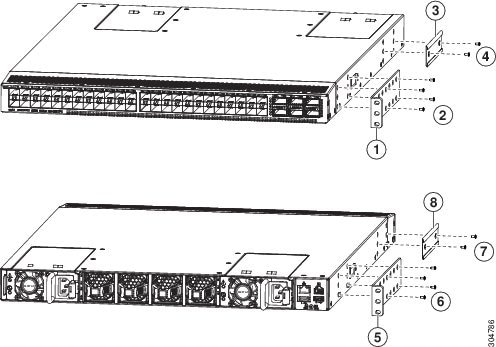
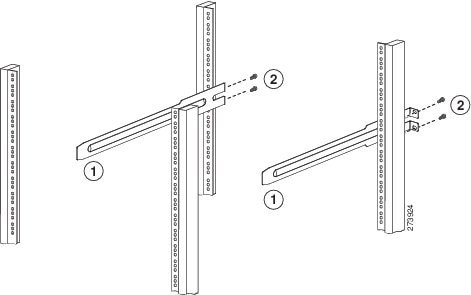
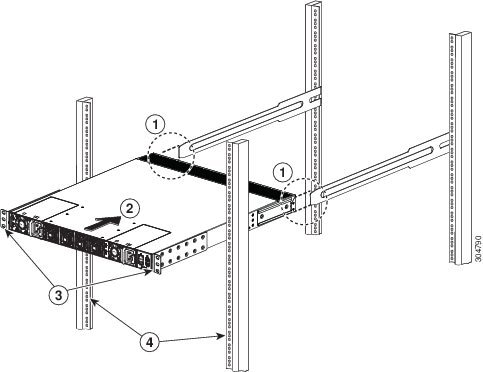
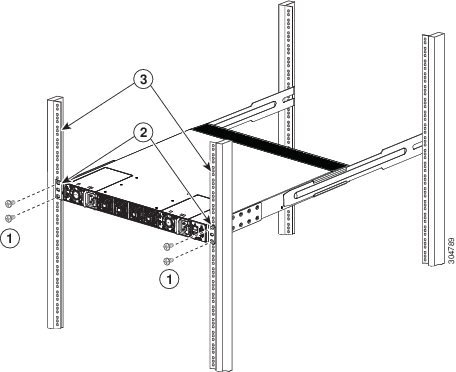
Installing a 2 (RU) Chassis in a Four-Post Rack
This section describes the rack installation for the Cisco Nexus 3164Q, 31128PQ, and 3264Q chassis.
Before moving or lifting the chassis, follow these guidelines:
-
Ensure that all cables are disconnected from the switch.
-
Ensure that there is adequate space around the switch for servicing and airflow.
-
Ensure that you have solid footing and that the weight of the switch is evenly distributed between your feet.
-
Lift the switch slowly, keeping your back straight. Lift with your legs, not with your back. Bend at the knees, not at the waist.
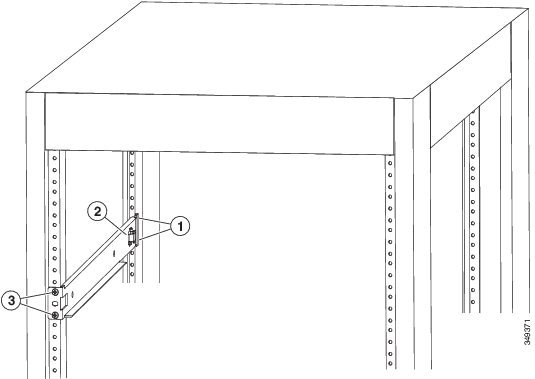
| Step 1 | Attach the
bottom-support rails on the rack as follows:
| ||||||||
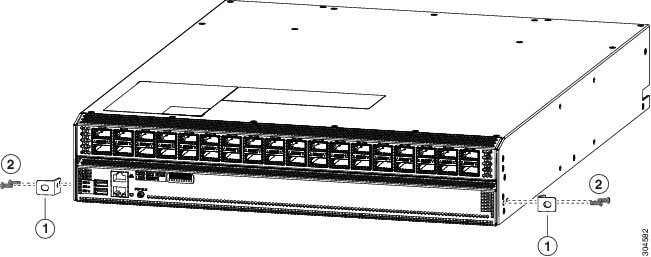
| Step 2 | Attach two front-mount brackets to the sides of the chassis as follows: | ||||||||
| Step 3 | Install the
chassis in the rack as follows:
|

Starting the Switch
To power up the switch, follow these steps:
-
Verify that the switch is fully installed and secured to a rack.
-
Verify that the switch is adequately grounded to the facility earth ground or to a grounded rack.
-
Verify that all of the fan and power supply modules are installed in the chassis. If the chassis has only one power supply, there must be a blank module (N2200-P-BLNK) in the open power supply slot to maintain the designed airflow.
-
If you are using a DC power source, verify that the circuit is shut off at a circuit breaker.
| Step 1 | If the switch
has AC power supplies, connect those power supplies to an AC power source as
follows:
|
| Step 2 | If the switch
has DC power supplies, connect those power supplies to a DC power source as
follows:
|
| Step 3 | Listen for the fans; they should begin operating when the power cable is plugged in. |
| Step 4 | After the switch
boots, verify that the following LEDs are on:
|
 Feedback