Decryption Rules Best Practices

Decryption Rules Best Practices

This chapter provides an example decryption policy with decryption rules that illustrates our best practices and recommendations. First we'll discuss settings for the decryption policies and access control policies and then walk through all the rules and why we recommend they be ordered in a particular way.

Some general guidelines:

  • Decrypting traffic requires processing and memory; decrypting too much traffic can impact performance. Before you set up decryption policies and rules, see When to Decrypt Traffic, When Not to Decrypt in the Cisco Secure Firewall Management Center Device Configuration Guide.

  • Among the types of traffic you should exclude from decryption is traffic that is by nature undecryptable; typically, undecryptable traffic uses TLS/SSL certificate pinning. .

Following are the decryption rules we'll discuss in this chapter.
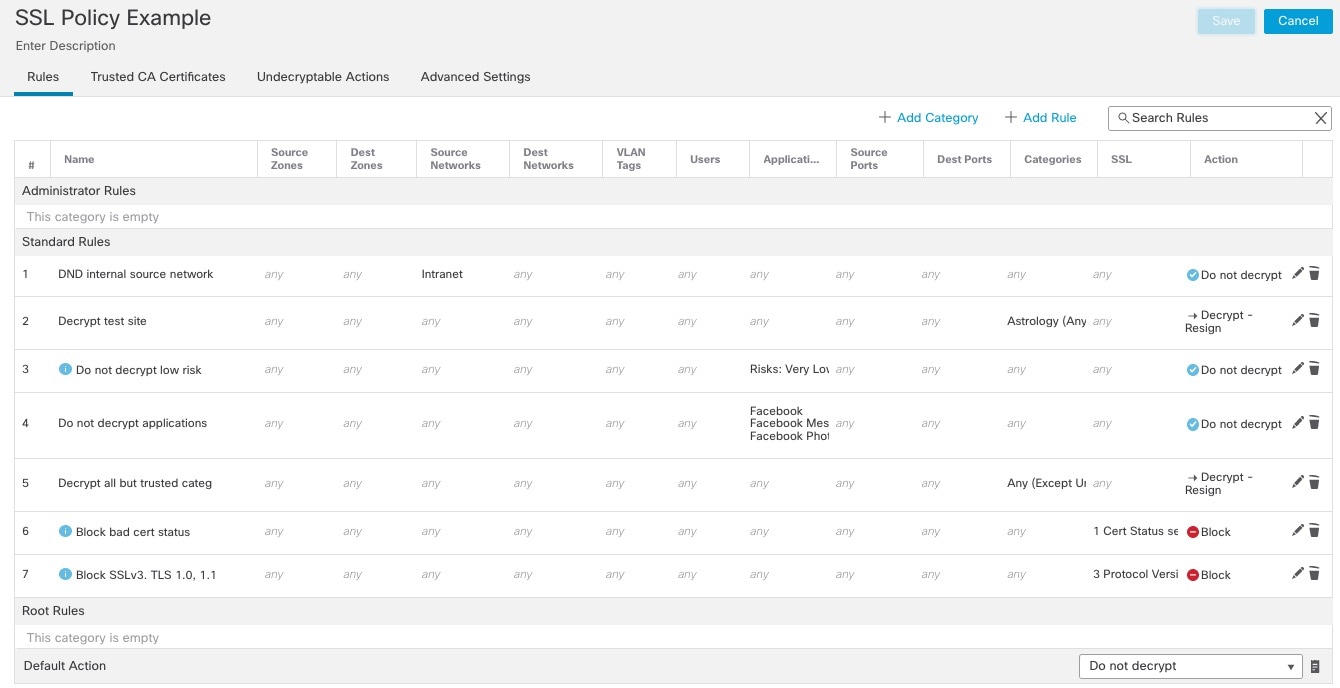
The sample SSL policy has several rules ordered simplest to most complex; this enables the system to quickly process traffic that matches the simplest rule and allow the system more time to match more complex rules.

Do Not Decrypt Best Practices

Log traffic during evaluation period

Do Not Decrypt rules generally should disable logging but if you're not sure what traffic matches your rules, you can temporarily enable logging. After you confirm the correct traffic is being matched, disable logging for those rules.

Guidelines for undecryptable traffic

We can determine that certain traffic is not decryptable either because the website itself is not decryptable or because the website uses TLS/SSL pinning, which effectively prevents users from accessing a decrypted site without errors in their browser.

We maintain the list of these sites as follows:

  • A Distinguished Name (DN) group named Cisco-Undecryptable-Sites

  • The pinned certificate or undecryptable application filter

If you are decrypting traffic and you do not want users to see errors in their browsers when going to these sites, we recommend you set up a Do Not Decrypt rule toward the bottom of your decryption rules.

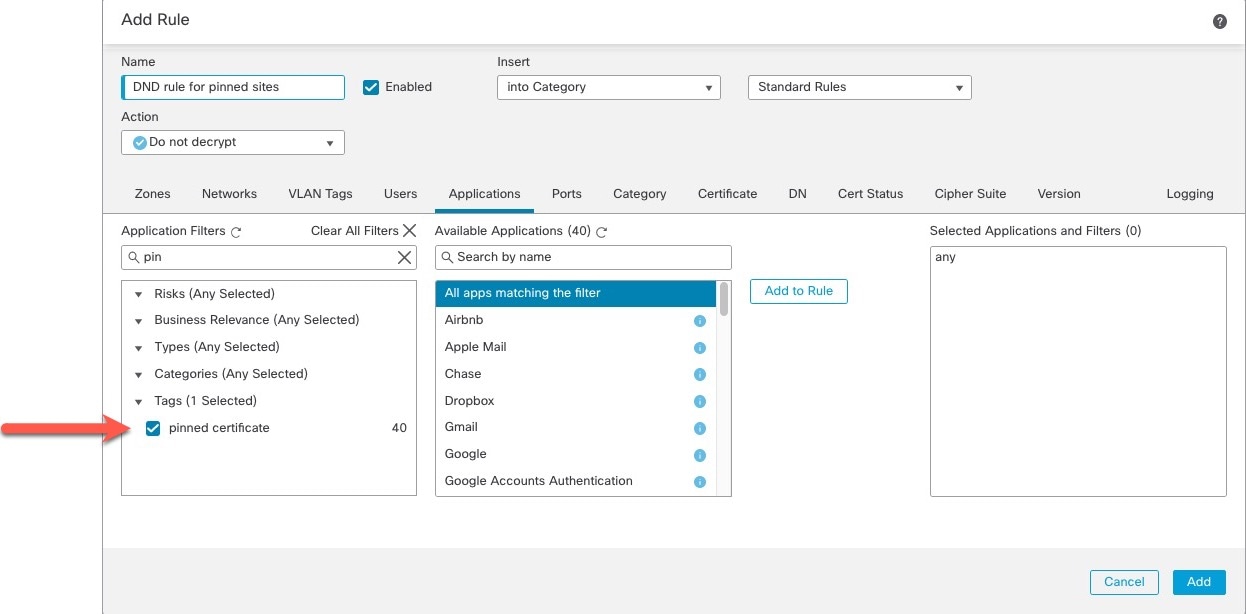
An example of setting up a pinned certificate application filter follows.

Use the Application type pinned certificate in a Do Not Decrypt rule to prevent users from getting errors browsing to pinned sites

Decrypt - Resign and Decrypt - Known Key Best Practices

This topic discusses best practices for Decrypt - Resign and Decrypt - Known Key decryption rule.

Do not use Version or Cipher Suite rule conditions


Important


Never use either Cipher Suite or Version rule conditions in a rule with a Decrypt - Resign or Decrypt - Known Key rule action. The use of these conditions in rules with other rule actions can interfere with the system's ClientHello processing, resulting in unpredictable performance.


Decrypt - Resign best practices with certificate pinning

Some applications use a technique referred to as TLS/SSL pinning or certificate pinning, which embeds the fingerprint of the original server certificate in the application itself. As a result, if you configured a decryption rule with a Decrypt - Resign action, when the application receives a resigned certificate from a managed device, validation fails and the connection is aborted.

Because TLS/SSL pinning is used to avoid man-in-the-middle attacks, there is no way to prevent or work around it. We recommend adding a Do Not Decrypt rule before the Decrypt - Resign rule so pinning traffic is excluded from being decrypted.

For more information about certificate pinning, see About TLS/SSL Pinning in the Cisco Secure Firewall Management Center Device Configuration Guide.

Decrypt - Known Key best practices

Because a Decrypt - Known Key rule action is intended to be used for traffic going to an internal server, you should always add either a destination network to the decryption rule rules (Networks rule condition) or add a security zone to the access control rule (Zones tab page). That way the traffic goes directly to the network or interface on which the server is located, thereby reducing traffic on the network.

Decryption Rules to Put First

Put first any rules that can be matched by the first part of the packet; an example is a rule that references IP addresses (Networks rule condition).

Decryption Rules to Put Last

Rules with the following rule conditions should be ordered immediately be last because those rules require traffic to be examined for the longest amount of time by the system:

  • Applications

  • Category

  • Certificate

  • Distinguished Name (DN)

  • Cert Status

  • Cipher Suite

  • Version

Logging Best Practices and Recommendations

This topic discusses our best practices and recommendations for logging in decryption policies.

Always log rules with decryption actions
Always enable logging for any decryption rule that performs a decryption action (that is, a rule action of Decrypt - Resign or Decrypt - Known Key).
Do not log rules for undecryptable applications
Undecryptable applications can generate a lot of noise so you can disable logging in rule actions where the Applications tab page filter setting includes the undecryptable tag. For example, Apple mobile devices typically contact the Apple site repeatedly. This traffic typically uses TLS/SSLcertificate pinning and therefore isn't decryptable.
Decryption policy logging settings override access control policy logging settings
Even if your access control policy is not set to log anything, enabling logging for decryption policies or rules enables a decryption associated with the access control policy to log.
Decryption policy logs are appended to access control policy logs
If both your access control policy and decryption policies and rules enable logging, the log messages are appended to the same log.
Enable logging for Do Not Decrypt rules to test, then disable logging
To save resources, there's normally no reason to enable logging for Do Not Decrypt rules; however, you can choose to enable logging temporarily as you fine-tune decryption rule rule conditions. For example, you can test how a Do Not Decrypt rule works in a particular security zone then either change the rule or disable logging if you're happy with the results.

Use Security Zones in Access Control Rules

You must associate a decryption policy with an access control policy for the decryption policy to have any effect; when you do that, set up your access control rule to use security zones to segment traffic to certain interfaces. For example, if your decryption policy has rules protecting outbound traffic, create a security zone of interfaces to the outside and add that to the access control rule.

For more information about security zones, see Security Zones and Interface Groups in the Cisco Secure Firewall Management Center Device Configuration Guide .

Step 1: Create a security zone

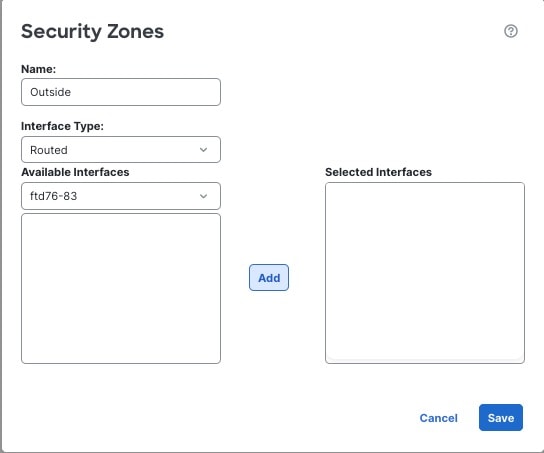
Create a security zone that contains at least one device that is on an inside or outside routed interface. In the following example, the security zone is for an outside interface.

Create a security zone:

  1. Click Objects > Object Management

  2. Click Interface.

  3. Click Add > Security Zone.

  4. Enter the required information.

    The following figure shows an example of a security zone named Outside with one managed device.

Step 2: Associate a decryption policy with an access control policy

Associate a decryption policy with an access control policy; otherwise, the decryption policy will have no effect.

For more information, see Associate the Decryption Policy with an Access Control Policy and Advanced Settings.

Step 3: Create an access control Allow rule that includes the security zone

In your access control policy, create a rule with an Allow action that is matched by traffic going to your security zone.

  1. Click Policies > Access Control.

  2. Click Edit (edit icon) next to the access control policy to edit.

  3. Click Add Rule and optionally give the rule a name.

  4. From the Action list, click Allow.

  5. Click the Zones tab.

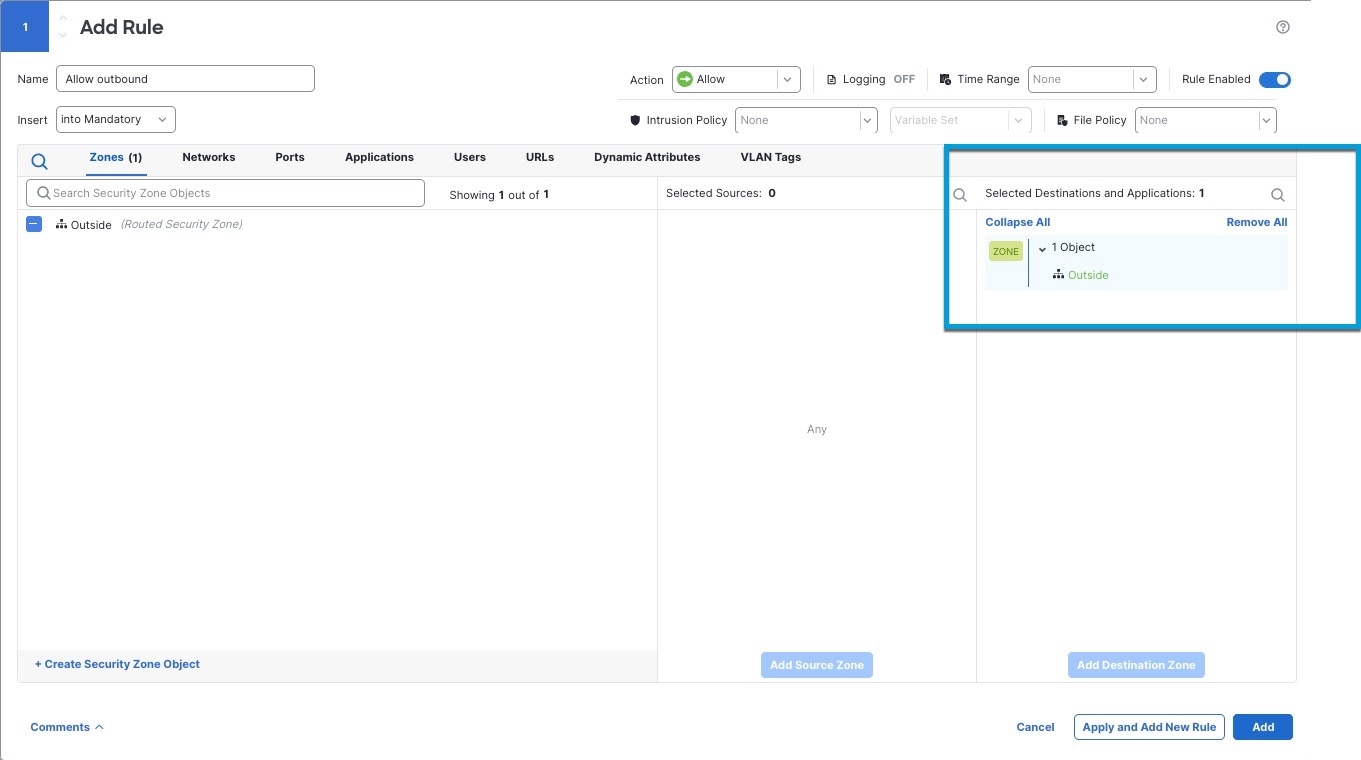
  6. On the Zones tab page, select the check box next to your outside security zone and click Add to Destination Zone.

    The following figure shows an example.

  7. Set up the access control rule as desired.

  8. Follow the prompts on your screen to complete the change to the access control policy.

  9. Deploy configuration changes as discussed in Deploy Configuration Changes in the Cisco Secure Firewall Management Center Device Configuration Guide.

Bypass Inspection with Prefilter and Flow Offload

Prefiltering is the first phase of access control, before the system performs more resource-intensive evaluation. Prefiltering is simple, fast, and early. Prefiltering uses limited outer-header criteria to quickly handle traffic. Compare this to subsequent evaluation, which uses inner headers and has more robust inspection capabilities.

Configure prefiltering to:

  • Improve performance— The sooner you exclude traffic that does not require inspection, the better. You can fastpath or block certain types of plaintext, passthrough tunnels based on their outer encapsulation headers, without inspecting their encapsulated connections. You can also fastpath or block any other connections that benefit from early handling.

  • Tailor deep inspection to encapsulated traffic—You can rezone certain types of tunnels so that you can later handle their encapsulated connections using the same inspection criteria. Rezoning is necessary because after prefiltering, access control uses inner headers.

If you have a Firepower 4100/9300 or Secure Firewall 3100 available, you can use large flow offload, a technique where trusted traffic can bypass the inspection engine for better performance. You can use it, for example, in a data center to transfer server backups.