Configure EVPN on Collapsed Forwarding

This module contains the following topics:

EVPN on Collapsed Forwarding Overview

Ethernet VPN (EVPN) is a next generation solution that provide Ethernet multipoint services over MPLS networks. EVPN operates in contrast to the existing Virtual Private LAN Service (VPLS) by enabling control-plane based MAC learning in the core. In EVPN, PE's participating in the EVPN instances learn customer MAC routes in Control-Plane using MP-BGP protocol. Control-plane MAC learning brings a number of benefits that allow EVPN to address the VPLS shortcomings, including support for multi-homing with per-flow load balancing. Dual-homing mode in EVPN Multihoming is not supported.

EVPN supports collapsed forwarding. EVPN on non-collapse forwarding mode is not supported. For more information about collapsed forwarding, see Configuring Collapsed Forwarding chapter.

EVPN Operation

At startup, PEs exchange EVPN routes in order to advertise the following:

  • VPN membership: The PE discovers all remote PE members of a given EVI. In the case of a multicast ingress replication model, this information is used to build the PE's flood list associated with an EVI.

  • Ethernet segment reachability: In multi-home scenarios, the PE auto-discovers remote PE and their corresponding redundancy mode (all-active or single-active). In case of segment failures, PEs withdraw the routes used at this stage in order to trigger fast convergence by signaling a MAC mass withdrawal on remote PEs.

  • Redundancy Group membership: PEs connected to the same Ethernet segment (multi-homing) automatically discover each other and elect a Designated Forwarder (DF) that is responsible for forwarding Broadcast, Unknown unicast and Multicast (BUM) traffic for a given EVI.

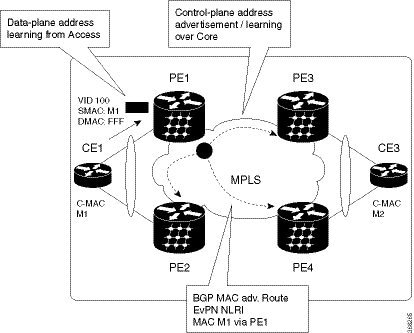
Figure 1. EVPN Operation


EVPN can operate in single homing mode. When EVPN is enabled on PE, routes are advertised where each PE discovers all other member PEs for a given EVPN instance. When an unknown unicast (or BUM) MAC is received on the PE, it is advertised as EVPN type-2 routes to other PEs. MAC routes are advertised to the other PEs using EVPN type-2 routes. In multi-homing scenarios Type 1, 3 and 4 are advertised to discover other PEs and their redundancy modes (single active or active-active). Use of Type-1 route is to auto-discover other PE which hosts the same CE. The other use of this route type is to fast route unicast traffic away from a broken link between CE and PE. Type-4 route is used for electing designated forwarder. For instance, consider the topology when customer traffic arrives at the PE, EVPN MAC advertisement routes distribute reachability information over the core for each customer MAC address learned on local Ethernet segments. Each EVPN MAC route announces the customer MAC address and the Ethernet segment associated with the port where the MAC was learned from and is associated MPLS label. This EVPN MPLS label is used later by remote PEs when sending traffic destined to the advertised MAC address.

EVPN Route Types

The EVPN network layer reachability information (NLRI) provides different route types.

Table 1. EVPN Route Types

Route Type

Name

Usage

1

Ethernet Auto-Discovery (AD) Route

Few routes sent per ES, carry the list of EVIs that belong to ES

2

MAC/IP Advertisement Route

Advertise MAC, address reachability, advertise IP/MAC binding

3

Inclusive Multicast Ethernet Tag Route

Multicast Tunnel End point discovery

4

Ethernet Segment Route

Redundancy group discovery, DF election

Route Type 1: Ethernet Auto-Discovery (AD) Route

The Ethernet (AD) routes are advertised on per EVI and per ESI basis. These routes are sent per ES. They carry the list of EVIs that belong to the ES. The ESI field is set to zero when a CE is single-homed.

Route Type 2: MAC/IP Advertisement Route

The host's IP and MAC addresses are advertised to the peers within NRLI. The control plane learning of MAC addresses reduces unknown unicast flooding.

Route Type 3: Inclusive Multicast Ethernet Tag Route

This route establishes the connection for broadcast, unknown unicast, and multicast (BUM) traffic from a source PE to a remote PE. This route is advertised on per VLAN and per ESI basis.

Route Type 4: Ethernet Segment Route

Ethernet segment routes enable to connect a CE device to two or PE devices. ES route enables the discovery of connected PE devices that are connected to the same Ethernet segment.

Configure EVPN Layer 2 Bridging Service


Router # configure
Router (config)# l2vpn
Router (config-l2vpn)# bridge group 1
Router (config-l2vpn-bg)# bridge-domain 1-1
Router (config-l2vpn-bg-bd)# interface GigabitEthernet 0/0/0/1.1
Router (config-l2vpn-bg-bd-ac)# evi 1
Router (config-l2vpn-bg-bd-evi)# exit 
Router (config-l2vpn-bg-bd)# exit
Router (config-l2vpn-bg)# bridge-domain 1-2  
Router (config-l2vpn-bg-bd)# interface gigabitEthernet 0/0/0/1.2
Router (config-l2vpn-bg-bd-ac)# evi 1
Router (config-l2vpn-bg-bd-ac-evi)# exit
Running Configuration

l2vpn 
 bridge group 1
  bridge-domain 1-1
   interface GigabitEthernet 0/0/0/1.1
    evi 1
    exit
    exit
   bridge-domain 1-2
  interface gigabitEthernet 0/0/0/1.2
 evi 1

EVPN Software MAC Learning

MAC learning is the method of learning the MAC addresses of all devices available in a VLAN.

The MAC addresses learned on one device needs to be learned or distributed on the other devices in a VLAN. EVPN Native with Software MAC Learning feature enables the distribution of the MAC addresses learned on one device to the other devices connected to a network. The MAC addresses are learnt from the remote devices using BGP.

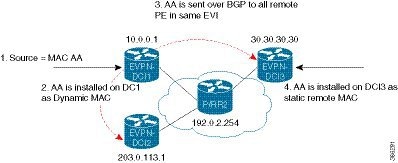
Figure 2. EVPN Software MAC Learning

The above figure illustrates the process of software MAC learning. The following are the steps involved in the process:

  1. Traffic comes in on one port in the bridge domain.

  2. The source MAC address (AA) is learnt on DCI1 and is stored as a dynamic MAC entry.

  3. The MAC address (AA) is converted into a type-2 BGP route and is sent over BGP to all the remote PEs in the same EVI.

  4. The MAC address (AA) is updated on the DCI3 as a static remote MAC address.

Configure EVPN Native with Software MAC Learning

The following section describes how you can configure EVPN Native with Software MAC Learning:


/* Configure bridge domain. */

Router(config)# l2vpn
Router(config-l2vpn)# bridge group EVPN_SH
Router(config-l2vpn-bg)# bridge-domain EVPN_2001
Router(config-l2vpn-bg-bd)# interface TenGigE0/4/0/10.2001
Router(config-l2vpn-bg-bd)# interface BundleEther 20.2001
Router(config-l2vpn-bg-bd)# storm-control broadcast pps 10000
Router(config-l2vpn-bg-bd)# neighbor 20.20.20.20 pw-id 1020001
Router(config-l2vpn-bg-bd-nbr)# evi 2001
Router(config-l2vpn-bg-bd)# exit
Router(config-l2vpn-bg)# exit
Router(config-l2vpn)# exit
/* Configure advertisement of MAC routes, suppress unknown unicast, disable the control word,*/
/* configure the flow label, configure BGP route-exchange using RT. */

Router(config)# evpn
Router(config-evpn)# evi 2001
/*Use the advertise-mac command to control the advertisement of MAC routes through BGP to other neighbors. */
Router(config-evpn-evi)# advertise-mac
/* Use the unknown-unicast-suppress command to prevent unknown unicast traffic from going to the MPLS core */
/* and then to all remote PE bridge-ports. */
Router(config-evpn-evi)# unknown-unicast-suppress
/* Use the control-word-disable command to prevent the control word from being sent */
/* in the packet that is sent to MPLS core. The control word functionality is enabled by default. */
Router(config-evpn-evi)# control-word-disable
/* Perform the following steps to configure BGP route-exchange using RT */ 
Router(config-evpn-evi)# bgp
Router(config-evpn-evi)# route-target import 200:101
Router(config-evpn-evi)# route-target export 200:101
/* Configure address family session in BGP. */

Router# configure
Router(config)# router bgp 200
Router(config-bgp)# bgp router-id 40.40.40.40
Router(config-bgp)# address-family l2vpn evpn
Router(config-bgp)# neighbor 10.10.10.10
Router(config-bgp-nbr)# remote-as 200
Router(config-bgp-nbr)# description MPLSFACINGPEER
Router(config-bgp-nbr)# update-source Loopback 0
Router(config-bgp-nbr)# address-family l2vpn evpn

Single Home Device or Single Home Network

The following section describes how you can configure EVPN Native with Software MAC Learning feature in single home device or single home network:

In the above figure, the PE (PE1) is attached to Ethernet Segment using bundle or physical interfaces. Null Ethernet Segment Identifier (ESI) is used for SHD/SHN.

Configure EVPN in Single Home Device or Single Home Network

/* Configure bridge domain. */

Router(config)# l2vpn
Router(config-l2vpn)# bridge group EVPN_ALL_ACTIVE 
Router(config-l2vpn-bg)# bridge-domain EVPN_2001
Router(config-l2vpn-bg-bd)# interface BundleEther1.2001
Router(config-l2vpn-bg-bd)# evi 2001
/* Configure advertisement of MAC routes. */

Router(config)# evpn
Router(config-evpn)# evi 2001
Router(config-evpn-evi)# advertise-mac

/* Configure address family session in BGP. */

Router# configure
Router#(config)# router bgp 200
Router#(config-bgp)# bgp router-id 40.40.40.40 
Router#(config-bgp)# address-family l2vpn evpn
Router#(config-bgp)# neighbor 10.10.10.10
Router#(config-bgp-nbr)# remote-as 200
Router#(config-bgp-nbr)# description MPLSFACING-PEER
Router#(config-bgp-nbr)# update-source Loopback 0
Router#(config-bgp-nbr)# address-family l2vpn evpn

Running Configuration

l2vpn 
bridge group EVPN_ALL_ACTIVE 
 bridge-domain EVPN_2001 
  interface BundleEther1.2001
  evi 2001 
!
evpn
 evi 2001  
  advertise-mac
! 
router bgp 200 bgp 
 router-id 40.40.40.40
 address-family l2vpn evpn
 neighbor 10.10.10.10 
  remote-as 200 description MPLS-FACING-PEER 
  updatesource Loopback0 
  addressfamily l2vpn evpn

Verification

Verify EVPN in single home devices.

Router# show evpn ethernet-segment interface Te0/4/0/10 detail

Ethernet Segment Id    Interface   Nexthops
--------------------   ----------  ----------
N/A     		 Te0/4/0/10  20.20.20.20
……………
 Topology :
 Operational : SH
 Configured : Single-active (AApS) (default) 

Verify EVPN Native with Software MAC Learning

Verify the packet drop statistics.

 
Router# show l2vpn bridge-domain bd-name EVPN_2001 details

Bridge group: EVPN_ALL_ACTIVE, bridge-domain: EVPN_2001, id: 1110,
state: up, ShgId: 0, MSTi: 0
 List of EVPNs:
 EVPN, state: up
 evi: 2001
 XC ID 0x80000458
 Statistics:
 packets: received 28907734874 (unicast 9697466652), sent
76882059953
 bytes: received 5550285095808 (unicast 1861913597184), sent
14799781851396
 MAC move: 0
 List of ACs:
 AC: TenGigE0/4/0/10.2001, state is up
 Type VLAN; Num Ranges: 1
...
 Statistics:
 packets: received 0 (multicast 0, broadcast 0, unknown
unicast 0, unicast 0), sent 45573594908
 bytes: received 0 (multicast 0, broadcast 0, unknown unicast
0, unicast 0), sent 8750130222336
 MAC move: 0
 ........

Verify the EVPN EVI information with the VPN-ID and MAC address filter.

 
Router# show evpn evi vpn-id 2001 neighbor

Neighbor IP    vpn-id
-----------   --------
20.20.20.20   2001
30.30.30.30   2001

Verify the BGP L2VPN EVPN summary.

Router# show bgp l2vpn evpn summary
...
Neighbor    Spk   AS     MsgRcvd MsgSent  TblVer    InQ  OutQ  Up/Down  St/PfxRcd
20.20.20.20 0    200     216739  229871   200781341  0    0     3d00h   348032
30.30.30.30 0    200     6462962 4208831  200781341  10   0     2d22h   35750

Verify the MAC updates to the L2FIB table in a line card.

Router# show l2vpn mac mac all location 0/6/cPU0

Topo ID Producer Next Hop(s)     Mac Address    IP Address
------- -------- -----------     -------------- ----------
1112    0/6/CPU0 Te0/6/0/1.36001 00a3.0001.0001

Verify the MAC updates to the L2FIB table in a route switch processor (RSP).

Router# show l2vpn mac mac all location 0/6/cPU0

Topo ID  Producer Next Hop(s)     Mac Address    IP Address
-------  -------- -----------     -------------- ----------
1112     0/6/CPU0 Te0/6/0/1.36001 00a3.0001.0001

Verify the summary information for the MAC address.

Router# show l2vpn forwarding bridge-domain EVPN_ALL_ACTIVE:EVPN_2001 mac-address location 0/6/CPU0

.....
Mac Address     Type      Learned from/Filtered on   LC learned   Resync Age/Last Change
Mapped to
0000.2001.5555  dynamic   Te0/0/0/2/0.2001           N/A          11 Jan 14:37:22
N/A <-- local dynamic
00bb.2001.0001 dynamic    Te0/0/0/2/0.2001           N/A          11 Jan 14:37:22
N/A
0000.2001.1111 EVPN       BD id: 1110                N/A 									N/A
N/A <-- remote static
00a9.2002.0001 EVPN 						BD id: 1110 															N/A 									N/A
N/A

Verify the EVPN EVI information with the VPN-ID and MAC address filter.

Router# show evpn evi vpn-id 2001 mac

EVI 			MAC address 			 IP address 							Nexthop 					Label
---- 		------------- 	 -----------       -------      ------
2001 		00a9.2002.0001  :: 															10.10.10.10  34226      <-- Remote MAC
2001 		00a9.2002.0001  :: 															30.30.30.30  34202

2001 		0000.2001.5555  20.1.5.55 


Router# show evpn evi vpn-id 2001 mac 00a9.2002.0001 detail

EVI     MAC address      IP address  Nexthop      Label
----    --------------   ----------  -------      ----- 
2001    00a9.2002.0001   ::          10.10.10.10  34226

2001    00a9.2002.0001   ::          30.30.30.30  34202

 Ethernet Tag : 0
 Multi-paths Resolved : True <--- aliasing to two remote PE with All-Active load balancing

 Static : No
 Local Ethernet Segment : N/A
 Remote Ethernet Segment : 0100.211b.fce5.df00.0b00
 Local Sequence Number : N/A
 Remote Sequence Number : 0
 Local Encapsulation : N/A
 Remote Encapsulation : MPLS

Verify the BGP routes associated with EVPN with bridge-domain filter.

Router# show bgp l2vpn evpn bridge-domain EVPN_2001 route-type 2

*> [2][0][48][00bb.2001.0001][0]/104
                        0.0.0.0           0 i <------ locally learnt MAC
*>i[2][0][48][00a9.2002.00be][0]/104
  			10.10.10.10 100 	0 i <----- remotely learnt MAC
* i 30.30.30.30 100 0 i
EVPN Multiple Services per Ethernet Segment

EVPN Multiple Services per Ethernet Segment feature allows you to configure multiple services over single Ethernet Segment (ES). Instead of configuring multiple services over multiple ES, you can configure multiple services over a single ES.

You can configure the Native EVPN service on a single Ethernet Bundle.

Both single-active and all-active multihoming modes are supported. However, both single-active and all-active multihoming cannot be configured on a single ES. You can configure either single-active or all-active multihoming mode on a single ES. But, they can coexist.

Configure EVPN Multiple Services per Ethernet Segment

Consider a customer edge (CE) device connected to two provider edge (PE) devices through Ethernet Bundle interface 22001. Configure multiple services on Bundle Ethernet sub-interfaces.

Router# configure
Router(config)# evpn
Router(config-evpn)# interface Bundle-Ether22001
Router(config-evpn-ac)# ethernet-segment identifier type 0 ff.ff.ff.ff.ff.ff.ff.ff.ee
Router(config-evpn-ac-es)# bgp route-target 2200.0001.0001
Router(config-evpn-ac-es)# exit
Router(config-evpn)# evi 24001 
Router(config-evpn-evi)# bgp
Router(config-evpn-evi-bgp)# route-target import 64:24001  
Router(config-evpn-evi-bgp)# route-target export 64:24001
Router(config-evpn-evi-bgp)# exit
Router(config-evpn-evi)# exit
Router(config-evpn)# evi 21006
Router(config-evpn-evi)# bgp
Router(config-evpn-evi-bgp)# route-target route-target 64:10000
Router(config-evpn-evi-bgp)# exit
Router(config-evpn-evi)# exit
Router(config-evpn)# evi 22101 
Router(config-evpn-evi)# bgp
Router(config-evpn-evi-bgp)# route-target import 64:22101
Router(config-evpn-evi-bgp)# route-target export 64:22101
Router(config-evpn-evi-bgp)# exit
Router(config-evpn-evi)# exit
Router(config-evpn)# evi 22021
Router(config-evpn-evi)# bgp
Router(config-evpn-evi-bgp)# route-target import 64: 22021
Router(config-evpn-evi-bgp)# route-target export 64: 22021
Router(config-evpn-evi-bgp)# exit
Router(config-evpn-evi)# exit
Router(config-evpn-evi)# advertise-mac
Router(config-evpn-evi)# exit
Router(config-evpn)# evi 22022
Router(config-evpn-evi)# bgp
Router(config-evpn-evi-bgp)# route-target import 64: 22022
Router(config-evpn-evi-bgp)# route-target export 64: 22022
Router(config-evpn-evi-bgp)# exit
Router(config-evpn-evi)# advertise-mac
Router(config-evpn-evi)# commit
Router(config-evpn-evi)# exit

Running Configuration


evpn
 interface Bundle-Ether22001  
  ethernet-segment   identifier type 0 ff.ff.ff.ff.ff.ff.ff.ff.ee 
  bgp route-target 2200.0001.0001
  !
  evi 24001  
   bgp  
    route-target import 64:24001   
    route-target export 64:24001
   !
   evi 21006  
    bgp   
      route-target 64:100006
   !
    evi 22101  
     bgp  
       route-target import 64:22101   
       route-target export 64:22101
     !
   evi 22021 
    bgp   
      route-target import 64:22021  
      route-target export 64:22021  
    !  
    advertise-mac
  !
  evi 22022  
   bgp   
    route-target import 64:22022  
    route-target export 64:22022  
   ! 
    advertise-mac
  !

EVPN Routing Policy

The EVPN Routing Policy feature provides the route policy support for address-family L2VPN EVPN. This feature adds EVPN route filtering capabilities to the routing policy language (RPL). The filtering is based on various EVPN attributes.

A routing policy instructs the router to inspect routes, filter them, and potentially modify their attributes as they are accepted from a peer, advertised to a peer, or redistributed from one routing protocol to another.

This feature enables you to configure route-policies using EVPN network layer reachability information (NLRI) attributes of EVPN route type 1 to 5 in the route-policy match criteria, which provides more granular definition of route-policy. For example, you can specify a route-policy to be applied to only certain EVPN route-types or any combination of EVPN NLRI attributes. This feature provides flexibility in configuring and deploying solutions by enabling route-policy to filter on EVPN NLRI attributes.

To implement this feature, you need to understand the following concepts:
  • Routing Policy Language

  • Routing Policy Language Structure

  • Routing Policy Language Components

  • Routing Policy Language Usage

  • Policy Definitions

  • Parameterization

  • Semantics of Policy Application

  • Policy Statements

  • Attach Points

For information on these concepts, see Implementing Routing Policy.

Currently, this feature is supported only on BGP neighbor "in" and "out" attach points. The route policy can be applied only on inbound or outbound on a BGP neighbor.

EVPN Route Types

The EVPN network layer reachability information (NLRI) provides different route types.

Table 2. EVPN Route Types

Route Type

Name

Usage

1

Ethernet Auto-Discovery (AD) Route

Few routes sent per ES, carry the list of EVIs that belong to ES

2

MAC/IP Advertisement Route

Advertise MAC, address reachability, advertise IP/MAC binding

3

Inclusive Multicast Ethernet Tag Route

Multicast Tunnel End point discovery

4

Ethernet Segment Route

Redundancy group discovery, DF election

Route Type 1: Ethernet Auto-Discovery (AD) Route

The Ethernet (AD) routes are advertised on per EVI and per ESI basis. These routes are sent per ES. They carry the list of EVIs that belong to the ES. The ESI field is set to zero when a CE is single-homed.

Route Type 2: MAC/IP Advertisement Route

The host's IP and MAC addresses are advertised to the peers within NRLI. The control plane learning of MAC addresses reduces unknown unicast flooding.

Route Type 3: Inclusive Multicast Ethernet Tag Route

This route establishes the connection for broadcast, unknown unicast, and multicast (BUM) traffic from a source PE to a remote PE. This route is advertised on per VLAN and per ESI basis.

Route Type 4: Ethernet Segment Route

Ethernet segment routes enable to connect a CE device to two or PE devices. ES route enables the discovery of connected PE devices that are connected to the same Ethernet segment.

EVPN RPL Attribute

Route Distinguisher

A Route Distinguisher (rd) attribute consists of eight octets. An rd can be specified for each of the EVPN route types. This attribute is not mandatory in route-policy.

Example


rd in (1.2.3.4:0)

EVPN Route Type

EVPN route type attribute consists of one octet. This specifies the EVPN route type. The EVPN route type attribute is used to identify a specific EVPN NLRI prefix format. It is a net attribute in all EVPN route types.

Example


evpn-route-type is 3


The following are the various EVPN route types that can be used:
1 - ethernet-ad
2 – mac-advertisement
3 - inclusive-multicast
4 - ethernet-segment
5 – ip-advertisement

IP Prefix

An IP prefix attribute holds IPv4 or IPv6 prefix match specification, each of which has four parts: an address, a mask length, a minimum matching length, and a maximum matching length. The address is required, but the other three parts are optional. When IP prefix is specified in EVPN route type 2, it represents either a IPv4 or IPv6 host IP Address (/32 or /128). When IP prefix is specified in EVPN route type 5, it represents either IPv4 or IPv6 subnet. It is a net attribute in EVPN route type 2 and 5.

Example


destination in (128.47.10.2/32)
destination in (128.47.0.0/16)
destination in (128:47::1/128)
destination in (128:47::0/112)

esi

An Ethernet Segment Identifier (ESI) attribute consists of 10 octets. It is a net attribute in EVPN route type 1 and 4, and a path attribute in EVPN route type 2 and 5.

Example


esi in (ffff.ffff.ffff.ffff.fff0)

etag

An Ethernet tag attribute consists of four octets. An Ethernet tag identifies a particular broadcast domain, for example, a VLAN. An EVPN instance consists of one or more broadcast domains. It is a net attribute in EVPN route type 1, 2, 3 and 5.

Example


etag in (10000)

mac

The mac attribute consists of six octets. This attribute is a net attribute in EVPN route type 2.

Example


mac in (0206.acb1.e806)

evpn-originator

The evpn-originator attribute specifies the originating router's IP address (4 or 16 octets). This is a net attribute in EVPN route type 3 and 4.

Example


evpn-originator in (1.2.3.4)

evpn-gateway

The evpn-gateway attribute specifies the gateway IP address. The gateway IP address is a 32-bit or 128-bit field (IPv4 or IPv6), and encodes an overlay next-hop for the IP prefixes. The gateway IP address field can be zero if it is not used as an overlay next-hop. This is a path attribute in EVPN route type 5.

Example


evpn-gateway in (1.2.3.4)

EVPN Attributes and Operators

This table summarizes the EVPN attributes and operators per attach points.

Table 3. EVPN Attributes and Operators

Attach Point

Attribute

Match

Attribute-Set

neighbor-in

destination

in

rd

in

evpn-route-type

is

esi

in

Yes

etag

in

Yes

mac

in

Yes

evpn-originator

in

evpn-gateway

in

neighbor-out

destination

in

rd

in

evpn-route-type

is

esi

in

Yes

etag

in

Yes

mac

in

Yes

evpn-originator

in

evpn-gateway

in