Using Zero Touch Provisioning


Note

Routers running ZTP must be able to connect to a DHCP server and TFTP server, download the configuration template, and begin operation, all at the press of a button.

Prerequisites for Using ZTP

  • The interface connected to the CCE must be turned green.

  • DHCP server should be configured to ensure reachability to the CCE and the TFTP server.

  • It is highly recommended to use free ports that do not need a license to enable, to reach the DHCP and TFTP servers during ZTP. Effective Cisco IOS XE Amsterdam 17.3.1 onwards, the 10G ports are considered as free during ZTP. For more information on port licensing, see Licensing 1G and 10G Ports on the Cisco NCS 520 Series Router.


Caution

Do not change the ROMMON configuration register to 0x0.


Restrictions for Using ZTP

  • ZTP is not supported on the LAN Management port—Gig0 on the router. ZTP is supported only on the Ethernet interfaces such as 1—Gige, 10—Gige ports, and so on.

  • ZTP is also not initialized when the router is already reloading or if the router is in ROMMON prompt.

  • ZTP is not initialized if bootflash has files named as 'router-confg'.

Information About Using ZTP

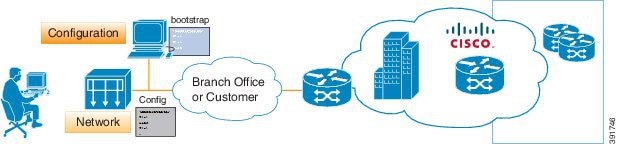
Figure 1. Sample ZTP Topology

On the Cisco NCS 520 Series Routers, ZTP is triggered under any of the following conditions:

  • A router without a start up configuration is powered on

  • The ZTP button in the front panel is pressed for less than 8 seconds.

  • The write erase and reload commands are executed.


Note

The Cisco NCS 520 Series Routers have a ZTP button on the front panel.

Note

When write erase and reload commands are executed and if Yes or No is requested to save running configuration before reload and if you type yes at the prompt, the system configuration is saved in the nvRAM and the ZTP process terminates.

After the ZTP process initializes, the following sequence is initiated:

  1. Effective Cisco IOS XE 17.3.1 onwards, the router will initiate the DHCP session over untagged interface as soon as the ZTP process is started. If a DHCP session is successfully established, then the below two steps are not relevant.

  2. The router detects the management VLAN by listening to any of the following data packets:

    • Broadcast (Gratuitous ARP)

    • ISIS hello packets

    • OSPF hello packets

    • IPv6 router advertisement packets

    • VRRP


      Note

      The operations center can initiate any of the above packets over the network to establish a connection to the DHCP server.
  3. The router willl wait for a certain interval of time to learn all the possible VLAN configurations and try to initiate a DHCP session to a DHCP server over the learned VLANs

  4. When connectivity to CCE is established, the bootup process is managed through the CCE engine by means of template configuration or manual intervention from the operations center.

When the ZTP process initiates, the Cisco NCS 520 Series Router creates an Ethernet flow point (EFP) and associates a bridge domain interface (BDI) on the detected management VLAN.

The router creates the following configuration to establish a connection with the DHCP server and the CCE. The BDI created for this purpose has description ZTP_BDI configured under the BDI interface.


Caution

Do not delete ZTP_BDI . Deleting this configuration results in loss of connectivity to the router and the ZTP process terminates.


Note

To stop the ZTP process when the ZTP button is accidentally pressed, use the ztp disable command in global configuration mode. However, if you long press the ZTP button, (more than 8 sec) ZTP is still initialized reload even though ZTP is disabled through the ztp disable command

Downloading the Initial Configuration

After the VLAN discovery process is complete, the configuration download process begins. The following sequence of events is initiated.

  1. The router sends DHCP discover requests on each Ethernet interface. The serial number of the router is used as a client identifier.

  2. The DHCP server allocates and sends an IP address, TFTP address (if configured with option 150) and default router address to the router.

  3. If the TFTP option (150) is present, the router requests a bootstrap configuration that can be stored in any of the following files: DOM-<mac-address> , network-confg, router-confg, ciscortr.cfg, or cisconet.cfg.


    Note

    Ensure to use hyphenated hexadecimal notation of MAC address (DOM-78-72-5D-00-A5-80) to name the files.


Effective Cisco IOS XE Amsterdam 17.3.2a, the router tries to learn the reachability to multiple DHCP servers during ZTP. Hence multiple DHCP discovery messages are sent out during this phase. The router goes through all the DHCP offer messages received and selects an appropriate DHCP server based on the priority decided based on below rules:

  1. The DHCP server reachable via untagged interface have higher priority than the one via tagged. In case of tagged, the one reachable via an interface learned using VRRP packets has higher priority.

  2. If multiple DHCP servers are reachable via similar interfaces mentioned in previous rule, the one reachable via higher physical port number has higher priority.

DHCP Server

The following is a sample configuration to set up a Cisco router as a DHCP server:


ip dhcp excluded-address 30.30.1.6
ip dhcp excluded-address 30.30.1.20 30.30.1.255
!
ip dhcp pool mwrdhcp
network 30.30.1.0 255.255.255.0
option 150 ip 30.30.1.6
default-router 30.30.1.6

This configuration creates a DHCP pool of 30.30.1.x addresses with 30.30.1.0 as the subnet start. The IP address of the DHCP server is 30.30.1.6. Option 150 specifies the TFTP server address. In this case, the DHCP and TFTP server are the same.

The DHCP pool can allocate from 30.30.1.1 to 30.30.1.19 with the exception of 30.30.1.6, which is the DHCP server itself.

TFTP Server

The TFTP server stores the bootstrap configuration file.

The following is a sample configuration (network– confg file):


hostname test-router
!
{ncs router-specifc configuration content}
!
end

Cisco Configuration Engine Server

The CCE server application is installed on a Linux system. In the above example, the router recognizes the CNS configuration and retrieves the complete configuration from the CCE server. For more information, see http://www.cisco.com/c/en/us/products/cloud-systems-management/configuration-engine/index.html


Note

You need a username and password to download the CCE application. Contact ask-ce@cisco.com for credentials.

Once the application is installed and the IP addresses are set, the CCE server can be accessed on providing a username and password.


Note

Ensure that the CNS ID is the hardware-serial number and that it matches with the CCE server.

ZTP LED Behavior

On Cisco NCS 520 Series Routers, when ZTP button is pressed:

Process

ZTP LED Status

Press ZTP button

Blinking Amber

Loading image

Off

ZTP process running

Blinking Amber

ZTP success

Green

ZTP failure

Red

Verifying the CNS Configuration

Use the following commands to verify the CNS configuration:

On the Cisco NCS 520 Series Router:

  • show cns event connection
  • show cns image connection
  • show cns config stats