Using Link Layer Discovery Protocol in Multivendor Networks

Link Layer Discovery Protocol (LLDP), standardized by the IEEE as part of 802.1ab, enables standardized discovery of nodes, which in turn facilitates future applications of standard management tools such as Simple Network Management Protocol (SNMP) in multivendor networks. Using standard management tools makes physical topology information available and helps network administrators detect and correct network malfunctions and inconsistencies in configuration.

The Cisco implementation of LLDP is based on the IEEE 802.1ab standard.

Information About Using Link Layer Discovery Protocol in Multivendor Networks

IEEE 802.1ab LLDP

IEEE 802.1ab Link Layer Discovery Protocol (LLDP) is an optional link layer protocol for network topology discovery in multivendor networks. Discovery information includes device identifiers, port identifiers, versions, and other details. As a protocol that aids network management, LLDP provides accurate network mapping, inventory data, and network troubleshooting information.

LLDP is unidirectional, operating only in an advertising mode. LLDP does not solicit information or monitor state changes between LLDP nodes. LLDP periodically sends advertisements to a constrained multicast address. Devices supporting LLDP can send information about themselves while they receive and record information about their neighbors. Additionally, devices can choose to turn off the send or receive functions independently. Advertisements are sent out and received on every active and enabled interface, allowing any device in a network to learn about all devices to which it is connected. Applications that use this information include network topology discovery, inventory management, emergency services, VLAN assignment, and inline power supply.


Note


LLDP and Cisco Discovery Protocol can operate on the same interface.


The figure below shows a high-level view of LLDP operating in a network node.
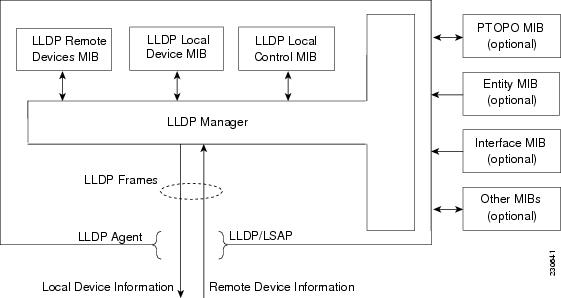
When you configure LLDP or Cisco Discovery Protocol location information on a per-port basis, remote devices can send Cisco medianet location information to the switch. For more information, see the Using Cisco Discovery Protocol module.

Benefits of LLDP

  • Follows IEEE 802.1ab standard.

  • Enables interoperability among multivendor devices.

  • Facilitates troubleshooting of enterprise networks and uses standard network management tools.

  • Provides extension for applications such as VoIP.

How to Configure Link Layer Discovery Protocol in Multivendor Networks

Enabling and Disabling LLDP Globally

LLDP is disabled globally by default. This section describes the tasks for enabling and disabling LLDP globally.

Enabling LLDP Globally

Procedure
  Command or Action Purpose

Step 1

enable

Example:

Device> enable

Enables privileged EXEC mode.

  • Enter your password if prompted.

Step 2

configure terminal

Example:

Device# configure terminal

Enters global configuration mode.

Step 3

lldp {hold time seconds | reinit delay | run | timer rate | tlv-select tlv }

Example:

Device(config)# lldp run

Enables LLDP globally.

Step 4

end

Example:

Device(config)# end

Returns to privileged EXEC mode.

Disabling and Enabling LLDP on a Supported Interface

LLDP is enabled by default on all supported interfaces. This section describes the tasks for disabling and enabling LLDP on a supported interface.

Disabling LLDP on a Supported Interface

Procedure
  Command or Action Purpose

Step 1

enable

Example:

Device> enable

Enables privileged EXEC mode.

  • Enter your password if prompted.

Step 2

configure terminal

Example:

Device# configure terminal

Enters global configuration mode.

Step 3

interface type number

Example:

Device(config)# interface ethernet 0/1

Specifies the interface type and number and enters interface configuration mode.

Step 4

no lldp {tlv-select tlv | receive | transmit }

Example:

Device(config-if)# no lldp receive

Disables an LLDP TLV or LLDP packet reception on a supported interface.

Step 5

end

Example:

Device(config-if)# end

Returns to privileged EXEC mode.

Setting LLDP Packet Hold Time

Hold time is the duration that a receiving device should maintain LLDP neighbor information before aging it. Perform this task to define a hold time for an LLDP-enabled device.

Procedure


Step 1

enable

Example:


Device> enable

Enables privileged EXEC mode.

  • Enter your password if prompted.

Step 2

configure terminal

Example:


Device# configure terminal

Enters global configuration mode.

Step 3

lldp holdtime seconds

Example:


Device(config)# lldp holdtime 100

Specifies the hold time.

Step 4

end

Example:


Device(config)# end

Returns to privileged EXEC mode.


Setting LLDP Packet Frequency

Perform this task to specify an interval at which the Cisco software sends LLDP updates to neighboring devices.

Procedure


Step 1

enable

Example:


Device> enable

Enables privileged EXEC mode.

  • Enter your password if prompted.

Step 2

configure terminal

Example:


Device# configure terminal

Enters global configuration mode.

Step 3

lldp timer rate

Example:


Device(config)# lldp timer 75

Specifies the rate at which LLDP packets are sent every second.

Step 4

end

Example:


Device(config)# end

Returns to privileged EXEC mode.


Monitoring and Maintaining LLDP in Multivendor Networks

Perform this task to monitor and maintain LLDP in multivendor networks. This task is optional, and Steps 2 and 3 can be performed in any sequence.

Procedure


Step 1

enable

Example:


Device> enable

Enables privileged EXEC mode.

  • Enter your password if prompted.

Step 2

show lldp [entry {* | word } | errors | interface [ethernet number ] | neighbors [ethernet number | detail ] | traffic ]

Example:


Device# show lldp entry *

Displays summarized and detailed LLDP information.

Note


When the show lldp neighbors command is issued, if the device ID has more than 20 characters, the ID is truncated to 20 characters in command output because of display constraints.

Step 3

clear lldp {counters | table }

Example:


Device# clear lldp counters

Resets LLDP traffic counters and tables to zero.

Step 4

end

Example:


Device# end

Returns to user EXEC mode.


Enabling and Disabling LLDP TLVs

LLDP TLV support is enabled by default if LLDP is enabled globally and locally on a supported interface. Specific TLVs, however, can be enabled and suppressed.

Tagged Packets Using Link Layer Discovery Protocol in Multivendor Networks

Table 1. Feature History

Feature Name

Release Information

Description

Tagged Packet Support Using Link Layer Discovery Protocol (LLDP)

Cisco IOS XE Dublin 17.10.1

LLDP now supports tagged packet transmission over a service instance with dot1q encapsulation.

LLDP advertises information about themselves to their network neighbors, and store the information they discover from other devices. Though both these transmitted frames go through the same physical interface, they can be uniquely identified by the information advertised in the Port ID Type-Length-Value (TLV).

You can use the lldp enable command to enable LLDP over a particular service instance. Use the show lldp neighbors and show lldp entry command outputs for neighboring device details.

This feature is supported on both Cisco RSP2 and RSP3 modules.

LLDP packets are untagged, and they don’t contain 802.1Q header information with VLAN identifier and priority tagging. Starting with Cisco IOS XE Dublin 17.10.1 release, LLDP packet transmission now supports tagged packets over a service instance with dot1q encapsulation. LLDP considers the interface and service instance as an individual entity and transmits the LLDP frames individually. A VLAN tag is added to the Ethernet LLDP frame, based on the encapsulation type of the service instance and sent via Ethernet interface.

An Ethernet flow point (EFP) service instance is a logical interface that connects a bridge domain to a physical port or to an Ether Channel. The neighbor discovery happens over a service instance with encapsulation type as dot1q, to advertise their identity, interconnections, and capabilities.

The lldp enable command supports LLDP frames traffic over a service instance. Use this command per service instance, and whenever there is a requirement to run LLDP over a service instance.

The existing commands, lldp run and l2protocol peer lldp under service instance, must be configured to initiate the LLDP process, along with lldp enable command to enable LLDP over a particular service instance.

Limitations and Restrictions

  • Starting with Cisco IOS XE Dublin 17.10.1, LLDP supports tagged packets. Also, LLDP is still supported over untagged encapsulated service instance.

  • The encapsulation untagged packets work, even without lldp enable command.

  • For LLDP to receive packets, ensure to enable l2protocol peer lldp command with lldp enable command.

Configuration Example of LLDP in Service Instance

Example Enabling LLDP

The following example shows, how to enable LLDP in a service instance on tagged packets.


Router#configure terminal
Router(config)#lldp run
Router(config)#interface TenGigabitEthernet0/2/0
Router(config-if)#service instance 20 ethernet
Router(config-if-srv)#encapsulation dot1q 20
Router(config-if-srv)#l2protocol peer lldp
Router(config-if-srv)#lldp enable
Router(config-if-srv)#bridge-domain 20
Router(config-if-srv)#exit

Example Disabling LLDP

The following example shows, how to disable LLDP in a service instance on tagged packets.


Router#configure terminal
Router(config)#interface TenGigabitEthernet0/2/0
Router(config-if)#service instance 20 ethernet
Router(config-if-srv)#encapsulation dot1q 20
Router(config-if-srv)#no l2protocol peer lldp
Router(config-if-srv)#no lldp enable
Router(config-if-srv)#bridge-domain 20
Router(config-if-srv)#exit

Example Verifying LLDP

The following example shows the global LLDP details.

Router#show lldp
Global LLDP Information:
    Status: ACTIVE
    LLDP advertisements are sent every 30 seconds
    LLDP hold time advertised is 120 seconds
    LLDP interface reinitialisation delay is 2 seconds

Router#show lldp neighbor
Capability codes:
    (R) Router, (B) Bridge, (T) Telephone, (C) DOCSIS Cable Device
    (W) WLAN Access Point, (P) Repeater, (S) Station, (O) Other

Device ID           Local Intf     Hold-time  Capability      Port ID
CE1                 Te0/2/6        120        R               Te0/0/12
CE1                 Te0/2/1        120        R               Te0/0/15
CE1                 Te0/2/0        120        R               Te0/0/14
CE1                 Te0/2/0:2001   120        R               Te0/0/14.2001
CE1                 Te0/2/0:30     120        R               Te0/0/14.30
CE1                 Te0/2/0:2000   120        R               Te0/0/14.2000
CE1                 Te0/2/0:20     120        R               Te0/0/14.20 ------> lldp neighbor learnt via service instance,
Port ID with service instance details
PE2                 Te0/2/3:20     120        R               Te0/8/3.20
PE2                 Te0/2/3:30     120        R               Te0/8/3.30
PE2                 Te0/2/3:1000   120        R               Te0/8/3.1000
PE2                 Te0/2/2        200        R               Te0/4/2
PE2                 Te0/2/5        120        R               Te0/8/5
PE2                 Te0/2/4        120        R               Te0/8/4
PE2                 Te0/2/3        120        R               Te0/8/3

Total entries displayed: 14

Router#show lldp interface TenGigabitEthernet0/2/0
TenGigabitEthernet0/2/0:
    Tx: enabled
    Rx: enabled
    Tx state: IDLE
    Rx state: WAIT FOR FRAME
    Enabled EFP: 2000 2001 20 30  ------> Displays the list of EFP’s where lldp is enabled

Router#show lldp interface TenGigabitEthernet0/2/0 service-instance 20
TenGigabitEthernet0/2/0:
Service instance: 20 ------> Displays service instance details that is fetched
    Tx: enabled
    Rx: enabled
    Tx state: IDLE
    Rx state: WAIT FOR FRAME