Deploying Transit VPC for Amazon Web Services

This section contains the following topics:

Information About Deploying Transit VPC

Transit VPC acts as a hub for traffic flowing to another destination such as a VPC or a remote network. The following list summarizes the three main components for deploying the transit VPC design.

  1. Launching a Transit VPC Hub

    This procedure deploys the transit VPC hub, which acts as the central hub for traffic flowing to other destinations (other VPCs or remote networks). The transit VPC hub hosts two Cisco CSR 1000v instances, which allow for VPN termination and routing. For more information, see Launching a Transit VPC Hub.

  2. Launching a Spoke VPC

    This procedure creates a spoke VPC, which connects to the transit VPC hub through dynamically routed VPN connections. The VPN connections of spoke VPCs allow the spoke VPCs to use routing and failover capabilities to maintain highly available network connections. To know how to launch a Spoke VPC, see Launching a Spoke VPC.

  3. Launching DMVPN for Transit VPC

    (Optional) This procedure launches Dynamic Multipoint VPN (DMVPN), which connects the transit VPC network to a private DMVPN hub. DMVPN is a combination of GRE, NHRP, and IPsec. The transit VPC hub is treated as a DMVPN spoke. Follow the steps in the procedure: Launching DMVPN for Transit VPC.


Note

A Cisco CSR 1000V instance is deployed on AWS by using a CloudFormation template that attaches interfaces through ENIAttachment objects. When using a CloudFormation template to deploy a Cisco CSR 1000V instance on AWS, ensure that you attach the interfaces directly to the instance as part of the Instance object definition, rather than using an ENIAttachment object separately.


Note

For the current version of all CSR transit VPC, if a CSR 1000v instance is down and a new spoke comes up, and is recovered, the new spoke in the transit VPC might not get configured with IPSec tunnel configuration. Do not stop a transit CSR instance voluntarily as the instances are deployed in pair to provide High Availability for your traffic through the cloud.

If a transit VPC CSR 1000v instance goes down, the autoscaling feature detects this and spins up a replacement CSR. To know more about enabling Autoscaler in a transit VPC solution, see Deploying Transit VPC with Autoscaling.


How to Deploy Transit VPC for DMVPN

Launching a Transit VPC Hub

This is the first procedure for launching the transit VPC for DMVPN—launching a transit VPC hub.

Before you begin


Note

Before following the procedures below, the following two prerequisites are needed:

  1. Review your current network architecture, configuration, and security, including any existing VPCs and DMVPN configurations.

  2. Decide on which of the following two licensing models to use for each Cisco CSR 1000v.

  • The Bring Your Own License (BYOL) model—for maximum performance.

  • The "License Included" model—"Cisco Cloud Services Router (CSR) 1000v - AX Pkg. Max Performance".

    Under the "License Included" model, you can choose to have an "hourly" license. If you have an issue with an hourly license you first contact AWS and then AWS contacts Cisco (depending upon the severity of the issue).


Procedure


Step 1

Go to the following github location: https://github.com/csr1000v/transit_vpc_all_csr.

Step 2

In the "Readme" section, click Launch Stack under Launching a Transit VPC Hub.

Step 3

In the "Choose a Template" section, check Specify an Amazon S3 template URL. (Notice that a link to the S3 template is preconfigured.) Click Next.

Step 4

Enter the template parameters in the following list.

Table 1. Parameters for Launching a Transit VPC

Parameter

Description

Stack name

Name of this transit VPC or "stack".

CSR Throughput Requirements

Required throughput for the CSR 1000v instance. This determines the instance type to be launched.

Default: 2 x 500 Mbps

SSH Key to access CSR

Public/private key pair which allows a secure connection to be made to a CSR 1000v instance after it has launched.

You must enter a public/private key pair. (The key pair was created in your preferred region at the time when the AWS account was created.)

License Model

The license model can be either LicenseIncluded or BYOL.

Default: LicenseIncluded

Enable Termination Protection

Termination protection for CSR 1000v instances helps to prevent accidental CSR 1000v termination. (This is recommended for production deployments.)

Default: Yes

Prefix for S3 Objects

Text string to be used as a prefix when Amazon S3 objects are created.

Default: vpnconfigs/

Additional AWS Account ID

Account ID of an AWS account to be associated with the transit network, which allows access to the S3 bucket and AWS KMS customer master key.

Note 

You can only enter one additional AWS account ID in this field. If you want to connect more than one additional AWS account to the transit network, you must manually configure permissions for the additional accounts.

Transit VPC CIDR Block

CIDR block for the transit VPC. Modify the VPC and subnet CIDR address ranges to avoid collisions with your network.

Default: 100.64.127.224/27

1st Subnet Network

CIDR block for the transit VPC subnet created in AZ1 (See Figure 2. DMVPN with Transit VPC in DMVPN Transit VPC).

Default: 100.64.127.224/28

2nd Subnet Network

CIDR block for the transit VPC subnet created in AZ2. (See Figure 2. DMVPN with Transit VPC in DMVPN Transit VPC).

Default: 100.64.127.240/28

Transit VPC BGP ASN

BGP Autonomous System Number (ASN) for the transit VPC.

Default: 64512

SendAnonymousData

Sends anonymous data to Amazon Web Services to help with understanding solution usage and achieve costs savings for customers. If you choose not to send this anonymous data, select "No".

Default: Yes

Step 5

Click Next

The Options page appears.
Step 6

Specify tags (key-value pairs) for stack resources and additional options, then click Next.

The Review page appears.
Step 7

Review and confirm the settings. Note: Check the checkbox that acknowledges the template will create an AWS Identity and Access Management (IAM) resources.

Step 8

Click Create to deploy the stack.

Step 9

To view the status of the stack, look at the Status column in the AWS Cloud Formation console. If the deployment is successful, a status of "CREATE_COMPLETE" appears after a period of approximately five minutes.

Step 10

(Optional) To add another account, perform these sub-steps.

  1. Select the stack that you created in steps 1 to 5.

  2. Click "Actions" and select update from the drop-down menu .

  3. Select "Use current template".

  4. In the “Additional Account (Update Stack Allow)” field, select "Add additional account".

    Note 

    Do not change the other fields that are displayed in the template.


What to do next

To install a Cisco CSR 1000v as a network spoke, see Launching a Spoke VPC. To connect a branch office or data center to the transit VPC hub, see Launching DMVPN for Transit VPC.

Launching a Spoke VPC

Before you begin

Before launching a spoke VPC, you must launch a transit VPC hub—see Launching a Transit VPC Hub.

Procedure


Step 1

Go to the following github location: https://github.com/csr1000v/transit_vpc_all_csr.

Step 2

In the "Readme" section, click Launch Stack under Launching a Spoke VPC.

Step 3

You have two options: (Option A) Enter the template parameters (see steps 4 and 5) or (Option B) Download, edit and upload the template file (see steps 6 and 7).

Step 4

(Option A) In the "Choose a Template" section, check the checkbox Specify an Amazon S3 template URL and click Next.

Step 5

(Option A) Enter the template parameters in the following list and go to step 8.

Table 2. Parameters for Launching a Spoke VPC

Parameter

Description

Stack name

Name of this spoke VPC.

CSR Throughput Requirements

Required throughput for the Cisco CSR 1000v instance. This determines the instance type to be launched.

Default: 2 x 500 Mbps

SSH Key to access CSR

Public/private key pair which allows a secure connection to be made to a CSR 1000v instance after it has launched.

You must enter a public/private key pair. (The key pair was created in your preferred region at the time when the AWS account was created.)

License Model

AWS license. Values: LicenseIncluded, BYOL.

Default: LicenseIncluded

Enable Termination Protection

If enabled, termination protection for a Cisco CSR 1000v instance helps to prevent accidental Cisco CSR 1000v termination. (This is recommended for production deployments).

Default: Yes

Enable High Availability

If High Availability is enabled, two Cisco CSR 1000v instances are created rather than one. These two Cisco CSR 1000v's run in high availability mode. (Additional costs apply.)

Values:

  • NO—creates a single spoke Cisco CSR 1000v VPC.

  • YES—creates a two spoke Cisco CSR 1000v VPC, for high availability.

Default: YES

Creates CSRs in a single availability Zone

Determines whether to create EC2 instances in one availability zone.

Default: "No"

Prefix for S3 Objects

Text string to be used as a prefix when Amazon S3 objects are created.

Default: vpnconfigs/

Transit VPC S3 Bucket

Name of the S3 bucket of the existing transit VPC hub, to which the spoke VPC will be connected.

Transit Prefer Path

Name of the preferred Cisco CSR 1000v instance to use for the active/passive paths through the transit network. Choose one of three options: NONE, CSR1, and CSR2.

Default: NONE

Use existing VPC

Drop-down menu from which to choose an existing VPC as the the spoke VPC.

SendAnonymousData

Indicates whether to send anonymous data about the usage of this spoke VPC to Amazon Web Services. AWS uses the data to better understand how this transit VPC design is working and achieve costs savings for customers. If you do not want to send them this anonymous data, select "No".

Default: Yes

Go to step 8.
Step 6

(Option B) Copy the template file from the URL shown in the text box in the "Choose a Template" section. Then download and edit the template file. Refer to the parameters listed in step 5.

Step 7

(Option B) Check “Upload a template to Amazon S3”, browse to your edited template file, and click Next.

Step 8

Click Next

The Options page appears.
Step 9

Specify tags (key-value pairs) for stack resources and additional options, then click Next.

The Review page appears.
Step 10

Review and confirm the settings. Note: You must check the checkbox that acknowledges the template will create an AWS Identity and Access Management (IAM) resources.

Step 11

Click Create to deploy the stack.

Step 12

To view the status of the stack, look at the Status column in the AWS Cloud Formation console. A status of CREATE_COMPLETE should appear after a period of approximately five minutes.

Example:

The following example shows the AWS Cloud Formation console after a spoke is launched. The stack consists of a spoke and a transit VPC.

What to do next

If required, to connect the transit hub to a private branch office or data center DMVPN network, see Launching DMVPN for Transit VPC.

Launching DMVPN for Transit VPC

An AWS CloudFormation template is used to bootstrap the AWS infrastructure and automate the deployment of a DMVPN on the transit VPC. The transit VPC hub acts as a spoke to the DMVPN network.

To launch DMVPN, perform the following steps:

Before you begin

Make notes about the information about the private network's DMVPN configuration, to use in the following procedure.

Procedure


Step 1

Go to the following github location: https://github.com/csr1000v/transit_vpc_all_csr.

Step 2

In the "Readme" section, click Launch Stack under Launching DMVPN for Transit VPC.

Step 3

You have two options: (Option A) Enter the template parameters (see steps 4 and 5) or (Option B) Download, edit and upload the template file (see steps 6 and 7).

Step 4

(Option A) In the "Choose a Template" section, check the checkbox Specify an Amazon S3 template URL and click Next.

Step 5

(Option A) Enter the template parameters in the following list and go to step 8.

Table 3. Parameters for Launching DMVPN

Parameter

Description

DMVPN Profile

DMVPN Profile. Values: Spoke-to-OneHub–EIGRP, Spoke-to-MultiHub–EIGRP.

Default: Spoke-to-OneHub–EIGRP

Create or Delete

Delete—deletes the DMVPN profile named in the DMVPN Profile field. Create—creates the DMVPN profile.

Default: Create

Transit VPC S3 Bucket

Name of the Amazon S3 bucket for the existing Transit VPC.

Prefix for S3 Objects

Prefix name for Amazon S3 objects that are created during the process of deploying the transit VPC design.

Default: vpnconfigs/

DMVPN tunnel CIDR

(Optional) DMVPN tunnel CIDR.

Example: 10.101.0.0/16

1st DMVPN Hub tunnel IP address

DMVPN hub tunnel IP address.

Example: 10.101.0.1

2nd DMVPN Hub tunnel IP address

(Optional) Second DMVPN hub tunnel IP address.

1st DMVPN Hub's IP address

Routable IP address of the first DMVPN Hub.

(Use only for transit VPC as Spoke)

2nd DMVPN Hub's IP address

(Optional) Routable IP address of the second DMVPN Hub.

(Use only for transit VPC as Spoke)

1st DMVPN spoke tunnel IP address

IP address of the first DMVPN spoke tunnel.

Example: 10.101.0.3

2nd DMVPN spoke tunnel IP address

IP address of the second DMVPN spoke tunnel.

Example: 10.101.0.4

Network ID for NHRP Protocol

Network ID for NHRP protocol—used under DMVPN tunnel interface.

Example: 9898

AuthString

Authentication string—used on an interface running NHRP.

Example: cisco123

Tunnel Key

DMVPN Tunnel key—used in the hub.

Example: 10

AS number for BGP/EIGRP

AS number of routing protocol—used in the hub

Example: 10000

Choice of IPsec cipher algorithm

IPsec cipher algorithm. Select the alogithirm for possible values. Values: ESP-GCM, ESP-3DES, ESP-GMAC, ESP-DES, and ESP-AES.

Default: ESP-AES

Choice of IPsec authentication algorithm

IPsec authentication algorithm. Values: ESP-SHA-HMAC, ESP-SHA256-HMAC, ESP-SHA384-HMAC, and ESP-SHA512-HMAC.

Default: ESP-SHA256-HMAC

Shared Key

ISAKMP shared key, used in the IPsec algorithm.

Go to step 8.
Step 6

(Option B) Copy the template file from the URL shown in the text box in the "Choose a Template" section. Then download and edit the template file. Refer to the parameters listed in step 5.

Step 7

(Option B) Check “Upload a template to Amazon S3”, browse to your edited template file, and click Next.

Step 8

Click Next

The Options page appears.
Step 9

Specify tags (key-value pairs) for stack resources and additional options, then click Next.

The Review page appears.
Step 10

Review and confirm the settings. Note: You must check the checkbox that acknowledges the template will create resources for AWS Identity and Access Management (IAM).

Step 11

Click Create to deploy the stack.

Step 12

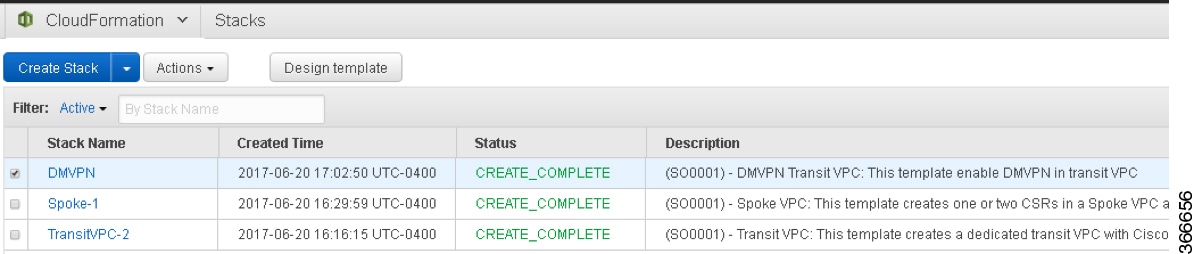
To view the status of the stack, look at the Status of each stack in the AWS Cloud Formation console. A status of "CREATE_COMPLETE" should appear for a stack after a period of approximately five minutes.

Example:

The following example shows the AWS Cloud Formation console after launching DMVPN. The DMVPN, spoke and transit VPC stacks all show a status of "CREATE_COMPLETE".

Example Configurations for Transit VPC

Example 1

This example shows the output from the show running-configuration command after launching a transit VPC hub using the procedure Launching a Transit VPC Hub The transit VPC configuration includes VRFs to isolate the traffic from each of the spokes. There is a tunnel for each spoke.

# show running-config 
Building configuration...

Current configuration : 5600 bytes
!
! Last configuration change at 13:48:53 UTC Mon Jun 5 2017 by automate
!
version 16.5
service timestamps debug datetime msec
service timestamps log datetime msec
service password-encryption
platform qfp utilization monitor load 80
no platform punt-keepalive disable-kernel-core
platform console virtual
!
hostname ip-100-64-127-234
!
boot-start-marker
boot-end-marker
!
!
logging persistent size 1000000 filesize 8192 immediate
!
no aaa new-model
!
ip vrf vpn-vpc-a1c1ffc6-1
 rd 64512:1
 route-target export 64512:0
 route-target import 64512:0
!
ip vrf vpn0
 rd 64512:0
!         
!
!
subscriber templating
! 
!
multilink bundle-name authenticated
!
!
crypto pki trustpoint TP-self-signed-3523259110
 enrollment selfsigned
 subject-name cn=IOS-Self-Signed-Certificate-3523259110
 revocation-check none
 rsakeypair TP-self-signed-3523259110
!
!
crypto pki certificate chain TP-self-signed-3523259110
 certificate self-signed 01
  30820330 30820218 A0030201 02020101 300D0609 2A864886 F70D0101 05050030 
  31312F30 2D060355 04031326 494F532D 53656C66 2D536967 6E65642D 43657274 
  69666963 6174652D 33353233 32353931 3130301E 170D3137 30363035 31333235 
  35315A17 0D323030 31303130 30303030 305A3031 312F302D 06035504 03132649 
  4F532D53 656C662D 5369676E 65642D43 65727469 66696361 74652D33 35323332 
  35393131 30308201 22300D06 092A8648 86F70D01 01010500 0382010F 00308201 
  0A028201 0100DA69 00E57565 01537E34 288860E9 D619B338 EC9E98DA 3A0F876F 
  C29C392F 1A6455E7 02F20233 340B5A8D D782321B 8F9B5EEC 7A282F83 98D1419F 
  07710FE0 3EF6C2BF 7D73E229 F9118E4D 38C7CA13 368B1C4C 85EEA34D C1ADF679 
  C5BC3713 30EF5F99 7FD57A14 41C74366 76939A99 5AB59D90 38A6494C B190BFAF 
  ABE43A8C 98FD93F4 7EC238E3 D942E764 EE3069DA DB891977 12AA5280 47B85DEB 
  B45A8E18 7105319C FC2A4DC4 E5700061 4581E540 2D3F661D E986DFBA 29734AF1 
  C5BC1E52 2619DFED 229337B6 1F6F4E9C A44C2AA0 54FD5590 A1073803 EE9B1668 
  BA6F96AC 7B75B1DE 27586013 227F0866 8239C0AD B3ED4553 FB63ACB6 99F28394 
  87C194A5 3D3B0203 010001A3 53305130 0F060355 1D130101 FF040530 030101FF 
  301F0603 551D2304 18301680 14933BEB 56E0BA3B 724C03DD 4992028A 423F9A66 
  AC301D06 03551D0E 04160414 933BEB56 E0BA3B72 4C03DD49 92028A42 3F9A66AC 
  300D0609 2A864886 F70D0101 05050003 82010100 D15CBF95 AE9301B7 3431B141 
  0EFA2309 118D16E5 1AB45B67 E8DA140A 1A3624C9 7B42787A 87C5C8B1 145B751A 
  CCCF5817 BC8526A7 2F1FFA9F 18B10DE8 4D7ECA46 E6A45DE8 30E85846 F00B3B3C 
  DA7D2AD2 5E71CF00 05F2FD7F 41F6102A 504EDCA6 B70270BE 4D215CDA CEB5DF69 
  7AC15D3F 9203EFAF DE9278B5 77042A4A F582B3D4 32749FB4 6CF62042 202D4520 
  EFF7C2E1 3BB2C49E 2F38BA99 C50D6CCA E53CA1D7 8BFE5A78 5AE6129B 9F1DC35D 
  D0487945 744AE38E 190739DD D321BABA D8175F32 8FAA1742 AD9DBB26 B1B86C73 
  A0DD9B40 51807D18 A4E9CB18 DE7C1185 616D3B61 B2AB993B 9C0943BF 14EE373E 
  7CBC65FC 6DCAEC9B 2725A155 6A85FAB3 473F065B
        quit
!
!
!
license udi pid CSR1000V sn 9AUMWWU9PUN
diagnostic bootup level minimal
!
spanning-tree extend system-id
!
!
username ec2-user privilege 15 secret 5 $1$kSop$DkIGMkrEfF25JjFKXguLf/
username automate privilege 15 password 7 130B4F422F0A081273333C3504043030
!
redundancy
!
! 
crypto keyring keyring-vpn-vpc-a1c1ffc6-1-1  
  local-address GigabitEthernet1
  pre-shared-key address 35.167.172.22 key xpXf7qkthnbUUbjdTOOCnd857wNXpwLC
!
!
crypto isakmp policy 200
 encr aes
 authentication pre-share
 group 2
 lifetime 28800
crypto isakmp keepalive 10 10
crypto isakmp profile isakmp-vpn-vpc-a1c1ffc6-1-1
   keyring keyring-vpn-vpc-a1c1ffc6-1-1
   match identity address 35.167.172.22 255.255.255.255 
   local-address GigabitEthernet1
!
crypto ipsec security-association replay window-size 1024
!
crypto ipsec transform-set ipsec-prop-vpn-aws esp-aes esp-sha-hmac 
 mode tunnel
crypto ipsec df-bit clear
!         
!
crypto ipsec profile ipsec-vpn-aws
 set transform-set ipsec-prop-vpn-aws 
 set pfs group2
!
!
!
interface Tunnel1
 ip vrf forwarding vpn-vpc-a1c1ffc6-1
 ip address 169.254.98.158 255.255.255.252
 ip tcp adjust-mss 1387
 tunnel source GigabitEthernet1
 tunnel mode ipsec ipv4
 tunnel destination 35.167.172.22
 tunnel protection ipsec profile ipsec-vpn-aws
 ip virtual-reassembly
!
interface GigabitEthernet1
 ip address dhcp
 negotiation auto
 no mop enabled
 no mop sysid
!
router bgp 64512
 bgp log-neighbor-changes
 !
 address-family ipv4 vrf vpn-vpc-a1c1ffc6-1
  neighbor 169.254.98.157 remote-as 7224
  neighbor 169.254.98.157 timers 10 30 30
  neighbor 169.254.98.157 activate
  neighbor 169.254.98.157 as-override
  neighbor 169.254.98.157 soft-reconfiguration inbound
  neighbor 169.254.98.157 route-map rm-vpn-vpc-a1c1ffc6-1 out
 exit-address-family
!

threat-visibility
!
virtual-service csr_mgmt
 ip shared host-interface GigabitEthernet1
 activate
!
ip forward-protocol nd
ip http server
ip http authentication local
ip http secure-server
ip route 0.0.0.0 0.0.0.0 GigabitEthernet1 100.64.127.225
!
ip ssh rsa keypair-name ssh-key
ip ssh version 2
ip ssh pubkey-chain
  username ec2-user
   key-hash ssh-rsa AB75A036D99B839B83054BD19A2FA911 ec2-user
  username automate
   key-hash ssh-rsa E1A59785E730AD9F790A8BEDCEDA5C49 
ip ssh server algorithm encryption aes128-ctr aes192-ctr aes256-ctr
ip ssh server algorithm authentication publickey
ip ssh client algorithm encryption aes128-ctr aes192-ctr aes256-ctr
ip scp server enable
!
!
!
route-map rm-vpn-vpc-a1c1ffc6-1 permit 10
 set as-path prepend 64512
!
!
!
control-plane
!
!
!
line con 0
 stopbits 1
line vty 0 4
 login local
 transport input ssh
!         
!
!
end

Example 2

This example shows the output from the show running-configuration command after adding a single spoke VPC using procedure Launching a Spoke VPC. This configuration has two tunnels—a tunnel for each transit VPC.

ip-30-20-0-29# show running-config
Building configuration...

Current configuration : 6139 bytes
!
! Last configuration change at 13:49:19 UTC Mon Jun 5 2017 by automate
!
version 16.5
service timestamps debug datetime msec
service timestamps log datetime msec
service password-encryption
platform qfp utilization monitor load 80
no platform punt-keepalive disable-kernel-core
platform console virtual
!
hostname ip-30-20-0-29
!
boot-start-marker
boot-end-marker
!
!
logging persistent size 1000000 filesize 8192 immediate
!
no aaa new-model
!
ip vrf vpn0
 rd 7224:0
!
!
subscriber templating
! 
!
multilink bundle-name authenticated
!
!
!
crypto pki trustpoint TP-self-signed-1386236880
 enrollment selfsigned
 subject-name cn=IOS-Self-Signed-Certificate-1386236880
 revocation-check none
 rsakeypair TP-self-signed-1386236880
!
!
crypto pki certificate chain TP-self-signed-1386236880
 certificate self-signed 01
  30820330 30820218 A0030201 02020101 300D0609 2A864886 F70D0101 05050030 
  31312F30 2D060355 04031326 494F532D 53656C66 2D536967 6E65642D 43657274 
  69666963 6174652D 31333836 32333638 3830301E 170D3137 30363035 31333434 
  31365A17 0D323030 31303130 30303030 305A3031 312F302D 06035504 03132649 
  4F532D53 656C662D 5369676E 65642D43 65727469 66696361 74652D31 33383632 
  33363838 30308201 22300D06 092A8648 86F70D01 01010500 0382010F 00308201 
  0A028201 0100AEDE 2A0D11AC 749A3653 9167DD5C E2F3D734 F520CAD7 C25F043E 
  4FFC8BC5 C2774656 B43E0184 03762DFE D28B99BF B7B4CE26 7C2045FF 562DBEFA 
  5DE59C75 E0D478EB 0DEE310D 75C37EAD 6D011075 C5625DBE 90A62281 38D3CBEB 
  39FF443C 4F66EB5A 2BB09E98 CFE092CF 92F0FFB6 29E65C72 AEB601D7 658EA1FA 
  65D4DFC7 EA2088A7 3E7EED02 3149D8DC 29D9E774 AA73EB8B B404C899 2B9793F8 
  1530913B 1B43D4B7 0A6E610B 2DF7ECC5 6B6EEC15 9AF6FE6E F83B3C3B 321F5C3B 
  0843CBEE 1EFDC8EF 5B88AABF E78C5E48 8752EB26 0ACF2858 831A4558 AE4405FC 
  A25F2989 38B56D00 EF6E2AAB D4C3F280 CACC4E74 9F724141 A7BC897C 94C78E7F 
  57F66DE6 10830203 010001A3 53305130 0F060355 1D130101 FF040530 030101FF 
  301F0603 551D2304 18301680 1430FBD0 ACC3496D 56D8DA0A 04C68E23 2DFDD68D 
  16301D06 03551D0E 04160414 30FBD0AC C3496D56 D8DA0A04 C68E232D FDD68D16 
  300D0609 2A864886 F70D0101 05050003 82010100 361BF93C 4F82F950 2E574DDE 
  A88E5B1C 4108CF38 E44F15E8 8D6CFD27 4D91C825 DB33BB79 57BE21E9 4861BB7E 
  34222C5A 55395427 C2F4CF58 8261C369 E9FD0FF6 B1CFDE77 C3903B7C 83261E46 
  A2AA923A EEC1B39B 75EB447A 92D463B4 C2FF52B5 8C39DCA1 4625CBCF 6F0AF06F 
  F47FD863 BB46AF60 3B0DD5D5 0057F036 81F42E1D 312DE686 8EC7886C 60C08D1E 
  48FF2F30 1BC7A2A5 7B9B8903 E3813BD5 C8778BE2 A342E453 EC542749 687EF070 
  A42251B3 5F08839C 057B9F42 52C0D431 6EFCAAFB 0F055EC5 DADF8741 F26ED316 
  215986FC 6AFC1203 9099C888 A62E40A9 4677C397 E22F995B CBA18F14 855F0DA8 
  AB6E4A03 071B1F5F 115474C5 4BA27036 B3D6D482
        quit
!
!
!
!
license udi pid CSR1000V sn 96XBJC62UE8
diagnostic bootup level minimal
!
spanning-tree extend system-id
!
!
username ec2-user privilege 15 secret 5 $1$YGPR$3jKBkXWAWfanoYJxzSRig0
username automate privilege 15 password 7 14404B221D5D3B73303E6B0001140B3E
!
redundancy
!
!
! 
crypto keyring keyring-vpn-vpc-a1c1ffc6-1-2  
  local-address GigabitEthernet1
  pre-shared-key address 52.35.65.47 key xpXf7qkthnbUUbjdTOOCnd857wNXpwLC
crypto keyring keyring-vpn-vpc-a1c1ffc6-1-1  
  local-address GigabitEthernet1
  pre-shared-key address 35.166.108.244 key 2PwgEmI4y75GNiNFGuPL4OjPTEdnOmfw
!
crypto isakmp policy 200
 encr aes
 authentication pre-share
 group 2
 lifetime 28800
crypto isakmp keepalive 10 10
crypto isakmp profile isakmp-vpn-vpc-a1c1ffc6-1-1
   keyring keyring-vpn-vpc-a1c1ffc6-1-1
   match identity address 35.166.108.244 255.255.255.255 
   local-address GigabitEthernet1
crypto isakmp profile isakmp-vpn-vpc-a1c1ffc6-1-2
   keyring keyring-vpn-vpc-a1c1ffc6-1-2
   match identity address 52.35.65.47 255.255.255.255 
   local-address GigabitEthernet1
!
crypto ipsec security-association replay window-size 1024
!
crypto ipsec transform-set ipsec-prop-vpn-aws esp-aes esp-sha-hmac 
 mode tunnel
crypto ipsec df-bit clear
!
crypto ipsec profile ipsec-vpn-aws
 set transform-set ipsec-prop-vpn-aws 
 set pfs group2
!
interface Tunnel1
 ip address 169.254.130.197 255.255.255.252
 ip tcp adjust-mss 1387
 tunnel source GigabitEthernet1
 tunnel mode ipsec ipv4
 tunnel destination 35.166.108.244
 tunnel protection ipsec profile ipsec-vpn-aws
 ip virtual-reassembly
!
interface Tunnel2
 ip address 169.254.98.157 255.255.255.252
 ip tcp adjust-mss 1387
 tunnel source GigabitEthernet1
 tunnel mode ipsec ipv4
 tunnel destination 52.35.65.47
 tunnel protection ipsec profile ipsec-vpn-aws
 ip virtual-reassembly
!
interface GigabitEthernet1
 ip address dhcp
 negotiation auto
 no mop enabled
 no mop sysid
!
router bgp 7224
 bgp log-neighbor-changes
 neighbor 169.254.98.158 remote-as 64512
 neighbor 169.254.98.158 timers 10 30 30
 neighbor 169.254.130.198 remote-as 64512
 neighbor 169.254.130.198 timers 10 30 30
 !        
 address-family ipv4
  redistribute connected
  neighbor 169.254.98.158 activate
  neighbor 169.254.98.158 as-override
  neighbor 169.254.98.158 soft-reconfiguration inbound
  neighbor 169.254.130.198 activate
  neighbor 169.254.130.198 as-override
  neighbor 169.254.130.198 soft-reconfiguration inbound
 exit-address-family
!
threat-visibility
!
virtual-service csr_mgmt
 ip shared host-interface GigabitEthernet1
 activate
!
ip forward-protocol nd
ip http server
ip http authentication local
ip http secure-server
ip route 0.0.0.0 0.0.0.0 GigabitEthernet1 30.20.0.17
!
ip ssh maxstartups 2
ip ssh rsa keypair-name ssh-key
ip ssh version 2
ip ssh pubkey-chain
  username ec2-user
   key-hash ssh-rsa AB75A036D99B839B83054BD19A2FA911 ec2-user
  username automate
   key-hash ssh-rsa 2072B88CA0E5AC33E2E29638FDFD26E9 
ip ssh server algorithm encryption aes128-ctr aes192-ctr aes256-ctr
ip ssh server algorithm authentication publickey
ip ssh client algorithm encryption aes128-ctr aes192-ctr aes256-ctr
ip scp server enable
!
control-plane
!
line con 0
 stopbits 1
line vty 0 4
 login local
 transport input ssh
!
end